The Starter Edition deploys a pre-configured Hyperledger Fabric network owned by a single account. It includes one consortium and two organizations joined to a shared default channel, so you can start testing smart contracts without manual network setup.
The Starter Edition is for testing only and does not support adding more organizations. To build a production network with multiple members, use the Basic Edition or Enterprise Edition. For more information, see Operation process.
A Starter Edition blockchain network includes one consortium and two organizations. Because this network is for testing purposes, you cannot add new organizations. To create a production environment, select the Basic Edition or Enterprise Edition. These editions support the extension and customization of blockchain networks. They also allow you to invite organizations from other Alibaba Cloud accounts to join. For more information, see Usage flow.
Quickly Create a Blockchain Business
What gets created
When the Starter Edition provisions, it creates the following Hyperledger Fabric components in your account:
| Component | Count | Description |
|---|---|---|
| Consortium | 1 | The governance boundary for your blockchain network |
| Organizations | 2 | Participant organizations that transact on the network |
| Channel | 1 (default) | A private communication subnet where both organizations transact |
Both organizations are automatically joined to the default channel. Your only remaining task is to deploy a chaincode to that channel.
Prerequisites
Before you begin, make sure you have:
An Alibaba Cloud account or RAM user with BaaS permissions
A region selected for your blockchain resources
Deploy a blockchain network
Log in to Alibaba Cloud.
Alibaba Cloud account: https://account.alibabacloud.com/login/login.htm
Go to the Alibaba Cloud BaaS console.
In the left navigation pane, choose Hyperledger Fabric. On the Overview page, click Create Consortium.
On the purchase page, configure the following settings, then complete the purchase.
Setting Description Region The Alibaba Cloud region where your network resources are deployed Consortium Instance Type The network edition. Select Starter Edition for testing Consortium Name A display name for your consortium Consortium DomainName The domain identifier used internally by the network Duration The billing period for your network Return to the Overview page. Your consortium and two organizations appear in the list. Resource provisioning takes several minutes. Wait until the status shows that all resources are ready before proceeding.
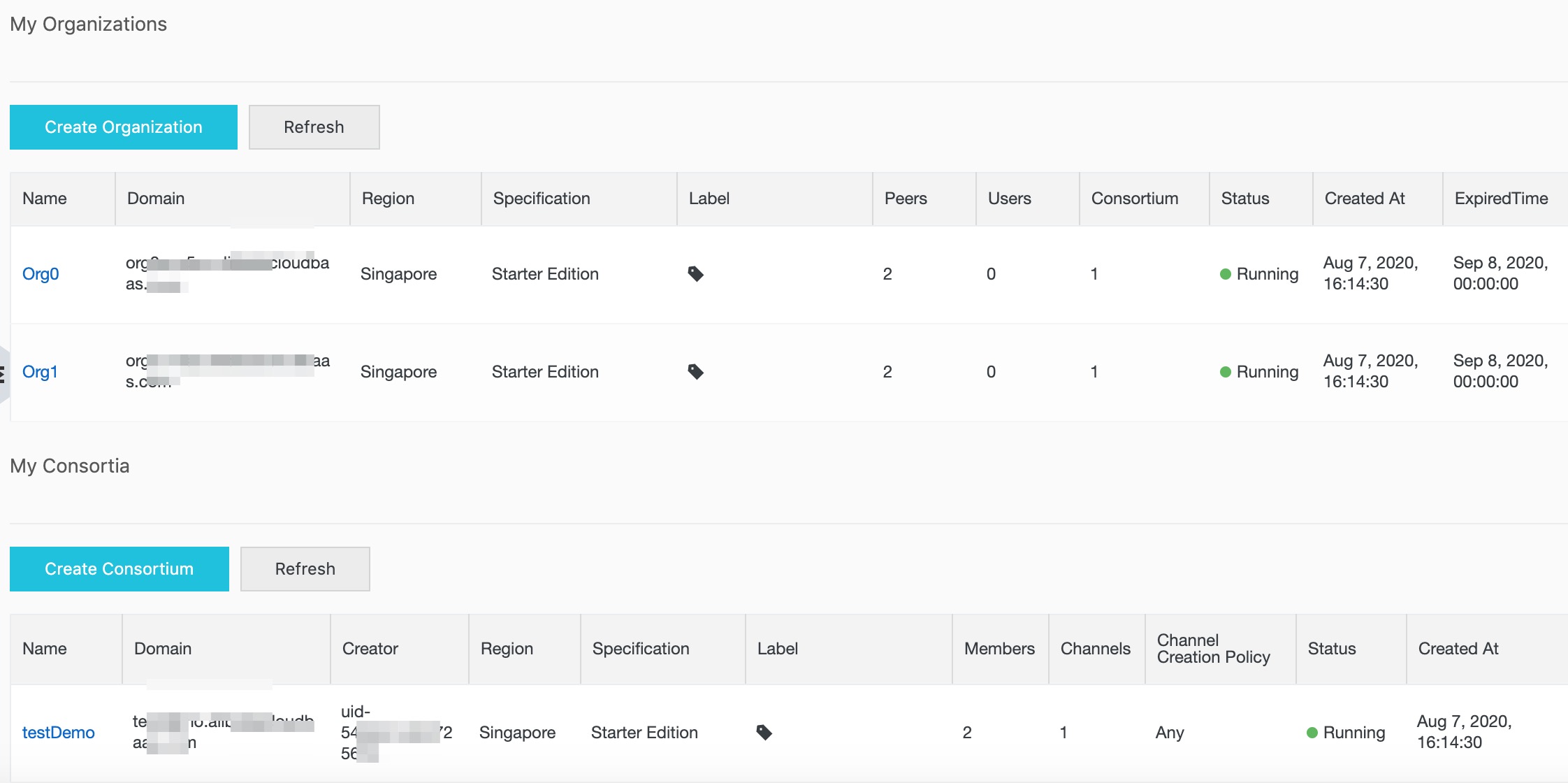
A default channel is created and both organizations have already joined this channel. Prepare your chaincode and deploy it to this channel.

Your blockchain network is ready. Both organizations can now transact on the default channel.
Troubleshooting
Consortium or organizations not appearing on the Overview page
Provisioning typically takes a few minutes. Refresh the page and wait. If resources do not appear after several minutes, check that your account has the required BaaS permissions and that the purchase completed successfully in your order history.
Purchase page does not load or shows an error
Make sure you are logged in with an account or RAM user that has BaaS purchase permissions.
What's next
Deploy chaincode to your channel to start executing transactions: