Configure timeouts, retries, the bulkhead pattern, and circuit breaking in Alibaba Cloud Service Mesh (ASM) so that your services tolerate the failure of the services they depend on. Stability risks can exist in the infrastructure, the application logic, and the operations processes, and any of them can bring down a business system.
Background information
Fault tolerance is the ability of a system to keep running while some of its parts are failing. A reliable, resilient system requires fault tolerance from every service that it contains. The dynamic nature of cloud environments requires services to anticipate such failures and respond gracefully to unexpected situations.
Any service can experience failed requests, and an appropriate fallback action is critical when a request fails. A single service interruption can trigger a chain reaction with serious business consequences. ASM applies its fault tolerance mechanisms in the sidecar proxy, so your applications require no changes to application code.
Choose a fault tolerance mechanism
The following table describes the fault tolerance mechanisms that ASM provides, the failure mode that each mechanism addresses, and the resource in which you configure it.
Mechanism |
Failure mode it addresses |
Configuration resource |
Key field |
An upstream service responds slowly or never responds, and the client keeps waiting. |
Virtual service |
|
|
A single request fails because of an error such as a request timeout, a connection timeout, or service downtime. |
Virtual service |
|
|
A client sends more connections or requests than the target service can absorb. |
Destination rule |
|
|
Individual hosts of an upstream service return consecutive errors. |
Destination rule |
|
Timeouts and retries govern a single request path, whereas the bulkhead pattern and host-level circuit breaking govern the load that a target service receives and which of its hosts remain in the load balancing pool. Configure a timeout on the same route as any retry policy: the route timeout is what bounds the total time that the sidecar proxy spends on retries.
The values in the examples in this topic demonstrate the syntax of each field. Derive your own values from the measured latency, capacity, and error behavior of your services instead of copying the example values into a production mesh.
Prerequisites
The following requirements apply to the mechanisms described in this topic:
ASM instance version — Configuring the default HTTP request retry policy requires an ASM instance of version 1.15.3.120 or later. For more information about how to upgrade an instance, see Upgrade an ASM instance.
Metric reporting and collection — Host-level circuit breaking metrics are available only after the sidecar proxy reports them and Prometheus collects them. Complete the setup described in View host-level circuit breaking metrics and Configure host-level circuit breaking metric collection and alerting before you rely on these metrics.
Timeouts
How timeouts work
When a service sends a request to an upstream service, the upstream service may never respond. Set a wait time for the request. After the wait time elapses, if the upstream service still has not responded, the request fails immediately instead of continuing to wait for the upstream service.
A timeout makes sure that an application receives an error return when a backend service does not respond, so that the application can handle the failure with appropriate fallback behavior. A timeout changes how long the client that sends the request waits for a response, and it does not affect how the target service processes the request. Therefore, a timeout does not mean that the requested operation failed.
Configure a route timeout
ASM lets you change the timeout value by setting a timeout policy for a route in a virtual service. If the sidecar proxy does not receive a response within the configured time, the request fails. When you adjust the timeout in this way, all requests that use the route use that timeout setting.
The following virtual service sets a timeout for the route to the httpbin application:
apiVersion: networking.istio.io/v1beta1
kind: VirtualService
metadata:
  name: httpbin
spec:
  hosts:
  - 'httpbin'
  http:
  - route:
    - destination:
        host: httpbin
    timeout: 5s
Field |
Description |
|
Sets the timeout duration for the route. If the requested service does not respond within the configured time, an error result is returned immediately and the client stops waiting. |
A route timeout also bounds the retries on that route. If a request has not reached the maximum number of retries but the total time spent on all retries already exceeds the timeout, the sidecar proxy stops retrying the request and returns a timeout. For more information about retry policies, see Retries.
Retries
How retries work
If a request to another service fails because of an error such as a request timeout, a connection timeout, or service downtime, configure a retry policy so that the sidecar proxy sends the request to that service again.
Do not retry too frequently or for too long, to avoid cascading system failures. Bound each attempt with the perTryTimeout field, and bound the total time spent on retries by configuring a timeout on the same route. For more information, see Timeouts.
Configure a retry policy for a route
ASM supports defining HTTP request retry policies by using a virtual service. In the following example, when a service in the mesh requests the httpbin application, the sidecar proxy retries the request three times if httpbin does not respond or a connection cannot be established, and applies a per-attempt timeout of 5 seconds.
apiVersion: networking.istio.io/v1beta1
kind: VirtualService
metadata:
  name: httpbin
spec:
  hosts:
  - 'httpbin'
  http:
  - route:
    - destination:
        host: httpbin
    retries:
      attempts: 3
      perTryTimeout: 5s
      retryOn: connect-failure,reset
Configure the following fields under the retries field to customize how the sidecar proxy retries requests.
Field |
Description |
attempts |
The maximum number of retries for a request. If a timeout is configured for the service route while the retry mechanism is configured, the actual number of retries depends on the timeout setting. For details, see Timeouts. |
perTryTimeout |
The timeout for each retry, in milliseconds (ms), seconds (s), minutes (m), or hours (h). |
retryOn |
Specifies the conditions under which a retry is performed. Separate multiple retry conditions with commas (,). For more information, see Common HTTP request retry conditions and Common gRPC request retry conditions. |
HTTP retry conditions
The following table describes common HTTP request retry conditions that you can set in the retryOn field.
Retry condition |
Description |
|
Retries if the request fails because a connection to the upstream service cannot be established, such as a connection timeout. |
|
Retries if the upstream service returns a REFUSED_STREAM frame to reset the stream. |
|
Retries if a disconnection, reset, or read timeout event occurs before the upstream service responds. |
|
Retries if the upstream service returns any 5xx response code, such as 500 or 503, or if the upstream service does not respond. Note The |
|
Retries when the upstream service returns a 502, 503, or 504 status code. |
|
Retries when the request contains the |
|
Retries when the upstream service returns a 409 status code. |
|
Retries when a status code returned by the upstream service is determined to be retriable. Note You can add valid status codes directly to the retryOn field, and those status codes are then determined to be retriable status codes. For example, |
|
Retries when the response headers returned by the upstream service contain a header that indicates a retry is possible. Note You can add the |
gRPC retry conditions
gRPC requests are based on HTTP/2, so you can also set gRPC retry conditions in the retryOn field of an HTTP request retry policy. The following table describes common gRPC request retry conditions.
Retry condition |
Description |
|
Retries if the gRPC status code in the response headers of the upstream gRPC service is cancelled (1). |
|
Retries if the gRPC status code in the response headers of the upstream gRPC service is unavailable (14). |
|
Retries if the gRPC status code in the response headers of the upstream gRPC service is deadline-exceeded (4). |
|
Retries if the gRPC status code in the response headers of the upstream gRPC service is internal (13). |
|
Retries if the gRPC status code in the response headers of the upstream gRPC service is resource-exhausted (8). |
Configure the default HTTP request retry policy
By default, even if you do not define an HTTP request retry policy in a virtual service, services in the mesh still apply a default HTTP request retry policy when they access other HTTP services. The default retry policy has a retry count of 2, no retry timeout, and uses connect-failure, refused-stream, unavailable, cancelled, and retriable-status-codes as its default retry conditions. To override the default policy for your instance, configure the default HTTP request retry policy on the Basic Information page of the ASM console.
This feature requires a supported ASM instance version. For details, see Prerequisites.
-
Log on to the ASM console. In the left-side navigation pane, choose .
-
On the Mesh Management page, click the name of the ASM instance. In the left-side navigation pane, choose .
-
On the Basic Information page, in the Config Info section, click Edit next to Default HTTP retry policy.
-
In the Default HTTP retry policy dialog box, configure the settings described in the following table and then click OK.
After you submit the settings, the new HTTP request retry policy overrides the default retry policy for services in the mesh.
Configuration item |
Description |
Retries |
Corresponds to attempts above. In the default HTTP request retry policy, this field can be set to 0, which disables HTTP request retries by default. |
Timeout |
Corresponds to perTryTimeout above. |
Retry On |
Corresponds to retryOn above. |
Bulkhead
How the bulkhead pattern works
The bulkhead pattern limits the number of connections and the number of access requests that a client can make to a target service, which keeps a single client from overloading that service. If a configured threshold is exceeded, requests are dropped. The bulkhead pattern helps isolate the resources used by a service and avoids cascading failures.
The maximum number of connections and the connection timeout are general connection settings that are effective for both TCP and HTTP, whereas the maximum number of requests per connection and the maximum number of pending requests are effective only for HTTP/1.1, HTTP/2, and gRPC connections.

Configure connection pool limits
ASM supports configuring the bulkhead pattern by using a destination rule. In the following destination rule, requests from other services to the httpbin application are limited to one TCP connection, one request per connection, and one pending request. Requests that exceed these connection pool thresholds are rejected with a 503 response. The sidecar proxy waits at most 10 seconds to establish a connection to a host of the service.
apiVersion: networking.istio.io/v1beta1
kind: DestinationRule
metadata:
  name: httpbin
spec:
  host: httpbin
  trafficPolicy:
    connectionPool:
      http:
        http1MaxPendingRequests: 1
        maxRequestsPerConnection: 1
      tcp:
        connectTimeout: 10s
        maxConnections: 1
Field |
Description |
|
The maximum number of pending requests. Effective only for HTTP/1.1, HTTP/2, and gRPC connections. |
|
The maximum number of requests per connection. Effective only for HTTP/1.1, HTTP/2, and gRPC connections. |
|
The connection timeout, which is the maximum time that the sidecar proxy waits to establish a connection to a host of the target service. Effective for both TCP and HTTP. |
|
The maximum number of connections. Effective for both TCP and HTTP. |
Circuit breaking
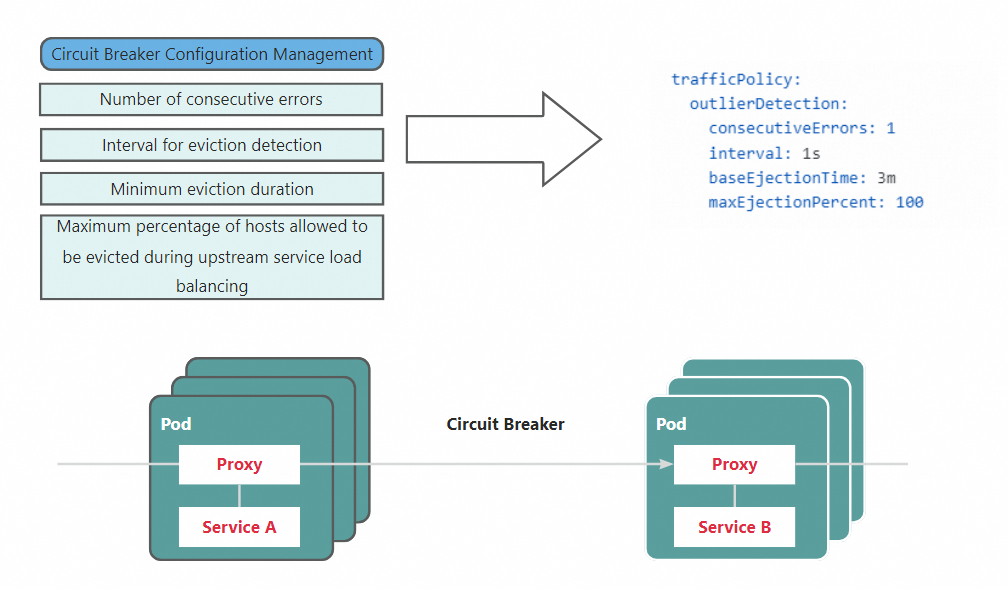
This section describes host-level circuit breaking, which you configure by using a destination rule. ASM also provides ASMCircuitBreaker, which is a different circuit breaking mechanism. With host-level circuit breaking, the sidecar proxy on the client detects the error rate of each upstream service host individually, and ejects a host from the load balancing pool of the service when that host produces consecutive errors.
How host-level circuit breaking works
Circuit breaking means that requests are not sent repeatedly to an unresponsive service. Instead, the number of failures that occur within a given period is observed.
If the error rate exceeds a threshold, the circuit breaker drops requests and all subsequent requests fail until the circuit breaker is closed.
Configure host-level circuit breaking
ASM supports configuring host-level circuit breaking by using a destination rule. In the following destination rule, the sidecar proxy scans the hosts of the httpbin application for ejection every 5 seconds. A host that produces three consecutive errors is removed from the load balancing pool of httpbin for at least 5 minutes. Hosts that are not ejected continue to serve requests from other services, within the ejection limit that maxEjectionPercent sets. For the risk of the value used in this example, see the maxEjectionPercent row in the following table.
apiVersion: networking.istio.io/v1beta1
kind: DestinationRule
metadata:
  name: httpbin
spec:
  host: httpbin
  trafficPolicy:
    outlierDetection:
      consecutiveErrors: 3
      interval: 5s
      baseEjectionTime: 5m
      maxEjectionPercent: 100
Field |
Description |
|
The number of consecutive errors that causes a host to be ejected from the load balancing pool of the service. |
|
The time interval for ejection detection. |
|
The minimum ejection duration. |
|
The maximum percentage of hosts in the load balancing pool that are allowed to be ejected. Important A value of 100 allows every host of the service to be ejected at the same time, which leaves no host to serve requests. |
View host-level circuit breaking metrics
Host-level circuit breaking in ASM produces a series of related metrics that help you determine whether circuit breaking occurred. The following table describes some of these metrics.
Metric |
Metric type |
Description |
|
Gauge |
The number of hosts that are currently ejected. |
|
Counter |
The number of host ejection events that occurred. |
|
Counter |
The number of times host ejection was abandoned because the maximum ejection percentage was exceeded. |
|
Counter |
The number of times a host was detected producing consecutive 5xx errors. |
To make these metrics available, configure the proxyStatsMatcher setting of the sidecar proxy so that the sidecar proxy reports the related metrics, and then use Prometheus to collect and view the metrics related to circuit breaking. Perform the following steps in order:
Configure the sidecar proxy to report circuit breaking metrics by using
proxyStatsMatcher. When you configureproxyStatsMatcher, select Regular Expression Match and set the value to.*outlier_detection.*. For more information, see proxyStatsMatcher.Redeploy the
httpbinstateless workload. For more information, see Redeploy a workload.
Configure host-level circuit breaking metric collection and alerting
After you configure the reporting of host-level circuit breaking metrics, you can collect the related metrics into Prometheus and configure alerting rules based on key metrics, so that you are alerted promptly when circuit breaking occurs. The following steps use Managed Service for Prometheus to describe how to configure collection and alerting for host-level circuit breaking metrics.
In Managed Service for Prometheus, integrate the Alibaba Cloud ASM component for the data plane cluster or upgrade it to the latest version, so that Managed Service for Prometheus can collect the exposed circuit breaking metrics. For more information about how to update an integration component, see Manage integration components. (If you have configured a self-managed Prometheus instance to collect service mesh metrics by following Integrate a self-managed Prometheus for mesh monitoring, you do not need to perform this step.)
Create an alert rule for host-level circuit breaking. For more information, see Create a Prometheus alert rule by using a custom PromQL query. The following table provides examples of how to fill in the key parameters of the alert rule. You can fill in the remaining parameters based on your own requirements by referring to the preceding document.
Parameter |
Example |
Description |
Custom PromQL query |
|
This example queries the |
Alert content |
Host-level circuit breaking triggered. A workload produced consecutive errors and was ejected from the load balancing pool of the service. Namespace: {{$labels.namespace}}, service where the ejection occurred: {{$labels.cluster_name}}. Number of ejections: {{ $value }} |
The example alert message shows the namespace and the service name of the service that triggered circuit breaking, as well as the current number of ejections for that service. |