To perform a canary release across an entire call chain or enforce version isolation, use traffic lanes in strict mode to isolate relevant versions (or other attributes) of an application in an independent runtime environment. This ensures only traffic meeting specific conditions is routed to the new service version, improving the stability and control of your release process.
Prerequisites
-
You have created an ASM instance of Enterprise Edition or Ultimate Edition, version 1.18.2.111 or later. For more information, see Create an ASM instance or Upgrade an ASM instance.
NoteIf your instance version is 1.17.2.22 or later but earlier than 1.18.2.111, see Use the traffic management feature in lane mode.
-
You have created an ASM ingress gateway named ingressgateway. For more information, see Create an ingress gateway service.
-
You have created a gateway named ingressgateway in the istio-system namespace. For more information, see Manage gateways.
Example
This example uses three services (mocka, mockb, and mockc) to create three lanes (s1, s2, and s3) that represent three versions of the service call chain.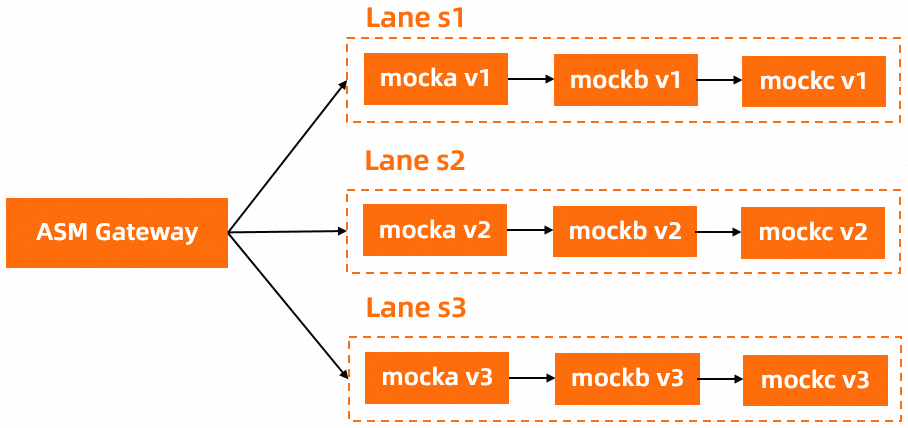
Step 1: Deploy sample services
-
Enable automatic sidecar proxy injection for the default namespace. For details, see Enable automatic sidecar proxy injection.
For more information about automatic injection, see Configure sidecar injection policies.
-
Run the following commands in your Container Service for Kubernetes (ACK) cluster to deploy the sample services:
kubectl apply -f https://alibabacloudservicemesh.oss-cn-beijing.aliyuncs.com/asm-labs/swimlane/v1/mock-tracing-v1.yaml
kubectl apply -f https://alibabacloudservicemesh.oss-cn-beijing.aliyuncs.com/asm-labs/swimlane/v2/mock-tracing-v2.yaml
kubectl apply -f https://alibabacloudservicemesh.oss-cn-beijing.aliyuncs.com/asm-labs/swimlane/v3/mock-tracing-v3.yaml
Step 2: Create a swimlane group and swimlanes
-
Create a swimlane group.
-
Log on to the ASM console. In the left-side navigation pane, choose .
-
On the Mesh Management page, click the name of the ASM instance. In the left-side navigation pane, choose .
-
On the Traffic Lane page, click Create Swimlane Group. In the Create Swimlane Group panel, configure the parameters and click OK.
Parameter
Description
Name of swim lane group
For this example, enter test.
Entrance gateway
Select ingressgateway.
Lane Mode
Select Strict Mode.
Swimlane service
Select the target Kubernetes cluster and the default namespace. In the list below, select the mocka, mockb, and mockc services, and then click the
 icon to add them to the selected section.
-
-
Create the s1, s2, and s3 swimlanes and bind them to the v1, v2, and v3 versions, respectively.
-
In the Traffic Lane section of the Traffic Rule Definition page, click Create swimlanes.
-
In the Create swimlanes dialog box, configure the parameters and click OK.
Parameter
Description
Swimlane Name
Set the swimlane names to s1, s2, and s3.
Configure Service Tag
Label Key: Select ASM_TRAFFIC_TAG.
Label Value: Select v1, v2, and v3 for the s1, s2, and s3 swimlanes, respectively.
After the three swimlanes are created, each swimlane contains the
mocka,mockb, andmockcswimlane services.After you create the swimlanes, ASM automatically creates a corresponding DestinationRule and VirtualService for each service in the swimlane group. To view these resources, navigate to or VirtualService in the left-side navigation pane.
-
-
Create an ingress traffic rule for each swimlane.
-
In the Traffic Lane section of the Traffic Rule Definition page, find the target swimlane and click Ingress traffic rules in the Actions column.
-
In the Add drainage rule dialog box, configure the parameters and click OK.
In this example, the ingress URI for the swimlane services is
/mock. Therefore, you configure the same ingress traffic rule for each swimlane.Parameter
Description
Ingress service
Select mocka.default.svc.cluster.local.
Ingress traffic rules
Set Name to r1 and Domain Name to *.
Matching request URI
Set Method to Exact and Content to /mock.
Add Header Matching Rule
Click Add Header Matching Rule. Set Name to x-asm-prefer-tag and Method to Exact. For the three swimlanes, set Content to s1, s2, and s3, respectively.
After you create the ingress traffic rules, the Traffic Rule Definition page updates. The swimlanes are now tagged s1, s2, and s3, and the swimlane services (mocka, mockb, and mockc) are enabled for all swimlanes.
After you create the rules, a VirtualService that implements the ingress traffic rule is automatically created for each swimlane.
-
Step 3: Verify the end-to-end canary release
-
Get the public IP address of the ASM ingress gateway. For more information, see Get the ASM ingress gateway address.
-
Run the following command to set an environment variable.
Replace
xxx.xxx.xxx.xxxwith the IP address from the previous step.export ASM_GATEWAY_IP=xxx.xxx.xxx.xxx -
Verify that the end-to-end canary release works as expected.
-
Run the following command to test routing to the s1 lane.
The value
s1forx-asm-prefer-tagspecifies the s1 lane that you configured in Step 2.for i in {1..100}; do curl -H 'x-asm-prefer-tag: s1' http://${ASM_GATEWAY_IP}/mock ; echo ''; sleep 1; done;Expected output:
-> mocka(version: v1, ip: 172.17.0.54)-> mockb(version: v1, ip: 172.17.0.129)-> mockc(version: v1, ip: 172.17.0.130)The output shows that requests with the HTTP header
x-asm-prefer-tag: s1are routed to the services in the s1 lane. -
Run the following command to test routing to the s2 lane.
The value
s2forx-asm-prefer-tagspecifies the s2 lane that you configured in Step 2.for i in {1..100}; do curl -H 'x-asm-prefer-tag: s2' http://${ASM_GATEWAY_IP}/mock ; echo ''; sleep 1; done;Expected output:
-> mocka(version: v2, ip: 172.17.0.9)-> mockb(version: v2, ip: 172.17.0.126)-> mockc(version: v2, ip: 172.17.0.128)The output shows that requests with the HTTP header
x-asm-prefer-tag: s2are routed to the services in the s2 lane. -
Run the following command to test routing to the s3 lane.
The value
s3forx-asm-prefer-tagspecifies the s3 lane that you configured in Step 2.for i in {1..100}; do curl -H 'x-asm-prefer-tag: s3' http://${ASM_GATEWAY_IP}/mock ; echo ''; sleep 1; done;Expected output:
-> mocka(version: v3, ip: 172.17.0.132)-> mockb(version: v3, ip: 172.17.0.127)-> mockc(version: v3, ip: 172.17.0.69)The output shows that requests with the HTTP header
x-asm-prefer-tag: s3are routed to the services in the s3 lane.
-
Route traffic with a custom virtual service
The traffic lane feature includes a built-in capability for configuring request routing rules. When you create these rules, ASM automatically generates a corresponding virtual service on the ingress gateway. This allows the ingress gateway to route requests to different traffic lanes.
The request routing rules for a traffic lane match requests by request headers and request paths. To implement more complex matching conditions or custom routing behavior, you can create a custom virtual service.
When you use a custom virtual service to route traffic to a traffic lane, avoid creating built-in request routing rules for the same traffic lane. A custom virtual service can conflict with the built-in rules and cause unpredictable or erroneous traffic distribution.
Create a virtual service for the ASM gateway
-
To continue with the example scenario, instead of completing Step 2.3, Create request routing rules for the three traffic lanes, create a virtual service with the following configuration. For more information, see Manage virtual services.
apiVersion: networking.istio.io/v1beta1 kind: VirtualService metadata: name: swimlane-ingress-vs-custom namespace: istio-system spec: gateways: - istio-system/ingressgateway hosts: - '*' http: - match: # This rule matches requests with the exact header 'env: dev'. - headers: env: exact: dev name: dev-route route: - destination: host: mocka.default.svc.cluster.local # The destination service for the traffic. subset: s2 # Set 'subset' to the name of the traffic lane. weight: 50 - destination: host: mocka.default.svc.cluster.local # The destination service for the traffic. subset: s3 # Set 'subset' to the name of the traffic lane. weight: 50 - name: base-route route: - destination: host: mocka.default.svc.cluster.local # The destination service for the traffic. subset: s1 # Set 'subset' to the name of the traffic lane. -
Run the commands from Step 3: Verify the end-to-end canary release. The expected output when accessing the s1, s2, and s3 traffic lanes is as follows:
-> mocka(version: v1, ip: 192.168.0.50)-> mockb(version: v1, ip: 192.168.0.46)-> mockc(version: v1, ip: 192.168.0.48)Run the following command to verify the behavior when accessing the s1 traffic lane with the
env: devrequest header.for i in {1..100}; do curl -H 'x-asm-prefer-tag: s1' -H 'env: dev' http://${ASM_GATEWAY_IP}/mock ; echo ''; sleep 1; done;Expected output:
The output shows that for requests that include the
env: devheader, traffic is split approximately 50/50 between traffic lanes s2 and s3. All other requests are routed to traffic lane s1.
The preceding virtual service defines a custom routing rule on the ASM gateway to forward traffic to different traffic lanes. When you use a custom virtual service to route traffic to a traffic lane in strict mode, you only need to specify the name of the target traffic lane in the subset field of the route destination. Once a request enters a traffic lane, all subsequent calls in the request chain remain within that traffic lane.

Create a virtual service for sidecars
In addition to defining rules on the ingress gateway, you can also create a virtual service that applies to all sidecars. This allows you to define request routing rules that control how services within the cluster access other services in a traffic lane. Unlike a virtual service for a gateway, a sidecar-based virtual service omits the gateway field, and the hosts field specifies the FQDN of the mocka service within the cluster. The following YAML is an example:
apiVersion: networking.istio.io/v1beta1
kind: VirtualService
metadata:
  name: swimlane-ingress-vs-custom
  namespace: istio-system
spec:
  hosts:
    - mocka.default.svc.cluster.local
  http:
    - match: # This rule matches requests with the exact header 'env: dev'.
        - headers:
            env:
              exact: dev
      name: dev-route
      route:
        - destination:
            host: mocka.default.svc.cluster.local # The destination service for the traffic.
            subset: s2 # Set 'subset' to the name of the traffic lane.
          weight: 50
        - destination:
            host: mocka.default.svc.cluster.local # The destination service for the traffic.
            subset: s3 # Set 'subset' to the name of the traffic lane.
          weight: 50
    - name: base-route
      route:
        - destination:
            host: mocka.default.svc.cluster.local # The destination service for the traffic.
subset: s1 # Set 'subset' to the name of the traffic lane.-
Run the following command to verify the behavior when accessing the mocka service from a sidecar without the
env: devrequest header.kubectl exec -it deploy/sleep -c sleep -- sh -c 'for i in $(seq 1 100); do curl http://mocka:8000; echo ""; sleep 1; done;'Expected output:
-> mocka(version: v1, ip: 192.168.0.50)-> mockb(version: v1, ip: 192.168.0.46)-> mockc(version: v1, ip: 192.168.0.48)The output shows that without the
env: devrequest header, all requests follow the v1 call chain, which confirms that traffic is routed to the s1 traffic lane. -
Run the following command to verify the behavior when the request includes the
env: devrequest header.kubectl exec -it deploy/sleep -c sleep -- sh -c 'for i in $(seq 1 100); do curl -H "env: dev" http://mocka:8000; echo ""; sleep 1; done;'Expected output:
The output is consistent with the result from the gateway-based virtual service. When you access the mocka service with the
env: devrequest header, traffic is split approximately 50/50 between the s2 and s3 traffic lanes.
This works on the same principle as the gateway-based virtual service. When another service in the cluster calls the mocka service, the entire subsequent request chain remains within the selected traffic lane.

Related documentation
-
A traffic lane has two modes: strict and permissive. For a comparison of these modes, see Traffic lane overview.
-
The permissive mode provides greater flexibility for traffic lanes, especially when your application uses pass-through request headers in a trace. For example, you can create a test environment that includes new versions of only some services in the trace. For details, see Use permissive mode traffic lanes for end-to-end traffic management.
-
You can implement traffic lanes using traffic rules such as VirtualService and DestinationRule. You can also configure traffic shifting to route traffic to a designated fallback application when an application of a specific version (or with other characteristics) is unavailable. For more information, see Configure traffic lanes and traffic shifting using traffic rules.