An Alibaba Cloud Service Mesh (ASM) gateway is a key component of Istio that manages ingress and egress traffic at the edge of your service mesh. In production, unoptimized gateways introduce latency at each network hop and become single points of failure during scaling events or regional outages. This topic explains how to optimize each segment of the traffic path -- from Domain Name System (DNS) resolution through load balancing to the gateway pods -- to reduce latency and eliminate downtime.
Traffic path and optimization targets
When you create an ASM gateway, ASM deploys an istio-ingressgateway Deployment in the istio-system namespace of your Container Service for Kubernetes (ACK) cluster. A Classic Load Balancer (CLB) instance is automatically associated with this Deployment, and the gateway pods serve as backend servers of the CLB instance.

A service request flows through each of these components:
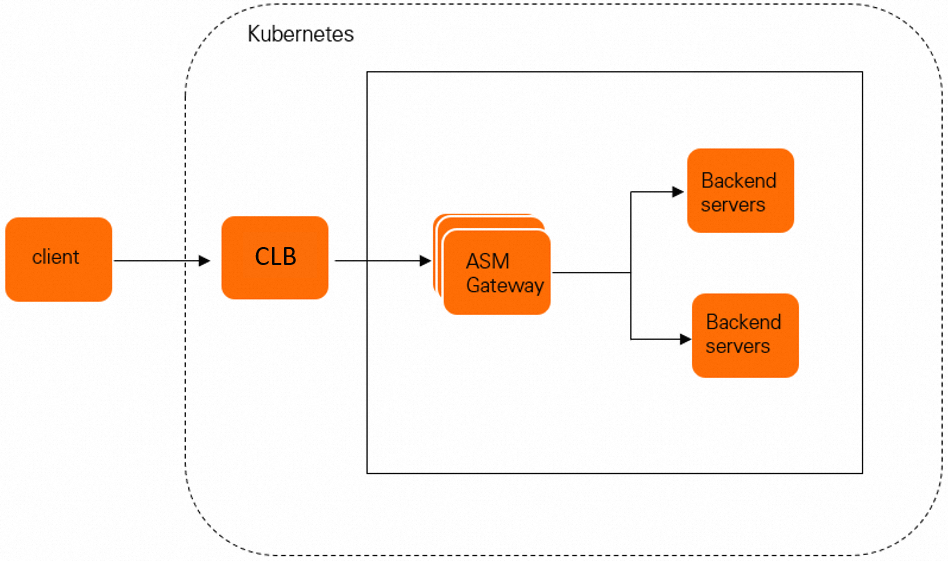
Every segment of this path -- DNS resolution, load balancing, network forwarding, and Transport Layer Security (TLS) termination -- affects latency and availability. The sections below cover how to optimize each one.
Reduce latency
Deploy across multiple regions for nearby access
ASM manages ACK clusters in multiple regions, allowing clients to connect to the nearest cluster rather than routing requests across long distances. Intelligent DNS resolution maps each domain name to the IP address of the CLB instance closest to the client. This reduces round-trip time and distributes traffic geographically.
Cross-region load balancing is also supported. When one region becomes overloaded, traffic shifts to healthier regions automatically. For details, see Use ASM to implement cross-region disaster recovery and load balancing.
Select the Terway CNI plug-in for direct pod forwarding
The Container Network Interface (CNI) plug-in in your ACK cluster determines how the CLB instance forwards traffic to the gateway pods:
| CNI plug-in | Traffic path | Latency impact |
|---|---|---|
| Terway (recommended) | CLB forwards traffic directly to gateway pods | Lower latency -- skips the extra hop through NodePort |
| Flannel | CLB forwards to NodePort Service, then NodePort routes to gateway pods | Higher latency -- adds an extra network hop |
Use the Terway CNI plug-in for production workloads. Direct pod forwarding eliminates the overhead of NodePort-based routing. For a detailed comparison, see Terway and Flannel.
Scale with multiple CLB instances
When a single CLB instance cannot handle your gateway's traffic volume, associate multiple CLB instances with the same gateway. Each instance independently distributes traffic to the gateway pods, increasing total throughput.
Enable TLS acceleration
ASM gateways on the commercial edition support TLS acceleration powered by Intel Multi-Buffer technology. In benchmark tests, enabling this feature improved queries per second (QPS) by 80%.
Note: The 80% QPS improvement was measured in Alibaba Cloud internal benchmarks. Actual gains depend on your workload characteristics, certificate key sizes, and hardware configuration.
Eliminate downtime
Set up geo-disaster recovery
Deploy ACK clusters across multiple regions with active geo-redundancy. If an entire region goes offline, traffic automatically fails over to clusters in other regions. Combined with intelligent DNS resolution, this provides region-level disaster recovery without manual intervention.
See Use ASM to implement cross-region disaster recovery and load balancing.
Add CLB redundancy
Associate multiple CLB instances with a single ASM gateway so that if one instance fails, the others continue serving traffic. This eliminates the load balancer as a single point of failure.
Distribute gateway pods across nodes and zones
Spread gateway pods across different nodes and availability zones to guard against node-level or zone-level outages. Use pod anti-affinity rules and topology spread constraints to control placement.
The following example shows a topology spread constraint that distributes gateway pods evenly across availability zones:
apiVersion: apps/v1
kind: Deployment
metadata:
  name: istio-ingressgateway
  namespace: istio-system
spec:
  template:
    spec:
      topologySpreadConstraints:
        - maxSkew: 1
          topologyKey: topology.kubernetes.io/zone
          whenUnsatisfiable: DoNotSchedule
          labelSelector:
            matchLabels:
              istio: ingressgateway
      affinity:
        podAntiAffinity:
          preferredDuringSchedulingIgnoredDuringExecution:
            - weight: 100
              podAffinityTerm:
                labelSelector:
                  matchLabels:
                    istio: ingressgateway
                topologyKey: kubernetes.io/hostname
For the full configuration procedure, see Improve availability for the ingress gateway service of an ASM instance.
Enable graceful shutdown for services
Configure a pre-stop hook on service pods to drain in-flight requests before the pod terminates. Without graceful shutdown, active requests fail or drop during scaling events and rolling updates.
Enable connection draining on the CLB instance
When the ASM gateway scales in or out, existing connections on the CLB instance must be retained for a configurable period to let in-flight requests complete. Enable connection draining on the CLB instance to prevent traffic loss during pod transitions.
Production readiness checklist
Before going live, verify that you have completed the following configurations. Beyond the performance and availability items covered above, also configure HorizontalPodAutoscaler, PodDisruptionBudget, and resource requests/limits on your gateway Deployment to handle scaling and disruptions gracefully.
Performance
| Configuration | Status | Notes |
|---|---|---|
| Multi-region deployment with intelligent DNS | Required for geo-distributed users | Reduces client-to-gateway latency |
| Terway CNI plug-in for direct pod forwarding | Recommended for all production clusters | Eliminates NodePort hop |
| Multiple CLB instances | Required when traffic exceeds single-instance capacity | Increases total throughput |
| TLS acceleration (Intel Multi-Buffer) | Recommended on commercial edition | Up to 80% QPS improvement |
Availability
| Configuration | Status | Notes |
|---|---|---|
| Active geo-redundancy across regions | Required for region-level disaster recovery | Automatic failover with intelligent DNS |
| Multiple CLB instances | Required to eliminate load balancer SPOF | Provides CLB-level redundancy |
| Pod anti-affinity and topology spread constraints | Required | Distributes pods across nodes and zones |
| Pre-stop hooks on service pods | Required | Drains in-flight requests before termination |
| Connection draining on CLB instances | Required | Prevents traffic loss during scaling |
HorizontalPodAutoscaler on gateway Deployment | Recommended | Auto-scales gateway pods based on load |
PodDisruptionBudget on gateway Deployment | Recommended | Prevents voluntary disruptions from removing too many pods |
| Resource requests and limits | Recommended | Prevents resource contention and OOM kills |