In large-scale microservice environments, you can enable the Multi-Buffer feature to accelerate Transport Layer Security (TLS) processing by the Envoy proxy. This feature efficiently handles high volumes of concurrent HTTPS requests by speeding up data packet encryption and decryption, reducing network latency, and enhancing system throughput and security.
Prerequisites
You have created an ASM Enterprise Edition or Ultimate Edition instance of version 1.10 or later. For instructions, see Create an ASM instance.
You have created an ACK cluster. The nodes in the cluster must use an instance family based on the Intel Ice Lake CPU architecture, which supports Multi-Buffer. For instructions, see Create an ACK managed cluster.
Background information
As network security technology evolves, TLS has become fundamental to network communication. A TLS session involves two main phases: the handshake and data transfer. During the handshake, asymmetric encryption is used to negotiate a shared session key. During data transfer, symmetric encryption then uses this key to secure the transmitted data.
In a microservice architecture, Envoy acts as both an ingress gateway and a sidecar proxy, processing a large volume of TLS requests. The asymmetric cryptography required during the handshake phase is CPU-intensive and can become a performance bottleneck in large-scale deployments. ASM integrates with Intel's Multi-Buffer technology to accelerate TLS processing in Envoy.
Multi-Buffer technology uses the Intel CPU AVX-512 instruction set to process multiple independent cryptographic buffers simultaneously. This allows multiple encryption and decryption operations to complete in a single execution cycle, significantly improving efficiency. This feature requires no additional hardware, only a CPU with the specific instruction set. Alibaba Cloud's Ice Lake processors are equipped with the latest AVX-512 instruction set.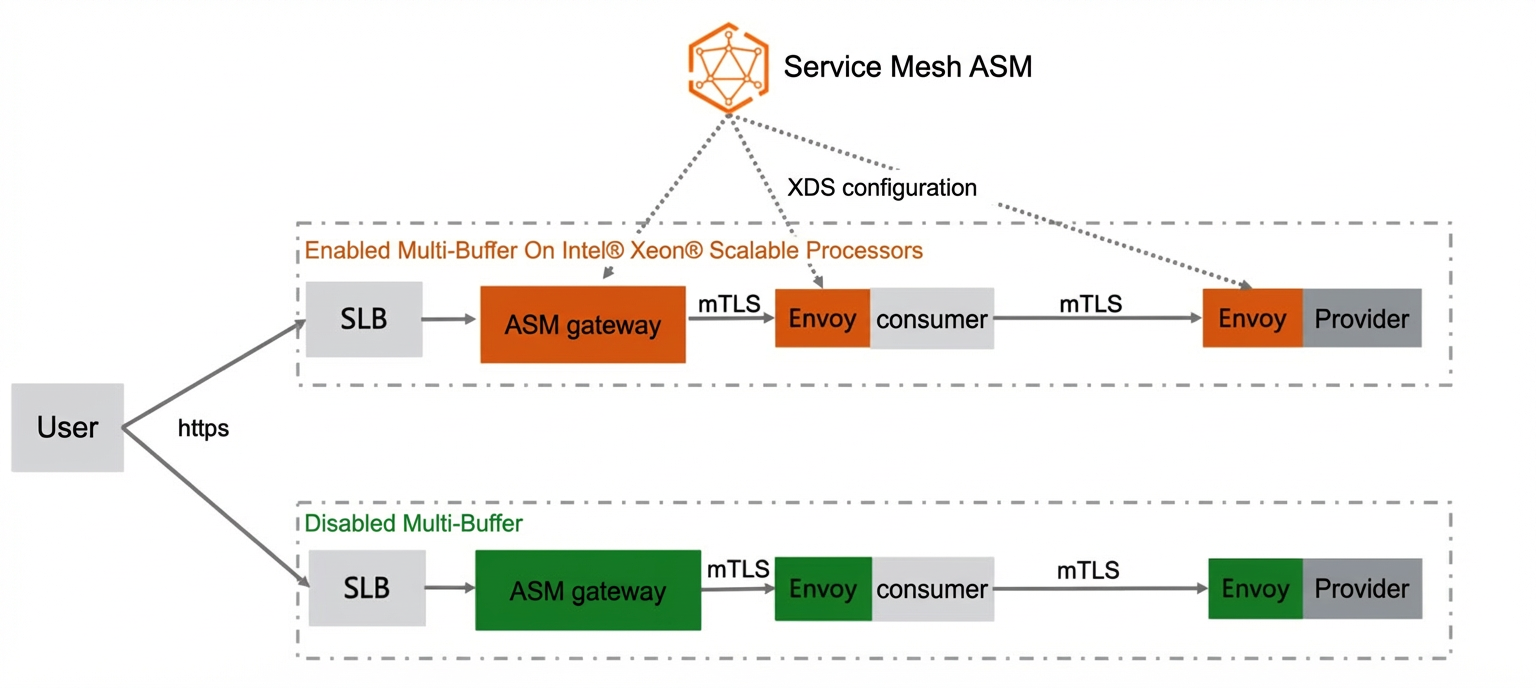
Procedure
Method 1: Enable globally
-
Log on to the ASM console. In the left-side navigation pane, choose .
-
On the Mesh Management page, click the name of the ASM instance. In the left-side navigation pane, choose .
On the Base Information page, click Settings on the right.
In the Settings Update panel, select Enable MultiBuffer-based TLS encryption and decryption performance optimization and click OK.
If you use nodes from the g7 general-purpose instance family, enabling Multi-Buffer can increase the query per second (QPS) by up to 75%. If you use ECS Bare Metal Instance nodes, the performance gain is even greater.
Method 2: Enable at the gateway level
For a new ASM gateway
-
Log on to the ASM console. In the left-side navigation pane, choose .
-
On the Mesh Management page, click the name of the ASM instance. In the left-side navigation pane, choose .
On the Ingress Gateway page, click Create. In the Advanced Options section of the Create page, select TLS performance optimization, configure the relevant settings, and then click Create.
For more information about the parameters, see Create an ingress gateway.
Parameter
Description
supported nodeaffinity
Selects nodes for performance optimization based on node labels.
Poll Delay(ms)
You typically do not need to adjust this parameter.
Multi-Buffer processes multiple cryptographic operations in batches. For example, if it is configured to process a batch of eight operations, it waits until eight requests are queued before execution. If the request volume is high, the batch fills quickly. If the volume is low, the wait can be long. Setting a poll delay forces Multi-Buffer to process the currently queued requests even if the batch is not full, reducing the waiting time for low-volume traffic.
For an existing ASM gateway
-
Log on to the ASM console. In the left-side navigation pane, choose .
-
On the Mesh Management page, click the name of the ASM instance. In the left-side navigation pane, choose .
For more information about the parameters, see Create an ingress gateway.
On the Ingress Gateway page, click the name of the target gateway. On the page, find the Advanced Options section. Click the
 icon next to Performance Optimization, select TLS performance optimization, configure the parameters, and then click Submit.
Parameter
Description
supported nodeaffinity
Selects nodes for performance optimization based on node labels.
Poll Delay(ms)
You typically do not need to adjust this parameter.
Multi-Buffer processes multiple cryptographic operations in batches. For example, if it is configured to process a batch of eight operations, it waits until eight requests are queued before execution. If the request volume is high, the batch fills quickly. If the volume is low, the wait can be long. Setting a poll delay forces Multi-Buffer to process the currently queued requests even if the batch is not full, reducing the waiting time for low-volume traffic.
Method 3: Enable at the pod level
This method requires ASM version 1.14.3 or later. To upgrade your instance, see Upgrade an ASM instance.
Ensure the pod is scheduled to a node that supports Multi-Buffer.
Add a specific annotation to the pod.
The following is a sample annotation:
proxy.istio.io/config: |
  privateKeyProvider:
    cryptomb:
      pollDelay: 10ms
Restart the pod to apply the changes.
FAQ
What happens if multi-buffer is enabled on unsupported nodes?
The Envoy proxy logs a warning, and the Multi-Buffer feature will not take effect.
2021-11-09T15:24:03.269127Z    info    sds service generate, Multibuffer enable: true
2021-11-09T15:24:03.269158Z    info    cache    returned workload trust anchor from cache    ttl=23h59m59.730845791s
2021-11-09T15:24:03.269177Z    info    proxyConfig: config_path:"/etc/istio/proxy" binary_path:"/usr/local/bin/envoy" service_cluster:"istio-ingressgateway" drain_duration:<seconds:45 > parent_shutdown_duration:<seconds:60 > discovery_address:"istiod.istio-system.svc:15012" proxy_admin_port:15000 control_plane_auth_policy:MUTUAL_TLS stat_name_length:189 concurrency:<> tracing:<zipkin:<address:"zipkin.istio-system:9411" > > proxy_metadata:<key:"DNS_AGENT" value:"" > status_port:15020 termination_drain_duration:<seconds:5 > multi_buffer:<enabled:true poll_delay:<nanos:20000000 > >
2021-11-09T15:24:03.269185Z    info    sds service generate, Multibuffer enable: true
2021-11-09T15:24:03.269211Z    info    cache    returned workload certificate from cache    ttl=23h59m59.730792927s
2021-11-09T15:24:03.269223Z    info    pollDelay config: 20ms
2021-11-09T15:24:03.269456Z    info    sds    SDS: PUSH    resource=ROOTCA
2021-11-09T15:24:03.269589Z    info    sds    SDS: PUSH    resource=default
2021-11-09T15:24:03.270330Z    warning envoy config    gRPC config for type.googleapis.com/envoy.extensions.transport_sockets.tls.v3.Secret rejected: Multi-buffer CPU instructions not available.
2021-11-09T15:24:03.271696Z    warn    ads    ADS:SDS: ACK ERROR router~172.18.96.137~istio-ingressgateway1-d7447cb55-khr8s.istio-system~istio-system.svc.cluster.local-2 Internal:Multi-buffer CPU instructions not available.
2021-11-09T15:24:04.309379Z    info    Initialization took 1.267025329s
2021-11-09T15:24:04.309416Z    info    Envoy proxy is ready
2021-11-09T15:24:04.458149Z    warning envoy config    gRPC config for type.googleapis.com/envoy.config.cluster.v3.Cluster rejected: Error adding/updating cluster(s) outbound|15021||istio-ingressgateway1.istio-system.svc.cluster.local: Multi-buffer CPU instructions not available., outbound|80||istio-ingressgateway1.istio-system.svc.cluster.local: Multi-buffer CPU instructions not available., outbound|443||istio-ingressgateway1.istio-system.svc.cluster.local: Multi-buffer CPU instructions not available.
ASM Enterprise Edition and Ultimate Edition instances of version 1.10 or later provide an adaptive check for this feature. If a service or gateway pod is scheduled to a node that is not an Intel Ice Lake model, the control plane does not push the acceleration configuration, and TLS acceleration remains disabled for that pod.
How to add and enable multi-buffer on a node?
Add a new node to your Kubernetes cluster. The node must use an instance from an instance family based on the Intel Ice Lake CPU architecture. For instructions, see Add existing nodes.
Set the
multibuffer-support:truelabel on the newly added node. For more information, see Manage node labels and taints.Add the following YAML configuration to your ASM gateway definition. For instructions, see CRD fields for an ASM gateway.
This adds node affinity to ensure the gateway instance is scheduled to a newly added, Multi-Buffer-capable node.
affinity:
    nodeAffinity:
      preferredDuringSchedulingIgnoredDuringExecution:
        - preference:
            matchExpressions:
              - key: feature.node.kubernetes.io/mb-feature-enabled
                operator: In
                values:
                  - 'true'
          weight: 1
Enable the Multi-Buffer feature for your ASM Enterprise Edition or Ultimate Edition instance. For instructions, see the procedures described earlier in this topic.
After you enable the feature, the new node can use Multi-Buffer to accelerate TLS processing.
Related documents
ASM provides features such as service discovery scoping, sidecar resource recommendations, and adaptive configuration push optimization. These features optimize the control plane's configuration push efficiency and reduce the configuration size of sidecars. For more information, see Configuration push optimization overview.