This topic outlines how to integrate Dify applications with ARMS Application Monitoring.
Component overview
workflow application (LLM application): The Large Language Model (LLM) application you build in the Dify visual interface. It typically exists as a workflow or a chatbot. It defines the application's logic, prompts, model selection, variable handling, conditional branches, and tool calls.
dify-api (Execution Engine API): The core backend service of Dify. It receives front-end requests, manages user and application data, schedules workflow executions, calls LLMs, coordinates plugin calls, and returns the final results.
dify-plugin-daemon (Plugin Engine): The plugin engine for Dify, used to execute user-defined or official plugins in a secure and isolated environment.
nginx (ingress gateway): Dify's ingress gateway for routing traffic.
Dify components iterate rapidly, and the monitoring methods vary across different versions. The following table outlines the integration methods for the components in each version.
Version | Workflow integration | dify-api integration | dify-plugin-daemon integration | Nginx integration |
Earlier than 1.6.0 | Use the ARMS Python agent. (Integrate the agent with the dify-api component.) | Use the ARMS Python agent. | Use the ARMS Golang agent. | Use OpenTelemetry. |
1.6.0 or later, earlier than 1.11.2 | Report data by using the Dify application observability integration feature. | Use the ARMS Python agent. | Use the ARMS Golang agent. | Use OpenTelemetry. |
1.11.2 or later | Use the ARMS Python agent. (Integrate the agent with the dify-api component. Newer versions have this capability built-in.) | Use the ARMS Python agent. | Use the ARMS Golang agent. | Use OpenTelemetry. |
1.13.0 or later | See Configure OTel for Dify. Configure the corresponding environment variables on the dify-worker component. To obtain the OTel endpoint, see Prerequisites. | Use the ARMS Python agent. | Use the ARMS Golang agent. |
If you use Dify through the ack-dify component in Container Service for Kubernetes (ACK), use the one-click integration by updating the Helm chart. You can update the ack-dify component on the Applications page of your ACK cluster:
In the Helm Chart Update Release panel, find the arms configuration section in the target version's parameter configuration (Values), and set enabled to true.
Alternatively, you can configure the relevant settings when you create the ack-dify component to enable ARMS Application Monitoring:
In the YAML editor of the parameter configuration, set enabled to true under the arms configuration section.
Prerequisites
ack-onepilot version 5.1.2 or later
Python agent version 2.2.0 or later
Procedure
Step 1: Integrate the dify-api component
Choose one of the following integration methods based on the deployment type of the Dify API:
Automatic integration for Kubernetes containers (Recommended): For more information, see Install the Python agent for applications in an ACK cluster by using ack-onepilot. Add the following labels to the Deployment of your dify-api:
labels:
  apsara.apm/application-type: Dify
  aliyun.com/app-language: python
  armsPilotAutoEnable: 'on'
  armsPilotCreateAppName: "deployment-name"    # The display name of the application in ARMS.
Obtain the entrypoint.sh startup script and make the following modifications:
Add the following commands to the beginning of the startup script to uninstall conflicting plugins and install the Python agent.
python3 -m ensurepip --upgrade
# Uninstall conflicting OTel plugins
pip3 uninstall -y opentelemetry-instrumentation-celery \
 opentelemetry-instrumentation-flask \
 opentelemetry-instrumentation-redis \
 opentelemetry-instrumentation-requests \
 opentelemetry-instrumentation-logging \
 opentelemetry-instrumentation-wsgi \
 opentelemetry-instrumentation-fastapi \
 opentelemetry-instrumentation-asgi \
 opentelemetry-instrumentation-sqlalchemy
# Install the Python agent
pip3 config set global.index-url https://mirrors.aliyun.com/pypi/simple/ && pip3 config set install.trusted-host mirrors.aliyun.com
pip3 install aliyun-bootstrap && aliyun-bootstrap -a install
Add the
aliyun-instrumentstartup command to the end of the script.# Start with aliyun-instrument exec aliyun-instrument gunicorn \ --bind "${DIFY_BIND_ADDRESS:-0.0.0.0}:${DIFY_PORT:-5001}" \ --workers ${SERVER_WORKER_AMOUNT:-1} \ --worker-class ${SERVER_WORKER_CLASS:-gevent} \ --worker-connections ${SERVER_WORKER_CONNECTIONS:-10} \ --timeout ${GUNICORN_TIMEOUT:-200} \ app:app
Configure environment variables.
Parameter
Example value
Description
GEVENT_ENABLE
true
Dify uses gevent. This variable must be set to true.
ARMS_APP_NAME
dify-api
The application name.
ARMS_REGION_ID
cn-heyuan
The region. Change this to your target region.
ARMS_LICENSE_KEY
xxx
The License Key.
APSARA_APM_APP_TYPE
microservice
Identifies the application as a microservice.
2. View monitoring data for the dify-api component. In the application list, you can see the dify-api application.
The trace shows upstream and downstream calls.
Step 2: Integrate Dify workflow applications
Dify API: 1.6.0 to 1.11.2
Integrate a single application: See Dify application observability integration to configure your Dify application.
Integrate applications in batches: See Batch integration for Dify LLM application monitoring.
Dify API: Up to 1.6.0 or from 1.11.2
Dify workflow applications require no additional configuration. After you integrate the dify-api component as described in the previous step, trace data from workflows is automatically reported and correlated.
Dify API: 1.13.0 or later
See Configure OTel for Dify. Configure the corresponding environment variables on the dify-worker component. To obtain the OTel endpoint, see Prerequisites.
View monitoring data for workflow applications
Example application details:
The application details page provides tabs including Overview, Performance Analysis, Token Analysis, LLM Operations, Provided Services, Dependent Services, Trace Analysis, Exception Analysis, and Session Analysis. The Overview page displays the following monitoring metrics:
Statistics cards: Model Call Count, Token Usage, Trace Count, Span Count, Session Count, User Count with day-over-day changes
Operation Type Distribution pie chart including TASK, TOOL, CHAIN, LLM, RETRIEVER types
Avg LLM call per request and Request Count Trend line charts
Model Call Ranking (Top 5) and Request Count User Ranking (Top 5)
Session Count Trend line chart
Example trace details: The trace collects detailed information about nodes such as LLM calls, retrieval, and tool calls.
The trace details page shows a Trace waterfall chart on the left, with each span annotated with type (TASK, TOOL, LLM, RETRIEVER), duration, and token count. The top section summarizes Trace ID, total duration, application count, interface count, and Total tokens. After clicking a span, the right-side details panel shows the span's metadata (Application Name, Interface Name, Hostname, spanId, start/end time, etc.). LLM-type spans also display input Prompt and Output Messages content.
Step 3: Integrate the dify-plugin-daemon
Modify the Dockerfile and rebuild the image. The following example shows modifications to local.dockerfile:
FROM golang:1.23-alpine AS builder ARG VERSION=unknown # copy project COPY . /app # set working directory WORKDIR /app # using goproxy if you have network issues # ENV GOPROXY=https://goproxy.cn,direct # download arms instgo RUN wget "http://arms-apm-cn-hangzhou.oss-cn-hangzhou.aliyuncs.com/instgo/instgo-linux-amd64" -O instgo RUN chmod 777 instgo # instgo build RUN INSTGO_EXTRA_RULES="dify_python" ./instgo go build \ -ldflags "\ -X 'github.com/langgenius/dify-plugin-daemon/internal/manifest.VersionX=${VERSION}' \ -X 'github.com/langgenius/dify-plugin-daemon/internal/manifest.BuildTimeX=$(date -u +%Y-%m-%dT%H:%M:%S%z)'" \ -o /app/main cmd/server/main.go # copy entrypoint.sh COPY entrypoint.sh /app/entrypoint.sh RUN chmod +x /app/entrypoint.sh FROM ubuntu:24.04 WORKDIR /app # check build args ARG PLATFORM=local # Install python3.12 if PLATFORM is local RUN apt-get update && DEBIAN_FRONTEND=noninteractive apt-get install -y curl python3.12 python3.12-venv python3.12-dev python3-pip ffmpeg build-essential \ && apt-get clean \ && rm -rf /var/lib/apt/lists/* \ && update-alternatives --install /usr/bin/python3 python3 /usr/bin/python3.12 1; # preload tiktoken ENV TIKTOKEN_CACHE_DIR=/app/.tiktoken # Install dify_plugin to speedup the environment setup, test uv and preload tiktoken RUN mv /usr/lib/python3.12/EXTERNALLY-MANAGED /usr/lib/python3.12/EXTERNALLY-MANAGED.bk \ && python3 -m pip install uv \ && uv pip install --system dify_plugin \ && python3 -c "from uv._find_uv import find_uv_bin;print(find_uv_bin());" \ && python3 -c "import tiktoken; encodings = ['o200k_base', 'cl100k_base', 'p50k_base', 'r50k_base', 'p50k_edit', 'gpt2']; [tiktoken.get_encoding(encoding).special_tokens_set for encoding in encodings]" ENV UV_PATH=/usr/local/bin/uv ENV PLATFORM=$PLATFORM ENV GIN_MODE=release COPY --from=builder /app/main /app/entrypoint.sh /app/ # run the server, using sh as the entrypoint to avoid process being the root process # and using bash to recycle resources CMD ["/bin/bash", "-c", "/app/entrypoint.sh"]NoteThe
INSTGO_EXTRA_RULESoption enables automatic monitoring of the plugin runtime. If you do not want the plugin agent to be launched when the plugin-daemon starts, removeINSTGO_EXTRA_RULES="dify_python"from the build file.Configure environment variables:
ECS environment
Parameter
Example value
Description
ARMS_LICENSE_KEY
xxx@xxx
The License Key.
ARMS_REGION_ID
cn-heyuan
The region.
ARMS_ENABLE
true
Enables or disables the agent.
ARMS_APP_NAME
dify-plugin-daemon
The application name.
Containerized ack-onepilot environment: In the YAML configuration file for the dify-plugin-daemon application, add the following labels under spec.template.metadata.
labels:
  aliyun.com/app-language: golang
  armsPilotAutoEnable: 'on'
  armsPilotCreateAppName: "dify-daemon-plugin"
Deploy and view monitoring data for dify-plugin-daemon. On the Application List page, go to the dify-plugin-daemon application.
After successful integration, you can view the following monitoring data on the Application Overview page of the ARMS console:
Summary metric cards: Request Count, Error Count, Average Latency, Instance Count with day-over-day/week-over-week changes
Time series charts: Request Count/1m, Error Count/1m, Latency/1m (including P99, P90, P75, Average), CPU Usage Peak
Top 5 rankings: Request Count ranking, Error Count ranking, Average Latency ranking, CPU Usage Peak Instance ranking
The top navigation tabs include Application Overview, Application Topology, Provided Services, Dependent Services, Trace Analysis, Instance Monitoring, Application Diagnostics, Scenario Analysis, Event Analysis, Application Configuration.
Trace details:
Select
insight-agent-plugin-daemonin the serviceName filter to view the complete distributed trace of plugin LLM request calls. The Trace waterfall chart shows multiple spans including:GET entry request
connect (redis/sqlalchemy connections)
SELECT dify (database queries)
/v1/sandbox/run (POST 200, sandbox execution, with httpx/go multi-layer calls)
UPDATE dify (database updates)
Span durations range from 131µs to 34.95ms. The right-side Span details panel shows hostname, start/end time, status, and Attributes including
net.protocol.name=HTTP,component.name,endpoint=/plugin/tenant_id/dispatch/llm/inv....View plugin monitoring data. After the agent is attached, the plugin-daemon automatically starts the agent for the plugin runtime. Each plugin runtime corresponds to an observable application with the name
{plugin_daemon_name}_plugin_{plugin_name}_{plugin_version}. For example, if the application name for the plugin-daemon islocal-dify-plugin-daemonand version0.0.53of thetongyiplugin is installed, an application namedlocal-dify-plugin-daemon_plugin_tongyi_0.0.53is automatically created.
(Optional) Step 4: Monitor the sandbox
Sandbox is the Dify code sandbox engine for running Python and Node.js code from a workflow. The Go agent supports sandbox monitoring. To enable it, you must modify the Dockerfile, rebuild the image, and configure environment variables to enable monitoring.
Modify the Dockerfile and rebuild the corresponding image. Modify the ./build/build_[amd64|arm64].sh file.
Add the command to download instgo. The following is a sample command. For download commands for other regions and architectures, see Download instgo.
wget "http://arms-apm-cn-hangzhou.oss-cn-hangzhou.aliyuncs.com/instgo/instgo-linux-amd64" -O instgo
chmod 777 instgo
Add the
instgocommand before thego buildcommand. The following is an example for amd64:rm -f internal/core/runner/python/python.so rm -f internal/core/runner/nodejs/nodejs.so rm -f /tmp/sandbox-python/python.so rm -f /tmp/sandbox-nodejs/nodejs.so wget "http://arms-apm-cn-hangzhou.oss-cn-hangzhou.aliyuncs.com/instgo/instgo-linux-amd64" -O instgo chmod 777 instgo echo "Building Python lib" CGO_ENABLED=1 GOOS=linux GOARCH=amd64 ./instgo go build -o internal/core/runner/python/python.so -buildmode=c-shared -ldflags="-s -w" cmd/lib/python/main.go && echo "Building Nodejs lib" && CGO_ENABLED=1 GOOS=linux GOARCH=amd64 ./instgo go build -o internal/core/runner/nodejs/nodejs.so -buildmode=c-shared -ldflags="-s -w" cmd/lib/nodejs/main.go && echo "Building main" && GOOS=linux GOARCH=amd64 ./instgo go build -o main -ldflags="-s -w" cmd/server/main.go echo "Building env" GOOS=linux GOARCH=amd64 ./instgo go build -o env -ldflags="-s -w" cmd/dependencies/init.go
Configure environment variables.
Integrate through Kubernetes containers: In the YAML configuration file for the dify-plugin-daemon application, add the following labels under spec.template.metadata.
labels:
  aliyun.com/app-language: golang
  armsPilotAutoEnable: 'on'
  armsPilotCreateAppName: "dify-daemon-plugin"
Manual integration:
Parameter
Example value
Description
ARMS_LICENSE_KEY
xxx
The License Key.
ARMS_REGION_ID
cn-heyuan
The region.
ARMS_ENABLE
true
Enables or disables the agent.
ARMS_APP_NAME
dify-plugin-daemon
The application name.
Deploy and view sandbox monitoring data. On the Application List page, go to the dify-sandbox application. The monitoring details are as follows:
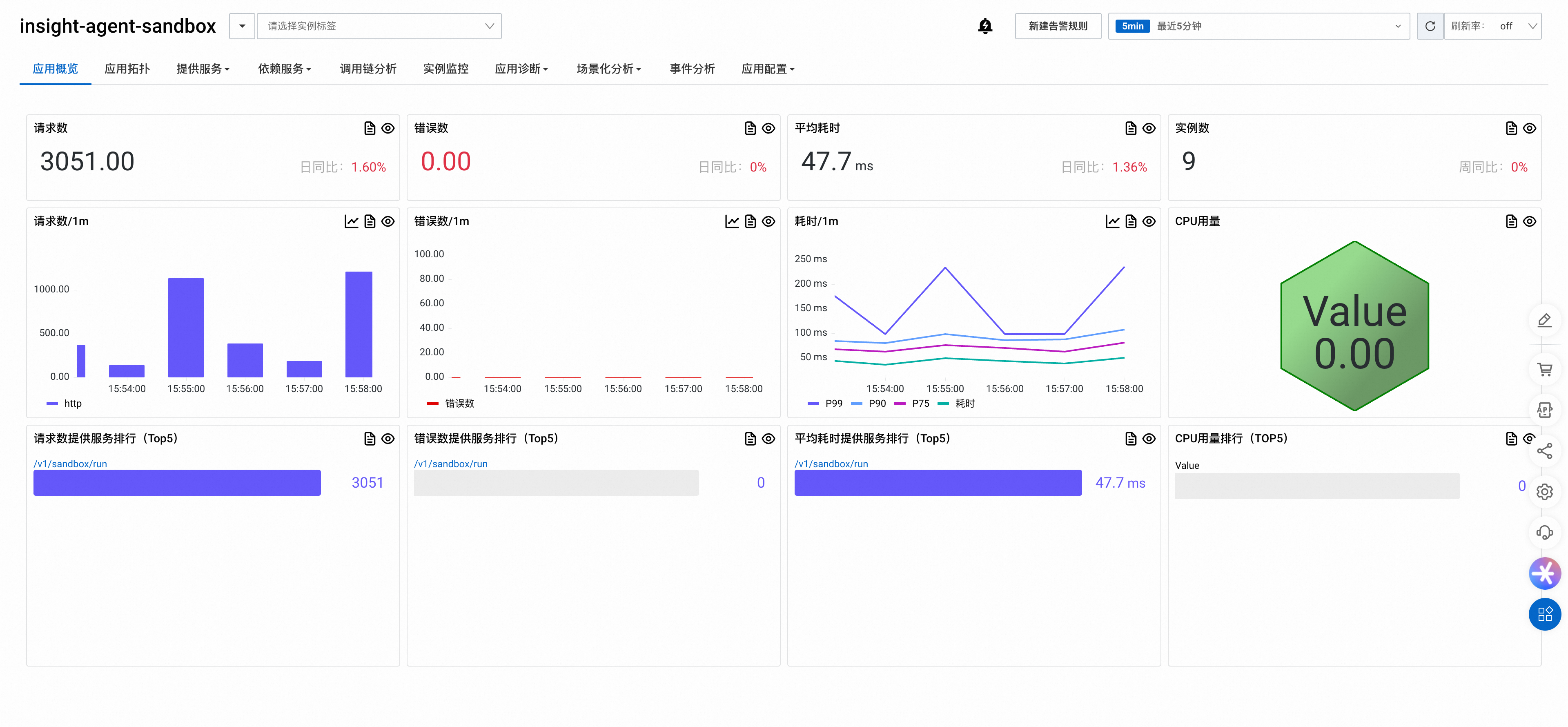
Trace details:
This Trace has a total duration of 8.7s, involving 5 applications and 1039 interfaces. The page indicates Exception Detected. Component calls include redis 575 times, sqlalchemy 337 times, httpx 14 times, etc. The core path in the Span waterfall chart shows
SELECT difyqueries followed by multi-layer/v1/sandbox/runcalls (POST httpx 35.96ms → SERVER go 28.39ms → multi-level INTERNAL go calls). Span details show application name insight-agent-sandbox, interface/v1/sandbox/run, hostnamesandbox-7489d68cd5-xcqv8, with normal status code.
(Optional) Step 5: Monitor the Nginx ingress gateway
Nginx serves as the ingress gateway for Dify. Some issues related to timeouts or file uploads for the knowledge base, plugins, or workflows might be related to the Nginx configuration. Report data by using OpenTelemetry, as described in Trace Nginx by using OpenTelemetry.
Configuration
Input and output content collection
Default: True.
Effect when disabled: When a user sends a query, the agent collects only the size of fields such as input and output for models, tools, and the knowledge base, but not the content of these fields.
Configuration: Set the environment variable OTEL_INSTRUMENTATION_GENAI_CAPTURE_MESSAGE_CONTENT=False.
LLM application splitting
Default: False.
Effect when enabled: The reported data is split into LLM sub-applications. Each LLM application, such as a Dify workflow, Agent, or Chat App, corresponds to a separate ARMS application.
Configuration: Set the environment variable PROFILER_GENAI_SPLITAPP_ENABLE=True.
Supported regions: China (Heyuan) and Singapore.
Message content length limit
Default: 4K characters.
Effect when enabled: Limits the length of each LLM message content, such as the input/output message fields. The agent truncates message content that exceeds the specified character length.
Supported plugins: This configuration applies only to Dify and LangChain.
Configuration: If your agent version is 1.8.3 or later, set the environment variable OTEL_INSTRUMENTATION_GENAI_MESSAGE_CONTENT_MAX_LENGTH=<integer_value>. Replace <integer_value> with an integer that specifies the maximum character length.
Span attribute value length limit
Default: No limit.
Effect when enabled: Limits the length of reported Span attribute values, such as gen_ai.agent.description. The agent truncates attribute values that exceed the specified character length.
Supported plugins: This configuration applies to all plugins that support OpenTelemetry, such as LangChain, DashScope, and Dify.
Configuration: Set the environment variable OTEL_SPAN_ATTRIBUTE_VALUE_LENGTH_LIMIT=<integer_value>. Replace <integer_value> with an integer that specifies the maximum character length.