Deploy Dify on ACK to create a scalable AI Q&A assistant backed by your enterprise knowledge base.
Solution overview
Dify custom AI application example
| Web-integrated AI application example
|
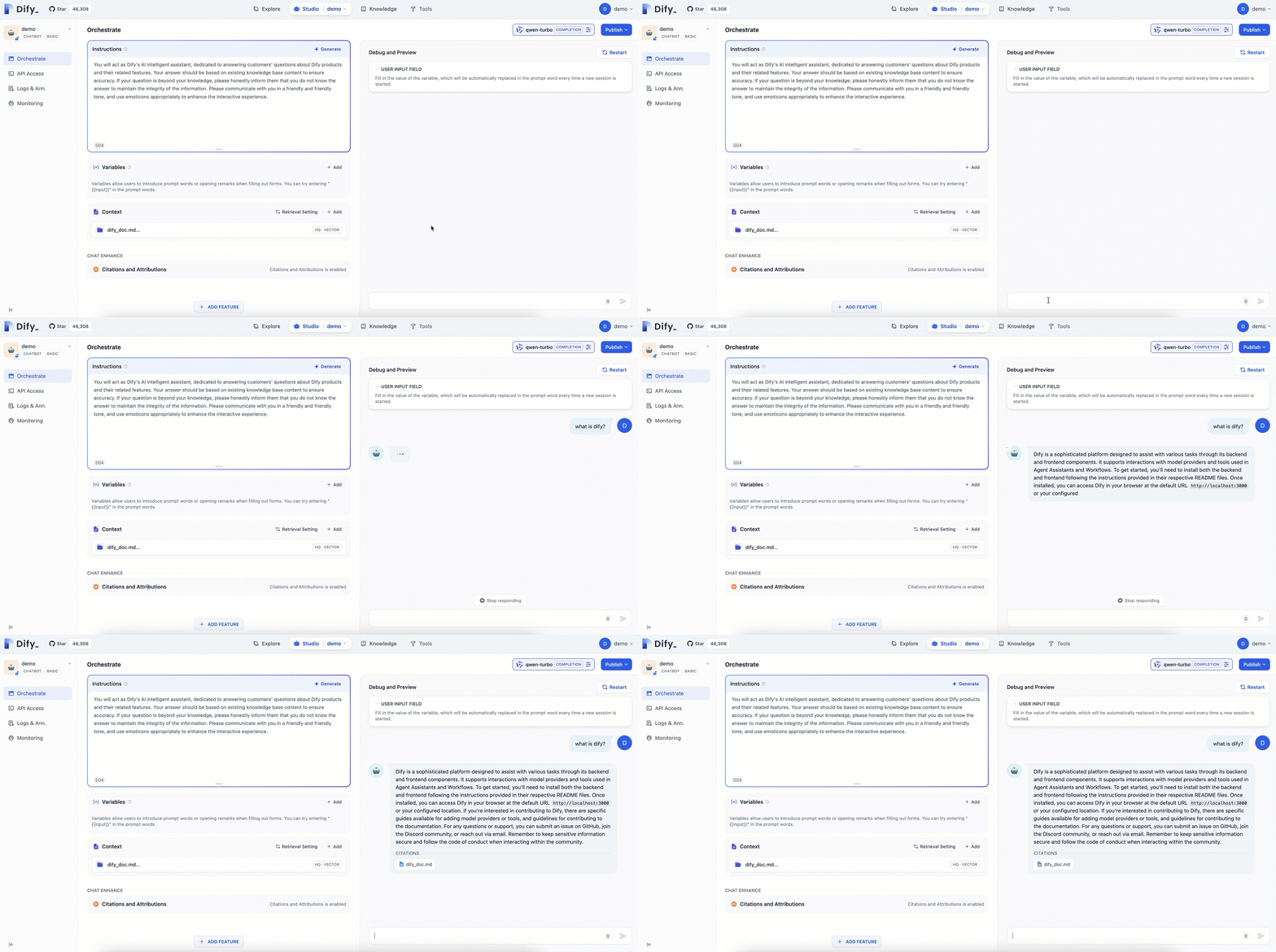
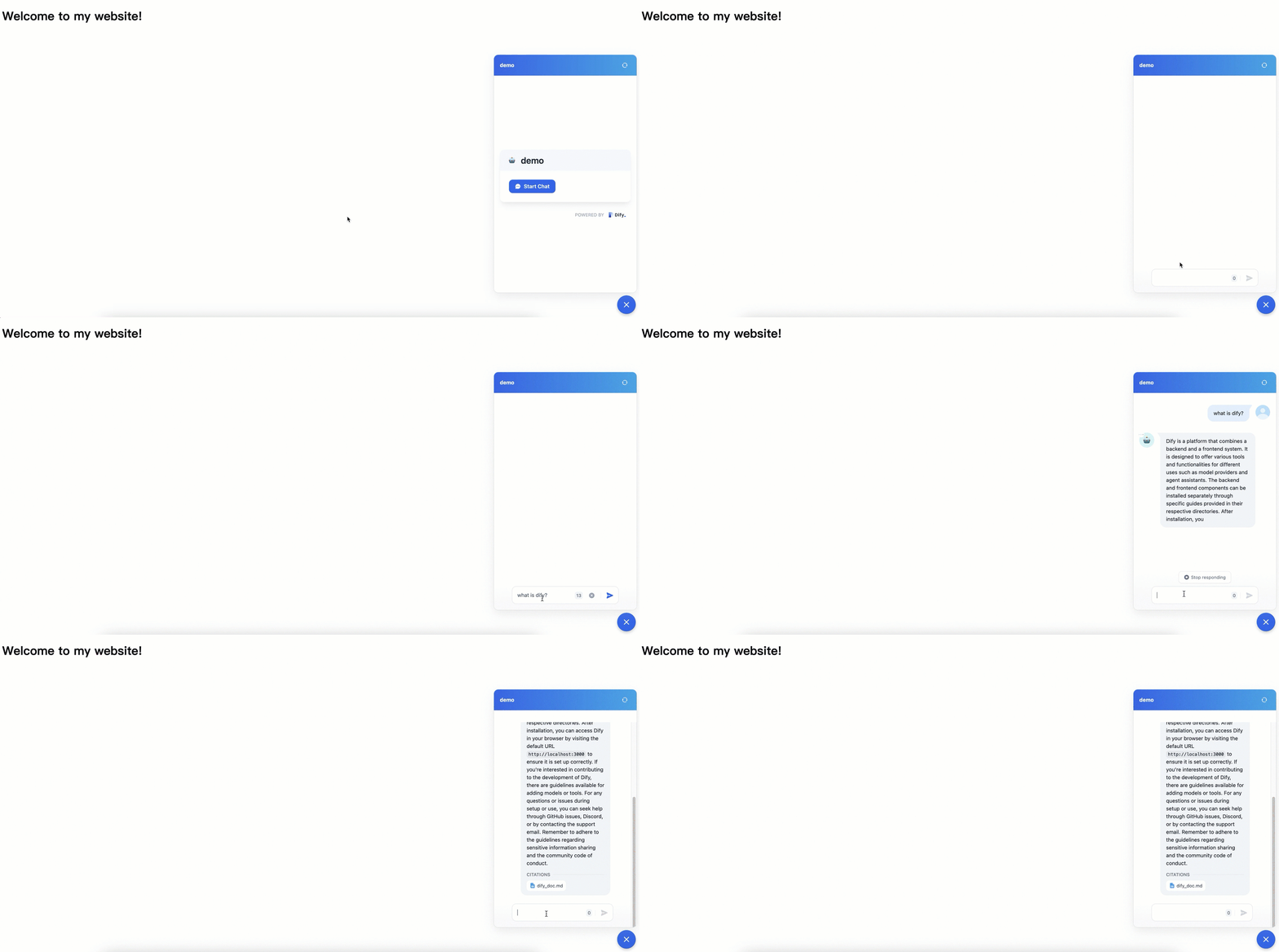
Set up a dedicated AI Q&A assistant in three steps:
Install the ack-dify component: Create an ACK cluster and install the ack-dify component.
Add an AI Q&A assistant: Access the Dify service to add an AI Q&A assistant to your website.
Customize the AI Q&A assistant: Add a dedicated knowledge base to improve accuracy for domain-specific questions.
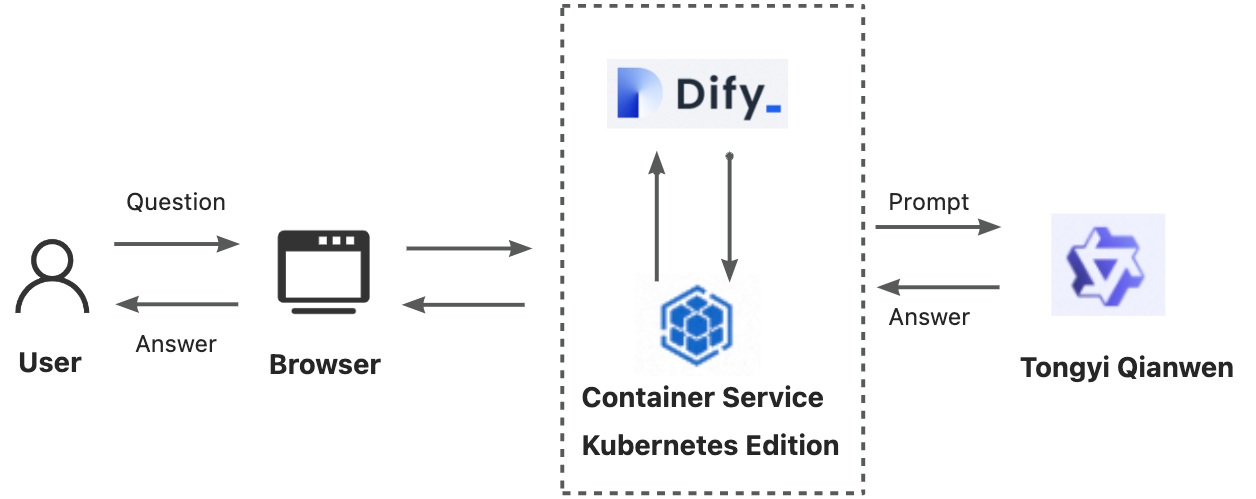
Interaction between the Dify service and the ACK cluster:

Introduction to Dify
Dify is an open-source large language model (LLM) application development platform that combines Backend-as-a-Service (BaaS) and LLMOps. It enables both developers and non-technical users to build production-grade generative AI applications without reinventing core components.
Key components of Dify's architecture:
Core technology components: Dify integrates essential components for creating LLM applications, including compatibility with numerous models, a user-friendly prompt design interface, a high-performance Retrieval-Augmented Generation (RAG) system, and a customizable Agent architecture.
Visual orchestration and operations: Dify's intuitive interface enables visual orchestration of prompts, streamlined operational workflows, and efficient management of datasets. This significantly accelerates the AI application development process, allowing developers to deploy quickly or integrate LLMs into existing systems, and supports continuous operational optimization.
Application templates and orchestration framework: Dify provides developers with out-of-the-box application templates and an orchestration framework, enabling them to rapidly develop generative AI applications based on large language models. The platform also supports instant, smooth scaling to meet changing business needs, driving business growth.
Together, these components provide a comprehensive platform for rapidly developing and deploying generative AI applications.
1. Install the ack-dify component
One-click deployment
If you are new to ACK clusters and unfamiliar with the creation process, click one-click deployment to create the Dify runtime environment. This deploys a single-instance Dify application via the ack-dify Helm template from the ACK App Marketplace, suitable for development and testing.
Before you use one-click deployment, ensure that ACK is activated and authorized. For more information, see Create an ACK managed cluster.
This solution uses the following cloud resources. For billing information, see Billing.
Cloud resources | Description |
1 Virtual Private Cloud (VPC) | Provides a private network for cloud resources such as Elastic Compute Service (ECS) instances and ACK clusters. |
2 vSwitches | Connects resources such as ECS instances and ACK clusters for communication and network isolation. |
1 security group | Defines inbound and outbound network rules for ECS instances in the VPC. |
1 Classic Load Balancer (CLB) instance | Provides internet access to the Dify platform. |
1 NAS file system | Stores data for internal Dify services (api and worker). |
1 ACK managed cluster | Deploys Dify. Select at least one node with 8 vCPUs and 16 GiB of memory (such as ecs.u1-c1m2.2xlarge) to avoid resource shortages. |
Procedure
Click one-click deployment. In ROS, select your region, such as China (Hangzhou). Follow the ROS template to configure vSwitch zone IDs, node pool instance type, password, security confirmation, and other settings. Keep defaults for the rest, then click Next: Check and Confirm.
The cluster takes about 10 minutes to create. After creation, log on to the Container Service for Kubernetes console. In the left-side navigation pane, choose Clusters. Click your target cluster. Choose Workloads > Pods, set the namespace to dify-system, and verify that the ack-dify component is installed on the cluster.
(Optional) If a pod is Pending, the cluster may lack the PVC dependency for ack-dify. Create a CNFS file system and NAS StorageClass for the cluster. For more information, see Manage NAS file systems by using CNFS. For more information about troubleshooting pod exceptions, see Troubleshoot pod exceptions.
After the ack-dify component is installed, proceed to the next step.
If you have already used ROS one-click deployment to install the ack-dify component, public access is already enabled for the ack-dify service. You can skip the steps in Access the Dify service.
Manual deployment
If you are familiar with the ACK cluster creation process, follow these steps to create a cluster tailored to your needs.
1.1 Prerequisites
An ACK Pro cluster, version 1.22 or later, is created. For more information, see Create an ACK managed cluster and Upgrade a cluster.
Reserve at least 2 vCPUs and 4 GB of memory. Ensure the CSI storage plugin and CNFS file system are configured.
kubectl is connected to the cluster. See Connect to an ACK cluster by using kubectl.
1.2 Deploy the component
Deploy the ack-dify component on your cluster for the Dify service.
Log on to the Container Service for Kubernetes console. In the left-side navigation pane, choose Clusters. Click your target cluster. Follow the steps below to install the ack-dify component.
You do not need to configure the Application Name or Namespace for the component. Click Next. In the Confirm dialog box that appears, click Yes to accept the defaults (ack-dify / dify-system). Then, select the latest Chart Version and click OK to install the ack-dify component.
Wait about one minute, then verify that all pods in the
dify-systemnamespace are in theRunningstate.kubectl get pod -n dify-systemIf any pod is Pending, the cluster may lack the PVC dependency for ack-dify. Create a CNFS file system and NAS StorageClass. For more information, see Manage NAS file systems by using CNFS. For more information about troubleshooting pod exceptions, see Troubleshoot pod exceptions.
2. Add an AI Q&A assistant
2.1 Access the Dify service
Enable public access for the ack-dify service.
NotePublic access is for demonstration purposes. For data security in a production environment, enable the Access Control feature.
In the ACK console, choose Network > Services in the left-side navigation pane. In the namespace selector at the top, select dify-system, find the ack-dify Service, and then click Update. In the Update Service dialog box that appears, configure the following parameters:
Service type: select Load Balancer (LoadBalancer).
Load balancer type: Classic Load Balancer (CLB).
Resource selection: New Resource.
Access method: select public network access.
Billing method: pay-as-you-go billing method (PayByCLCU).
TrafficPolicy: Local.
Port mapping: Name http-dify, Service port 80, container port dify, protocol TCP.
After you complete the configuration, click OK.
After configuration, choose Network > Services > ack-dify, set the namespace to dify-system. You will see the External IP of the ack-dify service. Open this IP in your browser to access Dify.
Register an account.
Access the External IP and follow the prompts to create an administrator account (email, username, password).
2.2 Create an AI Q&A assistant
Enter the External IP in your browser and log in to the Dify platform.
Add an AI model (Qwen in this example) and set the API key from Alibaba Cloud Model Studio.
Once you exhaust the free Qwen quota, charges are based on token usage. This reduces upfront costs compared to self-hosting a model.
Get API key: Choose Username > Settings > Model Provider > Install and set up the Qwen plugin > Get API Key From Alibaba Cloud.
Enter the API key, then click Save.
Create a general-purpose AI Q&A assistant.
Choose Studio > Create from Blank, and enter a Name and Description for the assistant. Keep other parameters at defaults.
2.3 Verify the AI Q&A assistant
Test the assistant by asking questions. The general-purpose chatbot handles simple conversations but cannot yet answer Dify-specific questions.
3. Customize the AI assistant
3.1 Create a knowledge base
To answer Dify-related technical questions accurately, configure a dedicated knowledge base for the assistant.
This example provides a corpus file dify_doc.md. Create and upload the knowledge base as follows.
Upload the prepared corpus file dify_doc.md to the knowledge base.
Choose Knowledge > Create Knowledge > Import from file > Select File > Next.
Click Next. Perform text segmentation and cleaning, then save.
Keep defaults. The knowledge base automatically cleans, segments, and indexes the document for retrieval.
To learn how the above corpus files are organized into a single .md file, expand the collapsible section below for details.
3.2 Orchestrate and publish the assistant
Configure a prompt and add the knowledge base to the assistant's context.
Configure the prompt: Copy the following content into the Instructions field. Prompts improve response accuracy with instructions and constraints.
You will act as Dify's AI assistant, dedicated to answering customers' questions about Dify products and their features. Your responses should be based on the existing knowledge base to ensure accuracy. If a question is beyond your knowledge, please honestly inform them that you do not know the answer, in order to maintain the integrity of the information. Please communicate in a friendly and warm tone, and feel free to use emoticons appropriately to enhance the interactive experience.Add the knowledge base to the context: Click Add in the Context area to add the knowledge base, enabling accurate and professional answers.
Click Releases > Update to save and apply the configuration.
3.3 Verify the results
With a dedicated knowledge base, the AI assistant provides more accurate, domain-specific answers than the general-purpose chatbot.
Before the knowledge base is configured, the answer to the question "What is Dify?" is generic and inaccurate: the AI lists several unrelated guesses about the meaning of DIFY. After the knowledge base is configured, the qwen-turbo model gives an accurate answer that describes the core features of the Dify platform, such as defining AI applications in a declarative way and describing prompts and context through a YAML file. The answer cites the dify_doc.md knowledge base document in the Citations area at the bottom.
Summary
Core Dify features:
Feature | Description |
Comprehensive LLMOps | Real-time monitoring of application logs and metrics, with continuous optimization of prompts, datasets, and models based on production data. |
RAG engine | End-to-end RAG pipeline from document ingestion to retrieval. Processes common formats such as PDF and PPT directly. |
Agent | Define agents using LLM function calling or the ReAct paradigm, with 50+ built-in tools and support for custom tools. |
workflow orchestration | Visual canvas for building AI workflows by dragging and connecting components, with minimal coding. |
observability | Track and evaluate the quality and cost of LLM applications through a monitoring dashboard. |
Enterprise features (SSO/access control) | Organizations can reduce the risk of information leakage and data damage, ensuring information security and business continuity. |
Going live
Four options for deploying the AI Q&A assistant to production:
Publicly shared website.
The AI application you create with Dify can be published as a web application accessible on the internet, which will operate based on your prompt and orchestration settings. For more information, see Publish as a public web app.
API-based calls.
Dify provides APIs for all applications based on the "Backend-as-a-Service" concept, allowing developers to leverage the power of large language models in their front-end applications without worrying about complex back-end architecture and deployment. For more information, see Develop with APIs.
Redevelopment based on front-end components.
If you are developing a new product from scratch or are in the prototype design phase, use Dify to quickly publish an AI site. For more information, see Redevelop based on front-end components.
Embedding in your enterprise or personal website.
Dify supports embedding your AI application into your business website. Use this capability to create an official AI customer service, business Q&A, and other applications with your business data in minutes. For more information, see Embed in a website.
Example: Embed into a website
Embed your LLM application into an enterprise or personal website.
This example is for demonstration purposes. For data security in a production environment, also enable the Access Control feature.
Enable public access for the ack-dify service and open the external IP in your browser. For more information, see Access the Dify service.
Quickly build a simple web application in your ACK cluster to debug your AI Q&A assistant.
This deploys a web application on your ACK cluster to host the embedded Dify LLM application.
Get the Dify service code.
Choose a method to embed the chat application's code into your website.
In the cluster, create a Deployment to run your web application and create a Service to expose it.
The following is a simple YAML example that shows how to deploy an Nginx server with static HTML.
Log on to the Container Service for Kubernetes (ACK) console. On the ConfigMaps page, set the namespace to default, and then click Create from YAML. Copy the YAML content below into the template and modify the
window.difyChatbotConfig,src, andidparameters based on the Dify service code that you have obtained.See the example below.
Check the deployment status. The deployment succeeds when both pods are in the
Runningstate.Enable public access for the deployed service.
For data security in a production environment, we recommend that you also enable the Access Control feature.
In the left-side navigation pane, choose Network > Services. Find
web-serviceand click Update. In the dialog box that appears, configure the following parameters:Service type: Load Balancer (LoadBalancer).
Load balancer type: Classic Load Balancer (CLB), and select New Resource.
Access method: public network access.
Billing method: pay-as-you-go billing method (PayByCLCU).
Access control: optionally select Enable based on your needs.
TrafficPolicy:
Cluster.Port mapping: Service port 80, container port 80, protocol TCP.
After you complete the configuration, click OK.
After configuration, you will see the External IP of the web-service service. Open this IP in your browser.
ImportantIf you want other devices to access the service, make sure your cluster's firewall or security group allows traffic on port 80. For more information, see Add a security group rule.
Ensure your code and third-party code are secure to prevent potential XSS or malicious code embedding. This is a basic example for demonstration purposes only; you can expand and modify it based on your needs.
Example Result.
The page displays the Welcome to my website! heading, which indicates that the AI application is successfully embedded into the website.
Billing
Using this feature incurs charges for ACK Pro cluster management and Alibaba Cloud resource usage. The Alibaba Cloud products involved include Elastic Compute Service (ECS), Classic Load Balancer (CLB), elastic IP address (EIP), and Apsara File Storage NAS. You will be billed for the resources you use according to the pricing rules of each product. For more information on cluster management fees and cloud product resource fees, see Billing overview.
Disclaimer
Dify on ACK is a Helm deployment solution that adapts the open-source Dify project for the Alibaba Cloud ACK environment to enable rapid deployment. ACK does not guarantee the performance of the Dify application or its compatibility with other ecosystem components, such as plug-ins and databases. ACK does not provide commercial services, such as compensation or indemnification, for any business losses caused by defects in Dify or its ecosystem components. To ensure the stability and security of Dify, follow updates from the open-source community and proactively fix issues in the open-source software.