This solution addresses common challenges in cross-border live streaming, including network latency, buffering, and limited reach. ApsaraVideo Live utilizes a global acceleration network, edge ingest, and advanced features such as adaptive bitrate streaming and content encryption to deliver stable, high-quality global live streaming.
Challenges in cross-border live streaming
When streamers and viewers are in different countries and regions, you face three major challenges:
Geographically dispersed viewers: Traditional content delivery networks cannot cover the entire geographical scope of a global audience.
Uncertain streamer locations: The streamer's location varies, and the network transmission is unstable, resulting in poor stream quality.
Long and unstable network links: Long-distance data transmission in cross-border streaming often suffers from network fluctuations that cause buffering and other interruptions.
Architecture
The architecture for cross-border live streaming optimizes the long-distance data transmission using edge ingest and the Global Real-time Transport Network (GRTN). A streamer pushes a live stream to the nearest ingest point of presence (POP). The stream is then backhauled over Alibaba Cloud's optimized private network to a regional live center for processing. Finally, the processed stream is delivered to a global audience via POPs worldwide.

Configuration guide
1. Basic configuration
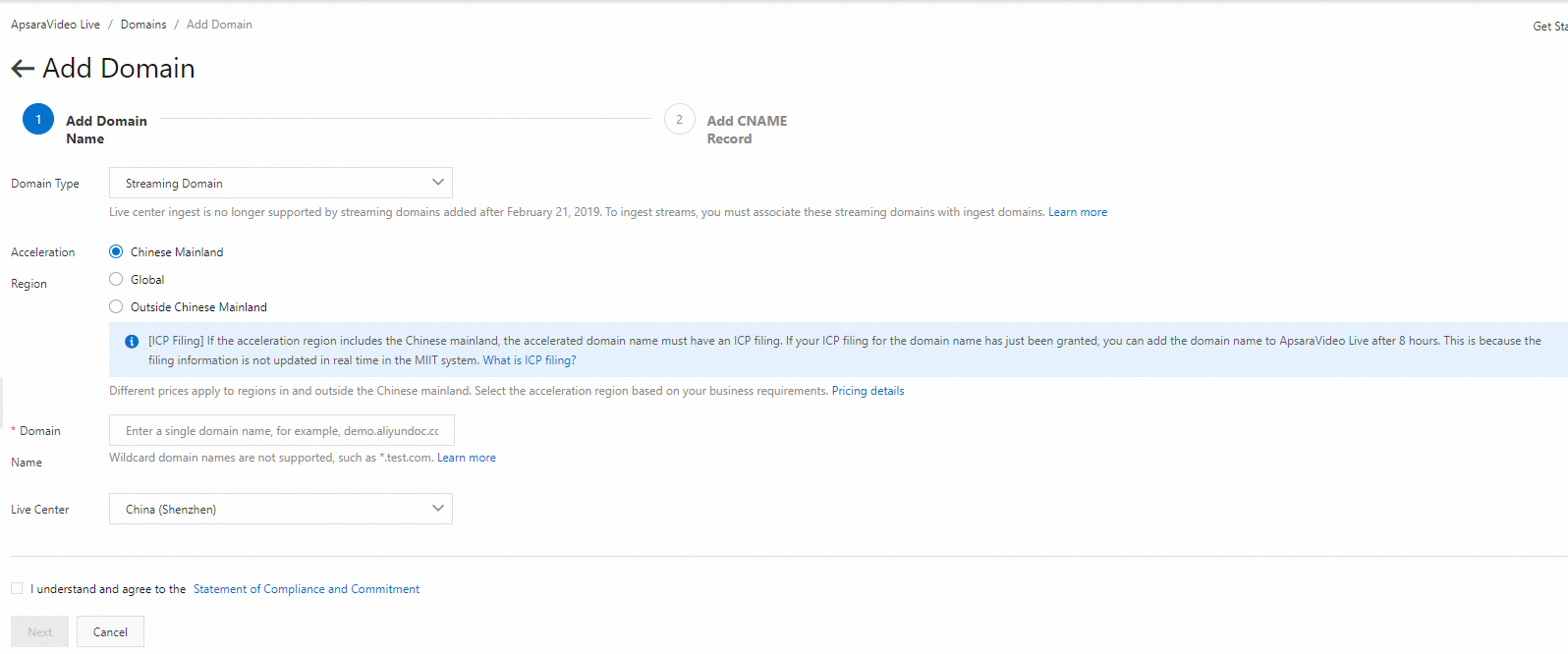
Follow the steps in Get started with ApsaraVideo Live to complete the basic setup. When adding a domain, select an appropriate acceleration region and live center:
Acceleration region:
Outside Chinese Mainland: Select this option if all streamers and viewers are located outside the Chinese mainland (including Hong Kong, Macao, and Taiwan). In this case, an Internet Content Provider (ICP) filing is not required for the domains.
Global: Select this option if some streamers and viewers are located in the Chinese mainland. In this case, your domains must have an ICP filing. If you need help, GoChina ICP Filing Assistant is recommended.
Live center: Select the live center closest to the streamer. The live center for the associated ingest and streaming domains must be the same. This setting cannot be changed after the initial setup.
Use cases:
Use case | Streamer location | Viewer location | Live center | Acceleration region | Considerations | |
Ingest domain | Streaming domain | |||||
Global live streaming | Global | Global | Live center closest to the streamer | Global | Global | Both the ingest and streaming domains require an ICP filing. This link optimizes global playback quality. |
Streaming outside the Chinese mainland | Outside the Chinese mainland | Outside the Chinese mainland | Live center closest to the streamer outside the Chinese mainland | Outside Chinese Mainland | Outside Chinese Mainland | ICP filing is not required for the domains. This link focuses on POP coverage and stream ingest quality for regions outside the Chinese mainland. |
Cross-border streaming to the Chinese mainland | Outside the Chinese mainland | In the Chinese mainland | Live center closest to the streamer outside the Chinese mainland | Outside Chinese Mainland | Global | The streaming domain requires an ICP filing. Otherwise, viewers in the Chinese mainland cannot access it. |
Streaming from the Chinese mainland to other regions | In the Chinese mainland | Outside the Chinese mainland | Live center in the Chinese mainland | Global | Outside Chinese Mainland | The ingest domain requires an ICP filing. This link optimizes the playback quality from the Chinese mainland to overseas viewers. |
The unit price for data transfer varies by acceleration region. For more information, see Billing of standard streaming.
2. Edge ingest (enabled by default)
Alibaba Cloud CDN has POPs in major countries and regions worldwide. With edge ingest, the video stream is first sent to the POP closest to the streamer. It then travels to the live center over Alibaba Cloud's optimized network.
All streaming domains added after February 21, 2019, use edge ingest by default.
3. Network status monitoring
To view the real-time stream ingest status and check the streamer's network conditions, log on to the ApsaraVideo Live console. In the left navigation pane, choose Streams. On the Active Streams tab, find the stream you want to monitor, and click Stream Monitoring in the Actions column. For more information, see Manage live streams.
You can also call an API to get the real-time frame rate and bitrate. For details, see DescribeLiveDomainFrameRateAndBitRateData.
If you experience buffering during cross-border live streaming, use the Troubleshooting tool in the console for diagnosis. For solutions to common issues, see FAQ about streaming and playback.
You can also use GA to accelerate ApsaraVideo Live.
Advanced features
Real-Time Streaming (RTS)
RTS delivers an end-to-end latency between 200 to 400 ms. Add a sub-streaming domain and enable RTS for it. The domain then uses the ARTC protocol (a WebRTC-based evolution) for content delivery. To enable this feature, see Enable RTS.
Content security
ApsaraVideo Live supports Alibaba Cloud proprietary cryptography. This feature encrypts live streams at the live center, with dynamic key management and rotation handled by Key Management Service (KMS). Only an authorized player can decrypt and play the streams. For more information, see Alibaba Cloud proprietary cryptography.
Adaptive bitrate streaming (ABR)
To ensure smooth playback in different network conditions, ABR provides multiple bitrates for playback. The player automatically selects the highest quality stream and switches to a lower bitrate when network performance degrades. For more information, see Live stream transcoding.