A VPC-integrated dedicated instance connects API Gateway to your VPC. It routes API traffic to backend services through private IP addresses within your VPC, eliminating the need for per-resource VPC access authorizations. This topic describes the use cases, key differences from conventional dedicated instances, prerequisites, purchasing configuration, and operational procedures for VPC-integrated dedicated instances.
Use cases
A VPC-integrated dedicated instance optimizes the network architecture between API Gateway and your VPC. This instance type applies to the following scenarios:
Multi-resource access within a VPC — APIs hosted on the gateway use multiple resources in the same VPC as backend services, such as ECS and SLB instances. Typical scenarios include microservices architectures and service discovery solutions such as Nacos.
Hybrid cloud networking — The backend service requires the egress IP address of the gateway instance to be a private IP address in the VPC when API Gateway forwards API requests. For more information, see Scenario 3: API Gateway accesses a backend service in an on-premises data center over an internal network.
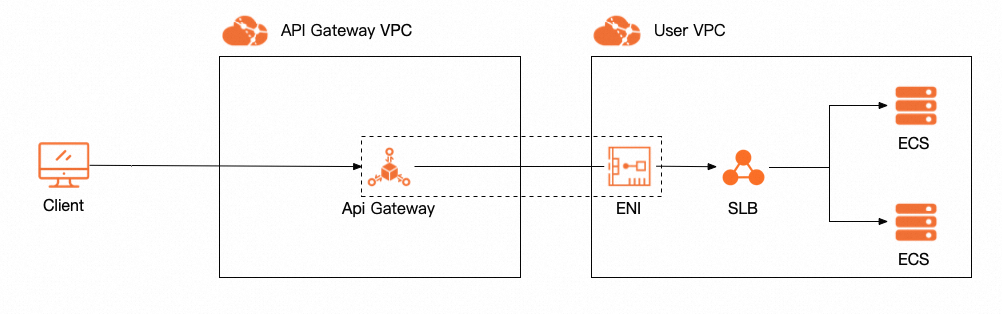
Comparison with conventional dedicated instances
The following comparison helps you choose between a VPC-integrated dedicated instance and a conventional dedicated instance.
VPC-integrated dedicated instances do not support DataWorks Data Service integration. If you need to integrate with DataWorks Data Service, use a conventional dedicated instance.
| VPC-integrated dedicated instance | Conventional dedicated instance | |
| Egress IP address of the gateway instance* | A private IP address in the VPC that you select when you create the instance. | An IP address in the 100.*.*.* format. |
| Forward requests to multiple resources in the same VPC | Recommended. Ideal for service registration and discovery scenarios. | Supported. However, you must configure a VPC access authorization for each backend resource, and dynamic configuration is not supported. |
| Forward requests to resources in multiple VPCs | Not supported. You must connect the VPCs on your own. | Recommended. You can configure multiple VPC access authorizations. |
| Configuration process | Specify the VPC when you purchase the instance. No extra configuration is required when you configure APIs. | You must configure a VPC access authorization. |
How to choose:
Single VPC with multiple backend resources — Choose a VPC-integrated dedicated instance. It connects directly to your VPC without per-resource authorization.
Multiple VPCs with backend resources — Choose a conventional dedicated instance. It supports multiple VPC access authorizations for resources across different VPCs.
DataWorks Data Service integration — Choose a conventional dedicated instance. VPC-integrated dedicated instances are not supported for this scenario.
* The egress IP address of a gateway instance is the TCP source IP address that a backend service sees when API Gateway forwards an API request to the backend service.
For information about VPC access authorizations used with conventional dedicated instances, see Use a resource in a VPC as the backend service of an API.
Prerequisites
Before you create a VPC-integrated dedicated instance, make sure that the following requirements are met:
VPC and vSwitch — A VPC and at least one vSwitch are created. The resources in your VPC that serve as API backends reside in the CIDR block of the vSwitch.
Service-linked role — API Gateway requires a service-linked role to manage elastic network interfaces (ENIs) in your VPC. For more information, see Service-linked role for connecting API Gateway to a user VPC.
CIDR block planning — The vSwitch CIDR block does not overlap with the internal resource CIDR blocks used by API Gateway. For the reserved CIDR blocks by region, see Reserved CIDR blocks of VPC-integrated dedicated instances by region.
Security group rules — The outbound rules of the security group allow traffic to the destination IP CIDR blocks of your backend services.
Create an instance
To create a VPC-integrated dedicated instance, set the instance type to VPC integration instance on the purchase page.
"VPC integration instance" is the purchase page label for a VPC-integrated dedicated instance. Both terms refer to the same instance type.
In addition to the VPC-specific settings described below, configure the general settings on the purchase page: Region and zone (for example, China (Hangzhou)), Instance Specifications (for example, api.s1.small, which displays parameters such as the maximum number of requests per second, the SLA, the maximum number of concurrent requests, and the outbound bandwidth), HTTPS Security Policy (for example, HTTPS2_TLS1_0), Network billing type (for example, pay-by-traffic), and Instance Name.
VPC-specific settings
VPC ID — The VPC that connects to API Gateway. You cannot change this setting after the instance is created.
API Gateway instance CIDR block — The CIDR block in which the API Gateway instance resides. API Gateway checks whether its resources conflict with the CIDR block of the vSwitch that you specify. If a conflict exists, the instance cannot be created.
Zone, vSwitch, and security group — API Gateway creates ENIs in the vSwitch and security group of the zone that you specify, and attaches the ENIs to the instance. Make sure that the backend resources in your VPC reside in the CIDR block of the specified vSwitch and in the same security group. The outbound rules of the security group must allow traffic to the destination IP CIDR block so that the instance can access your services.
Service-linked role — API Gateway requires a service-linked role when it manages the ENI resources in your VPC to create the instance. For more information about the role, see Service-linked role for connecting API Gateway to a user VPC.
After you configure all settings, click Create to create the instance.
ENI behavior
After the instance is created, API Gateway manages ENIs in your VPC. The following behaviors apply:
The ENIs reside in your VPC and are governed by the security rules and network configurations, such as security groups, of your VPC.
If a backend ECS instance is in the same security group as the ENIs and intra-group communication is enabled for the security group, you do not need to configure outbound rules separately.
If a backend CLB instance is used, make sure that the outbound rules of the security group allow traffic to the destination IP CIDR block, regardless of whether the CLB instance uses the same vSwitch.
The ENIs that API Gateway creates in your VPC do not incur additional fees.
Manage accessible CIDR blocks
By default, a VPC-integrated dedicated instance can access only the services in the CIDR block of the vSwitch that you specified during instance creation. To view the default accessible CIDR blocks, go to the instance details page in the API Gateway console and check the Access to Backend Service VPC section.
If other services reside in different CIDR blocks within your VPC and need to be accessed by API Gateway, add the CIDR blocks manually.
Log on to the API Gateway console. In the left-side navigation pane, choose Instances.
Find the VPC-integrated dedicated instance and click Add in the Access Allowed From column.
Add a CIDR block by using one of the following methods: Select from list or Enter manually.
If you enter a CIDR block manually, make sure that the CIDR block resides in the VPC that you specified when you created the instance, or is connected to that VPC.
After the CIDR block is added, verify that it appears in the Access Allowed From list on the instance details page.
Use a VPC access authorization as a backend service
A VPC-integrated dedicated instance can use a VPC access authorization as a backend service. The instance uses the ENIs in your VPC to directly access the services defined in the VPC access authorization.
Before you configure a VPC access authorization for an API or a plug-in on a VPC-integrated dedicated instance, make sure that the following conditions are met:
The VPC ID in the VPC access authorization is the same as the ID of the VPC connected to the instance.
The private IP address of the service in the VPC access authorization resides in the accessible CIDR block of the VPC-integrated dedicated instance.
If API Gateway returns an error similar to "instance cannot connect to the backend xxx.xxx.xxx.xxx" when you publish an API or modify a plug-in, check whether the private IP address in the error message resides in the accessible CIDR block of the instance.
Migrate API groups to a VPC-integrated dedicated instance
Modify Instance for API Group Deployment To migrate your workloads to a VPC-integrated dedicated instance, you can change the deployment instance of an API group from a serverless instance or a conventional dedicated instance to a VPC-integrated dedicated instance.
Log on to the API Gateway console. In the left-side navigation pane, choose API Groups.
Find the API group and click the group name to go to the group details page.
Click Modify Instance for API Group Deployment and select the target VPC-integrated dedicated instance.
API Gateway validates the VPC access authorizations used by the APIs and the associated plug-ins in the original group. If the validation succeeds, the migration is complete. If the validation fails, the migration fails and the reason is displayed.
Validation conditions
Before the migration, the same conditions listed in Use a VPC access authorization as a backend service must be met for all VPC-based services, including APIs and plug-ins. In addition, the following migration-specific conditions apply:
If your API group uses a VPC access authorization, make sure that the Security Group of the ECS or SLB service in the authorization is the same as the Security Group that you specified when you created the VPC-integrated dedicated instance.
Post-migration considerations
After the migration, the internal egress IP address changes to the egress IP address of the target instance. If your backend service uses a whitelist, add the new address to the whitelist before the migration to prevent access failures after the migration.
After the migration is complete, call your APIs to verify that backend services are reachable through the new instance.
Reserved CIDR blocks of VPC-integrated dedicated instances by region
The following tables list the reserved CIDR blocks for API Gateway internal resources in each region. Make sure that the vSwitch that you specify does not overlap with these CIDR blocks.
Hangzhou
| Zone | Reserved CIDR block |
| cn-hangzhou-b | 192.168.0.0/20, 172.19.0.0/20, and 172.20.0.0/16 |
| cn-hangzhou-d | 192.168.16.0/20, 172.19.16.0/20, and 172.20.0.0/16 |
| cn-hangzhou-e | 192.168.32.0/20, 172.19.32.0/20, and 172.20.0.0/16 |
| cn-hangzhou-f | 192.168.48.0/20, 172.19.48.0/20, and 172.20.0.0/16 |
| cn-hangzhou-g | 192.168.64.0/20, 172.19.64.0/20, and 172.20.0.0/16 |
| cn-hangzhou-h | 192.168.80.0/20, 172.19.80.0/20, and 172.20.0.0/16 |
| cn-hangzhou-i | 192.168.96.0/20, 172.19.96.0/20, and 172.20.0.0/16 |
| cn-hangzhou-j | 192.168.112.0/20, 172.19.112.0/20, and 172.20.0.0/16 |
| cn-hangzhou-k | 192.168.128.0/20, 172.19.128.0/20, and 172.20.0.0/16 |
Shanghai
| Zone | Reserved CIDR block |
| cn-shanghai-a | 192.168.0.0/20, 172.19.0.0/20, and 172.20.0.0/16 |
| cn-shanghai-b | 192.168.16.0/20, 172.19.16.0/20, and 172.20.0.0/16 |
| cn-shanghai-c | 192.168.32.0/20, 172.19.32.0/20, and 172.20.0.0/16 |
| cn-shanghai-d | 192.168.48.0/20, 172.19.48.0/20, and 172.20.0.0/16 |
| cn-shanghai-e | 192.168.64.0/20, 172.19.64.0/20, and 172.20.0.0/16 |
| cn-shanghai-f | 192.168.80.0/20, 172.19.80.0/20, and 172.20.0.0/16 |
| cn-shanghai-g | 192.168.96.0/20, 172.19.96.0/20, and 172.20.0.0/16 |
| cn-shanghai-k | 192.168.112.0/20, 172.19.112.0/20, and 172.20.0.0/16 |
| cn-shanghai-l | 192.168.128.0/20, 172.19.128.0/20, and 172.20.0.0/16 |
| cn-shanghai-m | 192.168.144.0/20, 172.19.144.0/20, and 172.20.0.0/16 |
| cn-shanghai-n | 192.168.160.0/20, 172.19.160.0/20, and 172.20.0.0/16 |
Shanghai Finance Cloud
| Zone | Reserved CIDR block |
| cn-shanghai-finance-1a | 192.168.0.0/20, 172.19.0.0/20, and 172.21.0.0/16 |
| cn-shanghai-finance-1b | 192.168.16.0/20, 172.19.16.0/20, and 172.21.0.0/16 |
| cn-shanghai-finance-1f | 192.168.32.0/20, 172.19.32.0/20, and 172.21.0.0/16 |
| cn-shanghai-finance-1g | 192.168.48.0/20, 172.19.48.0/20, and 172.21.0.0/16 |
| cn-shanghai-finance-1k | 192.168.64.0/20, 172.19.64.0/20, and 172.21.0.0/16 |
| cn-shanghai-finance-1z | 192.168.80.0/20, 172.19.80.0/20, and 172.21.0.0/16 |
Beijing
| Zone | Reserved CIDR block |
| cn-beijing-a | 192.168.0.0/20, 172.19.0.0/20, and 172.22.0.0/16 |
| cn-beijing-b | 192.168.16.0/20, 172.19.16.0/20, and 172.22.0.0/16 |
| cn-beijing-c | 192.168.32.0/20, 172.19.32.0/20, and 172.22.0.0/16 |
| cn-beijing-d | 192.168.48.0/20, 172.19.48.0/20, and 172.22.0.0/16 |
| cn-beijing-e | 192.168.64.0/20, 172.19.64.0/20, and 172.22.0.0/16 |
| cn-beijing-f | 192.168.80.0/20, 172.19.80.0/20, and 172.22.0.0/16 |
| cn-beijing-g | 192.168.96.0/20, 172.19.96.0/20, and 172.22.0.0/16 |
| cn-beijing-h | 192.168.112.0/20, 172.19.112.0/20, and 172.22.0.0/16 |
| cn-beijing-i | 192.168.128.0/20, 172.19.128.0/20, and 172.22.0.0/16 |
| cn-beijing-j | 192.168.144.0/20, 172.19.144.0/20, and 172.22.0.0/16 |
| cn-beijing-k | 192.168.160.0/20, 172.19.160.0/20, and 172.22.0.0/16 |
| cn-beijing-l | 192.168.176.0/20, 172.19.176.0/20, and 172.22.0.0/16 |
Beijing Finance Cloud
| Zone | Reserved CIDR block |
| cn-beijing-finance-1k | 192.168.0.0/20, 172.19.0.0/20, and 172.20.0.0/16 |
| cn-beijing-finance-1l | 192.168.16.0/20, 172.19.16.0/20, and 172.20.0.0/16 |
Shenzhen
| Zone | Reserved CIDR block |
| cn-shenzhen-a | 192.168.0.0/20, 172.19.0.0/20, and 172.23.0.0/16 |
| cn-shenzhen-b | 192.168.16.0/20, 172.19.16.0/20, and 172.23.0.0/16 |
| cn-shenzhen-c | 192.168.32.0/20, 172.19.32.0/20, and 172.23.0.0/16 |
| cn-shenzhen-d | 192.168.48.0/20, 172.19.48.0/20, and 172.23.0.0/16 |
| cn-shenzhen-e | 192.168.64.0/20, 172.19.64.0/20, and 172.23.0.0/16 |
| cn-shenzhen-f | 192.168.80.0/20, 172.19.80.0/20, and 172.23.0.0/16 |
Shenzhen Finance Cloud
| Zone | Reserved CIDR block |
| cn-shenzhen-finance-1a | 192.168.0.0/20, 172.19.0.0/20, and 172.20.0.0/16 |
| cn-shenzhen-finance-1b | 192.168.16.0/20, 172.19.16.0/20, and 172.20.0.0/16 |
| cn-shenzhen-finance-1d | 192.168.32.0/20, 172.19.32.0/20, and 172.20.0.0/16 |
| cn-shenzhen-finance-1e | 192.168.48.0/20, 172.19.48.0/20, and 172.20.0.0/16 |
Heyuan ACDR Auto
| Zone | Reserved CIDR block |
| cn-heyuan-acdr-1a | 192.168.0.0/20, 172.19.0.0/20, and 172.20.0.0/16 |
| cn-heyuan-acdr-1b | 192.168.16.0/20, 172.19.16.0/20, and 172.20.0.0/16 |
Zhangjiakou
| Zone | Reserved CIDR block |
| cn-zhangjiakou-a | 192.168.0.0/20, 172.19.0.0/20, and 172.20.0.0/16 |
| cn-zhangjiakou-b | 192.168.16.0/20, 172.19.16.0/20, and 172.20.0.0/16 |
| cn-zhangjiakou-c | 192.168.32.0/20, 172.19.32.0/20, and 172.20.0.0/16 |
Chengdu
| Zone | Reserved CIDR block |
| cn-chengdu-a | 192.168.0.0/20, 172.19.0.0/20, and 172.20.0.0/16 |
| cn-chengdu-b | 192.168.16.0/20, 172.19.16.0/20, and 172.20.0.0/16 |
Qingdao
| Zone | Reserved CIDR block |
| cn-qingdao-b | 192.168.0.0/20, 172.19.0.0/20, and 172.20.0.0/16 |
| cn-qingdao-c | 192.168.16.0/20, 172.19.16.0/20, and 172.20.0.0/16 |
Hong Kong
| Zone | Reserved CIDR block |
| cn-hongkong-b | 192.168.0.0/20, 172.19.0.0/20, and 172.21.0.0/16 |
| cn-hongkong-c | 192.168.16.0/20, 172.19.16.0/20, and 172.21.0.0/16 |
| cn-hongkong-d | 192.168.32.0/20, 172.19.32.0/20, and 172.21.0.0/16 |
Singapore
| Zone | Reserved CIDR block |
| ap-southeast-1a | 192.168.0.0/20, 172.19.0.0/20, and 172.21.0.0/16 |
| ap-southeast-1b | 192.168.16.0/20, 172.19.16.0/20, and 172.21.0.0/16 |
| ap-southeast-1c | 192.168.32.0/20, 172.19.32.0/20, and 172.21.0.0/16 |
Indonesia (Jakarta)
| Zone | Reserved CIDR block |
| ap-southeast-5a | 192.168.0.0/20, 172.19.0.0/20, and 172.20.0.0/16 |
| ap-southeast-5b | 192.168.16.0/20, 172.19.16.0/20, and 172.20.0.0/16 |
| ap-southeast-5c | 192.168.32.0/20, 172.19.32.0/20, and 172.20.0.0/16 |
Malaysia (Kuala Lumpur)
| Zone | Reserved CIDR block |
| ap-southeast-3a | 192.168.0.0/20, 172.19.0.0/20, and 172.20.0.0/16 |
| ap-southeast-3b | 192.168.16.0/20, 172.19.16.0/20, and 172.20.0.0/16 |
Japan (Tokyo)
| Zone | Reserved CIDR block |
| ap-northeast-1a | 192.168.0.0/20, 172.19.0.0/20, and 172.21.0.0/16 |
| ap-northeast-1b | 192.168.16.0/20, 172.19.16.0/20, and 172.21.0.0/16 |
| ap-northeast-1c | 192.168.32.0/20, 172.19.32.0/20, and 172.21.0.0/16 |
South Korea (Seoul)
| Zone | Reserved CIDR block |
| ap-northeast-2a | 192.168.0.0/20, 172.19.0.0/20, and 172.20.0.0/16 |
Germany (Frankfurt)
| Zone | Reserved CIDR block |
| eu-central-1a | 192.168.0.0/20, 172.19.0.0/20, and 172.20.0.0/16 |
| eu-central-1b | 192.168.16.0/20, 172.19.16.0/20, and 172.20.0.0/16 |
| eu-central-1c | 192.168.32.0/20, 172.19.32.0/20, and 172.20.0.0/16 |
UK (London)
| Zone | Reserved CIDR block |
| eu-west-1a | 192.168.0.0/20, 172.19.0.0/20, and 172.20.0.0/16 |
| eu-west-1b | 192.168.16.0/20, 172.19.16.0/20, and 172.20.0.0/16 |
US (Silicon Valley)
| Zone | Reserved CIDR block |
| us-west-1a | 192.168.0.0/20, 172.19.0.0/20, and 172.20.0.0/16 |
| us-west-1b | 192.168.16.0/20, 172.19.16.0/20, and 172.20.0.0/16 |
US (Virginia)
| Zone | Reserved CIDR block |
| us-east-1a | 192.168.0.0/20, 172.19.0.0/20, and 172.20.0.0/16 |
| us-east-1b | 192.168.16.0/20, 172.19.16.0/20, and 172.20.0.0/16 |
UAE (Dubai)
| Zone | Reserved CIDR block |
| me-east-1a | 192.168.0.0/20, 172.19.0.0/20, and 172.20.0.0/16 |
Saudi Arabia (Riyadh)
| Zone | Reserved CIDR block |
| me-central-1a | 192.168.0.0/20, 172.19.0.0/20, and 172.16.20.0/24 |
| me-central-1b | 192.168.16.0/20, 172.19.16.0/20, and 172.16.20.0/24 |