This topic describes how to use Cloud Enterprise Network (CEN) to build a centralized API management solution across regions. You can also refer to steps in this topic to build a centralized API management solution between virtual private clouds (VPCs) and between VPCs and on-premises data centers by using CEN and Express Connect. This way, you can publish APIs of various services for users to call in API Gateway.
Overview
By default, an API Gateway instance can communicate with only VPCs in the same region as itself. This topic uses a dedicated instance created in the China (Hangzhou) region as an example to describe how to manage APIs in three different scenarios.
API Gateway is an API hosting service. You must create a VPC in the region where your API Gateway instance resides to communicate with another region or with an on-premises data center. In this topic, VPC-1 is created in the China (Hangzhou) region to communicate with a VPC in the China (Beijing) region and with an on-premises data center.
The architectures in this topic are used only to illustrate how to call APIs across VPCs. In similar cases, you must configure a VPC, such as VPC-1 in this example, in the region where your API Gateway instance resides. This VPC is used to communicate with other environments, such as VPCs in other regions or on-premises data centers.
Scenario 1: Call APIs in another region over a VPC on Alibaba Cloud
Scenario 2: Call APIs in Alibaba Cloud from an on-premises data center
Scenario 3: Access a backend service deployed in an on-premises data center from an Elastic Compute Service (ECS) instance deployed on Alibaba Cloud
Limits
This topic is suitable for dedicated instances only.
Scenario 1: Call APIs in another region over a VPC on Alibaba Cloud
In this scenario, the client is deployed on ECS instance ecs-3 in VPC-3 of the China (Beijing) region. The API Gateway instance is a dedicated instance in the China (Hangzhou) region. The backend service is a Function Compute function in the China (Hangzhou) region. The following diagram shows the architecture: 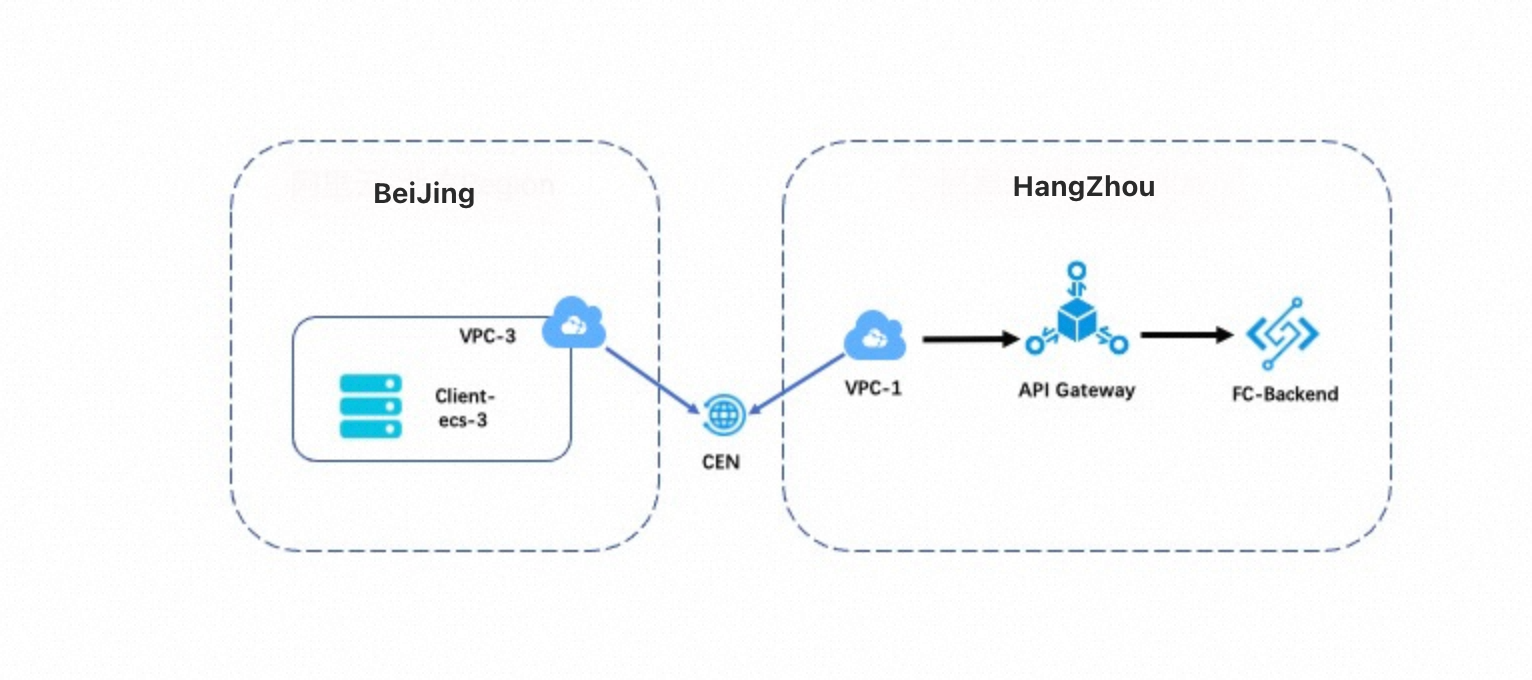 The configuration process is as follows:
Create an API.
Create a CEN instance and connect VPC-3 in the China (Beijing) region to VPC-1 in the China (Hangzhou) region.
Grant VPC-1 the access to the API Gateway instance. This way, the ECS instance in VPC-3 can call APIs over VPC-1.
Step 1: Create an API
Create an API with Function Compute as the backend service. For more information, see Use API Gateway to trigger a web function in Function Compute 3.0.
Step 2: Create a CEN instance
-
Log on to the CEN console. In the Create CEN Instance dialog box, click Create Scenario-specific CEN (Recommended) and click Create.
In the Select a Scenario area, select Interconnect Enterprise VPCs. This scenario enables communication between VPCs in the same or different regions under the same Alibaba Cloud account.
-
On the Create CEN Instance page, select the VPC configuration, and click Next.
Set Region to China (Beijing). Select Beijing Zone H and Beijing Zone G as availability zones. In the VPC configuration section, select the target VPC instance and specify a corresponding vSwitch for each availability zone.
-
In the Confirm Networking Settings and Fees step, click Start Deployment.
The confirmation page displays a cross-region network topology between the China (Hangzhou) (
cn-hangzhou) and China (Beijing) (cn-beijing) regions. In the cost details, two default route table (cbn_tr_table) resources are shown as newly created at no cost. -
After the deployment succeeds, you can select Cloud Enterprise Network Instances in the left navigation bar to view the instance.
The instance list shows the newly created instance (named
create_by_cadt) with a status of Available. The number of Transit Router (TR) instances is 2, the number of connections is 3, and the number of bandwidth plans is 0.
Step 3: Configure a bandwidth plan for cross-region communication
Purchase a bandwidth plan for communication within the CEN instance. In this example, a bandwidth plan of 2 Mbit/s is purchased. You can purchase a bandwidth plan based on your business requirements.
After the purchase is complete, go to the Bandwidth Plans tab to view the details. The interconnected area is Chinese mainland⇔Chinese mainland, the status is Bound, and the allocated bandwidth is displayed as Unallocated.
On the Region Connections tab of the CEN page, configure the bandwidth for the regions of the CEN instance. You can configure the bandwidth size for each pair of connected regions based on the bandwidth plan.
On the Transit Router (TR) details page, click the Region Connections tab. Find the target cross-region connection and click Set Cross-region Bandwidth in the Actions column. In the dialog box, confirm the Bandwidth Allocation Method (such as pay-by-data-transfer), enter the desired value in the Bandwidth field, and then click OK.
Step 4: Configure the VPC where the client resides
On the Instances page of the API Gateway console, find the dedicated instance you created and click Bind to VPC in the row of VPC for Access to Dedicated Instance. Select the ID of VPC-1 in the China (Hangzhou) region.
On the Inbound VPC configuration page, the VPC ID for vpc-1 in China (Hangzhou) is preselected in the Inbound VPC drop-down list. The page displays the ID and name of the selected VPC instance. Confirm the selection to complete the configuration.
In the left-side navigation pane, choose Open API > API Groups and click the API group that you want to manage. On the Group Details page, click Enable VPC Second-level Domain. In the Enable VPC Second-level Domain message, click OK. After the previous operations, resources in VPC-3 can call APIs of this API group.
Scenario 2: Call APIs in Alibaba Cloud from an on-premises data center
In this scenario, the client is located in an on-premises data center in Hangzhou. The API Gateway instance is a dedicated instance in the China (Hangzhou) region. The backend service is a Function Compute function in the China (Hangzhou) region. All access requests are sent over a VPC. The following diagram shows the architecture: 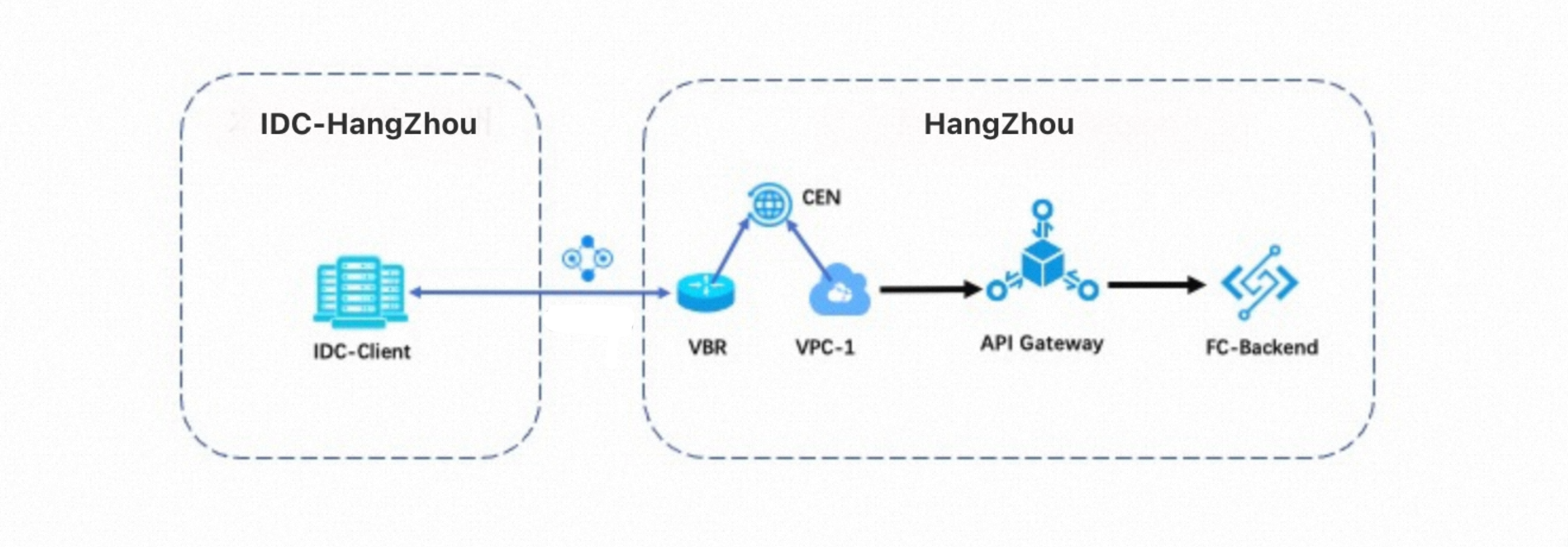 The configuration process is as follows:
Create an API.
Connect the on-premises data center to VPC-1.
Grant VPC-1 the access to the API Gateway instance. This way, the client located in the on-premises data center can call APIs over VPC-1.
Step 1: Create an API
Create an API with Function Compute as the backend service. For more information, see Use API Gateway to trigger a web function in Function Compute 3.0.
Step 2: Connect the on-premises data center to VPC-1
Connect the on-premises data center to VPC-1 by using an Express Connect circuit. For more information, see Connect a data center to ECS by using an Express Connect circuit.
Step 3: Grant VPC-1 the access to the API Gateway instance
Refer to Step 4 in Scenario 1. You must select the ID of VPC-1 in the China (Hangzhou) region. After the previous operations, the client in the on-premises data center can access the VPC domain of the API group to which the API you created belongs over VPC-1.
Scenario 3: Access a backend service deployed in an on-premises data center from an ECS instance deployed on Alibaba Cloud
In this scenario, the client is deployed on an ECS instance in the China (Hangzhou) region. The API Gateway instance is a dedicated instance in the China (Hangzhou) region. The backend service is deployed in an on-premises data center in Hangzhou. All access requests are sent over a VPC. The following diagram shows the architecture: 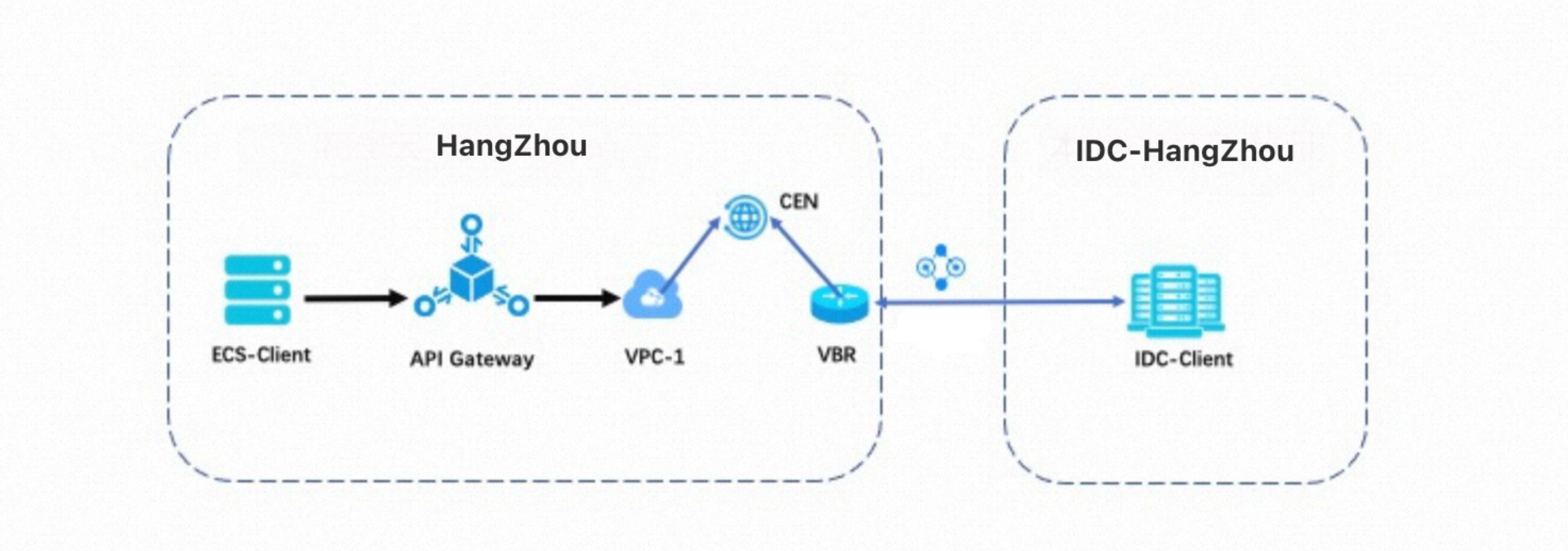
The configuration process is as follows:
Connect the on-premises data center to VPC-1.
Grant the API Gateway instance the access to VPC-1. This way, the API Gateway instance can access the client in the on-premises data center over VPC-1.
Create an API.
Step 1: Connect the on-premises data center to Alibaba Cloud over a VPC
Connect the on-premises data center to VPC-1 by using an Express Connect circuit. For more information, see Connect a data center to ECS by using an Express Connect circuit.
Step 2: Configure routes to access cloud services
Log on to the API Gateway console and click Instances in the left-side navigation pane. On the Instances page, find your instance and record its egress IP address.
Configure access routes to cloud services in the CEN console. For more information, see Manage access to cloud services.
Step 3: Create a VPC access authorization
Before you configure the API, you must create a VPC access authorization from API Gateway to vpc-1 in the API Gateway console. In the upper-right corner, click Create Authorization and configure the following parameters:
- VPC Access Name: Enter a custom name for the authorization.
- VPC Id: Enter the ID of VPC-1.
- Instance ID or IP Address: Enter the internal IP address of the data center.
- Port Number: Enter the service port number.
Step 4: Create an API
For more information, see Use API Gateway to access a backend service in a VPC.