The WebSocket protocol enables continuous two-way communications between a client and a server. This ensures persistent connections and low latency. When a Container Service for Kubernetes (ACK) cluster accesses the external WebSocket service, a Cloud-native API Gateway instance receives and forwards requests and distributes the requests to specific backend services based on the predefined routing rules. This topic describes how to deploy a WebSocket application in an Container Service for Kubernetes cluster and forward requests by using a Cloud-native API Gateway instance.
Prerequisites
An ACK cluster is created. For more information, see Create an ACK managed cluster.
A Cloud-native API Gateway instance is created. For more information, see Create a gateway instance.
Step 1: Deploy a WebSocket application in the ACK cluster
For more information about how to deploy an application, see Create a stateless application by using a Deployment.
In this example, the ACK cluster is used for service discovery. The backend service is registered with CoreDNS by using declarative service APIs. The backend service in this example provides multiple WebSocket APIs. The WebSocket application that is deployed in the ACK cluster uses the following resource configuration:
apiVersion: apps/v1
kind: Deployment
metadata:
  labels:
    app: sockbin
  name: sockbin-app
  namespace: default
spec:
  progressDeadlineSeconds: 600
  replicas: 2
  revisionHistoryLimit: 10
  selector:
    matchLabels:
      app: sockbin
  strategy:
    rollingUpdate:
      maxSurge: 25%
      maxUnavailable: 25%
    type: RollingUpdate
  template:
    metadata:
      labels:
        app: sockbin
    spec:
      containers:
        - image: therebelrobot/sockbin
          imagePullPolicy: Always
          name: sockbin
          ports:
            - containerPort: 4080
              protocol: TCP
          resources:
            limits:
              cpu: 500m
          terminationMessagePath: /dev/termination-log
          terminationMessagePolicy: File
      dnsPolicy: ClusterFirst
      restartPolicy: Always
      schedulerName: default-scheduler
      securityContext: {}
      terminationGracePeriodSeconds: 30
---
apiVersion: v1
kind: Service
metadata:
  labels:
    app: sockbin
  name: sockbin-service
  namespace: default
spec:
  ports:
    - name: http
      port: 4080
      protocol: TCP
      targetPort: 4080
  selector:
    app: sockbin
  sessionAffinity: None
  type: NodePort
Step 2: Use the Cloud-native API Gateway instance to route requests of the WebSocket application
Add the ACK cluster as a service source of the Cloud-native API Gateway instance and add the Sockbin service.
Add a service source
Log on to the Cloud-native API Gateway console.
In the left-side navigation pane, click Instance. In the top navigation bar, select a region.
On the Instance page, click the name of the gateway instance that you want to manage.
In the left-side navigation tree, click Service. Then, click the Source tab.
On the Source tab, click Create Source. In the Create Source panel, configure the parameters and click OK.
Parameter
Description
Source Type
Select ACK.
ACK/ACK Serverless Cluster
Select the cluster in which your backend service is deployed.
Listen to Kubernetes Ingress
If you turn on Listen to Kubernetes Ingress, the Cloud-native API Gateway instance automatically listens for changes in Ingress resources and applies the domain name and route configuration of the Ingress resources.
If you turn off the switch, the Cloud-native API Gateway instance no longer listens to the changes of Ingress resources and makes the listened configurations of domain names and routes of the Ingress resources become ineffective.
NoteThe priorities of the domain names and routes that are manually configured in the MSE console are higher than the priorities of the listened domain names and routes of the Ingress resources.
Add a service
Log on to the Cloud-native API Gateway console.
In the left-side navigation pane, click Instance. In the top navigation bar, select a region.
On the Instance page, click the name of the gateway instance that you want to manage.
In the left-side navigation tree, click Service. Then, click the Services tab.
On the Services tab, click Create Service. In the Create Service panel, configure the parameters and click OK.
Parameter
Description
Service Source
Select ACK.
Namespace
Select the namespace of the cluster.
Services
Select one or more services.
Add a route from Cloud-native API Gateway to the Sockbin service
Create an HTTP API. For more information, see Create an HTTP API.
Click the target API and click Create Route in the upper-left corner.
In the Create Route panel, configure the parameters and click Save and Publish.
Parameter
Description
Route Name
Enter
sockbin-route.Domain Name
Select the default associated domain name * from the drop-down list.
Path
Select Prefix from the matching condition drop-down list and enter
/in the field.Scenarios
Select Single Service.
Backend Services
Specify the Service Name and Service Port parameters.
Verify results
You can use one of the following methods to verify the availability of the WebSocket service.
Method 1: Conduct testing on the Sockbin service page.
The gateway routes requests based on the domain name and path that are carried in the requests during a WebSocket handshake. You can use the following configuration to access the gateway and go to the Sockbin service page.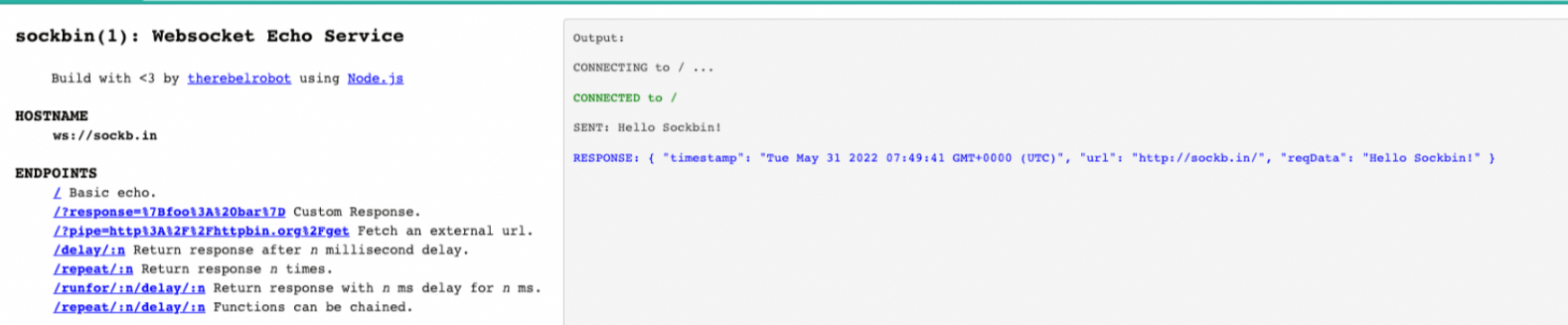
Method 2: Conduct testing on the WebSocket client in a specific programming language.
For example, you can use the WebSocket client in Python to receive a server response with a latency of 1 second.
#!/usr/bin/env python

import asyncio
import websockets

async def hello():
    async with websockets.connect("ws://ip_addr/delay/1000") as websocket:
        await websocket.send("Hello Test")
        text = await websocket.recv()
        print(text)

asyncio.run(hello())