Cloud-native API Gateway is a managed service that works as an ingress and provides enormous traffic management capabilities. Cloud-native API Gateway supports a variety of service sources, such as Container Service for Kubernetes (ACK), Microservices Engine (MSE) Nacos, MSE ZooKeeper, Enterprise Distributed Application Service (EDAS) registry, Serverless App Engine (SAE) registry, fixed address, and Domain Name System (DNS). Cloud-native API Gateway delivers a unified solution to support service versions and implement canary releases. This topic describes how to implement different service release strategies by using ACK clusters and Nacos instances for service discovery.
Prerequisites
You are familiar with the blue-green deployment, A/B testing, and canary release mechanisms. For more information, see Service release strategies.
An ACK cluster is created. For more information, see Create an ACK managed cluster.
A Cloud-native API Gateway instance is created. For more information, see Create a gateway instance.
A Nacos engine is created. For more information, see Create a Nacos engine.
Service discovery method: ACK
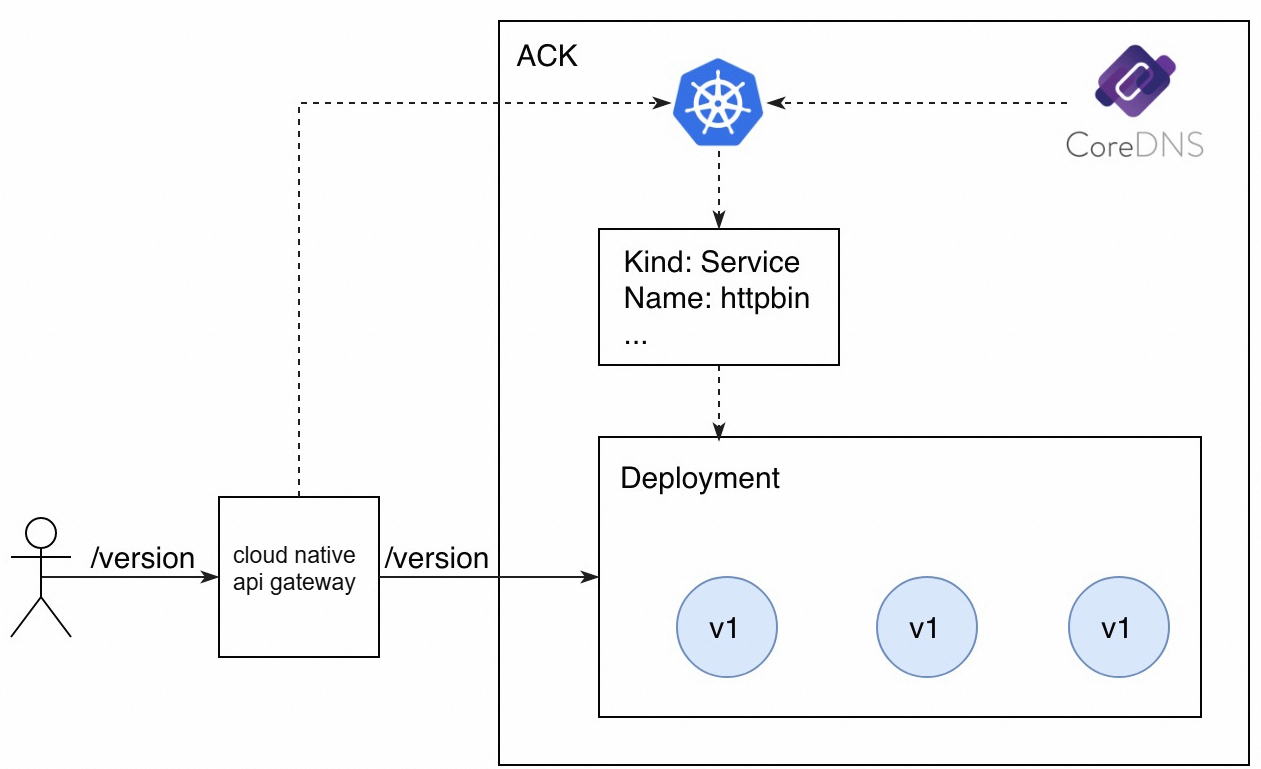
In this example, the native service discovery method of ACK is used. This method registers the backend service with CoreDNS by using declarative service APIs. The backend service provides an API operation that is used to query the version in use. The request path is /version and the version in use is v1. Cloud-native API Gateway is integrated with ACK and can obtain service information from ACK clusters in real time. This way, Cloud-native API Gateway can expose the backend service to external users.
Deploy an application
Log on to the ACK console. Use the following YAML code to deploy an application with the version of v1.
For more information about how to deploy an application, see Create a stateless application by using a Deployment.
apiVersion: v1
kind: Service
metadata:
  name: httpbin
spec:
  ports:
  - port: 8080
    protocol: TCP
  selector:
    app: httpbin
---
apiVersion: apps/v1
kind: Deployment
metadata:
  name: httpbin-v1
spec:
  replicas: 3
  selector:
    matchLabels:
      app: httpbin
      version: v1
  template:
    metadata:
      labels:
        app: httpbin
        version: v1
    spec:
      containers:
      - image: specialyang/spring-cloud-httpbin-k8s:v1
        imagePullPolicy: Always
        name: spring-cloud-httpbin-k8s
        ports:
        - containerPort: 8080
Create an HTTP API. For more information, see Create an HTTP API.
Click the target API and click Create Route in the upper-left corner.
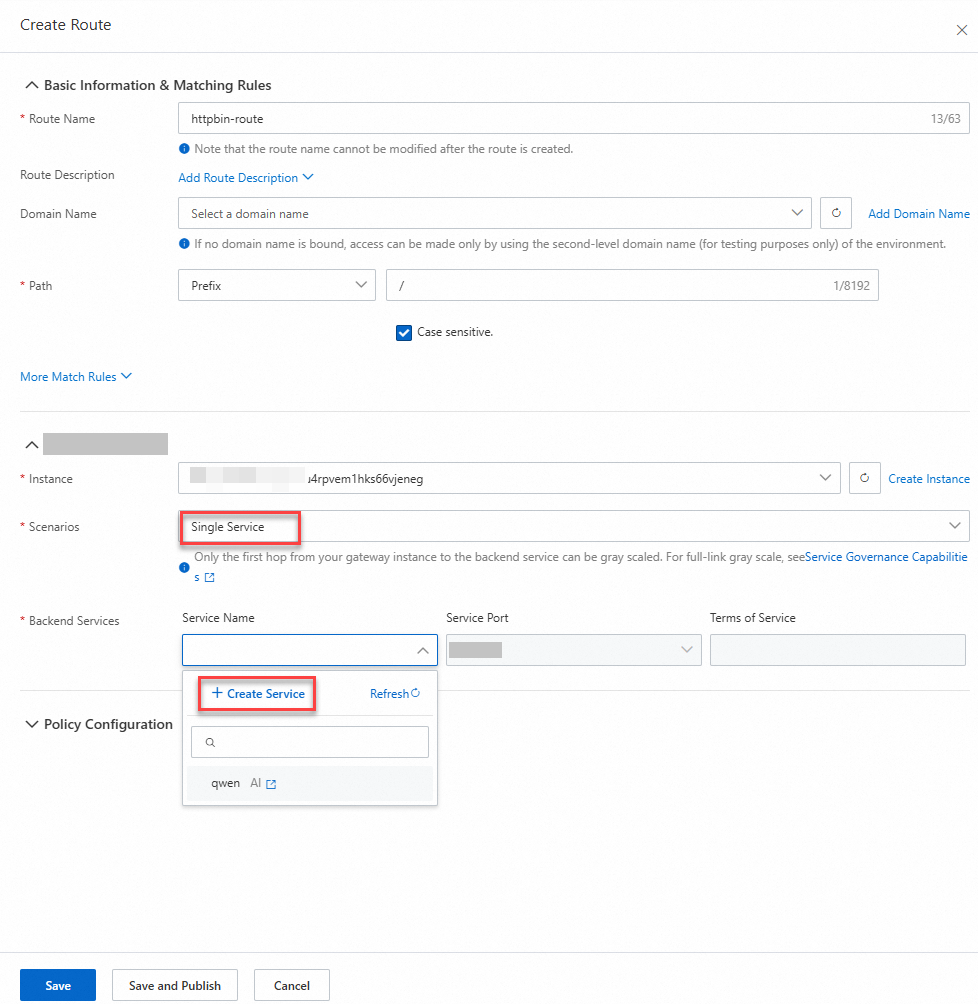
On the Create Route page, configure the following parameters and click Create Service.
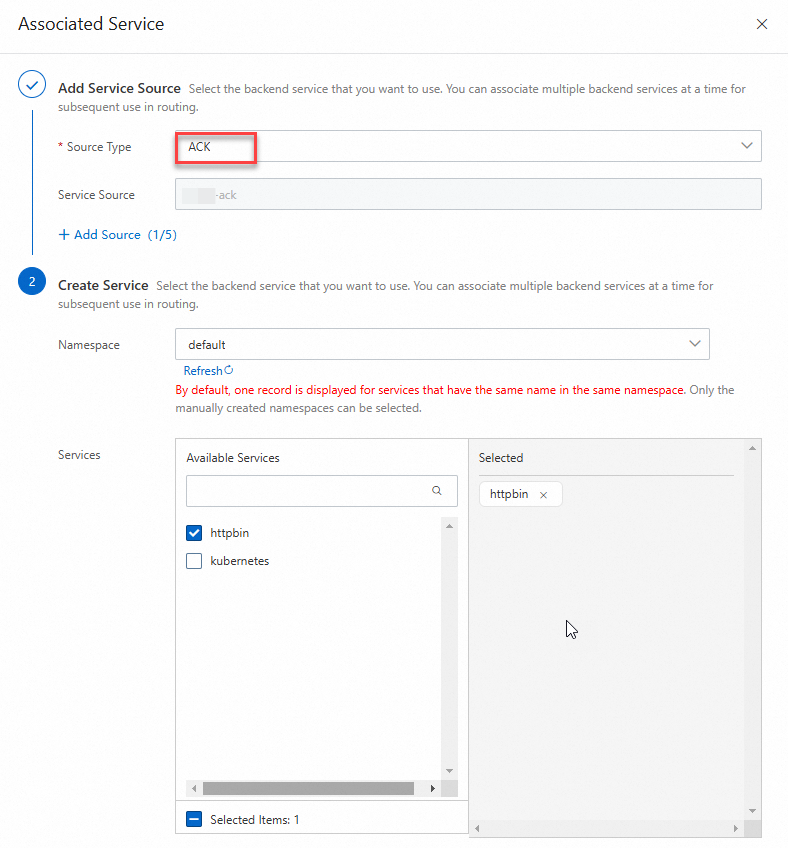
On the Associated Service page, configure the following parameters and click OK.
On the Create Route page, select a backend service and click Save and Publish.

Run the following command to check the result:
for i in {1..10}; do curl "${Endpoint of the gateway instance}/version"; echo ""; doneCommand output:
version: v1
version: v1
version: v1
version: v1
version: v1
version: v1
version: v1
version: v1
version: v1
version: v1
Perform a blue-green deployment
In a blue-green deployment, the new version of a service must take up the same amount of resources as the current version. After a blue-green deployment is complete, all traffic is switched over to the new version.
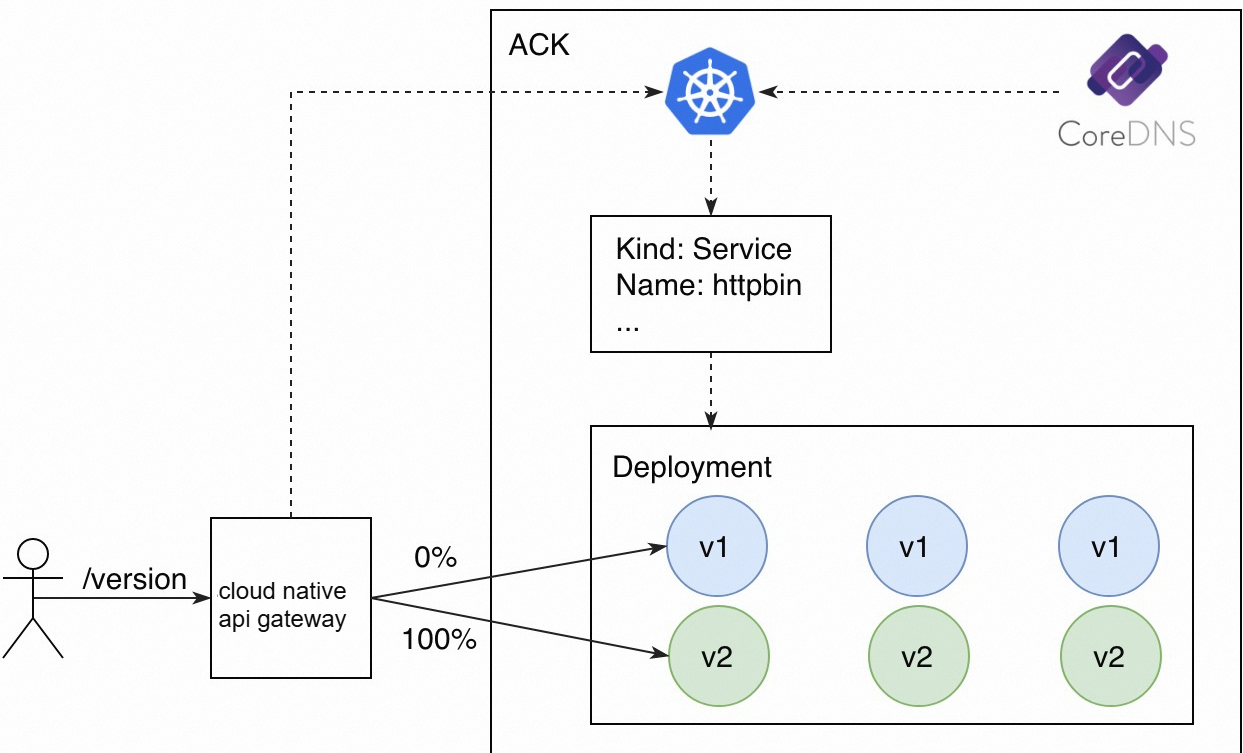
Deploy the v2 version for the httpbin service by using annotation-based API resources of ACK. The number of replicas is three.
apiVersion: apps/v1
kind: Deployment
metadata:
  name: httpbin-v2
spec:
  replicas: 3
  selector:
    matchLabels:
      app: httpbin
      version: v2
  template:
    metadata:
      labels:
        app: httpbin
        version: v2
    spec:
      containers:
      - image: specialyang/spring-cloud-httpbin-k8s:v2
        imagePullPolicy: Always
        name: spring-cloud-httpbin-k8s
        ports:
        - containerPort: 8080
Add the v2 version to the httpbin service.
For more information about how to add a service version, see Manage service versions.
NoteYou must filter v2 nodes based on the tag for v2. Currently, the number of v1 nodes is the same as the number of v2 nodes in an instance. Therefore, v1 and v2 nodes each take up 50% of instance nodes.

Modify the service in the created route to switch traffic from v1 to v2 in the blue-green deployment.
For more information about how to modify a routing rule, see Manage routes.

Run the following command to check the result:
for i in {1..10}; do curl "${Endpoint of the gateway instance}/version"; echo ""; doneCommand output:
version: v2
version: v2
version: v2
version: v2
version: v2
version: v2
version: v2
version: v2
version: v2
version: v2
Traffic that accesses API resources by using the /version request path has been switched from v1 to v2.
Perform A/B testing
A/B testing routes traffic to the new version of a service based on the metadata of a user request. A/B testing dynamically routes traffic based on request contents. In this example, the new version can be accessed only by requests whose User-Agent value is Android, and other requests are sent to the original version.
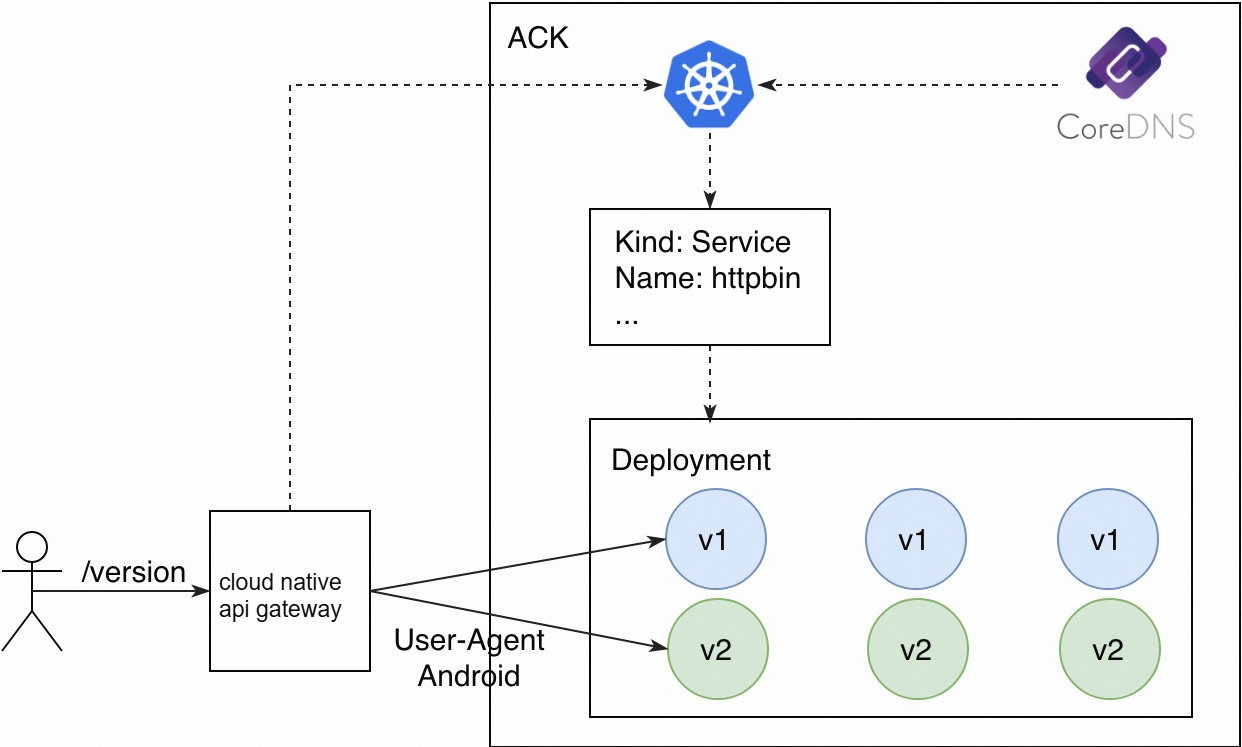
The v1 and v2 versions of the httpbin service are still used. In addition, two routing rules need to be created.
Requests that match the /version path are routed to the v1 version.
Requests that match the /version path and contain Android in the User-Agent header are routed to the v2 version.
NoteThe version-v2 route must be added with a request header that is used for matching.
Run the following command to send a test request that does not contain Android in the User-Agent header:
curl ${Endpoint of the gateway instance}/versionCommand output:
version: v1Run the following command to send a test request that contains Android in the User-Agent header:
curl -H "User-Agent: Mozilla/5.0 (Linux; Android 4.0.3)" ${Endpoint of the gateway instance}/versionCommand output:
version: v2
Requests are distributed to different service versions based on operating systems from which the requests are sent.
Perform a canary release
The canary release feature allows a small amount of traffic to be routed to the new version of a service. After the new version is verified, more traffic is gradually routed to the new version until all traffic is routed to the new version. In this process, the new version is scaled out and the original version is scaled in to maximize the resource utilization.
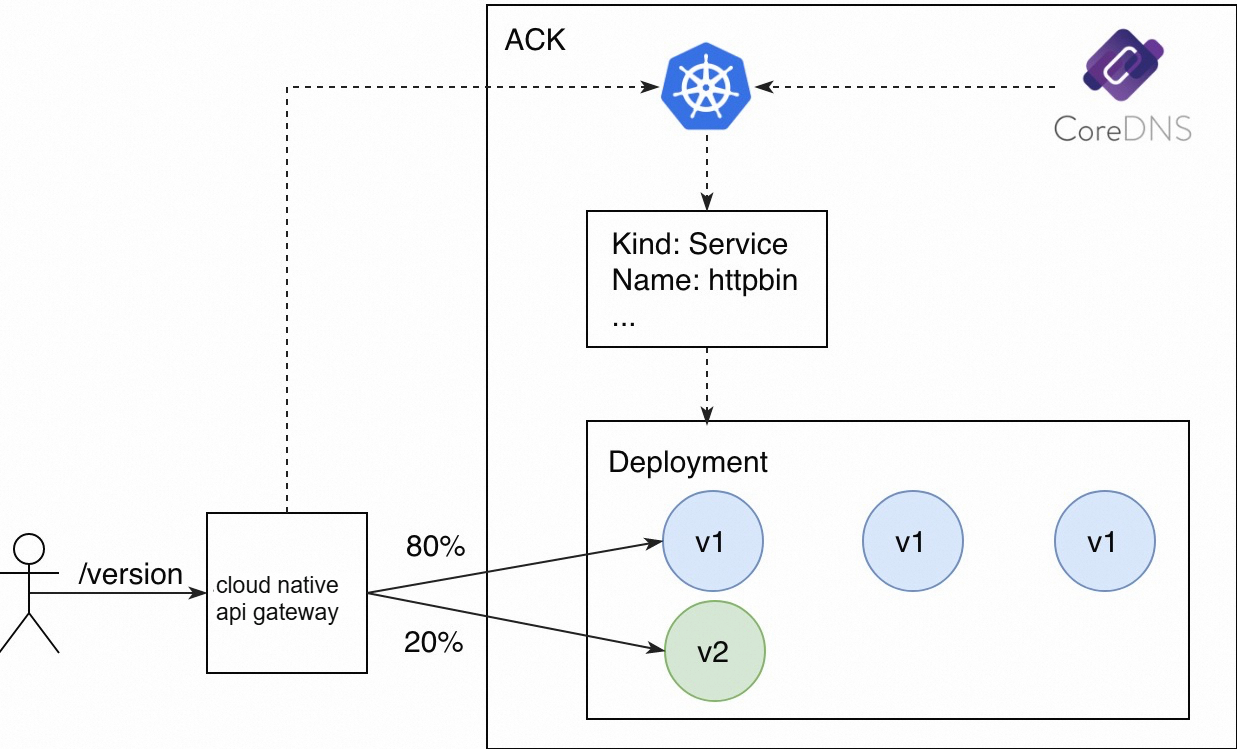
In a canary release, the number of replicas in the new version does not need to be consistent with that in the original version. The only requirement is that resources in the new version must be sufficient to handle canary traffic to the version. In this case, the number of replicas in the new version is set to 1. You can view the node distribution of versions in the Service Version section of the Services page.

Create a route to forward traffic to the new and original versions of the service based on node weights.
In the process, you must configure the v1 and v2 versions for the httpbin service and specify the weights based on which traffic is routed. For example, you can select Label Routing for Destination Service and set the weight of the v1 version to 80% and the weight of the v2 version to 20%.
Run the following command to check the result:
for i in {1..10}; do curl "${Endpoint of the gateway instance}/version"; echo ""; doneCommand output:
version: v1
version: v1
version: v1
version: v1
version: v1
version: v2
version: v1
version: v2
version: v1
version: v1
Two out of ten requests access the v2 version. This traffic distribution ratio is the expected ratio.
In actual business scenarios, you can gradually increase the traffic percentage for the new version after the version is verified. When you increase the traffic percentage, you must scale out the new version and scale in the original version.