AnalyticDB for PostgreSQL lets you export data to Object Storage Service (OSS) in parallel using the OSS external table feature (gpossext). gpossext supports TEXT and CSV formats, with optional GZIP compression to reduce file sizes and storage costs.
This feature applies to AnalyticDB for PostgreSQL V6.0 instances. For V7.0, see Use OSS foreign tables to import and export data.
How it works
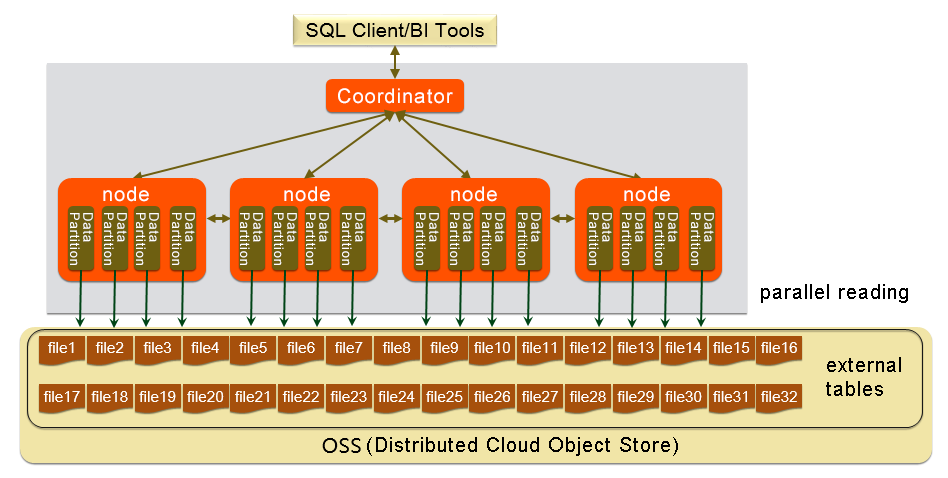
Each compute node exports data directly to OSS in parallel without redistributing data across nodes. The export follows a three-step pattern: install the oss_ext extension once per database, create a writable external table, then run an INSERT INTO ... SELECT statement.
Prerequisites
Before you begin, make sure you have:
-
An AnalyticDB for PostgreSQL V6.0 instance
-
An OSS bucket in the same region as your instance
-
An AccessKey ID and AccessKey secret with write access to the bucket. To create an AccessKey pair, see Create an AccessKey pair
Place the OSS bucket and the AnalyticDB for PostgreSQL instance in the same region to maximize throughput and avoid cross-region transfer costs.
Set up the extension
Run the following statement once per database to install the oss_ext extension before exporting data:
CREATE EXTENSION IF NOT EXISTS oss_ext;You only need to run this once per database—not before each export.
Export data to OSS
Step 1: Create a writable external table
CREATE WRITABLE EXTERNAL TABLE table_name
    ( column_name data_type [, ...] | LIKE other_table )
    LOCATION ('ossprotocol')
    FORMAT 'TEXT'
               [( [DELIMITER [AS] 'delimiter']
               [NULL [AS] 'null string']
               [ESCAPE [AS] 'escape' | 'OFF'] )]
          | 'CSV'
               [([QUOTE [AS] 'quote']
               [DELIMITER [AS] 'delimiter']
               [NULL [AS] 'null string']
               [FORCE QUOTE column [, ...]] ]
               [ESCAPE [AS] 'escape'] )]
    [ ENCODING 'encoding' ]
    [ DISTRIBUTED BY (column, [ ... ] ) | DISTRIBUTED RANDOMLY ]

ossprotocol:
    oss://oss_endpoint [prefix=prefix_name|dir=[folder/[folder/]...]/file_name]
     id=userossid key=userosskey bucket=ossbucket compressiontype=[none|gzip] async=[true|false]
The WRITABLE keyword is required. It defines a write-only external table for data export.
Connection and path parameters
| Parameter | Description |
|---|---|
oss://oss_endpoint |
The OSS endpoint in the format oss://oss_endpoint. For example: oss://oss-cn-hangzhou.aliyuncs.com. If accessing from an Alibaba Cloud server, use an internal endpoint (contains the internal keyword) to avoid Internet traffic. |
id |
Your AccessKey ID. |
key |
Your AccessKey secret. |
bucket |
The target OSS bucket. Create the bucket before running the export. |
prefix |
The path prefix for exported files. Regular expressions are not supported. The exported files use the prefix as a filename prefix. For example, setting prefix=osstest/exp/outfromhdb writes files to the osstest/exp/ path with filenames starting with outfromhdb. Mutually exclusive with dir. |
dir |
The target OSS directory. The path must end with /, for example, test/mydir/. Exported files are named in the filename.x format, where x is a number (values may not be consecutive). Mutually exclusive with prefix. |
Format parameters
| Parameter | Description |
|---|---|
FORMAT |
The file format. Supported values: TEXT and CSV. |
ENCODING |
The character encoding for file content, such as UTF-8. |
DISTRIBUTED BY |
The distribution key that determines which compute node writes each row. |
Default control characters
All control characters must be single-byte characters.
| Control character | TEXT | CSV |
|---|---|---|
| DELIMITER | \t (tab) |
, (comma) |
| QUOTE | " (double quotation mark) |
" (double quotation mark) |
| ESCAPE | N/A | " (double quotation mark) |
| NULL | \N |
Empty string without quotation marks |
Rules for format parameters:
-
If you specify
DELIMITER, you must also specifyQUOTE. -
QUOTEandDELIMITERcannot be the same character. -
If user data contains
QUOTEcharacters, includeESCAPEcharacters to distinguish user data from control characters.
Performance and compression parameters
| Parameter | Default | Valid values | Description |
|---|---|---|---|
compressiontype |
none |
none, gzip |
The compression format for exported files. Only GZIP is supported. |
num_parallel_worker |
3 |
1–8 | The number of parallel compression threads per segment. |
oss_flush_block_size |
32 MB |
1–128 MB | The size of each data block written to OSS. |
oss_file_max_size |
1024 MB |
8–4000 MB | The maximum file size. When a file reaches this limit, subsequent data is written to a new file. |
oss_connect_timeout |
10 s |
— | The connection timeout. |
oss_dns_cache_timeout |
60 s |
— | The timeout for DNS resolution. |
oss_speed_limit |
1024 bytes/s |
— | The minimum acceptable transfer rate. Must be configured together with oss_speed_time. |
oss_speed_time |
15 s |
— | The maximum duration the transfer rate can stay below oss_speed_limit before a timeout is triggered. Must be configured together with oss_speed_limit. |
With the default values, a timeout occurs if the transfer rate stays below 1 KB/s for 15 consecutive seconds. For more information, see Error handling.
Step 2: Run the export
INSERT INTO <external_table> SELECT * FROM <source_table>;Each compute node exports its local data directly to OSS. No data redistribution occurs across nodes.
Example
This example exports data from a local table named example to an OSS bucket.
1. Create the source table:
CREATE TABLE example
    (date text, time text, open float,
     high float, low float, volume int)
    DISTRIBUTED BY (date);
2. Create the writable external table.
Using prefix to specify the output path:
CREATE WRITABLE EXTERNAL TABLE ossexample_exp
    (date text, time text, open float, high float,
     low float, volume int)
    LOCATION ('oss://oss-cn-hangzhou.aliyuncs.com
    prefix=osstest/exp/outfromhdb id=<your-access-key-id>
    key=<your-access-key-secret> bucket=testbucket')
    FORMAT 'csv'
    DISTRIBUTED BY (date);
Using dir to specify the output path:
CREATE WRITABLE EXTERNAL TABLE ossexample_exp
    (date text, time text, open float, high float,
     low float, volume int)
    LOCATION ('oss://oss-cn-hangzhou.aliyuncs.com
    dir=osstest/exp/ id=<your-access-key-id>
    key=<your-access-key-secret> bucket=testbucket')
    FORMAT 'csv'
    DISTRIBUTED BY (date);
Replace the placeholders with your actual values:
| Placeholder | Description |
|---|---|
<your-access-key-id> |
Your AccessKey ID |
<your-access-key-secret> |
Your AccessKey secret |
3. Export the data:
INSERT INTO ossexample_exp SELECT * FROM example;4. Verify the export:
Run EXPLAIN to confirm that each compute node exports data directly to OSS:
EXPLAIN INSERT INTO ossexample_exp SELECT * FROM example;Expected output:
                          QUERY PLAN
---------------------------------------------------------------
 Insert (slice0; segments: 3)  (rows=1 width=92)
   ->  Seq Scan on example  (cost=0.00..0.00 rows=1 width=92)
(2 rows)
The segments: 3 indicates that all three compute nodes export data in parallel. After the export completes, verify that the files appear in the OSS console under the specified path.
Performance considerations
To maximize export throughput:
-
Use column-oriented storage with compression when creating source tables. For example:
WITH (APPENDONLY=true, ORIENTATION=column, COMPRESSTYPE=zlib, COMPRESSLEVEL=5, BLOCKSIZE=1048576)For more information, see CREATE TABLE.
-
Keep the OSS bucket and the AnalyticDB for PostgreSQL instance in the same region.
-
Tune
num_parallel_worker,oss_flush_block_size, andoss_file_max_sizebased on your data volume and network conditions.
Limitations
-
Only V6.0 instances are supported. For V7.0, use OSS foreign tables.
-
Only TEXT and CSV formats are supported.
-
Only GZIP compression is supported (
compressiontype=gzip). -
prefixanddirare mutually exclusive—specify only one per external table. -
Regular expressions are not supported in
prefix. -
All format control characters (DELIMITER, QUOTE, ESCAPE, NULL) must be single-byte characters.
-
The external table syntax follows Greenplum Database conventions, except for location-related parameters.
Troubleshooting
When an export error occurs, the error log includes:
| Field | Description |
|---|---|
code |
The HTTP status code of the failed request. |
error_code |
The error code returned by OSS. |
error_msg |
The error message returned by OSS. |
req_id |
The UUID of the failed request. Provide this to OSS technical support if the issue persists. |
For a full list of error codes, see Error responses. To fix timeout-related errors, adjust the oss_speed_limit and oss_speed_time parameters.OSS API error responsesOSS API error responses