Partition large tables into smaller segments so that AnalyticDB for PostgreSQL scans only the partitions matching your query conditions, instead of the full table. This improves query performance.
Partition types
AnalyticDB for PostgreSQL supports three partition types.
| Type | Partitions by | Use case | Default partition |
|---|---|---|---|
| Range | Continuous value ranges (dates, integers) | Time-series data, numeric intervals | Supported |
| List | Discrete values (regions, categories) | Categorical data with known values | Supported |
| Multi-level | Combination of range and list | Finer-grained organization across two dimensions | Supported at each level |
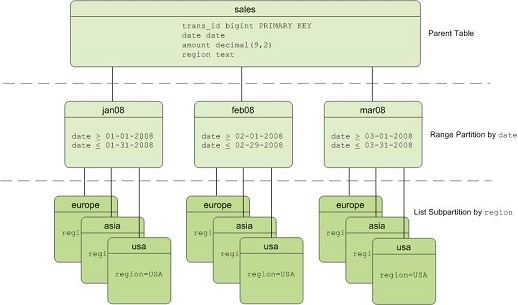
The following figure shows a multi-level partitioned table with date-based range partitions and region-based list subpartitions.
When to partition
Evaluate the following criteria before partitioning a table:
Data volume: Partitioning benefits tables with large data volumes, such as a fact table with more than 10 million rows. The exact threshold depends on your workload and query performance requirements.
Partition key: The table must have a suitable column for use as a partition key, such as a date (day or month) or a categorical value (region or status).
Data lifecycle: Dropping an old partition is faster and less resource-intensive than running a
DELETEstatement against millions of rows.Query patterns: Partitioning improves performance only when queries include the partition key in their filter conditions. Queries that omit the partition key must scan all partitions, which may take longer than scanning an unpartitioned table.
Create a range-partitioned table
A range-partitioned table divides data by a continuous range of values. Specify a START value, an END value, and an EVERY clause to define the partition interval. By default, START values are inclusive and END values are exclusive.
Partition by date
CREATE TABLE sales (id int, date date, amt decimal(10,2))
DISTRIBUTED BY (id)
PARTITION BY RANGE (date)
( START (date '2016-01-01') INCLUSIVE
   END (date '2017-01-01') EXCLUSIVE
   EVERY (INTERVAL '1 day') );
This statement creates one partition for each day between January 1, 2016 and December 31, 2016.
Partition by numeric value
A range-partitioned table also supports numeric data types as the partition key.
CREATE TABLE rank (id int, rank int, year int, gender char(1), count int)
DISTRIBUTED BY (id)
PARTITION BY RANGE (year)
( START (2006) END (2016) EVERY (1),
  DEFAULT PARTITION extra );
This statement creates one partition per year from 2006 through 2015, plus a default partition named extra for rows that fall outside the defined range.
Create a list-partitioned table
A list-partitioned table divides data by discrete values. The partition key accepts any data type that supports equality comparisons. Declare a partition specification for each distinct value.
CREATE TABLE rank (id int, rank int, year int, gender
char(1), count int )
DISTRIBUTED BY (id)
PARTITION BY LIST (gender)
( PARTITION girls VALUES ('F'),
  PARTITION boys VALUES ('M'),
  DEFAULT PARTITION other );
This statement creates two named partitions based on gender values, plus a default partition for any values not explicitly listed.
Create a multi-level partitioned table
A multi-level partitioned table combines two partitioning strategies. The following example creates a three-level partitioned table that first partitions by month (range) and then subpartitions by region (list).
CREATE TABLE sales
  (id int, year int, month int, day int, region text)
DISTRIBUTED BY (id)
PARTITION BY RANGE (month)
  SUBPARTITION BY LIST (region)
    SUBPARTITION TEMPLATE (
    SUBPARTITION usa VALUES ('usa'),
    SUBPARTITION europe VALUES ('europe'),
    SUBPARTITION asia VALUES ('asia'),
    DEFAULT SUBPARTITION other_regions)
(START (1) END (13) EVERY (1),
DEFAULT PARTITION other_months );
This statement creates 12 monthly range partitions (January through December), each containing four list subpartitions (usa, europe, asia, and other_regions), plus a default partition for months outside the 1-12 range.
Optimize partition performance
Choose partition granularity
For time-based partitioned tables, the granularity can be a day, a week, or a month. Finer granularity produces smaller partitions but increases the total partition count.
Around 200 partitions is considered quite large. A high partition count impacts database performance in two ways:
The query optimizer takes longer to generate execution plans.
Maintenance operations such as
VACUUMslow down.
Multi-level partitioned tables amplify this effect. Estimate the total partition count carefully before choosing a partitioning strategy.
Example calculation: A table partitioned by month and city with 24 months and 100 cities produces 2,400 partitions. If the table is a column-oriented table with 100 columns, each stored as a separate physical file, the system must manage over 100,000 files.
Partition pruning
AnalyticDB for PostgreSQL supports partition pruning for partitioned tables. For more information, see Partition pruning.
Maintain partitioned tables
Manage partitions with the following ALTER TABLE operations.
| Operation | Syntax | Notes |
|---|---|---|
| Add a partition | ALTER TABLE table_name ADD PARTITION p2 START ('2017-02-01') END ('2017-02-28'); | If a default partition exists, split the default partition instead. |
| Drop a partition | ALTER TABLE table_name DROP PARTITION p2; | Drops the partition and its subpartitions. |
| Rename a partition | ALTER TABLE table_name RENAME PARTITION p2 TO Feb17; | |
| Truncate a partition | ALTER TABLE table_name TRUNCATE PARTITION p1; | Removes all rows but keeps the partition structure. |
| Exchange a partition | ALTER TABLE table_name EXCHANGE PARTITION p2 WITH TABLE {cos_table_name}; | Swaps the partition with an existing table. |
| Split a partition | ALTER TABLE table_name SPLIT PARTITION p2 AT ('2017-02-20') INTO (PARTITION p2, PARTITION p3); | Splits one partition into two at the specified boundary value. |
Add a partition
If a default partition exists, split the default partition instead of adding a new partition directly.
ALTER TABLE test_partition_range ADD partition p2 start ('2017-02-01') end ('2017-02-28');Drop a partition and its subpartitions
ALTER TABLE test_partition_range DROP partition p2;Rename a partition
ALTER TABLE test_partition_range RENAME PARTITION p2 TO Feb17;Truncate a partition
ALTER TABLE test_range_partition TRUNCATE PARTITION p1;Exchange a partition
ALTER TABLE test_range_partition EXCHANGE PARTITION p2 WITH TABLE {cos_table_name} ;Split a partition
-- Split the p2 partition into two partitions with the boundary value set to 2017-02-20.
ALTER TABLE test_partition_range SPLIT partition p2 at ('2017-02-20') into (partition p2, partition p3);