Use the supabase-cli tool to migrate a complete Supabase project to AnalyticDB for PostgreSQL Supabase (AnalyticDB Supabase) in one command. The tool migrates the database, storage, and Edge Functions automatically — no manual schema scripting required.
Migration paths
Supabase Cloud → AnalyticDB Supabase
Self-hosted Supabase → AnalyticDB Supabase
AnalyticDB Supabase → AnalyticDB Supabase
What gets migrated
The tool migrates the following automatically:
| Component | What is migrated |
|---|---|
| Database schema | Schemas, table schemas, functions, and triggers |
| Database data | User data, auth data, and other system data |
| PostgreSQL extensions | Automatically installed in the destination project |
| Storage | Buckets and all files they contain |
| Edge Functions | Function code and related configurations |
| Roles and permissions | Database user roles and permissions |
Prerequisites
Before you begin, make sure you have:
Network access to both the source project API and database, and the destination AnalyticDB Supabase API and database. To configure network access for AnalyticDB Supabase, see Modify a whitelist.
Docker installed and running. The tool uses Docker by default. If you prefer not to use Docker, pass
--use-local-execand installpg_dumplocally instead.The destination database configured to allow external connections.
Test the full migration in a staging environment before running it against production. Run production migrations during off-peak hours and make sure your network connection stays stable throughout, as large databases can take a significant amount of time.
Usage notes
If your database password contains special characters, store credentials in environment variables (recommended) or percent-encode the special characters. See Handle special characters in a connection string.
If you get
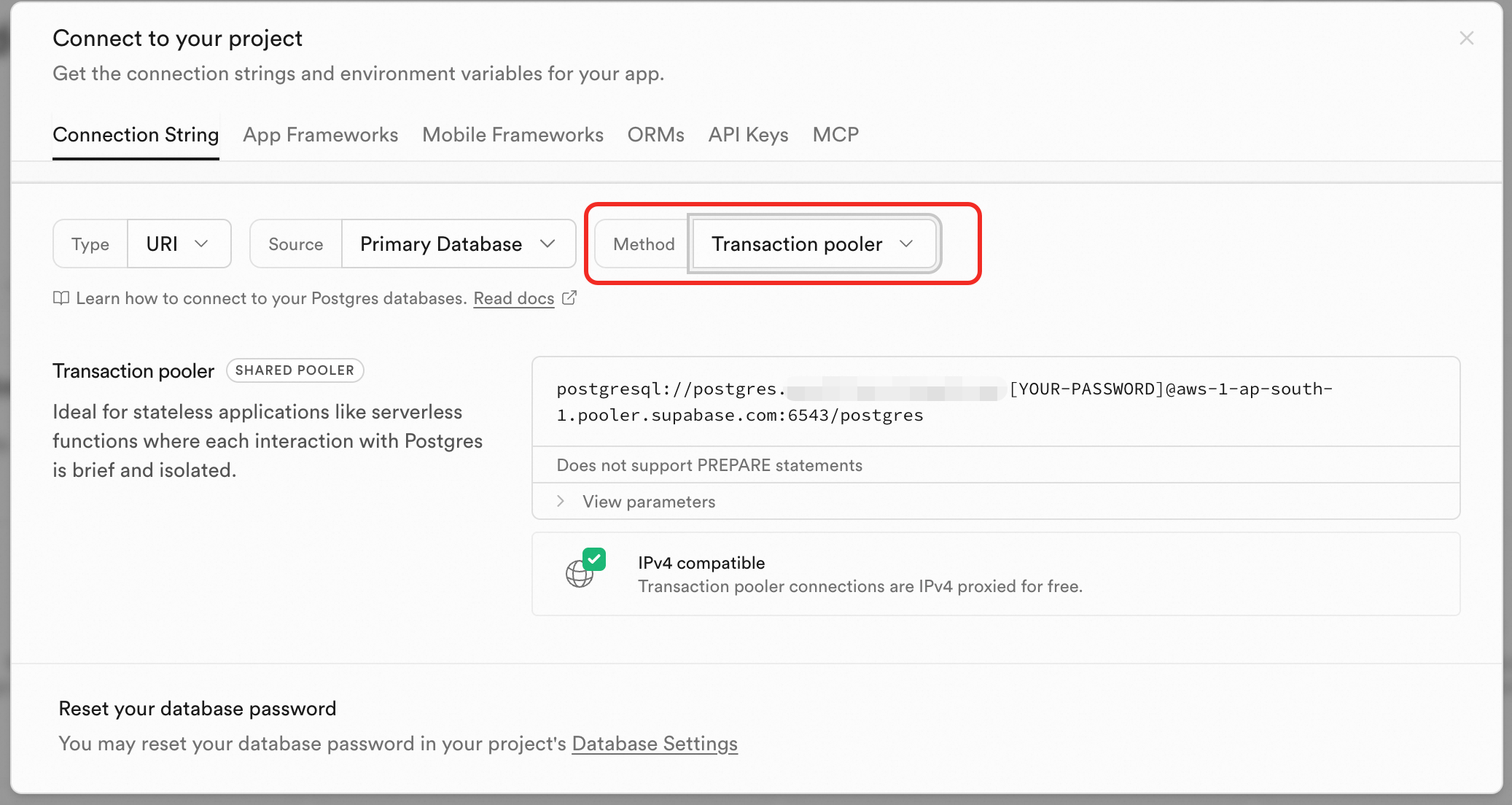
failed to connect to host=db.xxxx.supabase.co user=postgres database=postgreswhen migrating from Supabase Cloud, pass the Transaction pooler address as--source-database-urlinstead. See Step 1 for how to get the Transaction pooler address.
Step 1: Collect credentials
From Supabase Cloud
Get the following from your Supabase dashboard:
Project Ref — the 20-character ID at the end of your project URL. For example, in
https://supabase.com/dashboard/project/qeqfhfoebrtkbmwd**`, the Project Ref is `qeqfhfoebrtkbmwd**.Anon Key — starts with
eyJ. Find it in project settings.Service Role Key — starts with
eyJ. This key must have read access to all data.Database URL (optional) — the PostgreSQL connection string. Click Connect at the top of the project page, go to the Connection String tab, and set Method to Transaction pooler.
From AnalyticDB Supabase (destination)
Get the following from your AnalyticDB Supabase project. See Obtain API keys for detailed steps:
API URL — the full API address, such as
https://your-domain.supabase.opentrust.netAnon Key — the anonymous key for the destination project
Service Role Key — must have full administrative permission
Database URL — the PostgreSQL connection string. The database user must have permission to create tables, extensions, and other objects.
Store credentials as environment variables
Storing credentials in environment variables avoids exposing them on the command line and handles special characters automatically.
Migrating from Supabase Cloud:
# Create a configuration file
cat > migration.env << 'EOF'
SOURCE_PROJECT_REF="your-project-ref"
SOURCE_ANON_KEY="eyJ..."
SOURCE_SERVICE_ROLE_KEY="eyJ..."
TARGET_API_URL="https://your-domain.supabase.opentrust.net"
TARGET_ANON_KEY="eyJ..."
TARGET_SERVICE_ROLE_KEY="eyJ..."
TARGET_DATABASE_URL="postgres://postgres:password@{your-project-id}.supabase.opentrust.net:5432/postgres"
EOF

# Load the environment variables
source migration.env
Migrating from self-hosted Supabase or AnalyticDB Supabase:
# Create a configuration file
cat > migration.env << 'EOF'
SOURCE_API_URL="http://localhost:54321"
SOURCE_ANON_KEY="eyJ..."
SOURCE_SERVICE_ROLE_KEY="eyJ..."
SOURCE_DATABASE_URL="postgres://postgres:password@{your-project-id}.supabase.opentrust.net:5432/postgres"
TARGET_API_URL="https://your-domain.supabase.opentrust.net"
TARGET_ANON_KEY="eyJ..."
TARGET_SERVICE_ROLE_KEY="eyJ..."
TARGET_DATABASE_URL="postgres://postgres:password@{your-project-id}.supabase.opentrust.net:5432/postgres"
EOF

# Load the environment variables
source migration.env
Step 2: Download and log on
Download the binary for your platform and architecture. Replace supabase-cli in all commands with the name of the file you downloaded.
Log on to your account:
./supabase-cli loginStep 3: Preview the migration (optional)
Run a dry run to check what will be migrated without making any changes.
From Supabase Cloud:
./supabase-cli migrate-project \
  --source-project-ref "$SOURCE_PROJECT_REF" \
  --source-anon-key "$SOURCE_ANON_KEY" \
  --source-service-role-key "$SOURCE_SERVICE_ROLE_KEY" \
  --target-api-url "$TARGET_API_URL" \
  --target-anon-key "$TARGET_ANON_KEY" \
  --target-service-role-key "$TARGET_SERVICE_ROLE_KEY" \
  --target-database-url "$TARGET_DATABASE_URL" \
  --dry-run
From self-hosted Supabase or AnalyticDB Supabase:
./supabase-cli migrate-project \
  --source-hosted \
  --source-api-url "$SOURCE_API_URL" \
  --source-anon-key "$SOURCE_ANON_KEY" \
  --source-service-role-key "$SOURCE_SERVICE_ROLE_KEY" \
  --source-database-url "$SOURCE_DATABASE_URL" \
  --target-api-url "$TARGET_API_URL" \
  --target-anon-key "$TARGET_ANON_KEY" \
  --target-service-role-key "$TARGET_SERVICE_ROLE_KEY" \
  --target-database-url "$TARGET_DATABASE_URL" \
  --dry-run
Step 4: Migrate the project
Remove --dry-run from the preview command to run the actual migration.
From Supabase Cloud:
./supabase-cli migrate-project \
  --source-project-ref "$SOURCE_PROJECT_REF" \
  --source-anon-key "$SOURCE_ANON_KEY" \
  --source-service-role-key "$SOURCE_SERVICE_ROLE_KEY" \
  --target-api-url "$TARGET_API_URL" \
  --target-anon-key "$TARGET_ANON_KEY" \
  --target-service-role-key "$TARGET_SERVICE_ROLE_KEY" \
  --target-database-url "$TARGET_DATABASE_URL"
From self-hosted Supabase or AnalyticDB Supabase:
./supabase-cli migrate-project \
  --source-hosted \
  --source-api-url "$SOURCE_API_URL" \
  --source-anon-key "$SOURCE_ANON_KEY" \
  --source-service-role-key "$SOURCE_SERVICE_ROLE_KEY" \
  --source-database-url "$SOURCE_DATABASE_URL" \
  --target-api-url "$TARGET_API_URL" \
  --target-anon-key "$TARGET_ANON_KEY" \
  --target-service-role-key "$TARGET_SERVICE_ROLE_KEY" \
  --target-database-url "$TARGET_DATABASE_URL"
If the migration is interrupted, resume from a specific stage rather than starting over:
# Resume from a specific stage: database, storage, or functions
./supabase-cli migrate-project ... --resume-from database
Migrate individual components
Use subcommands to migrate only specific parts of a project.
Migrate only the database
# From Supabase Cloud
./supabase-cli migrate-project migrate-database \
  --source-project-ref "$SOURCE_PROJECT_REF" \
  --source-anon-key "$SOURCE_ANON_KEY" \
  --source-service-role-key "$SOURCE_SERVICE_ROLE_KEY" \
  --target-api-url "$TARGET_API_URL" \
  --target-anon-key "$TARGET_ANON_KEY" \
  --target-service-role-key "$TARGET_SERVICE_ROLE_KEY" \
  --target-database-url "$TARGET_DATABASE_URL"

# From self-hosted Supabase or AnalyticDB Supabase
./supabase-cli migrate-project migrate-database \
  --source-hosted \
  --source-api-url "$SOURCE_API_URL" \
  --source-anon-key "$SOURCE_ANON_KEY" \
  --source-service-role-key "$SOURCE_SERVICE_ROLE_KEY" \
  --source-database-url "$SOURCE_DATABASE_URL" \
  --target-api-url "$TARGET_API_URL" \
  --target-anon-key "$TARGET_ANON_KEY" \
  --target-service-role-key "$TARGET_SERVICE_ROLE_KEY" \
  --target-database-url "$TARGET_DATABASE_URL"
Additional flags for database migration:
| Flag | Description | Default |
|---|---|---|
--include-data | Include table data | true |
--include-system-data | Include system module data | true |
--allow-truncate | Clear destination table data before migrating | false |
--preserve-extra-tables | Keep tables in the destination that don't exist in the source | true |
Use --allow-truncate with care. Verify that your source and destination configurations are correct before using this flag, as it deletes data from the source database.
Migrate only storage
# From Supabase Cloud
./supabase-cli migrate-project migrate-storage \
  --source-project-ref "$SOURCE_PROJECT_REF" \
  --source-anon-key "$SOURCE_ANON_KEY" \
  --source-service-role-key "$SOURCE_SERVICE_ROLE_KEY" \
  --target-api-url "$TARGET_API_URL" \
  --target-anon-key "$TARGET_ANON_KEY" \
  --target-service-role-key "$TARGET_SERVICE_ROLE_KEY" \
  --target-database-url "$TARGET_DATABASE_URL"

# From self-hosted Supabase or AnalyticDB Supabase
./supabase-cli migrate-project migrate-storage \
  --source-hosted \
  --source-api-url "$SOURCE_API_URL" \
  --source-anon-key "$SOURCE_ANON_KEY" \
  --source-service-role-key "$SOURCE_SERVICE_ROLE_KEY" \
  --source-database-url "$SOURCE_DATABASE_URL" \
  --target-api-url "$TARGET_API_URL" \
  --target-anon-key "$TARGET_ANON_KEY" \
  --target-service-role-key "$TARGET_SERVICE_ROLE_KEY" \
  --target-database-url "$TARGET_DATABASE_URL"
Migrate only Edge Functions
# From Supabase Cloud
./supabase-cli migrate-project migrate-functions \
  --source-project-ref "$SOURCE_PROJECT_REF" \
  --source-anon-key "$SOURCE_ANON_KEY" \
  --source-service-role-key "$SOURCE_SERVICE_ROLE_KEY" \
  --target-api-url "$TARGET_API_URL" \
  --target-anon-key "$TARGET_ANON_KEY" \
  --target-service-role-key "$TARGET_SERVICE_ROLE_KEY" \
  --target-database-url "$TARGET_DATABASE_URL"

# From self-hosted Supabase or AnalyticDB Supabase
./supabase-cli migrate-project migrate-functions \
  --source-hosted \
  --source-api-url "$SOURCE_API_URL" \
  --source-anon-key "$SOURCE_ANON_KEY" \
  --source-service-role-key "$SOURCE_SERVICE_ROLE_KEY" \
  --source-database-url "$SOURCE_DATABASE_URL" \
  --target-api-url "$TARGET_API_URL" \
  --target-anon-key "$TARGET_ANON_KEY" \
  --target-service-role-key "$TARGET_SERVICE_ROLE_KEY" \
  --target-database-url "$TARGET_DATABASE_URL"
Alternatively, use the functions-cli tool to migrate Edge Functions.
Command reference
Required parameters
Supabase Cloud source:
| Parameter | Description |
|---|---|
--source-project-ref | Project Ref — the 20-character project ID |
--source-anon-key | Anon key for the source project |
--source-service-role-key | Service role key for the source project |
Self-hosted Supabase or AnalyticDB Supabase source:
| Parameter | Description |
|---|---|
--source-api-url | Source project API URL |
--source-anon-key | Anon key for the source project |
--source-service-role-key | Service role key for the source project |
--source-database-url | Source database URL (must be percent-encoded) |
Destination (all cases):
| Parameter | Description |
|---|---|
--target-api-url | Destination API URL |
--target-anon-key | Anon key for the destination project |
--target-service-role-key | Service role key for the destination project |
--target-database-url | Destination database URL (must be percent-encoded) |
Optional parameters
| Parameter | Description | Default |
|---|---|---|
--source-database-url | Source database URL for Supabase Cloud (must be percent-encoded) | — |
--include-data | Include database data | true |
--include-storage | Include storage objects | true |
--include-functions | Include Edge Functions | true |
--include-system-data | Include system module data | true |
--use-local-exec | Use a local executor instead of Docker; requires pg_dump installed locally | — |
--concurrency | Number of concurrent operations | 2 |
--dry-run | Preview mode — no actual migration is performed | — |
--resume-from | Resume from a specific stage: database, storage, or functions | — |
--allow-truncate | Clear destination table data before migrating | false |
--preserve-extra-tables | Keep tables in the destination that don't exist in the source | true |
FAQ
How do I resolve connection refused when connecting to the source database?
Check network connectivity with:
ping db.your-project-ref.supabase.coMake sure the database URL follows this format: postgres://postgres:password@host:port/database
Also verify that the destination database allows external connections and that both the source and destination APIs are reachable from your machine.
How do I resolve permission denied for schema auth?
This error means the tool is using a key without sufficient privileges. Check that you're passing the service role key (not the anon key) via --source-service-role-key or --target-service-role-key. The service role key for the destination must have full administrative permission.
How do I resolve plugin xxx is not available in the target database?
Either install the missing extension in the destination database, or remove it from the source database if it's no longer needed.
How do I resolve relation 'test_id_seq' already exists?
This sequence conflict happens when destination tables already have data. Use a safer cleanup policy:
./supabase-cli migrate-project ... --preserve-extra-tables=true --allow-truncate=trueHow do I handle special characters in a connection string?
Store credentials in environment variables — this is the simplest approach and avoids escaping entirely. If you must pass the URL directly on the command line, percent-encode any special characters:
| Character | Encoding |
|---|---|
! | %21 |
@ | %40 |
# | %23 |
$ | %24 |
% | %25 |
^ | %5e |
& | %26 |
* | %2a |
( | %28 |
) | %29 |
_ | %5f |
+ | %2b |
= | %3d |