AnalyticDB for PostgreSQL 7.0 introduces Serverless Pro mode: a cloud-native architecture that combines Massively Parallel Processing (MPP) database technology with Serverless technology to decouple compute from storage. You get second-level elastic scaling and one-write-multiple-reads without managing local disks or replicating data for each read cluster. Storage is pay-as-you-go, and compute scales automatically—both significantly lower your total cost of ownership (TCO) for large-scale analytics and high-concurrency read workloads.
Core advantages
Serverless Pro mode offers three improvements over the traditional Storage-Elastic Mode:
-
Lower storage costs: Data is stored in Object Storage Service (OSS), which has unlimited capacity at a fraction of the cost of local Enhanced SSDs (ESSDs). As your data grows, you no longer need to expand expensive local cloud disks.
-
Second-level elastic scaling: Because compute and storage are decoupled, compute resources scale independently on demand. Scale out in seconds to absorb peak traffic, then release resources during off-peak hours to avoid waste.
-
Stable one-write-multiple-reads: Virtual Warehouses (VWs) isolate I/O loads into independent compute clusters. The primary cluster handles writes. Read workloads—reports, dashboards, ad hoc analysis—run on separate VWs, so large queries never compete with write operations. All VWs share the same underlying storage, eliminating the need to replicate data for each read-only cluster.
Architecture design
Architecture evolution
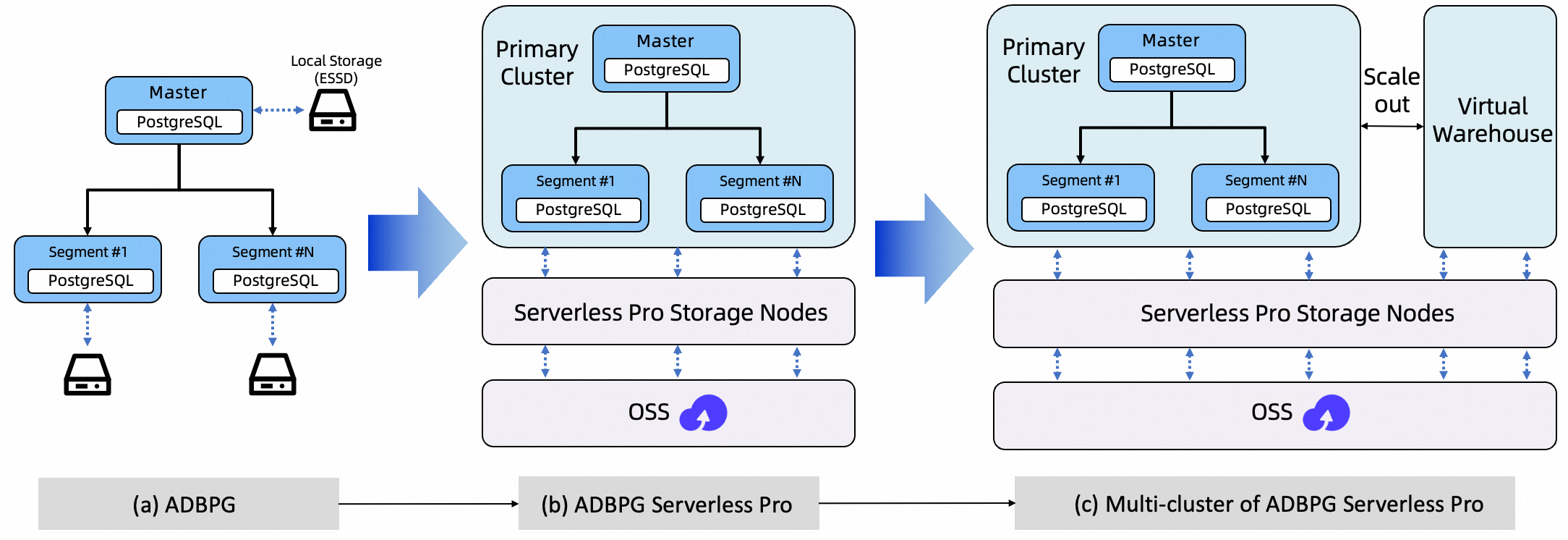
Serverless Pro evolved across three architectural generations to achieve lower cost, greater elasticity, and better workload isolation.
Traditional AnalyticDB for PostgreSQL: Master and segment compute nodes are tightly coupled to local ESSDs. Data growth means continuously expanding local disks and replicas, so storage costs rise linearly. Compute nodes are stateful, making scaling slow and resource reclamation difficult. Adding read capacity requires creating a new cluster and replicating all data—a process that takes days and multiplies storage costs.
Decoupled compute and storage: Serverless Pro introduces a shared storage foundation built on Serverless Pro storage nodes and OSS. Persistent data moves to OSS; local disks serve only as a cache for hot data, making compute nodes nearly stateless. You can scale compute independently, provision resources for peak loads in seconds, and release them when no longer needed. Storage is pay-as-you-go, eliminating the cost of over-provisioning local cloud disks.
Multi-cluster shared storage: Building on shared storage, this architecture supports a primary cluster and multiple VWs. The primary cluster handles writes; VWs provide independent, read-only compute for reports, dashboards, and ad hoc analysis. Creating a VW requires no data replication—read scaling drops from day-level data replication to minute-level resource provisioning. Read and write operations are physically isolated, so mixed workloads are more stable.
Service architecture
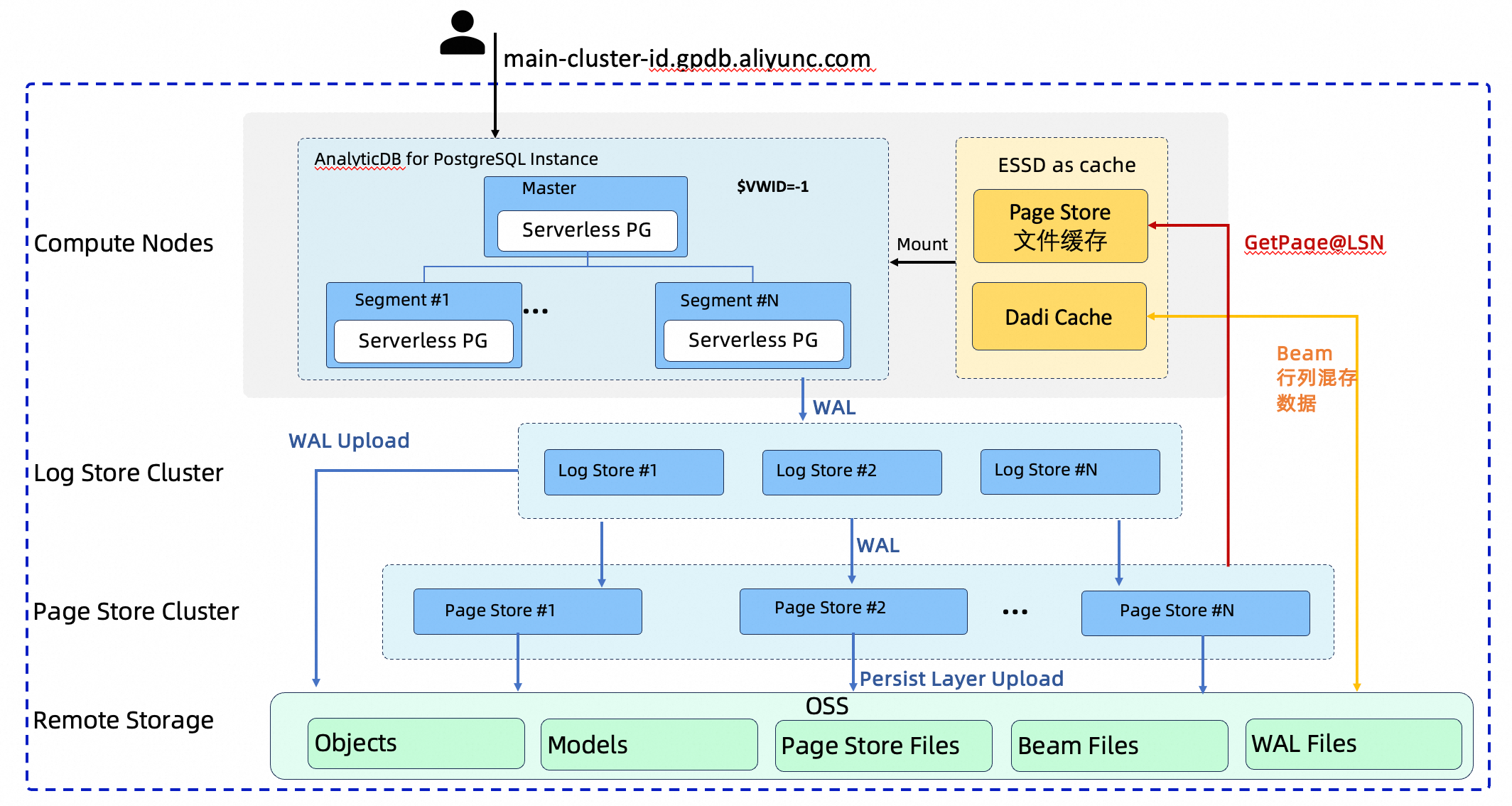
Serverless Pro is built on the Log-as-database concept. Each layer has a single responsibility: compute nodes execute SQL, the Log Store persists write-ahead logs, the Page Store serves data pages, and OSS provides final archival storage.
Random page writes are converted into sequential writes to the Write-Ahead Logging (WAL). The storage layer asynchronously replays the WAL to generate data pages for a specific Log Sequence Number (LSN), with all data ultimately archived in OSS.
The four layers are:
-
Compute nodes: A stateless or lightweight stateful layer that executes SQL. Each node uses Local File Cache and Dadi Cache backed by local ESSDs as a high-performance cache for hot data.
-
Storage nodes (Log Store): The log service layer. It ensures WAL persistence from compute nodes and asynchronously pushes logs to the Page Store.
-
Storage nodes (Page Store): The data page service layer. It consumes and replays WAL to produce data pages for a specific LSN and exposes a
GetPageservice to compute nodes. -
OSS: The final persistence layer. All data—data pages from the Page Store, Beam column-store data, manifests, and WAL logs—is archived here.
Virtual Warehouse
In traditional one-write-multiple-reads setups, adding read capacity means creating a separate cluster and replicating all data before read workloads can run in isolation. This takes days and doubles storage costs for every additional cluster.
Virtual Warehouse eliminates both constraints. It is the core feature enabling one-write-multiple-reads in Serverless Pro mode. Create multiple isolated, read-only compute clusters that all share the same underlying storage—no data replication required. Each VW handles a specific read workload independently, so large analytics queries on one VW never affect write stability on the primary cluster or queries on other VWs.
Adding a VW takes minutes, not days. Because VWs share underlying storage, you pay for compute only, not redundant copies of your data.
For details, see Virtual Warehouse.
Product mode comparison
Serverless Pro mode is compatible with most features of Storage-Elastic Mode. The following table compares instance management capabilities across both modes.
| Feature classification | Sub-feature | Storage-Elastic Mode | Serverless mode |
|---|---|---|---|
| Instance management | Basic instance information | Supported | Supported |
| Log on to database (DMS) | Supported | Supported | |
| Create instance | Supported | Supported | |
| Release instance | Supported | Supported | |
| Restart instance | Supported | Supported | |
| Upgrade or downgrade instance | Supported | Supported | |
| Scale Master nodes | Supported | Supported | |
| Scale out instance | Supported | Supported | |
| Scale in instance | Supported | Supported | |
| Minor version upgrade | Supported | Supported | |
| Account management | Create account | Supported | Supported |
| Reset password | Supported | Supported | |
| Database connection | Basic connection information | Supported | Supported |
| Apply for public endpoint | Supported | Supported | |
| Monitoring and alerts | Monitoring | Supported | Supported |
| Alert rules | Supported | Supported | |
| Data security | Whitelist | Supported | Supported |
| SQL audit | Supported | Supported | |
| SSL | Supported | Supported | |
| Backup and recovery | Supported | Supported | |
| Configuration management | Parameter settings | Supported | Supported |
Feature compatibility and constraints
Serverless Pro mode is compatible with over 95% of Storage-Elastic Mode features. Existing SQL syntax, JDBC/ODBC interfaces, and client tools such as psql work identically to Storage-Elastic Mode.
The following table lists features with constraints or limited support.
| Category | Feature | Support status | Constraints and notes |
|---|---|---|---|
| Basic features | ALTER TABLE |
Supported | — |
| Indexes | Supported | Supports B-tree, Hash, GiST, GIN, and more | |
PRIMARY KEY |
Supported | — | |
UNIQUE CONSTRAINT |
Supported | — | |
INSERT ON CONFLICT (overwrite) |
Supported | Heap tables only. Not supported for AO/AOCS tables. | |
| Unlogged tables | Supported | Suitable for temporary data. | |
| Triggers | Supported | Heap tables only. | |
| Heap/Beam tables | Supported | Default row-oriented table type. | |
| AO/AOCS tables | Not supported | Column-oriented tables have limitations in some scenarios (for example, they do not support triggers or ON CONFLICT). | |
| User-defined types | Supported | Includes composite types, enumerations, and range types. | |
| Explicit cursors | Supported | — | |
| Compute engine | ORCA optimizer | Supported | Enabled by default. Suitable for complex queries. |
| Laser engine | Supported | High-performance vectorized execution engine. | |
| Transaction capabilities | Sub-transactions | Supported | Supports SAVEPOINT and ROLLBACK TO. |
| Transaction isolation level | Supported | Read Committed and Repeatable Read only. | |
| Advanced features | Backup and recovery | Supported | Supports point-in-time recovery (PITR). |
| Materialized views | Supported | Supports automatic and manual refresh. | |
| AUTO VACUUM | Supported | Automatically cleans dead tuples. Keep this feature enabled. | |
| AUTO ANALYZE | Supported | Automatically collects statistics. | |
| Online scale-out | Supported | Dynamically add nodes without service interruption. | |
| Online scale-in | Supported | Dynamically remove nodes (minimum node count applies). | |
| GIS / Ganos | Supported | Built-in spatio-temporal data processing. | |
| Data sharing | Not supported | Cross-instance or cross-cluster data sharing is not currently supported. |
Data migration
To migrate from Storage-Elastic Mode or Storage-Reserved Mode to Serverless Pro mode, see Data migration between AnalyticDB for PostgreSQL instances.
The following table summarizes migration method support.
| Migration type | Method | Serverless Pro mode support |
|---|---|---|
| Data writing | Overwrite data using INSERT ON CONFLICT | Supported |
| Overwrite data using COPY ON CONFLICT | Supported | |
| Write data using a client SDK | Supported | |
| Table-level migration | DataWorks data integration | Supported |
| Migrate and synchronize data from Alibaba Cloud databases | Supported | |
| Migrate and synchronize data from self-managed databases | Supported | |
| Import local data using the \COPY command | Supported | |
| Use OSS external tables to import data from OSS | Supported | |
| Federated analytics using Hadoop ecosystem external tables | Not supported |
Time Travel and Branching (planned)
The features described in this section are in the planning stage. For release dates and usage details, see product announcements and official documentation updates.
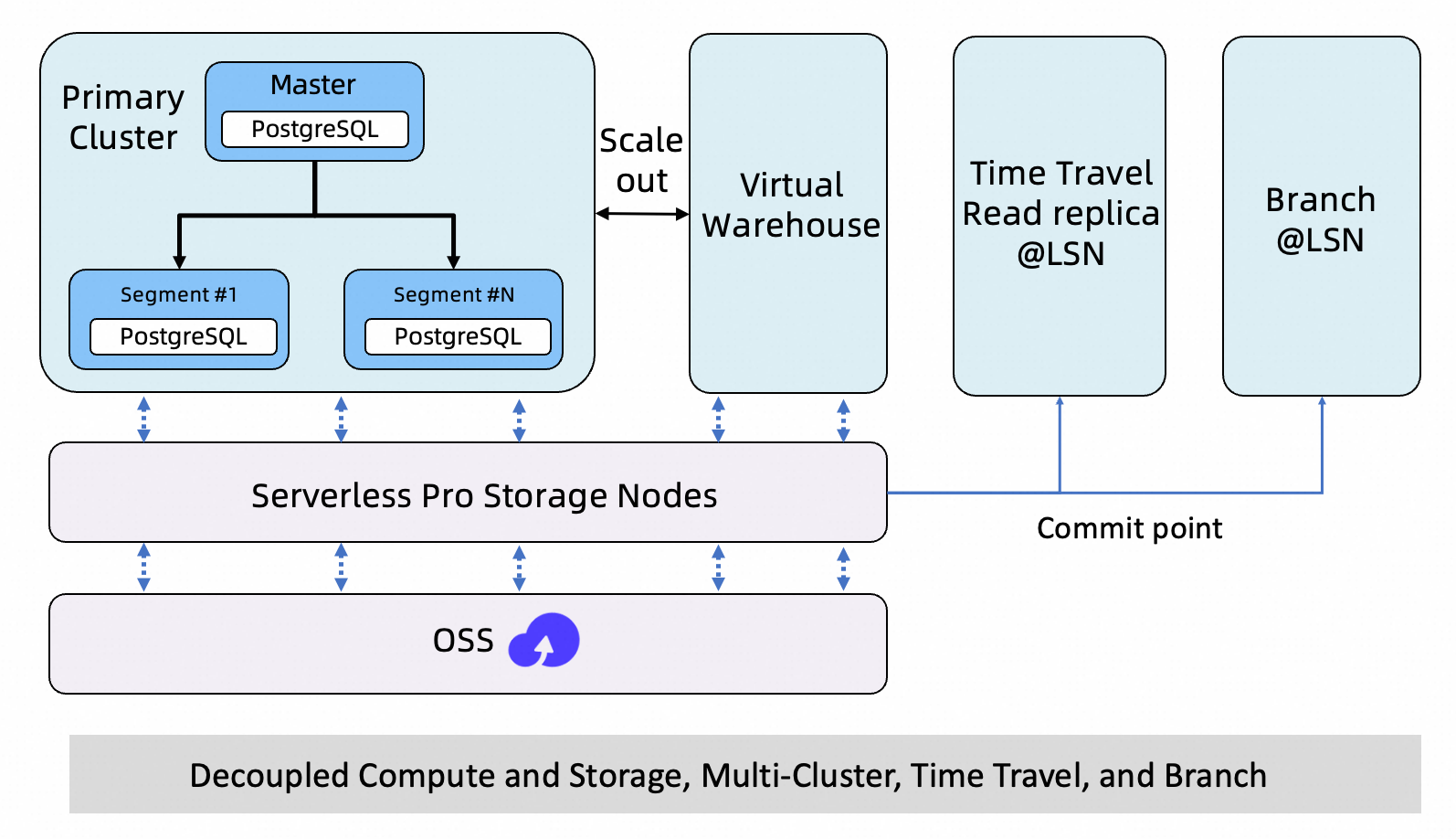
Building on the shared storage and one-write-multiple-reads architecture, Serverless Pro plans to introduce Time Travel and Branching. These features provide historical data access, isolated validation environments, and low-cost data branching—all without replicating your full dataset.
In addition to the primary cluster and VWs, you will be able to create the following on demand from the same shared storage:
Time Travel (Data Backtracking)
Create a read-only replica frozen at any historical LSN, attach an independent VW for querying, and start analyzing without restoring from a backup or replicating the full dataset.
Typical use cases: tracing operational errors, audit checks, reproducing historical issues, data reconciliation, and report backtracking.
Branching
Create an isolated, writable environment (a branch) from a specific point in time of your production data. Validate schema changes, run data repair drills, or test algorithms in the branch. If validation succeeds, merge the changes in a controlled manner. If it fails, discard the branch. The entire workflow does not affect the primary database or other services.
Typical use cases: drills for high-risk changes (DDL, indexes, parameters), code regression testing, data repair sandboxes, AI algorithm feature engineering, and parallel comparison of multiple solutions.