Virtual Warehouse (VW) is a core capability that enables a read/write splitting architecture in Serverless Pro mode. When read-intensive workloads — reports, BI dashboards, ad-hoc analytics, and ML feature extraction — compete with write operations on the primary cluster, a VW offloads those reads to an independent compute cluster that shares the same underlying data. No data replication is required.
VW is not yet available for self-service activation in the console. To enable it, submit a ticket. All VW instances operate in read-only mode.
How it works
VW separates storage from compute. Storage is shared; compute is independent.
The primary cluster and all VWs read from the same underlying data layer — Log Store, Page Store, and OSS. Each VW is an independent computing cluster with its own Master and Segment nodes and a dedicated read-only endpoint. Scaling read capacity requires launching new compute resources, not replicating data.
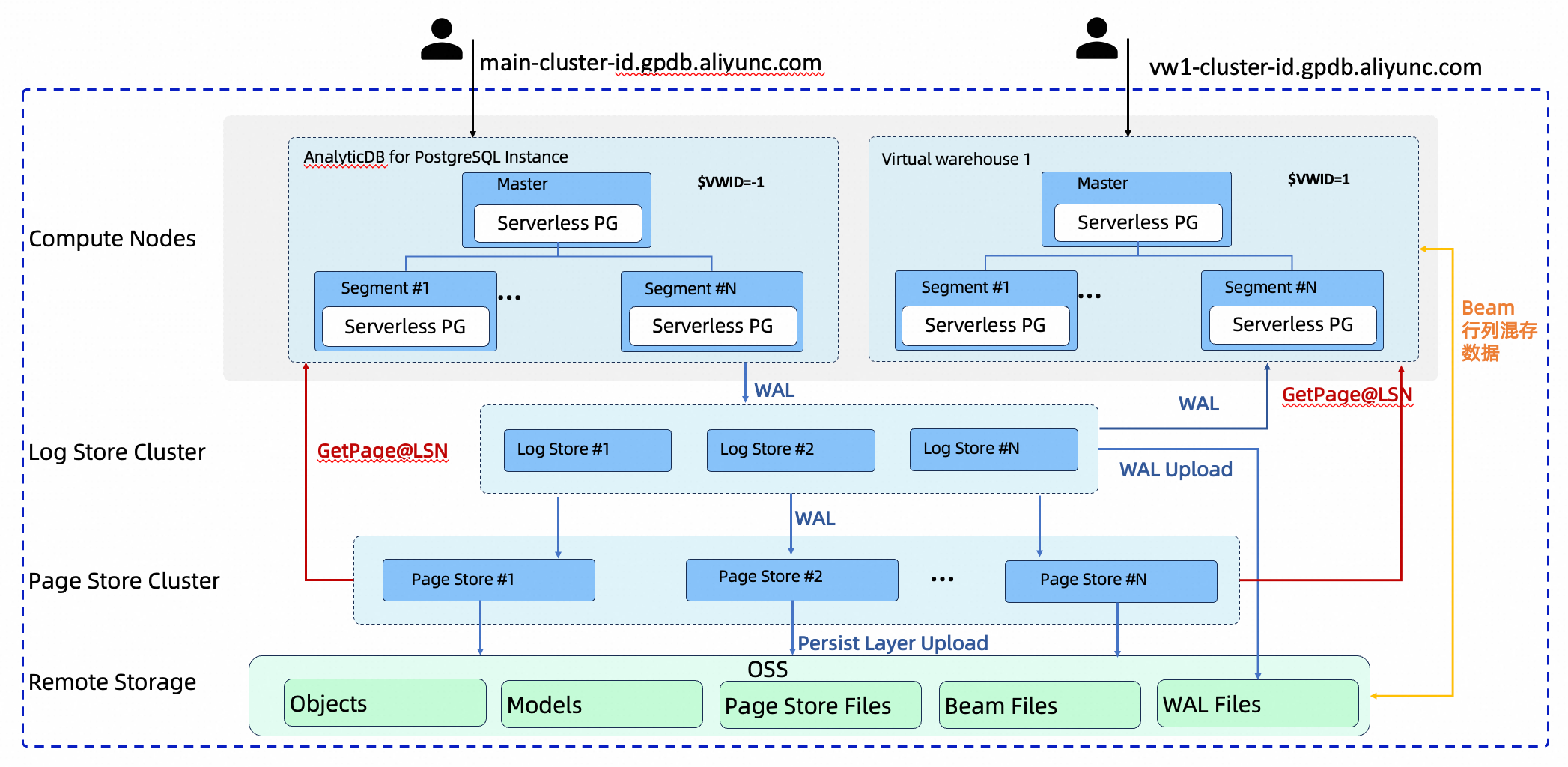
| Component | Role |
|---|---|
| Primary cluster | Handles all writes, updates, and metadata management. Also supports reads. |
| Virtual Warehouse (read-only instance) | Independent computing cluster with its own Master and Segment nodes. Provides a dedicated read-only endpoint for read scaling and workload isolation. |
| Shared storage (Log Store / Page Store / OSS) | Single data layer shared by the primary cluster and all VWs. Ensures data persistence, consistency, and freshness. |
Why VW instead of traditional read replicas
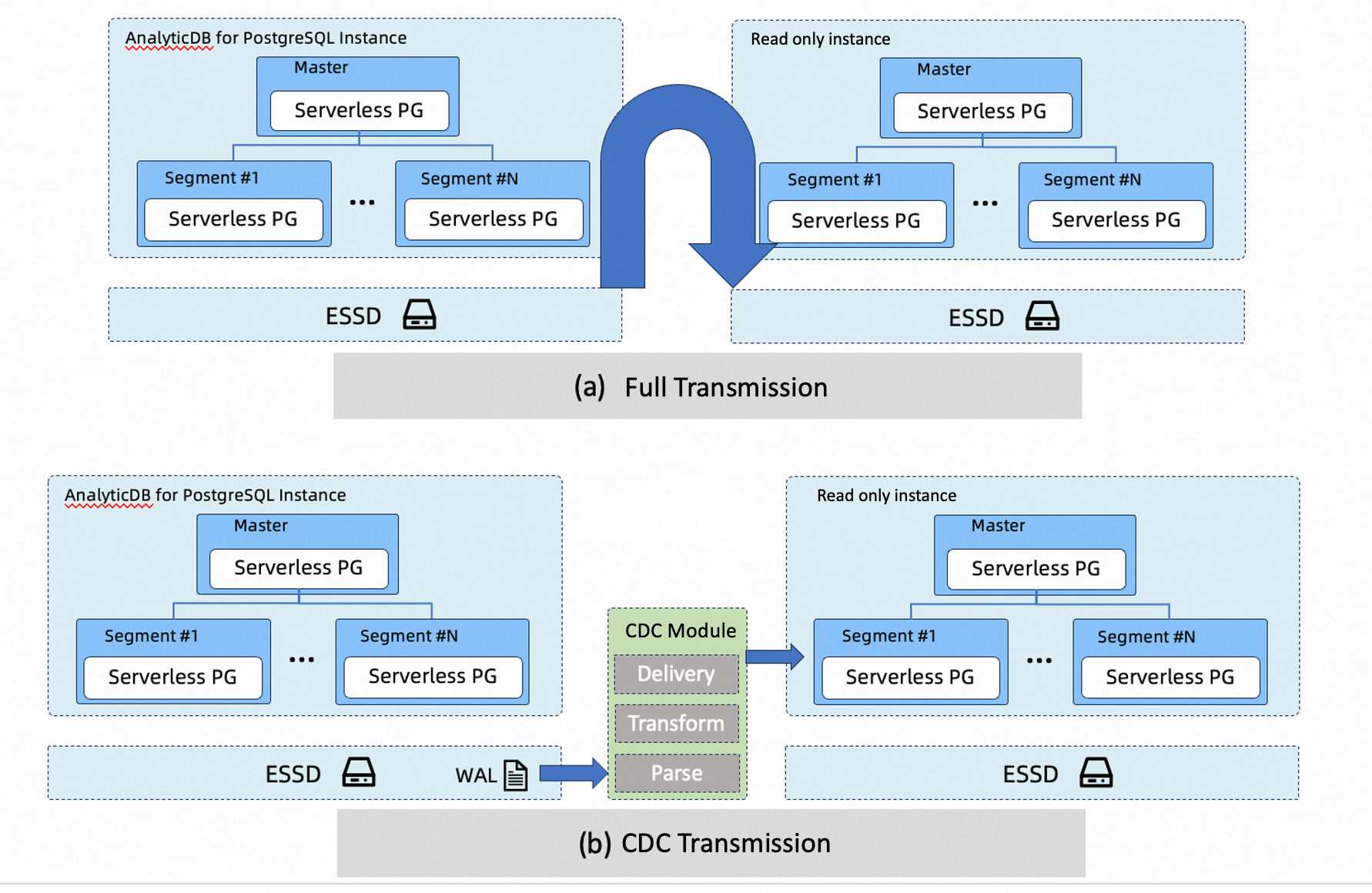
Traditional read/write splitting copies data — either as a full snapshot or via Change Data Capture (CDC) — which is slow, expensive, and operationally complex. VW takes a different approach: multiple read-only clusters share the same underlying data directly, with the storage layer and log links guaranteeing read consistency and data freshness.
| Dimension | Traditional (full/CDC sync) | Virtual Warehouse |
|---|---|---|
| Data replicas | Full or near-full replica per read-only cluster | All clusters share the same underlying data — no redundancy |
| Storage cost | Grows proportionally with the number of read-only clusters | Largely fixed; tied only to total data volume |
| Scaling speed | Hours to days — waiting for data replication or sync | Minutes — launch compute resources, no replication needed |
| Architecture complexity | CDC introduces complex pipelines and high O&M costs | Simple; the database kernel and storage layer handle consistency |
| Isolation | Physical isolation, but CDC sync can affect the primary cluster | Compute is physically isolated; no impact on the primary cluster |
Use cases
Multiple read-only teams or applications sharing the same data
When multiple business units — headquarters analytics, regional report teams, BI dashboards, and ML feature extraction pipelines — all need access to the same core dataset, each traditionally requires its own storage replica. With VW's shared storage, all of them read from one copy of the data. Storage costs can drop by over 50% compared to maintaining separate replicas per team.
Tip: Create a dedicated VW for each team or application. Each VW's compute resources scale and release independently, so one team's heavy query load does not affect others.
Burst or temporary read demand
Sales promotions, monthly settlements, and ad-hoc troubleshooting create short, sharp spikes in analytical workload. Provisioning a new cluster through traditional methods requires waiting hours or days for data synchronization before queries can run. With VW, a new read-only compute cluster is online within minutes — ready to absorb the burst. Release it when the workload subsides to avoid paying for idle capacity.
Tip: Launch a VW before a peak event and release it afterward to match capacity with actual demand.
Mixed write and read workloads
When high-volume transactions run alongside heavy dashboard queries and report generation, reads and writes compete for the same resources on the primary cluster. This leads to Performance Fluctuation and risks breaking service-level agreements (SLAs) for latency-sensitive operations. Migrating heavy read workloads to a dedicated VW achieves physical resource isolation: write paths on the primary cluster remain stable and predictable regardless of analytical query volume.
Tip: Start by migrating your heaviest or most variable read workloads — large report jobs or batch analytics — to a VW first. This has the fastest impact on stabilizing the primary cluster.
Supported operations
| Feature | Status |
|---|---|
| VW creation and deletion | Supported |
| VW version upgrade | Supported |
| VW disk scale-out | Supported |
| VW computing node scale-out | Supported |
| VW computing node scale-in | Supported |