OpenClaw is a popular open-source agent framework. However, its default local file-based memory system has limitations when handling long-duration, cross-session tasks. This topic explains how to use the openclaw-mem0 plugin to integrate AnalyticDB for MySQL as OpenClaw’s persistent memory backend. This integration provides your agent with an enterprise-grade, infinitely scalable long-term memory.
Scenarios
Feature | Description |
Cross-session memory management | Persistent memory storage powered by AnalyticDB for MySQL + Mem0, enabling long-term recording of user behavior. |
Multi-device collaboration and sharing | Multiple terminals or agent instances share the same memory repository, enabling memory sharing. |
Real-time, efficient retrieval | Millisecond-level memory read/write performance with high reliability and elastic scaling. |
Enterprise-grade reliability | Real-time backup and recovery mechanisms for cloud-based memory. |
Solution architecture
This solution uses the following components to build a complete persistent memory system:
Component | Role |
OpenClaw | The core runtime framework for the agent. |
| Acts as a “bridge,” intercepting conversations, invoking the LLM and embedding models, and storing or retrieving structured memories from AnalyticDB for MySQL. |
AnalyticDB for MySQL | Serves as the persistent memory backend, responsible for storing and efficiently retrieving vectorized memories. |
Alibaba Cloud Model Studio: Large Model Service | Provides the large language model (LLM) and text embedding model required for conversations. |
Preparations
Before you begin the integration, ensure that you have the following resources:
Create an AnalyticDB for MySQL cluster with a version of 3.2.7 or later. For more information, see Quick Start for Enterprise Edition, Basic Edition, and Data Lakehouse Edition.
NoteTo view and update the minor version, go to the Configuration Information section on the Cluster Information page in the AnalyticDB for MySQL console. To upgrade a cluster that is already on the latest default baseline version, contact Alibaba Cloud Service Support on DingTalk (DingTalk ID:
x5v_rm8wqzuqf).Obtain a model service API key. This tutorial uses Alibaba Cloud Model Studio. Activate the service and obtain an API key. For more information, see Get an API key.
Procedure
This procedure demonstrates how to connect OpenClaw to the openclaw-mem0 plugin for long-term memory storage. It uses an Alibaba Cloud Simple Application Server and an AnalyticDB for MySQL cluster.
Step 1: Provision an OpenClaw instance (optional)
You can purchase a server instance as follows:
Go to the Simple Application Server purchase page.
For the region, select the same region as your AnalyticDB for MySQL cluster. This enables efficient internal network communication.
For the image, in the Application Image section, search for and select OpenClaw .
For the plan, to ensure stable operation, choose General-purpose 4 vCPUs and 16 GB RAM or higher.
Select your subscription duration and quantity as needed. Then, click Buy Now .
You can initialize the OpenClaw application as follows:
After the instance status changes to Running , click the instance ID to navigate to the Server Overview page.
Switch to the Application Details tab. Then, follow the on-screen instructions to complete Port Release and Configure OpenClaw .
In the module, configure your large language model.
You can enable internal network interconnection as follows:
In the navigation pane on the left, select Internal Network Interconnection .
Click the Internal Network Interconnection button. This establishes an internal network connection between your Simple Application Server and other Alibaba Cloud services (such as AnalyticDB for MySQL) in the same region. This connection is essential for low-latency, secure access.
Step 2: Install the plugin and rebuild dependencies
At the top of the instance details page, click Remote Connection to log on to the server’s command-line terminal directly through your browser.
If your Python version is 3.8 or later, skip all other steps and install only the plugin.
Check your Python version. The plugin requires Python 3.8+ :
# Check Python version
python3 --version
You can install Python 3.9 (optional). If your current version is below 3.8, run the following commands:
# Install dependencies
sudo yum install gcc openssl-devel bzip2-devel libffi-devel zlib-devel --disablerepo=docker-ce-stable

# Download and install Python 3.9
cd /tmp
curl -O https://www.python.org/ftp/python/3.9.18/Python-3.9.18.tgz
tar xzf Python-3.9.18.tgz
cd Python-3.9.18
./configure --enable-optimizations
sudo make altinstall

# Verify installation
python3.9 --version

# Create a symbolic link
sudo ln -sf /usr/local/bin/python3.9 /usr/bin/python3

# Verify again
python3 --version
Install the plugin:
openclaw plugins install @adbm-ai/openclaw-mem0Recompile better-sqlite3. Remove and reinstall better-sqlite3 compiled for Python 3.9:
cd ~/.openclaw/extensions/openclaw-mem0
rm -rf node_modules/better-sqlite3
npm install better-sqlite3 --build-from-source
Step 3: Configure openclaw.json
This is a critical step. In the server’s command-line terminal, open the ~/.openclaw/openclaw.json file. Locate (or add) the "openclaw-mem0" configuration item, and fill in the following information based on your environment.
Open the configuration file.
Edit the
~/.openclaw/openclaw.jsonfile. After installation, you will see theopenclaw-mem0field underpluginsandentries.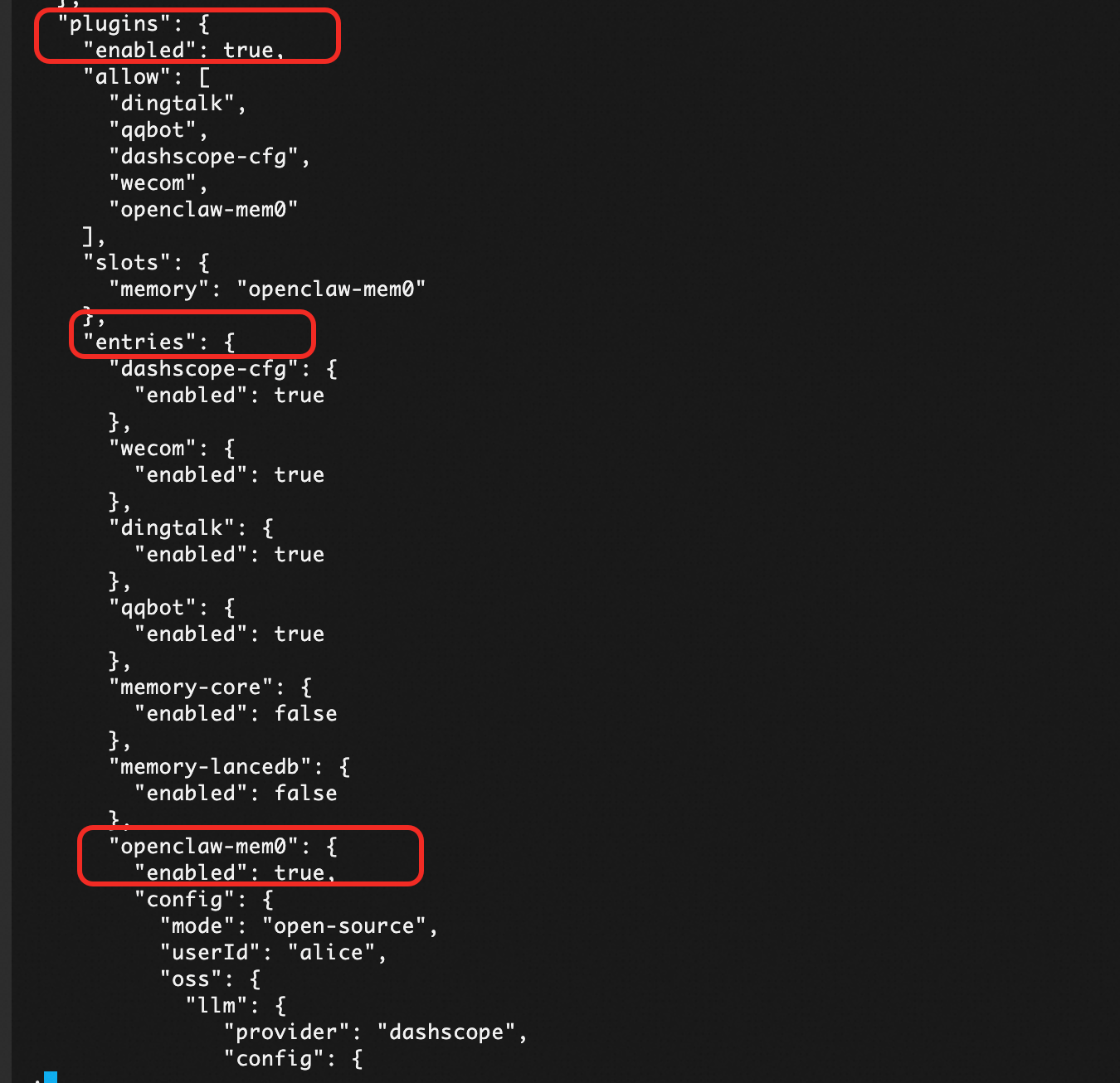
Configuration reference.
Parameter
Description
mode
Set to
"open-source"to use self-hosted Mem0.userId
User identity for memory sharing and tenant isolation. Assign a unique userId to each OpenClaw instance.
llm.provider
Fixed value: dashscope (Alibaba Cloud Model Studio).
llm.config.apiKey
Use the API key for Alibaba Cloud Model Studio.
llm.config.baseURL
https://dashscope-intl.aliyuncs.com/compatible-mode/v1.
llm.config.model
Use a model supported by Alibaba Cloud Model Studio. We recommend qwen3.5-plus.
embedder.provider
Fixed value: dashscope (Alibaba Cloud Model Studio).
embedder.config.apiKey
API key from Alibaba Cloud Model Studio.
embedder.config.url
https://dashscope-intl.aliyuncs.com/compatible-mode/v1.
embedder.config.model
We recommend
text-embedding-v4.embedder.config.embeddingDims
We recommend 1536 dimensions.
vectorStore.provider
Fixed value: aliyun-adb-mysql.
vectorStore.config.host
An internal network connection uses the VPC address of AnalyticDB for MySQL, and a public network connection uses the public network address of AnalyticDB for MySQL.
vectorStore.config.port
Database port: 3306.
vectorStore.config.database
openclaw_adb. Database name. If it does not exist or is unspecified, it will be created automatically. Do not modify this value.
vectorStore.config.user
Username of the AnalyticDB for MySQL account. The account must have read and write permission.
vectorStore.config.password
Password for the account.
vectorStore.config.collectionName
openclaw_mem0_adb. Table name for memory storage.
Configuration example.
"openclaw-mem0": {
  "enabled": true,
  "config": {
    "mode": "open-source",
    "userId": "alice",
    "oss": {
      "llm": {
        "provider": "dashscope",
        "config": {
          "apiKey": "sk-2fa2a****cef0",
          "baseURL": "https://dashscope-intl.aliyuncs.com/compatible-mode/v1",
          "model": "qwen3.5-plus"
        }
      },
      "embedder": {
        "provider": "dashscope",
        "config": {
          "model": "text-embedding-v4",
          "embeddingDims": 1536,
          "apiKey": "sk-2fa2a****cef0",
          "url": "https://dashscope-intl.aliyuncs.com/compatible-mode/v1"
        }
      },
      "vectorStore": {
        "provider": "aliyun-adb-mysql",
        "config": {
          "host": "amv-0jl1****41.ads.aliyuncs.com",
          "port": 3306,
          "database": "openclaw_adb",
          "user": "your-user-name",
          "password": "your-password",
          "collectionName": "openclaw_mem0_adb"
        }
      }
    }
  }
}
Restart the service.
openclaw gateway restartAfter configuration, you will see that the
openclaw-mem0plugin has loaded successfully.
Usage guide
Basic usage
Start a conversation.
openclaw tuiExample 1: Add memory manually.
Remember that I purchased an OpenClaw server from Alibaba Cloud. It expires on April 16, 2026.Example 2: Retrieve memory.
What should I pay attention to recently?
Command-line interface (CLI) operations
Run
openclaw mem0 search "openclaw"to view memories.openclaw mem0 search "openclaw"Supported CLI commands include the following:
# Search all memories (long-term + session)
openclaw mem0 search "what languages does the user know"

# Search only long-term memories
openclaw mem0 search "what languages does the user know" --scope long-term

# Search only session/short-term memories
openclaw mem0 search "what languages does the user know" --scope session

# Stats
openclaw mem0 stats

# Search a specific agent's memories
openclaw mem0 search "user preferences" --agent researcher

# Stats for a specific agent
openclaw mem0 stats --agent researcher
Multi-agent long-term memory isolation
In OpenClaw’s multi-agent scenarios, the Mem0 + AnalyticDB for MySQL solution supports isolated long-term memory for multiple agents.
Step 1: Create an agent.
# Add writer agent
openclaw agents add writer --workspace ~/.openclaw/workspace-writer --model bailian/qwen3.5-plus --non-interactive

# Restart Gateway
openclaw gateway restart

# Verify agent list
openclaw agents list
Step 2: Interact with the agent.
Run
openclaw tui. Switch to the writer agent and start a conversation.
Step 3: Search a specific agent’s memories.
openclaw mem0 search "science fiction novel recommendations" --agent writerStep 4: Verify memory isolation.
You can create a new agent reader.
# Add reader agent
openclaw agents add reader --workspace ~/.openclaw/workspace-reader --model bailian/qwen3.5-plus --non-interactive

# Search reader's memories (should be empty)
openclaw mem0 search "science fiction novel recommendations" --agent reader
You can observe that memories are isolated across different agents.
FAQ
Q: Why did the connection to AnalyticDB for MySQL fail?
A: Check the following items in order:
Are the
host,port,user, orpasswordparameters inopenclaw.jsoncorrect?Ensure that the IP address of your OpenClaw server is added to the whitelist of your AnalyticDB for MySQL cluster.
Confirm network connectivity (public or internal network).
Q: Why can memories not be saved or retrieved, even though no error is reported?
A: The most likely cause is an incorrect or expired API key for Alibaba Cloud Model Studio. Check the
llmandembedderconfigurations inopenclaw.json. You can also runopenclaw gateway logsto view detailed error logs.Q: Which embedding models are supported?
A: We recommend Alibaba Cloud Model Studio’s
text-embedding-v4(1536 dimensions). Other embedding services compatible with the OpenAI format are also supported.