Mailbox domain name resolution conflicts can prevent you from receiving some emails. Resolve your mailbox domain name resolution conflicts in three steps.
The preceding steps also apply to troubleshooting DNS resolution conflicts for domain aliases. Go to Enterprise Customization > Domain Management in the mail management console to view the DNS verification details for a domain alias. If the DNS records show that verification failed, follow the preceding steps to check for and delete the CNAME record where the host is @ and any non-Alibaba Mail MX records. After you make the changes, return to the domain alias management page and click Verify Now to re-verify.
1. Preparations
1.1 If your domain name service provider (SP) is Alibaba Cloud, log on to Alibaba Cloud DNS. In the list of domain names, select your mailbox domain name and click DNS Settings to open the DNS Settings page, as shown in the following figure:

1.2 If your domain name was not purchased from Alibaba Cloud, go to your domain name provider's management page. The location for adding DNS records varies by provider but is usually in a section named 'Domain Name Resolution' under 'Domain Management'. If you cannot find this section, contact your domain name provider for help. You can also send this document to your provider for assistance with the configuration. For more information, see How do I configure DNS records for an Alibaba Mail domain name that is not hosted on Alibaba Cloud?.
2. Perform the repair operations
2.1 Check the MX records where the host is @ and delete non-Alibaba Mail MX configurations
In this step, check whether the MX records for the @ host are correctly configured for Alibaba Mail.
The correct MX record values for Alibaba Mail are shown in the following table.
|
Host Record |
Record Type |
Priority |
Record Value |
|
@ |
MX |
5 |
mx1.sg.aliyun.com |
|
@ |
MX |
10 |
mx2.sg.aliyun.com |
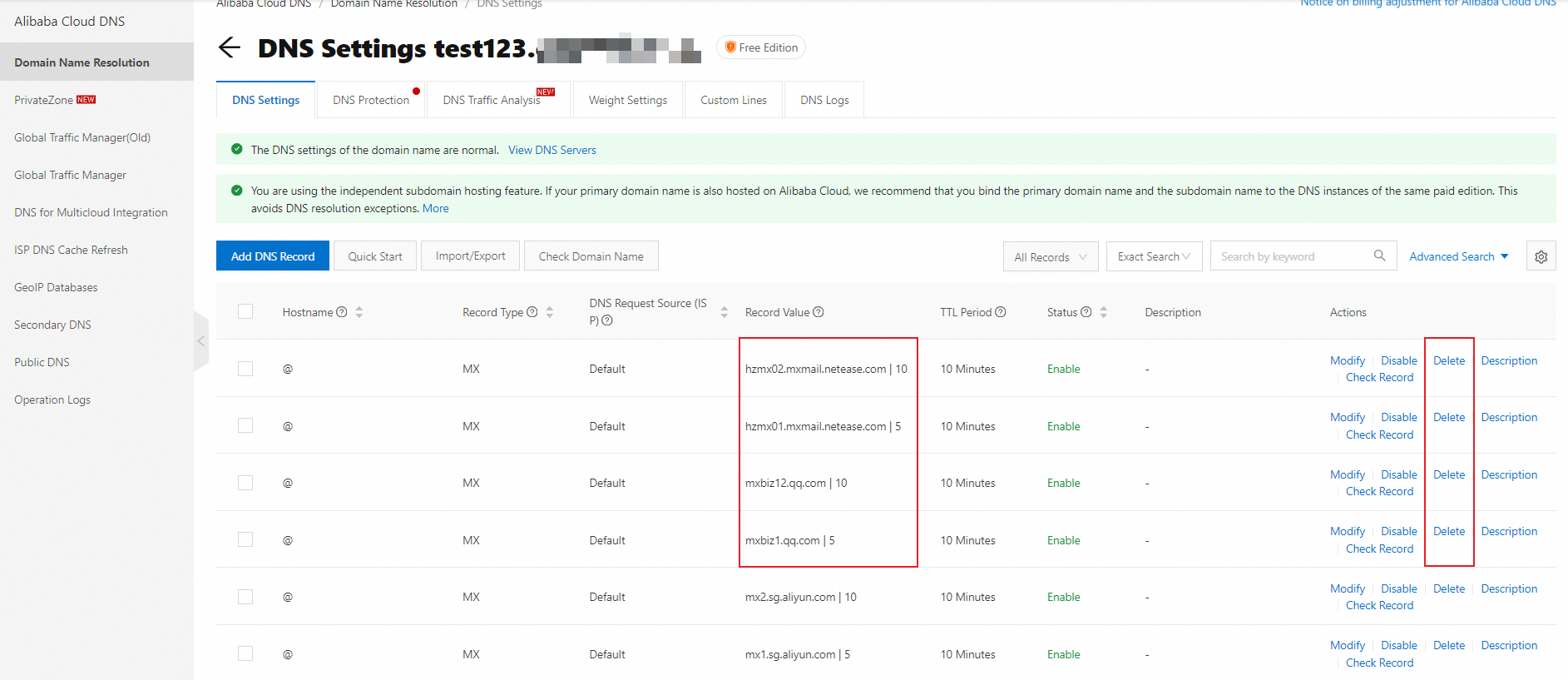
MX records that do not belong to Alibaba Mail cause emails to be delivered to the wrong address. As a result, you may not receive some emails in your Alibaba Mail mailbox. On the DNS Settings page, if any non-Alibaba Mail DNS records exist where the host is @ and the type is MX, click Delete, as shown in the following figure.
Note: The list of records may span multiple pages. Delete all non-Alibaba Mail MX records.
2.2 Delete CNAME records where the host is @
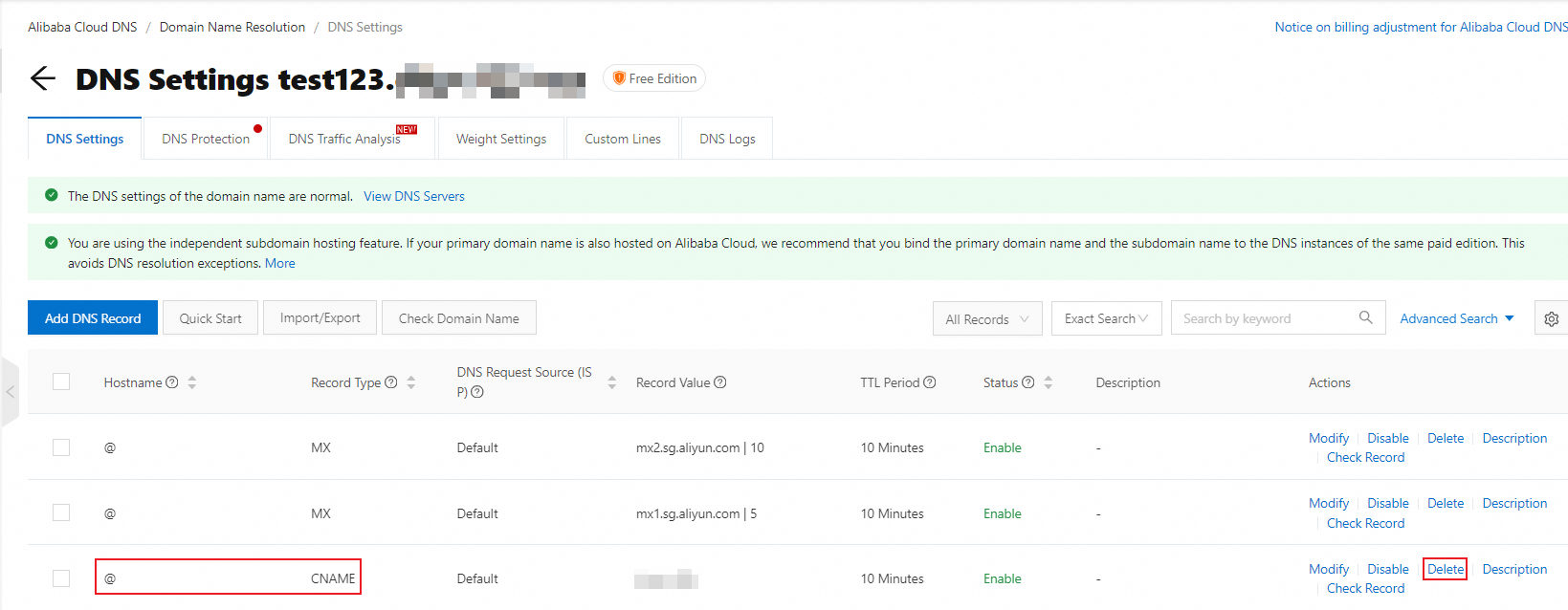
On the DNS Settings page, check for CNAME records where the host is @. If any such records exist, delete them. Otherwise, you can skip this step.
A conflict between a canonical name (CNAME) record and an MX record prevents senders from finding the DNS records for your mailbox. As a result, some emails are not delivered to your Alibaba Mail mailbox.
2.3 Example of correct DNS records where the host is @
After you complete the previous two steps, check the DNS Settings page to verify that all DNS records for the @ host are configured correctly. The following is an example of a correct configuration:
|
Host Record |
Record Type |
Priority |
Record Value |
|
@ |
MX |
5 |
mx1.sg.aliyun.com |
|
@ |
MX |
10 |
mx2.sg.aliyun.com |
|
@ |
TXT |
- |
v=spf1 include the following:spf.sg.aliyun.com -all |
3. Wait for the changes to take effect
Changes to DNS records typically take effect in 1 to 2 hours, but can take up to 48 hours to fully propagate. After you configure the DNS records, wait for this period to pass. The issue of not receiving emails should then be resolved.
While the external DNS provider's cache is still propagating, senders may continue to route emails to your previous mail server and you may receive a "Relay access denied" error. Alibaba Cloud cannot clear the DNS cache maintained by external DNS providers, so you must wait 1 to 48 hours for the cache to update.
If emails continue to be routed to your previous mail server after the DNS cache has propagated, check whether your domain name is still bound to your previous email service provider. Even if you have removed the DNS records, a domain name that remains bound at the previous provider can still cause emails to be misrouted. Log on to the console of your previous email service provider, back up your email data, and then unbind the domain name.
FAQ
Q: Will the DNS records I configure for building a website affect email delivery for my mailbox?
It depends on the type of DNS record that you use:
-
A record: An A record with host record @ or www that points to your server IP address does not affect the MX records for your mailbox. A records and MX records can coexist under the same host record.
-
CNAME record for the www subdomain: A CNAME record for a subdomain such as www that is used to connect to a Simple Application Server or an ECS instance for website hosting does not affect the MX records for the @ host. www and @ are different host records, so they do not interfere with each other at the DNS protocol level.
-
CNAME record for the @ host: Do not use this configuration. A CNAME record with host record @ conflicts with MX records and prevents your mailbox from sending or receiving emails normally.
When you build a website, we recommend that you use an A record or a CNAME record for the www subdomain, and avoid using a CNAME record for the @ host.