Deploy a production-ready DeepSeek distilled model inference service on ACK with KServe.
Background
DeepSeek-R1 model
KServe
Arena
Prerequisites
-
A Kubernetes cluster with GPU node pools is created.
-
The cluster is connected via kubectl.
-
The ack-kserve add-on is installed.
-
The Arena client is configured.
GPU specifications and cost
Model parameters consume the most GPU memory during inference. Calculate the required GPU memory:
For a 7B model with a default precision of FP16: 7 billion parameters at 2 bytes each (16-bit floating-point / 8 bits per byte).
Beyond model loading, factor in KV Cache and GPU utilization. With a typical buffer, use a GPU-accelerated instance with 24 GiB GPU memory, such as ecs.gn7i-c8g1.2xlarge or ecs.gn7i-c16g1.4xlarge. See GPU-accelerated compute-optimized instance family and GPU-accelerated cloud server billing.
Deploy the model
Step 1: Prepare the DeepSeek-R1-Distill-Qwen-7B model files
-
Download the DeepSeek-R1-Distill-Qwen-7B model from ModelScope.
NoteGit Large File Storage (LFS) must be installed. Run
yum install git-lfsorapt-get install git-lfs. See Install Git Large File Storage.git lfs install GIT_LFS_SKIP_SMUDGE=1 git clone https://www.modelscope.cn/deepseek-ai/DeepSeek-R1-Distill-Qwen-7B.git cd DeepSeek-R1-Distill-Qwen-7B/ git lfs pull -
Create a directory in OSS and upload the model files.
NoteSee Install ossutil.
ossutil mkdir oss://<your-bucket-name>/models/DeepSeek-R1-Distill-Qwen-7B ossutil cp -r ./DeepSeek-R1-Distill-Qwen-7B oss://<your-bucket-name>/models/DeepSeek-R1-Distill-Qwen-7B -
Create a persistent volume (PV) and persistent volume claim (PVC) named
llm-modelfor the target cluster. See Use statically provisioned ossfs 1.0 volumes.Console
Sample PV configurations:
Parameter
Description
PV type
OSS
Name
llm-model
Access certificate
The AccessKey ID and AccessKey secret for OSS access.
Bucket ID
The OSS bucket from the previous step.
OSS path
The model storage path, such as
/models/DeepSeek-R1-Distill-Qwen-7B.Sample PVC configurations:
Parameter
Description
PVC type
OSS
Name
llm-model
Allocation mode
Select an existing PV
Existing volumes
Select the PV created above.
kubectl
Sample YAML file:
apiVersion: v1
kind: Secret
metadata:
  name: oss-secret
stringData:
  akId: <your-oss-ak> # Your AccessKey ID for accessing OSS.
  akSecret: <your-oss-sk> # Your AccessKey secret for accessing OSS.
---
apiVersion: v1
kind: PersistentVolume
metadata:
  name: llm-model
  labels:
    alicloud-pvname: llm-model
spec:
  capacity:
    storage: 30Gi
  accessModes:
    - ReadOnlyMany
  persistentVolumeReclaimPolicy: Retain
  csi:
    driver: ossplugin.csi.alibabacloud.com
    volumeHandle: llm-model
    nodePublishSecretRef:
      name: oss-secret
      namespace: default
    volumeAttributes:
      bucket: <your-bucket-name> # The name of your bucket.
      url: <your-bucket-endpoint> # The endpoint, such as oss-cn-hangzhou-internal.aliyuncs.com.
      otherOpts: "-o umask=022 -o max_stat_cache_size=0 -o allow_other"
      path: <your-model-path> # In this example, the path is /models/DeepSeek-R1-Distill-Qwen-7B/.
---
apiVersion: v1
kind: PersistentVolumeClaim
metadata:
  name: llm-model
spec:
  accessModes:
    - ReadOnlyMany
  resources:
    requests:
      storage: 30Gi
  selector:
    matchLabels:
      alicloud-pvname: llm-model
Step 2: Deploy the inference service
-
Start the inference service named deepseek.
arena serve kserve \
    --name=deepseek \
    --image=kube-ai-registry.cn-shanghai.cr.aliyuncs.com/kube-ai/vllm:v0.6.6 \
    --gpus=1 \
    --cpu=4 \
    --memory=12Gi \
    --data=llm-model:/models/DeepSeek-R1-Distill-Qwen-7B \
    "vllm serve /models/DeepSeek-R1-Distill-Qwen-7B --port 8080 --trust-remote-code --served-model-name deepseek-r1 --max-model-len 32768 --gpu-memory-utilization 0.95 --enforce-eager"
Parameters:
Parameter
Required
Description
--name
Yes
The inference service name. Must be globally unique.
--image
Yes
The inference service image.
--gpus
No
The number of GPUs. Default value: 0.
--cpu
No
The number of CPUs.
--memory
No
The memory size.
--data
No
The model artifact path. In this example, the
llm-modelPV from the previous step, mounted to /models/ in the container.Expected output:
inferenceservice.serving.kserve.io/deepseek created
INFO[0003] The Job deepseek has been submitted successfully
INFO[0003] You can run `arena serve get deepseek --type kserve -n default` to check the job status
Step 3: Verify the inference service
-
Check the deployment status of the KServe inference service.
arena serve get deepseekExpected output:
Name:       deepseek
Namespace:  default
Type:       KServe
Version:    1
Desired:    1
Available:  1
Age:        3m
Address:    http://deepseek-default.example.com
Port:       :80
GPU:        1
Instances:
  NAME                                 STATUS   AGE  READY  RESTARTS  GPU  NODE
  ----                                 ------   ---  -----  --------  ---  ----
  deepseek-predictor-7cd4d568fd-fznfg  Running  3m   1/1    0         1    cn-beijing.172.16.1.77
The output confirms the inference service is deployed.
-
Send a request to the inference service via the NGINX Ingress gateway IP.
# Get the IP address of the NGINX Ingress.
NGINX_INGRESS_IP=$(kubectl -n kube-system get svc nginx-ingress-lb -ojsonpath='{.status.loadBalancer.ingress[0].ip}')
# Get the hostname of the inference service.
SERVICE_HOSTNAME=$(kubectl get inferenceservice deepseek -o jsonpath='{.status.url}' | cut -d "/" -f 3)
# Send a request to the inference service.
curl -H "Host: $SERVICE_HOSTNAME" -H "Content-Type: application/json" http://$NGINX_INGRESS_IP:80/v1/chat/completions -d '{"model": "deepseek-r1", "messages": [{"role": "user", "content": "Say this is a test!"}], "max_tokens": 512, "temperature": 0.7, "top_p": 0.9, "seed": 10}'
Expected output:
{"id":"chatcmpl-0fe3044126252c994d470e84807d4a0a","object":"chat.completion","created":1738828016,"model":"deepseek-r1","choices":[{"index":0,"message":{"role":"assistant","content":"<think>\n\n</think>\n\nIt seems like you're testing or sharing some information. How can I assist you further? If you have any questions or need help with something, feel free to ask!","tool_calls":[]},"logprobs":null,"finish_reason":"stop","stop_reason":null}],"usage":{"prompt_tokens":9,"total_tokens":48,"completion_tokens":39,"prompt_tokens_details":null},"prompt_logprobs":null}
Observability
In production, observability for LLM inference services is essential for detecting and locating faults early. vLLM provides inference metrics. vLLM provides inference metrics. See the Metrics document. KServe also provides service health metrics. Both are integrated into Arena — add --enable-prometheus=true when submitting the application.
arena serve kserve \
    --name=deepseek \
    --image=kube-ai-registry.cn-shanghai.cr.aliyuncs.com/kube-ai/vllm:v0.6.6 \
    --gpus=1 \
    --cpu=4 \
    --memory=12Gi \
    --enable-prometheus=true \
    --data=llm-model:/models/DeepSeek-R1-Distill-Qwen-7B \
    "vllm serve /models/DeepSeek-R1-Distill-Qwen-7B --port 8080 --trust-remote-code --served-model-name deepseek-r1 --max-model-len 32768 --gpu-memory-utilization 0.95 --enforce-eager"
Monitor the vLLM-deployed inference service with a Grafana dashboard. Obtain the official vLLM dashboard JSON from the vLLM official website and import it into Grafana. After configuration:
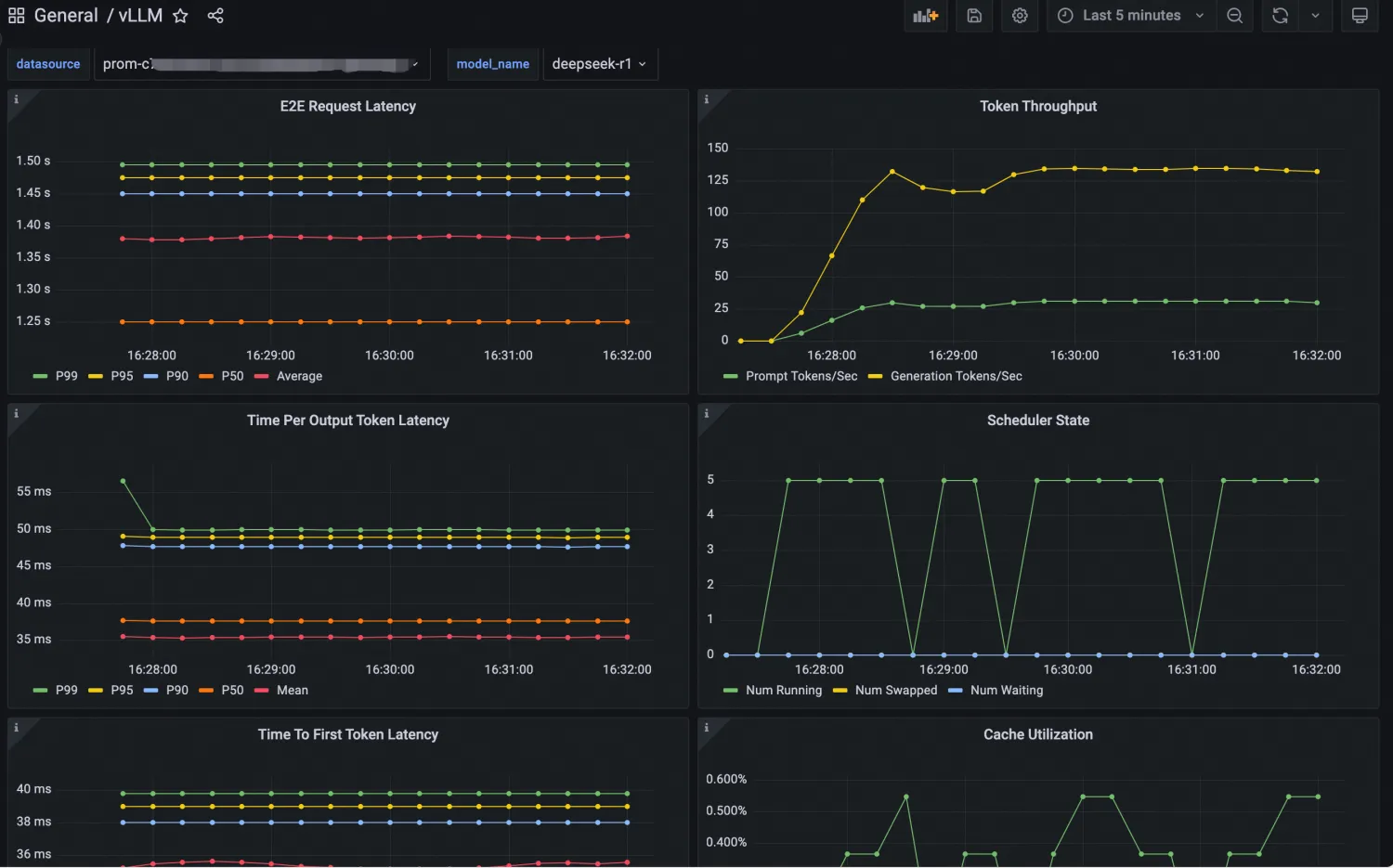
Import a Grafana dashboard
Import the dashboard
-
Log on to the ARMS console.
-
In the navigation pane on the left, click Integration Management.
-
On the integrated environments tab, select container environment, search by ACK cluster name, and click the target environment.
-
On the Component Management tab, copy and save the Cluster ID, and click Dashboard Directory.
The dashboard directory name contains the corresponding cluster ID.
-
On the right side of the Dashboards tab, click Import .
-
Copy the grafana.json contents, paste into the Import via panel json text box, and click Load.
NoteYou can also import the dashboard by uploading the JSON file.
-
Keep the default settings and click Import.
Verify the dashboard data
-
Search for the data source by saved cluster ID or Prometheus instance ID, and select it.
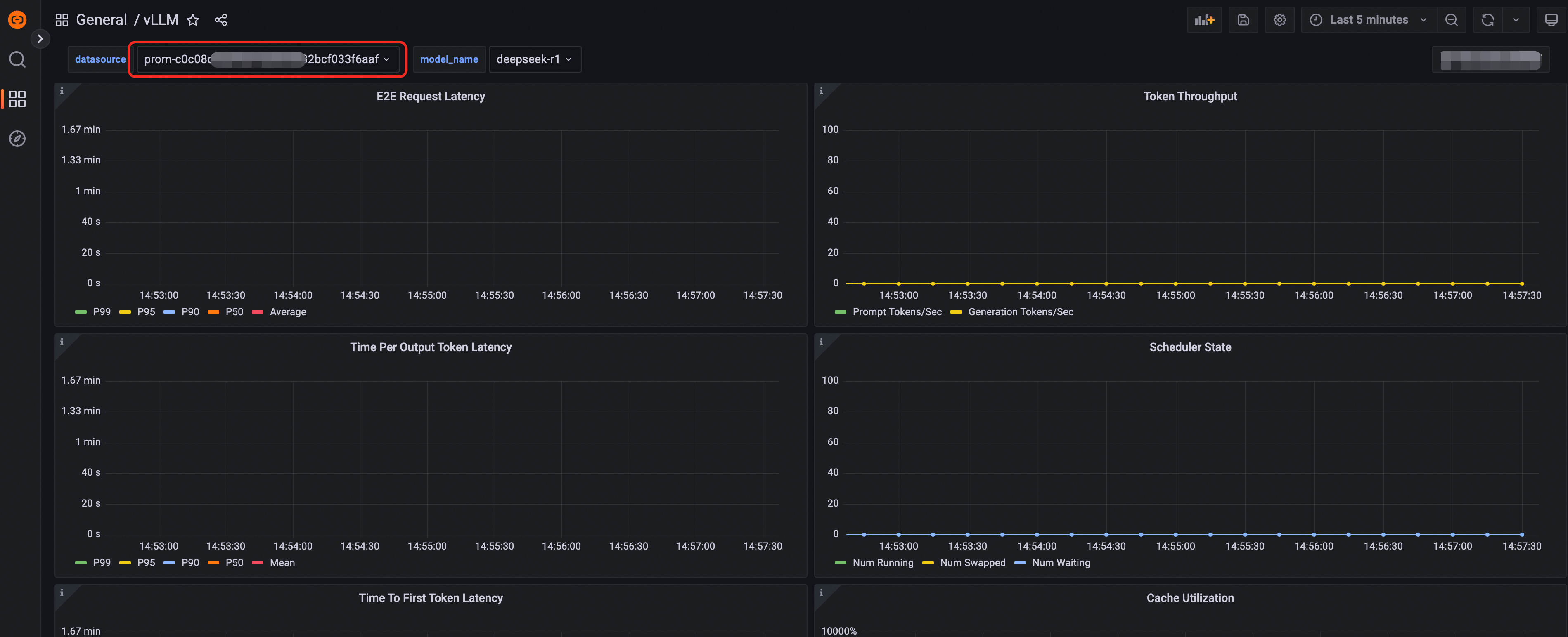
-
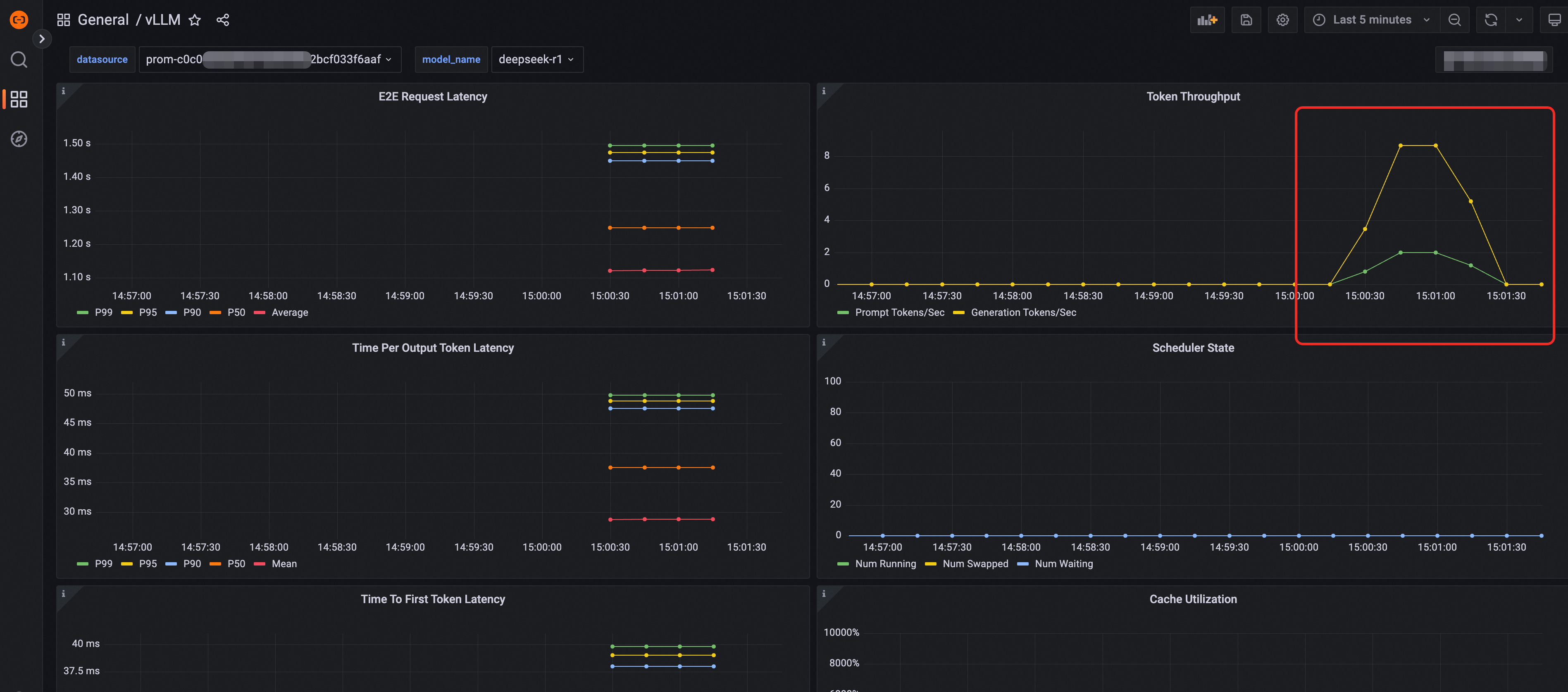
Send requests to access the inference service to simulate traffic. Verify that metrics such as Token Throughput appear on the dashboard.
Auto scaling
KServe handles fluctuating workloads through the Kubernetes Horizontal Pod Autoscaler (HPA) and ACK's ack-alibaba-cloud-metrics-adapter, scaling model service pods based on CPU, memory, GPU utilization, or custom metrics. See Configure auto scaling for a service.
Model acceleration
Large model artifacts pulled from storage services such as OSS and NAS can cause long delays and cold starts. Use Fluid to speed up model loading and optimize inference performance for KServe-based services. See Use Fluid for model acceleration.
Canary release
ACK supports canary release strategies such as traffic splitting by percentage and header-based routing to reduce deployment risks. See Implement canary releases for inference services.
GPU sharing inference
The DeepSeek-R1-Distill-Qwen-7B model requires only 14 GB of GPU memory. On instances with larger GPUs, GPU sharing inference partitions a single GPU for multiple inference services, improving utilization. See Deploy GPU sharing inference services.