System Observer Monitoring (SysOM) provides kernel-level container observability, supporting containerized deployment, migration, and monitoring. This topic explains how to enable and use ack-sysom-monitor and describes the related metrics.
Prerequisites
Before you begin, ensure that you have:
-
An ACK managed cluster, or an ACK Serverless cluster created after October 2021, with Kubernetes 1.18.8 or later. See Create an ACK managed cluster or Create an ACK Serverless cluster. To update, see Manually update ACK clusters
-
Managed Service for Prometheus enabled. See Enable Managed Service for Prometheus
What ack-sysom-monitor collects
ack-sysom-monitor is a System Observer Monitoring (SysOM) component that uses extended Berkeley Packet Filter (eBPF) to collect and enhance kernel-level metrics for nodes and containers. Beyond standard system metrics, it provides enhanced metrics for pod and node kernel-level monitoring, helping identify issues such as system jitters, delays, resource leaks, and pod memory exceptions.
Billing
After ack-sysom-monitor is enabled, related components automatically send monitoring metrics to Managed Service for Prometheus. These metrics are billed as custom metrics.
Before enabling this feature, read the Billing overview to understand how custom metrics are charged. Fees vary based on cluster size and the number of applications running. To monitor and control resource usage, see View resource usage.
Enable ack-sysom-monitor
-
Log on to the ARMS console.
-
In the left-side navigation pane, click Integration Center.
-
In the Infrastructure section of the Integration Center page, click SysOM System Observation.
-
In the Start Integration step of the SysOM System Observation panel, select the ACK cluster and click OK.
View monitoring data
-
Log on to the ACK console. In the left-side navigation pane, click Clusters.
-
On the Clusters page, click your cluster name. In the left-side pane, choose Operations > Prometheus Monitoring.
-
On the Prometheus Monitoring page, click the SysOM tab.
ack-sysom-monitorsupports two monitoring views:-
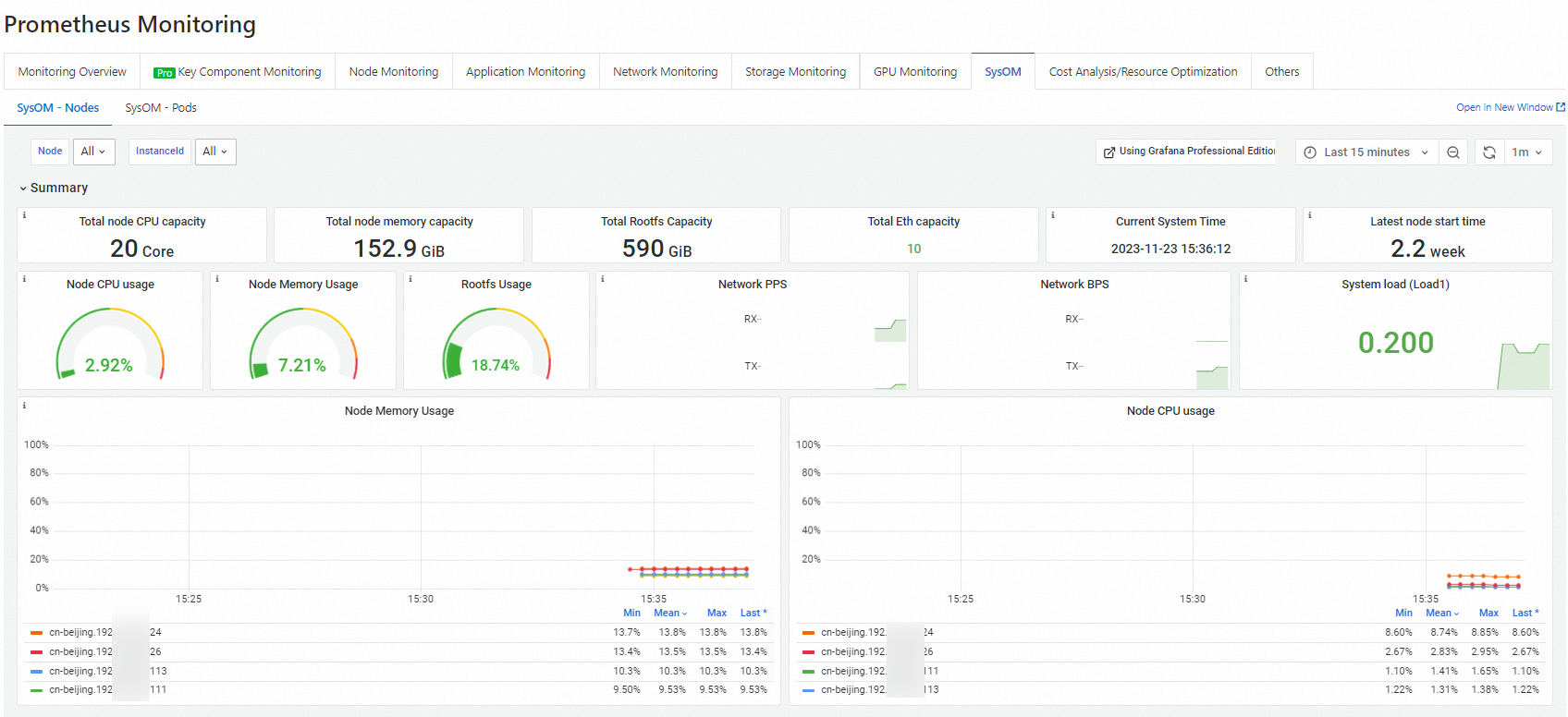
Node kernel-level monitoring — On the SysOM - Nodes tab, view CPU, memory, scheduling, storage, and network metrics for each node.
-
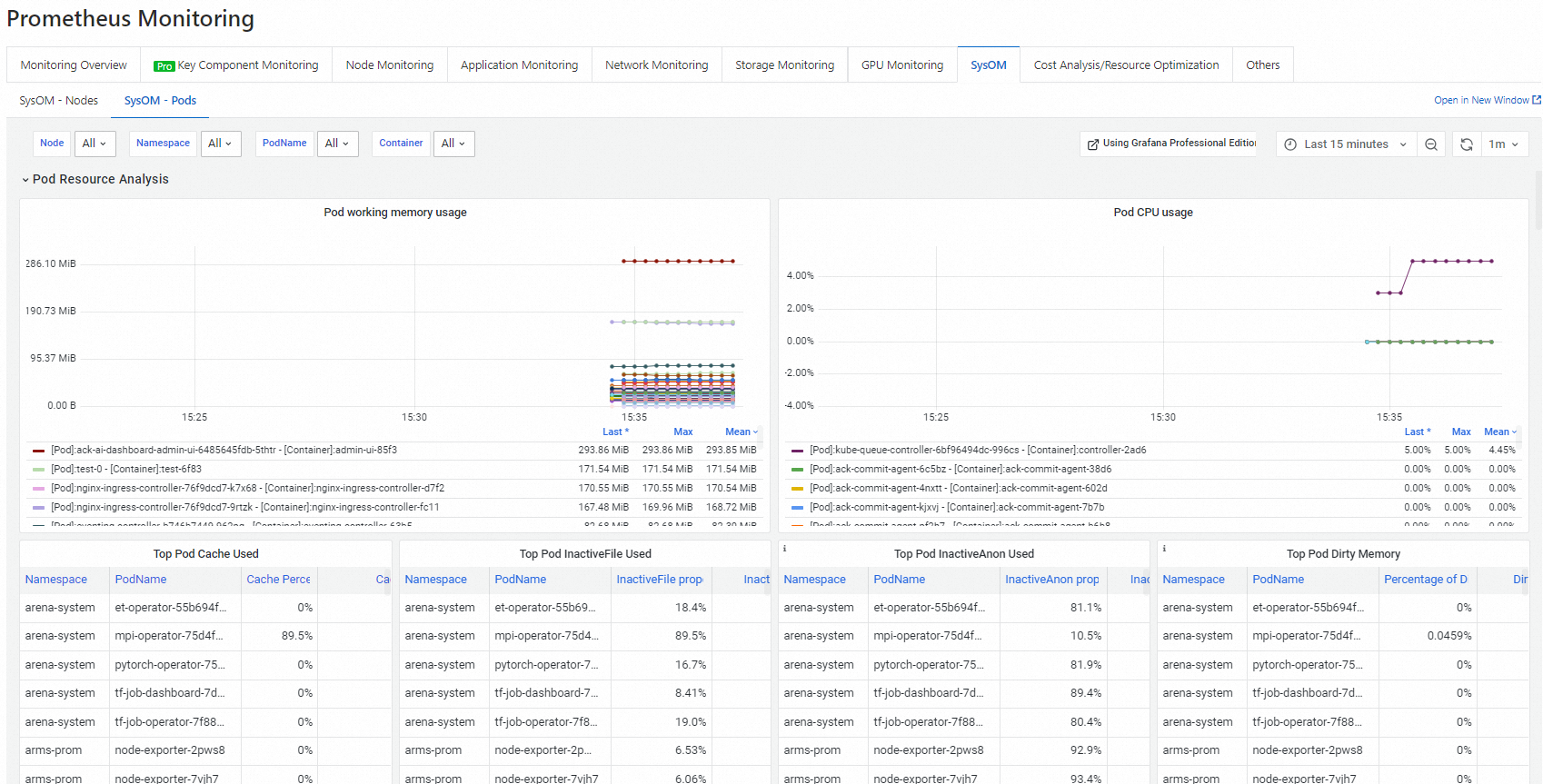
Pod kernel-level monitoring — On the SysOM - Pods tab, view memory, CPU, network, and I/O metrics for each pod in real time.
-
Next steps
To stop incurring charges, uninstall the ack-sysom-monitor component. See Manage components.
Metrics
All metrics provided by ack-sysom-monitor follow the Prometheus data model.
All metric types listed below are gauge.
Diagnostic scenarios
Use the table below to go from symptom to metric.
| Symptom | Relevant metrics |
|---|---|
| CPU throttling or scheduling delays | sysom_proc_schedstat, sysom_cpu_dist, sysom_container_cpu_stat, sysom_container_cpu_cfsquota |
| High load or too many D-state processes | sysom_proc_stat_counters, sysom_proc_loadavg |
| Memory pressure or OOM events | sysom_proc_vmstat, sysom_container_memory_gdrcm_latency, sysom_container_memory_cdrcm_latency, sysom_container_memory_cpt_latency |
| Page cache causing memory jitter | sysom_container_memory_filecache |
| cgroup leaks | sysom_cgroups |
| Disk I/O latency or throughput issues | sysom_proc_disks, sysom_container_blkio_stat |
| Network packet loss or retransmission | sysom_proc_pkt_status, sysom_net_retrans_count |
| High TCP RTT or connection anomalies | sysom_net_health_hist, sysom_net_health_count, sysom_net_tcp_count |
| Socket or buffer exhaustion | sysom_sock_stat |
Node metrics
Node metrics include CPU and scheduling, memory, storage, network, and other system metrics.
CPU and scheduling
|
Metric |
Type |
Unit |
Description |
|
sysom_proc_cpu_total |
gauge |
% |
CPU uptime breakdown for the whole node, by state: user mode, kernel mode, softirq, hardirq, idle, and iowait. Identifies which state consumes CPU time. |
|
sysom_proc_cpus |
gauge |
% |
CPU uptime breakdown per core, by state: user mode, kernel mode, softirq, hardirq, idle, and iowait. Detects per-core imbalances. |
|
sysom_proc_sirq |
gauge |
% |
Occurrences per softirq type: HI, TIMER, NET_TX, NET_RX, BLOCK, IRQ_POLL, TASKLET, SCHED, HRTIMER, and RCU. A spike in NET_RX or NET_TX can indicate network saturation. |
|
sysom_proc_stat_counters |
gauge |
- |
Number of processes in Running or D state, system startup time, and context switch count. A high D-state count indicates I/O or lock contention. |
|
sysom_proc_loadavg |
gauge |
- |
Load averages at 1-min, 5-min, and 15-min intervals, plus run-queue length and total process count. Assesses sustained load trends. |
|
sysom_proc_schedstat |
gauge |
ns (nanoseconds) |
CPU scheduling latency: time spent waiting in the run queue, and CPU time slice length. Elevated wait time indicates scheduling pressure. |
|
sysom_cpu_dist |
gauge |
- |
Distribution of CPU scheduling intervals: time from releasing the CPU to being rescheduled. Bucketed at 1 µs, 10 µs, 100 µs, 1 ms, 10 ms, 100 ms, and 1 s. Long tail latencies indicate scheduling jitter. |
Memory
|
Metric |
Type |
Unit |
Description |
|
sysom_proc_meminfo |
gauge |
KiB |
Node-level memory usage: Total, Free, Available, Cache, Buffers, SReclaimable, and SUnreclaim. Assesses overall memory pressure. |
|
sysom_proc_vmstat |
gauge |
- |
Memory page statistics: free pages, dirty pages, pages read/written, pages reclaimed from the inactive list, and out-of-memory (OOM) killer invocations. OOM killer activity signals critical memory exhaustion. |
|
sysom_proc_buddyinfo |
gauge |
- |
Buddy system allocator state: available blocks across sizes in each memory zone and node. Detects memory fragmentation that can cause allocation failures. |
Storage
|
Metric |
Type |
Unit |
Description |
|
sysom_proc_disks |
gauge |
- |
Per-disk and per-partition I/O statistics: read/write request count and bytes, merge counts, inflight requests, and total time to complete requests. Diagnoses disk throughput and latency issues. |
|
sysom_fs_stat |
gauge |
- |
File system usage per mount point: block size, used and available blocks, and used and available inodes. Detects disk or inode exhaustion before it causes failures. |
Network
|
Metric |
Type |
Unit |
Description |
|
sysom_proc_networks |
gauge |
- |
Per-NIC data transfer statistics: packets and bytes received and sent, driver-level discards, and send/receive errors. Detects NIC-level packet loss. |
|
sysom_proc_pkt_status |
gauge |
- |
Network protocol stack events: packet drops, buffer overflows, and assertion failures. Identifies where packets are lost in the stack. |
|
sysom_sock_stat |
gauge |
- |
Socket and buffer usage: total, raw, TCP, and UDP socket counts, TCP sockets in TIME_WAIT or orphan state, and TCP/UDP socket memory usage. High TIME_WAIT or orphan counts can indicate connection handling issues caused by application logic or system parameters. |
|
sysom_softnets |
gauge |
- |
Per-CPU NIC softirq statistics: packets received and sent per softirq, and |
|
sysom_net_health_hist |
gauge |
- |
Round-trip time (RTT) distribution across all TCP connections on the node, bucketed at 10 ms, 100 ms, and 1 s. Detects TCP latency degradation. |
|
sysom_net_health_count |
gauge |
- |
Average RTT of TCP connections on the node. Similar to |
|
sysom_net_retrans_count |
gauge |
- |
TCP retransmission statistics: count of retransmitted packets by type (SYN, SYN-ACK, RESET), including retransmissions due to timeout. Rising counts indicate network instability or congestion. |
|
sysom_net_tcp_count |
gauge |
- |
TCP connection statistics: active connection count, segments received and sent, segments retransmitted, and receive failures. |
|
sysom_net_udp_count |
gauge |
- |
UDP statistics: packets received and sent, send/receive buffer errors, and packets dropped due to no available ports. |
|
sysom_net_ip_count |
gauge |
- |
IP layer statistics: packets forwarded, received, and sent. |
|
sysom_net_icmp_count |
gauge |
- |
ICMP statistics: packets received and sent, and send/receive failures. |
Other system metrics
|
Metric |
Type |
Unit |
Description |
|
sysom_cgroups |
gauge |
- |
Number of cgroups in use across subsystems: CPU, Cpuacct, Memory, Pids, Blkio, and Devices. A steadily increasing count that does not decrease can indicate cgroup leaks. |
|
sysom_uptime |
gauge |
s (seconds) |
System uptime since last boot, and idle time. |
Container metrics
Container metrics include CPU and scheduling, memory, I/O, and network metrics.
CPU and scheduling
|
Metric |
Type |
Unit |
Description |
|
sysom_container_cpu_stat |
gauge |
- |
CPU throttling statistics per cgroup: number of times CPU limits were enforced, total enforcement count, and total duration of enforcement. Determines whether resource quotas need adjustment. |
|
sysom_container_cpu_acctstat |
gauge |
% |
CPU utilization for container tasks, broken down by mode: user, kernel, and total. Shows how containers consume CPU across kernel and user space. |
|
sysom_container_cpu_cfsquota |
gauge |
- |
Completely Fair Scheduler (CFS) configuration for the container cgroup: |
Memory
|
Metric |
Type |
Unit |
Description |
|
sysom_container_memory_stat |
gauge |
KiB |
Container memory usage by category: Total, Free, Available, Cache, Buffers, SReclaimable, and SUnreclaim. Assesses memory consumption per container. |
|
sysom_container_memory_filecache |
gauge |
KiB |
Page cache usage per container: the top 10 files consuming the most page cache, file sizes, and total page cache occupied. Identifies containers where page cache overuse causes memory pressure, latency, or jitter. |
|
sysom_container_memory_gdrcm_latency |
gauge |
Times |
Delays caused by memory reclamation due to insufficient memory resources. Counts delays in six ranges: 1–5 ms, 5–10 ms, 10–100 ms, 100–500 ms, 500–1,000 ms, and over 1,000 ms. Detects node-level memory pressure affecting container performance. |
|
sysom_container_memory_cdrcm_latency |
gauge |
Times |
Delays caused by memory reclamation due to insufficient memory cgroups. Counts delays in the same six ranges as
Note
This metric is valid only if the current memory cgroups are non-root cgroups or memory limits are configured for the current memory cgroups. |
|
sysom_container_memory_cpt_latency |
gauge |
Times |
Delays caused by kernel memory adjustment, triggered when a process in the container requests memory but the node has insufficient memory or an excessive number of memory fragments exists. Counts delays in the same six ranges. Detects memory fragmentation impacting container allocation. |
I/O
|
Metric |
Type |
Unit |
Description |
|
sysom_container_blkio_stat |
gauge |
- |
Block I/O statistics for the container's disk: read/write request count and bytes, queued request count and bytes, and request wait time. Diagnoses I/O bottlenecks at the container level. |
Network
|
Metric |
Type |
Unit |
Description |
|
sysom_container_network_stat |
gauge |
- |
Virtual NIC data transfer statistics per container: packets and bytes received and sent, and device-level discards. Packets dropped by the network protocol stack are not included. |