Add vSwitches to expand the Pod IP pool when a vSwitch runs out of IPs in a Terway cluster.
You might need this if:
A vSwitch is exhausted and Pods are stuck in
ContainerCreating.You're scaling out nodes and need more IP capacity in a specific zone.
You want to spread IP usage across multiple vSwitches for better balance.
Prerequisites
Before you begin, ensure that you have:
An ACK cluster running in Terway network mode
Access to the Virtual Private Cloud (VPC) console and the Container Service Management Console
Permissions to edit the Terway add-on configuration or ConfigMaps in the
kube-systemnamespace
Limitations
The new vSwitch must be in the same zone as your nodes. If no configured vSwitch covers a node's zone, Terway falls back to the vSwitch of the node's primary ENI.
You cannot change the vSwitch of an existing ENI. To apply updated Pod vSwitch settings, add new nodes or perform a rolling restart.
Detect vSwitch IP exhaustion
When a vSwitch runs out of IPs, Pods that need a new ENI stay in ContainerCreating.
Check the Terway logs on the node where the Pod is scheduled:
kubectl logs --tail=100 -f terway-eniip-***** -n kube-system -c terwayIf the output contains the following error, the vSwitch has no available IPs:
time="20**-03-17T07:03:40Z" level=warning msg="Assign private ip address failed: Aliyun API Error: RequestId: 2095E971-E473-4BA0-853F-0C41CF52651D Status Code: 403 Code: InvalidVSwitchId.IpNotEnough Message: The specified VSwitch \"vsw-***\" has not enough IpAddress., retrying"Also check the Available IP Addresses count in the VPC console under vSwitch. A count of 0 confirms exhaustion.
When changes take effect
Terway applies the new vSwitch configuration only when creating a new ENI. Existing ENIs are unaffected.
Existing nodes: The new configuration does not apply while:
An ENI on the node is still in use (running Pods or trunk ENI).
The node has reached its ENI limit (set by instance type).
New nodes: Nodes added after the update use the new vSwitch immediately.
Modify the vSwitch for Pods
Console method
Requires Terway v1.4.4 or later. For earlier versions, use the kubectl method.
Create a vSwitch in the Virtual Private Cloud (VPC) console in the same zone as the target nodes. See Create and manage vSwitches.
NotePod density grows over time. Use a subnet mask of /19 or smaller (at least 8,192 IPs per CIDR block) for Pod vSwitches.
Log on to the Container Service Management Console. In the left navigation pane, click Clusters.
On the Clusters page, click the name of your cluster. In the left navigation pane, click Add-ons.
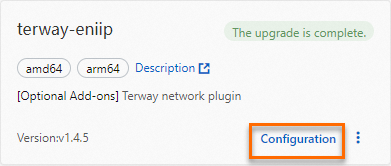
On the Add-ons page, click the Network tab. Find Terway and click Upgrade. If Upgrade is unavailable, the version is already current. After upgrading, click Configuration.
NoteChanges to add-ons made through other methods are overwritten on redeployment.
On the Parameters page for terway-eniip, select the new vSwitch in PodVswitchId. Keep other parameters at defaults.
Click OK.
kubectl method
Use this method for Terway earlier than v1.4.4, or to manage configuration through kubectl.
Create a vSwitch in the VPC console in the same zone as the target nodes. See Create and manage vSwitches.
NotePod density grows over time. Use a subnet mask of /19 or smaller (at least 8,192 IPs per CIDR block) for Pod vSwitches.
Edit the Terway ConfigMap to add the new vSwitch:
kubectl edit cm eni-config -n kube-systemAdd the new vSwitch ID to the
vswitchesfield. This example addsvsw-BBBalongsidevsw-AAA:eni_conf: | { "version": "1", "max_pool_size": 25, "min_pool_size": 10, "vswitches": {"cn-shanghai-f":["vsw-AAA", "vsw-BBB"]}, "service_cidr": "172.21.0.0/20", "security_group": "sg-CCC" }Restart Terway pods to apply the new configuration. Pods are automatically recreated.
Delete Terway pods in the ENI multi-IP scenario:
kubectl delete -n kube-system pod -l app=terway-eniipDelete Terway pods in the ENI single-IP scenario:
kubectl delete -n kube-system pod -l app=terway-eni
Verify that all Terway pods are running:
kubectl get pod -n kube-system | grep terwayCreate a test Pod and verify it gets an IP from the new vSwitch.
NoteNew vSwitch settings apply only to newly created ENIs. Existing ENIs retain the original vSwitch. To apply changes to all nodes, perform a rolling restart.
vSwitch selection strategies
When multiple vSwitches exist in a zone, Terway selects one for each new ENI based on the vswitch_selection_policy parameter. See Customize Terway configuration parameters.
Default: ordered
Terway picks the vSwitch with the most available IPs, which works well in most cases.
Edge case: During rapid scaling, concurrent ENI creation requests run before IP counts update, so all may pick the same vSwitch, causing uneven distribution.
Alternative: random
Terway picks a vSwitch at random for each new ENI, distributing IPs more evenly and preventing hotspots during burst scaling.
Isolate vSwitches by node pool
For strict control, configure node-level network settings to bind a unique Pod vSwitch to each node pool per zone, eliminating IP allocation contention.
FAQ
Pods lost Internet access after I added a vSwitch
The new vSwitch lacks a SNAT rule, so its Pods can't reach the Internet. Configure a SNAT rule for the new vSwitch using NAT Gateway. See Enable Internet access for your cluster.
A Pod's IP address is outside the configured vSwitch CIDR block
Pod IPs come from ENIs, and you can only specify a vSwitch at ENI creation. After that, all Pods on the ENI get IPs from that vSwitch regardless of later configuration changes.
This typically happens when:
The node has leftover ENIs from a previous cluster (removed without draining Pods).
You updated the vSwitch configuration, but existing ENIs on the node still use the old vSwitch.
Add new nodes or rolling-restart existing nodes to create fresh ENIs with the updated configuration.
IP usage is unbalanced across vSwitches
The ordered strategy causes this during rapid scaling. Concurrent ENI creation requests all pick the same vSwitch (the one with the most IPs), exhausting it while others remain underused.
Depending on your situation:
For existing nodes with near-exhausted vSwitches: Rolling-restart some nodes to release ENIs and return IPs to the vSwitch.
For new nodes or future deployments: Change
vswitch_selection_policyfromorderedtorandom. This distributes ENIs randomly to prevent hotspots. See Customize Terway configuration parameters.For strict isolation: Use node-level network configuration to assign exactly one Pod vSwitch per zone per node pool.