Dynamically hot migrate an ACK managed cluster Basic Edition to an ACK managed cluster Pro Edition. Hot migration does not interrupt services or affect the normal operation of cluster services. Rollback is not supported after a cluster is successfully migrated.
An ACK managed cluster Pro Edition is a Kubernetes cluster built on an ACK managed cluster Basic Edition, designed for large-scale enterprise production environments. It further enhances reliability and security and provides a compensable Service-Level Agreement (SLA).
ACK managed cluster Basic Edition supports a maximum of two clusters per account, with up to 10 nodes per cluster. It is intended for small-scale use and does not guarantee control plane availability, so it is primarily used for personal learning and testing. To scale your cluster and ensure high availability of the control plane, we recommend migrating to the ACK managed cluster Pro Edition to take advantage of its enhanced features and capabilities. For a detailed comparison, see Cluster types.
Notes
Notes | Description |
Billing | ACK managed cluster Basic Edition is upgraded to ACK managed cluster Pro Edition, you are charged a new cluster management fee (charged by ACK), and billing for other cloud resources remains unchanged. |
Cluster version |
After migration, the cluster version remains unchanged. To migrate the cluster and upgrade the cluster version, we recommend that you complete the migration first and then upgrade the cluster version. |
Procedure
The cluster migration procedure consists of two parts: pre-check and cluster migration. After the pre-check passes, the Basic Edition cluster begins migrating to the Pro Edition.
If the pre-check fails, go to the corresponding check page as prompted to view the specific reasons for the failure.
Log on to the ACK console. In the left navigation pane, click Clusters.
On the Clusters page, find the ACK Basic Edition cluster to be migrated. In the Actions column, click .
In the dialog box, carefully read the notes, then click Precheck.
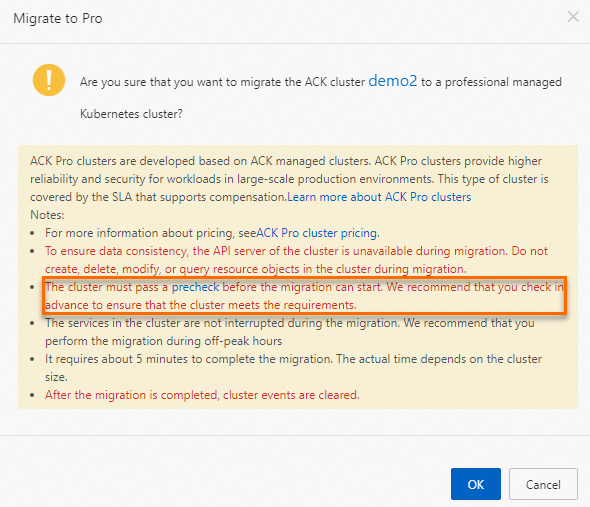
After clicking Precheck, the page redirects to the Container artificial intelligence for IT operations platform console. Click Perform migration check, and then follow the on-screen prompts to perform a migration pre-check for your cluster. If the check fails, view the details and resolve the issue on the Migration Check page.
After the check passes, return to the migration dialog box, read the notes, and then click OK.
After the migration completes successfully, the Cluster Specification of the target ACK managed cluster Basic Edition on the Cluster List page automatically changes from Basic to Pro.
FAQ
During migration, are services in an ACK managed cluster Basic Edition affected?
During cluster migration, the control plane components of the ACK managed cluster Basic Edition are hibernated, but running services are not affected.
How long does the migration procedure take?
Cluster migration includes three phases: control plane hibernation, etcd data backup, and control plane component startup. The entire procedure takes approximately 10 to 15 minutes, with an estimated downtime of 5 to 10 minutes.
Will the access link change after cluster migration?
After migration, the API Server SLB IP address remains unchanged. When you access the cluster through KubeConfig, the cluster endpoint also remains unchanged.
References
To upgrade the cluster version after migration, see Upgrade a cluster.
After migrating to ACK Managed Cluster Pro Edition, you must manually converge the Worker RAM role permissions of cluster nodes to improve node security. For detailed steps, see Manually converge Worker RAM role permissions for ACK managed clusters.
To migrate an ACK dedicated cluster, see Hot Migrate an ACK Dedicated Cluster to an ACK Managed Cluster Pro Edition.