ACK secures workloads across three layers: runtime, trusted supply chain, and infrastructure.
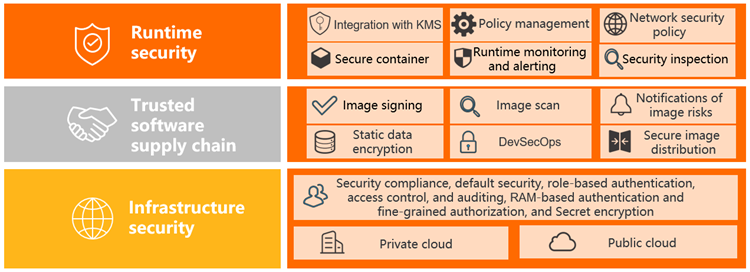
Shared responsibility
ACK secures the control plane — including the API server, etcd, and system component certificates. You secure your workloads, images, and access configurations.
| Layer | ACK manages | You configure |
|---|---|---|
| Control plane | TLS certificate renewal, API server hardening, system component certificates | — |
| Nodes | Security group defaults, NAT Gateway routing, OS hardening | SSH access, RAM role permissions |
| Workloads | — | Pod security policies, RBAC, runtime monitoring |
| Images | — | Image scanning, signing, delivery chain policies |
Runtime security
Security inspection
ACK scans running workload configurations in real time to detect least-privilege violations — the most common entry point for container escapes.
Inspection results appear in a specified Simple Log Service (SLS) Logstore as reports with per-item descriptions and fix suggestions. Schedule periodic inspections to maintain visibility. See Use configuration inspection to check for security risks in cluster workloads.
Policy management
ACK integrates Gatekeeper, an admission controller built on Open Policy Agent (OPA), to block non-compliant workloads at deploy time — before they reach your cluster.
Key capabilities:
-
A built-in library of Kubernetes-specific policy rules covering common security scenarios
-
Visual policy configuration in the ACK console, no OPA policy language required
-
Policy governance statistics and log retrieval for auditing
ACK policy management automatically blocks non-compliant workloads at deploy time, raising the runtime security baseline of cluster applications and reducing communication and learning overhead between development and operations teams.
Runtime monitoring and alerting
Admission control alone is insufficient — zero trust demands continuous runtime monitoring. ACK integrates with Security Center to detect container-level threats.
Threats detected:
-
Malicious image startups
-
Viruses and malicious programs
-
Internal container intrusions
-
Container escapes and high-risk operations
View and handle alerts on the Security > Security Monitoring page. See Use security monitoring.
Isolation models
When workload isolation requirements go beyond standard Kubernetes Pod security, ACK offers two stronger options:
| Scenario | Solution | How it works |
|---|---|---|
| Untrusted workloads, fault isolation, multi-tenant isolation | Sandboxed containers | Runs each container in a lightweight VM with an independent kernel. Provides stronger isolation with minimal performance overhead and the same observability and elasticity as standard containers. |
| Finance, government, and other high-compliance workloads | ACK-TEE confidential computing | Places code and data in a hardware-backed Trusted Execution Environment (TEE). Prevents access from other applications, the OS, kernel, BIOS, administrators, O&M engineers, cloud vendors, and hardware other than the CPU — only the CPU can access the data. |
-
For sandboxed containers, see Sandboxed Container.
-
For ACK-TEE, see ACK-TEE confidential computing.
Trusted software supply chain
ACK enforces security at every pipeline stage — from build to registry to cluster.
Build: image scanning
Container Registry scans Linux-based container images for known vulnerabilities with severity assessments and fix suggestions. The engine, powered by Security Center, also detects system vulnerabilities, application vulnerabilities, and malicious samples in images.
Registry: image signing
Use image signing to ensure only trusted images reach your cluster. The creator signs images digitally; signatures are stored in Container Registry. At deploy time, ACK verifies signatures before running containers — blocking tampered or unexpected images.
See Use the kritis-validation-hook component to automatically verify container image signatures.
Deploy: delivery chain
Container Registry's delivery chain lets you define an automated, end-to-end secure pipeline. Configure tasks such as image building, scanning, global synchronization, and deployment — with fine-grained security policies at each stage.
A single commit triggers secure distribution across multiple regions, elevating your pipeline from DevOps to DevSecOps. See Create a delivery chain.
Infrastructure security
Default security
Every new ACK cluster is hardened at creation time:
-
Node and control plane hardening: Configurations follow Alibaba Cloud Kubernetes security hardening standards. All system component images are free of critical-level CVE vulnerabilities.
-
Network isolation: Each cluster gets a dedicated security group that allows only inbound ICMP from the Internet. SSH access from the Internet is disabled by default. Nodes access the public network through NAT Gateway.
-
Least-privilege node roles: RAM roles attached to worker nodes in managed clusters have the minimum permissions required. See [Product Change] Announcement on the convergence of RAM role permissions for managed cluster nodes.
To enable SSH access, see Connect to the master nodes of an ACK dedicated cluster using SSH.
Identity management
All communication between cluster components is protected by TLS, with automatic certificate renewal handled by the ACK control plane.
RAM users and roles obtain kubeconfig credentials via the console or OpenAPI to connect to a cluster's API server. ACK tracks identity in issued credentials — if a kubeconfig is compromised, revoke it immediately.
ACK supports Service Account Token Volume Projection to harden ServiceAccount security. See Deploy service account token volume projection.
Fine-grained access control
ACK implements Role-Based Access Control (RBAC) at the namespace level, configurable from the Authorization management page in the ACK console.
Key features:
-
Predefined role templates: Built-in RBAC templates for administrator, O&M engineer, and developer roles simplify permission setup.
-
Batch authorization: Authorize multiple RAM users across multiple clusters in a single operation.
-
RAM role support: Grant access to users who assume a RAM role.
-
Custom ClusterRoles: Bind any ClusterRole defined in the cluster to a user.
See Configure RBAC roles for a RAM user or RAM role.
For policy-based access control, install the Gatekeeper component via component management to apply OPA rules cluster-wide.
Auditing
ACK integrates with SLS to collect, query, and visualize three types of audit logs:
| Log type | What it covers | Where to view |
|---|---|---|
| Cluster API server audit logs | Records all operations on cluster resources — essential for tracing access and detecting unauthorized activity. Supports real-time alerts on specified resource types. | Cluster Auditing page |
| Ingress traffic audit | Monitors service access PV and UV, success and failure ratios, and latency across all cluster Ingresses. Uses SLS machine learning algorithms to detect anomalies. | Configured via log analysis |
| Event monitoring audit | Captures Kubernetes events to diagnose cluster anomalies and security risks in real time. | Event monitoring dashboard |
References:
Secret encryption at rest
Kubernetes Secrets are Base64-encoded by default in etcd — not encrypted. In ACK Pro clusters, use Key Management Service (KMS) keys to encrypt Secrets at rest, protecting sensitive data in etcd.