A blockchain network is a consortium consisting of multiple organizations. Alibaba Cloud Blockchain as a Service (BaaS) provides two ways to create one:
You can create a consortium in one of the following two ways:
Quick mode: BaaS automatically creates the consortium, organizations, and channels, and invites groups to join. See Quick start.
Standard mode: Create a consortium without channels, then build out the network step by step. The rest of this topic covers the standard mode.
Prerequisites
Before you begin, ensure that you have:
An Alibaba Cloud account with access to the BaaS console
Decided on a region for your blockchain infrastructure (select the same region as your business application system to reduce latency)
Reviewed the available editions and pricing in the Purchase guide
Create an independent consortium
Log on to the Alibaba Cloud BaaS console.
On the Hyperledger Fabric > Overview page, click Create Consortium.
Configure the following parameters.
Parameter Description Region The region where your blockchain infrastructure is deployed. Select the region closest to your business application system. Blockchain Engine The blockchain framework. Currently, only Hyperledger Fabric is available. Quorum requires a separate application to enable. Version The Hyperledger Fabric version. V2.2 is required for first-time purchases. If you have an existing V1.4 instance, you can create additional V1.4 or V2.2 instances, but mixed networking between V1.4 and V2.2 is not supported. Resource Type Select Consortium/Organization. Edition The service tier: Starter Edition, Beginner Edition, or Basic Class. For a comparison of features and pricing, see Purchase guide. Consortium Name A name for your consortium. Use a business-related name that is easy to identify. Consortium Domain Name The unique identifier of this consortium in the blockchain network. Enter the prefix for your consortium domain name. Storage Fee Storage is billed by the hour based on actual usage. No capacity reservation is required at purchase. For pricing details, see Specifications and pricing. During The service duration you want to purchase. Click OK. Resource configuration takes 15 to 40 minutes. When the consortium is ready, its status changes to Running.
BaaS automatically creates 3 orderer nodes for each consortium by default.
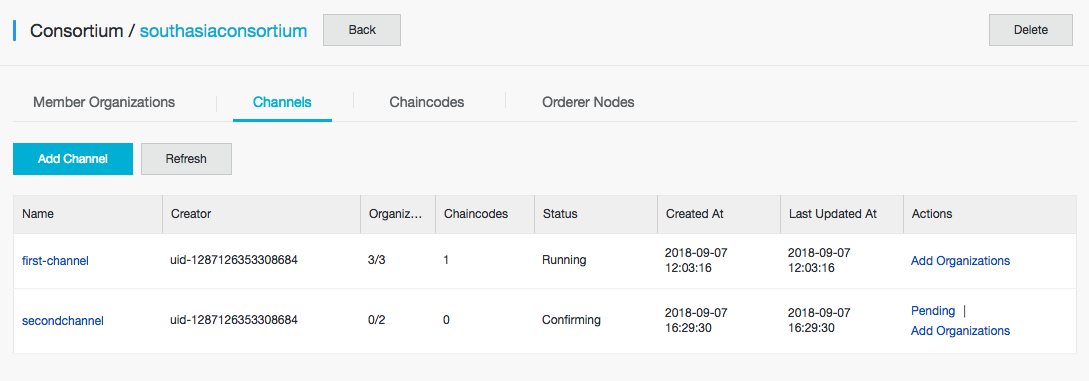
In My Consortia, click the consortium name to view its details. The details page includes the Member Organizations, Channels, Chaincodes, and Orderer Nodes tabs.
What's next
Use blockchain services — add organizations, configure channels, and deploy chaincode