Answers to common WAF 3.0 questions, organized by phase: pre-onboarding, during onboarding, and post-onboarding.
Pre-onboarding
What is the difference between an origin IP address and a back-to-origin IP address in WAF?
These two IPs define opposite ends of the WAF-to-origin traffic path:
Origin IP: The public IP of your actual server — an ECS instance, SLB, or OSS bucket. WAF forwards clean traffic to this address.
Back-to-origin IP: An IP from a range owned by WAF. When WAF forwards a request to your origin server, it uses a back-to-origin IP as the source.
Configure your origin server's firewall or security group to allow traffic only from WAF back-to-origin IP ranges. This prevents attackers from bypassing WAF by sending requests directly to your origin.
Can the same domain use both cloud native mode and CNAME record mode at the same time?
No. Using both modes for the same domain causes routing conflicts and disables WAF protection. Each domain can only be onboarded using one mode at a time.
To switch a domain from CNAME record mode to cloud native mode, delete its CNAME configuration from WAF first, then re-add the domain in cloud native mode.
How can I configure WAF to protect a single domain with multiple origin server IPs?
Add up to 20 origin IP addresses for a single domain. WAF distributes traffic across them for load balancing and high availability.
Does WAF perform health checks on origin servers?
Health checks are enabled by default. WAF continuously monitors all configured origin IPs. If an origin IP becomes unresponsive, WAF stops sending traffic to it and distributes requests among the remaining healthy IPs. After a brief silence period, WAF retests the unresponsive IP to check if it has recovered.
How does an exclusive IP in WAF help mitigate DDoS attacks?
An exclusive IP isolates your WAF-protected services from those of other customers. This prevents a large-scale DDoS attack on another customer's domain from affecting your domains — a problem known as the "noisy neighbor" effect. For details, see Value of exclusive IP addresses.
What is the correct way to integrate WAF 3.0 with CDN or Anti-DDoS Proxy?
Traffic must flow in this order: Client → CDN/Anti-DDoS Proxy → WAF → Origin server.
To set this up:
Add your domain to WAF and get the WAF CNAME address.
In your CDN or Anti-DDoS Proxy configuration, set the origin address to the WAF CNAME.
For step-by-step instructions, see Improve website security by deploying Anti-DDoS Proxy and WAF and Deploy WAF and CDN to protect a domain name for which CDN is enabled.
Does WAF support a cross-account architecture using CDN, Anti-DDoS Proxy, and WAF?
Cross-account architectures are fully supported. You can use CDN, Anti-DDoS Proxy, and WAF from different Alibaba Cloud accounts to build a layered security architecture.
When using WAF for HTTPS traffic, how are my SSL certificate and private key secured?
Certificate storage
WAF stores your SSL certificate and private key in a dedicated Key Server built on Alibaba Cloud Key Management Service (KMS), which is designed for the security, integrity, and availability of cryptographic keys in compliance with regulatory standards. For details, see What is KMS?.
Traffic logging
WAF decrypts HTTPS traffic for real-time inspection only. It records only the parts of request content that contain attack signatures (payloads) — for attack reports and data statistics. Full request or response content is not recorded without your authorization.
Alibaba Cloud WAF holds multiple international certifications, including ISO 9001, ISO 20000, ISO 22301, ISO 27001, ISO 27017, ISO 27018, ISO 27701, ISO 29151, BS 10012, CSA STAR, Classified Protection Compliance Level 3, SOC 1/2/3, C5, HK Finance, OSPAR, and PCI DSS. For more information, see Alibaba Cloud Trust Center.
How does WAF use a custom header to get and record the client's source IP?
WAF supports two custom header workflows for client IP:
Get the client IP from a custom header
If Layer 7 proxies such as Anti-DDoS Proxy or CDN sit in front of WAF, attackers can forge the X-Forwarded-For (XFF) header to spoof their source IP. To prevent this, place the real client IP in a custom header field such as X-Client-IP or X-Real-IP, then configure WAF to read from that field. If you specify multiple header fields, WAF reads them in the order listed.
Write the client IP into a custom header
Enable traffic marking when adding a website to WAF. WAF then writes the client IP into a custom header field in the back-to-origin request. Your backend server can read the client IP from that field for business analysis.
The same domain name resolves to multiple cloud product instances. How should I onboard?
Cloud native mode: Onboard all cloud product instances — for example, all service ports of an SLB instance — at the same time. WAF redirects traffic for all of them.
CNAME record mode: Add the domain once. All cloud product instances are protected by the WAF default mitigation policy.
Multiple domain names resolve to the same cloud product instance. How should I onboard?
Cloud native mode: All domain names on the onboarded instance are automatically covered by the WAF default policy. To configure different protection rules per domain, add each as a protected object. For details, see Manually add a protected object.
CNAME record mode: Add each domain name individually.
What domain name suffixes are supported for CNAME onboarding?
WAF 3.0 supports most domain name suffixes, including Chinese domain name suffixes. For the full list of supported suffixes, see iana.org.
WAF 3.0 supports more suffixes than WAF 2.0. If a suffix is unsupported in WAF 2.0, upgrade to WAF 3.0.
Does WAF support HTTPS mutual authentication (mTLS)?
CNAME record mode and transparent proxy mode do not support HTTPS mutual authentication (mTLS). The service-based onboarding solution in WAF 3.0 does support it. Cloud products that support service-based onboarding include ALB, MSE, FC, and SAE — configure this in the cloud native mode section of the WAF console.
Does WAF support WebSocket, HTTP/2, or SPDY?
| Protocol | Support |
|---|---|
| WebSocket | Supported |
| HTTP/2 listening | Supported on the Enterprise Edition and higher subscription plans, and on the pay-as-you-go plan |
| SPDY | Not supported |
WAF forwards back-to-origin requests over HTTP 1.0/1.1 only — HTTP/2 is not supported between WAF and the origin server. If you protect an HTTP/2 service, the origin's HTTP/2 multiplexing feature may become ineffective, increasing origin bandwidth usage.
To block HTTP/2 cleartext smuggling (h2c bypass), create a custom rule where the header name is Upgrade and the value is h2c. For details, see Create a custom rule to defend against specific requests.
Does WAF support websites that use NTLM protocol authentication?
No. WAF cannot forward NTLM authentication correctly — access requests forwarded by WAF fail NTLM authentication at the origin, causing repeated authentication prompts on the client. Use a different authentication method for your website.
Is the WAF QPS limit per instance or per domain?
The queries per second (QPS) limit applies to the entire WAF instance, not to individual domains.
For example, if you have three domains on one WAF instance, their combined QPS cannot exceed the instance limit. If the total QPS exceeds the limit, the instance may enter a sandbox and the service level agreement (SLA) is no longer guaranteed.
During onboarding
How do I find the WAF back-to-origin IP ranges and the WAF CNAME?
Both are available on the onboarding list page, as shown in the following figure.
The SLB, NLB, or ECS instance I want to onboard doesn't appear on the configuration page
| Cause | Action |
|---|---|
| The instance doesn't meet the onboarding conditions. | Check the instance against the requirements: SLB onboarding conditions, NLB onboarding conditions, ECS onboarding conditions. |
| No listener is configured on the SLB instance. | Add a listener: for Layer 7 SLB, see Add an HTTP listener or Add an HTTPS listener; for Layer 4 SLB, see Add a TCP listener. |
| WAF failed to sync with the instance. | Trigger a manual sync. For steps, see Manually sync assets. |
For the origin IP address in WAF, should I use the public or private IP of an ECS instance?
Use the public IP. WAF fetches traffic over the Internet and does not support private IP addresses.
When adding an HTTPS traffic redirection port, the message "SLB certificate is incomplete" appears
This message means WAF cannot retrieve the complete certificate content from Certificate Management Service (Original SSL Certificate). Common causes include:
The certificate was not purchased from or uploaded to Certificate Management Service (Original SSL Certificate).
The certificate was uploaded directly through the SLB console. The SLB console does not automatically sync certificate information to Certificate Management Service, and WAF only reads certificates from Certificate Management Service.
The certificate was previously uploaded but has since been manually deleted from Certificate Management Service (Original SSL Certificate).
To resolve this, choose one of the following:
Upload your certificate to Certificate Management Service. For steps, see Upload SSL certificate.
In the SLB console, create a certificate and select Alibaba Cloud Certificates as the source. For steps, see Select an Alibaba Cloud-issued certificate.
In the SLB console, select the uploaded server certificate for the listener. For steps, see Configure an SSL certificate.
The public IP of my origin server is exposed. How do I prevent attackers from bypassing WAF?
| Mode | Approach |
|---|---|
| CNAME record mode | Configure your origin server to accept traffic only from WAF back-to-origin IP ranges. For steps, see Allow WAF back-to-origin IP addresses. |
| Cloud native mode | Use cloud native mode. |
Post-onboarding
502 errors after onboarding WAF
Scenario 1: 502 in CNAME mode
Scenario 2: Intermittent 5xx with a Layer 7 SLB in cloud native mode
This is a timeout mismatch between WAF and SLB:
WAF back-to-origin connection idle timeout: 3,600 seconds (1 hour)
SLB client-facing connection idle timeout: 15 seconds
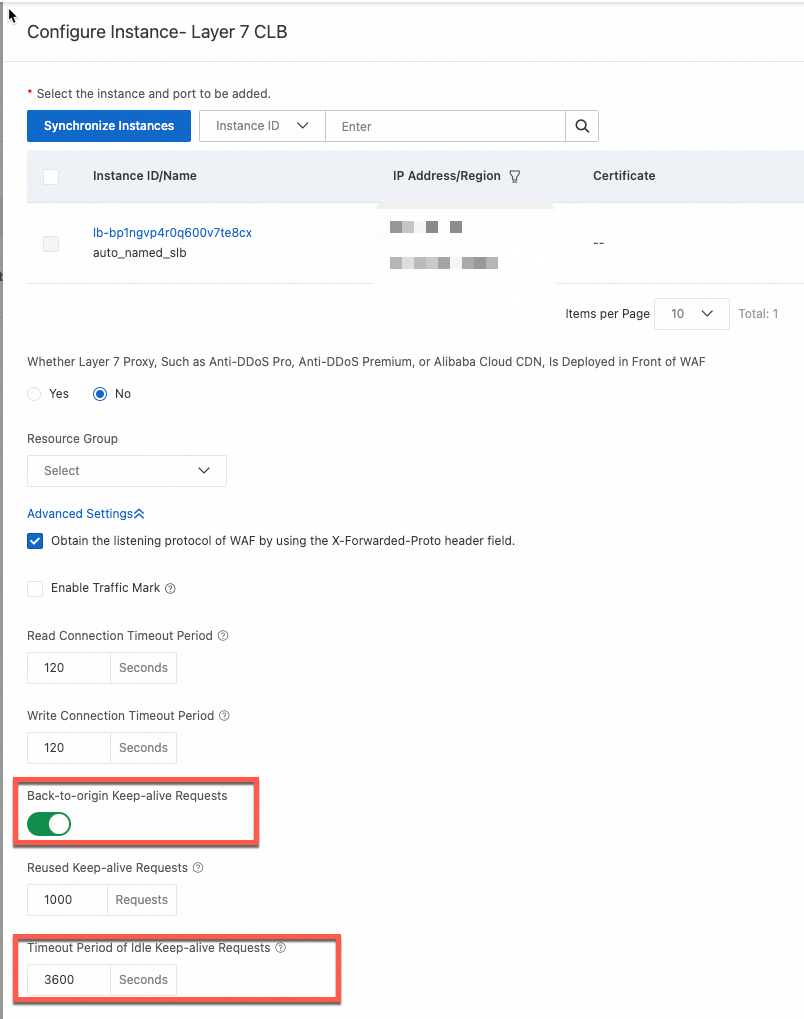
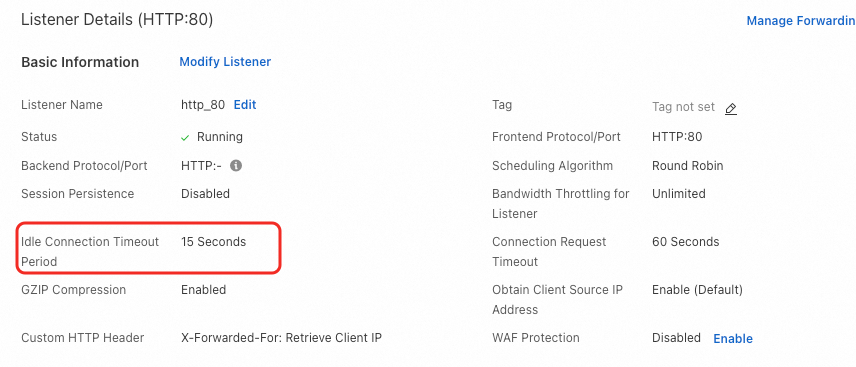
When a persistent connection idles out on the SLB side (no data for over 15 seconds), WAF may reuse that stale connection for a new back-to-origin request. SLB no longer has session state for it and sends an RST, causing WAF to log a 502.
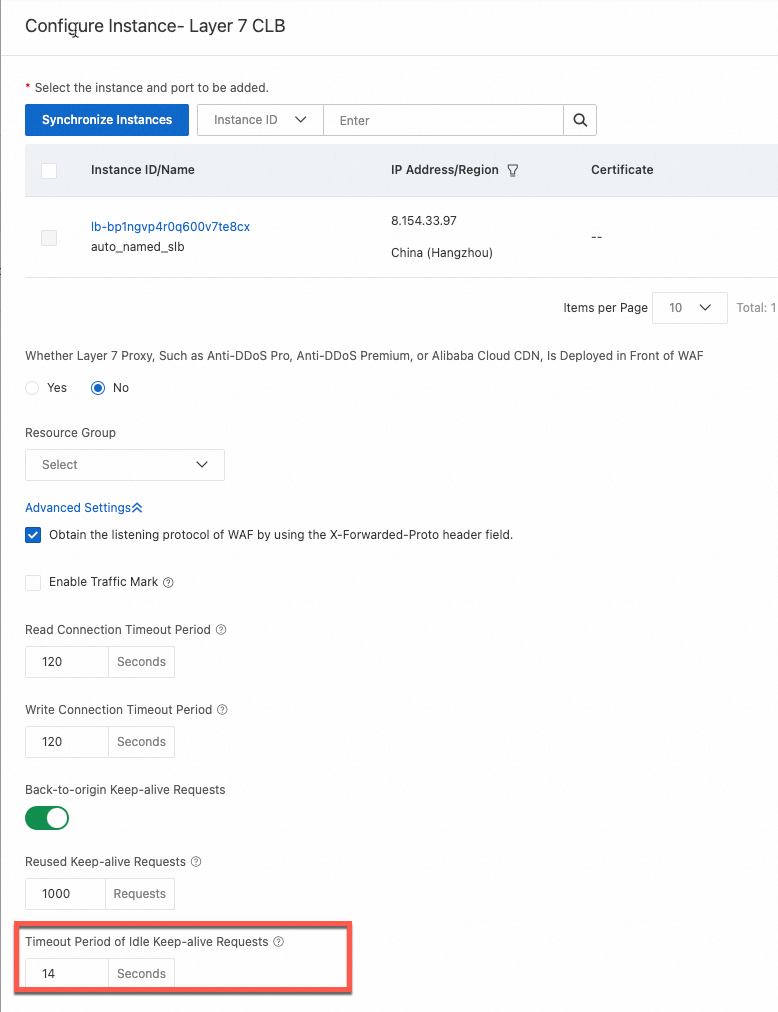
Solution: In the Layer 7 SLB cloud native settings, set Idle Timeout to a value less than 15 seconds — for example, 14 seconds.
Scenario 3: Intermittent 502 due to a long URI
Scenario 4: Intermittent 502 when WAF sends back-to-origin requests to multiple Layer 4 SLBs

In this architecture, WAF is onboarded in reverse proxy mode and sends back-to-origin requests to multiple Layer 4 SLBs. When WAF sends back-to-origin requests to multiple Layer 4 SLBs that share the same backend ECS instances and service port, two failure modes can occur:
5-tuple conflict (TCP stream collision)
Requests from the same WAF node to different SLB instances (CLB1 and CLB2) can arrive at the backend ECS with an identical 5-tuple (WIP:CPORT → DIP:DPORT). The backend server sees these as the same TCP connection, causing SYN drops and connection failures.
Incorrect return path
The SLB that initiates the connection differs from the one that receives the response. If the responding SLB has no session for the 5-tuple, it resets the connection, causing WAF to return a 502.
Solutions
| Option | Approach | Recommendation |
|---|---|---|
| Solution 1 | Use multiple Layer 7 SLBs as origin servers instead of multiple Layer 4 SLBs. This eliminates the 5-tuple conflict by design. | Recommended |
| Solution 2 | Migrate from SLB to NLB. Disable Client IP Affinity in the NLB server group, and deploy Proxy Protocol on the backend to get the real client IP. For steps, see Obtain client IP addresses using the Proxy Protocol feature. | — |
| Solution 3 | Submit a ticket to enable FULLNAT mode on the SLB listener. FULLNAT modifies the source address for each connection, making every 5-tuple unique. | Not recommended |
Steps for Solution 2 (NLB)
In the left navigation pane, choose Network Load Balancer (NLB) > Server Groups.
Select the server group and click Edit Basic Information in the Actions column. In the dialog box, disable Client IP Affinity and save the changes.

File upload fails after onboarding WAF
WAF supports file uploads up to 2 GB. If the request body exceeds 2 GB, WAF returns a 413 status code. Check the response status code to confirm whether the upload hit this limit.
How do I update a certificate that is about to expire?
The update procedure depends on your onboarding mode:
| Mode | Instructions |
|---|---|
| CNAME mode | Update the certificate bound to a domain name |
| Cloud native mode + ECS | Update the certificate bound to an ECS traffic redirection port |
| Cloud native mode + SLB | Update the certificate bound to an SLB traffic redirection port |
| Cloud native mode + NLB | Update the certificate bound to an NLB traffic redirection port |
| Cloud native mode + ALB | No update needed in the WAF console. Deploy the certificate to the ALB instance directly from Certificate Management Service (Original SSL Certificate). See Deploy an SSL certificate to an Alibaba Cloud service. |
After cloud native onboarding, can the origin server get the real client IP?
In cloud native mode, WAF provides the real client IP directly to the cloud product instance.
My website is protected by WAF, but it doesn't appear in the domain name list
An expired ICP filing causes WAF to automatically remove the domain from the protected list. Complete the ICP filing renewal and re-add the website to WAF. For ICP filing guidance, see ICP filing process.
WAF instances in the Chinese mainland require a valid ICP filing for all protected domains. Domains with expired ICP filings are periodically purged to comply with applicable laws and regulations.