Cloud Storage Gateway (CSG) is a hybrid storage service that bridges your on-premises infrastructure and Alibaba Cloud Object Storage Service (OSS). Deploy it in your data center or on Alibaba Cloud to access OSS through standard file protocols (NFS and SMB) and block storage protocols (iSCSI)—no changes to your existing applications required.
Product overview
CSG provides two gateway types: file gateways and iSCSI gateways.
File gateway
Map the object structure of an OSS bucket to the directory and file structure of a Network-Attached Storage (NAS) file system. Read and write objects using NFS or SMB without modifying existing applications.
Cache frequently accessed data locally for high-performance access while using OSS for unlimited storage capacity.
Share the same data across multiple data centers through a single file storage service.
Achieve high compatibility with POSIX and third-party backup software.
Back up and share small files for read and write access using a standard or basic file gateway.
Handle high-concurrency or high-performance workloads using an enhanced or performance-optimized file gateway.
iSCSI gateway
Mount OSS storage volumes as iSCSI targets on on-premises servers.
Choose between two modes based on your connectivity and latency requirements:
Pass-through mode — Slices block volume data and synchronizes it directly to OSS. Best for high-speed connections such as leased lines.
Cache mode — Uses local cache disks to accelerate reads and writes, then uploads data to OSS asynchronously. Best for workloads that need fast local access over a slower connection.
For gateway specifications and limits, see Product specifications. For common deployment scenarios, see Scenarios.
Service architecture
CSG acts as a local cache in front of OSS. On-premises servers see CSG as a standard NAS file system or iSCSI block device, while all data is stored in OSS. Multiple gateway instances can form a storage gateway cluster, enabling file data to move freely between on-premises data centers and the cloud. This cluster facilitates collaborative data and service migration for typical scenarios, including file backup, data distribution, and disaster recovery, and lets you publish data across multiple physical locations.
CSG can be deployed in your on-premises data center or on Alibaba Cloud.
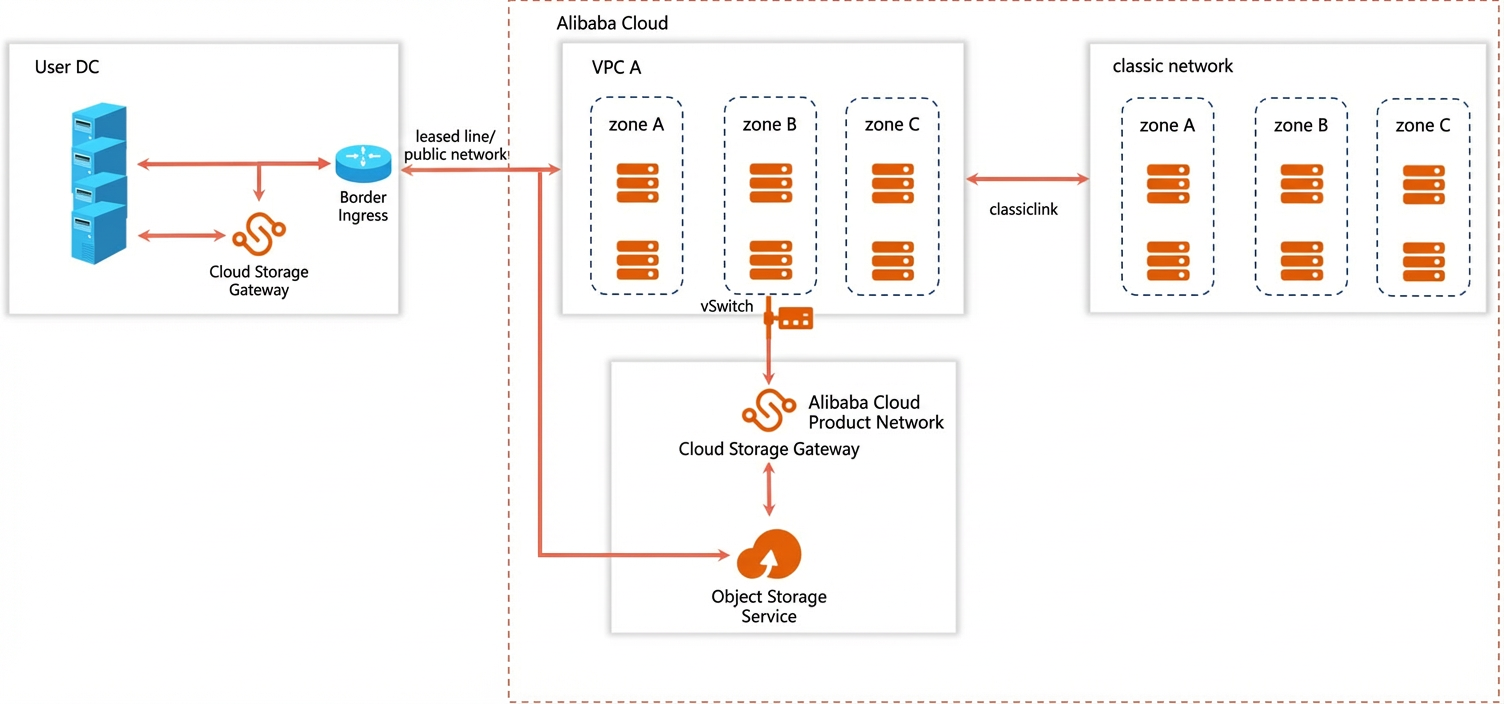
Access CSG
By default, a RAM user does not have any permissions. An Alibaba Cloud account administrator must grant the required permissions before a RAM user can access CSG resources. For more information, see System policies for Cloud Storage Gateway.
Create, manage, and release CSG instances using the console or APIs:
Console — Log in to the Cloud Storage Gateway console to manage gateway instances. Console guides are available for:
APIs — CSG provides APIs for custom development. See the API reference.
Use cases
File gateway
Extend local storage — Build a file storage service backed by OSS when local storage capacity is limited.
Access cloud objects as files — Store data as OSS objects while letting on-premises applications read and write it through a standard file system—no code changes required.
Multi-site file sharing — Access the same shared folders from multiple data centers through a single file storage service.
iSCSI gateway
Cloud-based backup — Back up data to OSS using backup software that transfers data over iSCSI.
Video stream storage — Ingest video stream data into iSCSI storage volumes and store it in OSS.
Related services
Elastic Compute Service: provides a simple, efficient, and elastic cloud computing service. See the ECS product page.
Object Storage Service (OSS): provides a massive, secure, cost-effective, and highly durable cloud storage service that serves as the backend storage for CSG. See the Object Storage Service (OSS) product page.
Cloud Monitor: monitors gateway resource usage. See the Cloud Monitor product page.
To mount an OSS bucket using CSG, see Mount an OSS bucket using Cloud Storage Gateway.