This topic describes the main scenarios for Cloud Storage Gateway.
Cloud storage expansion and migration
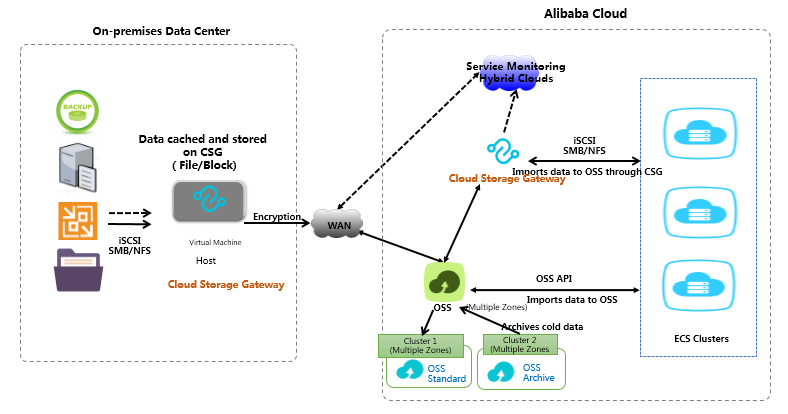
Cloud Storage Gateway uses an intelligent caching algorithm to automatically detect hot and cold data. It keeps hot data in a local cache to ensure fast data access. It seamlessly connects your data center to large amounts of cloud storage to expand your storage space. It also stores all data, both hot and cold, in the cloud to ensure data consistency. Common scenarios are listed below.
Shared file pool: You can share files and data between different compute clusters.
Data backup: You can use backup software such as Veeam and NetBackup to back up application data to Alibaba Cloud OSS through Cloud Storage Gateway based on a policy.
Cold data archiving: You can use Cloud Storage Gateway to write cold data from local storage or ECS instances to OSS Infrequent Access and Archive buckets. This frees up local storage space and reduces storage costs.
Cloud disaster recovery
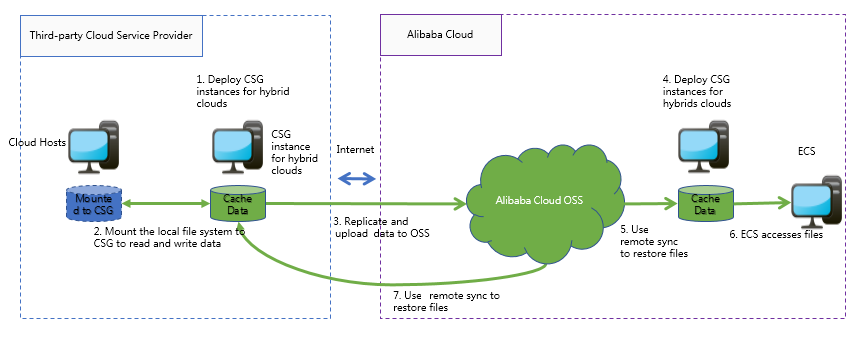
Many users run their businesses on the cloud. As their businesses grow, they need to improve reliability and business continuity. Cross-cloud disaster recovery is an important solution. Cloud Storage Gateway fully supports virtualization, which makes it easy to set up data disaster recovery between third-party clouds and Alibaba Cloud.
Multi-site data sharing and distribution
You can connect multiple file gateway instances in different locations to the same Alibaba Cloud OSS Bucket. This lets you quickly share and distribute files across sites. This solution is ideal for synchronizing and sharing data between branch offices.

Adapting to traditional applications
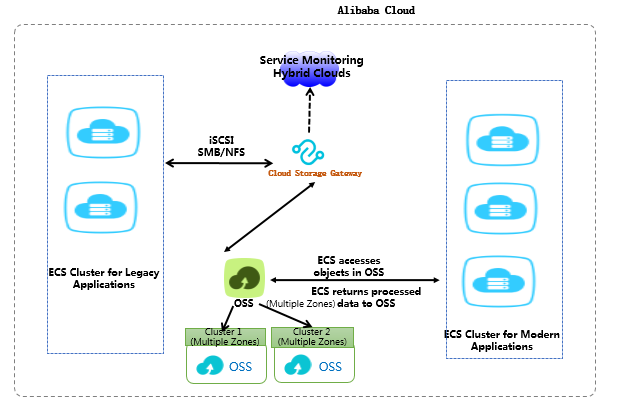
Many users run a mix of new and legacy applications on the cloud. Legacy applications migrated from data centers use standard storage protocols, such as NFS, SMB, and iSCSI. Newer applications often use modern technologies that support object access protocols. Exchanging data between these two types of applications can be difficult. Cloud Storage Gateway acts as a bridge, connecting legacy and modern applications to facilitate easy data exchange.
Replacing ossfs and OSS FTP
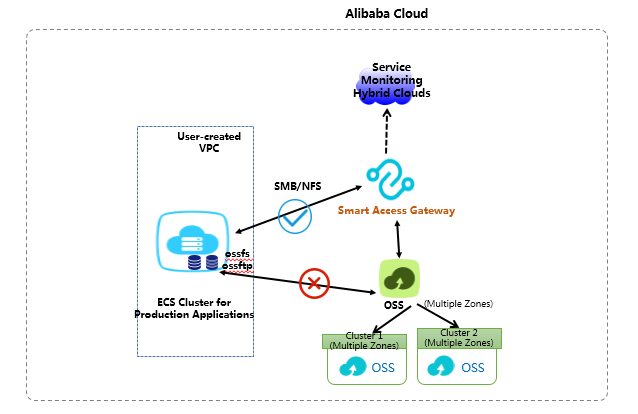
ossfs and OSS FTP are open-source tools that use file protocols to upload files directly to OSS. However, these tools are not recommended for production environments due to their low POSIX compatibility. Mounting these tools on a client requires additional configuration and cache resources. The installation and configuration process is complex when you have multiple clients.
A file gateway is an excellent replacement for ossfs and OSS FTP. After you create a file gateway, you can simply mount it using NFS or map it using Windows SMB. Then, you can use OSS as if it were a local file system.