Connection and configuration
Common errors and solutions
Error message | Possible cause | Solution |
400 InvalidParameter: Range of input length should be [1, xxx] | Input exceeds limit. |
|
401 invalid access token or token expired |
|
|
model 'xxx' is not supported | Model name is misspelled, has incorrect case, contains extra spaces, or is unsupported. | Model IDs are case-sensitive and must match those in the Coding Plan overview exactly. Remove leading or trailing spaces. |
403 invalid api-key | Used general Model Studio base URL instead of Coding Plan base URL. | Anthropic compatible: OpenAI compatible: |
404 status code (no body) | Base URL path is incorrect. Claude Code requires | Anthropic compatible: OpenAI compatible: |
Connection error | Base URL domain is misspelled, or network is unreachable. | Verify the spelling of the base URL domain and check your network connection. |
hour allocated quota exceeded | 5-hour quota exhausted. | Wait 5 hours for the quota to reset or upgrade to Pro. |
week allocated quota exceeded | Weekly quota exhausted. | Wait until 00:00:00 (UTC+8) on Monday for the quota to reset, or upgrade to Pro. |
month allocated quota exceeded | Monthly quota exhausted. | Wait until 00:00:00 (UTC+8) on the same day of your next billing month for the quota to reset, or upgrade to Pro. |
Claude Code shows "Claude Code has switched from npm to native installer." What should I do?
This does not affect normal use. Run claude install in your terminal to migrate to the native installer and follow the prompts to complete the migration.
Claude Code error: "Unable to connect to Anthropic services. Failed to connect to api.anthropic.com: ERR_BAD_REQUEST." What should I do?
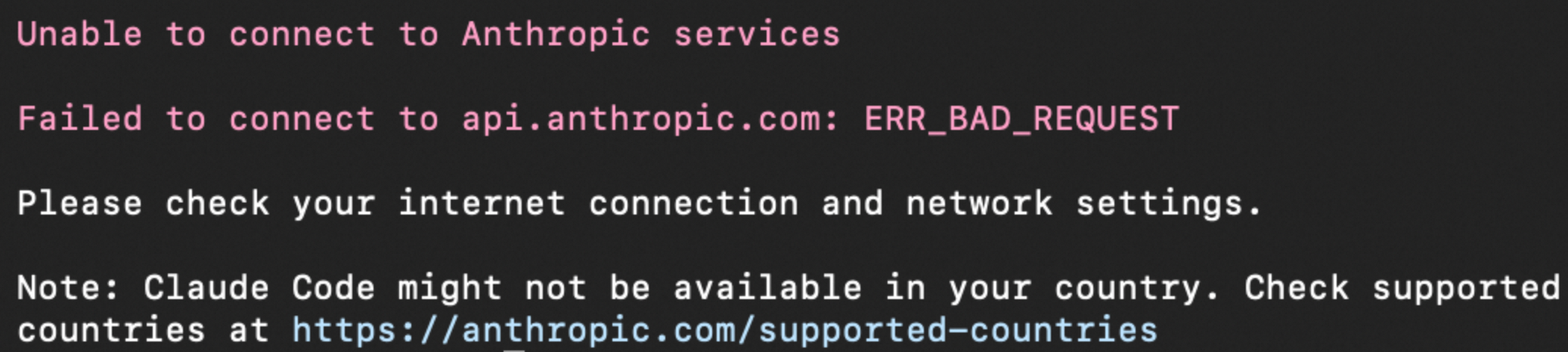
Cause: On first startup, Claude Code connects to api.anthropic.com for authentication. This connection fails in regions where Claude Code is unavailable.
Solution:
Add
"hasCompletedOnboarding": trueas a top-level field in~/.claude.json.We recommend using Qwen Code to add this automatically. Launch it by running
qwenin your terminal, then send the following message:Please add "hasCompletedOnboarding": true as a top-level field in ~/.claude.json without overwriting existing content.{ "hasCompletedOnboarding": true }Save the file and restart Claude Code.
claude
OpenCode shows "Request Entity Too Large." What should I do?
Request content (code context or conversation history) exceeds maximum input limit. Solutions:
Run
/newto start a new conversation, or run/compactto compress the context. For details, see What are the context windows for each model? How do I handle inputs that exceed the context window?.If this does not help, update OpenCode to version 1.2.16 or later, which includes a fix.
OpenCode shows "The thinking_budget parameter must be a positive integer and not greater than 38912." What should I do?
Cause: budgetTokens in opencode.json exceeds maximum thinking_budget for the model. Adjust per table below.
Model | Max thinking budget |
qwen3.5-plus | 81,920 |
qwen3-max-2026-01-23 | 81,920 |
kimi-k2.5 | 81,920 |
glm-5 | 32,768 |
glm-4.7 | 32,768 |
MiniMax-M2.5 | 32,768 (chain-of-thought + response) |
qwen3-coder-next | Thinking mode not supported |
qwen3-coder-plus | Thinking mode not supported |
Solution: In opencode.json, adjust options.thinking.budgetTokens so it does not exceed the model's limit. For models that do not support thinking mode (such as qwen3-coder-next and qwen3-coder-plus), remove the options.thinking configuration. For details, see OpenCode.
OpenCode shows "InternalError.Algo.InvalidParameter: Range of max_tokens should be [1, xxxx]." What should I do?
Cause: limit.output in opencode.json exceeds maximum output tokens (max_tokens) for the model.
Solution: Adjust the limit value for the model in opencode.json. For details, see the OpenCode documentation.
Do Coding Plan models support thinking mode?
Most Coding Plan models with deep thinking support thinking mode by default. To enable it, verify model support. Common methods:
The model must support thinking mode in the first place.
Claude Code
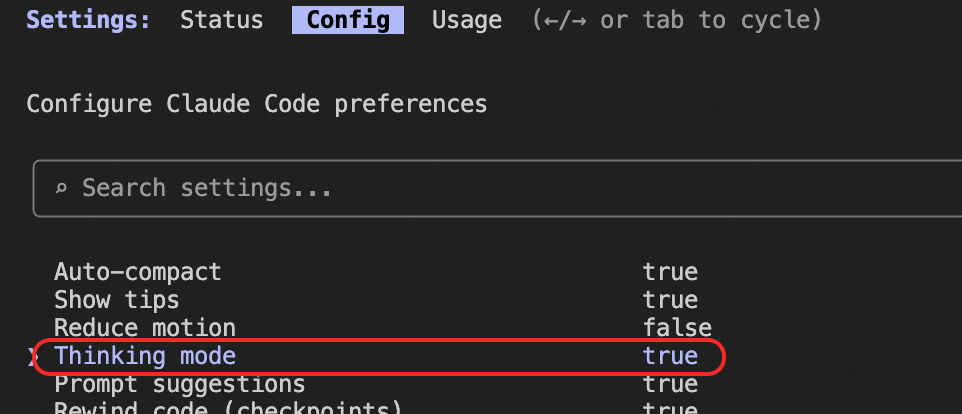
Enable thinking mode: Type /config, navigate to Thinking mode, and press Enter to set it to true.
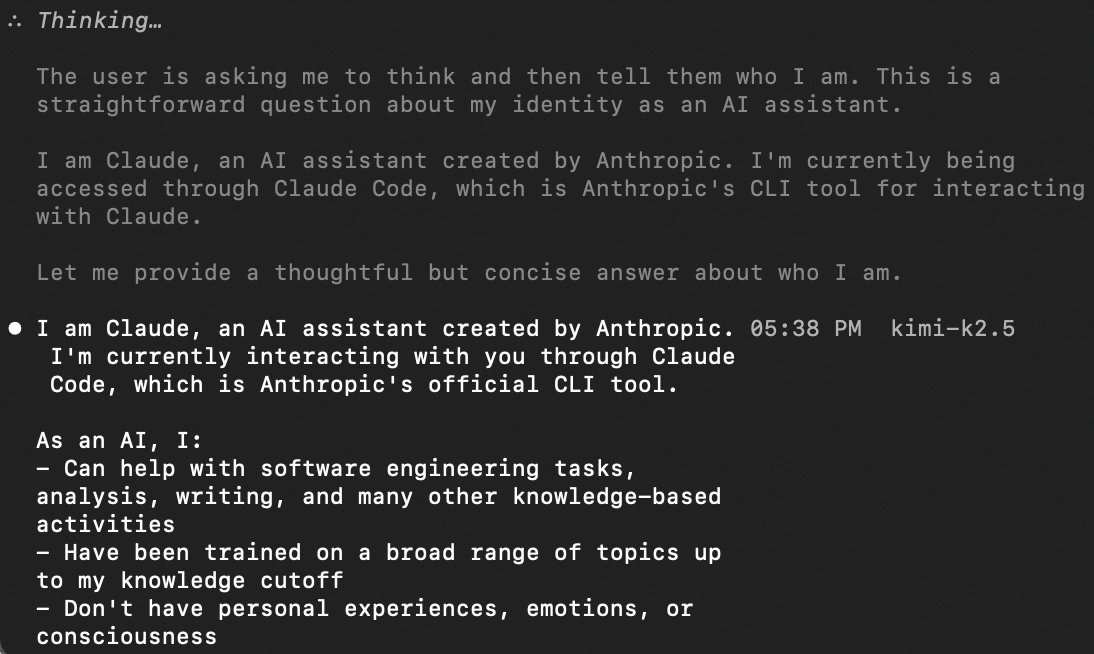
View the thinking process: Press Ctrl + O.
OpenCode
For details, see OpenCode. Configure the options parameter:
{
  "thinking": {
    "type": "enabled",
    "budgetTokens": 1024
  }
}
budgetTokens is the maximum thinking token count. Adjust as needed.
Qwen Code
Open ~/.qwen/settings.json and set enable_thinking to true in modelProviders:
{
  "ide": {
    "hasSeenNudge": true
  },
  "env": {
    "BAILIAN_CODING_PLAN_API_KEY": "sk-sp-xxx"
  },
  "modelProviders": {
    "openai": [
      {
        "id": "qwen3.5-plus",
        "name": "[Bailian Coding Plan for Global/Intl] qwen3.5-plus",
        "baseUrl": "https://coding-intl.dashscope.aliyuncs.com/v1",
        "envKey": "BAILIAN_CODING_PLAN_API_KEY",
        "generationConfig": {
          "extra_body": {
            "enable_thinking": true
          }
        }
      },
      ...
    ]
  },
  "security": {
    "auth": {
      "selectedType": "openai"
    }
  },
  "codingPlan": {
    "region": "global",
    "version": "xxx"
  },
  "model": {
    "name": "qwen3.5-plus"
  },
  "$version": 3
}
OpenClaw
Follow these steps to enable thinking mode in OpenClaw:
Check the OpenClaw version
Run
openclaw tuito enter the TUI, then typeopenclaw --versionto check the version. Ensure OpenClaw isv2026.03.02or later. Earlier versions may not support thinking mode.
Select a thinking level
In the TUI, type
/think highto select a thinking level. This example useshigh.
Modify the config file
Set the
compatparameterFor details, see OpenClaw. Open the config file and add
compatto the model configuration:"compat": { "thinkingFormat": "qwen" }Set the
reasoningparameterIn the same configuration, set
reasoningtotrue:{ "id": "qwen3-max-2026-01-23", "name": "qwen3-max-2026-01-23", "reasoning": true, "compat": { "thinkingFormat": "qwen" }, "input": [ "text" ], "cost": { "input": 0, "output": 0, "cacheRead": 0, "cacheWrite": 0 }, "contextWindow": 262144, "maxTokens": 65536 }
Restart OpenClaw Gateway
Save the file and run the following command to restart OpenClaw Gateway:
openclaw gateway restart
Why do I see call records of models that I never configured in OpenClaw?
Cause: openclaw.json does not restrict allowed models via agents.defaults.models.
Solution: Declare the allowed models in the agents.defaults.models field of ~/.openclaw/openclaw.json. For details, see Coding Plan for OpenClaw.
OpenClaw shows "Connected" but chat responses hang or spin endlessly. What should I do?
Causes:
Local proxy (VPN or HTTP proxy) intercepts or blocks requests to
coding.dashscope.aliyuncs.com.Base URL in OpenClaw cache file
~/.openclaw/agents/main/agent/models.jsonpoints to an incorrect address.
Solution:
Disable your local proxy, or ensure it can access
coding.dashscope.aliyuncs.com.Delete the
~/.openclaw/agents/main/agent/models.jsoncache file and restart OpenClaw. The cache file is automatically rebuilt from~/.openclaw/openclaw.json.
OpenClaw shows "Agent failed before reply: OAuth token refresh failed." What should I do?
This means a third-party OAuth service is connected instead of Coding Plan.
Solution:
Set up Coding Plan in OpenClaw. For details, see Coding Plan for OpenClaw.
Clear the old OAuth credentials and model cache, and then restart OpenClaw.
Back up the related files before deleting old OAuth credentials.
  rm ~/.openclaw/agents/main/agent/auth.json
  rm ~/.openclaw/agents/main/agent/models.json
  openclaw gateway restart
OpenClaw shows "Agent failed before reply: Unknown model." What should I do?
OpenClaw cannot find the specified model. Check these in order:
Incorrect
models.providerskey or model prefixWhen using a Coding Plan subscription, the
models.providersobject must include abailiankey (it may coexist with other providers). Also,agents.defaults.model.primarymust start with thebailian/prefix. Example:// Configuration file: ~/.openclaw/openclaw.json { "models": { "providers": { "bailian": {...} } }, "agents": { "defaults": { "model": { "primary": "bailian/qwen3.5-plus" } } } }Old provider configurations cause routing conflicts
If you previously used other providers, such as
qwen-portal, leftover entries can cause routing conflicts. Remove irrelevant providers. Ensure the model referenced by theprimaryfield is correctly defined in themodels.providers.bailian.modelslist. For details, see OpenClaw.
OpenClaw shows "No API key found for provider 'xxxxx'." What should I do?
OpenClaw cannot find the API key for the provider. Check these in order:
Missing provider configuration in
models.providersOpen
~/.openclaw/openclaw.jsonand confirm thatmodels.providerscontains a key matching the provider name in the error.If you use Coding Plan, the configuration must include a
bailiankey (it may coexist with other providers).If the key is missing, add the provider configuration.
Incorrect API key for the provider
Enter a valid API key (not empty and without extra spaces).
If you use Coding Plan, use the plan-specific key (
sk-sp-xxx).If the Web UI shows "__OPENCLAW_REDACTED__", the API key is saved and does not need re-entry. If it is blank or shows YOUR_API_KEY, enter the key again.
Local credential cache is outdated
Back up related files before deleting old credentials.
# Delete old credentials and model cache
rm ~/.openclaw/agents/main/agent/auth-profiles.json
rm ~/.openclaw/agents/main/agent/models.json

# Restart Gateway to apply new configuration
openclaw gateway restart
OpenClaw shows "API rate limit reached." What should I do?
Check these items in order:
Configuration error
Misconfigured base URL or provider routes requests to general API endpoints, triggering rate limits.
If you use Coding Plan, verify the
models,agents, andgatewayfields in your OpenClaw config file. Ensure they match the documented structure, for example:{ "models": { "providers": { "bailian": {...} } } }.If you do not use Coding Plan, switch to it to get dedicated quotas.
Plan quota exceeded: Check your usage on the Coding Plan page.
If your quota is exhausted, check the next reset time on that page.
If you frequently reach the limit, upgrade to Pro for more calls.
Reset your API key: If the issue persists after the above checks, go to the Coding Plan page and reset your API key.
OpenClaw shows "Failed to discover Alibaba Cloud models" on startup. What should I do?
OpenClaw shows one of these errors on startup:
Failed to discover Alibaba Cloud models: TimeoutError: The operation was aborted due to timeoutFailed to discover Alibaba Cloud models: 404 Not Found
Cause: OpenClaw attempts to fetch the Coding Plan model list, which isn't available via API.
Solution:
This message does not affect normal use. You can ignore it.
If OpenClaw fails to run, check other error messages.
To hide this message, delete the
alibaba-cloud:default profilefrom~/.openclaw/agents/main/agent/auth-profiles.json. For example, change this:"profiles": { "alibaba-cloud:default": { "type": "api_key", "provider": "alibaba-cloud", "key": "sk-sp-xxxxx" } }After changing the value to
"profiles": {}, the message no longer appears.
OpenClaw shows "auth.profiles.xxx" errors. What should I do?
Common errors:
auth.profiles.qwen-portal:default.mode: Invalid inputauth.profiles.qwen-portal:default: Unrecognized key: "apiKey"
Cause: Incorrectly modified auth.profiles in openclaw.json (e.g., invalid mode value or added apiKey field). The auth field stores authentication metadata only, not keys. Example: Qwen daily quota auto-adds OAuth config qwen-portal:default. Coding Plan doesn't need auth.profiles configuration.
Solution:
Fix the
auth.profilesconfiguration. Remove incorrectly added or modified fields and unnecessary profiles.Confirm that your Coding Plan API key is set in
models.providers.bailian.apiKey. For details, see OpenClaw.
Why do I get "HTTP 401: Incorrect API key provided."?
Possible reasons:
Incorrect API key format: The API key is empty, malformed, incomplete, or contains extra spaces. Ensure you are using a complete Coding Plan-specific API key (starting with
sk-sp-) with no extra spaces.Subscription expired or invalid: If your subscription has expired or is invalid, the plan-specific API key will not work. Ensure your subscription is active.
Incorrect base URL: You have configured a plan-specific API key (starting with
sk-sp-), but the base URL is still the general one, such as https://dashscope-intl.aliyuncs.com/compatible-mode/v1. Replace the base URL with a plan-specific URL from the following table, based on the AI tool you are using.Tool
Protocol
Base URL
OpenClaw
OpenAI-compatible
https://coding-intl.dashscope.aliyuncs.com/v1
OpenCode
Anthropic-compatible
https://coding-intl.dashscope.aliyuncs.com/apps/anthropic/v1
Claude Code
Anthropic-compatible
https://coding-intl.dashscope.aliyuncs.com/apps/anthropic
Cursor
OpenAI-compatible
https://coding-intl.dashscope.aliyuncs.com/v1
VSCode Cline
OpenAI-compatible
https://coding-intl.dashscope.aliyuncs.com/v1
Qwen Code
OpenAI-compatible
https://coding-intl.dashscope.aliyuncs.com/v1
Incorrect API key used: You have configured the plan-specific base URL but are using a general API key (starting with
sk-). Use a plan-specific API key.Cached OpenClaw setting: Delete the
providers.bailianitem from the~/.openclaw/agents/main/agent/models.jsonfile, and restart OpenClaw.
Why do I get "Authentication failed, please make sure that a valid ModelScope token is supplied."?
This error means you connected to ModelScope, not Coding Plan. To connect to Coding Plan, see Connect AI tools.
The error indicates authentication failure. It usually occurs when you provide an incorrect credential while calling ModelScope APIs. Check these items in order:
The access credential is incorrect because ModelScope and Alibaba Cloud Model Studio are independent platforms with non-interchangeable credentials. A ModelScope token uses the format
ms-xxx, while a Model Studio general API key usessk-xxx. Get the correct credential from ModelScope.Formatting error: When copying your ModelScope token, ensure no extra spaces or line breaks are included.
Why do I get the error "Coding Plan is currently only available for Coding Agents"?
This error means the call was made from an unsupported tool or environment.
Coding Plan is intended for use only with programming tools, such as Claude Code and Qwen Code. It is not supported in tools such as curl, Postman, or Dify.
Billing and quota
Why am I still charged for API calls (or have overdue payments) after subscribing to Coding Plan?
Still charged or have overdue payments after subscribing? Check these reasons:
Incorrect API Key and Base URL configuration (most common)
Cause: Using general API key (
sk-xxx) with general base URL (without "coding" keyword) routes calls to pay-as-you-go and generates bills.Solution: Use Coding Plan-specific config: API Key must be
sk-sp-xxx, Base URL must contain "coding" (e.g.,https://coding-intl.dashscope.aliyuncs.com/xxx). Details: see Get your plan-specific API key and Base URL.
Billing settlement delay (charges before subscription)
Cause: Hourly billing may be delayed. Example: API call at 16:00 may bill at 19:30 (post-subscription).
Solution: The charge is based on actual billing time. For details, see Bill queries and cost management.
Both credentials configured; general API used by mistake
Cause: When both configs are saved, some tools (e.g., OpenClaw) may auto-route to general credentials, causing charges.
Solution: Remove the general API configuration and ensure you select a model supported by Coding Plan. For example, in OpenCode, select a model with the provider labeled 'Model Studio Coding Plan'.
Client cache not cleared
Cause: Tools may read cached credentials after reconfiguration.
Solution: Clear the cache and restart the tool. For example, with OpenClaw, delete
~/.openclaw/agents/main/agent/models.json, runopenclaw gateway restart, and reconfigure per the OpenClaw documentation.
What should I do when my quota runs out?
Lite: When 5-hour/weekly quota depletes, wait for auto-reset. When monthly quota depletes, upgrade to Pro or wait for next billing month.
Pro: When 5-hour/weekly quota depletes, wait for auto-reset. When monthly quota depletes, wait for next billing month.
Will my usage switch to pay-as-you-go after my Coding Plan quota is used up?
No. After your quota is used up, further API calls fail with an error. Usage does not automatically switch to pay-as-you-go. To continue, upgrade to Pro or wait for your quota to refresh.
Can Coding Plan use Model Studio's free trial?
No. Coding Plan is standalone. Its billing/quota system doesn't participate in Model Studio free trial.
If I buy Coding Plan without enabling auto-renewal, can I still get the 50% discount on my first manual renewal?
Yes. Your first manual renewal qualifies for the 50% discount.
Why does my Coding Plan subscription purchased in February last only 28 days instead of 31?
Your subscription starts at the moment of activation and expires at 23:59:59 (UTC+8) on the same date of the following month. If the following month has no corresponding date, it expires at 23:59:59 (UTC+8) on the last day of that month.
For example, if you activate Coding Plan on February 3, 2026, it expires on March 3, 2026, giving you 28 days of coverage.
How can I view token consumption details?
Coding Plan quota is based on model call count, not token usage. You cannot view token-level consumption details. View your usage on the Coding Plan page.
Can I check usage for a specific model in Coding Plan, such as qwen3.5-plus?
No. The Coding Plan page shows only overall quota usage and remaining balance, not per-model usage.
Does Coding Plan have an annual plan?
No. Coding Plan is available only as a monthly subscription.
Can I renew Coding Plan early? Can I renew after expiration?
You can renew before expiration. After expiration, renewal is not supported. You must repurchase. Your API key will change with each new purchase and must be manually replaced.
If I renew early, how is the new service period calculated?
For 1-month subscriptions, the duration is calculated by calendar month. The subscription takes effect immediately upon activation and expires at 23:59:59 (UTC+8) on the corresponding day of the following month. If the next month has no corresponding day, it expires on the last day of that month at 23:59:59 (UTC+8). When renewing early, the new period automatically extends from the original expiration date.
Example:
First activation on March 15 at 10:00, expiring April 15 at 23:59:59.
Early renewal on April 10 for 1 month extends expiration to May 15 at 23:59:59.
Can I use coupons for renewal?
Yes. General-purpose coupons are supported.
Where can I renew?
We recommend using the Coding Plan page for renewals or new purchases. You can also use the Renewal page for renewals only (new purchases not supported).
Product features
What models does Coding Plan support?
Recommended models include: qwen3.5-plus (supports image understanding), kimi-k2.5 (supports image understanding), glm-5, and MiniMax-M2.5. For more models, see Overview.
How many Coding Plan subscriptions can one account have at the same time?
Each account can subscribe to only one Coding Plan at a time (Lite or Pro).
Can I use models outside the supported models list?
No. Coding Plan supports only listed models. Using others causes errors.
Do Lite and Pro plans have the same model response speed?
Lite and Pro have the same response speed, as they share the same model resources and inference services.
Can I upgrade from Lite to Pro? Will my API key change?
Upgrading is supported. Your API key remains unchanged. Go to the Coding Plan page to upgrade. Costs and expiration dates are shown there.
Can I downgrade from Pro to Lite?
No. Downgrading is not supported.
Does Coding Plan support multiple users?
Coding Plan API key is for personal use only. Sharing is prohibited. Public exposure may trigger automatic key disabling.
Can multiple developers in an enterprise share a Pro plan?
No. Keep API key confidential. Don't share or expose in client-side code. Public exposure may trigger automatic disabling.
What are the context windows for each model? How do I handle inputs that exceed the context window?
Model | Context window (tokens) |
qwen3.5-plus | 1,000,000 |
kimi-k2.5 | 262,144 |
glm-5 | 202,752 |
MiniMax-M2.5 | 204,800 |
qwen3-max-2026-01-23 | 262,144 |
qwen3-coder-next | 262,144 |
qwen3-coder-plus | 1,000,000 |
glm-4.7 | 202,752 |
Context limit error? Start a new session. Prevention:
Switch models: Use a model with a longer context window, such as qwen3.5-plus or qwen3-coder-plus.
Reduce unnecessary files: Start the AI coding tool in a specific project folder with only the files you need.
Split tasks: Break complex tasks into smaller subtasks and ask about them one at a time to reduce context per request.
Use precise instructions: Vague requests may trigger unnecessary file scans. Ask clear, specific questions or give exact instructions.
Exact steps vary by tool. For details, see Connect AI tools.
How do I reset my Coding Plan API key?
On the Coding Plan page, click the Reset button next to your Coding Plan API key.
After resetting, update the API key in all tools that use it. Otherwise, the tools will fail.
If I do not renew Coding Plan after expiration, will my API key reset when I resubscribe?
Yes, your API key will be reset unless you renew before expiration.
Will I receive reminders before Coding Plan expires?
Yes. The system sends expiration reminders 7, 3, and 1 day(s) before expiration via in-site messages, email, SMS, and intelligent voice calls.
Can I subscribe to expiration notifications for Coding Plan?
No subscription is supported or needed. The system automatically sends expiration reminders 7, 3, and 1 day(s) before expiration via in-site messages, email, SMS, and intelligent voice calls. No manual subscription required.
Can I generate multiple API keys for Coding Plan?
No. Only one API key is supported per subscription.
Does Coding Plan support IP allowlists?
No. If your API key is exposed, reset it on the Coding Plan page.
How can a RAM user view or get the Coding Plan API key?
Contact your Alibaba Cloud account owner or a RAM user with administrative permission to grant the Subscription Plans permission.
How do I use Coding Plan in VSCode?
You can use VS Code extensions that support OpenAI- or Anthropic-compatible APIs, such as Qwen Code or Claude Code.
Are models in Coding Plan quantized?
Models in Coding Plan, such as glm-5 and qwen3.5-plus, are full-featured versions. They are not quantized or reduced in any way.
What's the difference between Coding Plan and Savings Plan?
Feature | ||
Use case | AI coding tools (Claude Code, OpenClaw, etc.) | Deduct Alibaba Cloud Model Studio pay-as-you-go API fees |
API Key format |
|
|
Base URL domain |
|
|
Billing method | Monthly subscription | Pay-as-you-go by token usage |
Scenario | Interactive AI coding | API calls, application development |
How do I handle the data_inspection_failed error?
For details, see the Error messages document.
Why does Coding Plan fail when configured in Dify?
Don't use Coding Plan in Dify. It's for programming tools only (Claude Code, Qwen Code). Using API keys in automated scripts, custom backends, or batch scenarios may cause suspension.
Can I call Coding Plan using Postman?
Don't use Coding Plan in Postman. It's for programming tools only (Claude Code, Qwen Code). Using API keys in automated scripts, custom backends, or batch scenarios may cause suspension.