SASE gives cloud-native applications private network access without exposing public IP addresses. By combining zero-trust policies with centralized endpoint management, only authenticated users can reach your cloud databases, middleware, and developer tools — SASE proxies all traffic.
How it works
SASE establishes an outbound private channel between your cloud-native applications and authorized users. Instead of exposing a public IP, each application is reachable exclusively through the SASE client, which enforces identity-, device-, and environment-based authentication before granting access. This achieves two goals: stealth access (resources are invisible to the public internet) and least privilege (access is granted only to what each user needs).

Prerequisites
Before you begin, ensure that you have:
Zero-trust policies configured and enabled for all cloud-native applications you plan to manage
Access to the Secure Access Service Edge console
Configure zero-trust policies before disabling public access for any application. After public access is disabled, all public connections are blocked — this action is irreversible. However, applications can still be accessed through SASE.
View and manage cloud-native applications
Log on to the Secure Access Service Edge console.
In the left navigation pane, choose Private Access > Network Settings.
On the Services on Alibaba Cloud > Cloud-native Application tab, you can view the cloud-native applications that SASE supports, organized by category.
In the All Cloud Apps area on the left, click a cloud-native application to view its details and perform the following operations.
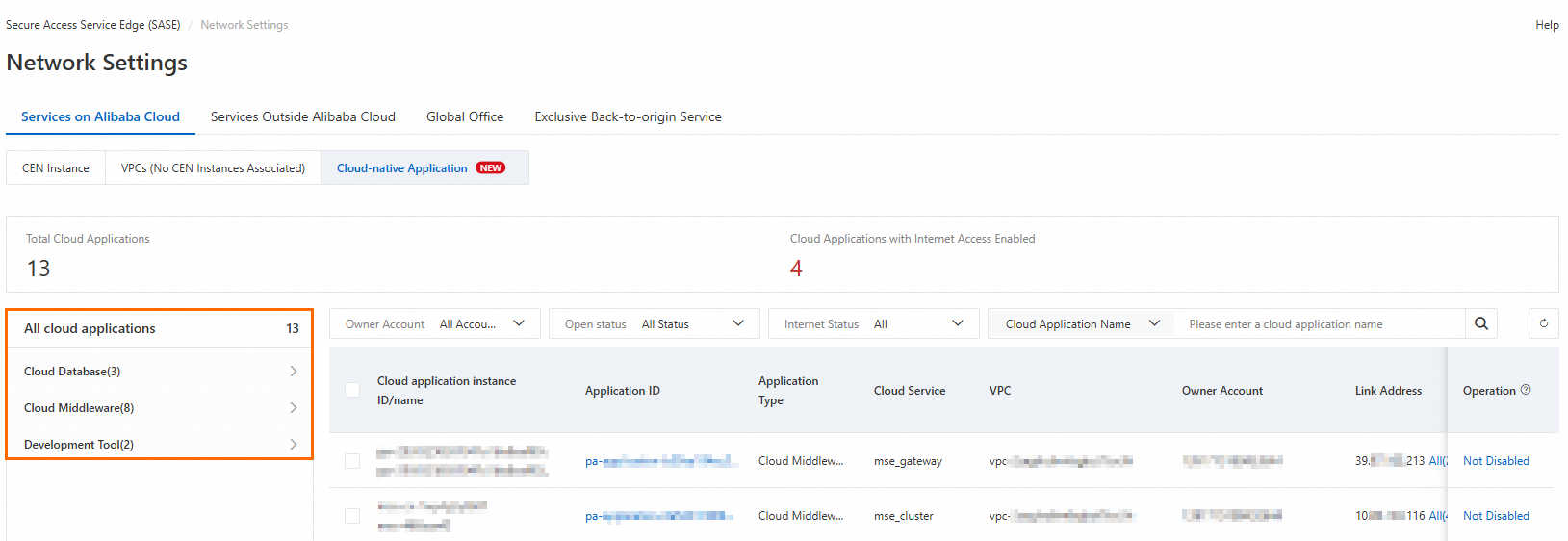
Enable application access: Toggle the switch in the Application Connection column.
View Internet exposure threats: Check the Internet Exposure Risk column to see any exposed public IP addresses.
Reduce public access: If an application has an exposed public IP address, click Not Disabled in the Actions column to disable public access.
NoteFor some cloud products, security policies or product limitations prevent direct disabling of public access. In these cases, go to the console of the corresponding cloud product to configure blacklists and whitelists, or adjust the configuration to reduce public exposure.
What's next
Reduce your attack surface with zero trust: Follow the step-by-step walkthrough in SASE Best Practices for Accessing Cloud-Native Applications to converge public access addresses and apply zero-trust policies across your applications.
Protect database traffic end to end: See Achieve End-to-End Protection for Database Applications with SASE to learn how to combine ApsaraDB access with outbound traffic management policies.