When you use an endpoint to connect to a Tair (or Redis Open-Source Edition) instance, an issue with the Domain Name System (DNS) service can prevent an Elastic Compute Service (ECS) instance from resolving the endpoint. This interrupts the network connection between the ECS and Tair instances. This topic describes how to resolve such issues.
Cause
Connection issues between an ECS instance and a Tair instance can have many causes. If you receive one of the following error messages, it indicates that the hostname or endpoint cannot be resolved. In this case, check the domain name and the DNS server settings.
Name or service not knownUnknownHostExceptionfailed to connect: r-***************.redis.rds.aliyuncs.com could not be resolved
Procedure
The following procedure uses a Linux environment as an example.
Verify that the Tair endpoint specified in your service code is correct.
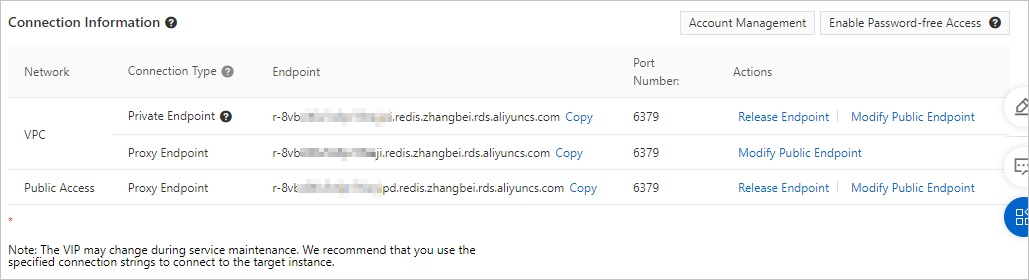
NoteYou can view the Tair endpoint on the instance details page in the Tair console. The endpoint is in the Endpoint section, as shown in the following figure.
Figure 1. View endpoint
Confirm that the correct DNS server is configured on the ECS instance. For more information, see An ECS instance that runs Linux fails to resolve domain names.
Optional: If the previous steps do not resolve the issue, you can use the following temporary solution.
Add the domain name and IP address mapping for the Tair instance to the
/etc/hostsfile to ensure that the domain name can be resolved. Then, see Troubleshoot Tair connection issues to rule out other causes of the connection issue.ImportantThe method for editing the
/etc/hostsfile is similar to editing theresolv.conffile. However, modifying the/etc/hostsfile is only a temporary solution that becomes invalid if the IP address of the Tair instance changes.