This topic compares the features of different Alibaba Mail editions.
Standard Edition
The Standard Edition is a full-featured mailbox that covers all typical business scenarios. It includes key enterprise features such as email archiving, monitoring, and review, making it suitable for small, medium, and large businesses.
For more information, please check Purchase Alibaba Mail.
AI Advanced Edition
The AI Advanced Edition is designed for large enterprises. It supports AI-powered composing, smart replies, intelligent translation, and smart labels for efficient collaboration. It includes all features of the Standard Edition and provides additional benefits.
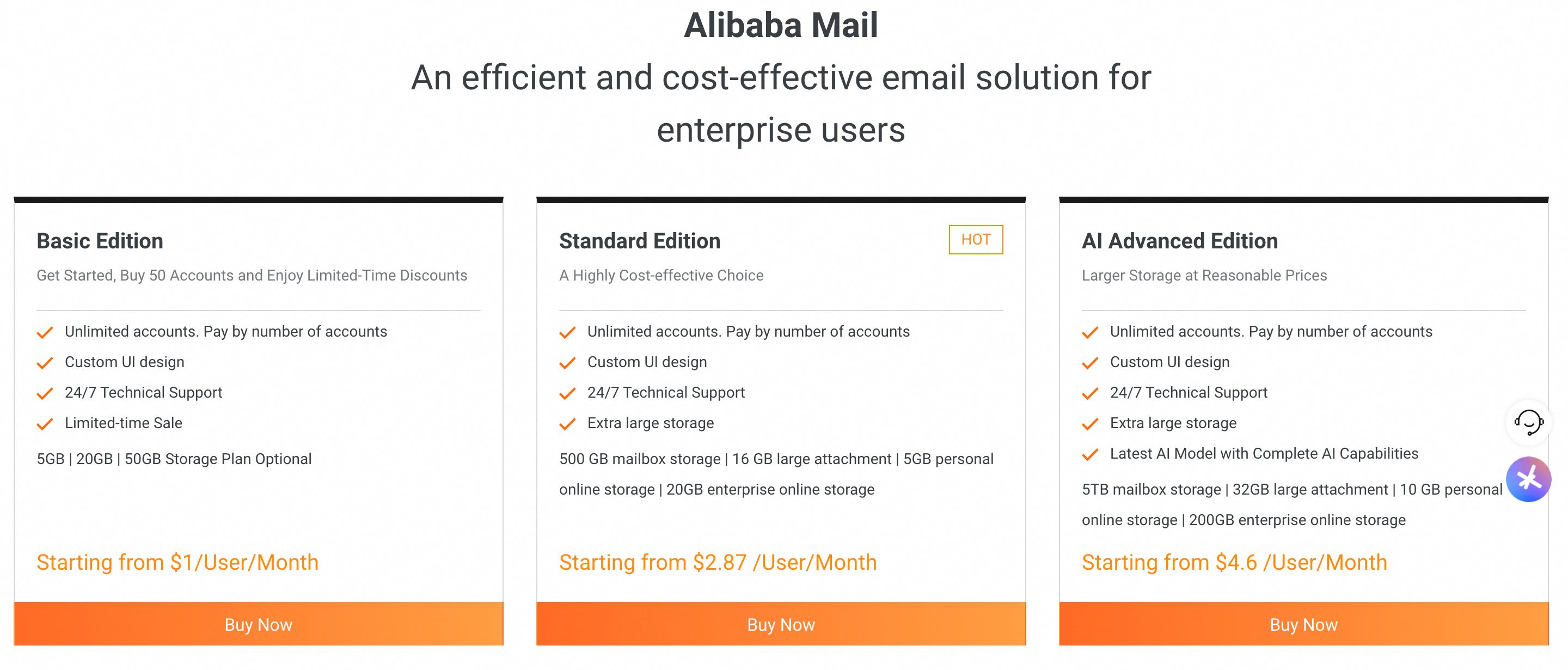
Note: The image shows only basic information about each edition.
For more information, please check Purchase Alibaba Mail.
Differences Between Editions
Feature/Edition | New Basic Edition | New Standard Edition | New AI Advanced Edition | ||
Product Parameters | |||||
Number of users | Starts at 3 accounts. Purchase as needed. No upper limit on accounts. | ||||
Mailbox capacity | 5 GB/account | 20 GB/account | 50 GB/account | 500 GB/account | 5 TB/account |
Large attachment relay station | / | / | / | 16 GB/account | 32 GB/account |
Corporate drive capacity | / | / | / | 20 GB | 200 GB |
Personal drive | / | / | / | 5 GB/account | 32 GB/account |
After-sales service | |||||
The official website is now online. | 24/7 | ||||
Hotline | 24/7 | ||||
Email Sending and Receiving Services | |||||
Intra-Enterprise Sending Volume | Unlimited | Unlimited | Unlimited | Unlimited | |
Outbound enterprise email count | Sufficient for all business needs (excludes spam and promotional emails). | ||||
Email delivery channel | Global multi-node relay and acceleration channel for faster delivery and higher success rates. | ||||
Administrator Features | |||||
Basic account management | Support | Support | Support | Supported | Support |
Public contacts | Support | Support | Support | Supported | Support |
Email group | Support | Support | Support | Support | Support |
Account alias | Support | Support | Support | Supported | Supported |
Batch settings | Supported. Use simple settings for individual accounts. Use the export/import feature for departments or many accounts. | ||||
Account recycle bin | Support | Supported | Support | Support | Support |
Two-factor authentication for proprietary clients | Supported | Support | Supported | Support | Support |
Access restrictions for proprietary clients | Support | Support | Supported | Supported | Supported |
Third-party client logon management | Support | Support | Supported | Supported | Support |
Secure logon IP | Support | Supported | Supported | Support | Support |
Forced periodic password changes | Support | Supported | Supported | Support | Support |
Weak password blacklist | Supported | Supported | Support | Support | Support |
Blacklists and whitelists | Supported | Support | Support | Support | Supported |
Email rules | Support | Support | Supported | Support | Support |
Anti-spam settings | Support | Supported | Support | Support | Supported |
IP logon restrictions/IP blacklist | Support | Support | Support | Support | Supported |
External account alerts | Support | Supported | Support | Supported | Support |
Malicious link warnings | Supported | Support | Supported | Support | Support |
Behavior query | Support | Support | Supported | Support | Support |
Data statistics | Support | Support | Support | Support | Support |
Security statistics | Supported | Support | Support | Support | Support |
Hierarchical administrators | Support | Support | Supported | Support | Support |
Edit enterprise information | Supported | Support | Support | Support | Support |
Domain name management | Supported. Number of subdomains (the multi-domain feature requires a purchase of 10 or more accounts): | ||||
Interface customization | Support | Support | Support | Supported | Support |
Mailbox migration | Support | Support | Support | Support | Support |
Sending settings | Support | Supported | Support | Support | Support |
Mailbox delegation (mailbox authorization and email secretary) | Support | Support | Support | Support | Support |
Email recall | Support | Support | Support | Supported | Supported |
Mailbox recycle bin | Support | Supported | Support | Support | Support |
Meeting room management | Support | Support | Support | Support | Supported |
User features | |||||
Support | Support | Support | Support | Support | |
Address book | Support | Supported | Support | Support | Support |
Calendar | Support | Support | Support | Supported | Supported |
Drive | Support | Supported | Supported | Support | Support |
Set default sender mailbox | Supported | Support | Support | Supported | Supported |
Set sender name | Supported | Support | Support | Support | Support |
Set profile picture | Support | Supported | Supported | Supported | Supported |
Authenticator | Supported | Supported | Support | Support | Support |
Security questions/Secure phone | Supported | Support | Support | Support | Support |
Log query | Support | Supported | Support | Support | Support |
Logon device management | Support | Support | Support | Supported | Support |
POP settings | Support | Support | Support | Support | Support |
Read receipts | Support | Support | Supported | Support | Support |
Set reply-to address | Support | Supported | Support | Supported | Supported |
Custom display settings | Support | Support | Support | Supported | Supported |
Incoming mail rules | Supported | Support | Supported | Supported | Supported |
Vacation reply settings | Support | Support | Supported | Support | Supported |
Blacklists and whitelists | Supported | Supported | Support | Support | Support |
Auto-forwarding | Support | Support | Supported | Supported | Supported |
Fetch mail from other accounts | Supported | Supported | Support | Support | Support |
Signature | Support | Supported | Supported | Support | Support |
New mail notification settings | Support | Support | Support | Support | Support |
Multi-language settings | Support | Support | Support | Support | Support |
Time zone settings | Supported | Support | Support | Support | Supported |
Theme settings | Support | Support | Support | Support | Support |
Email templates | Personal templates only | Personal templates only | Personal templates only | Personal templates only | Personal and corporate templates |
Groups | / | / | / | Support | Support |
Email archiving | Supported (paid add-on) | Supported (paid add-on) | Supported (paid add-on) | Supported (paid add-on) | Supported |
API Open Platform | / | / | / | Support | Support |
Custom fields for organization address book | / | / | / | / | Create and sort custom fields for the organization address book |
Integration Solutions | |||||
AD integration | / | / | / | Supported (paid add-on) | Support |
DingTalk integration | / | / | / | Support | Support |
AI Features | |||||
Smart compose | / | / | / | Limited-time trial | Support |
Smart reply | / | / | / | Limited-time trial | Support |
Smart translation | / | / | / | / | Support |
AI-enhanced gateway | / | / | / | / | Supported (paid add-on) |
Data Security and Compliance | |||||
Email leakage prevention watermark | / | / | / | / | Support |
S/MIME | / | / | / | / | Supported |
Advanced behavior logs (URL clicks, address book queries, etc.) | / | / | / | / | Support |
Third-party gateway integration | / | / | / | / | Supported |
Third-party unified identity authentication integration | / | / | / | / | Support |
Global distributed solution (multi-node storage worldwide under the same domain name) | / | / | / | / | Support |