Security Token Service (STS) lets you grant time-limited access to OSS resources without exposing your permanent AccessKey pair. When the temporary credentials expire, access is automatically revoked.
Use STS-based temporary credentials when you need to:
Grant a third party (such as a supplier or partner) time-limited access to your OSS bucket without sharing your permanent credentials
Control permissions dynamically — grant only the specific operations the third party needs, and adjust or revoke access as requirements change
Avoid managing long-term credentials for external parties
OSS also supports presigned URLs for temporary access. Use STS when you need role-based permission control and dynamic access management. Use presigned URLs when you need to share a specific object with a time-limited URL.
How it works
The flow involves three parties: the enterprise (the Alibaba Cloud account owner), STS, and the supplier (the third party).

The enterprise sets up a RAM user and a RAM role, and grants the role the required OSS permissions.
The supplier requests temporary credentials from the enterprise's application server.
The application server calls
AssumeRoleusing the RAM user's credentials to get temporary credentials from STS.STS returns temporary credentials — an AccessKey ID, AccessKey secret, and STS token — with an expiration time.
The supplier uses the temporary credentials to upload data to the OSS bucket.
Prerequisites
Before you begin, ensure that you have:
An existing OSS bucket. See Create buckets
Step 1: Configure the enterprise side
The enterprise performs the following setup once to enable the supplier to request temporary credentials.
1.1 Create a RAM user
The RAM user represents your application server — it calls STS to generate temporary credentials on behalf of the enterprise.
Log on to the RAM consoleRAM consoleRAM consoleRAM consoleRAM console.
In the left-side navigation pane, choose Identities > Users.
Click Create User.
Specify a Logon Name and Display Name.
Under Access Mode, select Using permanent AccessKey to access, then click OK.
Complete security verification as prompted.
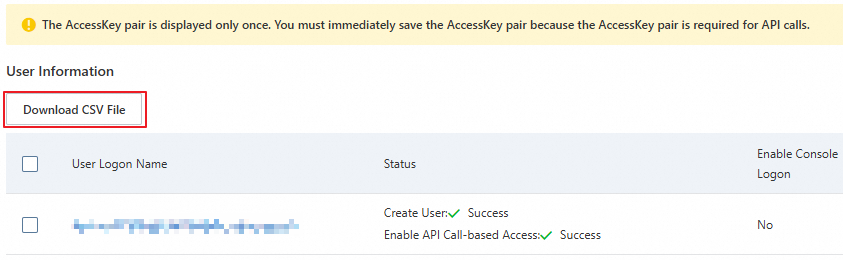
Copy the AccessKey ID and AccessKey secret, and save them securely.
The AccessKey secret is shown only once at creation time. Download the CSV file immediately and store it in a safe location.
1.2 Grant the RAM user permission to call AssumeRole
In the RAM console, choose Identities > Users.
Find the RAM user you created and click Add Permissions in the Actions column.
In the Grant Permission panel, select the AliyunSTSAssumeRoleAccess policy.
Click Grant permissions.
AliyunSTSAssumeRoleAccess only allows the RAM user to call AssumeRole. It does not grant OSS access — that comes from the RAM role you create next.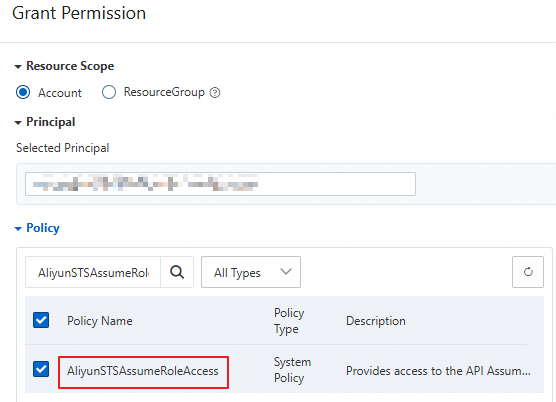
1.3 Create a RAM role
The RAM role defines what the temporary credentials can do. The supplier's temporary credentials inherit the role's permissions.
In the RAM console, choose Identities > Roles.
Click Create Role.
Set Principal Type to Cloud Account and Principal Name to Current Account, then click OK.
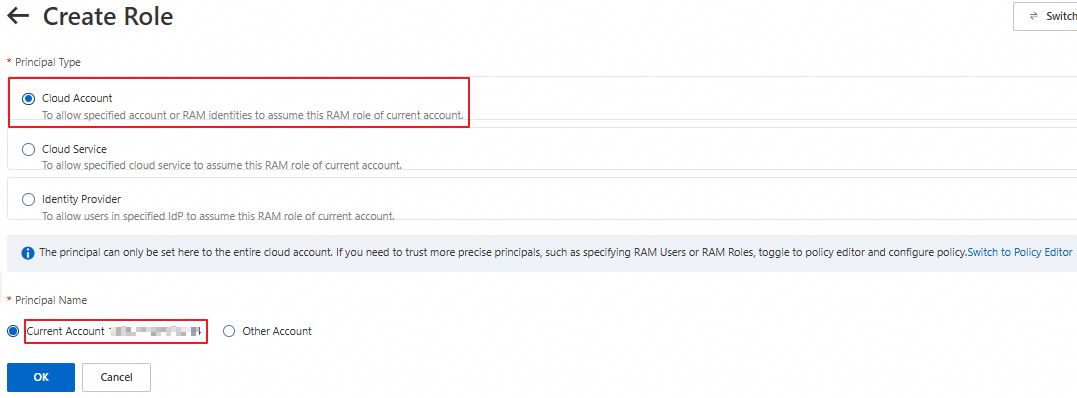
In the Create Role dialog, specify a role name and click OK.
On the role details page, click Copy next to the ARN field in the Basic Information section. Save the ARN — you'll need it when calling AssumeRole.

1.4 Grant the RAM role OSS upload permissions
Attach a policy to the RAM role that grants only the permissions the supplier needs.
Create a custom policy:
In the RAM console, choose Permissions > Policies.
Click Create Policy.
Click JSON and enter the following policy, which allows uploading objects to a specific bucket:
WarningThis example grants broad upload access to the entire bucket. For production use, restrict the
Resourceto specific directories. See Common examples of RAM policies.oss:PutObjectcovers simple upload, form upload, append upload, multipart upload, and resumable upload. For other operations, see Action element in RAM policies for OSS.{ "Version": "1", "Statement": [ { "Effect": "Allow", "Action": [ "oss:PutObject" ], "Resource": [ "acs:oss:*:*:examplebucket/*" ] } ] }Click OK. In the dialog, enter a policy name (for example,
RamTestPolicy), then click OK.
Attach the policy to the RAM role:
In the RAM console, choose Identities > Roles.
Find the
RamOssTestrole and click Grant Permission in the Actions column.In the Policy section, select Custom Policy from the type dropdown, then select
RamTestPolicy.Click Grant permissions.
1.5 Generate temporary credentials
The application server calls AssumeRole using the RAM user's AccessKey pair (from step 1.1) to get temporary credentials from STS.
Use the RAM user's AccessKey pair — not the Alibaba Cloud account's. Calling STS with an Alibaba Cloud account's credentials will fail.
All examples below read credentials from environment variables and use the RAM role ARN from step 1.3. The returned credentials include an AccessKey ID (prefixed with STS.), an AccessKey secret, an STS token, and an expiration time.
Example response:
{
  "AccessKeyId": "STS.****************",
  "AccessKeySecret": "3dZn*******************************************",
  "SecurityToken": "CAIS*****************************************************************************************************************************************",
  "Expiration": "2024-**-*****:**:50Z"
}
The expiration time is in UTC. For example, 2024-04-18T11:33:40Z means April 18, 2024 at 19:33:40 (UTC+8).An Alibaba Cloud account, along with its RAM users and RAM roles, can send up to 100 requests per second (RPS) to STS. In high-concurrency scenarios, reuse credentials until they expire rather than requesting new ones for each operation.
Validity period:
| Scenario | Minimum | Maximum |
|---|---|---|
| Default role max session duration (3,600 s) | 900 s | 3,600 s |
| Custom role max session duration | 900 s | Up to 43,200 s |
Set a validity period long enough for your operation. For large file uploads or other time-consuming tasks, use a longer duration to avoid refreshing credentials mid-operation.
Java
import com.aliyuncs.DefaultAcsClient;
import com.aliyuncs.exceptions.ClientException;
import com.aliyuncs.http.MethodType;
import com.aliyuncs.profile.DefaultProfile;
import com.aliyuncs.profile.IClientProfile;
import com.aliyuncs.auth.sts.AssumeRoleRequest;
import com.aliyuncs.auth.sts.AssumeRoleResponse;

public class StsServiceSample {
    public static void main(String[] args) {
        // STS endpoint — use one in the same region as your application server for faster responses
        String endpoint = "sts.cn-hangzhou.aliyuncs.com";
        // Read the RAM user credentials from environment variables (created in step 1.1)
        String accessKeyId = System.getenv("ACCESS_KEY_ID");
        String accessKeySecret = System.getenv("ACCESS_KEY_SECRET");
        // Read the RAM role ARN from environment variables (created in step 1.3)
        String roleArn = System.getenv("RAM_ROLE_ARN");
        // A label to identify this session — useful for auditing
        String roleSessionName = "yourRoleSessionName";
        // null means the temporary credentials inherit all role permissions
        String policy = null;
        // Validity period in seconds (min: 900, max: role's max session duration, default max: 3,600)
        Long durationSeconds = 3600L;

        try {
            String regionId = "";
            // For STS SDK for Java V3.12.0 and later:
            DefaultProfile.addEndpoint(regionId, "Sts", endpoint);
            // For STS SDK for Java earlier than V3.12.0:
            // DefaultProfile.addEndpoint("", regionId, "Sts", endpoint);

            IClientProfile profile = DefaultProfile.getProfile(regionId, accessKeyId, accessKeySecret);
            DefaultAcsClient client = new DefaultAcsClient(profile);

            final AssumeRoleRequest request = new AssumeRoleRequest();
            // For STS SDK for Java V3.12.0 and later:
            request.setSysMethod(MethodType.POST);
            // For STS SDK for Java earlier than V3.12.0:
            // request.setMethod(MethodType.POST);
            request.setRoleArn(roleArn);
            request.setRoleSessionName(roleSessionName);
            request.setPolicy(policy);
            request.setDurationSeconds(durationSeconds);

            final AssumeRoleResponse response = client.getAcsResponse(request);
            System.out.println("Expiration: " + response.getCredentials().getExpiration());
            System.out.println("Access Key Id: " + response.getCredentials().getAccessKeyId());
            System.out.println("Access Key Secret: " + response.getCredentials().getAccessKeySecret());
            System.out.println("Security Token: " + response.getCredentials().getSecurityToken());
            System.out.println("RequestId: " + response.getRequestId());
        } catch (ClientException e) {
            System.out.println("Failed: ");
            System.out.println("Error code: " + e.getErrCode());
            System.out.println("Error message: " + e.getErrMsg());
            System.out.println("RequestId: " + e.getRequestId());
        }
    }
}
Python
# -*- coding: utf-8 -*-
from aliyunsdkcore import client
from aliyunsdkcore.request import CommonRequest
import json
import oss2
import os

# Read the RAM user credentials from environment variables (created in step 1.1)
access_key_id = os.getenv("ACCESS_KEY_ID")
access_key_secret = os.getenv("ACCESS_KEY_SECRET")
# Read the RAM role ARN from environment variables (created in step 1.3)
role_arn = os.getenv("RAM_ROLE_ARN")

clt = client.AcsClient(access_key_id, access_key_secret, 'cn-hangzhou')
request = CommonRequest(product="Sts", version='2015-04-01', action_name='AssumeRole')
request.set_method('POST')
request.set_protocol_type('https')
request.add_query_param('RoleArn', role_arn)
# A label to identify this session
request.add_query_param('RoleSessionName', 'sessiontest')
# Validity period: 3,600 seconds
request.add_query_param('DurationSeconds', '3600')
request.set_accept_format('JSON')

body = clt.do_action_with_exception(request)

token = json.loads(oss2.to_unicode(body))
print('AccessKeyId: ' + token['Credentials']['AccessKeyId'])
print('AccessKeySecret: ' + token['Credentials']['AccessKeySecret'])
print('SecurityToken: ' + token['Credentials']['SecurityToken'])
print('Expiration: ' + token['Credentials']['Expiration'])
Node.js
const { STS } = require('ali-oss');
const express = require("express");
const app = express();

app.get('/sts', (req, res) => {
  let sts = new STS({
    // Read the RAM user credentials from environment variables (created in step 1.1)
    accessKeyId: process.env.ACCESS_KEY_ID,
    accessKeySecret: process.env.ACCESS_KEY_SECRET
  });
  // Read the RAM role ARN from environment variables (created in step 1.3)
  // The second argument is an optional inline policy to further restrict permissions
  // Validity period: 3,600 seconds (min: 900)
  // A label to identify this session
  sts.assumeRole(process.env.RAM_ROLE_ARN, ``, '3600', 'sessiontest').then((result) => {
    console.log(result);
    res.set('Access-Control-Allow-Origin', '*');
    res.set('Access-Control-Allow-METHOD', 'GET');
    res.json({
      AccessKeyId: result.credentials.AccessKeyId,
      AccessKeySecret: result.credentials.AccessKeySecret,
      SecurityToken: result.credentials.SecurityToken,
      Expiration: result.credentials.Expiration
    });
  }).catch((err) => {
    console.log(err);
    res.status(400).json(err.message);
  });
});

app.listen(8000, () => {
  console.log("server listen on:8000")
})
Go
package main

import (
    "fmt"
    "os"

    openapi "github.com/alibabacloud-go/darabonba-openapi/v2/client"
    sts20150401 "github.com/alibabacloud-go/sts-20150401/v2/client"
    util "github.com/alibabacloud-go/tea-utils/v2/service"
    "github.com/alibabacloud-go/tea/tea"
)

func main() {
    // Read the RAM user credentials from environment variables (created in step 1.1)
    accessKeyId := os.Getenv("ACCESS_KEY_ID")
    accessKeySecret := os.Getenv("ACCESS_KEY_SECRET")
    // Read the RAM role ARN from environment variables (created in step 1.3)
    roleArn := os.Getenv("RAM_ROLE_ARN")

    config := &openapi.Config{
        AccessKeyId:     tea.String(accessKeyId),
        AccessKeySecret: tea.String(accessKeySecret),
    }
    // STS endpoint — see https://api.alibabacloud.com/product/Sts for all endpoints
    config.Endpoint = tea.String("sts.cn-hangzhou.aliyuncs.com")
    client, err := sts20150401.NewClient(config)
    if err != nil {
        fmt.Printf("Failed to create client: %v\n", err)
        return
    }

    request := &sts20150401.AssumeRoleRequest{
        // Validity period: 3,600 seconds
        DurationSeconds: tea.Int64(3600),
        RoleArn:         tea.String(roleArn),
        // A label to identify this session
        RoleSessionName: tea.String("examplename"),
    }
    response, err := client.AssumeRoleWithOptions(request, &util.RuntimeOptions{})
    if err != nil {
        fmt.Printf("Failed to assume role: %v\n", err)
        return
    }

    credentials := response.Body.Credentials
    fmt.Println("AccessKeyId: " + tea.StringValue(credentials.AccessKeyId))
    fmt.Println("AccessKeySecret: " + tea.StringValue(credentials.AccessKeySecret))
    fmt.Println("SecurityToken: " + tea.StringValue(credentials.SecurityToken))
    fmt.Println("Expiration: " + tea.StringValue(credentials.Expiration))
}
php
<?php
require __DIR__ . '/vendor/autoload.php';

use AlibabaCloud\Client\AlibabaCloud;
use AlibabaCloud\Client\Exception\ClientException;
use AlibabaCloud\Client\Exception\ServerException;
use AlibabaCloud\Sts\Sts;

// Read the RAM user credentials from environment variables (created in step 1.1)
$accessKeyId = getenv("ACCESS_KEY_ID");
$accessKeySecret = getenv("ACCESS_KEY_SECRET");
// Read the RAM role ARN from environment variables (created in step 1.3)
$roleArn = getenv("RAM_ROLE_ARN");

AlibabaCloud::accessKeyClient($accessKeyId, $accessKeySecret)
    ->regionId('cn-hangzhou')
    ->asDefaultClient();

try {
    $result = Sts::v20150401()
        ->assumeRole()
        ->withRoleArn($roleArn)
        // A label to identify this session
        ->withRoleSessionName('sessiontest')
        // Validity period: 3,600 seconds
        ->withDurationSeconds(3600)
        ->request();

    $credentials = $result['Credentials'];
    echo 'AccessKeyId: ' . $credentials['AccessKeyId'] . PHP_EOL;
    echo 'AccessKeySecret: ' . $credentials['AccessKeySecret'] . PHP_EOL;
    echo 'SecurityToken: ' . $credentials['SecurityToken'] . PHP_EOL;
    echo 'Expiration: ' . $credentials['Expiration'] . PHP_EOL;
} catch (ClientException $e) {
    echo $e->getErrorMessage() . PHP_EOL;
} catch (ServerException $e) {
    echo $e->getErrorMessage() . PHP_EOL;
}
Ruby
require 'sinatra'
require 'base64'
require 'open-uri'
require 'cgi'
require 'openssl'
require 'json'
require 'sinatra/reloader'
require 'sinatra/content_for'
require 'aliyunsdkcore'

set :public_folder, File.dirname(__FILE__) + '/templates'

def get_sts_token_for_oss_upload()
  client = RPCClient.new(
    # Read the RAM user credentials from environment variables (created in step 1.1)
    access_key_id: ENV['ACCESS_KEY_ID'],
    access_key_secret: ENV['ACCESS_KEY_SECRET'],
    endpoint: 'https://sts.cn-hangzhou.aliyuncs.com',
    api_version: '2015-04-01'
  )
  response = client.request(
    action: 'AssumeRole',
    params: {
      # Read the RAM role ARN from environment variables (created in step 1.3)
      "RoleArn": ENV['RAM_ROLE_ARN'],
      # Validity period: 3,600 seconds
      "DurationSeconds": 3600,
      # A label to identify this session
      "RoleSessionName": "sessiontest"
    },
    opts: {
      method: 'POST',
      format_params: true
    }
  )
end

$server_ip = "127.0.0.1"  # To listen on another IP address, implement authentication on the server side
$server_port = 8000

if ARGV.length == 1
  $server_port = ARGV[0]
elsif ARGV.length == 2
  $server_ip = ARGV[0]
  $server_port = ARGV[1]
end

puts "App server is running on: http://#{$server_ip}:#{$server_port}"

set :bind, $server_ip
set :port, $server_port

get '/get_sts_token_for_oss_upload' do
  token = get_sts_token_for_oss_upload()
  response = {
    "AccessKeyId" => token["Credentials"]["AccessKeyId"],
    "AccessKeySecret" => token["Credentials"]["AccessKeySecret"],
    "SecurityToken" => token["Credentials"]["SecurityToken"],
    "Expiration" => token["Credentials"]["Expiration"]
  }
  response.to_json
end

get '/*' do
  puts "********************* GET "
  send_file File.join(settings.public_folder, 'index.html')
end
For other languages, see STS SDK overview.
Fine-grained permissions (optional)
By default, the temporary credentials have all the permissions of the RAM role. To restrict them further — for example, to allow uploads only to a specific directory — pass an inline policy in the AssumeRole request. The final permissions are the intersection of the role permissions and the inline policy.
// This policy restricts the temporary credentials to uploading objects to the src/ directory only.
// Final permissions = role permissions (step 1.4) intersect this inline policy
String policy = "{\n" +
                "    \"Version\": \"1\", \n" +
                "    \"Statement\": [\n" +
                "        {\n" +
                "            \"Action\": [\n" +
                "                \"oss:PutObject\"\n" +
                "            ], \n" +
                "            \"Resource\": [\n" +
                "                \"acs:oss:*:*:examplebucket/src/*\" \n" +
                "            ], \n" +
                "            \"Effect\": \"Allow\"\n" +
                "        }\n" +
                "    ]\n" +
                "}";
Step 2: Upload data using the temporary credentials
Starting March 20, 2025, new OSS users must use a custom domain name (CNAME) to perform data API operations on OSS buckets in Chinese mainland regions. Default public endpoints are restricted for these operations. See the official announcement for the full list of affected operations. If you access data over HTTPS, bind a valid SSL certificate to your custom domain — this is mandatory for OSS console access.
Initialize the OSS client with the temporary credentials (AccessKey ID, AccessKey secret, and STS token) from step 1.5. The temporary AccessKey ID starts with STS..
For other languages, see Overview.
Java
import com.aliyun.oss.*;
import com.aliyun.oss.common.auth.CredentialsProvider;
import com.aliyun.oss.common.auth.DefaultCredentialProvider;
import com.aliyun.oss.common.comm.SignVersion;
import com.aliyun.oss.model.PutObjectRequest;
import com.aliyun.oss.model.PutObjectResult;
import java.io.File;

public class Demo {
    public static void main(String[] args) throws Exception {
        // Use the temporary credentials from step 1.5 — not a RAM user's credentials
        // The temporary AccessKey ID starts with STS.
        String accessKeyId = "yourSTSAccessKeyID";
        String accessKeySecret = "yourSTSAccessKeySecret";
        String stsToken = "yourSecurityToken";

        CredentialsProvider credentialsProvider = new DefaultCredentialProvider(accessKeyId, accessKeySecret, stsToken);
        ClientBuilderConfiguration clientBuilderConfiguration = new ClientBuilderConfiguration();
        // Use V4 signature
        clientBuilderConfiguration.setSignatureVersion(SignVersion.V4);

        OSS ossClient = OSSClientBuilder.create()
                // Endpoint of the region where the bucket is located, e.g., https://oss-cn-hangzhou.aliyuncs.com
                .endpoint("endpoint")
                .credentialsProvider(credentialsProvider)
                .clientConfiguration(clientBuilderConfiguration)
                // Region ID, e.g., cn-hangzhou
                .region("region")
                .build();

        try {
            // Upload exampletest.txt to examplebucket
            PutObjectRequest putObjectRequest = new PutObjectRequest(
                "examplebucket",
                "exampletest.txt",
                new File("D:\\localpath\\exampletest.txt")
            );
            PutObjectResult result = ossClient.putObject(putObjectRequest);
        } catch (OSSException oe) {
            System.out.println("OSS error — request reached OSS but was rejected:");
            System.out.println("Error Message: " + oe.getErrorMessage());
            System.out.println("Error Code: " + oe.getErrorCode());
            System.out.println("Request ID: " + oe.getRequestId());
            System.out.println("Host ID: " + oe.getHostId());
        } catch (ClientException ce) {
            System.out.println("Client error — could not reach OSS:");
            System.out.println("Error Message: " + ce.getMessage());
        } finally {
            if (ossClient != null) {
                ossClient.shutdown();
            }
        }
    }
}
Python
OSS SDK for Python is available in two versions. Version 2.0 is a complete rewrite of 1.0 with streamlined authentication, retry logic, and error handling, plus more flexible configuration options.
V2 example
import alibabacloud_oss_v2 as oss

def main():
    # Use the temporary credentials from step 1.5 — not a RAM user's credentials
    # The temporary AccessKey ID starts with STS.
    sts_access_key_id = 'yourSTSAccessKeyID'
    sts_access_key_secret = 'yourSTSAccessKeySecret'
    sts_security_token = 'yourSecurityToken'

    credentials_provider = oss.credentials.StaticCredentialsProvider(
        access_key_id=sts_access_key_id,
        access_key_secret=sts_access_key_secret,
        security_token=sts_security_token,
    )

    cfg = oss.config.load_default()
    cfg.credentials_provider = credentials_provider
    # Region where the bucket is located, e.g., cn-hangzhou
    cfg.region = 'cn-hangzhou'

    client = oss.Client(cfg)

    # Upload a local file to examplebucket
    local_file_path = 'D:\\localpath\\exampletest.txt'
    with open(local_file_path, 'rb') as file:
        data = file.read()

    result = client.put_object(oss.PutObjectRequest(
        bucket='examplebucket',
        key='exampletest.txt',
        body=data,
    ))

    print(f'status code: {result.status_code},'
          f' request id: {result.request_id},'
          f' content md5: {result.content_md5},'
          f' etag: {result.etag},'
          f' hash crc64: {result.hash_crc64},'
          f' version id: {result.version_id},'
    )

if __name__ == "__main__":
    main()
V1 example
# -*- coding: utf-8 -*-
import oss2

# Endpoint of the region where the bucket is located, e.g., https://oss-cn-hangzhou.aliyuncs.com
endpoint = 'https://oss-cn-hangzhou.aliyuncs.com'
# Use the temporary credentials from step 1.5 — not a RAM user's credentials
sts_access_key_id = 'yourAccessKeyId'
sts_access_key_secret = 'yourAccessKeySecret'
bucket_name = 'examplebucket'
object_name = 'examplebt.txt'
security_token = 'yourSecurityToken'

auth = oss2.StsAuth(sts_access_key_id, sts_access_key_secret, security_token)
bucket = oss2.Bucket(auth, endpoint, bucket_name)
result = bucket.put_object(object_name, "hello world")
print(result.status)
Go
OSS SDK for Go is available in two versions. Version 2.0 is a complete rewrite of 1.0 with streamlined authentication, retry logic, and error handling, plus more flexible configuration options.
V2 example
package main

import (
	"context"
	"log"

	"github.com/aliyun/alibabacloud-oss-go-sdk-v2/oss"
	"github.com/aliyun/alibabacloud-oss-go-sdk-v2/oss/credentials"
)

func main() {
	// Region where the bucket is located, e.g., cn-hangzhou
	region := "cn-hangzhou"

	// Use the temporary credentials from step 1.5 — not a RAM user's credentials
	// The temporary AccessKey ID starts with STS.
	accessKeyID := "yourSTSAccessKeyID"
	accessKeySecret := "yourSTSAccessKeySecret"
	stsToken := "yourSecurityToken"

	provider := credentials.NewStaticCredentialsProvider(accessKeyID, accessKeySecret, stsToken)

	cfg := oss.LoadDefaultConfig().
		WithCredentialsProvider(provider).
		WithRegion(region)

	client := oss.NewClient(cfg)

	localFile := "D:\\localpath\\exampletest.txt"

	putRequest := &oss.PutObjectRequest{
		Bucket:       oss.Ptr("examplebucket"),
		Key:          oss.Ptr("exampletest.txt"),
		StorageClass: oss.StorageClassStandard,
		Acl:          oss.ObjectACLPrivate,
		Metadata: map[string]string{
			"yourMetadataKey1": "yourMetadataValue1",
		},
	}

	result, err := client.PutObjectFromFile(context.TODO(), putRequest, localFile)
	if err != nil {
		log.Fatalf("failed to put object from file %v", err)
	}
	log.Printf("put object from file result:%#v\n", result)
}
V1 example
package main

import (
    "fmt"
    "github.com/aliyun/aliyun-oss-go-sdk/oss"
    "os"
)

func main() {
    // Read temporary credentials from environment variables
    // Set OSS_ACCESS_KEY_ID, OSS_ACCESS_KEY_SECRET, and OSS_SESSION_TOKEN before running
    provider, err := oss.NewEnvironmentVariableCredentialsProvider()
    if err != nil {
        fmt.Println("Error:", err)
        os.Exit(-1)
    }
    // Endpoint of the region where the bucket is located, e.g., https://oss-cn-hangzhou.aliyuncs.com
    client, err := oss.New("yourEndpoint", "", "", oss.SetCredentialsProvider(&provider))
    if err != nil {
        fmt.Println("Error:", err)
        os.Exit(-1)
    }
    bucketName := "examplebucket"
    objectName := "exampledir/exampleobject.txt"
    filepath := "D:\\localpath\\examplefile.txt"

    bucket, err := client.Bucket(bucketName)
    if err != nil {
        fmt.Println("Error:", err)
        os.Exit(-1)
    }
    err = bucket.PutObjectFromFile(objectName, filepath)
    if err != nil {
        fmt.Println("Error:", err)
        os.Exit(-1)
    }
    fmt.Println("upload success")
}
Node.js
This example requires Axios.
const axios = require("axios");
const OSS = require("ali-oss");

const getToken = async () => {
  // Fetch temporary credentials from the application server (running step 1.5)
  await axios.get("http://localhost:8000/sts").then((token) => {
    const client = new OSS({
      // Region where the bucket is located, e.g., oss-cn-hangzhou
      region: 'oss-cn-hangzhou',
      // Use the temporary credentials from step 1.5
      accessKeyId: token.data.AccessKeyId,
      accessKeySecret: token.data.AccessKeySecret,
      stsToken: token.data.SecurityToken,
      authorizationV4: true,
      bucket: "examplebucket",
      // Automatically refresh credentials before they expire
      refreshSTSToken: async () => {
        const refreshToken = await axios.get("http://localhost:8000/sts");
        return {
          accessKeyId: refreshToken.data.AccessKeyId,
          accessKeySecret: refreshToken.data.AccessKeySecret,
          stsToken: refreshToken.data.SecurityToken,
        };
      },
    });
    // Upload an object using the temporary credentials
    client.put('exampleobject.jpg', 'D:\\example.jpg')
      .then((res) => { console.log(res) })
      .catch(e => console.log(e))
  });
};
getToken()
php
<?php
if (is_file(__DIR__ . 'autoload.php')) {
    require_once __DIR__ . 'autoload.php';
}
if (is_file(__DIR__ . '/vendor/autoload.php')) {
    require_once __DIR__ . '/vendor/autoload.php';
}

use OSS\Credentials\StaticCredentialsProvider;
use OSS\OssClient;
use OSS\Core\OssException;

try {
    // Use the temporary credentials from step 1.5 — not a RAM user's credentials
    // The temporary AccessKey ID starts with STS.
    $accessKeyId = 'yourSTSAccessKeyID';
    $accessKeySecret = 'yourSTSAccessKeySecret';
    $securityToken = 'yourSecurityToken';

    $provider = new StaticCredentialsProvider($accessKeyId, $accessKeySecret, $securityToken);

    // Endpoint of the region where the bucket is located, e.g., https://oss-cn-hangzhou.aliyuncs.com
    $endpoint = "https://oss-cn-hangzhou.aliyuncs.com";
    $bucket = "examplebucket";
    $object = "exampletest.txt";
    $localFilePath = "D:\\localpath\\exampletest.txt";

    $options = array(
        OssClient::OSS_HEADERS => array(
            'x-oss-object-acl' => 'private',
            'x-oss-meta-info' => 'yourinfo'
        ),
    );

    $config = array(
        "provider" => $provider,
        "endpoint" => $endpoint,
        "signatureVersion" => OssClient::OSS_SIGNATURE_VERSION_V4,
        // Region where the bucket is located, e.g., cn-hangzhou
        "region" => "cn-hangzhou"
    );

    $ossClient = new OssClient($config);
    $ossClient->putObject($bucket, $object, $localFilePath, $options);
} catch (OssException $e) {
    printf($e->getMessage() . "\n");
    return;
}
Ruby
require 'aliyun/sts'
require 'aliyun/oss'

client = Aliyun::OSS::Client.new(
  # Endpoint of the region where the bucket is located, e.g., https://oss-cn-hangzhou.aliyuncs.com
  endpoint: 'https://oss-cn-hangzhou.aliyuncs.com',
  # Use the temporary credentials from step 1.5 — not a RAM user's credentials
  access_key_id: 'token.access_key_id',
  access_key_secret: 'token.access_key_secret',
  sts_token: 'token.security_token'
)
bucket = client.get_bucket('examplebucket')
bucket.put_object('exampleobject.txt', :file => 'D:\test.txt')Due to a policy change to improve compliance and security, starting March 20, 2025, new OSS users must use a custom domain name (CNAME) to perform data API operations on OSS buckets located in Chinese mainland regions. Default public endpoints are restricted for these operations. Refer to the official announcement for a complete list of the affected operations. If you access your data via HTTPS, you must bind a valid SSL Certificate to your custom domain. This is mandatory for OSS Console access, as the console enforces HTTPS.
FAQ
"You are not authorized to do this action. You should be authorized by RAM"
"The Min/Max value of DurationSeconds is 15min/1hr"
"The security token you provided is invalid"
"The OSS Access Key Id you provided does not exist in our records"
"AccessDenied: Anonymous access is forbidden for this operation"
NoSuchBucket
"You have no right to access this object because of bucket acl"
"Access denied by authorizer's policy"
The temporary credentials don't have sufficient permissions. This happens when the inline policy passed to AssumeRole (step 1.5) is more restrictive than needed.
The final permissions of temporary credentials are the intersection of the RAM role's permissions (step 1.4) and the inline policy (step 1.5). Two examples:
If the role has permissions A and you pass an inline policy with permissions B, the final permissions are A intersect B.

If B is a subset of A (the inline policy is a subset of the role's permissions), the final permissions are B.

If you don't pass an inline policy, the temporary credentials have all the role's permissions.
"The bucket you are attempting to access must be addressed using the specified endpoint"
Can I hold multiple sets of temporary credentials at the same time?
Time format error
Error 0003-0000301
What's next
Direct uploads from clients: Let clients upload directly to OSS using temporary credentials, with upload conditions such as file size limits, allowed file types, and destination directories. See Direct client uploads.
Share uploaded objects: Generate presigned URLs to share objects that were uploaded using temporary credentials. See Using presigned URLs to download or preview files.