By Siddharth Pandey
Alibaba Cloud’s 9th-generation ECS instances (g9i family) feature a significant increase in L3 cache—about 50% more than the previous generation—which plays a key role in enhancing gaming server performance.
Built on Alibaba Cloud's CIPU 1.0 architecture with Intel Granite Rapids CPUs with higher clock speed, the platform also delivers 20%+ higher single vCPU performance alongside 50% more L3 cache.
Larger L3 Cache Reduces Cache Contention: The ultra-large L3 cache on gen 9 ECS instances reduces contention among CPU cores for cached data. This means game server CPUs can access frequently used data and instructions faster without repeatedly fetching from slower main memory, leading to more stable and reliable performance during gameplay.
Improved Performance: The 9th-generation ECS instances deliver approximately 20% better overall performance compared to the 8th generation, partly due to the increased L3 cache size. This improvement benefits gaming workloads that require rapid data access and low latency, such as real-time multiplayer games and game state synchronization.
Support for High-Concurrency and Low Latency: The enhanced L3 cache helps maintain low latency and high throughput for database and caching layers critical to gaming servers, ensuring smooth player experiences even under heavy concurrent loads.
Underlying Hardware: These instances use Intel Xeon Granite Rapids processors with high base and turbo frequencies, combined with the larger L3 cache, to provide consistent and robust compute power suitable for demanding gaming server environments.
Alibaba Cloud is the first public cloud provider to launch compute product based on Intel 6th gen Xeon (Granite Rapids) globally.
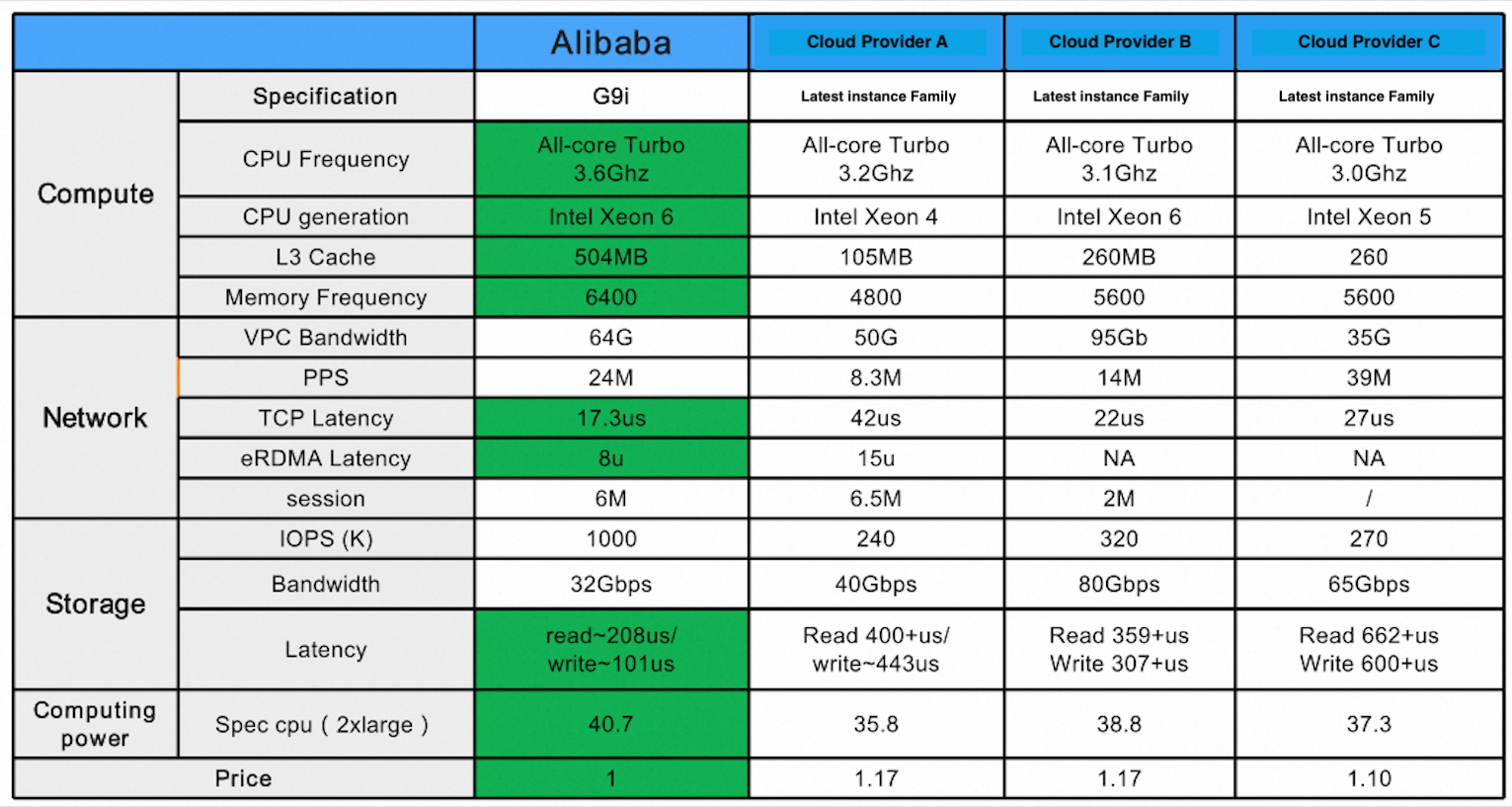
Let's compare performance of Gen 9 instances with previous generations instances. Here, I have taken a few instances from previous generations at random:
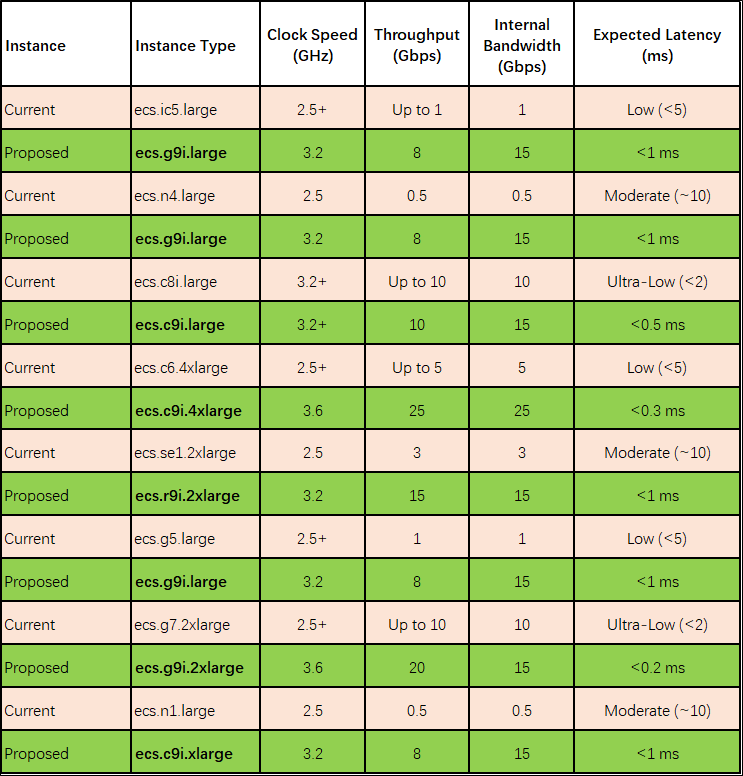
There is considerable improvement in performance and stability in the new generation instances. In addition, the prices have also reduced as compared to previous generation despite these added performance benefits. Below is the comparison of a few instances in Gen 9 vs Gen 8 (list price USD - Singapore region)
| Instance specs | Gen 8 | Gen 9 | Cheaper |
| 2 vCPU 4 GB RAM | 49.32 | 46.85 | 5% |
| 8 vCPU 16 GB RAM | 197.29 | 187.42 | 5% |
| 4 vCPU 16 GB RAM | 127.01 | 120.65 | 5% |
| 8 vCPU 64 GB RAM | 312.66 | 297.05 | 5% |
| 16 vCPU 32 GB RAM | 394.59 | 374.83 | 5% |
| 16 vCPU 64 GB RAM | 508.02 | 482.6 | 5% |
The instance migration depends on whether the instance support NVMe. NVMe (Non-Volatile Memory Express) is a high-speed storage interface protocol used by Alibaba Cloud Elastic Compute Service (ECS) to significantly improve storage performance by enabling direct communication between solid-state drives (SSDs) and CPUs, thereby reducing data transfer latency and improving I/O access times.
In order to achieve this, it is suggested to move older instances first to Gen 7 generation. Post this, these instances can be moved to Gen 9.
Note: Gen 9 instances will be available in Virginia region in July 2025.
Alibaba API portal: https://api.alibabacloud.com/
Call ModifyDiskSpec API and set DiskCategory paramter to "cloud_essd".
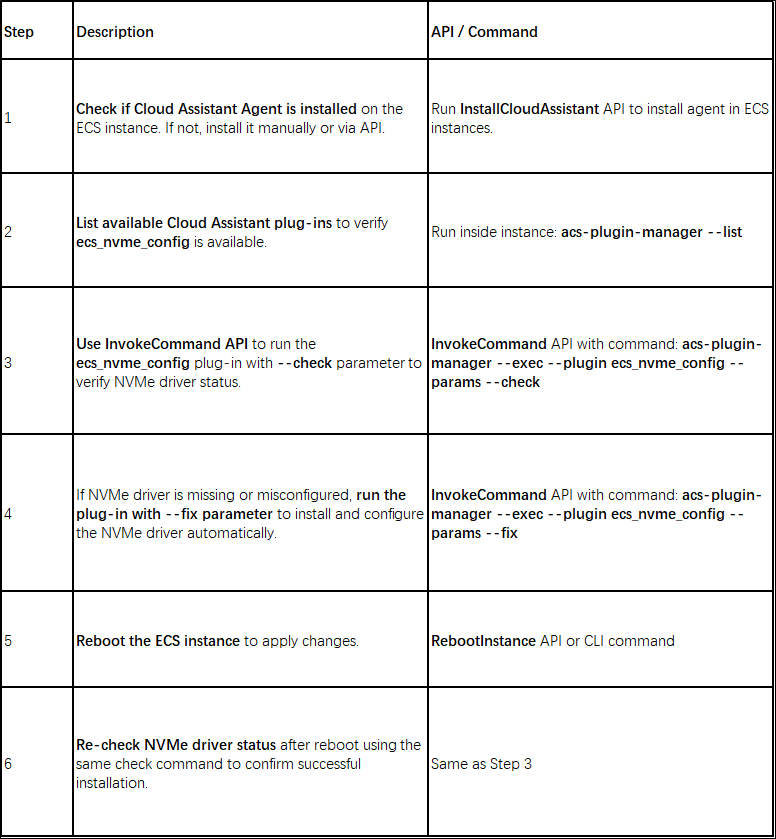
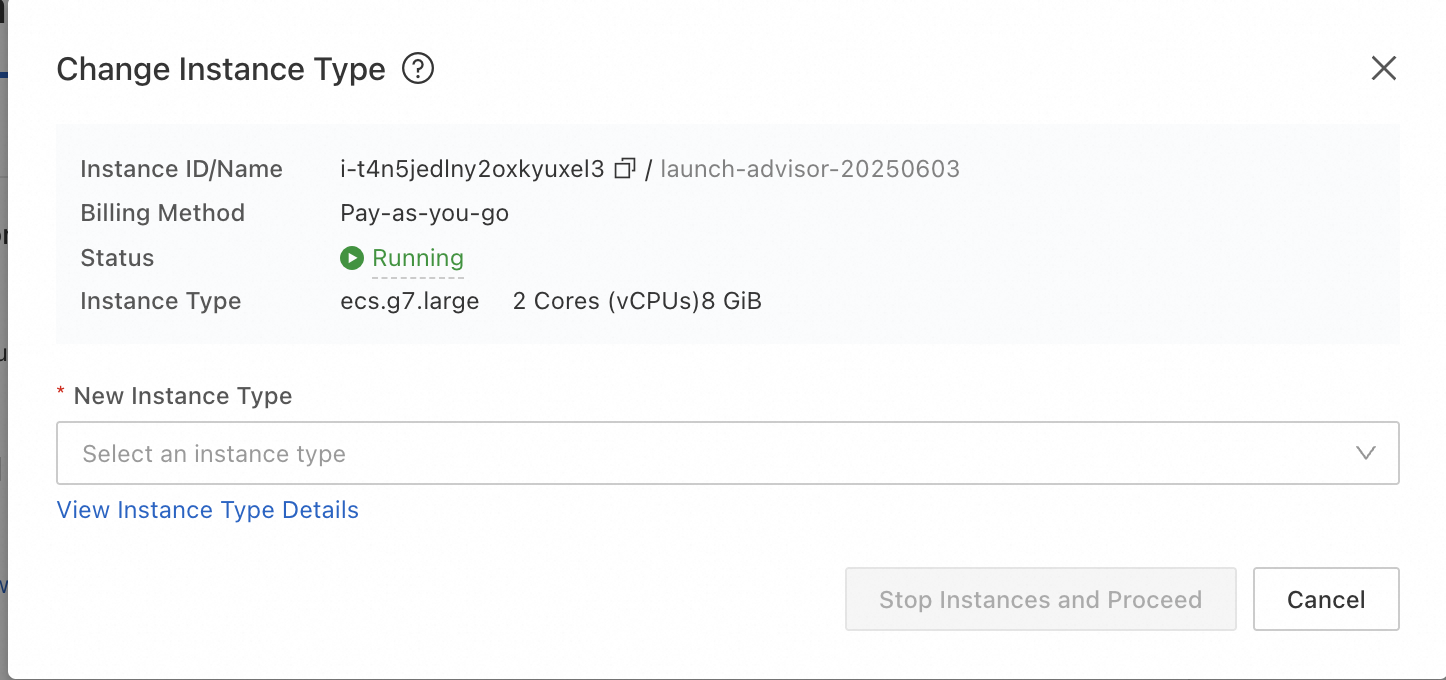
1. Login to ECS console and click on the instance to go to Instance details page.
2. Click on 'Change' under Instance Type in Configuration Information section.
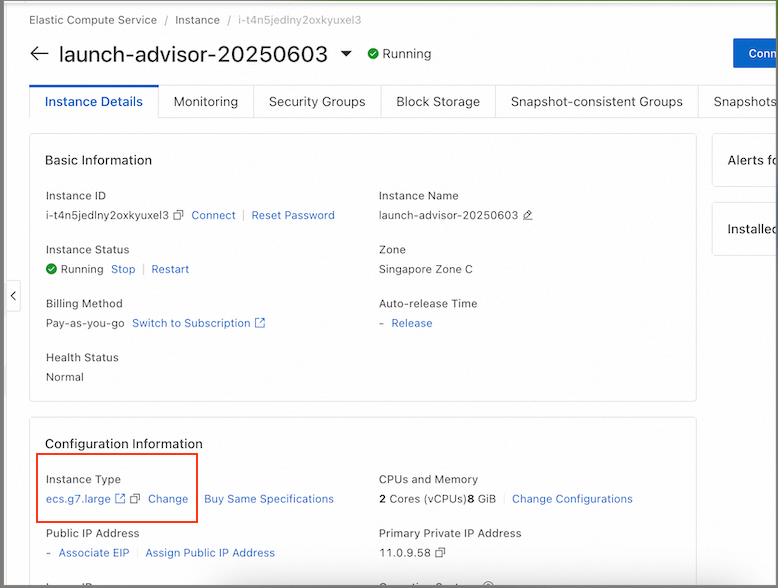
3. Select the new instance type and click on Stop Instances and Proceed
| Item | Description |
| Amount of time that is required to migrate an ECS instance | Approximately 5-15 minutes are required from the time when an instance is stopped until the time when the instance is migrated and started. Important After the computing and network resources of an ECS instance are migrated, the instance is started. After the instance is started, the system continues to migrate the disk data of the instance. In most cases, approximately 4 hours are required to migrate 100 GiB of disk data. During the migration, the I/O performance of disks degrades and you cannot perform snapshot-related and disk-related operations. |
| Software authorization codes | After an ECS instance is migrated, its software authorization codes may change. If the software vendor did not approve the migration certificate issued by Alibaba Cloud, we recommend that you contact the software vendor or channel partner to submit a verification form for re-authorization. |
| Public/private IP address | ● The public IP address of the ECS instance may change. After the instance is migrated, the system attempts to assign the original public IP address to the instance. If the original public IP address cannot be assigned to the instance, the system assigns a new public IP address to the instance. ● The private IP address of the ECS instance may change. After the instance is migrated, the new vSwitch assigns a new private IP address to the instance. You can modify the private IP address. For more information, see Change the primary private IPv4 address for an existing ECS instance. |
| Other | ● After an ECS instance is migrated, the following attributes of the instance remain unchanged: instance ID, elastic IP address (EIP), media access control (MAC) address, security groups, disk serial numbers, disk IDs, username, and logon password. ● If the ECS instance is added to the vServer group of a Server Load Balancer (SLB) instance before the ECS instance is migrated, the ECS instance is not automatically associated with the SLB instance after the ECS instance is migrated. You must add the ECS instance to the vServer group of the SLB instance. For more information, see the "Modify a vServer group" section of the Create and manage a vServer group topic. |
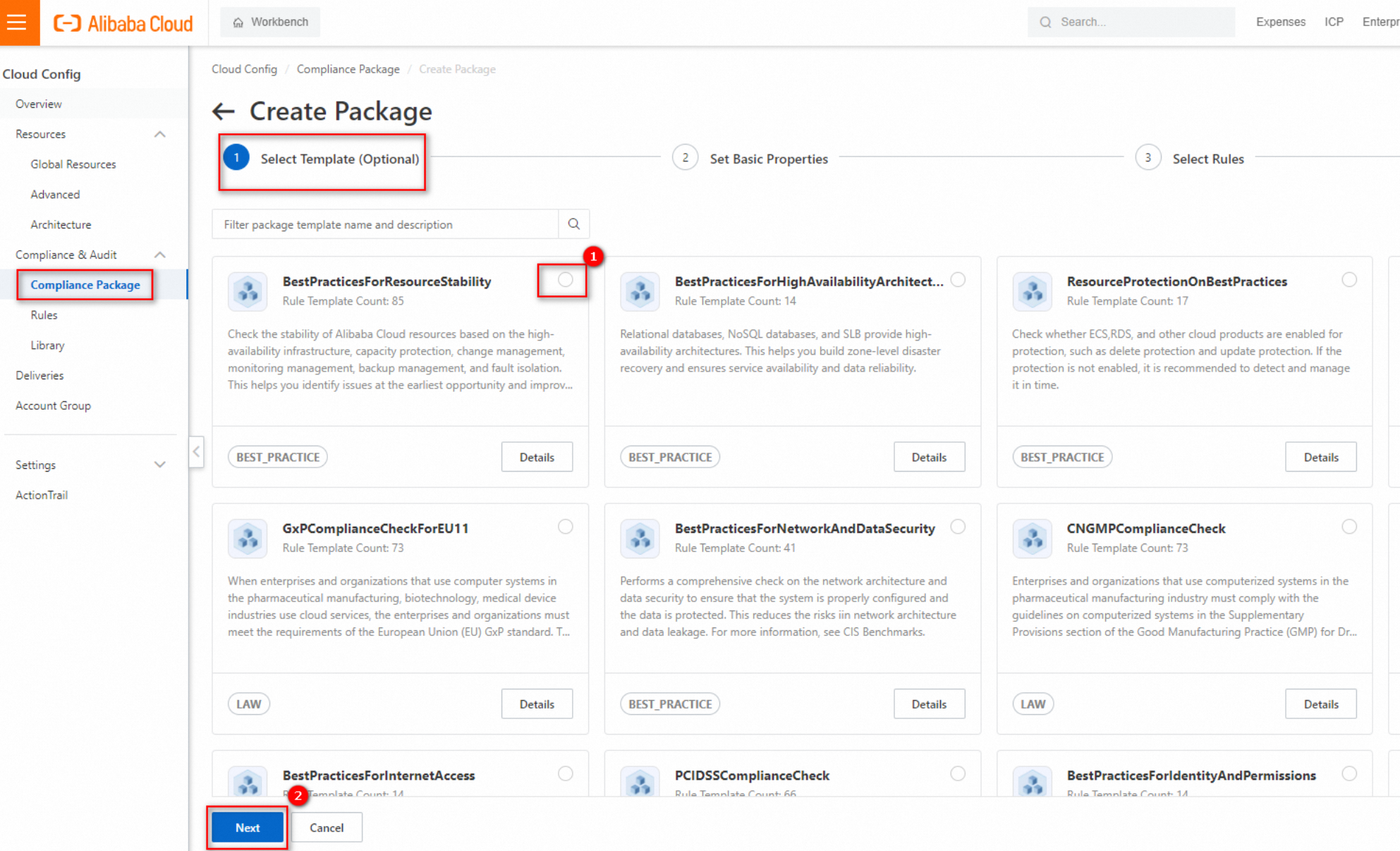
Cloud Config is a service that allows you to evaluate cloud resources. Cloud Config aggregates resources in different regions to accelerate the query of resources. Cloud Config takes snapshots to record configuration changes of each monitored resource and displays the configuration changes over time in a configuration timeline. Resource configuration changes can trigger compliance evaluation. Cloud Config generates alerts for non-compliant configurations.
You can create compliance packages in Cloud Config or choose from preset templates. One such template that is relevant here is BestPracticesforECS. You can find more details here: https://www.alibabacloud.com/help/en/cloud-config/latest/quick-start-for-ordinary-accounts

Use public images and enable security hardening for the images.
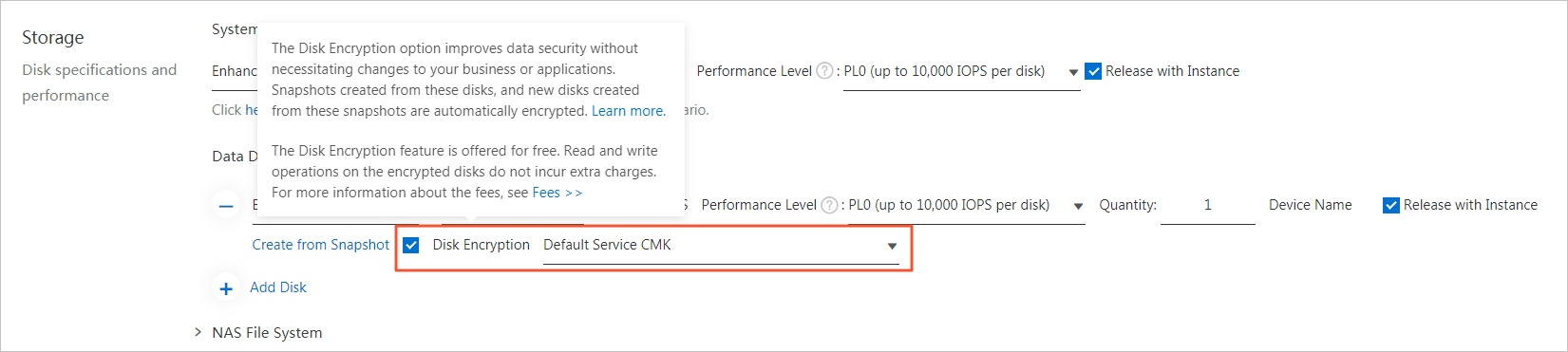
You can encrypt disks to provide maximum protection for data stored on the disks without additional modifications to business or applications. Snapshots that are created from encrypted disks and disks that are created from these snapshots are encrypted. In scenarios that require data security and regulatory compliance, you can use the disk encryption feature to encrypt your data stored in Alibaba Cloud ECS. This way, you can protect the privacy, autonomy, and security of your data without the need to establish or maintain key management infrastructure. Both system disks and data disks can be encrypted. For more information, see Encrypt cloud disks.
Data backup is the foundation of disaster recovery and helps reduce the risk of data loss caused by system failures, accidental operations, and security issues. ECS provides the snapshot feature to meet the data backup requirements of most users. You can select a method of creating snapshots based on your needs. For more information, see Create a snapshot.
We recommend that you create automatic snapshots on a daily basis and retain the snapshots for at least seven days. This significantly improves disaster tolerance and minimizes potential data loss.

ECS is integrated with the ActionTrail service, allowing you to query management events triggered by ECS operations. ActionTrail facilitates the delivery of these events to either SLS Logstores or OSS buckets, providing solutions for real-time auditing and troubleshooting analysis. For more information, refer to Audit events of ECS.
In addition to logon audit and ActionTrail, we recommend that you enable the Log Audit Service. This service builds upon the capabilities of Simple Log Service (SLS), offering support for real-time, automated, and centralized log collection from various cloud products across multiple accounts for auditing purposes. Additionally, it facilitates the necessary storage, querying, and aggregation of information for audit compliance.
 icon in the Monitoring column corresponding to an ECS instance to check the security status of the instance. You can click Process Now to view the alert details of an unhandled task. If high-severity risks exist, we recommend that you handle the risks as prompted to prevent your business from being affected.
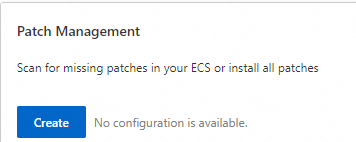
1. Log on to the CloudOps Orchestration Service console. In the left-side navigation pane, click Quick Setup.
2. On the Quick Setup page, click Create in the Patch Management section.
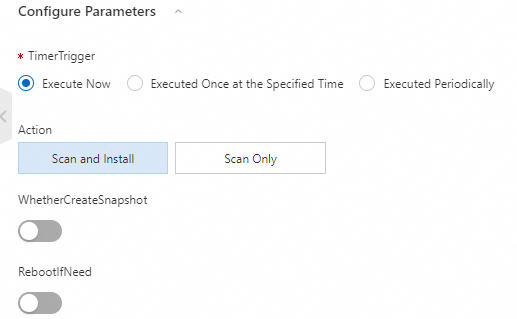
3. Select Execute Now for the TimerTrigger parameter. Select Scan and Install or Scan Only for the Action parameter. If you select Scan and Install, you can specify whether to restart an instance and whether to create a snapshot.
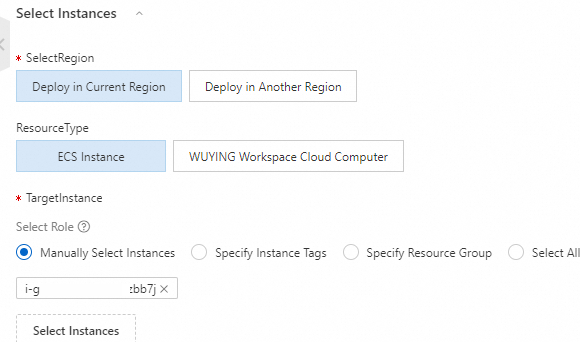
4. Select the instance on which you want to install a patch.
5. Click Create. In the dialog box that appears, click OK.
6. In the left-side navigation pane, choose Server Management > Patch Management to view the fix status.

More info on server management: https://www.alibabacloud.com/help/en/oos/getting-started/server-management
Alibaba Introduces Open-Source Model for Digital Human Video Generation

1,555 posts | 524 followers
FollowAlibaba Cloud Community - January 30, 2024
Justin See - December 1, 2025
Alibaba Cloud Community - September 19, 2024
Rupal_Click2Cloud - November 26, 2024
Alibaba Cloud Community - March 19, 2024
Alibaba Clouder - January 6, 2021
1,555 posts | 524 followers
Follow Best Practices
Follow our step-by-step best practices guides to build your own business case.
Learn More Gaming Solution
When demand is unpredictable or testing is required for new features, the ability to spin capacity up or down is made easy with Alibaba Cloud gaming solutions.
Learn More Cloud Database Solutions for Gaming
Alibaba Cloud’s world-leading database technologies solve all data problems for game companies, bringing you matured and customized architectures with high scalability, reliability, and agility.
Learn More ECS(Elastic Compute Service)
Elastic and secure virtual cloud servers to cater all your cloud hosting needs.
Learn MoreMore Posts by Alibaba Cloud Community

