Storage pools let you divide the physical data nodes (DNs) in a PolarDB-X instance into named resource groups. By binding a database, table, or table partition to a specific pool, you get physical storage isolation between tenants — without complex manual migration or resharding.
Use storage pools to:
Isolate storage resources between VIP and regular tenants in a multitenant SaaS or e-commerce platform
Guarantee stable online traffic for high-value sellers while sharing resources among smaller ones
Adjust tenant service levels — upgrade or downgrade isolation granularity — without taking services offline
Migrate from a standalone database to a distributed one gradually, with standalone and distributed tables coexisting on separate storage nodes
Key concepts
| Term | Description |
|---|---|
| Storage pool | A named group of one or more DNs. DNs in different pools never overlap. |
| `_default` | The system pool that initially contains all active DNs. Objects with no explicit LOCALITY go here. |
| `_recycle` | The system pool for idle DNs — those removed from other pools or not yet allocated. New pools draw from here. |
| `LOCALITY` | The SQL clause used to bind a database, table, or partition to one or more storage pools. |
| `UNDELETABLE_DN` | A designated DN within each pool that cannot be removed until the pool itself is deleted. Ensures minimum pool availability. |
| Data node (DN) | A physical storage node in the PolarDB-X instance. |
Prerequisites
Before you begin, ensure that you have:
An instance with kernel version
5.4.20-20250806or later. For version naming rules, see Release notes. To check and update the version, see View and update the version of an instance.A logical database with partition mode (
MODE) set toauto
How storage pools work
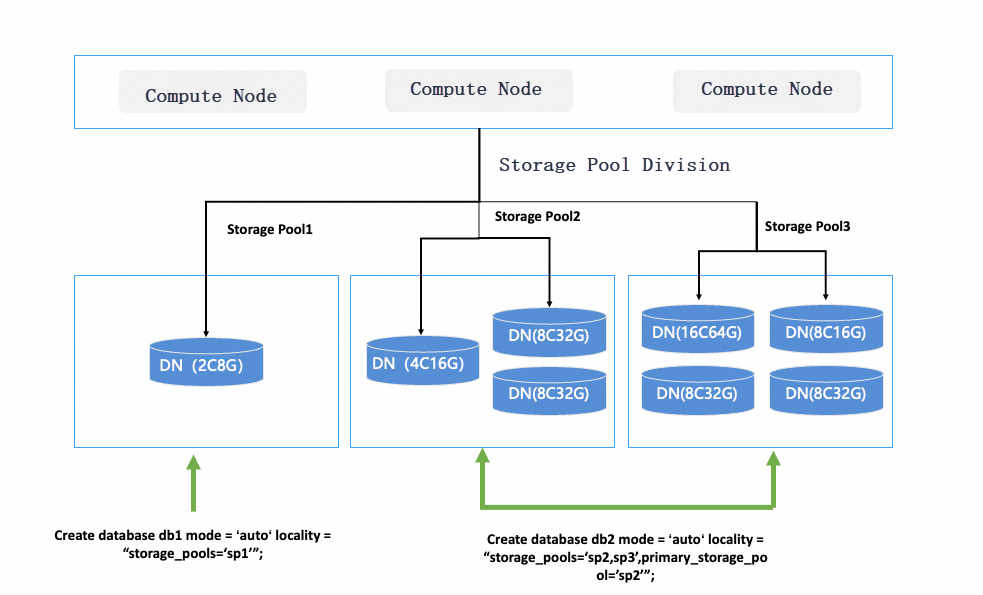
Each storage pool is a logical group of DNs. When you bind a database object to a pool, PolarDB-X physically stores that object's data on the DNs in that pool.
On binding: Data is migrated automatically and asynchronously to satisfy the new layout. Migration is online and transparent to your application.
On pool membership change: Adding or removing DNs from a pool triggers the same automatic migration.
Broadcast tables: Replicas are created in every pool listed in the object's
storage_poolsparameter.Inheritance: If a child object (table or partition) has no explicit
LOCALITY, it inherits theprimary_storage_poolfrom its parent database.
Choose an isolation strategy
| Strategy | Best for | Trade-offs |
|---|---|---|
| Database-level | Each large tenant gets a dedicated database and storage pool | Simplest to set up; schema changes per tenant are independent |
| Partition-level | Many tenants share one logical table; fine-grained per-partition isolation | All partitions share the same schema; partition split/merge lets you change service levels online |
| Migration (standalone to distributed) | Gradually moving from a standalone relational database | Reuse existing table creation statements with minimal changes; transform tables one at a time |
Manage storage pools
Use the Data Node Management feature in the PolarDB-X console to create and manage storage pools in production. The SQL statements below are provided to help you understand how storage pools work.
View storage pools
Query the information_schema.storage_pool_info view to see all pools and their current state.
SELECT * FROM information_schema.storage_pool_info;Sample output:
+------+----------+-----------------------------------------------------+-----------------+---------------------------+--------+---------------------+---------------------+
| ID   | NAME     | DN_ID_LIST                                          | IDLE_DN_ID_LIST | UNDELETABLE_DN_ID         | EXTRAS | GMT_CREATED         | GMT_MODIFIED        |
+------+----------+-----------------------------------------------------+-----------------+---------------------------+--------+---------------------+---------------------+
|    1 | _default | dn0,dn1,dn2,dn3,dn4,dn5,dn6,dn7,dn8,dn9             |                 | dn0                       | NULL   | 2024-04-15 19:46:05 | 2024-04-15 19:46:05 |
|    2 | _recycle |                                                     |                 |                           | NULL   | 2024-04-15 19:46:05 | 2024-04-15 19:46:05 |
+------+----------+-----------------------------------------------------+-----------------+---------------------------+--------+---------------------+---------------------+
Create a storage pool
Combine idle DNs from _recycle into a new named pool.
CREATE STORAGE POOL <pool_name> DN_LIST = "<dn_id_1>,<dn_id_2>,..." UNDELETABLE_DN = "<dn_id>";| Parameter | Description |
|---|---|
pool_name | Name of the new storage pool |
DN_LIST | Comma-separated list of idle DN IDs to include |
UNDELETABLE_DN | The DN that cannot be removed until the pool is deleted; ensures minimum availability |
Rules:
Each pool must have at least one DN, with one designated as
UNDELETABLE_DN.DNs specified at creation must not contain any database objects.
DNs cannot belong to more than one pool.
A single pool can contain DNs of different specifications.
Example: Create three pools from available nodes.
-- pool_1: three nodes
CREATE STORAGE POOL pool_1 DN_LIST="dn4,dn5,dn6" UNDELETABLE_DN="dn4";
-- pool_2: one node
CREATE STORAGE POOL pool_2 DN_LIST="dn7" UNDELETABLE_DN="dn7";
-- pool_3: two nodes
CREATE STORAGE POOL pool_3 DN_LIST="dn8,dn9" UNDELETABLE_DN="dn8";
Scale a storage pool
Scale in (remove a node)
Removing a node moves it to _recycle. Data on that node is migrated automatically and asynchronously.
ALTER STORAGE POOL <pool_name> DRAIN NODE "<dn_id_list>";Example: Scale in _default to keep only dn0. All other nodes move to _recycle.
ALTER STORAGE POOL _default DRAIN NODE 'dn1,dn2,dn3,dn4,dn5,dn6,dn7,dn8,dn9';Result:
+------+----------+-----------------------------------------------------+-----------------+---------------------------+--------+---------------------+---------------------+
| ID   | NAME     | DN_ID_LIST                                          | IDLE_DN_ID_LIST | UNDELETABLE_DN_ID         | EXTRAS | GMT_CREATED         | GMT_MODIFIED        |
+------+----------+-----------------------------------------------------+-----------------+---------------------------+--------+---------------------+---------------------+
|    1 | _default | dn0                                                 |                 | dn0                       | NULL   | 2024-04-15 19:46:05 | 2024-04-15 19:46:05 |
|    2 | _recycle | dn1,dn2,dn3,dn4,dn5,dn6,dn7,dn8,dn9                 |                 |                           | NULL   | 2024-04-15 19:46:05 | 2024-04-15 19:46:05 |
+------+----------+-----------------------------------------------------+-----------------+---------------------------+--------+---------------------+---------------------+
The UNDELETABLE_DN cannot be removed. Each pool must always contain at least one DN.Scale out (add a node)
ALTER STORAGE POOL <pool_name> APPEND NODE "<dn_id_list>";Rules:
The node must not contain any database objects.
DNs cannot belong to more than one pool.
A pool can mix DNs of different specifications.
Example: Move dn1 back to _default.
ALTER STORAGE POOL _default APPEND NODE 'dn1';Result:
+------+----------+-----------------------------------------------------+-----------------+---------------------------+--------+---------------------+---------------------+
| ID   | NAME     | DN_ID_LIST                                          | IDLE_DN_ID_LIST | UNDELETABLE_DN_ID         | EXTRAS | GMT_CREATED         | GMT_MODIFIED        |
+------+----------+-----------------------------------------------------+-----------------+---------------------------+--------+---------------------+---------------------+
|    1 | _default | dn0,dn1                                             |                 | dn0                       | NULL   | 2024-04-15 19:46:05 | 2024-04-15 19:46:05 |
|    2 | _recycle | dn2,dn3,dn4,dn5,dn6,dn7,dn8,dn9                     |                 |                           | NULL   | 2024-04-15 19:46:05 | 2024-04-15 19:46:05 |
+------+----------+-----------------------------------------------------+-----------------+---------------------------+--------+---------------------+---------------------+
Bind database objects to storage pools
Use the LOCALITY clause to assign a database, table, or partition to one or more storage pools.
Define a binding
CREATE DATABASE | TABLE ... LOCALITY = "storage_pools=<pool_list>;primary_storage_pool=<pool_name>";| Parameter | Description |
|---|---|
storage_pools | All pools the object can use. For broadcast tables, a replica is created in every pool in this list. |
primary_storage_pool | The default pool for child objects that have no explicit LOCALITY. |
When you explicitly specify aLOCALITYfor a child object (table or partition), the specified pool must belong to thestorage_poolslist of its parent database.
Example: Create a database that can use three pools, with pool_1 and pool_2 as defaults.
CREATE DATABASE db_test MODE = "auto" LOCALITY = "storage_pools=pool_1,pool_2,pool_3;primary_storage_pool=pool_1,pool_2";Modify a binding
Change the storage pools for an existing database, table group, or partition. The system runs a background migration task to move data from the old pool to the new one. The process is online and transparent to your application.
ALTER DATABASE | TABLE <object_name> [SET] LOCALITY = "...";What happens when you change the association:
Add a pool: No data is migrated. Broadcast tables expand to the new pool's nodes.
Remove a pool: The pool's bindings for the object and all its child objects are removed, and their data is migrated to the remaining pools.
Clear all pools (not supported at the database level): The object's association reverts to the default storage pool.
For database-level objects, you cannot remove theprimary_storage_poolfrom thestorage_poolslist, and you cannot change aprimary_storage_poolthat has already been defined. These restrictions do not apply to table groups and partitions.
Example:
ALTER TABLE db_test LOCALITY = "storage_pools=pool_1;primary_storage_pool=pool_1";Scenarios
Scenario 1: Database-level tenants
An e-commerce platform needs to serve multiple sellers: a few large sellers with heavy order volumes and many smaller sellers. The requirements are:
Large sellers each get dedicated storage to guarantee stable online traffic and independent analytics.
Small sellers share a common storage pool with balanced resource distribution.
When a small seller grows into a large seller, they can be migrated to dedicated storage without affecting others.
Set up tenant isolation
Divide DNs into dedicated pools for large sellers and use _default as the shared pool for small sellers.
CREATE STORAGE POOL sp1 dn_list="dn4,dn5,dn6" undeletable_dn="dn4";
CREATE STORAGE POOL sp2 dn_list="dn7,dn8,dn9" undeletable_dn="dn7";

-- Small sellers share _default (dn1, dn2, dn3)
CREATE DATABASE orders_comm MODE = "auto" LOCALITY= "storage_pools='_default'";

-- Large Seller 1 uses sp1 (dn4, dn5, dn6)
CREATE DATABASE orders_seller1 MODE = "auto" LOCALITY= "storage_pools='sp1'";
-- Large Seller 2 uses sp2 (dn7, dn8, dn9)
CREATE DATABASE orders_seller2 MODE = "auto" LOCALITY= "storage_pools='sp2'";
After running these statements:
Large sellers and small sellers are physically isolated on separate DNs.
Small sellers share
dn1,dn2, anddn3in_default.Each seller's database has an independent schema and storage allocation.
Rebalance resources among small sellers
To distribute data evenly across small-seller nodes:
REBALANCE TENANT "_default" POLICY="data_balance";This automatically distributes all non-partitioned tables and partitions across dn1, dn2, and dn3.
Onboard a new large seller
Add nodes, create a dedicated pool, and assign a new database to it. New nodes are initially in _recycle.
CREATE STORAGE POOL spn dn_list = "dn10,dn11,dn12" undeletable_dn="dn10";
CREATE DATABASE orders_sellern MODE = "auto" LOCALITY="storage_pools='spn'";
Offboard a large seller
Delete the database and release the storage pool. Existing services on other pools are not affected, and applications experience minimal interruption.
DROP DATABASE orders_sellern;
DELETE STORAGE POOL spn; -- Nodes automatically move to _recycle
ALTER STORAGE POOL _recycle DRAIN NODE "dn7, dn8, dn9"; -- Release nodes from the cluster
Scenario 2: Partition-level tenants
Partition-level isolation gives you the same physical separation as database-level isolation, with two additional advantages:
All partitions share a single logical table definition. Schema changes (adding columns, indexes) apply uniformly across all tenants.
Partition management operations (split, merge) let you change tenant service levels online — for example, upgrading a small seller to VIP by splitting their partition onto a dedicated pool.
Set up tenant isolation
Create a database that spans all pools, then partition the orders table so each large tenant maps to a dedicated pool.
CREATE DATABASE orders_db MODE = "auto"
       LOCALITY = "storage_pools='_default,sp1,sp2,...',primary_storage_pool='_default'";

USE orders_db;

-- Broadcast table: replicated across all pools so joins can be pushed down
CREATE TABLE commodity(
  commodity_id int,
  commodity_name varchar(64)
) BROADCAST;

-- Partitioned by seller_id; large tenants get dedicated pools
CREATE TABLE orders_sellers(
  order_id int AUTO_INCREMENT primary key,
  customer_id int,
  commodity_id int,
  country varchar(64),
  seller_id int,
  order_time datetime not null)
partition BY list(seller_id)
(
  partition p1 VALUES IN (1, 2, 3, 4),
  partition p2 VALUES IN (5, 6, 7, 8),
  -- p1 and p2 use _default by default (primary_storage_pool)
  ...
  partition pn VALUES IN (k) LOCALITY = "storage_pools='sp1'",
  partition pn+1 VALUES IN (k+1, k+2) LOCALITY = "storage_pools='sp2'",
  -- pn and pn+1 exclusively occupy sp1 and sp2, respectively
  ...
) LOCALITY = "storage_pools='_default,sp1,sp2,...'";
Onboard a new small tenant
Add a partition. No data migration occurs — only the new partition is created.
ALTER TABLE orders_sellers ADD PARTITION
(PARTITION p3 values in (32, 33));
Onboard a new large tenant
Add nodes, create a pool, register it with the database, then add a partition bound to the new pool.
CREATE STORAGE POOL spn dn_list = "dn10,dn11,dn12" undeletable_dn="dn10";

ALTER DATABASE orders_db SET LOCALITY =
  "storage_pools='_default,sp1,sp2,...,spn',primary_storage_pool='_default'";
-- Adding spn triggers automatic migration of the broadcast table to spn's nodes

ALTER TABLE orders_sellers ADD PARTITION
(PARTITION p4 values in (34) LOCALITY="storage_pools='spn'");
Offboard a tenant
Drop the partition or narrow the values it covers.
-- Remove a large tenant partition entirely
ALTER TABLE orders_sellers DROP PARTITION p4;

-- Or remove specific sellers from a shared partition
ALTER TABLE orders_sellers MODIFY PARTITION p1 DROP VALUES (4, 5);
All partition operations are online and affect only the target partition. Other partitions remain unaffected.
Upgrade a small seller to VIP
Split the partition to move the seller to a dedicated pool.
ALTER TABLE orders_sellers SPLIT PARTITION p2 INTO
(PARTITION p2 VALUES in (6, 7, 8),
PARTITION `pn+2` VALUES in (5) LOCALITY = "storage_pools='spn+3'");
Downgrade a large seller
Merge partitions to consolidate them back into the shared pool.
ALTER TABLE orders_sellers MERGE PARTITION p1, pn TO p1 LOCALITY="";The merged partition is stored in the default storage pool.
Rebalance resources
Balance load across shared-pool partitions with the same REBALANCE command:
REBALANCE TENANT "_default" POLICY="data_balance";Scenario 3: Migration from standalone to distributed
If you're migrating from a standalone relational database, use storage pools to run standalone and distributed tables side by side. Start with non-partitioned tables in a single pool, then progressively move high-traffic tables to dedicated pools and convert them to partitioned tables — one at a time, without disrupting other tables.
Create databases and tables
Create a database with DEFAULT_SINGLE=on so that standard table creation statements from your standalone database work without modification.
CREATE DATABASE orders_db MODE = "auto" DEFAULT_SINGLE=on
    LOCALITY = "storage_pools='_default',primary_storage_pool='_default'";

use orders_db;

-- These tables are automatically balanced across _default nodes
CREATE TABLE orders_region1(
  order_id int AUTO_INCREMENT primary key,
  customer_id int,
  country varchar(64),
  city int,
  order_time datetime not null);
CREATE TABLE orders_region2(
  order_id int AUTO_INCREMENT primary key,
  customer_id int,
  country varchar(64),
  city int,
  order_time datetime not null);
CREATE TABLE orders_region3(
  order_id int AUTO_INCREMENT primary key,
  customer_id int,
  country varchar(64),
  city int,
  order_time datetime not null);

-- Broadcast table: replicated across all _default nodes
CREATE TABLE commodity(
  commodity_id int,
  commodity_name varchar(64)
) BROADCAST;
Isolate high-traffic non-partitioned tables
When a table's volume or traffic exceeds what a shared pool can handle, move it to a dedicated pool.
ALTER DATABASE orders_db set LOCALITY = "storage_pools='_default,sp1',primary_storage_pool='_default'";
-- The broadcast table automatically expands to sp1's nodes

ALTER TABLE orders_region_single1 single LOCALITY = "storage_pools='sp1'";
-- orders_region_single1 is now isolated on sp1
Convert to distributed tables
When a table's workload exceeds the capacity of a single physical table, convert it to a partitioned distributed table on a dedicated pool.
ALTER DATABASE orders_db set LOCALITY = "storage_pools='_default,sp1,sp2,sp3',primary_storage_pool='_default'";

ALTER TABLE orders_region_single2 partition by hash(order_id) partitions 16
  LOCALITY = "storage_pools='sp2'";

ALTER TABLE orders_region_single3 partition by hash(order_id) partitions 16
  LOCALITY = "storage_pools='sp3'";
All sharding operations run online. You can specify custom partitioning methods and storage pools without interrupting other tables.