Alibaba Cloud E-MapReduce (EMR), an open-source big data platform, is a fully managed cloud-native big data platform built on the open-source ecosystem. It is deeply compatible with Hadoop, Spark, StarRocks, Presto, Hudi, Iceberg, and Paimon, and provides three flexible deployment models: Serverless, on ECS, and on ACK.
About Alibaba Cloud E-MapReduce: Serverless Open-Source Big Data Platform
This article provides a detailed introduction to best practices for multimodal processing with Alibaba Cloud EMR Serverless Spark AI Function. Focusing on autonomous driving scenarios, it demonstrates through a real-world intelligent driving data preprocessing case how multimodal AI Function can automatically identify complex road conditions, such as roundabouts, and long-tail special vehicles, such as police cars and crane trucks. This solution transforms the traditional high-cost, labor-intensive annotation process into an efficient automated ETL pipeline. It not only enables second-level analysis of high-resolution images, but also verifies accuracy in handling non-standard visual features through structured outputs, offering a highly valuable reference for intelligent data-cleaning engines in the autonomous driving data closed loop.
EMR Serverless Spark AI Function greatly lowers the barrier to using large models by natively integrating LLM inference capabilities into the compute engine in the form of SQL functions. In the latest esr-4.7.0 and later versions (Spark 3.5.2), AI Function has comprehensively expanded support for multimodal input. This is mainly reflected in the multimodal usage of ai_query and the new ai_embedding_multimodal function.
ai_query: Several Modes for Image UnderstandingMode 1: Read image content from a DLF Blob field This is suitable for scenarios where image binary data is stored directly in the table.
CREATE DATABASE ai_dataset;
CREATE TABLE ai_dataset.test_blob (
    path STRING,
    data BINARY
) TBLPROPERTIES (
    'row-tracking.enabled' = 'true',
    'data-evolution.enabled' = 'true',
    'blob-field' = 'data'
);

INSERT INTO ai_dataset.test_blob
SELECT path, content FROM read_files("oss://bucket_name/images/ccpd_1m_100/", suffix => "jpg");

SELECT path,
  ai_query(
  'Please describe the main content of the image',
  service_name => 'qwen3.6-plus',
  data => data
  )
  FROM ai_dataset.test_blob;
Mode 2: Path column + URI reading When images are stored in OSS, OSS-HDFS, or other Hadoop-compatible file systems, and the table only stores the file paths, you can specify data_type => 'uri'. The function will read the file internally by path and perform inference. This mode is suitable for existing datasets where image paths are already stored in a table.
-- License plate recognition: batch inference from a path table
SELECT
  path,
  ai_query(
    'Return the license plate number in the image. IMPORTANT: only reply with the plate information; if the image is blurry and cannot be recognized, reply "Unrecognizable".',
    service_name => 'qwen3.6-plus',
    data => path,
    data_type => 'uri',
    options => '{"enable_thinking": false}'
  ) AS plate_number
FROM (
  SELECT /*+ REPARTITION(10) */ path
  FROM ccpd_1m_1000
) t;
data => path means the path column is passed in.data_type => 'uri' means the function reads the file internally by path, supporting OSS and file paths. For file paths, Spark-managed mounting must be used, for example file:///mnt/data/images/xxx.jpg.data_type => 'binary', the function accepts binary image content as well as http(s) URLs.REPARTITION hint, rather than directly in the outer projection containing the AI function.options.enable_thinking is not set, the default is false.Mode 3: read_files + binary reading By combining the read_files function, images can be batch-read directly from a directory, and the binary content (BINARY type) can be used as multimodal input. This removes the need to create a path table in advance, making it suitable for batch processing newly added data.
-- Directly read images in bulk from an OSS directory and run inference
SELECT
  path,
  ai_query(
    'Please describe the main content of the image',
    service_name => 'qwen3.6-plus',
    data => content
  ) AS description
FROM read_files(
  'oss://bucket/path/to/images/',
  suffix => 'jpg,jpeg,png'
);
Tip: read_files supports the suffix parameter for extension filtering. The filter is pushed down to the file scan stage, avoiding reading other large files in the directory first and significantly reducing irrelevant file scans and downstream AI request volume. If recursive reading of subdirectories is needed, you can add recursive => true.
ai_embedding_multimodal: Image VectorizationFor image-to-image search and multimodal retrieval scenarios, the ai_embedding_multimodal function can efficiently convert images into vectors (embeddings), laying the foundation for subsequent vector search and similarity computation.
Method 1: Path column + URI reading
SELECT
  path,
  ai_embedding_multimodal(
    path,
    service_name => 'tongyi-embedding-vision-plus',
    data_type => 'uri'
  ) AS embedding
FROM image_paths_table;
Method 2: Directly pass a binary column and write vectors into DLF Paimon
create table embedding_result(
  path string,
  embedding array<double>)
using paimon;

insert overwrite embedding_result
SELECT
  path,
  ai_embedding_multimodal(
    content,
    service_name => 'tongyi-embedding-vision-plus'
  ) AS embedding
FROM read_files('oss://bucket/path/to/images/', suffix => 'jpg,png');
The image embeddings generated by ai_embedding_multimodal can be written directly into vector databases such as Milvus to build multimodal retrieval systems that support advanced scenarios like cross-modal text-image search.
EMR Serverless Spark AI Function not only has built-in Qwen series models, but also supports integration with mainstream external models through a unified model service registration mechanism, including PAI-EAS, DeepSeek, KIMI, GLM, MiniMax, and others, covering today’s most popular LLM ecosystems.
In terms of integration, the product provides two core paths to cover all scenarios from rapid validation to enterprise-grade production:
Quick Validation: Connect to Alibaba Cloud Model Studio (out-of-the-box) For teams that want to quickly validate business scenarios, perform PoC verification, or explore data, Alibaba Cloud Model Studio is the most efficient choice. Users do not need to worry about model deployment, autoscaling, or API authentication details; they only need to obtain the key from the Model Studio console and can then directly call cloud-hosted large models in SQL. This “zero-code, zero-ops” experience reduces PoC time from weeks to hours.
Enterprise Customization: Connect to PAI-EAS (secure and controllable) For industries such as finance and healthcare, where data privacy is extremely sensitive, or for enterprises with self-developed fine-tuned models, PAI-EAS (Model Online Service) provides a solid foundation. Users can deploy private models on PAI-EAS and connect them to EMR Serverless Spark through the VPC internal network. Data never needs to leave the secure VPC environment; inference is completed directly inside the lakehouse, meeting strict compliance requirements while benefiting from the extreme performance of Serverless Spark elastic computing.
The following models are built into Serverless Spark and can be called directly with AI Function without additional registration:
| Model Service Name | Model Name |
|---|---|
| qwen3.6-plus | qwen3.6-plus |
| qwen3.5-plus | qwen3.5-plus |
| qwen-plus | qwen-plus |
| text-embedding-v4 | text-embedding-v4 |
| tongyi-embedding-vision-plus | tongyi-embedding-vision-plus |
In the R&D and testing of autonomous driving and intelligent transportation systems, road test vehicles generate dashcam video data every day. Traditional processing workflows often rely on manual annotation teams to label video frames frame by frame, which is not only costly and time-consuming, but also difficult to handle long-tail scenarios such as rare special vehicles and complex road structures.
This case requires a smart driving team to quickly analyze a batch of raw images collected by a front camera, with the goal of automatically identifying whether they contain the following key elements:
We use the ai_query function integrated in EMR Serverless Spark to invoke the multimodal capabilities of the Qwen (Qwen3.6-plus) large model. The entire process is simplified into a standard ETL pipeline: read OSS files -> define prompts in SQL -> call the AI function -> output structured results.
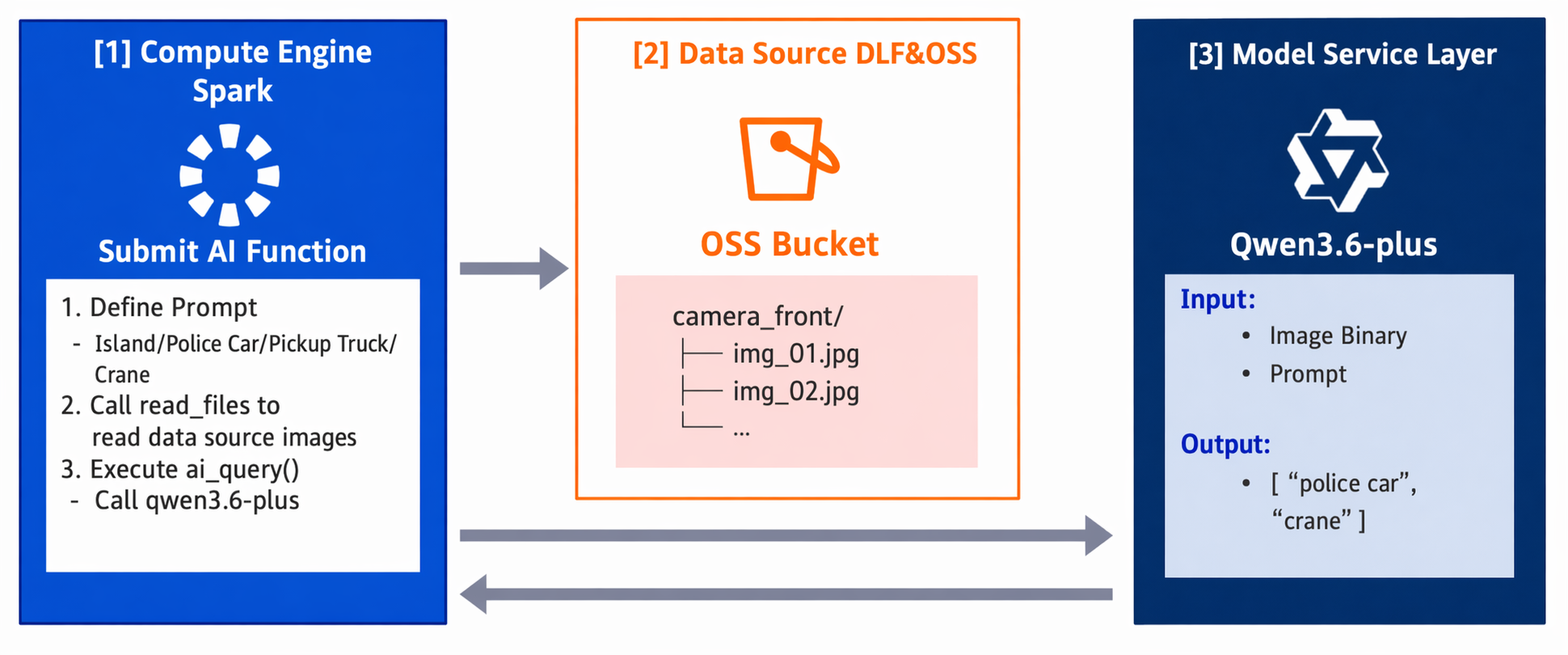
-- Define a prompt variable containing detailed visual feature descriptions
WITH vars AS (
  SELECT '''
# Please determine which of the following labels the image belongs to: Roundabout | Police Car | Pickup Truck | Crane/Lift Truck | None of the Above

* Roundabout
Visual features: There is a circular intersection directly in front of the vehicle, and there are white guide arrows on the road surface or roadside.

* Police Car
Visual features: The vehicle body has clearly visible words such as "公安", "警察", or "POLICE", or official police insignia, and the body livery matches a standard police car style (such as black-and-white, blue-and-white, etc.).

* Pickup Truck
Visual features: A light truck with a separate cab and an open cargo bed at the rear.

* Crane/Lift Truck
Visual features: A heavy-duty special-purpose engineering vehicle with a large folding crane arm or a tall telescopic ladder mounted on the chassis.

# Do not include any explanatory text in the output. Format: ["Label 1", "Label 2", ...]
''' AS prompt
)

-- Run visual inference
SELECT
  t.path,
  ai_query(
    v.prompt,
    data => t.content,
    service_name => "qwen3.6-plus"
  ) as result
FROM read_files('oss://baobao-wlcb/camera_front/', 'jpg,png') t
CROSS JOIN vars v;After the task was submitted, EMR Serverless Spark automatically and elastically scaled compute resources, completing the analysis of five high-resolution intelligent driving images within seconds.
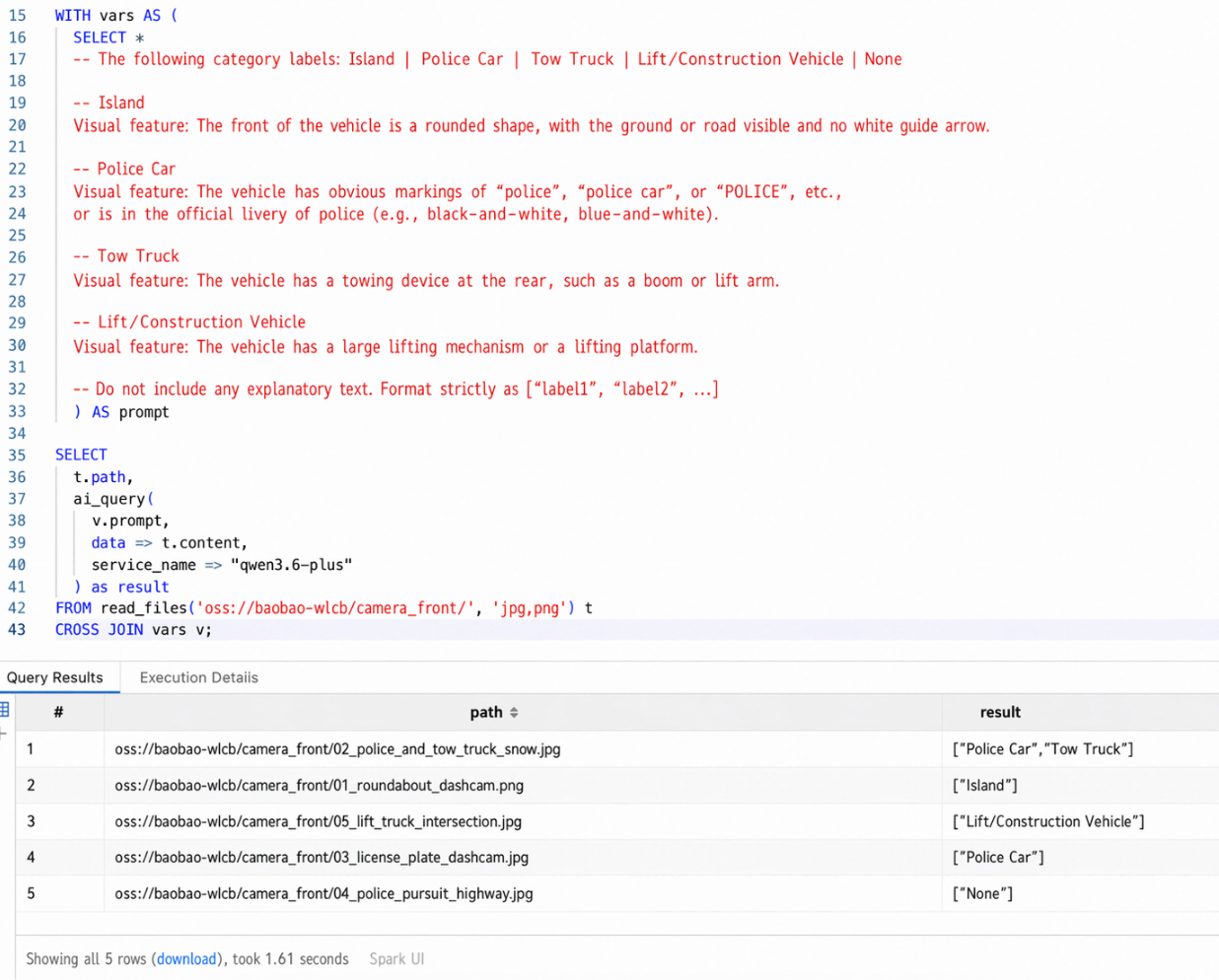
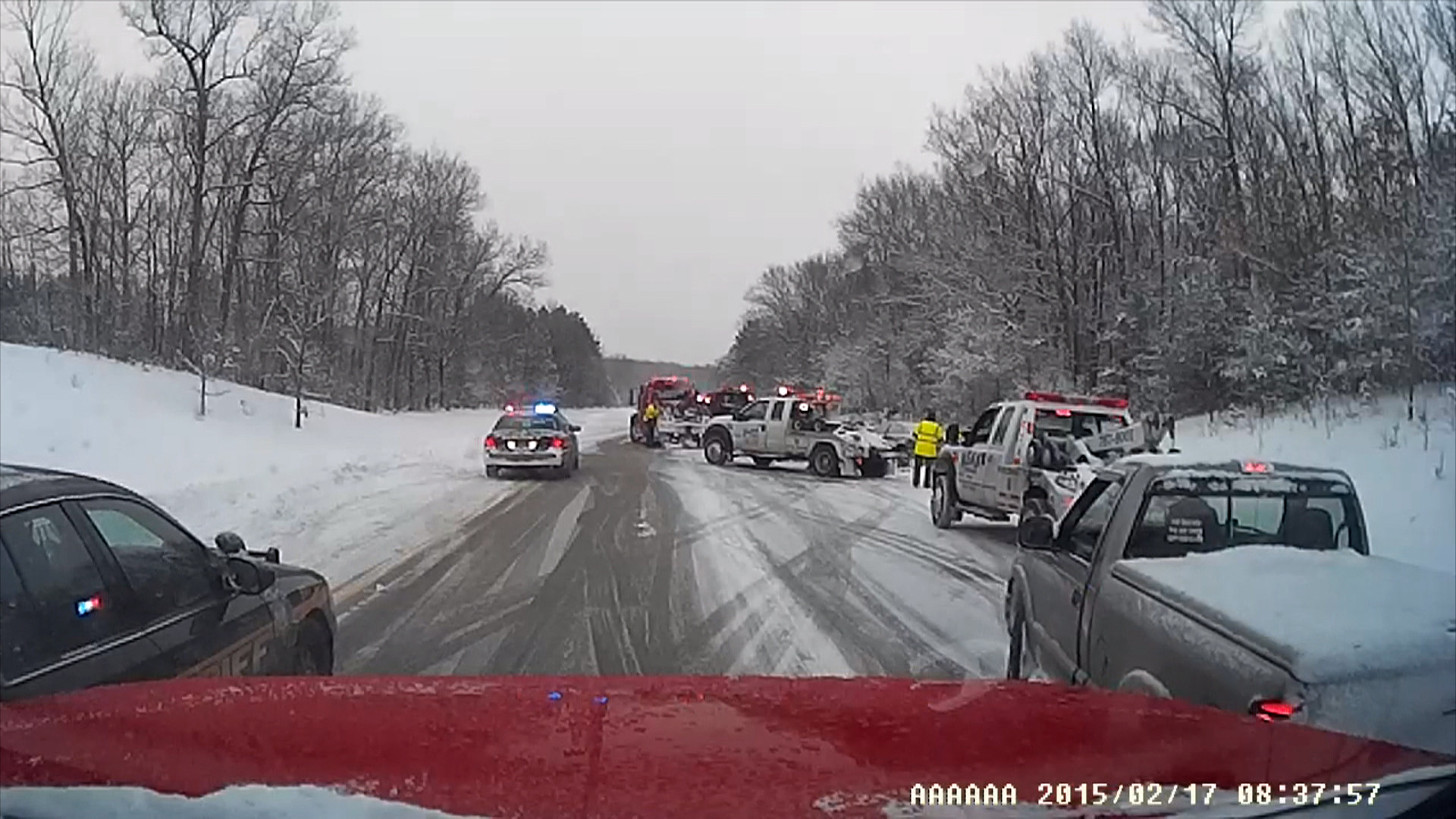
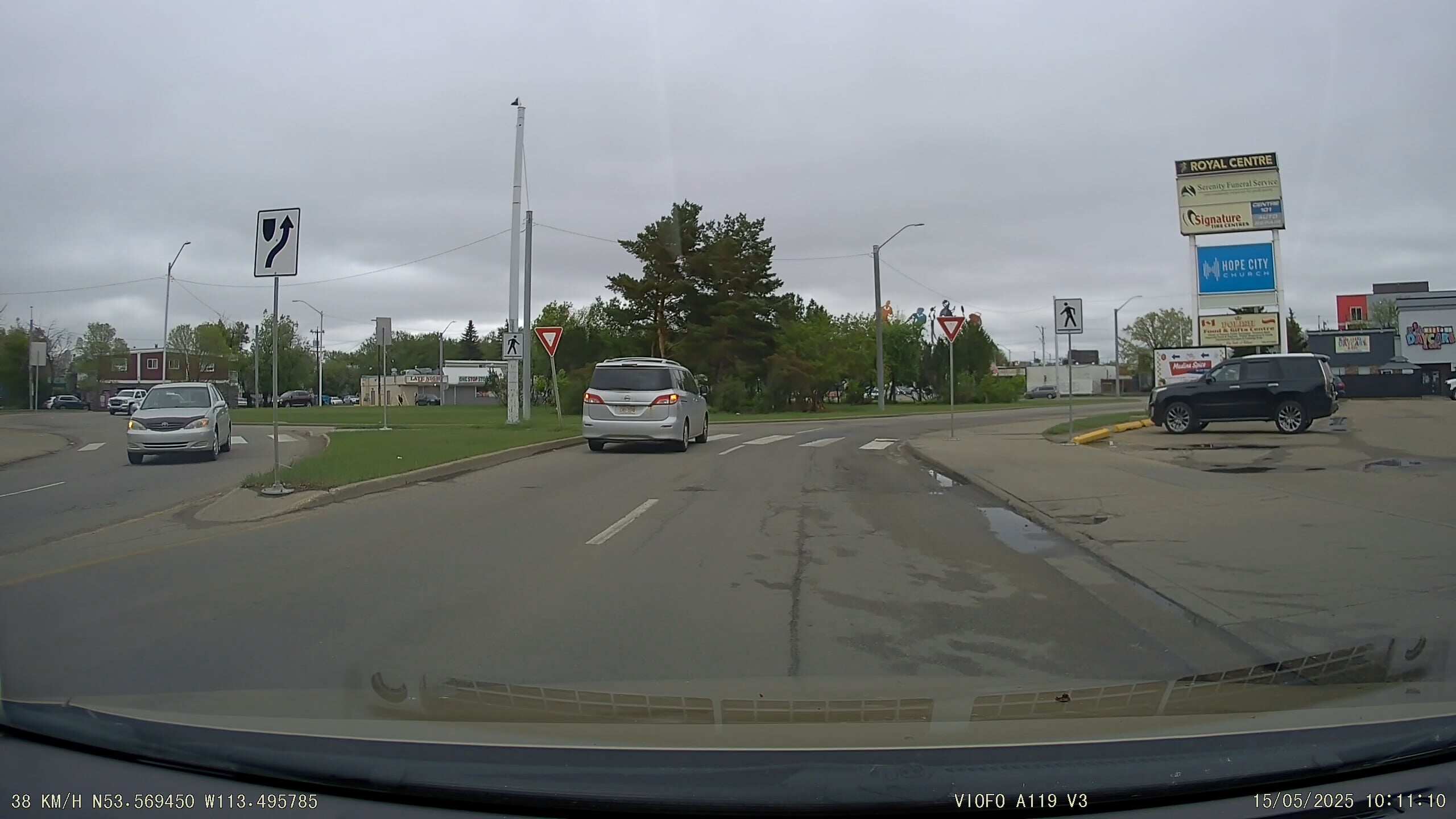
Input data overview We prepared five typical test images in the oss://baobao-wlcb/camera_front/ directory, covering different levels of difficulty:
["Police Car", "Pickup Truck"]
["Roundabout"]
["Crane/Lift Truck"]

["Pickup Truck"]

[] (corresponding to “None of the Above”)
Through this case, we verified the advantages of EMR Serverless Spark AI Functions in intelligent driving data preprocessing:
In the future, this architecture can be extended to video-level behavior analysis, such as “Is the driver fatigued?” and “Are pedestrians crossing illegally?”, becoming an indispensable intelligent cleaning engine in the autonomous driving data closed loop.
Want to see how EMR powers elastic, fully managed big data analytics with Spark, StarRocks, and lakehouse-native AI? 👉 Try EMR on Alibaba Cloud or talk to our solution architect to explore how you can build data lakes, real-time warehouses, and Data + AI workflows with seamless scalability.
More Resources:
E-MapReduce Serverless Spark Free Trial:1000 CU*H 3 months !
Hybrid Scalar-Vector Retrieval with Alibaba Cloud EMR Serverless Spark

27 posts | 0 followers
FollowAlibaba Cloud Big Data and AI - July 6, 2026
Alibaba Cloud Big Data and AI - July 9, 2026
Alibaba Cloud Big Data and AI - May 15, 2026
Alibaba Cloud Big Data and AI - April 15, 2026
Alibaba Cloud Big Data and AI - July 17, 2026
Alibaba Cloud Big Data and AI - April 13, 2026
27 posts | 0 followers
Follow Big Data Consulting for Data Technology Solution
Alibaba Cloud provides big data consulting services to help enterprises leverage advanced data technology.
Learn More Big Data Consulting Services for Retail Solution
Alibaba Cloud experts provide retailers with a lightweight and customized big data consulting service to help you assess your big data maturity and plan your big data journey.
Learn More ApsaraDB for HBase
ApsaraDB for HBase is a NoSQL database engine that is highly optimized and 100% compatible with the community edition of HBase.
Learn More Financial Services Solutions
Alibaba Cloud equips financial services providers with professional solutions with high scalability and high availability features.
Learn MoreMore Posts by Alibaba Cloud Big Data and AI

