Have you ever experienced this situation: the photos in your phone gallery keep accumulating, taking up more and more space, but many photos are already outdated and you wish there was a way to automatically clean up old photos? Flink's state management faces a similar challenge - state data continuously accumulates, and how to elegantly handle expired data becomes an important topic. FLIP-25 is like installing a smart management system for your data gallery, capable of automatically identifying and cleaning up those "expired photos."
Before discussing the specific solution, let's look at why we need the TTL (Time-To-Live) mechanism:
Imagine you're organizing a digital photo album and have two ways to determine if a photo should be cleaned up: looking at the current date or looking at the photo's capture date. Flink's TTL mechanism works in a similar way:
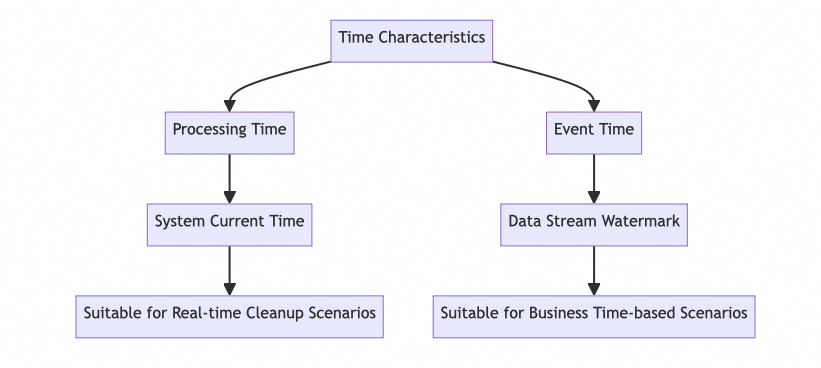
The solution supports two time characteristics:
Imagine each state data is like a photo with an "expiration date" tag:
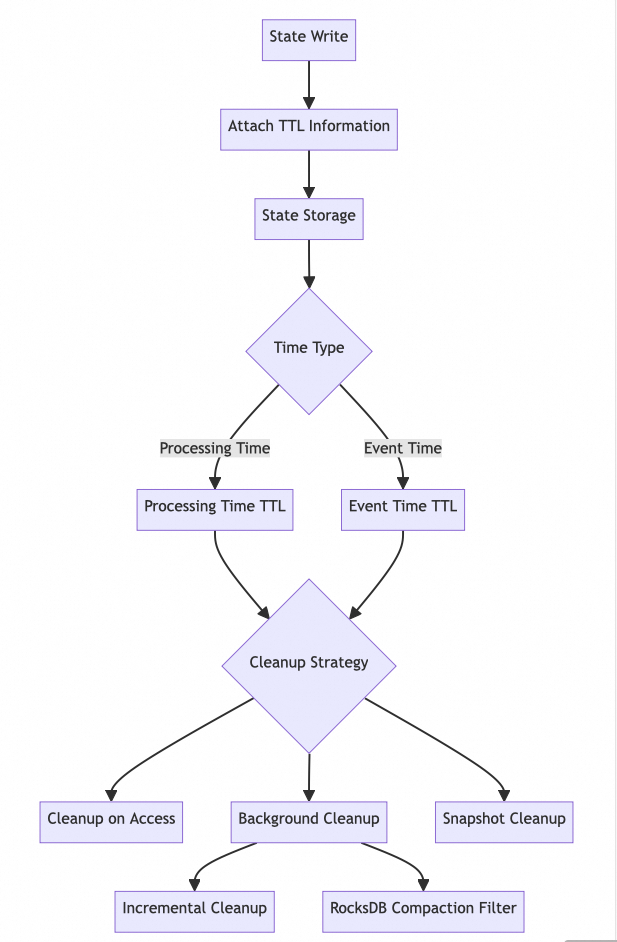
FLIP-25's design is like a smart photo album management system:
Like setting photo retention rules:
Each "photo" comes with a timestamp mark:
class TtlValue<T> {
    T value;           // Actual state value (photo content)
    long lastAccess;   // Last access time (similar to photo timestamp)
}Like how a smart album cleans up old photos, there are multiple approaches:
In code, it looks like this:
// Configure TTL, like setting automatic photo cleanup rules
StateTtlConfig ttlConfig = StateTtlConfig
    .newBuilder(Time.days(1))    // Keep photos for 1 day
    .setUpdateType(UpdateType.OnCreateAndWrite)    // Update timestamp when viewing photos
    .setStateVisibility(StateVisibility.NeverReturnExpired)  // Expired photos not visible
    .cleanupFullSnapshot()       // Clean up expired photos during backup
    .setTtlTimeCharacteristic(TtlTimeCharacteristic.ProcessingTime) // Use current time to judge
    .build();

// Create state descriptor and enable TTL
ValueStateDescriptor<String> descriptor =
    new ValueStateDescriptor<>("myState",`String.class);
descriptor.enableTimeToLive(ttlConfig);  // Turn on automatic cleanup
If you want to use the photo's capture time to determine expiration, just change the configuration:
StateTtlConfig ttlConfig = StateTtlConfig
    .newBuilder(Time.days(1))
    .setTtlTimeCharacteristic(TtlTimeCharacteristic.EventTime)
.build();This smart album feature has been improved step by step:
State TTL helps us solve the "what to do when there's too much data" problem. Just like a smart album automatically cleaning up old photos, with this feature, you no longer need to worry about state data accumulating endlessly. Flink will quietly handle everything in the background, making your application run more smoothly and efficiently, like a photo album that never fills up, always keeping enough space for new data.

215 posts | 60 followers
FollowApache Flink Community China - July 3, 2023
Apache Flink Community China - November 8, 2023
Apache Flink Community - April 10, 2025
XianYu Tech - September 24, 2019
Alibaba Cloud Native Community - May 14, 2026
Alibaba Cloud Native Community - June 8, 2026
215 posts | 60 followers
Follow Realtime Compute for Apache Flink
Realtime Compute for Apache Flink offers a highly integrated platform for real-time data processing, which optimizes the computing of Apache Flink.
Learn More Big Data Consulting for Data Technology Solution
Alibaba Cloud provides big data consulting services to help enterprises leverage advanced data technology.
Learn More Big Data Consulting Services for Retail Solution
Alibaba Cloud experts provide retailers with a lightweight and customized big data consulting service to help you assess your big data maturity and plan your big data journey.
Learn More Quick BI
A new generation of business Intelligence services on the cloud
Learn MoreMore Posts by Apache Flink Community

