In financial markets, speed is no longer the only challenge. Traders and investment teams are now facing a deeper problem: market data is scattered across platforms, trading signals change rapidly, and risk exposure can shift before teams have enough time to manually interpret the numbers.
A quantitative trader may monitor U.S. equities on a major stock exchange, futures and options on a leading derivatives venue, and crypto spot or perpetual contracts on a top crypto exchange at the same time. Each venue produces different types of data: tick prices, bid-ask spreads, executed trades, positions, PnL, volatility, leverage, and benchmark movements. When these datasets remain isolated, even experienced teams can struggle to answer basic but time-sensitive questions:
Is the current price range suitable for intraday T+0 trading?
Is a spread between two related instruments becoming abnormal?
Which strategy contributed most to today’s PnL?
Where did the largest risk exposure come from?
What should the trader watch tomorrow?
This is where Quick BI and its built-in AI agent, Smart Q, can bring AI-native analytics into the trading workflow.
Quick BI provides a unified BI platform for connecting, visualizing, and analyzing multi-source data, while Smart Q allows users to ask natural-language questions, interpret dashboards, detect anomalies, and generate structured analysis reports. For financial teams, this means AI is no longer just a chatbot sitting outside the workflow. It becomes an analytical assistant embedded into the data decision-making process.
Disclaimer: The following scenario is based on synthetic demo data and is designed to illustrate data analysis capabilities. It is not investment advice, trading advice, or a recommendation to buy or sell any financial instrument.
| Capability Scenario | Application Value | Smart Q Capability | Example Use Case |
|---|---|---|---|
| Intraday Range Analysis | Move from manual chart reading to AI-assisted price range interpretation | Smart Q Interpretation / Smart Q Insights | Identify support, resistance, buy zone, sell zone, and stop-loss level |
| Cross-Platform Spread Monitoring | Move from passive monitoring to proactive signal detection | Smart Q Insights / Scheduled Interpretation | Detect abnormal spreads between related assets across major trading platforms |
| End-of-Day Trading Review | Move from fragmented trade records to structured strategy review | Smart Q Reports | Summarize PnL, risk, abnormal trades, and next-day watchlist |
| Multi-Source Data Analysis | Move from isolated platform dashboards to unified cross-market analysis | Quick BI Dataset + Data Analysis Skill | Analyze tick data, order book snapshots, trades, positions, PnL, and risk metrics together |
| Collaborative Decision Workflow | Move from individual data viewing to team-level insight delivery | Smart Q Reports / Subscription / Email Push | Deliver trading summaries and risk alerts to managers or trading teams |
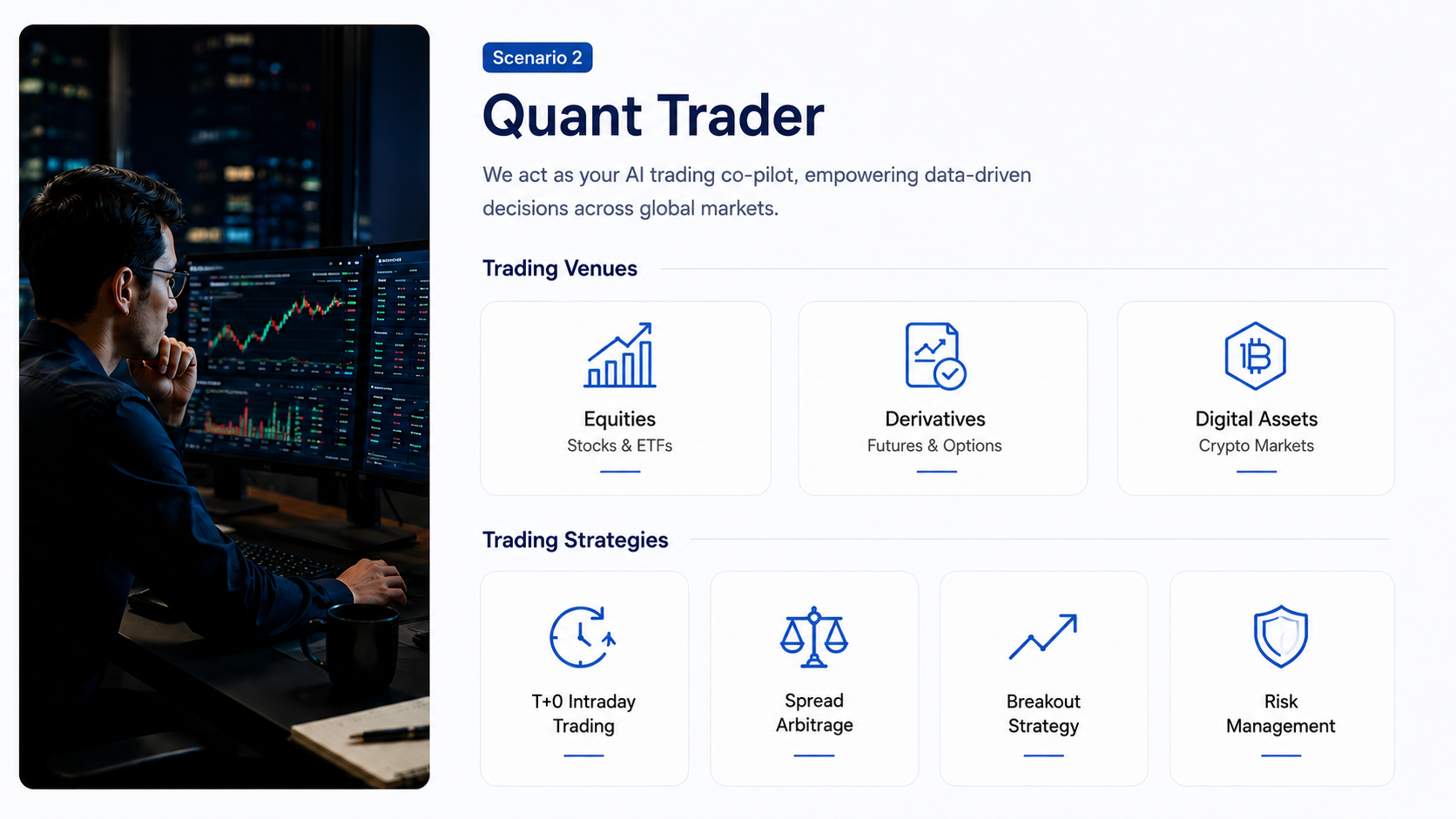
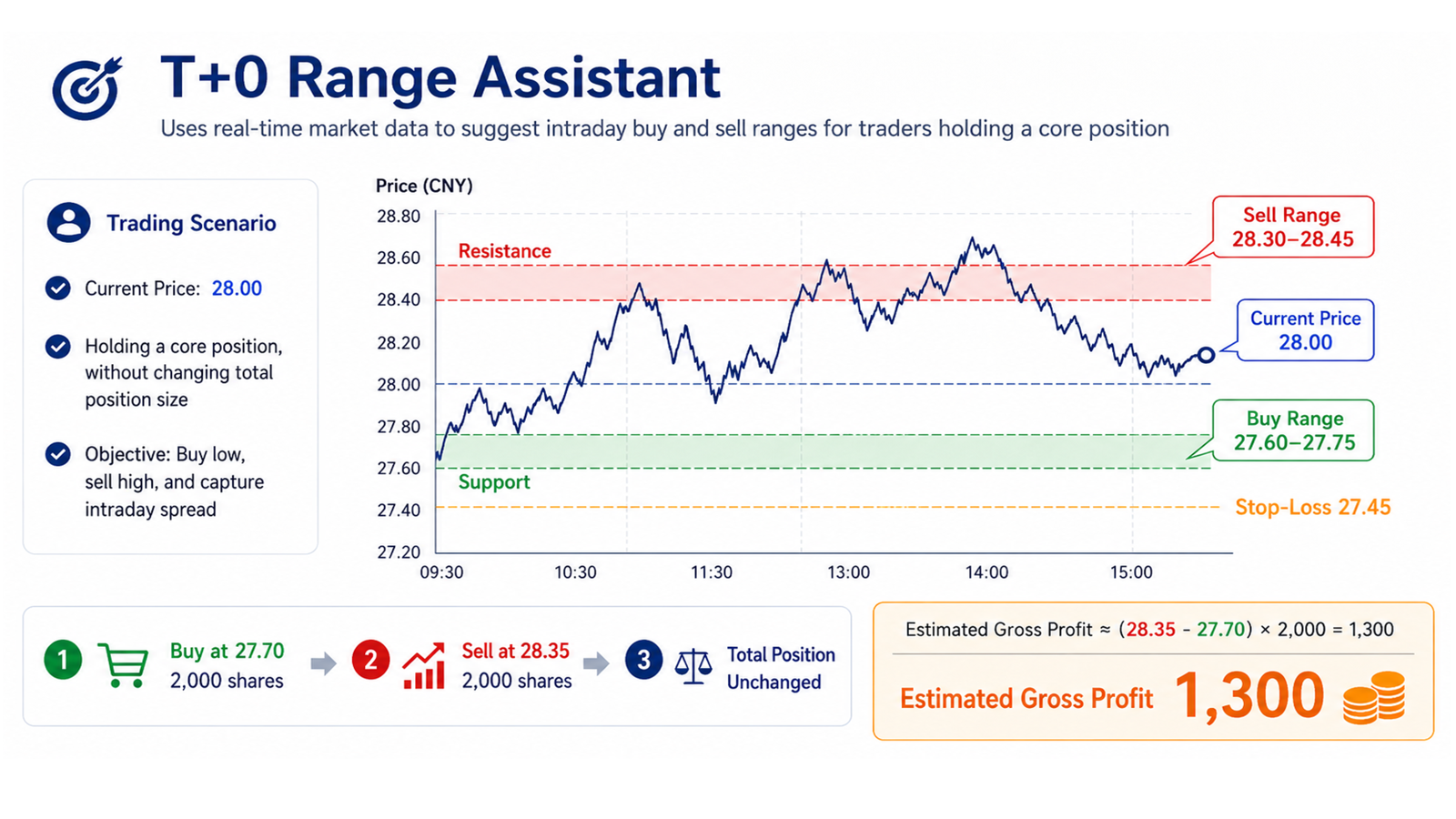
During intraday trading, a trader may already hold a core position in a publicly listed equity. The goal is not to change the long-term position, but to use intraday volatility to buy lower and sell higher within a reasonable range.
Traditionally, this requires the trader to constantly monitor price movement, volume changes, bid-ask spread, short-term moving averages, support and resistance levels, and order-book depth. This process is highly manual and becomes even harder when the trader is watching multiple assets across multiple platforms.
With Quick BI and Smart Q, the trader can connect market tick data, order book snapshots, positions, trades, and risk data into a single analytical workspace. Smart Q can then interpret the data and recommend a T+0 trading plan in natural language.
Smart Q can help the trader analyze:
Based on these signals, Smart Q can generate a suggested intraday plan, including:
Using the uploaded market tick data, order book snapshots, position data, trade records, and risk data, analyze NOVA with the current price around 28. Estimate the intraday support and resistance range based on recent price movement, volume changes, bid-ask spread, order-book imbalance, and volatility. Recommend a T+0 plan including buy zone, sell zone, stop-loss level, suggested position size, and risk warning.
In the demo dataset, Smart Q identifies repeated buying support around 27.60–27.75 and selling pressure near 28.35–28.50. It recommends a T+0 range of buying around 27.65–27.75, selling around 28.35–28.48, and stopping the T+0 plan if the price breaks below 27.45.
Instead of simply displaying the chart, Quick BI turns the chart into an explainable trading analysis interface. Smart Q helps the trader understand not only what happened, but also which price zones matter and what risks should be considered before taking action.
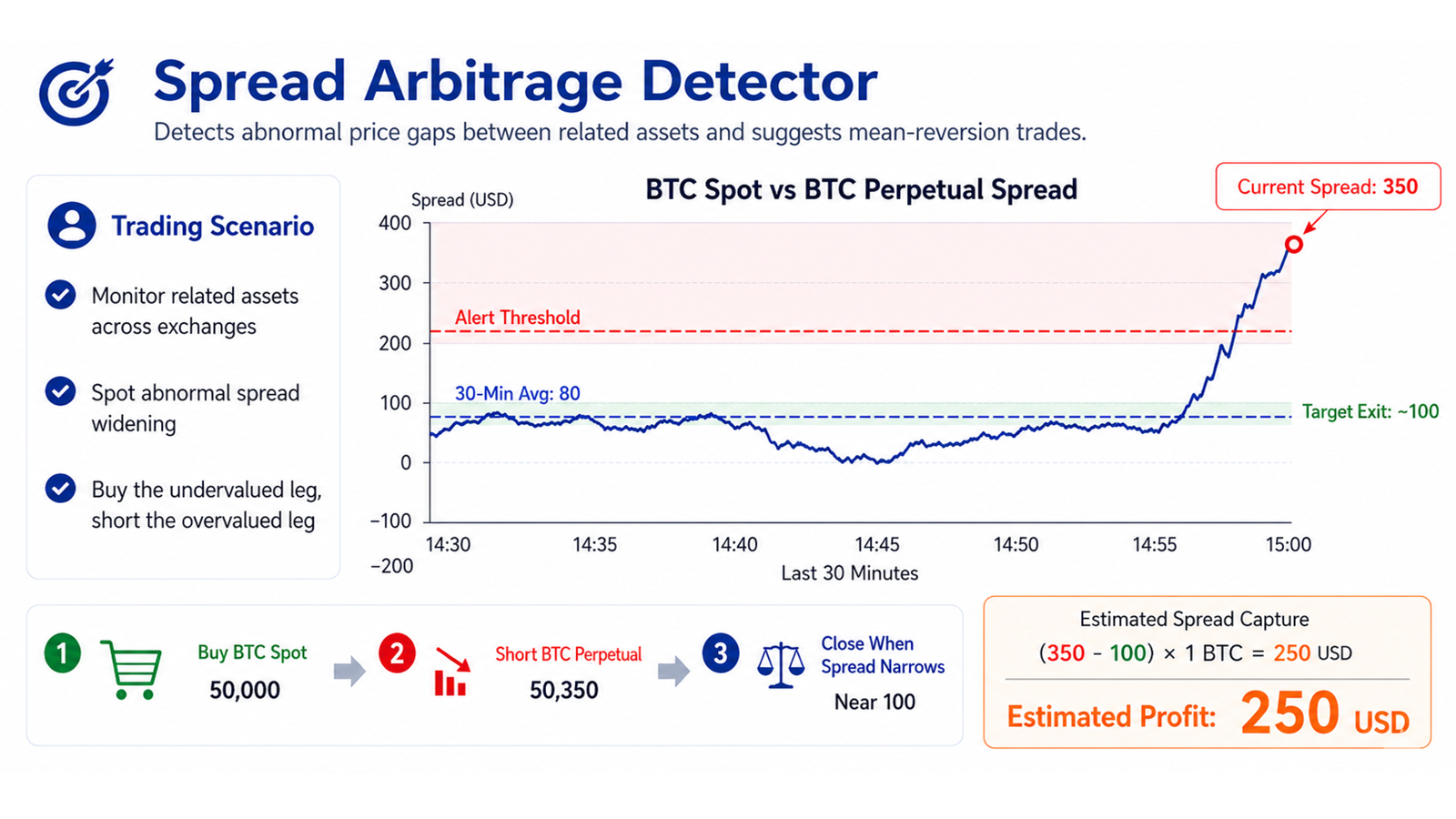
A quantitative trader often monitors related instruments across different markets. For example:
When the spread between two highly related instruments expands beyond its recent historical range, it may indicate a potential mean-reversion opportunity. However, finding this opportunity manually requires constant monitoring of multiple platforms, multiple instruments, and multiple time windows.
With Quick BI, traders can bring spread monitoring data, market ticks, trades, positions, and risk metrics into one analytical environment. Smart Q can then detect abnormal spreads, calculate spread z-scores, explain possible trading logic, and generate a long-short structure for further review.
Smart Q can help analyze:
This allows the trading team to move from passive dashboard monitoring to proactive opportunity detection.
Using the uploaded spread monitoring data, market tick data, trade records, position data, and risk data, identify abnormal spread opportunities across related instruments on major trading platforms. Calculate recent average spread, current spread, spread z-score, and mean-reversion opportunity. Suggest which leg to long, which leg to short, exit condition, and key risks.
In the demo dataset, Smart Q identifies that the BTCUSDT perpetual contract premium expands from around 75 dollars to approximately 310 dollars, with a z-score above 2.5. Smart Q suggests reviewing a potential long-short structure: long BTCUSDT spot and short BTCUSDT perpetual, with the exit condition set around spread normalization.
This does not mean the trade is risk-free. Smart Q also highlights risks such as slippage, funding rate changes, liquidity conditions, and the possibility that the spread may continue to widen. For financial teams, this risk-aware explanation is critical. The value of AI in trading analytics is not to blindly generate signals, but to make the reasoning process faster, clearer, and easier to verify.
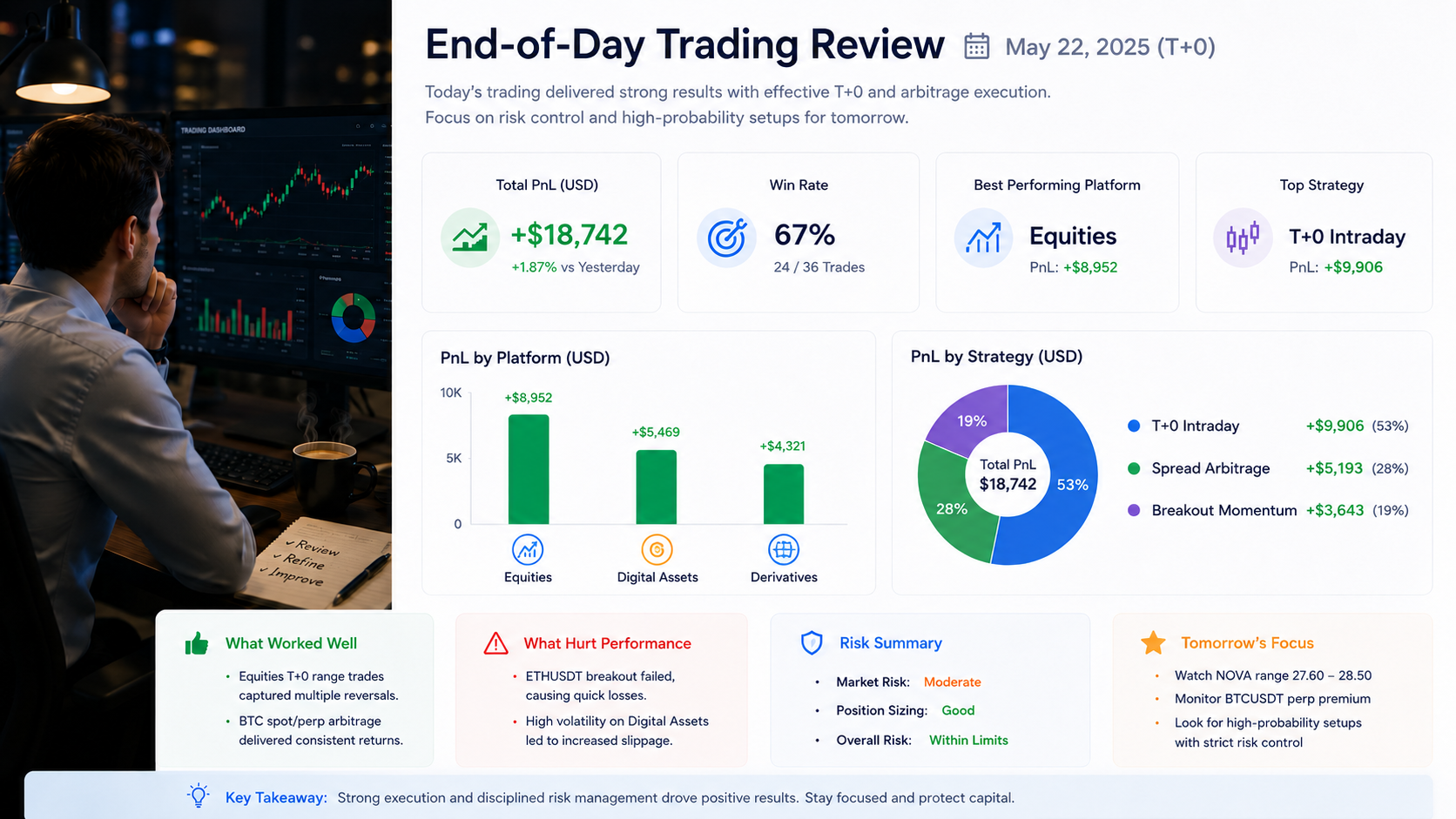
After the market closes, trading teams need to review the day’s performance. This includes understanding which platform contributed the most PnL, which strategy worked, which trades were abnormal, and which risks should be watched the next day.
In many teams, this process still depends on manual data exports, spreadsheet calculations, and fragmented notes across different systems. As trading frequency increases and asset coverage expands, manual review becomes less scalable.
With Quick BI and Smart Q Reports, traders can automatically generate structured end-of-day trading reviews based on market data, trades, PnL, positions, risk metrics, and spread monitoring records.
Smart Q can summarize:
This transforms end-of-day review from a reporting task into a repeatable analytical workflow.
Using the uploaded market tick data, order book snapshots, spread monitoring data, trade records, PnL data, position data, and risk data, generate an end-of-day trading review. Summarize PnL by platform, strategy, and symbol. Evaluate the effectiveness of T+0 range trading and spread arbitrage opportunities. Identify major profit contributors, loss drivers, abnormal trades, drawdowns, and tomorrow’s recommended watchlist.
In the demo dataset, Smart Q identifies that the BTCUSDT perpetual contract premium expands from around 75 dollars to approximately 310 dollars, with a z-score above 2.5. Smart Q suggests reviewing a potential long-short structure: long BTCUSDT spot and short BTCUSDT perpetual, with the exit condition set around spread normalization.
This does not mean the trade is risk-free. Smart Q also highlights risks such as slippage, funding rate changes, liquidity conditions, and the possibility that the spread may continue to widen. For financial teams, this risk-aware explanation is critical. The value of AI in trading analytics is not to blindly generate signals, but to make the reasoning process faster, clearer, and easier to verify.
Financial trading teams do not simply need another dashboard. They need an AI-native analytics workflow that can connect data, understand market logic, detect abnormal movements, and generate structured conclusions.
Quick BI and Smart Q bring value in four ways.
Trading data often comes from multiple platforms and systems. Quick BI can help teams organize tick data, trade records, PnL data, positions, risk metrics, and benchmark data into a unified analytical environment.
With Smart Q, users can ask questions in natural language instead of writing SQL or manually switching between reports. For example:
“Which strategy contributed the most PnL today?”
“Did the BTC spot/perpetual spread exceed its normal range?”
“What is the suggested T+0 range for NOVA based on current volatility?”
“Which position has the highest risk exposure?”
Smart Q interprets the question, identifies the relevant data, and generates an analytical answer.
Smart Q can help detect anomalies, explain possible causes, and provide risk warnings. In trading analytics, this is especially important because a signal without risk context can be misleading.
Instead of simply saying “spread widened,” Smart Q can explain whether the spread is abnormal compared with recent history, what the possible long-short structure is, and what risks should be reviewed before any action.
End-of-day reviews, risk summaries, and strategy performance reports can be generated automatically through Smart Q Reports. These reports can support internal reviews, manager briefings, and team-level decision workflows.
The result is a more scalable trading analytics process: less time spent collecting data, more time spent evaluating decisions.
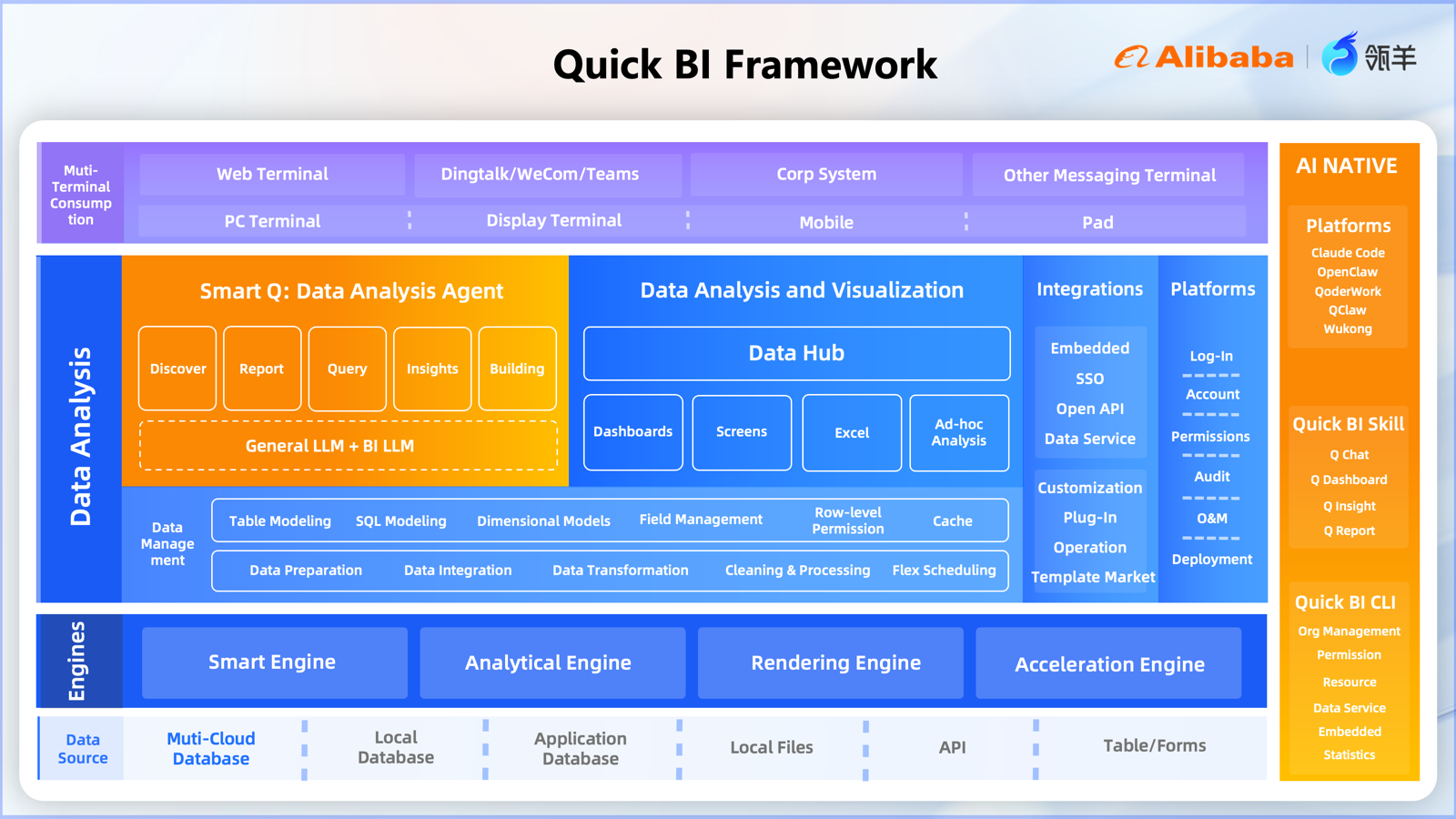
Traditional BI helps teams see what happened. AI-native BI helps teams understand what happened, why it happened, what may happen next, and what should be watched.
For quantitative trading and high-frequency monitoring scenarios, this shift is especially valuable. The trading environment is fast, multi-source, and risk-sensitive. A static dashboard alone is not enough. Teams need an intelligent layer that can continuously interpret data, detect signals, summarize performance, and support decision-making.
Quick BI, together with Smart Q, brings this intelligent layer into the BI workflow.
It helps traders and analysts move from:
In cross-platform quant trading, data is everywhere: perpetual contracts, tick data, order books, trades, positions, PnL, risk metrics, and benchmarks.
The real challenge is not only connecting this data, but turning it into timely, explainable, and trustworthy analysis.
Quick BI and Smart Q provide a practical path toward AI-native financial analytics. By combining multi-source BI capabilities with natural-language analysis, proactive insights, and automated reports, Smart Q helps trading teams monitor market movements, identify abnormal spreads, review strategy performance, and improve decision workflows.
For financial teams entering the AI era, the next step is not just building more dashboards.
It is building an intelligent data workflow where AI understands the data, explains the signal, highlights the risk, and supports better decisions.

Joe Tsai on the Future of AI: Full-Stack Value Drives Alibaba’s Confidence

1,493 posts | 508 followers
FollowAlibaba Container Service - February 25, 2025
Bryan, Zhang - June 23, 2026
Ellen Cibula - January 18, 2023
Daniel Molenaars - December 12, 2024
Alibaba Cloud Blockchain Service Team - August 27, 2018
Alibaba Cloud Native Community - April 18, 2025
1,493 posts | 508 followers
Follow Quick BI
A new generation of business Intelligence services on the cloud
Learn More Big Data Consulting for Data Technology Solution
Alibaba Cloud provides big data consulting services to help enterprises leverage advanced data technology.
Learn More Big Data Consulting Services for Retail Solution
Alibaba Cloud experts provide retailers with a lightweight and customized big data consulting service to help you assess your big data maturity and plan your big data journey.
Learn More ApsaraDB for HBase
ApsaraDB for HBase is a NoSQL database engine that is highly optimized and 100% compatible with the community edition of HBase.
Learn MoreMore Posts by Alibaba Cloud Community

