In the modern professional landscape, managing hundreds of emails daily can lead to significant cognitive overload. Developers and knowledge workers frequently miss critical communications, delay responses to mentions, or struggle to prioritize their next actions.
HermesAgent is an autonomous AI agent framework designed for multi-step workflow orchestration, tool calling, and context-aware decision-making. This article provides a highly detailed, step-by-step guide to installing HermesAgent on Alibaba Cloud Elastic Compute Service (ECS) and configuring it as an automated "Morning Assistant." This assistant will automatically summarize the previous day's Outlook emails at 7:00 AM, highlighting unread messages, specific mentions, and actionable next steps.
This solution relies on four primary components working in harmony:
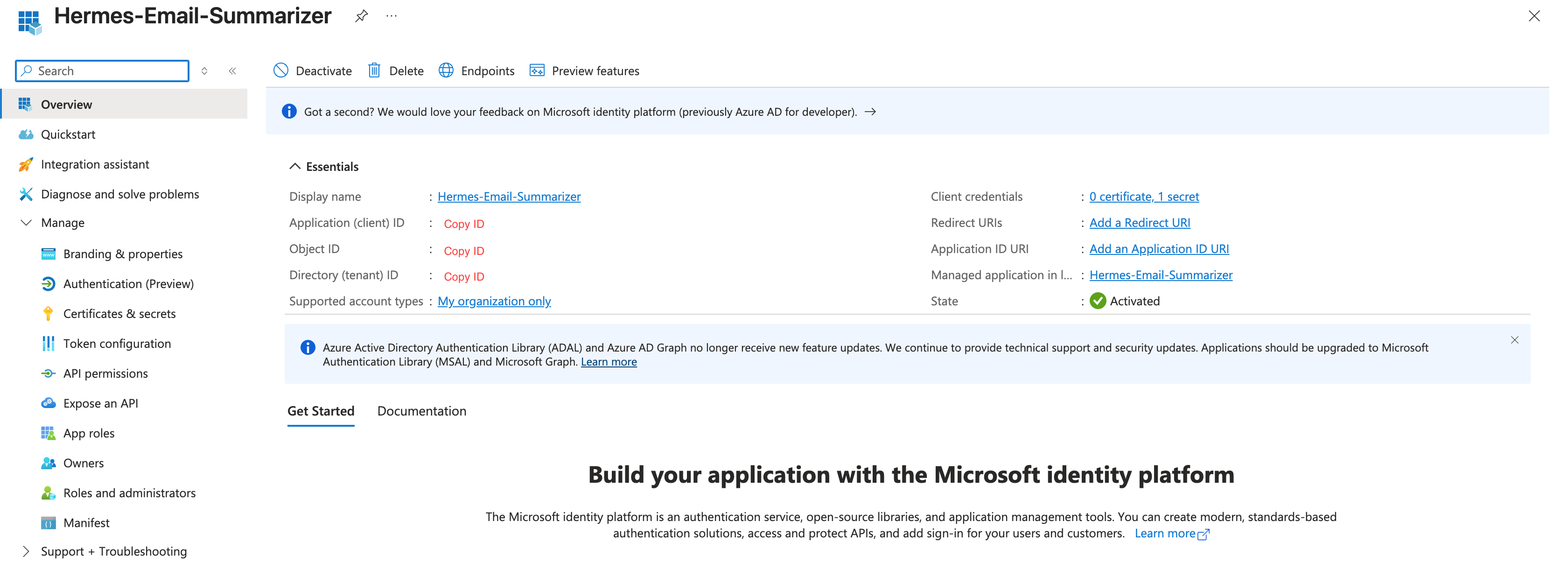
Step 1: Register Application in Microsoft Entra ID (Azure AD)
We will use Delegated Permissions. This means the application will act on behalf of the signed-in user, and only you need to grant it permission to read your own mailbox.
Supported account types: Accounts in this organizational directory only (Single tenant)
Redirect URI: Select Public client/native (mobile & desktop) and enter http://localhost
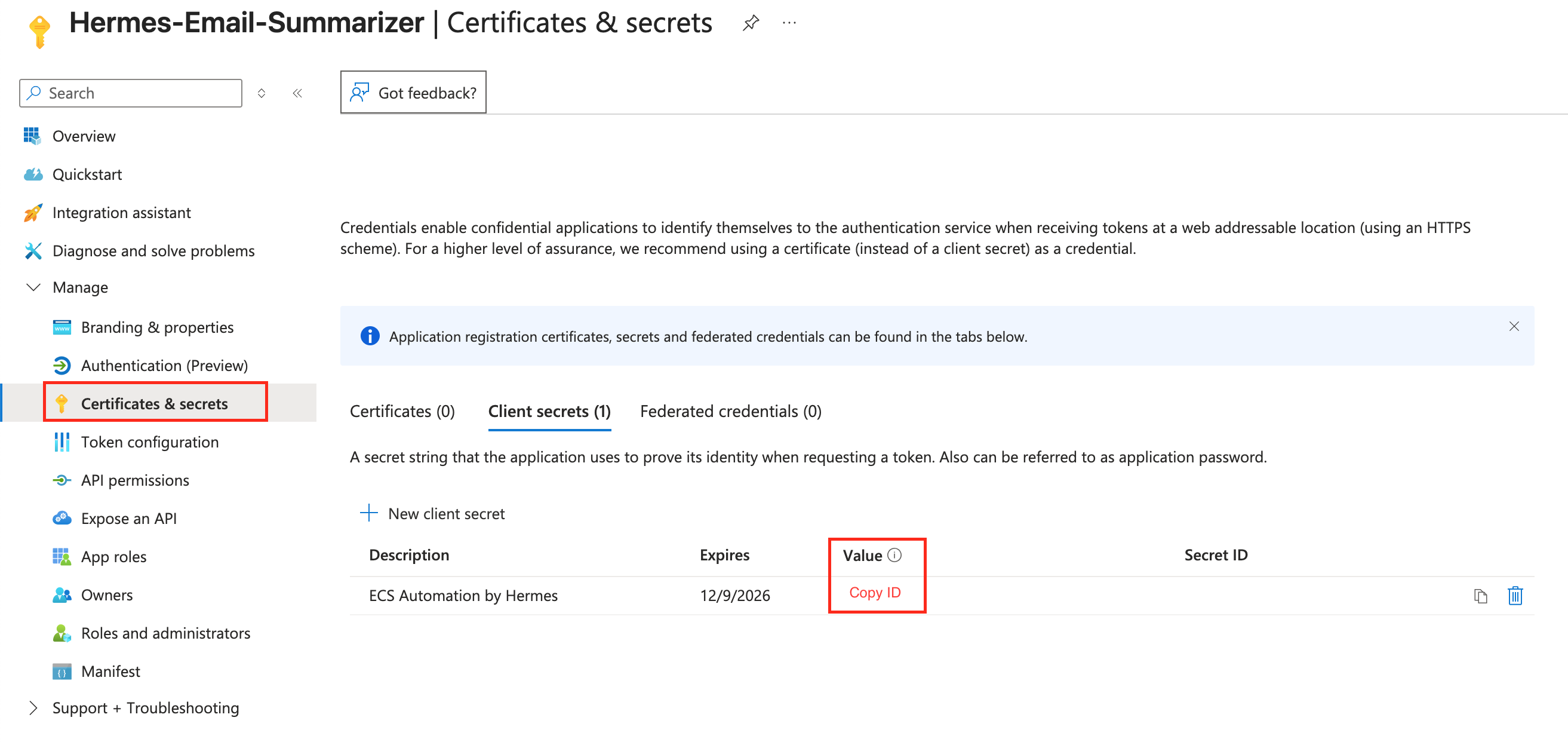
Mail.Send (Send mail as a user)
offline_access (Allows the app to maintain access to your data even when you are not actively using it, via a Refresh Token)
User.Read (Allows the app to read your basic profile)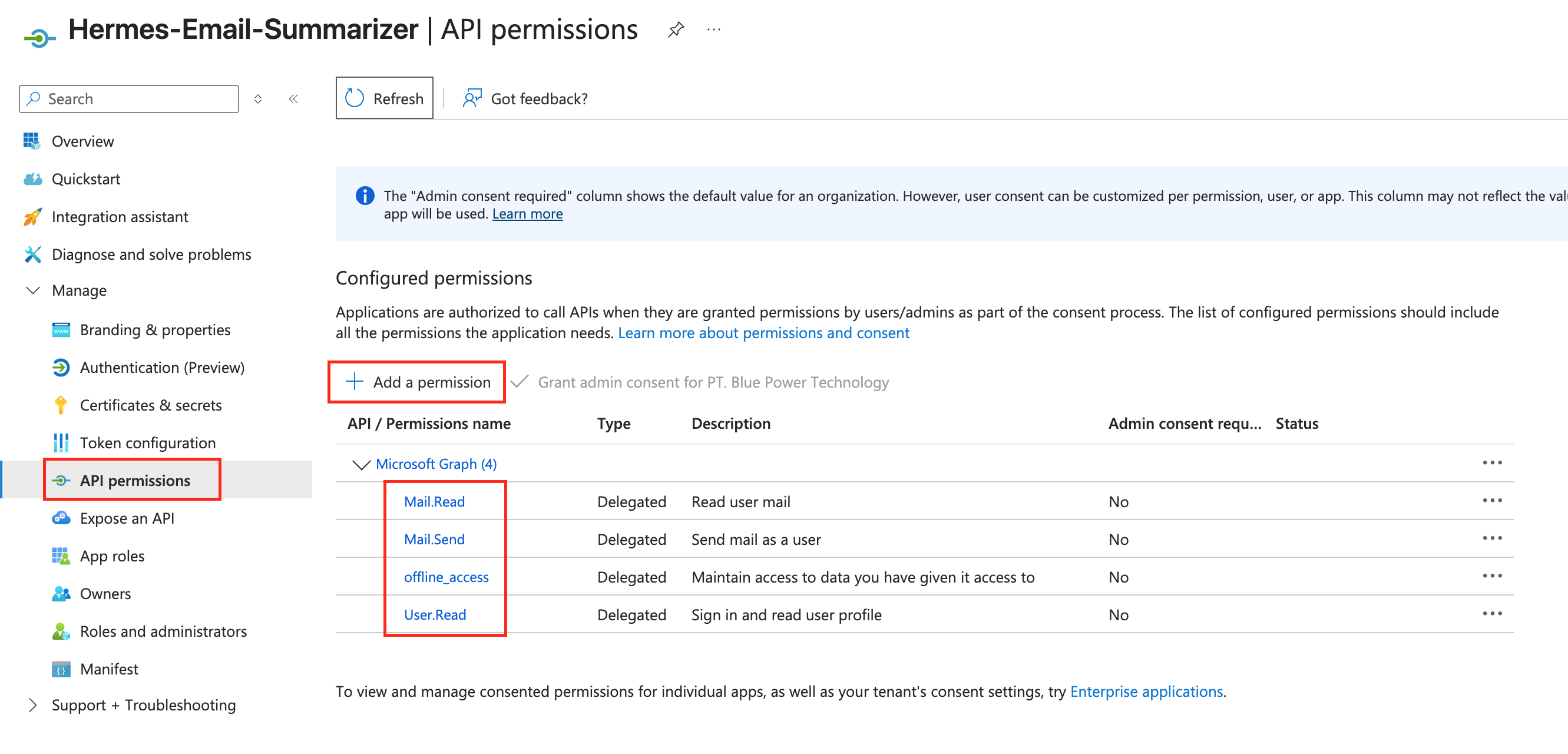
Step 2: One-Time Manual Authentication (Generate Refresh Token)
To run in the background without a browser, the agent needs a Refresh Token. You must generate this once manually.
import msal

client_id = "YOUR_CLIENT_ID"
tenant_id = "YOUR_TENANT_ID"
client_secret = "YOUR_CLIENT_SECRET"
authority = f"https://login.microsoftonline.com/{tenant_id}"
scopes = ["https://graph.microsoft.com/Mail.Read", "https://graph.microsoft.com/offline_access", "https://graph.microsoft.com/User.Read"]

app = msal.ConfidentialClientApplication(client_id, authority=authority, client_credential=client_secret)

# 1. Get the authorization URL
auth_url = app.get_authorization_request_url(scopes)
print("1. Visit this URL in your browser and log in with your work email:")
print(auth_url)

# 2. After logging in and consenting, the browser will redirect to http://localhost/?code=...
# Copy the 'code' parameter from the URL and paste it below:
auth_code = input("2. Paste the 'code' from the redirect URL here: ")

# 3. Exchange the code for tokens
result = app.acquire_token_by_authorization_code(auth_code, scopes=scopes)

if "access_token" in result:
    print("\nSuccess! Copy this Refresh Token into your .env file:")
    print(result.get("refresh_token"))
else:
    print("Error:", result.get("error"), result.get("error_description"))
2 .Run the script locally (python get_token.py), follow the prompts, log in with your work email, and grant consent when prompted by Microsoft.
3 .Copy the resulting Refresh Token. You will need this for the ECS configuration.
Step 3: Environment Setup on ECS
Login to your ECS, and establish an SSH connection to your new ECS instance:
ssh root@your_public_ipInstall HermesAgent on ECS:
curl -fsSL https://raw.githubusercontent.com/NousResearch/hermes-agent/main/scripts/install.sh | bash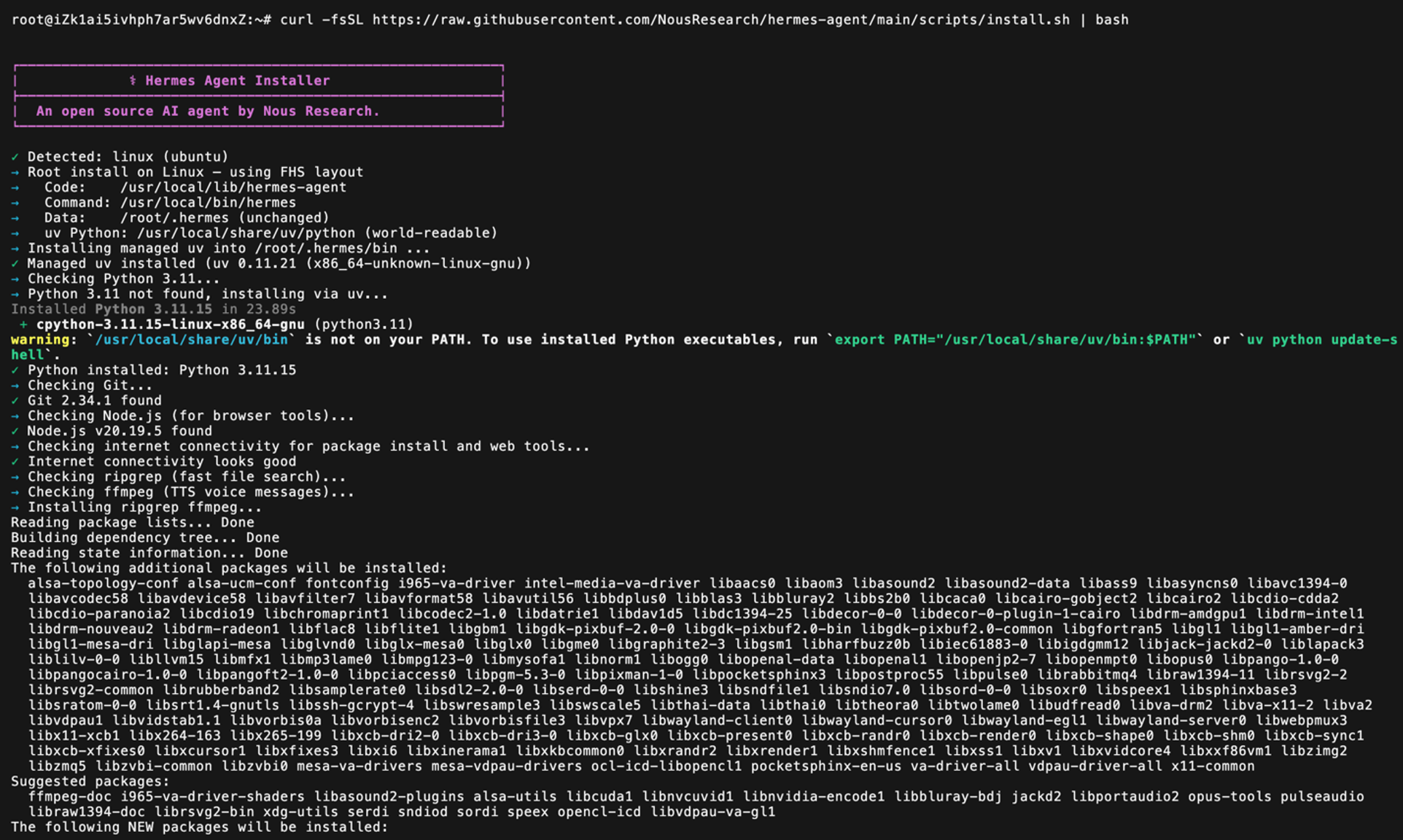
After installation, reload the terminal environment:
source ~/.bashrc # If using zsh, change to source ~/.zshrc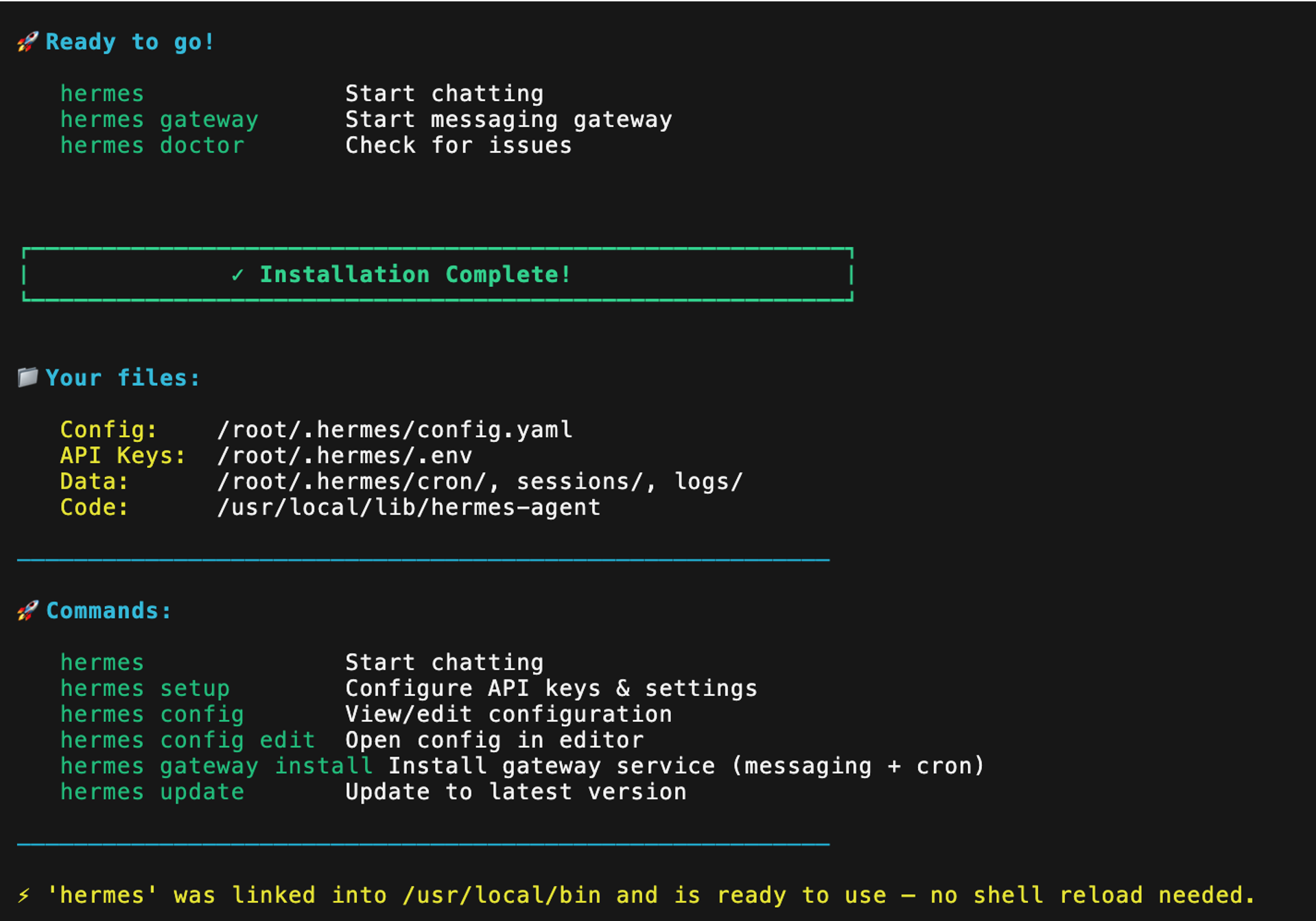
Update the system and install basic dependencies:
apt update && apt upgrade -y
apt install -y python3 python3-pip python3-venv git cron systemd
Verify the installation. A version number confirms success.
hermes --versionCreate the project directory and a Python virtual environment:
mkdir -p /opt/hermes-outlook
cd /opt/hermes-outlook
python3 -m venv .venv
source .venv/bin/activate
Install the required Python libraries:
pip install msal requests pyyaml python-dotenv scheduleStep 4: Credential Configuration and Email Fetching Script
Create a .env file to store secrets securely:
nano .envPopulate it with your configuration (replace with your actual values, including the Refresh Token from Step 2):
OUTLOOK_CLIENT_ID=your_client_id_here
OUTLOOK_TENANT_ID=your_tenant_id_here
OUTLOOK_CLIENT_SECRET=your_client_secret_here
OUTLOOK_REFRESH_TOKEN=your_refresh_token_here
OUTLOOK_USER_EMAIL=your.email@domain.com
MENTION_KEYWORD=YourName
DASHSCOPE_API_KEY=sk-xxxx-your-dashscope-key
WEBHOOK_URL=https://hooks.slack.com/services/YOUR/SLACK/WEBHOOK
TIMEZONE=Asia/Jakarta
Secure the file permissions:
chmod 600 .envNext, create the Python script to fetch yesterday's emails (fetch_outlook.py). Note the updated token acquisition method:
#!/usr/bin/env python3
import os, json, re, requests, msal
from datetime import datetime, timedelta, timezone
from zoneinfo import ZoneInfo

def get_access_token():
    app = msal.ConfidentialClientApplication(
        os.getenv("OUTLOOK_CLIENT_ID"),
        authority=f"https://login.microsoftonline.com/{os.getenv('OUTLOOK_TENANT_ID')}",
        client_credential=os.getenv("OUTLOOK_CLIENT_SECRET")
    )

    # Use the refresh token to get a new access token silently
    scopes = ["https://graph.microsoft.com/Mail.Read", "https://graph.microsoft.com/offline_access"]
    result = app.acquire_token_by_refresh_token(
        os.getenv("OUTLOOK_REFRESH_TOKEN"),
        scopes=scos
    )

    if "access_token" in result:
        # Optional: Update the .env file with the new refresh token if Microsoft rotates it
        return result["access_token"]

    raise Exception("Failed to acquire token. Refresh token may be invalid or revoked. Error: " + result.get("error_description"))

def fetch_yesterday_emails():
    token = get_access_token()
    tz = ZoneInfo(os.getenv("TIMEZONE", "Asia/Jakarta"))

    # Calculate yesterday's range (00:00 to 23:59)
    yesterday_start = datetime.now(tz) - timedelta(days=1)
    yesterday_start = yesterday_start.replace(hour=0, minute=0, second=0, microsecond=0)
    yesterday_end = yesterday_start.replace(hour=23, minute=59, second=59)

    # Convert to UTC ISO 8601 format for Graph API
    start_utc = yesterday_start.astimezone(timezone.utc).strftime("%Y-%m-%dT%H:%M:%SZ")
    end_utc = yesterday_end.astimezone(timezone.utc).strftime("%Y-%m-%dT%H:%M:%SZ")

    headers = {"Authorization": f"Bearer {token}"}
    user_email = os.getenv("OUTLOOK_USER_EMAIL")
    url = f"https://graph.microsoft.com/v1.0/users/{user_email}/messages"

    params = {
        "$filter": f"receivedDateTime ge {start_utc} and receivedDateTime le {end_utc}",
        "$select": "subject,from,receivedDateTime,bodyPreview,isRead",
        "$top": 50, # Limit to 50 emails to control token costs
        "$orderby": "receivedDateTime desc"
    }

    resp = requests.get(url, headers=headers, params=params)
    resp.raise_for_status()
    emails = resp.json().get("value", [])

    mention_re = re.compile(rf'(?i)(@{os.getenv("MENTION_KEYWORD")}|{os.getenv("MENTION_KEYWORD")})', re.IGNORECASE)
    results = []

    for mail in emails:
        sender = mail.get("from", {}).get("emailAddress", {}).get("address", "Unknown")
        subject = mail.get("subject", "(No Subject)")
        preview = mail.get("bodyPreview", "")[:250].replace("\n", " ").strip()
        is_unread = not mail.get("isRead", False)
        mentioned = bool(mention_re.search(subject + " " + preview))

        results.append({
            "id": mail.get("id"),
            "subject": subject,
            "sender": sender,
            "received": mail.get("receivedDateTime"),
            "unread": is_unread,
            "mentioned": mentioned,
            "preview": preview
        })

    return results

if __name__ == "__main__":
    print(json.dumps(fetch_yesterday_emails(), ensure_ascii=False, indent=2))
Make the script executable:
chmod +x fetch_outlook.pyStep 5: HermesAgent Workflow Configuration
Create a workflow.yaml file to define the agent's logic, scheduling, and AI prompt:
agent:
  name: outlook-daily-orchestrator
  version: 1.0
  model: qwen3.7-plus
  max_turns: 3

tools:
  - name: fetch_outlook
    type: python_script
    path: "./fetch_outlook.py"
    env_file: "./.env"

  - name: generate_summary
    type: llm_generate
    system_prompt: |
      You are a highly efficient executive productivity assistant.
      Your task is to analyze the provided JSON email data and generate a daily report in Markdown format.

      The report MUST include three main sections:
      1. Unread Emails: List emails where "unread" is true. Assign a priority (High, Medium, Low) based on the subject and sender.
      2. Mentioned Emails: List emails where "mentioned" is true.
      3. Recommended Next Actions: For EVERY email listed in sections 1 and 2, provide one concrete, actionable sentence on what the user should do (e.g., "Reply with the attached document", "Schedule a 15-minute sync", "Archive if irrelevant").

      Rules:
      - Use professional, concise English.
      - Do not hallucinate facts. If a category is empty, state "None".
      - The output MUST be clean, well-formatted Markdown.
    output_format: text

schedule:
  type: cron
  expression: "0 7 * * *"
  timezone: "Asia/Jakarta"

delivery:
  type: console_file
  path: "/opt/hermes-outlook/daily_summary.md"
  # Alternatively, configure a webhook type to send to Slack, Teams, or Email

safety:
  dry_run_first: false
  max_tokens: 3000
  pii_mask: true
  retry_on_fail: 2
Step 6: Automated Scheduling with Systemd Timer
To ensure HermesAgent runs precisely at 7:00 AM daily without relying on an active SSH session, use a systemd timer, which is more robust than traditional cron.
Create the service file:
sudo tee /etc/systemd/system/hermes-outlook.service <<EOF
[Unit]
Description=HermesAgent Outlook Daily Summary
After=network.target

[Service]
Type=oneshot
User=root
WorkingDirectory=/opt/hermes-outlook
EnvironmentFile=/opt/hermes-outlook/.env
ExecStart=/opt/hermes-outlook/.venv/bin/python3 -m hermes_agent run --config workflow.yaml

[Install]
WantedBy=multi-user.target
EOF
Create the timer file to schedule execution at 7:00 AM:
sudo tee /etc/systemd/system/hermes-outlook.timer <<EOF
[Unit]
Description=Run HermesAgent Outlook daily at 07:00 AM

[Timer]
OnCalendar=*-*-* 07:00:00
Timezone=Asia/Jakarta
Persistent=true

[Install]
WantedBy=timers.target
EOF
Enable and start the timer:
sudo systemctl daemon-reload
sudo systemctl enable --now hermes-outlook.timer
Verify the timer status:
systemctl list-timers | grep hermesOnce executed, HermesAgent will generate the daily_summary.md file (or send it via webhook) in the following structured format:
# Daily Email Summary - June 14, 2024

## Unread Emails
| Priority | Sender | Subject | Next Action |
|----------|--------|---------|-------------|
| High | finance@company.com | Q3 Budget Approval Required | Review the attached spreadsheet and reply with approval or requested revisions before 12:00 PM. |
| Medium | vendor@tech.com | API Maintenance Schedule Update | Coordinate with the DevOps team to ensure this does not conflict with our upcoming release. |
| Low | newsletter@industry.com | Weekly Tech Digest | Read during downtime or archive if no longer relevant. |

## Mentioned Emails
- **From**: pm@client.com
  **Subject**: Re: Project Alpha Timeline
  **Context**: "@YourName, can we accelerate the testing milestone?"
  **Next Action**: Reply confirming resource availability or schedule a brief call to negotiate the timeline.

> Generated by HermesAgent at 07:00 AM WIB. Token Usage: ~1,250.
Integrating HermesAgent on Alibaba Cloud ECS transforms email management from a reactive chore into a proactive, automated workflow. By utilizing delegated OAuth 2.0 permissions, this solution bypasses the need for restrictive tenant-wide admin consent, making it highly accessible for individual professionals. With precise configuration, this agent operates silently in the background, filtering noise, highlighting priorities, and delivering clear, actionable recommendations exactly when the workday begins.
This solution not only saves valuable developer time but also establishes a new standard for secure, scalable, and auditable personal workflow automation within an enterprise environment.
Alibaba Cloud Token Plan in Third-Party IDEs: A Guide to VS Code + Cline via OpenAPI Compatibility

8 posts | 0 followers
FollowKalpesh Parmar - November 13, 2025
francisndungu - October 26, 2018
Justin See - March 20, 2026
Alibaba Cloud Community - August 4, 2026
Alibaba Cloud Community - August 27, 2025
Alibaba Cloud Community - February 23, 2022
8 posts | 0 followers
Follow Token Plan
Build more, spend less. One plan, every modality.
Learn More Qwen
Qwen
Full-range, open-source, multimodal, and multi-functional
Learn More
Alibaba Cloud Model Studio
A one-stop generative AI platform to build intelligent applications that understand your business, based on Qwen model series such as Qwen-Max and other popular models
Learn More QwenWork
QwenWork is dedicated to helping employees strengthen their professional competitiveness in the AI era and to enabling enterprises to improve organizational effectiveness.
Learn MoreMore Posts by Muhamad Miftah

