Use Alibaba Cloud Serverless Kubernetes + AIGC to Build a Personal Code Assistant
By Zibai and Dongdao
AIGC technology is causing a worldwide AI technology wave. Many similar models have emerged in the open source community, such as FastGPT, Moss, and Stable Diffusion. These models have shown amazing results, attracting enterprises and developers to participate, but the complex and cumbersome deployment methods have become obstacles.
Alibaba Serverless Kubernetes (ASK) provides Serverless container services. It helps developers quickly deploy AI models without worrying about resource or environment configurations. This article uses open-source FastChat as an example to explain how to quickly build a personal code assistant in ASK.
Effect Preview
If you think the code generation of Cursor + GPT-4 is intelligent, we can achieve the same effect with FastChat + VSCode plug-ins!
- Generate a Golang Hello World
- Generate a Kubernetes Deployment
Background
Alibaba Serverless Kubernetes (ASK) is a container service provided by the Alibaba Cloud Container Service Team for Serverless scenarios. Users can use the Kubernetes API to create Workloads directly, free from the operation and maintenance of nodes. As a Serverless container platform, ASK has four major features: O&M-free, elastic scale-out, compatibility with the Kubernetes community, and strong isolation.
The main challenges in training and deploying large-scale AI applications are listed below:
- Limited GPU Resources and High Training Costs
Large-scale AI applications require GPUs for training and inference. However, many developers lack GPU resources. Purchasing a GPU card separately or purchasing an ECS instance can be costly.
- Resource Heterogeneity
A large number of GPU resources are required for parallel training, and these GPUs are often of different series. Different GPUs support different CUDA versions and are bound to the kernel version and nvidia-container-cli version. Developers need to pay attention to the underlying resources, making AI application development more difficult.
- Slow Image Loading
AI application images are often tens of GB in size, and it takes tens of minutes (or hours) to download them.
ASK provides a perfect solution to the preceding problems. In ASK, you can use Kubernetes Workload to easily use GPU resources without preparing them in advance. You can release GPU resources immediately when you finish using them. Thus, the cost is low. ASK shields the underlying resources. Users do not need to care about dependencies (such as GPU and CUDA versions). They only need to care about the logic of AI applications. At the same time, ASK has image caching capabilities by default. When a Pod is created for the second time, it can be started within seconds.
Procedure
1. Prerequisites
- An ASK cluster is created. Please see Create an ASK cluster [1] for more information.
- Download the llama-7b model and upload it to OSS. Please see the Appendix for more information.
2. Use Kubectl to Create
Replace variables in the yaml file.
${your-ak} Your AK
${your-sk} Your SK
${oss-endpoint-url} OSS Endpoint
Replace ${llama-oss-path} with the address where the llama-7b model is stored (/ is not required at the end of the path). For example, oss://xxxx/llama-7b-hf
apiVersion: v1
kind: Secret
metadata:
name: oss-secret
type: Opaque
stringData:
.ossutilconfig: |
[Credentials]
language=ch
accessKeyID=${your-ak}
accessKeySecret=${your-sk}
endpoint=${oss-endpoint-url}
---
apiVersion: apps/v1
kind: Deployment
metadata:
labels:
app: fastchat
name: fastchat
namespace: default
spec:
replicas: 1
selector:
matchLabels:
app: fastchat
strategy:
rollingUpdate:
maxSurge: 100%
maxUnavailable: 100%
type: RollingUpdate
template:
metadata:
labels:
app: fastchat
alibabacloud.com/eci: "true"
annotations:
k8s.aliyun.com/eci-use-specs: ecs.gn6e-c12g1.3xlarge
spec:
volumes:
- name: data
emptyDir: {}
- name: oss-volume
secret:
secretName: oss-secret
dnsPolicy: Default
initContainers:
- name: llama-7b
image: yunqi-registry.cn-shanghai.cr.aliyuncs.com/lab/ossutil:v1
volumeMounts:
- name: data
mountPath: /data
- name: oss-volume
mountPath: /root/
readOnly: true
command:
- sh
- -c
- ossutil cp -r ${llama-oss-path} /data/
resources:
limits:
ephemeral-storage: 50Gi
containers:
- command:
- sh
- -c
- "/root/webui.sh"
image: yunqi-registry.cn-shanghai.cr.aliyuncs.com/lab/fastchat:v1.0.0
imagePullPolicy: IfNotPresent
name: fastchat
ports:
- containerPort: 7860
protocol: TCP
- containerPort: 8000
protocol: TCP
readinessProbe:
failureThreshold: 3
initialDelaySeconds: 5
periodSeconds: 10
successThreshold: 1
tcpSocket:
port: 7860
timeoutSeconds: 1
resources:
requests:
cpu: "4"
memory: 8Gi
limits:
nvidia.com/gpu: 1
ephemeral-storage: 100Gi
volumeMounts:
- mountPath: /data
name: data
---
apiVersion: v1
kind: Service
metadata:
annotations:
service.beta.kubernetes.io/alibaba-cloud-loadbalancer-address-type: internet
service.beta.kubernetes.io/alibaba-cloud-loadbalancer-instance-charge-type: PayByCLCU
name: fastchat
namespace: default
spec:
externalTrafficPolicy: Local
ports:
- port: 7860
protocol: TCP
targetPort: 7860
name: web
- port: 8000
protocol: TCP
targetPort: 8000
name: api
selector:
app: fastchat
type: LoadBalancer3. Wait for FastChat Ready
After the pod is ready, visit http://${externa-ip}:7860 in the browser.
📍 After startup, you need to download vicuna-7b model, which is about 13GB in size.
It takes about 20 minutes to download the model. If you create a disk snapshot in advance, create a disk through the disk snapshot and attach it to a pod. The model takes effect in seconds.
kubectl get po |grep fastchat
# NAME READY STATUS RESTARTS AGE
# fastchat-69ff78cf46-tpbvp 1/1 Running 0 20m
kubectl get svc fastchat
# NAME TYPE CLUSTER-IP EXTERNAL-IP PORT(S) AGE
# fastchat LoadBalancer 192.168.230.108 xxx.xx.x.xxx 7860:31444/TCP 22mEffect
Case 1: Use FastChat through the Console
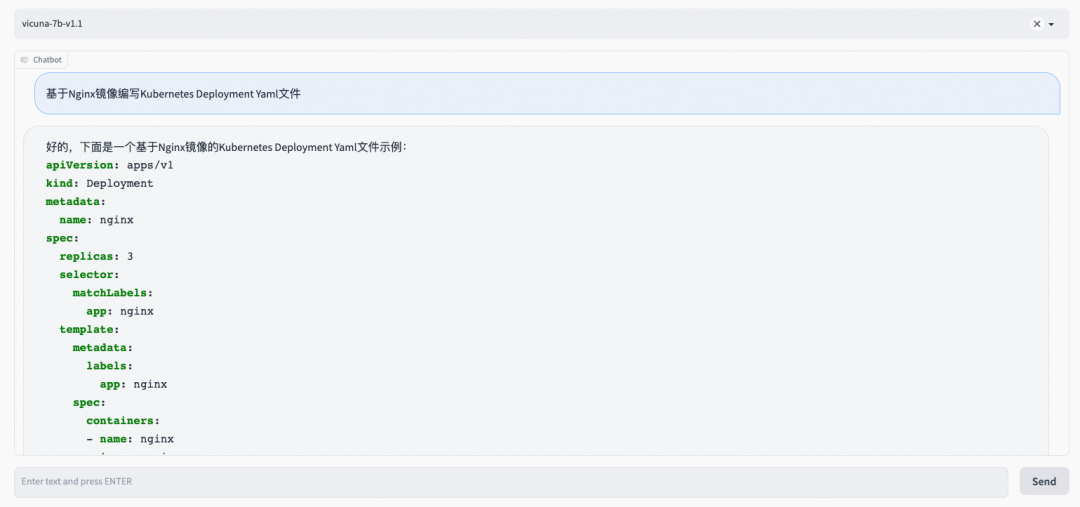
Visit http://${externa-ip}:7860 in the browser to directly test the chat function. For example, use natural language to make FastChat write a piece of code.
Input: Write a Kubernetes Deployment Yaml file based on the NGINX image
FastChat output is shown in the following figure:
Case 2: Use FastChat through API
The FastChat API monitors port 8000. As shown in the following figure, Initiate an API call through curl and then return the result.
- curl command
curl http://xxx:xxx:xxx:8000/v1/chat/completions \
  -H "Content-Type: application/json" \
  -d '{
    "model": "vicuna-7b-v1.1",
    "messages": [{"role": "user", "content": "golang generates a hello world"}]
}'- Output result
{"id":"3xqtJcXSLnBomSWocuLW 2b","object":"chat.com pletion","created":1682574393,"choices":[{"index":0,"message":{"role":"assistant","content":" Here is the code that generates \"Hello, World!\" in golang:\n```go\npackage main\n\nimport \"fmt\"\n\nfunc main() {\n fmt.Println(\"Hello, World! \")\n}\n```\n After running this code, it prints \"Hello, World!\". "},"finish_reason":"stop"}],"usage":null}Case 3: VSCode Plug-In
Now that you have an API interface, how can you integrate this capability in an integrated development environment (IDE)? You might think of Copilot, Cursor, and Tabnine. Let's integrate FastChat using the VSCode plug-in. src/extension.ts, package.json, and tsconfig.json are core files of the VSCode plug-in.
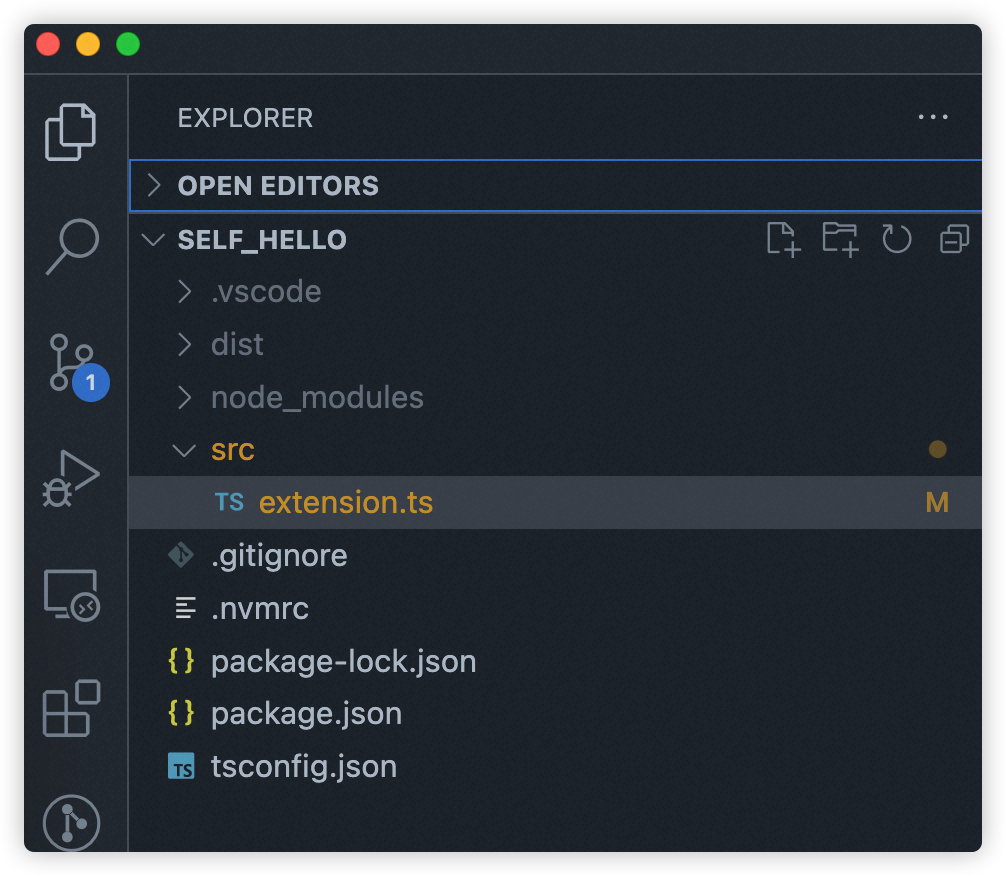
The contents of the three files are listed below:
- src/extension.ts
import * as vscode from 'vscode';
import axios from 'axios';

import { ExtensionContext, commands, window } from "vscode";
const editor = window.activeTextEditor
export function activate(context: vscode.ExtensionContext) {
    let fastchat = async () => {
        vscode.window.showInputBox({ prompt: ' Please enter code prompt ' }).then((inputValue) => {
            if (!inputValue) {
                return;
            }

            vscode.window.withProgress({
                location: vscode.ProgressLocation.Notification,
                title: 'Requesting...',
                cancellable: false
            }, (progress, token) => {
                return axios.post('http://example.com:8000/v1/chat/completions', {
                    model: 'vicuna-7b-v1.1',
                    messages: [{ role: 'user', content: inputValue }]
                }, {
                    headers: {
                        'Content-Type': 'application/json'
                    }
                }).then((response) => {
                    // const content = JSON.stringify(response.data);
                    const content = response.data.choices[0].message.content;
                    console.log(response.data)
                    const regex = /```.*\n([\s\S]*?)```/
                    const matches = content.match(regex)
                    if (matches && matches.length > 1) {
                        editor?.edit(editBuilder => {
                            let position = editor.selection.active;
                            position && editBuilder.insert(position, matches[1].trim())
                        })
                    }
                }).catch((error) => {
                    console.log(error);
                });
            });
        });

    }
    let command = commands.registerCommand(
        "fastchat",
        fastchat
    )
    context.subscriptions.push(command)
}- package.json
{
    "name": "fastchat",
    "version": "1.0.0",
    "publisher": "yourname",
    "engines": {
        "vscode": "^1.0.0"
    },
    "categories": [
        "Other"
    ],
    "activationEvents": [
        "onCommand:fastchat"
    ],
    "main": "./dist/extension.js",
    "contributes": {
        "commands": [
            {
                "command": "fastchat",
                "title": "fastchat code generator"
            }
        ]
    },
    "devDependencies": {
        "@types/node": "^18.16.1",
        "@types/vscode": "^1.77.0",
        "axios": "^1.3.6",
        "typescript": "^5.0.4"
    }
}- tsconfig.json
{
    "compilerOptions": {
      "target": "ES2018",
      "module": "commonjs",
      "outDir": "./dist",
      "strict": true,
      "esModuleInterop": true,
      "resolveJsonModule": true,
      "declaration": true
    },
    "include": ["src/**/*"],
    "exclude": ["node_modules", "**/*.test.ts"]
  }
Let's look at the effect after the plug-in is developed.
- Generate a Golang Hello World
- Generate a Kubernetes Deployment
Summary
As a Serverless container platform, ASK has capabilities, including O&M-free, auto scaling, shielding heterogeneous resources, and image acceleration. ASK is suitable for deployment scenarios of large-scale AI models. You are welcome to try it out.
Appendix
1. Download the llama-7b model
Model address: https://huggingface.co/decapoda-research/llama-7b-hf/tree/main
# If you are using Alibaba Cloud Elastic Compute Service (ECS), you need to run the following command to install git-lfs.
# yum install git-lfs

git clone https://huggingface.co/decapoda-research/llama-7b-hf
git lfs install
git lfs pull
2. Upload to OSS
You can refer to: https://www.alibabacloud.com/help/en/object-storage-service/latest/ossutil-overview
References
[1] Create an ASK Cluster
https://www.alibabacloud.com/help/en/container-service-for-kubernetes/latest/cluster-create-an-ask-cluster
[2] ASK Overview
https://www.alibabacloud.com/help/en/container-service-for-kubernetes/latest/ask-overview
Read previous post:
How Can Metabit Trading Improve the Efficiency of Quantitative Research on the Cloud by 40%?
Read next post:
Analysis of Alibaba Cloud Container Network Data Link (6): ASM Istio
-

-
Alibaba Cloud Native
212 posts | 13 followers
Follow
Comments
-
-
Alibaba Cloud Native
212 posts | 13 followers
Follow
Related Products
-
 Container Compute Service (ACS)
A cloud computing service that provides container compute resources that comply with the container specifications of Kubernetes
Learn More -
Container Service for Kubernetes
Alibaba Cloud Container Service for Kubernetes is a fully managed cloud container management service that supports native Kubernetes and integrates with other Alibaba Cloud products.
Learn More -
 Serverless Workflow
Visualization, O&M-free orchestration, and Coordination of Stateful Application Scenarios
Learn More -
 Managed Service for Prometheus
Multi-source metrics are aggregated to monitor the status of your business and services in real time.
Learn More
More Posts by Alibaba Cloud Native
- Manage Legacy Code with Tongyi Lingma: Enhance Code Quality and Maintainability
- Tongyi Lingma x Function Compute: Build an Efficient Development Process to Accelerate Project Delivery
- Optimize Python Application Observability: Overcome the Challenges in LLM Application Deployment
- The Way to Breaking Through the Performance Bottleneck of Locks in Apache RocketMQ
- AI-native Applications Based on Event-driven Architectures
- Evolution and Classification of Application Gateways
- High-cardinality GroupBy Query Acceleration in SLS SQL
- Design of Cloud-native MQTT Message Engine Based on RocketMQ
- How to Migrate from Self-managed Open-source Prometheus to Alibaba Cloud Managed Service for Prometheus
- New Scenarios and New Capabilities: Observability Innovations in the AI-Native Era