Alibaba Cloud Workspace is an integrated device-cloud solution that pairs a terminal with Elastic Desktop Service (EDS), a cloud computer service. The terminal carries the Alibaba Cloud Workspace software client. End users must use Alibaba Cloud Workspace terminals to connect to and use cloud computers.
Architecture
Alibaba Cloud Workspace provides an integrated device-cloud solution. The device refers to a terminal that carries an Alibaba Cloud Workspace software client. Alibaba Cloud Workspace also provides Elastic Desktop Service (EDS), which is a cloud computer service. End users must use Alibaba Cloud Workspace terminals to connect to and use cloud computers.
For information about how to obtain an Alibaba Cloud Workspace client, see Install and update a desktop client and Web client.
Supported clients
End users connect to cloud computers through one of three clients:
| Client | Requirements | Action |
|---|---|---|
| Web | Google Chrome or Firefox | Open |
| Windows | 64-bit Windows 7 and later | Download |
| macOS | macOS 10.15 and later | Download |
To get started with a client, see Obtain and install a Windows client or macOS client and Web client.
How it works
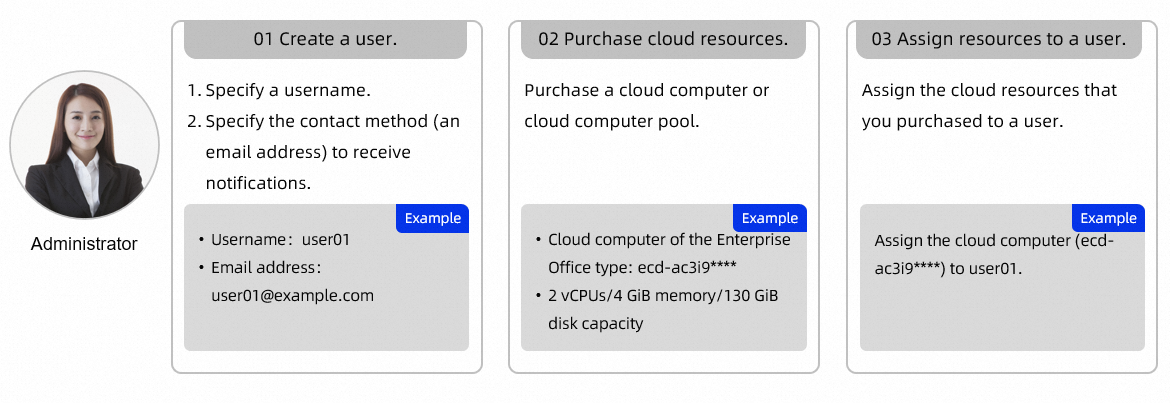
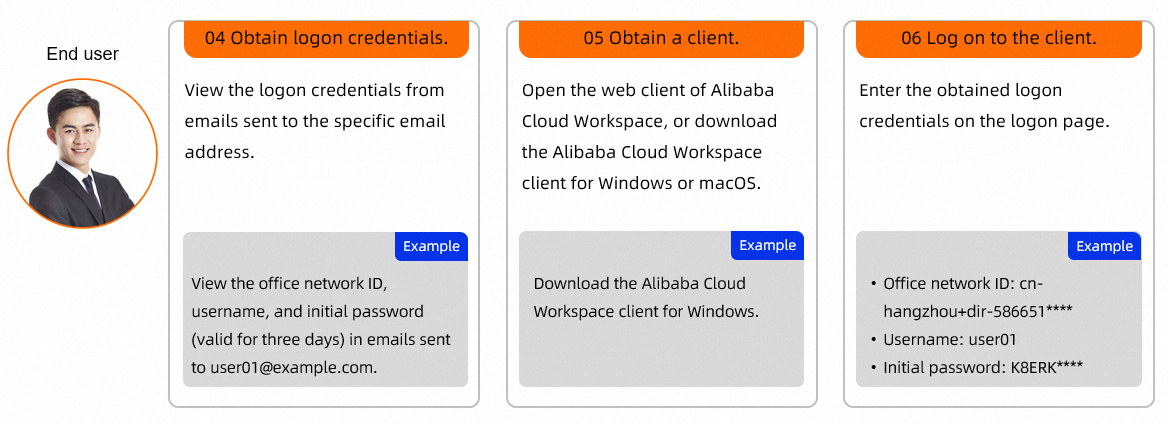
Alibaba Cloud Workspace is designed for enterprise deployments and involves two roles: the IT administrator and the end user. Each role has a distinct workflow.
Create and assign cloud resources as an administrator
The administrator creates cloud resources and users and assigns the resources to the users.

Connect to and use cloud resources as an end user
After cloud resources are assigned, end users receive logon credentials in the email inbox specified by the administrator. Use those credentials to log on to an Alibaba Cloud Workspace client and access the assigned cloud resources.

FAQ
Does my cloud computer support virtualization?
Windows cloud computers do not support virtualization technology or nested virtualization software. Linux cloud computers also do not support virtualization technology, but they can run Docker to implement virtualization.
What's next
End users: See Obtain and install a Windows client or macOS client or Web client to install a client and log on.