Para iniciar uma transmissão ao vivo, você precisa de uma URL de ingestão para broadcast e de uma URL de streaming para visualização. Este tópico descreve como gerar URLs de ingestão e streaming assinadas com o ApsaraVideo Live para proteger a distribuição do seu fluxo.
Pré-requisitos
Antes de gerar uma URL de ingestão ou de streaming, adicione um domínio de ingestão e um domínio de streaming e associe-os. Para mais informações, consulte Adicionar domínios.
Cada domínio suporta várias URLs de ingestão e streaming para transmissões simultâneas. Em domínios de ingestão, o limite é de 300 transmissões simultâneas nas regiões China (Beijing), China (Shanghai) e China (Shenzhen), e 50 nas demais regiões. Para mais informações, consulte Limites.
Estrutura da URL
Uma URL de streaming consiste em um protocolo, um domínio de ingestão/streaming, AppName, StreamName e um Token.

A tabela a seguir descreve os componentes de uma URL de transmissão ao vivo.
|
Parâmetro |
Descrição |
Exemplo |
|
Protocolo |
Protocolo da transmissão ao vivo. |
|
|
Domínio de ingestão/streaming |
Domínio adicionado. Use um domínio de ingestão para gerar uma URL de ingestão e um domínio de streaming para gerar uma URL de streaming. |
|
|
AppName |
Nome personalizado da aplicação de transmissão ao vivo. Diferencia aplicações ou cenários de negócios. |
|
|
StreamName |
Identificador único e personalizado da transmissão ao vivo. |
|
|
access token |
String criptografada gerada com o algoritmo MD5 e a chave de autenticação do domínio. Protege a transmissão ao vivo. Para detalhes sobre as regras de geração, consulte Assinatura de URL. |
|
Gerar URLs
Gere URLs de ingestão e streaming por um dos seguintes métodos:
Gerar no console: Recomendado para testes iniciais e experimentação. O console gera URLs com um Token criptografado com um único clique.
Gerar programaticamente: Indicado para ambientes de produção. A automação da geração de URLs no servidor permite gerenciamento e distribuição flexíveis.
Gerar no console
Acesse a página URL Generators.
-
Preencha as configurações a seguir e clique em Generate URLs para obter as URLs de ingestão e streaming.
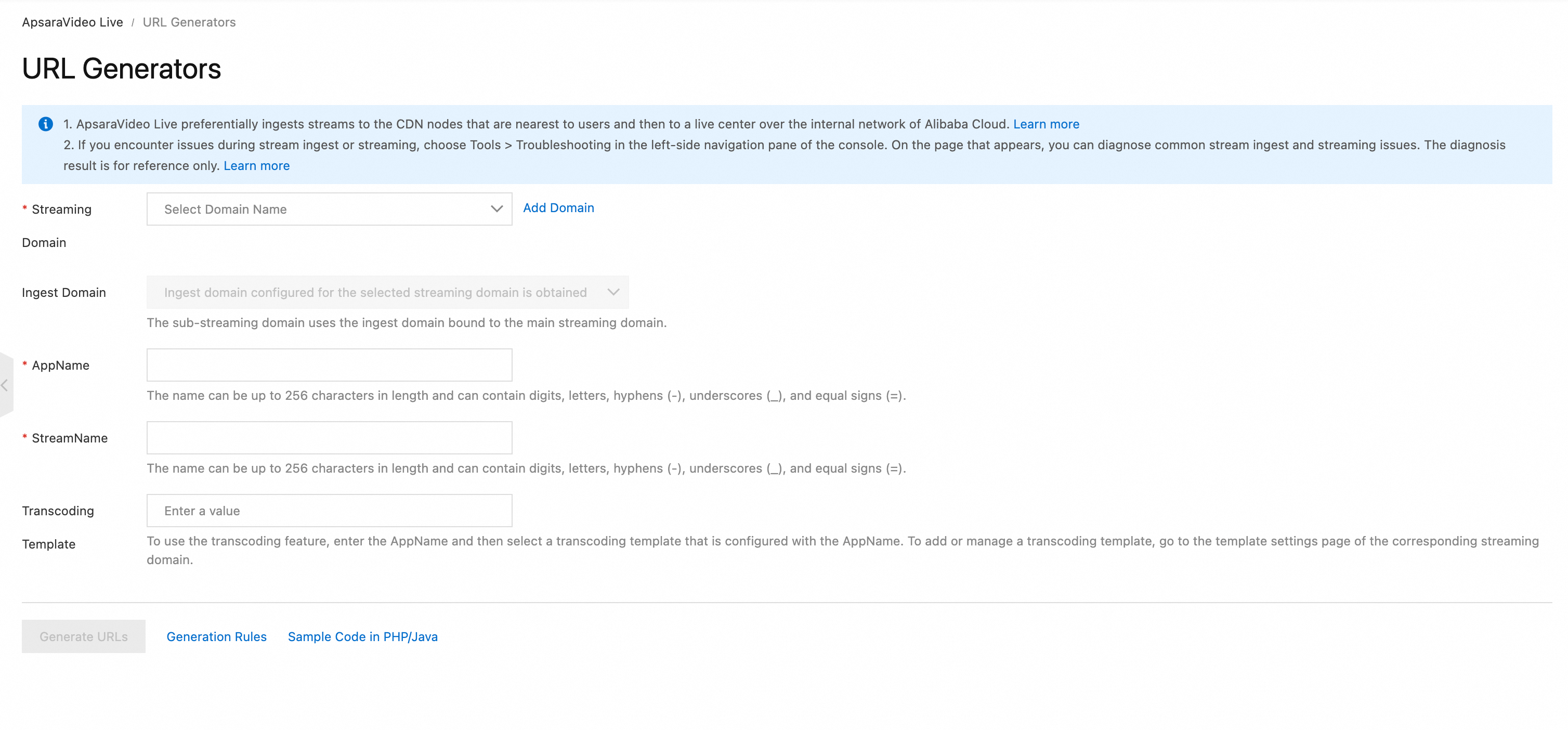 Nota
NotaO gerador de URLs não suporta a geração de URLs de streaming para legendas ao vivo.
Gerar programaticamente
Etapa 1: Construir a URI
Construa a URI base no seguinte formato: {protocol}://{domain}/{AppName}/{streamName}. Para exemplos de diferentes protocolos, consulte Exemplos de URL de ingestão ou Exemplos de URL de streaming.
// Pseudocode
protocol = "rtmp"
domain = "example.aliyundoc.com"
appName = "liveApp"
streamName = "liveStream"
uri = protocol + "://" + domain + "/" + appName + "/" + streamName
// Result: rtmp://example.aliyundoc.com/liveApp/liveStream
Etapa 2: Obter a chave de autenticação
A chave de autenticação gera o access token. Obtenha-a na página URL signing no console ou chamando a API DescribeLiveDomainConfigs.
Use a chave de autenticação do domínio de ingestão para URLs de ingestão e a chave do domínio de streaming para URLs de streaming.
Etapa 3: Montar a URL assinada
O código de exemplo a seguir para o protocolo RTMP gera primeiro um {Token} e depois monta uma URL completa de streaming ao vivo:
Java
import java.math.BigInteger;
import java.nio.charset.StandardCharsets;
import java.security.MessageDigest;
import java.security.NoSuchAlgorithmException;
import java.util.regex.Matcher;
import java.util.regex.Pattern;

public class AuthDemo {
    private static String md5Sum(String src) {
        MessageDigest md5 = null;
        try {
            md5 = MessageDigest.getInstance("MD5");
        } catch (NoSuchAlgorithmException e) {
            e.printStackTrace();
        }
        md5.update(StandardCharsets.UTF_8.encode(src));
        return String.format("%032x", new BigInteger(1, md5.digest()));
    }

private static String aAuth(String uri, String key, long exp) {
    String pattern = "^(rtmp://)?([^/?]+)(/[^?]*)?(\\\\?.*)?$";
    Pattern r = Pattern.compile(pattern);
    Matcher m = r.matcher(uri);
    String scheme = "", host = "", path = "", args = "";
    if (m.find()) {
        scheme = m.group(1) == null ? "rtmp://" : m.group(1);
        host = m.group(2) == null ? "" : m.group(2);
        path = m.group(3) == null ? "/" : m.group(3);
        args = m.group(4) == null ? "" : m.group(4);
    } else {
        System.out.println("NO MATCH");
    }

    String rand = "0";  // "0" by default, other value is ok
    String uid = "0";   // "0" by default, other value is ok
    String sString = String.format("%s-%s-%s-%s-%s", path, exp, rand, uid, key);
    String hashValue = md5Sum(sString);
    String authKey = String.format("%s-%s-%s-%s", exp, rand, uid, hashValue);
    if (args.isEmpty()) {
        return String.format("%s%s%s%s?auth_key=%s", scheme, host, path, args, authKey);
    } else {
        return String.format("%s%s%s%s&auth_key=%s", scheme, host, path, args, authKey);
    }
}

public static void main(String[] args) {
    // The ingest or streaming URL to be signed. example.aliyundoc.com is the ingest or streaming domain, liveApp is the AppName, and liveStream is the StreamName.
    // The same signing method is used for both ingest and streaming URLs.
    // The AppName and StreamName can be up to 256 characters long and can contain digits, uppercase and lowercase letters, hyphens (-), underscores (_), and equal signs (=).
    String uri = "rtmp://example.aliyundoc.com/liveApp/liveStream";
    // The authentication key. Use the key of the ingest domain for ingest URLs and the key of the streaming domain for streaming URLs.
    String key = "<input private key>";
    // The URL's final expiration time is the `exp` timestamp plus the validity period configured for the domain's URL signing. For example, if `exp` is `now + 3600`, the URL expires at `now + 3600 + validity_period`.
    long exp = System.currentTimeMillis() / 1000 + 1 * 3600;
    String authUri = aAuth(uri, key, exp);
    System.out.printf("URL : %s\nAuth: %s", uri, authUri);
}
}
Python
import re
import time
import hashlib
import datetime
def md5sum(src):
    m = hashlib.md5()
    if isinstance(src, str):
        src = src.encode('utf-8')
    m.update(src)
    return m.hexdigest()

def a_auth(uri, key, exp):
    p = re.compile("^(rtmp://)?([^/?]+)(/[^?]*)?(\\?.*)?$")
    if not p:
        return None
    m = p.match(uri)
    scheme, host, path, args = m.groups()
    if not scheme: scheme = "rtmp://"
    if not path: path = "/"
    if not args: args = ""
    rand = "0"      # "0" by default, other value is ok
    uid = "0"       # "0" by default, other value is ok
    sstring = "%s-%s-%s-%s-%s" %(path, exp, rand, uid, key)
    hashvalue = md5sum(sstring.encode('utf-8'))
    auth_key = "%s-%s-%s-%s" %(exp, rand, uid, hashvalue)
    if args:
        return "%s%s%s%s&auth_key=%s" %(scheme, host, path, args, auth_key)
    else:
        return "%s%s%s%s?auth_key=%s" %(scheme, host, path, args, auth_key)
def main():
    # The ingest or streaming URL to be signed. example.aliyundoc.com is the ingest or streaming domain, liveApp is the AppName, and liveStream is the StreamName.
    # The same signing method is used for both ingest and streaming URLs.
    # The AppName and StreamName can be up to 256 characters long and can contain digits, uppercase and lowercase letters, hyphens (-), underscores (_), and equal signs (=).
    uri = "rtmp://example.aliyundoc.com/liveApp/liveStream"
    # The authentication key. Use the key of the ingest domain for ingest URLs and the key of the streaming domain for streaming URLs.
    key = "<input private key>"
    # The URL's final expiration time is the `exp` timestamp plus the validity period configured for the domain's URL signing. For example, if `exp` is `now + 3600`, the URL expires at `now + 3600 + validity_period`.
    exp = int(time.time()) + 1 * 3600
    authuri = a_auth(uri, key, exp)
    print("URL : %s\nAUTH: %s" %(uri, authuri))
if __name__ == "__main__":
    main()
Go
package main
import (
    "crypto/md5"
    "encoding/hex"
    "fmt"
    "regexp"
    "time"
)

func md5sum(src string) string {
    h := md5.New()
    h.Write([]byte(src))
    return hex.EncodeToString(h.Sum(nil))
}

func a_auth(uri, key string, exp int64) string {
    p, err := regexp.Compile("^(rtmp://)?([^/?]+)(/[^?]*)?(\\?.*)?$")
    if err != nil {
        fmt.Println(err)
        return ""
    }
    m := p.FindStringSubmatch(uri)
    var scheme, host, path, args string
    if len(m) == 5 {
        scheme, host, path, args = m[1], m[2], m[3], m[4]
    } else {
        scheme, host, path, args = "rtmp://", "", "/", ""
    }
    rand := "0" // "0" by default, other value is ok
    uid := "0"  // "0" by default, other value is ok
    sstring := fmt.Sprintf("%s-%d-%s-%s-%s", path, exp, rand, uid, key)
    hashvalue := md5sum(sstring)
    auth_key := fmt.Sprintf("%d-%s-%s-%s", exp, rand, uid, hashvalue)
    if len(args) != 0 {
        return fmt.Sprintf("%s%s%s%s&auth_key=%s", scheme, host, path, args, auth_key)
    } else {
        return fmt.Sprintf("%s%s%s%s?auth_key=%s", scheme, host, path, args, auth_key)
    }
}

func main() {
    // The ingest or streaming URL to be signed. example.aliyundoc.com is the ingest or streaming domain, liveApp is the AppName, and liveStream is the StreamName.
    // The same signing method is used for both ingest and streaming URLs.
    // The AppName and StreamName can be up to 256 characters long and can contain digits, uppercase and lowercase letters, hyphens (-), underscores (_), and equal signs (=).
    uri := "rtmp://example.aliyundoc.com/liveApp/liveStream"
    // The authentication key. Use the key of the ingest domain for ingest URLs and the key of the streaming domain for streaming URLs.
    key := "<input private key>"
    // The URL's final expiration time is the `exp` timestamp plus the validity period configured for the domain's URL signing. For example, if `exp` is `now + 3600`, the URL expires at `now + 3600 + validity_period`.
    exp := time.Now().Unix() + 3600
    authuri := a_auth(uri, key, exp)
    fmt.Printf("URL : %s\nAUTH: %s", uri, authuri)
}
PHP
<?php
function a_auth($uri, $key, $exp) {
    preg_match("/^(rtmp:\/\/)?([^\/?]+)?(\/[^?]*)?(\?.*)?$/", $uri, $matches);
    $scheme = $matches[1];
    $host = $matches[2];
    $path = $matches[3];
    $args = $matches[4];
    if  (empty($args)) {
        $args ="";
    }
    if  (empty($scheme)) {
        $scheme ="rtmp://";
    }
    if  (empty($path)) {
        $path ="/";
    }
    $rand = "0";
    // "0" by default, other value is ok
    $uid = "0";
    // "0" by default, other value is ok
    $sstring = sprintf("%s-%u-%s-%s-%s", $path, $exp, $rand, $uid, $key);
    $hashvalue = md5($sstring);
    $auth_key = sprintf("%u-%s-%s-%s", $exp, $rand, $uid, $hashvalue);
    if ($args) {
        return sprintf("%s%s%s%s&auth_key=%s", $scheme, $host, $path, $args, $auth_key);
    } else {
        return sprintf("%s%s%s%s?auth_key=%s", $scheme, $host, $path, $args, $auth_key);
    }
}
// The ingest or streaming URL to be signed. example.aliyundoc.com is the ingest or streaming domain, liveApp is the AppName, and liveStream is the StreamName.
// The same signing method is used for both ingest and streaming URLs.
// The AppName and StreamName can be up to 256 characters long and can contain digits, uppercase and lowercase letters, hyphens (-), underscores (_), and equal signs (=).
$uri = "rtmp://example.aliyundoc.com/liveApp/liveStream";
// The authentication key. Use the key of the ingest domain for ingest URLs and the key of the streaming domain for streaming URLs.
$key = "<input private key>";
// The URL's final expiration time is the `exp` timestamp plus the validity period configured for the domain's URL signing. For example, if `exp` is `now + 3600`, the URL expires at `now + 3600 + validity_period`.
$exp = time() + 3600;
$authuri = a_auth($uri, $key, $exp);
echo "URL :" . $uri;
echo PHP_EOL;
echo "AUTH:" . $authuri;
?>
C#
using System;
using System.Text.RegularExpressions;
using System.Security.Cryptography;
using System.Text;
public class Test
{
    public static void Main()
    {
        // The ingest or streaming URL to be signed. example.aliyundoc.com is the ingest or streaming domain, liveApp is the AppName, and liveStream is the StreamName.
        // The same signing method is used for both ingest and streaming URLs.
        // The AppName and StreamName can be up to 256 characters long and can contain digits, uppercase and lowercase letters, hyphens (-), underscores (_), and equal signs (=).
        string uri= "rtmp://example.aliyundoc.com/liveApp/liveStream";
        // The authentication key. Use the key of the ingest domain for ingest URLs and the key of the streaming domain for streaming URLs.
        string key= "<input private key>";
        DateTime dateStart = new DateTime(1970, 1, 1, 8, 0, 0);
        // The URL's final expiration time is the `exp` timestamp plus the validity period configured for the domain's URL signing. For example, if `exp` is `now + 3600`, the URL expires at `now + 3600 + validity_period`.
        string exp  = Convert.ToInt64((DateTime.Now - dateStart).TotalSeconds+3600).ToString();
        string authUri = aAuth(uri, key, exp);
        Console.WriteLine (String.Format("URL :{0}",uri));
        Console.WriteLine (String.Format("AUTH :{0}",authUri));
    }
    public static string aAuth(string uri, string key, string exp)
    {
        Regex regex = new Regex("^(rtmp://)?([^/?]+)(/[^?]*)?(\\\\?.*)?$");
        Match m = regex.Match(uri);
        string scheme = "rtmp://", host = "", path = "/", args = "";
        if (m.Success)
        {
            scheme=m.Groups[1].Value;
            host=m.Groups[2].Value;
            path=m.Groups[3].Value;
            args=m.Groups[4].Value;
        }else{
            Console.WriteLine ("NO MATCH");
        }
        string rand = "0";  // "0" by default, other value is ok
        string uid = "0";   // "0" by default, other value is ok
        string u = String.Format("{0}-{1}-{2}-{3}-{4}",  path, exp, rand, uid, key);
        string hashValue  = Md5(u);
        string authKey = String.Format("{0}-{1}-{2}-{3}", exp, rand, uid, hashValue);
        if (args=="")
        {
            return String.Format("{0}{1}{2}{3}?auth_key={4}", scheme, host, path, args, authKey);
        } else
        {
            return String.Format("{0}{1}{2}{3}&auth_key={4}", scheme, host, path, args, authKey);
        }
    }
    public static string Md5(string value)
    {
        MD5CryptoServiceProvider md5 = new MD5CryptoServiceProvider();
        byte[] bytes = Encoding.ASCII.GetBytes(value);
        byte[] encoded = md5.ComputeHash(bytes);
        StringBuilder sb = new StringBuilder();
        for(int i=0; i<encoded.Length; ++i)
        {
            sb.Append(encoded[i].ToString("x2"));
        }
        return sb.ToString();
   }
}
Exemplos de URL de ingestão
|
Protocolo |
Exemplo de URL |
Descrição |
|
RTMP |
|
Protocolo padrão para ingestão de transmissão ao vivo. |
|
RTMPS |
|
Protocolo padrão para ingestão segura e criptografada de transmissão ao vivo. |
|
ARTC |
|
URL de ingestão para Real-Time Streaming (RTS). |
|
SRT |
|
O SRT vem desativado por padrão. Ative-o para o domínio de ingestão. Para instruções, consulte Ingestão de fluxo SRT. |
Exemplos de URL de streaming
Tipo de URL | Descrição | Protocolo | Exemplo de URL |
URL de streaming padrão | Ao usar SRT para ingestão de transmissão ao vivo, a reprodução é compatível via RTMP, FLV, HLS e ARTC. | RTMP |
|
FLV |
| ||
HLS |
| ||
ARTC |
| ||
URL de streaming transcodificada (Default Transcoding/Custom Transcoding) | Para um fluxo transcodificado, anexe | RTMP |
|
FLV |
| ||
HLS |
| ||
ARTC |
| ||
URL de streaming transcodificada (Multi-bitrate Transcoding) | Para um fluxo com taxa de bits adaptativa, anexe | HLS |
|
URL de fluxo com atraso | Para um fluxo com atraso, anexe | RTMP |
|
FLV |
| ||
HLS |
| ||
ARTC |
| ||
URL de fluxo com legendas ao vivo | Para um fluxo com legendas ao vivo, anexe | RTMP |
|
FLV |
| ||
HLS |
|
Verificar as URLs geradas
Para validar suas URLs, recomendamos ingerir o fluxo com nosso aplicativo de demonstração em um dispositivo móvel e usar o VLC media player em um PC para reprodução. Para outros métodos de ingestão e reprodução, consulte Ingestão de transmissão ao vivo e Reprodução de transmissão ao vivo:
Verifique a URL de ingestão:
-
Em um dispositivo móvel (Android ou iOS), escaneie o código QR para baixe e instale o aplicativo de demonstração do ApsaraVideo Live.
 Nota
NotaEm dispositivos iOS, se aparecer uma mensagem indicando um desenvolvedor empresarial não confiável, acesse Settings > General > VPN & Device Management, localize o perfil da Taobao e toque em Trust.
-
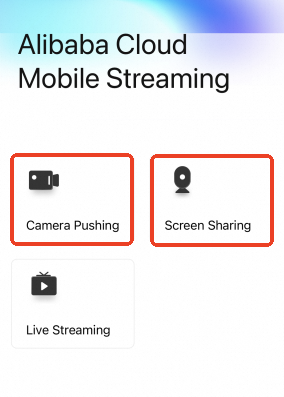
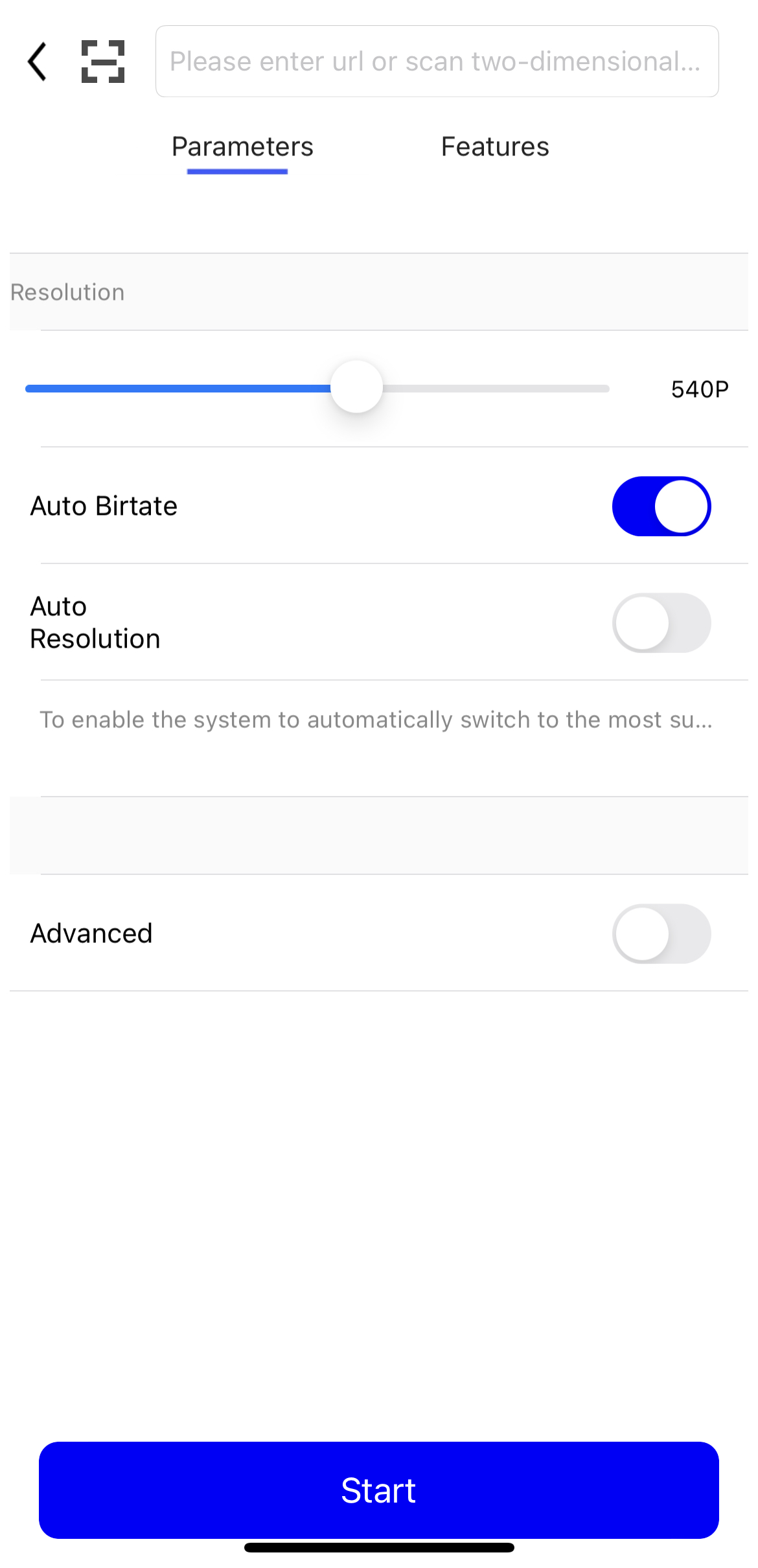
Abra o Demo App e selecione Camera ou Screen Recording Ingest. Insira a URL de ingestão. Você pode escanear um código QR para inserir a URL gerada no console.
-
Toque em Start para iniciar a ingestão do fluxo.
Visualize o fluxo ativo na página Stream Management no console do ApsaraVideo Live. Se o fluxo não for exibido, revise as etapas anteriores para identificar erros.

Verifique a URL de streaming:
Mantenha o cliente de ingestão em execução. Caso contrário, a reprodução falhará.
Baixe e instale o VLC media player.
Abra o VLC media player.
Na barra de menus, selecione Media > Open Network Stream.
-
Na aba Network, insira a URL de streaming. Por exemplo:
rtmp://pull-singapore.cloud-example.net/testApp/testStream?auth_key=1750150177-0-0-9b7*******31acc543a99c69********
Solução de problemas
Se encontrar problemas durante a ingestão ou reprodução da transmissão ao vivo, use a ferramenta de solução de problemas para validar sua URL, assinatura e outras configurações.