Orca is a persistent, Redis-compatible key-value database built on PolarDB for MySQL. When you enable the Orca feature, your PolarDB for MySQL cluster can manage both relational data and Redis-style data structures on a single, unified platform. Applications can continue using familiar Redis clients and access methods, which reduces the operational complexity and total cost of ownership of managing separate middleware. This architecture also delivers lower latency for workloads that use the Redis protocol. Additionally, Orca supports individual values of up to 4 GB, making it well-suited for use cases that involve large objects.
How it works
Traditional key-value databases, such as the open-source projects Pika and Kvrocks, are often designed for high scalability. However, their deployment can complicate node coordination and operational management. To address these challenges, PolarDB for MySQL introduces the Orca feature. After you purchase a PolarDB for MySQL cluster, you can also use it as a persistent key-value database (Redis-compatible). MySQL data and key-value (Redis protocol) data are kept separate.
Built on the PolarDB for MySQL architecture, Orca incorporates a framework for parsing and processing Redis protocol requests. All Orca-related requests connect to a dedicated port. The following figure illustrates the technical architecture of Orca in PolarDB for MySQL: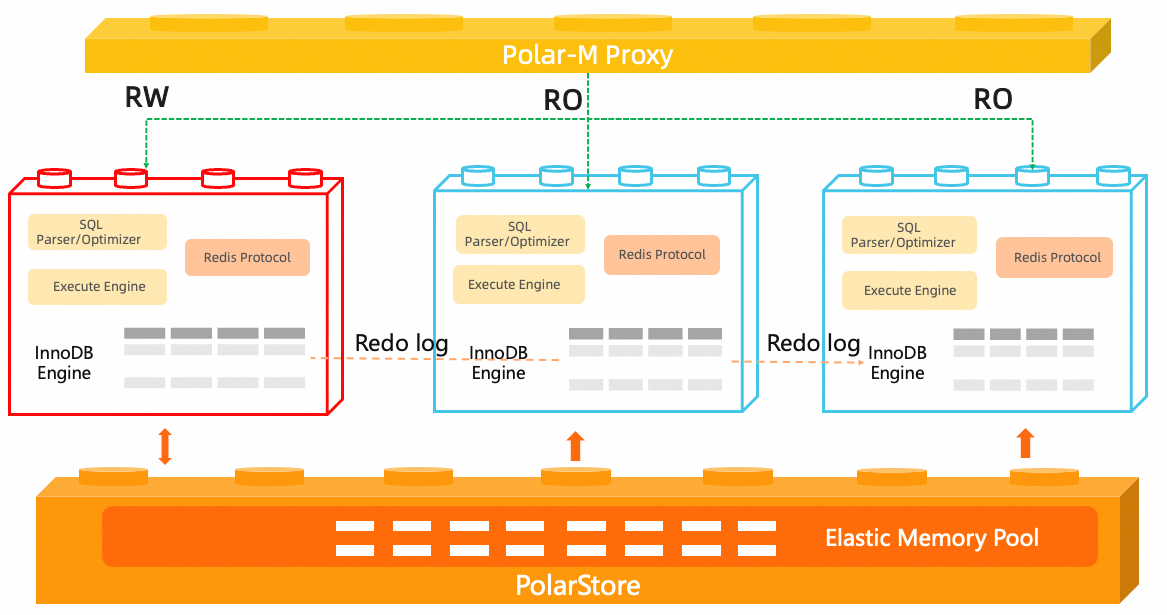
Key advantages
-
Low cost
-
Orca eliminates the need for separate compute resources. It leverages high-performance distributed storage to meet large capacity requirements.
-
-
Ease of use
-
Based on the PolarDB for MySQL architecture, Orca uses physical replication to enable read/write splitting. It also supports horizontal and vertical Serverless elastic scaling and includes a compute hot standby feature, which significantly reduces operational overhead.
-
Orca is compatible with advanced PolarDB for MySQL product forms, such as Global Database Network (GDN). By using Orca with a GDN, you can deploy your business across multiple regions. The GDN provides low-latency cross-region data synchronization, cross-region read/write splitting, and local read routing, ensuring application access to Orca has a latency of less than 2 seconds in each region.
-
-
Data persistence and strong consistency
-
Built on the InnoDB storage engine of PolarDB for MySQL, Orca uses PolarStore, a distributed storage service, to prevent data loss.
-
Orca achieves strong read consistency on the primary and read-only nodes by using the SCC technology of PolarDB for MySQL.
-
-
High performance
-
Based on the high-performance InnoDB engine, Orca uses features like the Blink-tree high-performance index structure and logical prefetch to deliver significant performance improvements for high-concurrency read and write scenarios.
-
Use cases
Orca provides Redis protocol compatibility on top of PolarDB for MySQL, complementing existing Redis use cases. You can use Orca as a persistent key-value database. With the massive storage capacity of up to 500 TB provided by the PolarStore distributed storage, you can address cost and data volume challenges while retaining the ease of use of Redis.
-
Core database for game servers: A typical game deployment has a simple architecture. The main application is deployed on ECS instances, and all business data is stored in Orca. As a persistent database, Orca provides multi-AZ disaster recovery by default, fast backups, point-in-time recovery, high-performance writes, and the ability to scale out with read-only nodes to meet the growing write demands of games.
-
Game leaderboards: In gaming applications, real-time leaderboard updates and fast access to player status are critical. Orca can store player scores and rankings. You can easily implement leaderboards by using the sorted set data structure from the Redis protocol.
-
Ad recommendation services: In many online advertising scenarios, ad systems must store large amounts of data and handle high-concurrency requests. Orca provides stable low latency and low storage costs, making it an effective solution for ad delivery requirements.
-
Lua script execution engine: Clients often need to combine multiple Redis commands into a single atomic operation to ensure data consistency. Common examples include inventory reduction, distributed locks, and rate limiting. Orca is compatible with the EVAL/EVALSHA commands of the Redis protocol and supports server-side execution of Lua scripts. This allows you to encapsulate multiple operations into an atomic transaction, reducing network round-trips and ensuring atomicity. By enabling Orca, you gain Lua scripting capabilities without needing additional middleware.
-
Lightweight message queue: Some business scenarios require a reliable message queue for asynchronous task processing, event notifications, or service decoupling. Orca is compatible with the List data structure of the Redis protocol and naturally supports the producer-consumer model through commands like LPUSH/BRPOP. You can meet the needs of a lightweight message queue simply by purchasing a PolarDB for MySQL cluster and enabling Orca. This eliminates the need to deploy and maintain separate message middleware, reducing architectural complexity and operational costs. At the same time, the data persistence and high availability of PolarDB for MySQL ensure the durability of your message data.
-
Redis protocol capabilities on a unified data stack: If you want to use PolarDB for MySQL as your unified data platform but also need Redis-like data structures, Orca can provide a Redis-compatible data service on top of your existing PolarDB for MySQL cluster. This allows you to manage both relational data and structures like hashes, sets, queues, and leaderboards with a unified management approach and persistence.
-
Storage for large value objects: In scenarios like user profiling, recommendation features, document storage, or AI task state management, the value for a single key can be very large. Based on the BLOB performance optimization of PolarDB for MySQL, Orca supports a single value of up to 4 GB. This allows you to persistently store large objects, continue using a simple key-value access model, and reduce the complexity of splitting, moving, and managing large objects.
-
Local development and integration testing: In local development, joint debugging, and CI/CD scenarios, applications often need to use the same Redis protocol interface as in production but without the overhead of deploying and maintaining a separate Redis service. Because Orca is Redis-compatible, it can be used as a persistent key-value store for functional validation, issue reproduction, and regression testing. This simplifies the environment and improves development efficiency.
Requirements
Your PolarDB for MySQL cluster must meet the following requirements:
-
CPU architecture: X86
-
Engine version:
-
MySQL 8.0.1, with a minor engine version of 8.0.1.1.53 or later.
-
MySQL 8.0.2, with a minor engine version of 8.0.2.2.24 or later.
-
Billing
The Orca feature is free of charge. You are not charged for compute nodes. You are charged only for the storage space consumed by Orca data. For more information, see Compute node billing rules and Storage space billing rules.
Limitations
-
The Orca feature does not support password-free access. You must create an Orca account.
-
After you enable the Orca feature, Orca reuses the CPU and memory resources of the entire PolarDB for MySQL cluster. Therefore, Orca workloads increase the load on the cluster. The actual increase in CPU and memory overhead depends on your business workload.
-
After you enable the Orca feature, the PolarDB for MySQL cluster automatically creates a default Orca database named
__orca_in_polardb_m_. You cannot perform any operations on this database or create another database with the same name.
Compatibility
Orca is compatible with some commands of Redis 7.0 and earlier, and supports both the RESP2 and RESP3 protocols. It currently supports up to 16 Redis databases (DB 0 to DB 15). Cross-database commands, such as MOVE, are not supported. For more information, see Redis protocol compatibility.
Usage
-
Enable Orca:
-
Enable Orca on the cluster purchase page.
-
Enable Orca in the section of the cluster details page.
-
-
Create an Orca account: Create an Orca account in the section of the cluster details page. For more information, see Create an Orca account
-
Manage Orca endpoints and ports: View the Orca endpoint and port in the section of the cluster details page. For more information, see Manage Orca endpoints
-
Connect to Orca (Redis protocol): You can use a Redis client or application to connect to and use Orca.
NoteYou can use Data Management Service (DMS) to connect to and manage Orca data.
-
View Orca metrics: On the cluster details page, go to the section to view Orca metrics based on your business needs. For more information, see View Orca metrics
-
(Optional) Migrate data: You can use Data Transmission Service (DTS) to migrate Orca data.