PolarDB for MySQL supports upgrading clusters across major versions and editions. The system automatically creates a destination cluster and synchronizes data from the source. The destination PolarDB for MySQL cluster retains the accounts, databases, IP whitelists, and required parameters of the source PolarDB for MySQL cluster.
-
Version upgrades
-
Upgrade a PolarDB for MySQL 5.6 cluster to a PolarDB for MySQL 5.7, 8.0.1, or 8.0.2 cluster.
-
Upgrade a PolarDB for MySQL 5.7 cluster to a PolarDB for MySQL 8.0.1 or 8.0.2 cluster.
-
Upgrade a PolarDB for MySQL 8.0.1 cluster to a PolarDB for MySQL 8.0.2 cluster.
-
-
Edition upgrades
Enterprise Edition cluster: upgrade from Cluster Edition to Multi-master cluster (Limitless) Edition.
-
Billing method changes
-
Change a subscription or pay-as-you-go cluster with defined specifications to a serverless cluster.
-
Change a serverless cluster to a subscription or pay-as-you-go cluster with defined specifications.
-
For more information, see Upgrade procedure.
Benefits
-
Source cluster endpoints are retained, so applications require no connection changes.
-
Incremental migration keeps service downtime under 10 minutes.
-
Hot upgrades cause only one transient connection interruption.
-
Rollback restores the cluster within 10 minutes if the upgrade fails.
Limits
|
Category |
Description |
|
Limits on source database |
|
|
Limits on SQL statements |
Note
The keywords of PolarDB for MySQL are 100% compatible with those of MySQL.
|
|
Other limits |
|
|
Other issues |
DTS periodically runs the |
Usage notes
-
If SSL is enabled on the source cluster endpoint and you select Switch with Endpoints, enable SSL on the destination cluster endpoint as well.
-
Clusters in a global database network (GDN) cannot be upgraded.
-
PolarDB for MySQL Multi-master Cluster (Database/Table) Edition does not support SSL on endpoints. Endpoint switching is unavailable when upgrading an SSL-enabled source cluster to this edition.
-
Initial full data synchronization during the upgrade uses read and write resources of both databases, which may increase load.
-
Full data synchronization causes table fragmentation through concurrent INSERT operations, making the destination tablespace larger than the source.
-
Do not manually release DTS tasks during the upgrade.
-
Full data synchronization duration varies by data volume. The destination cluster shows Creating status until synchronization completes.
-
If the cluster being upgraded is part of an existing DTS task, you can perform a DTS task switchover to redirect the DTS task to the new cluster.
-
After the upgrade, some SQL statements may perform slower due to query plan changes, such as suboptimal index selection. These changes stem from:
-
Database engine version: The new optimizer algorithm may differ from the old one, causing different execution behavior.
-
Storage structure and statistics: The new and old databases use different InnoDB B-tree structures and table statistics, which may produce different query plans.
-
Billing rules
-
You are charged for the DTS synchronization task and the destination PolarDB cluster.
-
During the upgrade, DTS automatically creates a synchronization task from source to destination. For more information about the billing rules of DTS tasks, see Billing overview.
-
The destination PolarDB cluster:
-
Serverless and subscription destination clusters are billed from the Running state.
-
Subscription clusters require payment at creation.
-
-
-
If you no longer need the upgraded subscription cluster, apply for unsubscription refunds to reduce costs. For more information, see Unsubscription refund after an upgrade.
Switch with endpoints
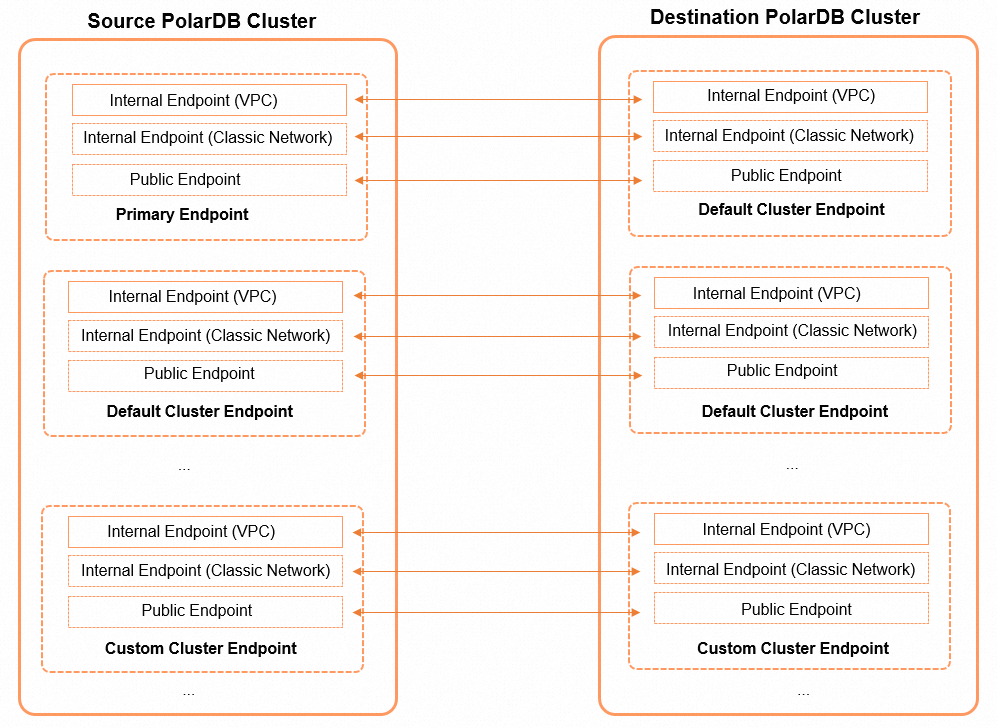
When upgrading a PolarDB for MySQL cluster, you can switch endpoints between the source and destination clusters. The following figures show the endpoint mapping.
-
Endpoint mapping for version upgrades
-
Endpoint mapping for edition upgrades from Cluster Edition to Multi-master Cluster (Database/Table) Edition
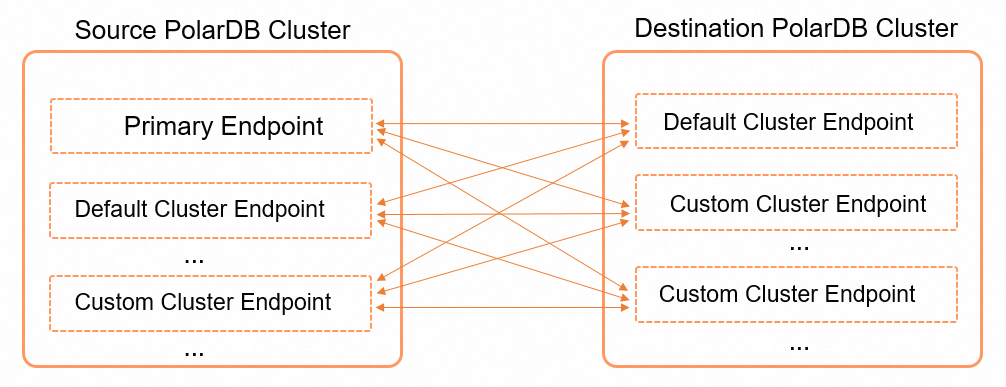
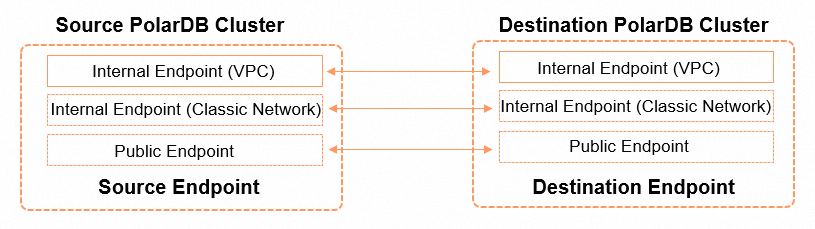
Edition upgrades allow you to specify which endpoints to switch between source and destination clusters. For example, you can switch between the primary endpoint of the source cluster and the cluster endpoint of the destination cluster, between the primary endpoint of the source cluster and the custom endpoint of the destination cluster, and between the cluster endpoint of the source cluster and the custom endpoint of the destination cluster. The following figure shows the internal endpoint mapping.
When using endpoint switching, note the following:
-
Only endpoints are switched. Other configurations such as vSwitches and virtual IP addresses remain unchanged.
-
Endpoints can be switched only if both clusters have them. By default, only private endpoints are switched.
NoteIf the source cluster has a public endpoint, apply for a corresponding public endpoint on the destination cluster to ensure successful switching.
-
For version upgrades, the primary endpoints are switched. You can also switch multiple endpoint groups.
-
For edition upgrades, you can specify which endpoint pairs to switch and whether to switch multiple groups.
-
To switch to a different endpoint, create it before the switchover. For more information about how to create endpoints for a PolarDB cluster, see Manage endpoints.
-
Ports are not switched with endpoints. Ensure the source and destination clusters use the same port. PolarDB clusters use port 3306 by default. Change the endpoint and port number.
-
After switching, stale DNS cache may cause connection failures or read-only access. Refresh the DNS cache to resolve this.
Upgrade evaluation
The upgrade evaluation feature is provided by PolarDB to ensure the successful execution of upgrade tasks and high upgrade efficiency. This feature allows you to precheck the prerequisites such as the cluster status, upgrade task dependencies, and attributes of the source cluster before you upgrade a PolarDB for MySQL cluster. This way, you can identify the factors that may affect the upgrade progress and resolve the issue in advance to reduce the processing and resource costs during the upgrade.
For more information, see Upgrade evaluation.
Expert service
For questions about major version upgrades, join DingTalk group 43055001012 by scanning the QR code below or searching the group ID.