Qwen-Image は、複数のアートスタイルをサポートし、 複雑なテキストレンダリング に優れた汎用画像生成モデルです。複数行のレイアウト、段落レベルのテキスト生成、および詳細なディテールレンダリングに対応しています。
クイックアクセス: ユーザーガイド| オンラインで試す(シンガポール | 北京)| 技術ブログ (その他の例) |
例
プロンプト | 生成された画像 |
|---|---|
緑豊かな芝生の上で 3 匹の子犬がボールで遊んでいる、癒し系手描きポスター。鳥や星などの装飾要素が散りばめられている。メインタイトル「Come Play Ball!」が、太字の青い漫画風フォントで上部に目立つように表示されている。その下には、サブタイトル「Come [Show Off Your Skills]!」が緑色のフォントで表示されている。吹き出しには「Hehe, watch me amaze my little friends next!」というテキストが書かれており、遊び心のある魅力を加えている。下部には、「We get to play ball with our friends again!」という補足テキストが記載されている。カラーパレットは、新鮮な緑と青を中心に、明るいピンクと黄色のトーンでアクセントをつけ、陽気で子供らしい雰囲気を強調している。 |
|
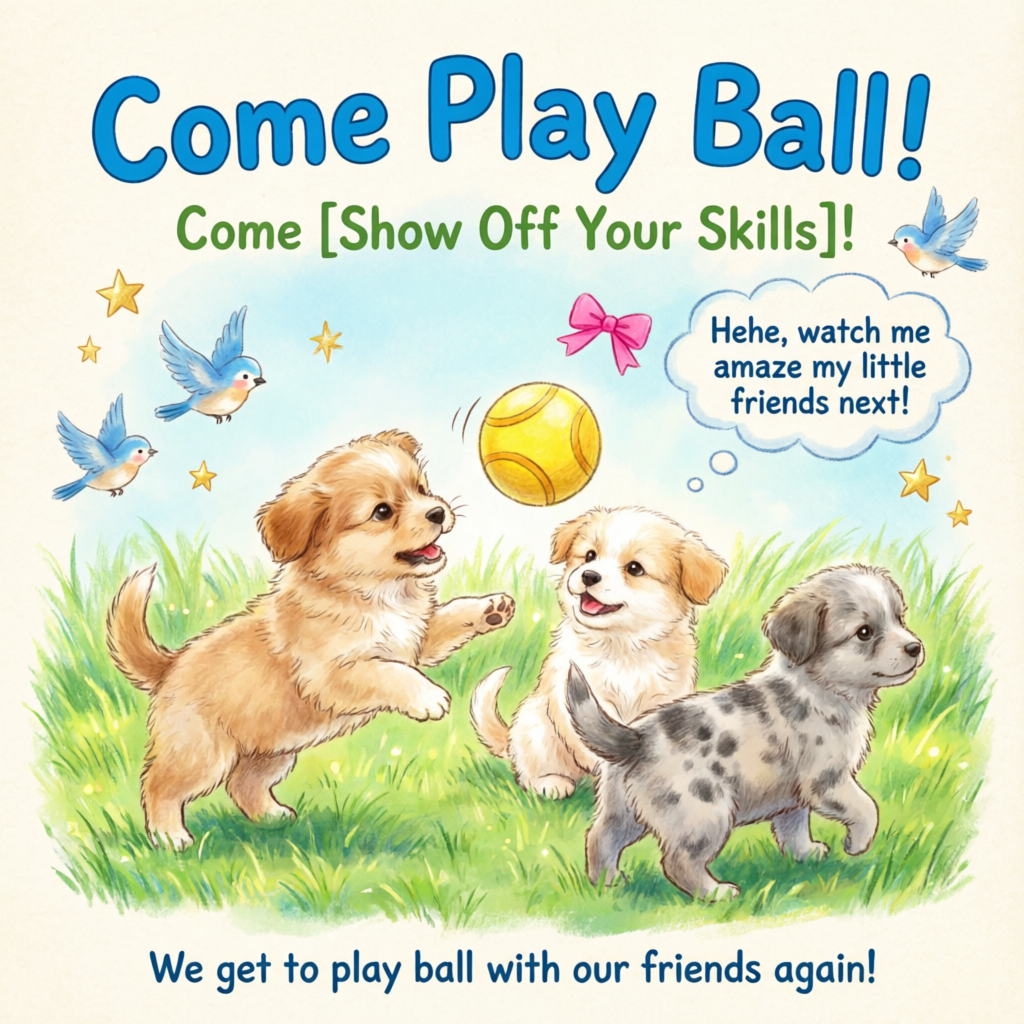
モデル概要
| モデル | 説明 | 出力画像の仕様 |
|---|---|---|
qwen-image-2.0-pro
| 画像生成および編集用の Qwen プロ版シリーズ。より強力なテキストレンダリング、リアルなテクスチャ、セマンティックな忠実性を提供します。
| 解像度:幅と高さを自由に設定します。総ピクセル数は 512×512 から 2048×2048 の範囲内である必要があります。デフォルトの解像度は 2048×2048 です。 フォーマット:PNG 画像数:1~6 |
qwen-image-2.0-pro-2026-06-22 | ||
qwen-image-2.0-pro-2026-04-22 | ||
qwen-image-2.0-pro-2026-03-03 | ||
qwen-image-2.0
| 画像生成および編集用の Qwen 高速化シリーズ。品質と応答速度のバランスが取れています。
| |
qwen-image-2.0-2026-03-03 | ||
qwen-image-max
| 画像生成用の Qwen Max シリーズ。より高いリアリズムと自然さを実現し、AI 生成のアーティファクトを低減します。 | 解像度:サポートされている解像度とアスペクト比については、「size パラメーター設定」をご参照ください。 フォーマット:PNG 画像数:1 に固定 |
qwen-image-max-2025-12-30 | ||
qwen-image-plus
| 画像生成用の Qwen Plus シリーズ。多様なアートスタイルとテキストレンダリングに優れています。 | |
qwen-image-plus-2026-01-09 | ||
qwen-image |
非同期呼び出しをサポートしているのは、qwen-image-plus と qwen-image のみです。
注記API を呼び出す前に、ご利用のリージョンでサポートされているモデルリストをご確認ください。
前提条件
呼び出しを行う前に、API キーを取得し、API キーを環境変数としてエクスポートしてください。SDK を使用して呼び出しを行うには、DashScope SDK をインストールする必要があります。
重要中国 (北京) リージョンとシンガポールリージョンでは、API キーとリクエストエンドポイントがそれぞれ異なります。これらは相互に利用することはできません。リージョンをまたいだ呼び出しは、認証の失敗やサービスエラーにつながります。
同期 API (推奨)
HTTP
同期呼び出しは、1 回のリクエストで結果を返します。
シンガポール:POST https://{WorkspaceId}.ap-southeast-1.maas.aliyuncs.com/api/v1/services/aigc/multimodal-generation/generation
北京:POST https://{WorkspaceId}.cn-beijing.maas.aliyuncs.com/api/v1/services/aigc/multimodal-generation/generation
{WorkspaceId} を実際のワークスペース ID に置き換えてください。
リクエストパラメーター | Text-to-Image |
リクエストヘッダー | |
Content-Type リクエストのコンテンツタイプです。 | |
Authorization Model Studio API キーでリクエストを認証します。例:Bearer sk-xxxx。 | |
リクエストボディ | |
model モデル名。例: | |
input 入力情報。 | |
parameters 画像処理パラメーター。 プロパティ negative_prompt 画像に含めたくない要素を記述するネガティブプロンプトです。 中国語と英語をサポートしています。最大長は 500 文字です。超過した文字は自動的に切り捨てられます。 例:低解像度、低品質、歪んだ手足、奇形の指、過飽和の色、蝋人形のような外観、顔のディテールの欠如、過度の滑らかさ、AI 生成のような見た目。混沌とした構図。ぼやけたまたは歪んだテキスト。 size 出力画像の解像度。 qwen-image-2.0 シリーズモデル:総ピクセル数は
qwen-image-max および qwen-image-plus シリーズモデル:デフォルトの解像度は
n 出力画像の数。デフォルトは 1 です。 qwen-image-2.0 シリーズモデルでは、1~6 枚の画像を選択できます。 qwen-image-max および qwen-image-plus シリーズモデルでは、この値は 1 に固定されています。他の値を設定するとエラーが返されます。 prompt_extend スマートなプロンプトリライトを有効にします。モデルがポジティブプロンプトを最適化します。ネガティブプロンプトには影響しません。
リライトの例を表示
元のプロンプト (orig_prompt):座っているジンジャーキャット、楽しそうな表情、生き生きとして愛らしく、信じられないほどリアル。 実際のプロンプト (actual_prompt):フォトリアリスティックな野生動物のポートレート:豊かな太陽の光を浴びた毛並みと、活気に満ちた楽しそうな表情を持つ座っているジンジャーキャット。目は好奇心と温かさで輝いている。猫の頭はわずかに傾き、耳は前方に立ち、口は満足げで生き生きとしたポーズで優しく開いており、愛らしい魅力と信じられないほどのリアルなディテールを醸し出している。柔らかい自然光が、各ひげや毛の一本一本の質感を高め、鼻先や内耳に微妙なハイライトを与えている。背景:ゴールデンアワーの柔らかくぼやけた秋の庭園。琥珀色の葉の暖かいトーン、木々から差し込むまだらな太陽の光、そして苔むした石段のかすかなヒント。構図は猫を中央の焦点として強調し、浅い被写界深度でシャープに捉えられている。スタイル:超リアルな写真、ナショナルジオグラフィックレベルのディテール、8K 解像度、Canon EOS R5、f/1.2 絞り、映画のような照明、リアルなカラーグレーディング、最小限の後処理。テキストやオーバーレイなし。 watermark 画像の右下に「Qwen-Image」のウォーターマークを追加します。デフォルト: seed 乱数シード。有効範囲: 同じ 注:画像生成は確率的です。同じ |

レスポンスパラメーター | タスク成功画像の URL は 24 時間のみ有効で、その後自動的にパージされます。生成された画像は速やかに保存してください。 タスク失敗タスクが失敗した場合、レスポンスには code および message フィールドにエラーの詳細が含まれます。「エラーコード」をご参照ください。 |
output タスクの出力情報。 | |
usage 注記このフィールドは非同期呼び出しでのみ返されます。同期 ImageSynthesis SDK 呼び出しではこのフィールドは返されません。 出力統計。成功した結果のみをカウントします。 | |
request_id トレースとトラブルシューティングのためのユニークなリクエスト識別子。 | |
code エラーコード。失敗したリクエストに対してのみ返されます。「エラーコード」をご参照ください。 | |
message 詳細なエラーメッセージ。失敗したリクエストに対してのみ返されます。「エラーコード」をご参照ください。 |
DashScope SDK の呼び出し
DashScope SDK は Python と Java をサポートしています。
SDK のパラメーター名は HTTP パラメーターとほぼ一致しており、パラメーター構造は言語固有の規則に従います。同期呼び出しのパラメーターについては、「HTTP」をご参照ください。
Python
注記実行時エラーを避けるために、最新の DashScope Python SDK をインストールしてください:SDK のインストール。
リクエストの例
import json
import os
import dashscope
from dashscope import MultiModalConversation

# シンガポールリージョン。{WorkspaceId} を実際のワークスペース ID に置き換えてください。URL はリージョンによって異なります。
dashscope.base_http_api_url = 'https://{WorkspaceId}.ap-southeast-1.maas.aliyuncs.com/api/v1'

messages = [
    {
        "role": "user",
        "content": [
            {"text": "緑豊かな芝生の上で 3 匹の子犬がボールで遊んでいる、癒し系手描きポスター。鳥や星などの装飾要素が散りばめられている。メインタイトル「Come Play Ball!」が、太字の青い漫画風フォントで上部に目立つように表示されている。その下には、サブタイトル「Come [Show Off Your Skills]!」が緑色のフォントで表示されている。吹き出しには「Hehe, watch me amaze my little friends next!」というテキストが書かれており、遊び心のある魅力を加えている。下部には、「We get to play ball with our friends again!」という補足テキストが記載されている。カラーパレットは、新鮮な緑と青を中心に、明るいピンクと黄色のトーンでアクセントをつけ、陽気で子供らしい雰囲気を強調している。"}
        ]
    }
]

# API キーは北京リージョンとシンガポールリージョンで異なります。API キーの取得: https://www.alibabacloud.com/help/model-studio/get-api-key
# 環境変数を設定していない場合は、以下の行を api_key="sk-xxx" に置き換えてください。
api_key = os.getenv("DASHSCOPE_API_KEY")

response = MultiModalConversation.call(
    api_key=api_key,
    model="qwen-image-2.0-pro",
    messages=messages,
    result_format='message',
    stream=False,
    watermark=False,
    prompt_extend=True,
    negative_prompt="低解像度、低品質、歪んだ手足、奇形の指、過飽和の色、蝋人形のような外観、顔のディテールの欠如、過度の滑らかさ、AI のようなアーティファクト、混沌とした構図、ぼやけたまたは歪んだテキスト。",
    size='2048*2048'
)

if response.status_code == 200:
    print(json.dumps(response, ensure_ascii=False))
else:
    print(f"HTTP ステータスコード: {response.status_code}")
    print(f"エラーコード: {response.code}")
    print(f"エラーメッセージ: {response.message}")
    print("ドキュメントを参照してください: https://www.alibabacloud.com/help/model-studio/error-code")
レスポンスの例
画像の URL は 24 時間後に有効期限が切れます。速やかに画像をダウンロードしてください。
{
    "status_code": 200,
    "request_id": "d2d1a8c0-325f-9b9d-8b90-xxxxxx",
    "code": "",
    "message": "",
    "output": {
        "text": null,
        "finish_reason": null,
        "choices": [
            {
                "finish_reason": "stop",
                "message": {
                    "role": "assistant",
                    "content": [
                        {
                            "image": "https://dashscope-result-wlcb.oss-cn-wulanchabu.aliyuncs.com/xxx.png?Expires=xxx"
                        }
                    ]
                }
            }
        ]
    }
}
Java
注記最新の DashScope Java SDK をインストールする必要があります。そうしないと、実行時エラーが発生する可能性があります:SDK のインストール。
リクエストの例
import com.alibaba.dashscope.aigc.multimodalconversation.MultiModalConversation;
import com.alibaba.dashscope.aigc.multimodalconversation.MultiModalConversationParam;
import com.alibaba.dashscope.aigc.multimodalconversation.MultiModalConversationResult;
import com.alibaba.dashscope.common.MultiModalMessage;
import com.alibaba.dashscope.common.Role;
import com.alibaba.dashscope.exception.ApiException;
import com.alibaba.dashscope.exception.NoApiKeyException;
import com.alibaba.dashscope.exception.UploadFileException;
import com.alibaba.dashscope.utils.JsonUtils;
import com.alibaba.dashscope.utils.Constants;

import java.io.IOException;
import java.util.Arrays;
import java.util.Collections;
import java.util.HashMap;
import java.util.Map;

public class QwenImage {

    static {
        // シンガポールリージョン。{WorkspaceId} を実際のワークスペース ID に置き換えてください。URL はリージョンによって異なります。
        Constants.baseHttpApiUrl = "https://{WorkspaceId}.ap-southeast-1.maas.aliyuncs.com/api/v1";
    }

    // API キーは北京リージョンとシンガポールリージョンで異なります。API キーの取得: https://www.alibabacloud.com/help/model-studio/get-api-key
    // 環境変数を設定していない場合は、以下の行を static String apiKey="sk-xxx" に置き換えてください。
    static String apiKey = System.getenv("DASHSCOPE_API_KEY");

    public static void call() throws ApiException, NoApiKeyException, UploadFileException, IOException {

        MultiModalConversation conv = new MultiModalConversation();

        MultiModalMessage userMessage = MultiModalMessage.builder().role(Role.USER.getValue())
                .content(Arrays.asList(
                        Collections.singletonMap("text", "緑豊かな芝生の上で 3 匹の子犬がボールで遊んでいる、癒し系手描きポスター。鳥や星などの装飾要素が散りばめられている。メインタイトル「Come Play Ball!」が、太字の青い漫画風フォントで上部に目立つように表示されている。その下には、サブタイトル「Come [Show Off Your Skills]!」が緑色のフォントで表示されている。吹き出しには「Hehe, watch me amaze my little friends next!」というテキストが書かれており、遊び心のある魅力を加えている。下部には、「We get to play ball with our friends again!」という補足テキストが記載されている。カラーパレットは、新鮮な緑と青を中心に、明るいピンクと黄色のトーンでアクセントをつけ、陽気で子供らしい雰囲気を強調している。")
                )).build();

        Map<String, Object> parameters = new HashMap<>();
        parameters.put("watermark", false);
        parameters.put("prompt_extend", true);
        parameters.put("negative_prompt", "低解像度、低品質、歪んだ手足、奇形の指、過飽和の色、蝋人形のような外観、顔のディテールの欠如、過度の滑らかさ、AI のようなアーティファクト、混沌とした構図、ぼやけたまたは歪んだテキスト。");
        parameters.put("size", "2048*2048");

        MultiModalConversationParam param = MultiModalConversationParam.builder()
                .apiKey(apiKey)
                .model("qwen-image-2.0-pro")
                .messages(Collections.singletonList(userMessage))
                .parameters(parameters)
                .build();

        MultiModalConversationResult result = conv.call(param);
        System.out.println(JsonUtils.toJson(result));
    }

    public static void main(String[] args) {
        try {
            call();
        } catch (ApiException | NoApiKeyException | UploadFileException | IOException e) {
            System.out.println(e.getMessage());
        }
        System.exit(0);
    }
}
レスポンスの例
画像の URL は 24 時間後に有効期限が切れます。速やかに画像をダウンロードしてください。
{
    "requestId": "5b6f2d04-b019-40db-a5cc-xxxxxx",
    "output": {
        "choices": [
            {
                "finish_reason": "stop",
                "message": {
                    "role": "assistant",
                    "content": [
                        {
                            "image": "https://dashscope-result-wlcb.oss-cn-wulanchabu.aliyuncs.com/xxx.png?Expires=xxx"
                        }
                    ]
                }
            }
        ]
    }
}
非同期 API
重要非同期呼び出しをサポートしているのは qwen-image-plus と qwen-image のみです。
HTTP
非同期呼び出しは、2 段階の HTTP ワークフローを使用します:
- タスクを作成してタスク ID を取得:タスクを作成するためのリクエストを送信します。レスポンスはタスク ID (task_id) を返します。
- タスク ID を使用して結果をポーリング:タスクが完了し、画像の URL が返されるまで、task_id を使用してタスクのステータスをポーリングします。
ステップ 1:タスクを作成してタスク ID を取得
シンガポール:POST https://{WorkspaceId}.ap-southeast-1.maas.aliyuncs.com/api/v1/services/aigc/text2image/image-synthesis
北京:POST https://{WorkspaceId}.cn-beijing.maas.aliyuncs.com/api/v1/services/aigc/text2image/image-synthesis
注記
- タスクが作成された後、返された
task_idを使用して結果をクエリします。task_idは 24 時間有効です。重複したタスクを作成しないでください。代わりに、ポーリングを使用して結果を取得してください。 - 初心者向けのガイダンスについては、「Postman または cURL で API を呼び出す」をご参照ください。
リクエストパラメーター | Text-to-Image非同期呼び出しをサポートしているのは |
リクエストヘッダー | |
Content-Type リクエストのコンテンツタイプです。 | |
Authorization Model Studio API キーでリクエストを認証します。例:Bearer sk-xxxx。 | |
X-DashScope-Async 非同期処理を有効にします。HTTP リクエストは非同期呼び出しのみをサポートします。 重要このリクエストヘッダーがない場合、「current user api does not support synchronous calls」というエラーが返されます。 | |
リクエストボディ | |
model モデル名。非同期呼び出しをサポートしているのは 例: | |
input 入力情報。 | |
parameters 画像処理パラメーター。 プロパティ size 出力画像の解像度。 qwen-image-2.0 シリーズモデル:総ピクセル数は
qwen-image-max および qwen-image-plus シリーズモデル:デフォルトの解像度は
n 生成される画像の数。この値は 1 に固定されています。他の値を設定するとエラーが返されます。 prompt_extend スマートなプロンプトリライトを有効にします。モデルがポジティブプロンプトを最適化します。ネガティブプロンプトには影響しません。
リライトの例を表示
元のプロンプト (orig_prompt):座っているジンジャーキャット、楽しそうな表情、生き生きとして愛らしく、信じられないほどリアル。 実際のプロンプト (actual_prompt):フォトリアリスティックな野生動物のポートレート:豊かな太陽の光を浴びた毛並みと、活気に満ちた楽しそうな表情を持つ座っているジンジャーキャット。目は好奇心と温かさで輝いている。猫の頭はわずかに傾き、耳は前方に立ち、口は満足げで生き生きとしたポーズで優しく開いており、愛らしい魅力と信じられないほどのリアルなディテールを醸し出している。柔らかい自然光が、各ひげや毛の一本一本の質感を高め、鼻先や内耳に微妙なハイライトを与えている。背景:ゴールデンアワーの柔らかくぼやけた秋の庭園。琥珀色の葉の暖かいトーン、木々から差し込むまだらな太陽の光、そして苔むした石段のかすかなヒント。構図は猫を中央の焦点として強調し、浅い被写界深度でシャープに捉えられている。スタイル:超リアルな写真、ナショナルジオグラフィックレベルのディテール、8K 解像度、Canon EOS R5、f/1.2 絞り、映画のような照明、リアルなカラーグレーディング、最小限の後処理。テキストやオーバーレイなし。 watermark 画像の右下に「Qwen-Image」のウォーターマークを追加します。デフォルト: seed 乱数シード。有効範囲: 同じ 注:画像生成は確率的です。同じ |
レスポンスパラメーター | 成功したレスポンス
エラーレスポンスタスクの作成に失敗しました。「エラーコード」をご参照ください。 |
output タスクの出力情報。 | |
request_id トレースとトラブルシューティングのためのユニークなリクエスト識別子。 | |
code エラーコード。失敗したリクエストに対してのみ返されます。「エラーコード」をご参照ください。 | |
message 詳細なエラーメッセージ。失敗したリクエストに対してのみ返されます。「エラーコード」をご参照ください。 |
ステップ 2:タスク ID を使用して結果をポーリング
シンガポール
GET https://{WorkspaceId}.ap-southeast-1.maas.aliyuncs.com/api/v1/tasks/{task_id}
呼び出す際、{WorkspaceId} を実際のワークスペース ID に置き換えてください。
中国 (北京)
GET https://{WorkspaceId}.cn-beijing.maas.aliyuncs.com/api/v1/tasks/{task_id}
呼び出す際、{WorkspaceId} を実際のワークスペース ID に置き換えてください。
注記
- ポーリングの推奨:画像生成には時間がかかります。10 秒などの適切な間隔でポーリングメカニズムを使用することを推奨します。
- タスクの状態遷移:PENDING → RUNNING → SUCCEEDED または FAILED。
- 結果リンク:タスクが成功すると、24 時間有効な画像の URL が返されます。画像をダウンロードし、OSS などの永続ストレージに保存してください。
リクエストパラメーター | タスク結果のポーリング
|
リクエストヘッダー | |
Authorization Model Studio API キーでリクエストを認証します。例:Bearer sk-xxxx。 | |
URL パスパラメーター | |
task_id タスクの ID。 |
レスポンスパラメーター | タスク成功タスクデータ (タスクステータスと画像 URL) は 24 時間のみ保持され、その後自動的にパージされます。生成された画像は速やかに保存してください。 タスク失敗タスクが失敗すると、 |
output タスクの出力情報。 | |
usage 出力統計。成功した結果のみをカウントします。 | |
request_id トレースとトラブルシューティングのためのユニークなリクエスト識別子。 |
DashScope SDK
DashScope SDK は Python と Java をサポートしています。
SDK のパラメーター名は、HTTP の対応するものとほぼ一致しています。パラメーター構造は、言語固有の規則に従います。非同期呼び出しのパラメーターについては、「HTTP」をご参照ください。
画像モデルは処理時間が長いため、基盤となるサービスは非同期実行を使用します。SDK は 2 つのモードを提供します:
- 同期呼び出し (ブロッキングモード):SDK はタスクが完了するのを待ち、最終結果を返します。これは標準的な同期呼び出しの動作と一致します。
- 非同期呼び出し (ノンブロッキングモード):呼び出しはすぐにタスク ID を返します。その ID を使用してタスクのステータスと最終結果をポーリングします。
Python SDK
注記実行時エラーを避けるために、最新の DashScope Python SDK をインストールしてください:SDK のインストール。
同期
リクエストの例
from http import HTTPStatus
from urllib.parse import urlparse, unquote
from pathlib import PurePosixPath
import requests
from dashscope import ImageSynthesis
import os
import dashscope

# シンガポールリージョン。{WorkspaceId} を実際のワークスペース ID に置き換えてください。URL はリージョンによって異なります。
dashscope.base_http_api_url = 'https://{WorkspaceId}.ap-southeast-1.maas.aliyuncs.com/api/v1'

prompt = "緑豊かな芝生の上で 3 匹の子犬がボールで遊んでいる、癒し系手描きポスター。鳥や星などの装飾要素が散りばめられている。メインタイトル「Come Play Ball!」が、太字の青い漫画風フォントで上部に目立つように表示されている。その下には、サブタイトル「Come [Show Off Your Skills]!」が緑色のフォントで表示されている。吹き出しには「Hehe, watch me amaze my little friends next!」というテキストが書かれており、遊び心のある魅力を加えている。下部には、「We get to play ball with our friends again!」という補足テキストが記載されている。カラーパレットは、新鮮な緑と青を中心に、明るいピンクと黄色のトーンでアクセントをつけ、陽気で子供らしい雰囲気を強調している。"

# API キーは北京リージョンとシンガポールリージョンで異なります。API キーの取得: https://www.alibabacloud.com/help/model-studio/get-api-key
# 環境変数を設定していない場合は、以下の行を api_key="sk-xxx" に置き換えてください。
api_key = os.getenv("DASHSCOPE_API_KEY")

print('----同期呼び出し、しばらくお待ちください----')
rsp = ImageSynthesis.call(api_key=api_key,
                          model="qwen-image-plus", # 非同期呼び出しをサポートしているのは qwen-image-plus と qwen-image のみです
                          prompt=prompt,
                          negative_prompt=" ",
                          n=1,
                          size='1664*928',
                          prompt_extend=True,
                          watermark=False)
print(f'response: {rsp}')
if rsp.status_code == HTTPStatus.OK:
    # 現在のディレクトリに画像を保存
    for result in rsp.output.results:
        file_name = PurePosixPath(unquote(urlparse(result.url).path)).parts[-1]
        with open('./%s' % file_name, 'wb+') as f:
            f.write(requests.get(result.url).content)
else:
    print(f'同期呼び出し失敗, status_code: {rsp.status_code}, code: {rsp.code}, message: {rsp.message}')
レスポンスの例
URL は 24 時間後に有効期限が切れます。速やかに画像をダウンロードしてください。
{
    "status_code": 200,
    "request_id": "a47b1a65-7041-4565-9068-xxxxxx",
    "code": null,
    "message": "",
    "output": {
        "task_id": "91093132-475e-43cf-b94e-xxxxxx",
        "task_status": "SUCCEEDED",
        "results": [
            {
                "url": "https://dashscope-result-sz.oss-cn-shenzhen.aliyuncs.com/xxx.png?Expires=xxxxxx",
                "orig_prompt": "緑豊かな芝生の上で 3 匹の子犬がボールで遊んでいる、癒し系手描きポスター。鳥や星などの装飾要素が散りばめられている。メインタイトル「Come Play Ball!」が、太字の青い漫画風フォントで上部に目立つように表示されている。その下には、サブタイトル「Come [Show Off Your Skills]!」が緑色のフォントで表示されている。吹き出しには「Hehe, watch me amaze my little friends next!」というテキストが書かれており、遊び心のある魅力を加えている。下部には、「We get to play ball with our friends again!」という補足テキストが記載されている。カラーパレットは、新鮮な緑と青を中心に、明るいピンクと黄色のトーンでアクセントをつけ、陽気で子供らしい雰囲気を強調している。",
                "actual_prompt": "子供時代をテーマにした手描きポスターデザイン:3 匹の遊び心のある子犬が、鮮やかな緑の芝生の上でカラフルなボールと楽しそうに戯れている。舞い飛ぶ鳥やきらめく星など、繊細な装飾要素が全体に散りばめられている。上部中央には、太字の青い漫画風のタイトル「Come Play Ball!」が目立つように表示されている。そのすぐ下には、サブタイトル「Come [Show Off Your Skills]!」が陽気な緑色の文字で描かれている。子犬の 1 匹の近くにある気まぐれな吹き出しには、「Hehe, watch me amaze my little friends next!」という遊び心のあるテキストが含まれている。下端には、「We get to play ball with our friends again!」という小さな補足テキストが記載されている。カラーパレットは、新鮮な緑と空色を中心に、明るいピンクと太陽のような黄色のポップな色でアクセントをつけ、陽気で子供らしい雰囲気を高めている。スタイルは、柔らかいテクスチャ、優しい線画、そして気まぐれな絵本のような構図で、ノスタルジックな手描きイラストを彷彿とさせる。"
            }
        ],
        "submit_time": "2025-09-09 13:39:20.659",
        "scheduled_time": "2025-09-09 13:39:20.717",
        "end_time": "2025-09-09 13:39:45.233"
    },
    "usage": {
        "image_count": 1
    }
}
非同期
リクエストの例
from http import HTTPStatus
from urllib.parse import urlparse, unquote
from pathlib import PurePosixPath
import requests
from dashscope import ImageSynthesis
import os
import dashscope
import time

# シンガポールリージョン。{WorkspaceId} を実際のワークスペース ID に置き換えてください。URL はリージョンによって異なります。
dashscope.base_http_api_url = 'https://{WorkspaceId}.ap-southeast-1.maas.aliyuncs.com/api/v1'

prompt = "緑豊かな芝生の上で 3 匹の子犬がボールで遊んでいる、癒し系手描きポスター。鳥や星などの装飾要素が散りばめられている。メインタイトル「Come Play Ball!」が、太字の青い漫画風フォントで上部に目立つように表示されている。その下には、サブタイトル「Come [Show Off Your Skills]!」が緑色のフォントで表示されている。吹き出しには「Hehe, watch me amaze my little friends next!」というテキストが書かれており、遊び心のある魅力を加えている。下部には、「We get to play ball with our friends again!」という補足テキストが記載されている。カラーパレットは、新鮮な緑と青を中心に、明るいピンクと黄色のトーンでアクセントをつけ、陽気で子供らしい雰囲気を強調している。"

# API キーは北京リージョンとシンガポールリージョンで異なります。API キーの取得: https://www.alibabacloud.com/help/model-studio/get-api-key
# 環境変数を設定していない場合は、以下の行を api_key="sk-xxx" に置き換えてください。
api_key = os.getenv("DASHSCOPE_API_KEY")

def async_call():
    print('----タスクを作成中----')
    task_info = create_async_task()
    print('----タスクステータスをポーリング中----')
    poll_task_status(task_info)

# 非同期タスクを作成
def create_async_task():
    rsp = ImageSynthesis.async_call(api_key=api_key,
                                    model="qwen-image-plus", # 非同期呼び出しをサポートしているのは qwen-image-plus と qwen-image のみです
                                    prompt=prompt,
                                    negative_prompt=" ",
                                    n=1,
                                    size='1664*928',
                                    prompt_extend=True,
                                    watermark=False)
    print(rsp)
    if rsp.status_code == HTTPStatus.OK:
        print(rsp.output)
    else:
        print(f'タスクの作成に失敗しました, status_code: {rsp.status_code}, code: {rsp.code}, message: {rsp.message}')
    return rsp

# 非同期タスクのステータスをポーリング、5 秒ごとにクエリ、最大 1 分間ポーリング
def poll_task_status(task):
    start_time = time.time()
    timeout = 60  # 1 分のタイムアウト

    while True:
        # タイムアウトを確認
        if time.time() - start_time > timeout:
            print('ポーリングタイムアウト (1 分)、タスクが完了しませんでした')
            return

        # タスクステータスを取得
        status_rsp = ImageSynthesis.fetch(task)
        print(f'タスクステータスのクエリ結果: {status_rsp}')

        if status_rsp.status_code != HTTPStatus.OK:
            print(f'タスクステータスの取得に失敗しました, status_code: {status_rsp.status_code}, code: {status_rsp.code}, message: {status_rsp.message}')
            return
        task_status = status_rsp.output.task_status
        print(f'現在のタスクステータス: {task_status}')

        if task_status == 'SUCCEEDED':
            print('タスク完了、画像をダウンロード中...')
            for result in status_rsp.output.results:
                file_name = PurePosixPath(unquote(urlparse(result.url).path)).parts[-1]
                with open(f'./{file_name}', 'wb+') as f:
                    f.write(requests.get(result.url).content)
                print(f'画像は {file_name} として保存されました')
            break
        elif task_status == 'FAILED':
            print(f'タスクの実行に失敗しました, status: {task_status}, code: {status_rsp.code}, message: {status_rsp.message}')
            break
        elif task_status == 'PENDING' or task_status == 'RUNNING':
            print('タスクは進行中です、5 秒後に再度クエリします...')
            time.sleep(5)
        else:
            print(f'不明なタスクステータス: {task_status}, 5 秒後に再度クエリします...')
            time.sleep(5)

# 非同期タスクをキャンセル、PENDING ステータスのタスクのみキャンセル可能
def cancel_task(task):
    rsp = ImageSynthesis.cancel(task)
    print(rsp)
    if rsp.status_code == HTTPStatus.OK:
        print(rsp.output.task_status)
    else:
        print(f'タスクのキャンセルに失敗しました, status_code: {rsp.status_code}, code: {rsp.code}, message: {rsp.message}')

if __name__ == '__main__':
    async_call()
レスポンスの例
- タスク作成のレスポンス
{
	"status_code": 200,
	"request_id": "31b04171-011c-96bd-ac00-xxxxxx",
	"code": "",
	"message": "",
	"output": {
		"task_id": "4f90cf14-a34e-4eae-xxxxxxxx",
		"task_status": "PENDING",
		"results": []
	},
	"usage": null
}
-
タスク結果ポーリングのレスポンス
URL は 24 時間後に有効期限が切れます。速やかに画像をダウンロードしてください。
{
    "status_code": 200,
    "request_id": "a47b1a65-7041-4565-9068-xxxxxx",
    "code": null,
    "message": "",
    "output": {
        "task_id": "91093132-475e-43cf-b94e-xxxxxx",
        "task_status": "SUCCEEDED",
        "results": [
            {
                "url": "https://dashscope-result-sz.oss-cn-shenzhen.aliyuncs.com/xxx.png?Expires=xxxxxx",
                "orig_prompt": "緑豊かな芝生の上で 3 匹の子犬がボールで遊んでいる、癒し系手描きポスター。鳥や星などの装飾要素が散りばめられている。メインタイトル「Come Play Ball!」が、太字の青い漫画風フォントで上部に目立つように表示されている。その下には、サブタイトル「Come [Show Off Your Skills]!」が緑色のフォントで表示されている。吹き出しには「Hehe, watch me amaze my little friends next!」というテキストが書かれており、遊び心のある魅力を加えている。下部には、「We get to play ball with our friends again!」という補足テキストが記載されている。カラーパレットは、新鮮な緑と青を中心に、明るいピンクと黄色のトーンでアクセントをつけ、陽気で子供らしい雰囲気を強調している。",
                "actual_prompt": "子供時代をテーマにした手描きポスターデザイン:3 匹の遊び心のある子犬が、鮮やかな緑の芝生の上でカラフルなボールと楽しそうに戯れている。舞い飛ぶ鳥やきらめく星など、繊細な装飾要素が全体に散りばめられている。上部中央には、太字の青い漫画風のタイトル「Come Play Ball!」が目立つように表示されている。そのすぐ下には、サブタイトル「Come [Show Off Your Skills]!」が陽気な緑色の文字で描かれている。子犬の 1 匹の近くにある気まぐれな吹き出しには、「Hehe, watch me amaze my little friends next!」という遊び心のあるテキストが含まれている。下端には、「We get to play ball with our friends again!」という小さな補足テキストが記載されている。カラーパレットは、新鮮な緑と空色を中心に、明るいピンクと太陽のような黄色のポップな色でアクセントをつけ、陽気で子供らしい雰囲気を高めている。スタイルは、柔らかいテクスチャ、優しい線画、そして気まぐれな絵本のような構図で、ノスタルジックな手描きイラストを彷彿とさせる。"
            }
        ],
        "submit_time": "2025-09-09 13:39:20.659",
        "scheduled_time": "2025-09-09 13:39:20.717",
        "end_time": "2025-09-09 13:39:45.233"
    },
    "usage": {
        "image_count": 1
    }
}
Java SDK
注記最新の DashScope Java SDK をインストールする必要があります。そうしないと、実行時エラーが発生する可能性があります:SDK のインストール。
同期
リクエストの例
// Copyright (c) Alibaba, Inc. and its affiliates.

import com.alibaba.dashscope.aigc.imagesynthesis.ImageSynthesis;
import com.alibaba.dashscope.aigc.imagesynthesis.ImageSynthesisListResult;
import com.alibaba.dashscope.aigc.imagesynthesis.ImageSynthesisParam;
import com.alibaba.dashscope.aigc.imagesynthesis.ImageSynthesisResult;
import com.alibaba.dashscope.exception.ApiException;
import com.alibaba.dashscope.exception.NoApiKeyException;
import com.alibaba.dashscope.task.AsyncTaskListParam;
import com.alibaba.dashscope.utils.Constants;
import com.alibaba.dashscope.utils.JsonUtils;
import java.util.HashMap;
import java.util.Map;

public class Text2Image {
    static {
        // シンガポールリージョン。{WorkspaceId} を実際のワークスペース ID に置き換えてください。URL はリージョンによって異なります。
        Constants.baseHttpApiUrl = "https://{WorkspaceId}.ap-southeast-1.maas.aliyuncs.com/api/v1";
    }

    // API キーは北京リージョンとシンガポールリージョンで異なります。API キーの取得: https://www.alibabacloud.com/help/model-studio/get-api-key
    // 環境変数を設定していない場合は、以下の行を static String apiKey = "sk-xxx" に置き換えてください。
    static String apiKey = System.getenv("DASHSCOPE_API_KEY");

    public static void basicCall() throws ApiException, NoApiKeyException {
        String prompt = "緑豊かな芝生の上で 3 匹の子犬がボールで遊んでいる、癒し系手描きポスター。鳥や星などの装飾要素が散りばめられている。メインタイトル「Come Play Ball!」が、太字の青い漫画風フォントで上部に目立つように表示されている。その下には、サブタイトル「Come [Show Off Your Skills]!」が緑色のフォントで表示されている。吹き出しには「Hehe, watch me amaze my little friends next!」というテキストが書かれており、遊び心のある魅力を加えている。下部には、「We get to play ball with our friends again!」という補足テキストが記載されている。カラーパレットは、新鮮な緑と青を中心に、明るいピンクと黄色のトーンでアクセントをつけ、陽気で子供らしい雰囲気を強調している。";
        Map<String, Object> parameters = new HashMap<>();
        parameters.put("prompt_extend", true);
        parameters.put("watermark", false);
        parameters.put("negative_prompt", " ");
        ImageSynthesisParam param =
                ImageSynthesisParam.builder()
                        .apiKey(apiKey)
                        // 非同期呼び出しをサポートしているのは qwen-image-plus と qwen-image のみです
                        .model("qwen-image-plus")
                        .prompt(prompt)
                        .n(1)
                        .size("1664*928")
                        .parameters(parameters)
                        .build();

        ImageSynthesis imageSynthesis = new ImageSynthesis();
        ImageSynthesisResult result = null;
        try {
            System.out.println("---同期呼び出し、しばらくお待ちください----");
            result = imageSynthesis.call(param);
        } catch (ApiException | NoApiKeyException e){
            throw new RuntimeException(e.getMessage());
        }
        System.out.println(JsonUtils.toJson(result));
    }

    public static void main(String[] args){
        try{
            basicCall();
        }catch(ApiException|NoApiKeyException e){
            System.out.println(e.getMessage());
        }
    }
}
レスポンスの例
URL は 24 時間後に有効期限が切れます。速やかに画像をダウンロードしてください。
{
    "request_id": "9f3044ba-528f-4606-8830-xxxxxx",
    "output": {
        "task_id": "fecf4c7f-3508-45f4-8454-xxxxxx",
        "task_status": "SUCCEEDED",
        "results": [
            {
                "orig_prompt": "緑豊かな芝生の上で 3 匹の子犬がボールで遊んでいる、癒し系手描きポスター。鳥や星などの装飾要素が散りばめられている。メインタイトル「Come Play Ball!」が、太字の青い漫画風フォントで上部に目立つように表示されている。その下には、サブタイトル「Come [Show Off Your Skills]!」が緑色のフォントで表示されている。吹き出しには「Hehe, watch me amaze my little friends next!」というテキストが書かれており、遊び心のある魅力を加えている。下部には、「We get to play ball with our friends again!」という補足テキストが記載されている。カラーパレットは、新鮮な緑と青を中心に、明るいピンクと黄色のトーンでアクセントをつけ、陽気で子供らしい雰囲気を強調している。",
                "actual_prompt": "子供時代をテーマにした手描きポスターデザイン:3 匹の遊び心のある子犬が、鮮やかな緑の芝生の上でカラフルなボールと楽しそうに戯れている。舞い飛ぶ鳥やきらめく星など、繊細な装飾要素が全体に散りばめられている。上部中央には、太字の青い漫画風のタイトル「Come Play Ball!」が目立つように表示されている。そのすぐ下には、サブタイトル「Come [Show Off Your Skills]!」が陽気な緑色の文字で描かれている。子犬の 1 匹の近くにある気まぐれな吹き出しには、「Hehe, watch me amaze my little friends next!」という遊び心のあるテキストが含まれている。下端には、「We get to play ball with our friends again!」という小さな補足テキストが記載されている。カラーパレットは、新鮮な緑と空色を中心に、明るいピンクと太陽のような黄色のポップな色でアクセントをつけ、陽気で子供らしい雰囲気を高めている。スタイルは、柔らかいテクスチャ、優しい線画、そして気まぐれな絵本のような構図で、ノスタルジックな手描きイラストを彷彿とさせる。"
            }
        ]
    },
    "usage": {
        "image_count": 1
    }
}
非同期
リクエストの例
// Copyright (c) Alibaba, Inc. and its affiliates.

import com.alibaba.dashscope.aigc.imagesynthesis.ImageSynthesis;
import com.alibaba.dashscope.aigc.imagesynthesis.ImageSynthesisParam;
import com.alibaba.dashscope.aigc.imagesynthesis.ImageSynthesisResult;
import com.alibaba.dashscope.exception.ApiException;
import com.alibaba.dashscope.exception.NoApiKeyException;
import com.alibaba.dashscope.utils.Constants;
import com.alibaba.dashscope.utils.JsonUtils;
import java.util.HashMap;
import java.util.Map;

public class Text2Image {

    static {
        // シンガポールリージョン。{WorkspaceId} を実際のワークスペース ID に置き換えてください。URL はリージョンによって異なります。
        Constants.baseHttpApiUrl = "https://{WorkspaceId}.ap-southeast-1.maas.aliyuncs.com/api/v1";
    }

    // API キーは北京リージョンとシンガポールリージョンで異なります。API キーの取得: https://www.alibabacloud.com/help/model-studio/get-api-key
    // 環境変数を設定していない場合は、以下の行を static String apiKey = "sk-xxx" に置き換えてください。
    static String apiKey = System.getenv("DASHSCOPE_API_KEY");

    public void asyncCall() {
        System.out.println("---タスクを作成中----");
        String taskId = this.createAsyncTask();
        System.out.println("--タスクが完了し、画像 URL が返されるのを待機中----");
        this.waitAsyncTask(taskId);
    }

    public String createAsyncTask() {
        String prompt = "緑豊かな芝生の上で 3 匹の子犬がボールで遊んでいる、癒し系手描きポスター。鳥や星などの装飾要素が散りばめられている。メインタイトル「Come Play Ball!」が、太字の青い漫画風フォントで上部に目立つように表示されている。その下には、サブタイトル「Come [Show Off Your Skills]!」が緑色のフォントで表示されている。吹き出しには「Hehe, watch me amaze my little friends next!」というテキストが書かれており、遊び心のある魅力を加えている。下部には、「We get to play ball with our friends again!」という補足テキストが記載されている。カラーパレットは、新鮮な緑と青を中心に、明るいピンクと黄色のトーンでアクセントをつけ、陽気で子供らしい雰囲気を強調している。";
        Map<String, Object> parameters = new HashMap<>();
        parameters.put("prompt_extend", true);
        parameters.put("watermark", false);
        parameters.put("negative_prompt", " ");
        ImageSynthesisParam param =
                ImageSynthesisParam.builder()
                        .apiKey(apiKey)
                        // 非同期呼び出しをサポートしているのは qwen-image-plus と qwen-image のみです
                        .model("qwen-image-plus")
                        .prompt(prompt)
                        .n(1)
                        .size("1664*928")
                        .parameters(parameters)
                        .build();

        try {
            ImageSynthesisResult result = new ImageSynthesis().asyncCall(param);
            System.out.println(JsonUtils.toJson(result));
            String taskId = result.getOutput().getTaskId();
            System.out.println("task_id=" + taskId);
            return taskId;
        } catch (Exception e) {
            throw new RuntimeException(e.getMessage());
        }
    }

    public void waitAsyncTask(String taskId) {
        ImageSynthesis imageSynthesis = new ImageSynthesis();
        long startTime = System.currentTimeMillis();
        int timeout = 60 * 1000; // 1 分のタイムアウト
        int interval = 5 * 1000;  // 5 秒のポーリング間隔

        while (true) {
            if (System.currentTimeMillis() - startTime > timeout) {
                System.out.println("ポーリングがタイムアウトしました (1 分)、タスクが完了しませんでした");
                return;
            }

            try {
                ImageSynthesisResult result = imageSynthesis.fetch(taskId, apiKey);
                System.out.println("タスクステータスのクエリ結果: " + JsonUtils.toJson(result));
                if (result.getOutput() == null) {
                    System.out.println("タスクステータスの取得に失敗しました、出力が空です");
                    return;
                }
                String taskStatus = result.getOutput().getTaskStatus();
                System.out.println("現在のタスクステータス: " + taskStatus);
                switch (taskStatus) {
                    case "SUCCEEDED":
                        System.out.println("タスク完了");
                        System.out.println(JsonUtils.toJson(result));
                        return;
                    case "FAILED":
                        System.out.println("タスクの実行に失敗しました, status: " + taskStatus);
                        return;
                    case "PENDING":
                    case "RUNNING":
                        System.out.println("タスクは進行中です、5 秒後に再度クエリします...");
                        Thread.sleep(interval);
                        break;
                    default:
                        System.out.println("不明なタスクステータス: " + taskStatus + ", 5 秒後に再度クエリします...");
                        Thread.sleep(interval);
                        break;
                }
            } catch (ApiException | NoApiKeyException e) {
                System.err.println("API 呼び出し例外: " + e.getMessage());
                return;
            } catch (InterruptedException e) {
                System.err.println("スレッド割り込み例外: " + e.getMessage());
                Thread.currentThread().interrupt();
                return;
            }
        }
    }

    public static void main(String[] args){
        Text2Image text2Image = new Text2Image();
        text2Image.asyncCall();
    }
}
レスポンスの例
- タスク作成のレスポンス
{
	"request_id": "5dbf9dc5-4f4c-9605-85ea-542f97709ba8",
	"output": {
		"task_id": "7277e20e-aa01-4709-xxxxxxxx",
		"task_status": "PENDING"
	}
}
-
タスク結果ポーリングのレスポンス
URL は 24 時間後に有効期限が切れます。速やかに画像をダウンロードしてください。
{
    "request_id": "9f3044ba-528f-4606-8830-xxxxxx",
    "output": {
        "task_id": "fecf4c7f-3508-45f4-8454-xxxxxx",
        "task_status": "SUCCEEDED",
        "results": [
            {
                "orig_prompt": "緑豊かな芝生の上で 3 匹の子犬がボールで遊んでいる、癒し系手描きポスター。鳥や星などの装飾要素が散りばめられている。メインタイトル「Come Play Ball!」が、太字の青い漫画風フォントで上部に目立つように表示されている。その下には、サブタイトル「Come [Show Off Your Skills]!」が緑色のフォントで表示されている。吹き出しには「Hehe, watch me amaze my little friends next!」というテキストが書かれており、遊び心のある魅力を加えている。下部には、「We get to play ball with our friends again!」という補足テキストが記載されている。カラーパレットは、新鮮な緑と青を中心に、明るいピンクと黄色のトーンでアクセントをつけ、陽気で子供らしい雰囲気を強調している。",
                "actual_prompt": "子供時代をテーマにした手描きポスターデザイン:3 匹の遊び心のある子犬が、鮮やかな緑の芝生の上でカラフルなボールと楽しそうに戯れている。舞い飛ぶ鳥やきらめく星など、繊細な装飾要素が全体に散りばめられている。上部中央には、太字の青い漫画風のタイトル「Come Play Ball!」が目立つように表示されている。そのすぐ下には、サブタイトル「Come [Show Off Your Skills]!」が陽気な緑色の文字で描かれている。子犬の 1 匹の近くにある気まぐれな吹き出しには、「Hehe, watch me amaze my little friends next!」という遊び心のあるテキストが含まれている。下端には、「We get to play ball with our friends again!」という小さな補足テキストが記載されている。カラーパレットは、新鮮な緑と空色を中心に、明るいピンクと太陽のような黄色のポップな色でアクセントをつけ、陽気で子供らしい雰囲気を高めている。スタイルは、柔らかいテクスチャ、優しい線画、そして気まぐれな絵本のような構図で、ノスタルジックな手描きイラストを彷彿とさせる。"
            }
        ]
    },
    "usage": {
        "image_count": 1
    }
}
OpenAI Agents SDK との使用
Qwen-Image などの画像生成モデルは、DashScope ネイティブ API を通じて呼び出され、OpenAI 互換モード (compatible-mode) をサポートしていないため、OpenAI Agents SDK のエージェントの推論モデルとして直接使用することはできません。
OpenAI Agents SDK などのエージェントフレームワークでは、画像生成をツール (関数ツール) としてラップし、OpenAI 互換モードをサポートするテキストチャットモデル (qwen-plus など) をエージェントの推論コアとして機能させ、それをオーケストレーションさせることができます。例:
実行する前に、依存関係をインストールします:pip install openai-agents dashscope。
import os
import asyncio
import dashscope
from openai import AsyncOpenAI
from dashscope import MultiModalConversation
from agents import Agent, Runner, function_tool, OpenAIChatCompletionsModel

# 環境変数から Model Studio API キーを読み込む
# (または api_key="sk-xxx" に置き換える)
API_KEY = os.getenv("DASHSCOPE_API_KEY")

# シンガポールリージョン。{WorkspaceId} を実際のワークスペース ID に置き換えてください。URL はリージョンによって異なります。
dashscope.base_http_api_url = "https://{WorkspaceId}.ap-southeast-1.maas.aliyuncs.com/api/v1"
# テキストチャットモデル (エージェントの推論コア) は、OpenAI 互換モードを介してアクセスされます
client = AsyncOpenAI(api_key=API_KEY, base_url="https://{WorkspaceId}.ap-southeast-1.maas.aliyuncs.com/compatible-mode/v1")

# 画像生成をエージェントが呼び出すための関数ツールとしてラップする
@function_tool
def generate_image(prompt: str) -> str:
    """テキスト記述から画像を生成し、その URL を返します。prompt: 画像のテキスト記述。"""
    rsp = MultiModalConversation.call(
        api_key=API_KEY,
        model="qwen-image",
        messages=[{"role": "user", "content": [{"text": prompt}]}],
        result_format="message",
    )
    if rsp.status_code != 200:
        return f"生成に失敗しました: {rsp.code} {rsp.message}"
    return rsp.output.choices[0].message.content[0]["image"]

agent = Agent(
    name="画像アシスタント",
    instructions="あなたは画像生成アシスタントです。ユーザーが画像を求めたら、generate_image ツールを呼び出し、画像の URL をユーザーに返してください。",
    model=OpenAIChatCompletionsModel(model="qwen-plus", openai_client=client),
    tools=[generate_image],
)

async def main():
    result = await Runner.run(agent, "芝生の上を走るコーギーを描いて")
    print(result.final_output)

if __name__ == "__main__":
    asyncio.run(main())
課金とレート制限
- 無料クォータと料金については、「モデル料金」をご参照ください。
- レート制限については、「Qwen-Image」をご参照ください。
- 課金の詳細:正常に生成された各画像に対して課金されます。失敗した呼び出しや処理エラーは、料金が発生したり、新規ユーザーの無料クォータを消費したりすることはありません。
エラーコード
モデルの呼び出しが失敗し、エラーメッセージが返された場合は、「エラーコード」で解決策をご確認ください。
よくある質問
Q: prompt_extend パラメーターは有効にすべきですか、それとも無効にすべきですか?
A: より多様な画像コンテンツを求め、モデルに詳細を追加させたい場合は、このオプションを有効にしてください (デフォルト)。画像のディテールをより厳密に制御する必要がある場合は無効にし、「Text-to-Image プロンプトガイド」を使用してプロンプトを最適化してください。
Q: qwen-image、qwen-image-plus、qwen-image-max、qwen-image-2.0、qwen-image-edit の違いは何ですか?
A:
-
画像生成と編集の統合モデル:Text-to-Image と画像編集の両方をサポートします。
qwen-image-2.0-proとqwen-image-2.0-pro-2026-03-03:同等の機能を持ちます。プロ版シリーズは、よりプロフェッショナルなテキストレンダリング、より細かいリアルなテクスチャ、詳細なリアルなシーン、そしてより強力なセマンティックな忠実性を提供します。同期呼び出しのみをサポートします。qwen-image-2.0とqwen-image-2.0-2026-03-03:同等の機能を持ちます。高速化バージョンは、モデルのパフォーマンスと品質のバランスを取ります。同期呼び出しのみをサポートします。
-
Text-to-Image モデル:テキスト記述から画像を生成します。
qwen-image-maxとqwen-image-max-2025-12-30:同等の機能を持ちます。qwen-image-plusと比較して、リアリズムと自然さが向上し、キャラクターのテクスチャ、ディテール、テキストレンダリングの結果が向上しています。qwen-imageとqwen-image-plus:同等の機能を持ちますが、qwen-image-plusの方がコスト効率が高いです。qwen-image-plus-2026-01-09:Qwen-Image の新しいスナップショットバージョンです。qwen-image-maxの蒸留および高速化バージョンであり、高品質な画像の高速生成をサポートします。
-
画像編集モデル:
qwen-image-edit:入力画像とテキストの指示に基づいて、画像から画像への変換、インペインティング、その他の操作を実行します。詳細については、「Qwen - 画像編集」をご参照ください。
Q: 画像ストレージのドメイン名ホワイトリストを取得するにはどうすればよいですか?
A: モデルによって生成された画像は OSS に保存されます。API は一時的な公開 URL を返します。このダウンロード URL のファイアウォールホワイトリストを設定するには、次の点にご注意ください:基盤となるストレージは動的に変更される可能性があります。このトピックでは、古い情報によるアクセス問題を避けるため、固定の OSS ドメイン名ホワイトリストは提供していません。セキュリティ管理要件がある場合は、アカウントマネージャーに連絡して最新の OSS ドメイン名リストを入手してください。