Text-to-Image API を使用して、テキスト記述から画像を生成します。このサービスは Alibaba Cloud Model Studio によって提供され、Wan、Qwen-Image、Z-Image モデルファミリーを特徴としています。
オンラインで試すでは、コード不要の Web ベースの Text-to-Image 体験を提供します。ページでテキスト記述を入力するだけで、直接画像を生成できます。
- モデル体験センター:上記のオンラインで試すリンク (シンガポール、北京) をクリックして開きます。モデルの選択、出力解像度の設定、プロンプトリライトの有効化、そして送信して画像を生成できます。
Text-to-Image をご自身のアプリケーションに統合するには、以下で説明する API を使用してください。
モデルのパフォーマンス
Qwen-Image
複雑なレイアウト
| 長文
| リアルなポートレート
|
UI デザイン
| PPT
| イラストデザイン
|
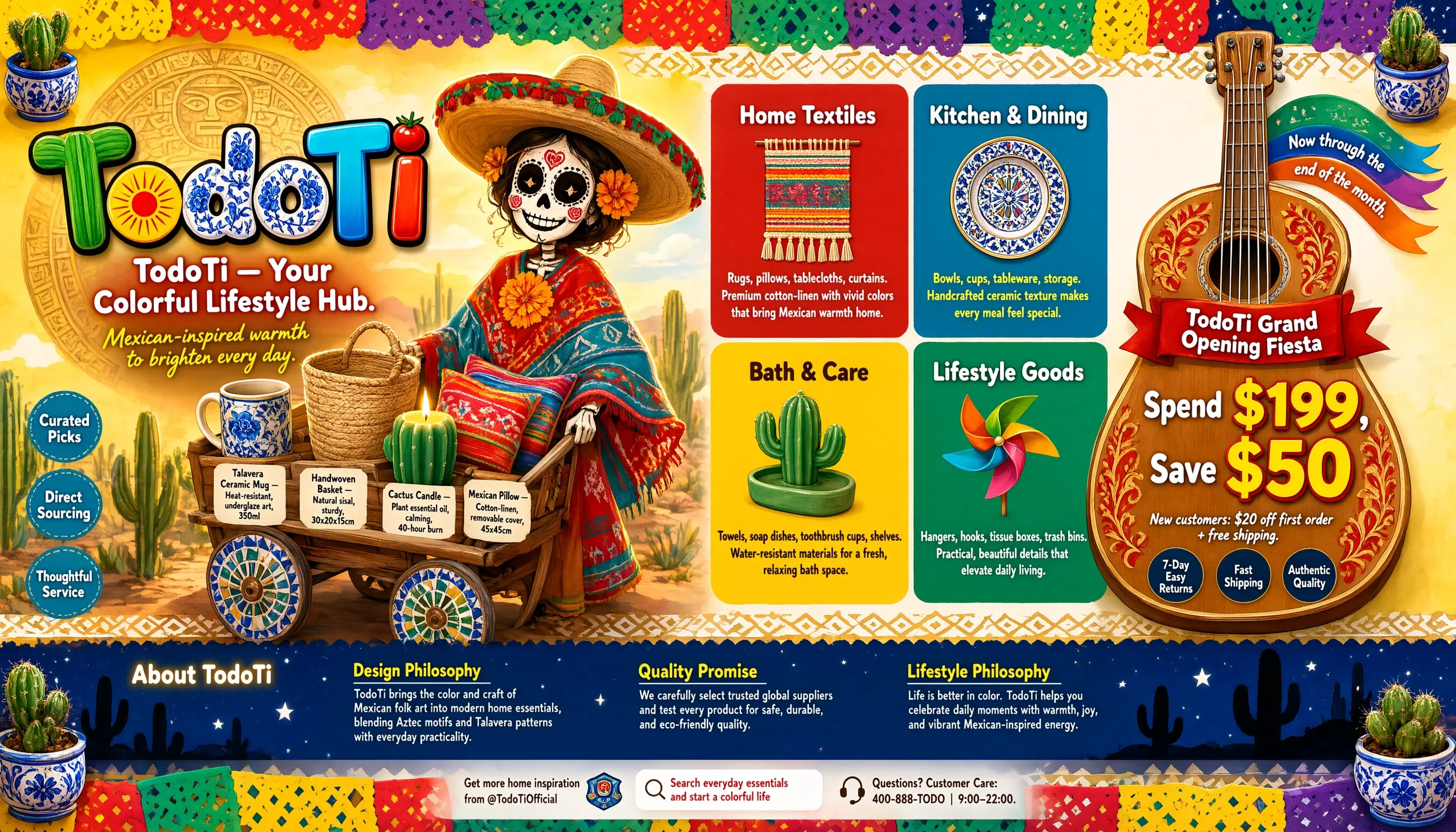
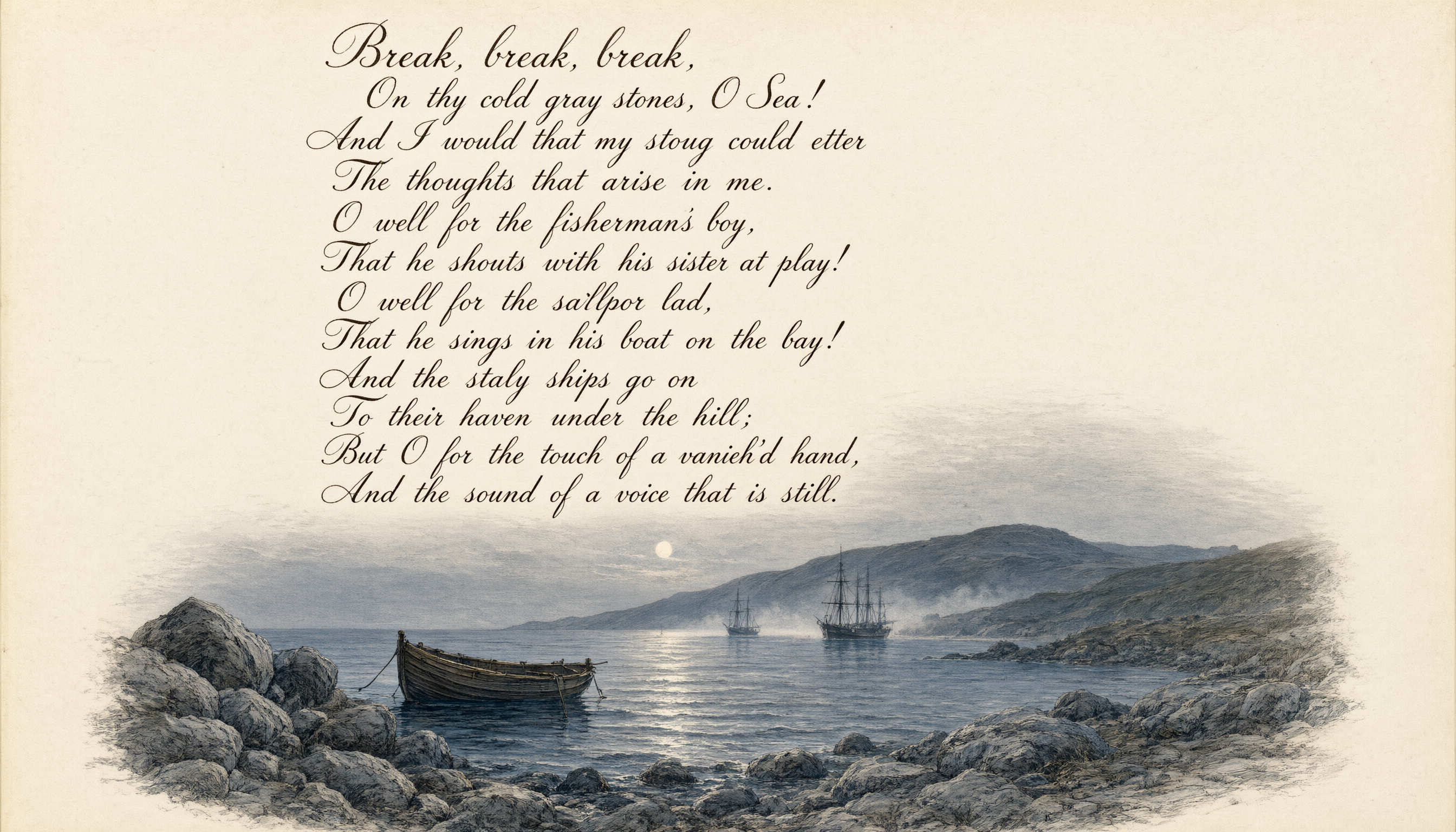
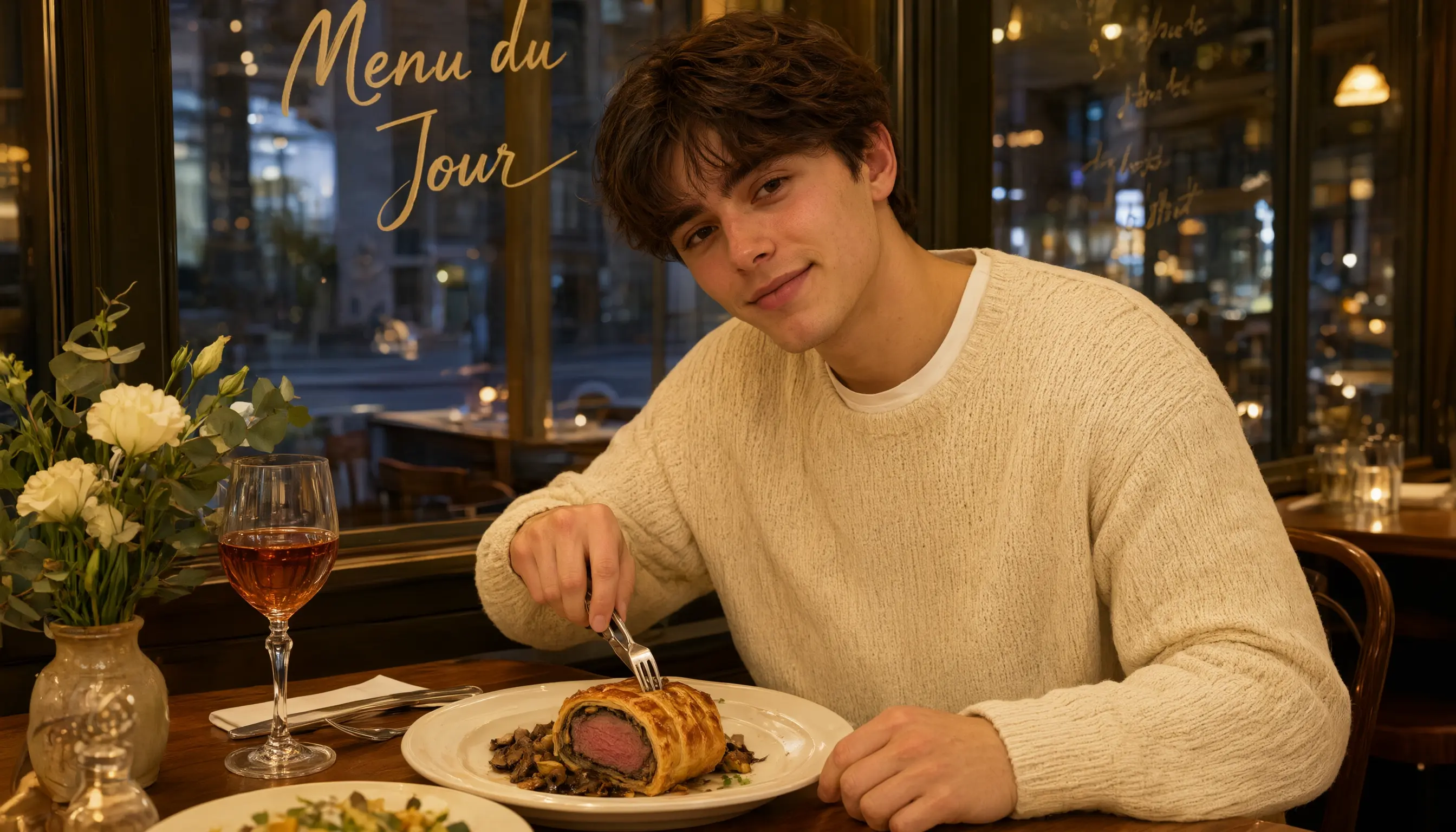
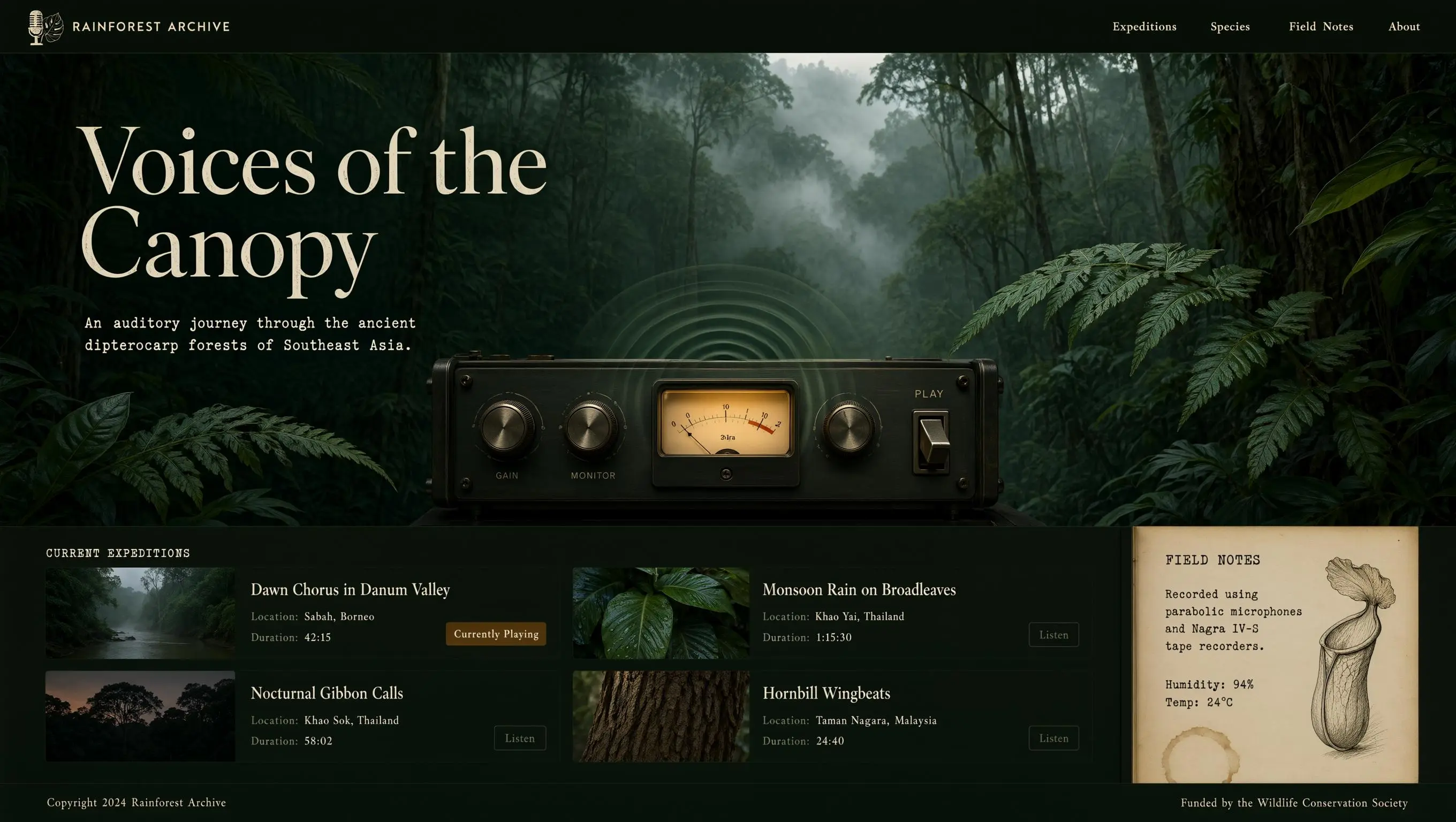
プロンプト
Complex layout: Create a 16:9 wide horizontal e-commerce storefront hero banner infographic for "TodoTi," a Mexican-inspired colorful lifestyle brand. The design should look like a professional online shop header for desktop and tablet, with clear visual hierarchy, festive marketing energy, and readable English typography.
Background: vibrant Mexican folk color palette of bright yellow, warm red, peacock blue, and emerald green, blended with soft watercolor washes, subtle handmade paper texture, and fine grain. The top and bottom edges are decorated with traditional papel picado cut-paper banners made of repeating diamonds, triangles, and wave shapes in alternating yellow, red, green, and purple. The papel picado should look light and gently fluttering, with cut-out areas revealing a deep starry-night blue background. Below the top papel picado and above the bottom papel picado, add a continuous Aztec geometric border of stepped lines and diamond motifs in white and antique gold.
Four corners: add small 3D decorative Talavera ceramic pots with blue-and-white floral patterns, glossy glaze highlights, and miniature potted cacti with rich green texture and fine spines. These corner elements should balance the composition and add handcrafted detail.
Left third: brand identity zone. Feature a large 3D wordmark "TodoTi." The letter "T" extends into two green cactus pads with clear vein texture; the letter "o" contains a red-and-yellow sunburst with sixteen thin rays; the curve of the letter "d" is decorated with blue-and-white Talavera ceramic patterns featuring three peonies and winding vines; the dot of the letter "i" is a glossy red cherry tomato with a white highlight. The wordmark has bold black outlines, high-saturation gradient fills, and a soft drop shadow.
Below the wordmark, place the slogan: "TodoTi — Your Colorful Lifestyle Hub." The slogan is in rounded bold white sans-serif with a subtle red glow, centered and highly legible. Below it, add a smaller handwritten-style subtitle in bright yellow: "Mexican-inspired warmth to brighten every day."
Behind the wordmark, add a faint semi-circular Aztec sun calendar relief in antique gold and bronze, with fine geometric patterns and a stylized face motif featuring diamond eyes and a rectangular mouth. The relief should glow softly with warm golden light. On the left edge, stack three small circular badges with peacock-blue backgrounds, white text, and stitched dashed borders: "Curated Picks," "Direct Sourcing," and "Thoughtful Service."
Center-left: a cheerful Mexican folk-art lifestyle illustration. A cute Catrina skeleton girl wears a wide straw sombrero with red-and-green woven tassels and a colorful embroidered poncho in warm red and peacock blue. Her poncho is decorated with Aztec geometric patterns and blooming marigolds with radiating petals. Her face has elegant Day of the Dead makeup: black heart-shaped eye details with white dashed outlines, red rose cheek motifs, and a warm friendly smile. She pushes a vintage wooden cart with mosaic-tile wheels in blue, white, yellow, and green.
The cart is filled with clearly visible everyday products with small clean English labels. Include a Talavera ceramic mug labeled "Talavera Ceramic Mug — Heat-resistant, underglaze art, 350ml"; a handwoven sisal basket labeled "Handwoven Basket — Natural sisal, sturdy, 30x20x15cm"; a green cactus-shaped scented candle with a soft flame labeled "Cactus Candle — Plant essential oil, calming, 40-hour burn"; and colorful Mexican throw pillows labeled "Mexican Pillow — Cotton-linen, removable cover, 45x45cm." The illustration background is a sunny desert oasis with real cacti, soft clouds, warm side-backlight, and a thin golden rim light on the illustrated elements.
Center-right: product category navigation in a 2x2 grid of rounded rectangle cards with even spacing, 15px rounded corners, and subtle paper texture. Card 1, red background, title "Home Textiles" in bold white, with a flat icon of a woven wall tapestry with tassels; body text: "Rugs, pillows, tablecloths, curtains. Premium cotton-linen with vivid colors that bring Mexican warmth home." Card 2, peacock-blue background, title "Kitchen & Dining" in bold white, with a Talavera ceramic plate icon; body text in bright yellow: "Bowls, cups, tableware, storage. Handcrafted ceramic texture makes every meal feel special." Card 3, bright yellow background, title "Bath & Care" in bold dark brown, with a cactus-shaped soap dish icon; body text in dark brown: "Towels, soap dishes, toothbrush cups, shelves. Water-resistant materials for a fresh, relaxing bath space." Card 4, emerald-green background, title "Lifestyle Goods" in bold white, with a colorful pinwheel icon; body text in white: "Hangers, hooks, tissue boxes, trash bins. Practical, beautiful details that elevate daily living."
Right side: promotional zone shaped like a large Mexican mariachi guitar. The guitar body is warm wood with red-and-gold floral vine carvings, the neck extends upward, and the strings are silvery with a metallic shine. Inside the guitar body, place the main promotion. At the top, add a red ribbon banner with white bold text: "TodoTi Grand Opening Fiesta." Below it, display a large offer: "Spend $199, Save $50," with "Spend" and "Save" in white medium text and the numbers in oversized yellow-and-red 3D type. Below the offer, add smaller handwritten white text: "New customers: $20 off first order + free shipping."
At the bottom of the guitar body, place three small circular badges with dark blue backgrounds, white text, and thin gold outlines: "7-Day Easy Returns," "Fast Shipping," and "Authentic Quality." From the guitar neck, let several colorful ribbons flow outward with tilted text: "Now through the end of the month."
Bottom area: brand story and culture zone against a deep blue night sky with glowing white five-pointed stars and black cactus silhouettes. On the left, place a title block: "About TodoTi" in bold white with a soft yellow glow. To the right, create three equal columns. Column 1 heading in bright yellow with a white underline: "Design Philosophy"; body in light gray-white: "TodoTi brings the color and craft of Mexican folk art into modern home essentials, blending Aztec motifs and Talavera patterns with everyday practicality." Column 2 heading: "Quality Promise"; body: "We carefully select trusted global suppliers and test every product for safe, durable, and eco-friendly quality." Column 3 heading: "Lifestyle Philosophy"; body: "Life is better in color. TodoTi helps you celebrate daily moments with warmth, joy, and vibrant Mexican-inspired energy."
Very bottom: a slim interactive guidance bar above the Aztec border. Use a translucent frosted-white background with a soft blur. Left side: "Get more home inspiration from @TodoTiOfficial" in dark brown, aligned with a small official badge icon. Center: a white rounded search box with a magnifying-glass icon and placeholder text: "Search everyday essentials and start a colorful life" in warm red. Right side: a headset customer-service icon with dark brown text: "Questions? Customer Care: 400-888-TODO | 9:00–22:00."
Overall style: vibrant, festive, handcrafted, authentic Mexican-inspired e-commerce banner, modern retail marketing layout, balanced composition, clean information hierarchy, high readability, warm lighting, rich details, professional storefront hero image. All on-image text must be in English only, with no Chinese characters, no misspellings, and clean legible typography.
Long paragraph: Vertical Western European 19th-century illustrated poetry page, Romantic maritime farewell theme, international English visual tradition, not an East Asian painting. The composition is a vertical art print or vintage book page with aged ivory paper, fine engraved linework, muted blue-gray watercolor washes, and elegant negative space. The main feature is a long English poem rendered clearly in elegant English copperplate-inspired calligraphy, highly legible, English alphabet only, standard left-to-right reading order, top-to-bottom layout, correct punctuation, exact line breaks, natural ink pressure, dark sepia-black lettering, subtle vintage letterpress texture, refined international typography.
Below and around the text, illustrate a cold twilight seashore: gray stones beside the sea, a small boat floating near the shore, distant ships moving toward a haven under low hills, pale evening mist over the water, faint moonlight, soft ripples, a lonely coastal atmosphere, melancholic but restrained. The mood is poetic, timeless, and elegant, like a Victorian English maritime lyric. No Chinese characters, no Chinese painting style, no seals, no stamps, no modern objects, no illegible glyphs, no random letters.
Render exactly the following 12 lines from Alfred, Lord Tennyson's public-domain poem "Break, Break, Break"; do not render the title or author name:
Break, break, break, On thy cold gray stones, O Sea! And I would that my tongue could utter The thoughts that arise in me. O well for the fisherman's boy, That he shouts with his sister at play! O well for the sailor lad, That he sings in his boat on the bay! And the stately ships go on To their haven under the hill; But O for the touch of a vanish'd hand, And the sound of a voice that is still.
High resolution, masterful long-form English text rendering, poetic, elegant, museum-quality Western illustrated book page.
Realistic portrait: A lifestyle-style male food portrait with a cinematic, on-location feel. The subject is a young man in his early twenties with clean, fresh features, gentle eyes and brows, and naturally clear skin that retains realistic texture detail. He wears a soft, off-white chunky knit sweater over a plain white T-shirt peeking out at the collar, giving off a warm, refined, and relaxed lifestyle vibe. He sits at a cozy Western restaurant table, leaning slightly forward, cutting into a Beef Wellington on his plate with a silver knife and fork in his right hand while his left hand rests naturally on the edge of the table. He tilts his head slightly toward the camera with a faint, relaxed smile and a warm, life-filled gaze. The wooden tabletop is set with an elegant Western meal, alongside a vintage stemmed glass holding an amber-colored drink and a small, delicately arranged vintage flower vase. Behind him is a clear glass wall printed with a light gold, handwritten French menu that reads "Menu du Jour," the text applied to the glass in a silkscreen-like finish with a subtle ambient reflection. The scene is lit with warm yellow overhead interior lighting that softly bathes his face and the food on the table, giving the food an appetizing sheen, while cool ambient light filtering through the glass from outside creates a cinematic contrast between warm and cool tones. The shot is a close, eye-level composition with a slight off-center angle for a natural, breathing feel rather than a stiff, centered framing. A shallow depth of field softly blurs the glass wall and restaurant setting in the background into warm bokeh, with the foreground flowers and drink edges also softly out of focus. The overall tone is warm and comforting, full of everyday atmosphere and mouthwatering appeal.
UI design: A widescreen desktop UI design for an immersive website exploring the sounds of an Asian rainforest. The overall mood is dark and tranquil, inspired by vintage field-recording equipment and analog scientific instruments. The color palette centers on deep emerald green, rich obsidian black, and soft earthy brown, creating a calm and serene atmosphere. The interface features subtle mist and haze effects, with soft, dappled light refraction simulating sunlight filtering through a dense canopy, and the background incorporates natural textures such as fine paper grain and leaf veins. The overall image is highly realistic, in a style comparable to a premium BBC nature documentary, with a cinematic composition and extremely fine rendering detail.
A minimal, semi-transparent navigation bar spans the very top of the page. On the far left is the brand mark, formed by an intertwined line-art illustration of a vintage analog microphone and monstera leaves, paired with the brand name "RAINFOREST ARCHIVE" in an elegant, soft cream-colored serif font. On the right side of the navigation bar is a menu with four minimal text links in a matching font and color: "Expeditions," "Species," "Field Notes," and "About."
The upper two-thirds of the page is the main visual hero banner. The background is an ultra-high-definition, richly atmospheric photo of an ancient Southeast Asian dipterocarp rainforest, wrapped in soft, drifting mist, with blurred dark-green fern fronds in the foreground creating a natural vignette. Overlaid on the left of the banner is the main headline, in a large, high-contrast, elegant serif font: "Voices of the Canopy." Directly below the headline is a smaller, refined subtitle in light cream: "An auditory journey through the ancient dipterocarp forests of Southeast Asia." The text has a subtle typewriter texture, with slightly irregular character spacing that reinforces the vintage, analog-equipment feel.
In the lower-middle of the banner is the core audio interaction component: a precision player modeled after a vintage field-recording reel-to-reel deck, inspired by classic Nagra or Marantz tape recorders. The player body is brushed dark gunmetal-gray metal with subtle natural scratches and wear marks, and features two large knurled metal knobs printed with small, clear sans-serif labels: "GAIN" and "MONITOR." At the center of the device is a classic VU meter with a warm, soft amber backlight, its needle resting near the zero mark. To the right of the meter is a heavy-duty physical toggle switch, flipped up to indicate "PLAY" status. While audio is playing, the VU meter emits slowly expanding concentric ripples, resembling gentle water ripples or faint sound waves, in a translucent misty green tone that blends naturally with the hazy background.
Below the banner, the page layout shifts to a clean, documentary-style grid used as the sound library section. At the top of this section is an elegant small heading in wide-spaced, all-caps type: "CURRENT EXPEDITIONS." Below the heading is a tidy two-column grid displaying four soundscape cards, each with a distinct style.
Card 1 (top left): background is a moody, misty riverbank thumbnail, with the title "Dawn Chorus in Danum Valley," and below it the caption "Location: Sabah, Borneo" and "Duration: 42:15." A small amber badge on the right of the card reads "Currently Playing."
Card 2 (top right): a close-up of wet, broad green leaves, with the title "Monsoon Rain on Broadleaves," caption "Location: Khao Yai, Thailand" and "Duration: 1:15:30," and a thin-outlined button labeled "Listen."
Card 3 (bottom left): a hazy silhouette of the forest canopy at dusk, with the title "Nocturnal Gibbon Calls," caption "Location: Khao Sok, Thailand" and "Duration: 58:02," and a thin-outlined button labeled "Listen."
Card 4 (bottom right): a macro close-up of tree bark texture, with the title "Hornbill Wingbeats," caption "Location: Taman Negara, Malaysia" and "Duration: 24:40," and a thin-outlined button labeled "Listen."
On the far right of the soundscape grid, a vertical panel spans the lower half of the section, styled after a page from a vintage field science notebook. The paper has a soft, aged cream texture, with a faint coffee stain in the bottom-right corner. The panel title uses a typewriter monospace font reading "FIELD NOTES," with elegant, slightly faded ink-toned body text: "Recorded using parabolic microphones and Nagra IV-S tape recorders. Humidity: 94% Temp: 24°C." Next to the text is a finely hand-drawn dark brown ink sketch of a pitcher plant.
At the very bottom of the page is a minimal footer spanning the full width, with a thin dark green divider line above it. The footer reads "Copyright 2024 Rainforest Archive" on the left and "Funded by the Wildlife Conservation Society" on the right, both in a soft, understated small serif font.
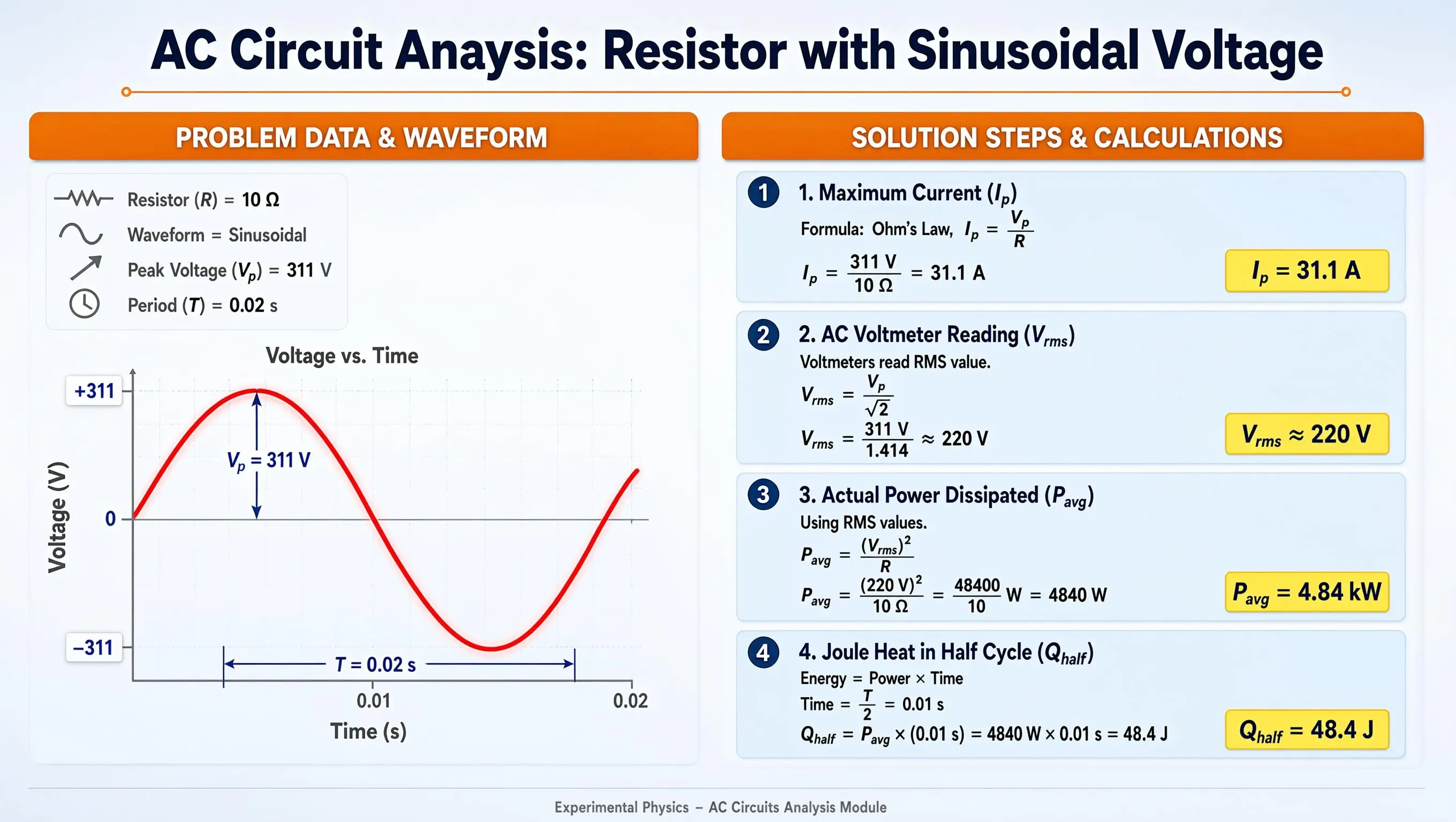
PPT: A professional educational PPT slide with a 16:9 aspect ratio. The background is an extremely subtle blue-gray gradient, overlaid with a very low-opacity sine-wave pattern and a faint dot-grid texture, creating a rigorous academic physics atmosphere with a tech-forward feel. Centered at the top of the slide is the main title area, with the text in large, bold, dark navy sans-serif type: "AC Circuit Analysis: Resistor with Sinusoidal Voltage." Directly below the title is a bright thin orange horizontal line as a visual divider, with small circular end caps at both ends to add a sense of ceremony to the layout. The main body of the slide is split into two columns using a strict grid-alignment system, with the left and right columns in roughly a 1:1.2 width ratio, giving the complex formulas on the right ample display space.
At the top of the left column is a rounded-rectangle orange header bar with centered bold white text: "PROBLEM DATA & WAVEFORM." The header bar has a subtle drop shadow at the bottom, giving it a slightly raised, three-dimensional feel. Below the orange header is a light gray-white rounded data card with an extremely thin light blue border, containing four vertically arranged data points. Each point has a minimalist, solid-gray line icon to its left — in order, a resistor symbol, a wave line, a voltage arrow, and a clock symbol. The text for the four points is in clear dark gray type, reading in order: "Resistor (R) = 10 Ω," "Waveform = Sinusoidal," "Peak Voltage (V subscript p) = 311 V," and "Period (T) = 0.02 s," neatly laid out with comfortable line spacing, with key numbers highlighted in a slightly darker color.
Below the data card is the chart area, with a dark gray chart title centered at the top: "Voltage vs. Time." The chart itself is a 2D coordinate system with light gray gridlines. To the left of the vertical Y-axis is the dark gray label "Voltage (V)," with tick marks labeled "+311," "0," and "-311" in dark blue text on white background boxes. Below the horizontal X-axis is the dark gray label "Time (s)," with tick marks labeled "0.01" and "0.02." At the center of the coordinate system is a smooth, full, slightly glowing bright red sine-wave curve of moderate line weight, showing perfect periodicity. At the peak of the sine wave, a dark blue vertical double-headed arrow indicates the amplitude, labeled in dark blue text: "V subscript p = 311 V." Above one full period on the X-axis is a dark blue horizontal dimension line with vertical lead lines at both ends, labeled in the center in dark blue text: "T = 0.02 s." The chart area has generous white space overall, keeping the visual focus on the red waveform.
At the top of the right column is another rounded-rectangle orange header bar, aligned in height with the left header, with centered bold white text: "SOLUTION STEPS & CALCULATIONS." Below the orange header, four light-blue gradient rounded cards are arranged vertically with even spacing between them and generous internal breathing room.
The first card has a dark blue circular numbered badge in the top-left corner with a white "1" inside. The card title is bold dark blue text: "1. Maximum Current (I subscript p)." The body below is laid out in three lines in the visual style of standard mathematical notation — with fraction bars, sub/superscripts, and radicals rendered elegantly — reading in dark gray: "Formula: Ohm's Law, I subscript p = V subscript p over R," followed by the calculation "I subscript p = 311 V over 10 Ω = 31.1 A." In the bottom-right corner of the card is a bright yellow rounded highlight box with bold dark blue text: "I subscript p = 31.1 A."
The second card's badge shows "2," titled "2. AC Voltmeter Reading (V subscript rms)." The body includes the note "Voltmeters read RMS value," the formula "V subscript rms = V subscript p over square root of 2," and the calculation "V subscript rms = 311 V over 1.414 ≈ 220 V," with the bottom-right highlight box showing "V subscript rms ≈ 220 V."
The third card's badge shows "3," titled "3. Actual Power Dissipated (P subscript avg)." The body includes "Using RMS values," the formula "P subscript avg = (V subscript rms) squared over R," the calculation "P subscript avg = (220 V) squared over 10 Ω = 48400 over 10 W = 4840 W," with the bottom-right highlight box showing "P subscript avg = 4.84 kW."
The fourth card's badge shows "4," titled "4. Joule Heat in Half Cycle (Q subscript half)." The body includes "Energy = Power × Time," the time calculation "Time = T over 2 = 0.01 s," the main calculation "Q subscript half = P subscript avg × (0.01 s) = 4840 W × 0.01 s = 48.4 J," with the bottom-right highlight box showing "Q subscript half = 48.4 J." All four cards' highlight boxes are aligned uniformly in the bottom-right corner, creating a tidy visual alignment and reading flow.
At the very bottom of the slide is an extremely thin light gray horizontal divider, below which is centered small light gray sans-serif text: "Experimental Physics - AC Circuits Analysis Module." The footer area remains minimal, with the rest of the background kept as clean graphics and white space. The slide's overall color system is built around dark navy, bright orange, light blue-gray, and pure white, with the red waveform and yellow highlight boxes as visual accents that break the monotony and add vibrancy and professionalism. All text has sharp edges and extremely high contrast, ensuring clear readability on projectors or screens. Lighting and shadow are handled with restraint, adding depth only through subtle drop shadows beneath the cards and slight highlights on the header bars, resulting in an overall highly polished, clearly structured, and information-rich professional physics teaching slide.
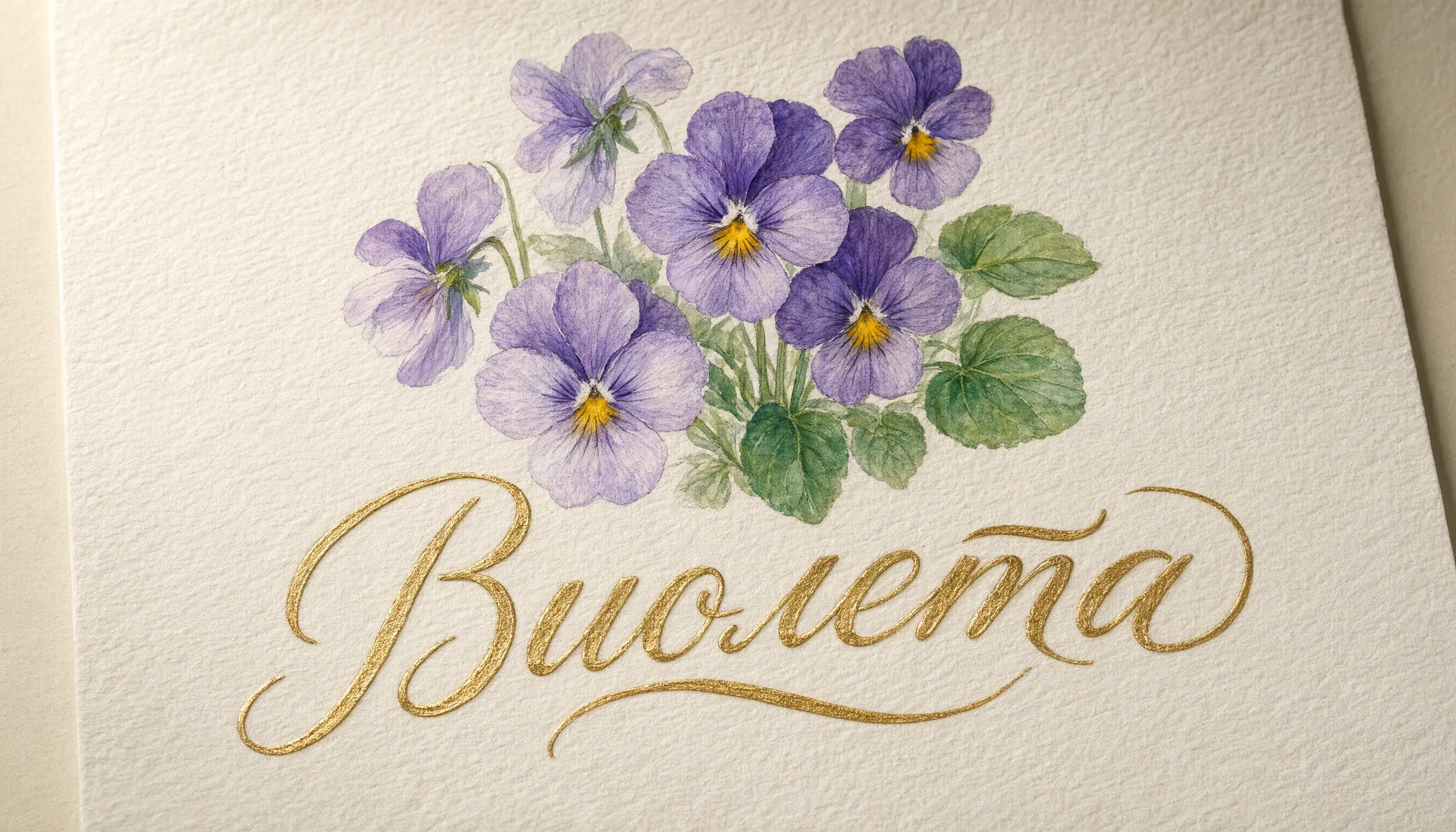
イラストのデザイン: 柔らかいオフホワイトの水彩紙に描かれた、手描きの水彩イラストです。紙の表面には、はっきりと見える顔料の粒状感や、ウェットオンウェット技法による柔らかな色のにじみなど、伝統的な植物画の特徴が見られます。構図の上部中央エリアには、スミレとパンジーのクラスターがあります。花びらは、明るい紫色、深い紫色、ラベンダー色のグラデーションで混ざり合い、花の中心は黄金色です。花の横には、半透明の水彩ウォッシュで描かれ、葉脈が細かくディテールされた小さなエメラルドグリーンの葉があります。柔らかい平行光がシーンを照らし、水彩紙の質感と顔料の微妙な変化を際立たせています。花のモチーフの真下、紙の下半分に水平方向に中央揃えで、「」という単語が配置されています。このレタリングは、メタリックゴールドのインクを使い、アーチ状のカリグラフィースクリプトで書かれています。文字の形は、流れるような連続したストロークと、微妙なエンボス加工のような立体感で描かれており、光の下で柔らかい金属的な光沢を放っています。
Wanxiang
ポートレート写真
| 写実的な写真
| 芸術的なスタイル
|
テキストレンダリング
| ポスターデザイン
| 画像セット生成
|



プロンプトの表示
Portrait photography: hyper-realistic Scandinavian woman portrait, flowing platinum blonde hair and piercing blue eyes with prominent freckles, sharp intellectual gaze, Nordic cold-toned directional lighting creating icy atmosphere, minimalist modern styling with clean lines, shallow depth-of-field blurred cold-gradient background, authentic Nordic facial features and porcelain skin texture.
Photorealistic photography: fish-eye perspective forest scene with dramatic perspective distortion, ultra-detailed red fox staring into lens with piercing amber eyes, hyper-realistic fur texture showing individual guard hairs and undercoat layers, radially warped trees forming circular background patterns, watercolor painting style with translucent washes and organic pigment bleeding, soft pastel palette of moss green and earth ochre tones, painterly lighting with atmospheric glow through canopy gaps
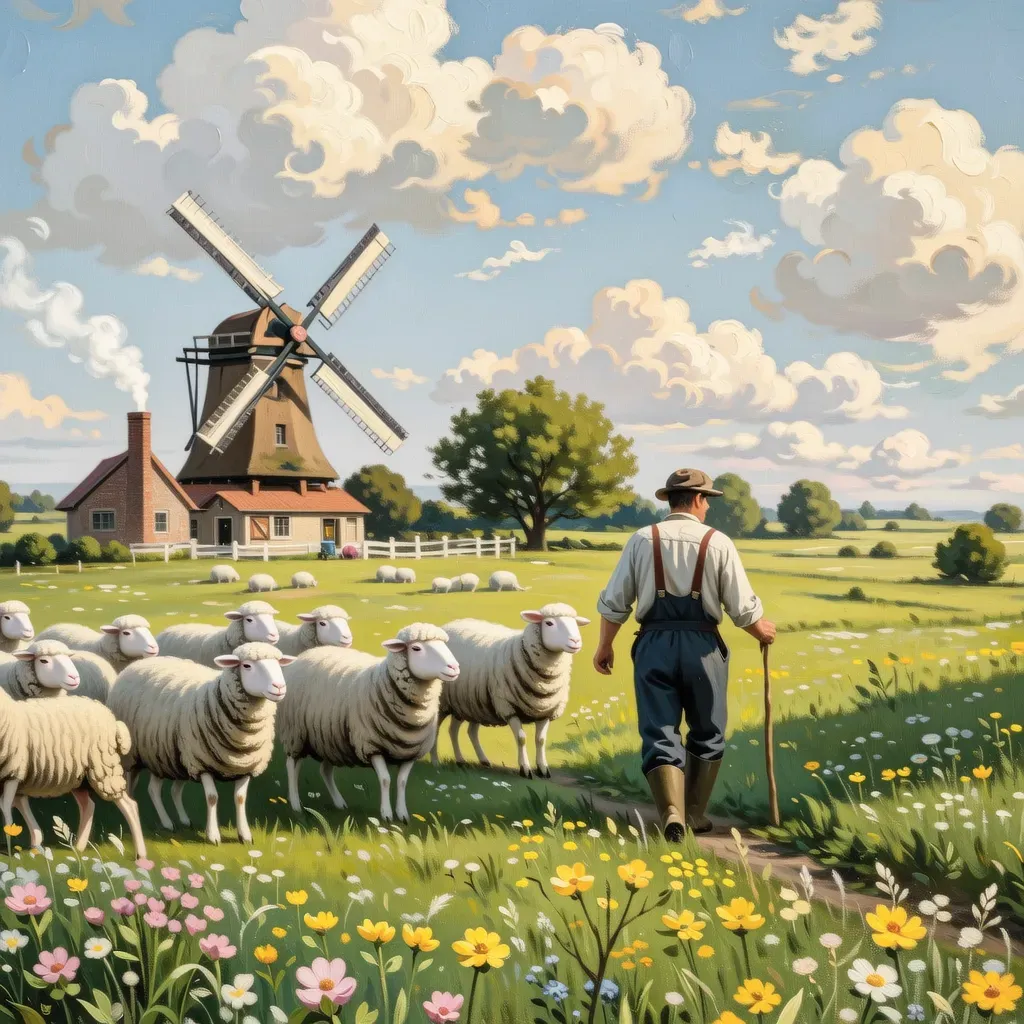
Artistic styles: Vintage oil painting style pastoral scene, a farmer herding sheep across a meadow full of wildflowers, a windmill in the distance turning under blue sky and white clouds, smoke curling from the chimney of a wooden house, bright and soft colors, full of tranquility and comfort.
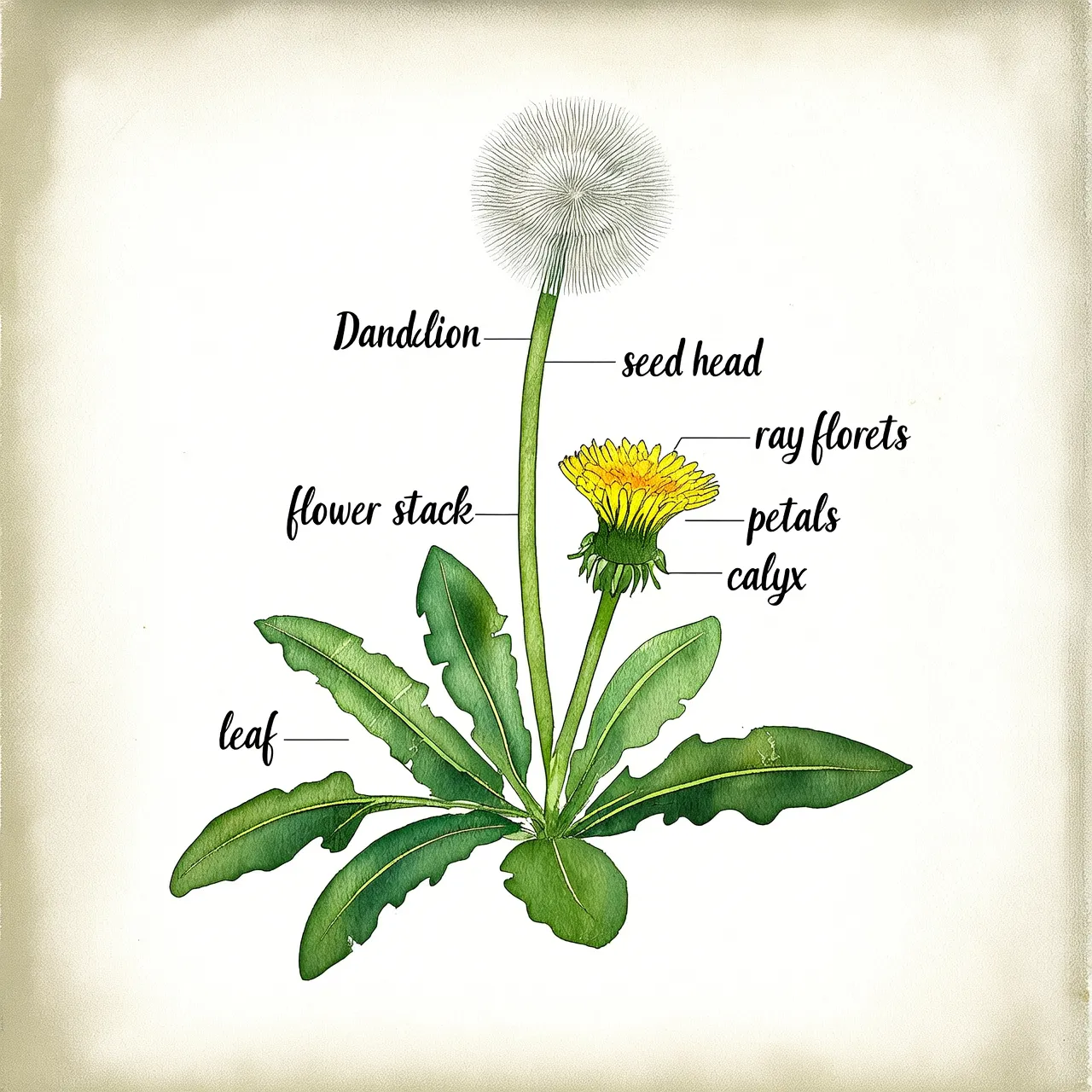
Text rendering: A page from a plant identification guide. Hand-drawn watercolor style. Depicts a dandelion with labeled parts.
Poster design: Cinematic poster scene: Extreme macro close-up of eye in wooden crack. Minimalist monochrome, watercolor-CGI fusion, low saturation. Slow push-in with tremor for surreal intensity. Vast negative space, hidden title. Optimized for immersive video generation.
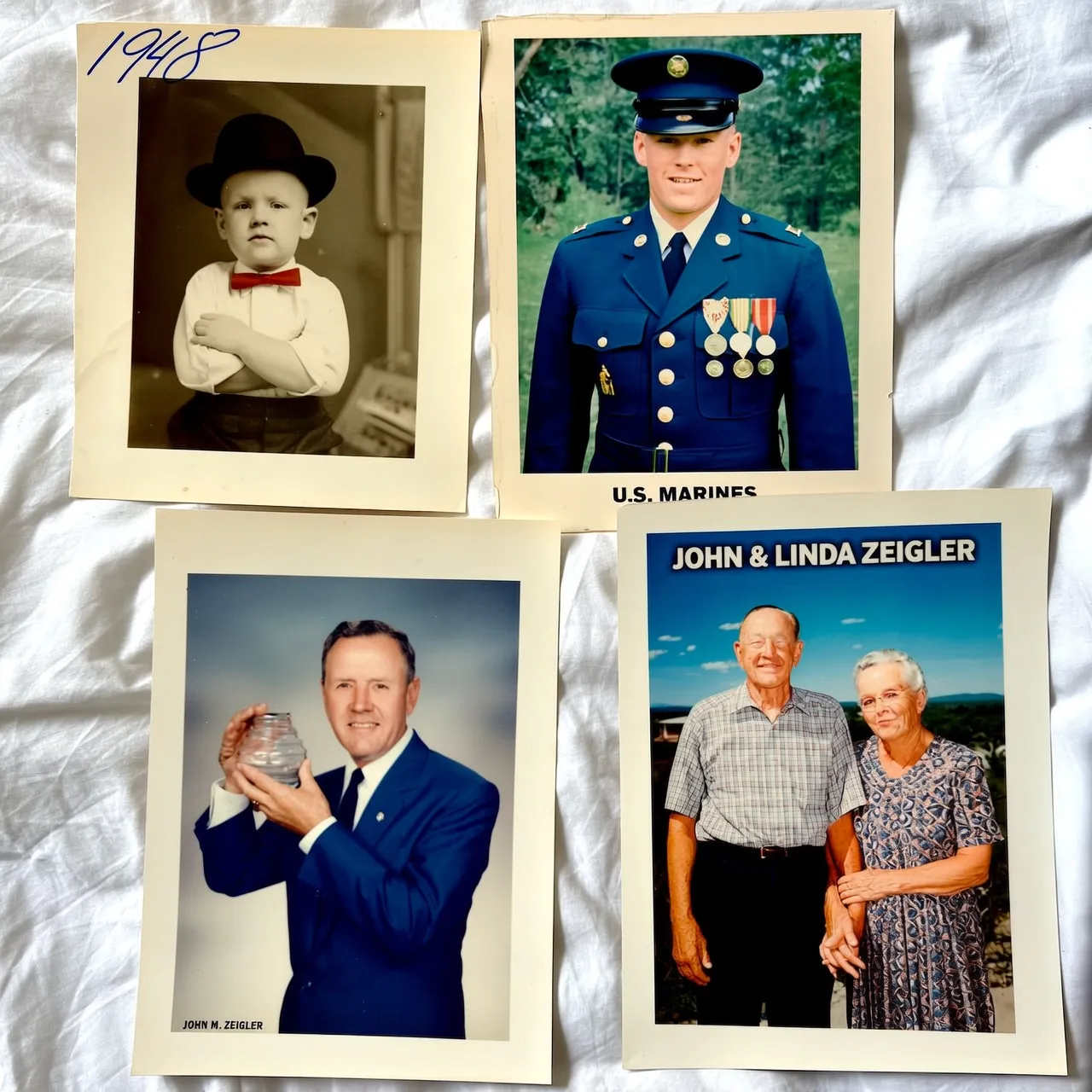
Image set generation: A lifetime of memories for an elderly man. Four portraits in different frames: childhood (black-and-white photo), youth (military uniform photo), middle age (work photo in a business suit), and old age (photo with spouse).
モデルの選択
- qwen-image-3.0-pro:フラッグシップの Qwen Image 3.0 モデルです。インテリジェントなプロンプトリライトをサポートし、中国語と英語の両方で物理的な素材と自然に融合するテキストのレンダリングに優れています。
- wan2.7-image-pro:複数画像の生成、最大 4096x4096 の解像度、顔の特徴、色、長文テキストレンダリングに対する高度な制御など、最も多くの機能を提供します。
- z-image-turbo:高速でコスト効率の高い画像生成を実現し、非常にリアルなポートレートや商品画像に優れています。
利用オプション
Text-to-Image には 2 つの利用オプションがあります。ご利用のシナリオに合わせて選択してください:
利用オプション | コーディング必須 | エントリーポイント | 最適な用途 |
|---|---|---|---|
Web ベースのオンライン体験 | 不要 | モデル体験センター (このトピックの上部にあるオンラインで試すリンクをご参照ください) | モデルの試用、プロンプトの検証、少数の画像生成 |
API 呼び出し | はい | 以下のクイックスタートをご参照ください | Text-to-Image をご自身のアプリケーションやサービスに大規模に統合 |
クイックスタート
前提条件
開始する前に、API キーを取得し、API キーを環境変数として設定してください。DashScope SDK を使用する場合は、SDK をインストールする必要もあります。
サンプルコード
呼び出しメソッド:- Qwen の Text-to-Image モデルはすべて同期呼び出しをサポートしています。qwen-image-3.0 シリーズ、
qwen-image-plus、qwen-imageモデルは非同期呼び出しもサポートしています。詳細については、「Qwen - 画像生成と編集 3.0」および「Qwen - Text-to-Image」をご参照ください。 - すべての Wan Text-to-Image モデルは非同期呼び出しをサポートしています。
wan2.7-image-pro、wan2.7-image、wan2.6-image、wan2.6-t2iモデルは同期呼び出しもサポートしています。詳細については、「Wan - 画像生成と編集 2.7」、「Wan - 画像生成と編集 2.6」、および「Wan - Text-to-Image V2」をご参照ください。
Qwen - 同期呼び出し
Python
import os
import dashscope
from dashscope import MultiModalConversation

dashscope.base_http_api_url = 'https://{WorkspaceId}.ap-southeast-1.maas.aliyuncs.com/api/v1'

response = MultiModalConversation.call(
    api_key=os.getenv("DASHSCOPE_API_KEY"),
    model="qwen-image-3.0-pro",
    messages=[{
        "role": "user",
        "content": [
            {"text": "暖かい午後の街の雰囲気を持つ、縦長の屋外ポートレート写真。上部には、建物の軒から深い緑色のツタと小さなオレンジ色の花がカスケード状に垂れ下がっています。濃い青色の看板には、白いゴシック体の文字で「Il Messaggero」と書かれており、葉で部分的に隠されています。その下には、新聞スタンドがあり、黒い金属フレームのガラスの向こうに新聞が陳列されていますが、浅い被写界深度によってぼやけています。通りの突き当たりからは強い逆光が差し込んでいます。中央右には、黒いスパゲッティストラップのバックレスドレスを着た若い女性が、暖かい笑顔でカメラを振り返っています。彼女の長くて豊かなウェーブのかかった黒髪は、金色のリムライトで縁取られています。彼女は色白で、目は輝き、唇は柔らかいコーラルレッドで、オレンジ、アプリコット、ピンク、ピーチ色のバラの大きな花束を抱えており、それが彼女の黒いドレスとコントラストをなしています。太陽の光が降り注ぐ街並みは、ぼやけたバックグラウンドへと続いています。暖かいフィルム調の色合い、細かい粒子、柔らかいコントラスト、そして際立った逆光のエッジの輝きが、ロマンチックで明るい、都会の散策の雰囲気を醸し出しています。"}
        ]
    }],
    prompt_extend=True
)

print(response)
if response.status_code == 200:
    url = response.output.choices[0].message.content[0]["image"]
    print(f"生成されたイメージの URL: {url}")
else:
    print(f"エラー: {response.code} - {response.message}")
Java
import java.util.Arrays;
import java.util.Collections;
import com.alibaba.dashscope.aigc.multimodalconversation.MultiModalConversation;
import com.alibaba.dashscope.aigc.multimodalconversation.MultiModalConversationParam;
import com.alibaba.dashscope.aigc.multimodalconversation.MultiModalConversationResult;
import com.alibaba.dashscope.common.MultiModalMessage;
import com.alibaba.dashscope.common.Role;
import com.alibaba.dashscope.utils.Constants;

public class ImageEditExample {
    public static void main(String[] args) {
        // これはシンガポールリージョンのベース URL です。ベース URL はリージョン固有です。
        Constants.baseHttpApiUrl = "https://{WorkspaceId}.ap-southeast-1.maas.aliyuncs.com/api/v1";

        MultiModalConversation conv = new MultiModalConversation();
        MultiModalMessage userMessage = MultiModalMessage.builder()
            .role(Role.USER.getValue())
            .content(Arrays.asList(
                Collections.singletonMap("text", "A vertical outdoor portrait photograph with a warm afternoon street atmosphere. Deep green vines and small orange flowers cascade from building eaves across the upper area. A dark blue sign reads 'Il Messaggero' in white Gothic lettering, partially obscured by foliage. Below, a newsstand displays newspapers behind black metal-framed glass, blurred by shallow depth of field. Strong backlight streams from the street's end. Center-right, a young woman in a black spaghetti-strap backless dress looks back at the camera with a warm smile. Her long, thick wavy black hair is outlined by golden rim light. She has fair skin, bright eyes, soft coral-red lips, and holds a large bouquet of orange, apricot, pink and peach roses contrasting with her black dress. The sunlit city street stretches into the blurred background. Warm film-like tones with fine grain, soft contrast and pronounced backlit edge glow create a romantic, bright, urban strolling atmosphere.")
            ))
            .build();
        MultiModalConversationParam param = MultiModalConversationParam.builder()
            .apiKey(System.getenv("DASHSCOPE_API_KEY"))
            .model("qwen-image-3.0-pro")
            .messages(Arrays.asList(userMessage))
            .parameter("prompt_extend", true)
            .build();
        try {
            MultiModalConversationResult result = conv.call(param);
            System.out.println(result);
        } catch (Exception e) {
            e.printStackTrace();
        }
    }
}
curl
リクエスト例
curl --location 'https://{WorkspaceId}.ap-southeast-1.maas.aliyuncs.com/api/v1/services/aigc/multimodal-generation/generation' \
--header 'Content-Type: application/json' \
--header "Authorization: Bearer $DASHSCOPE_API_KEY" \
--data '{
    "model": "qwen-image-3.0-pro",
    "input": {
        "messages": [
            {
                "role": "user",
                "content": [
                    {
                        "text": "A vertical outdoor portrait photograph with a warm afternoon street atmosphere. Deep green vines and small orange flowers cascade from building eaves across the upper area. A dark blue sign reads '\''Il Messaggero'\'' in white Gothic lettering, partially obscured by foliage. Below, a newsstand displays newspapers behind black metal-framed glass, blurred by shallow depth of field. Strong backlight streams from the street'\''s end. Center-right, a young woman in a black spaghetti-strap backless dress looks back at the camera with a warm smile. Her long, thick wavy black hair is outlined by golden rim light. She has fair skin, bright eyes, soft coral-red lips, and holds a large bouquet of orange, apricot, pink and peach roses contrasting with her black dress. The sunlit city street stretches into the blurred background. Warm film-like tones with fine grain, soft contrast and pronounced backlit edge glow create a romantic, bright, urban strolling atmosphere."
                    }
                ]
            }
        ]
    },
    "parameters": {
        "prompt_extend": true
    }
}'
レスポンス例
{
    "output": {
        "choices": [
            {
                "finish_reason": "stop",
                "message": {
                    "content": [
                        {
                            "image": "https://dashscope-result-sz.oss-cn-shenzhen.aliyuncs.com/xxx.png?Expires=xxx"
                        }
                    ],
                    "role": "assistant"
                }
            }
        ]
    },
    "usage": {
        "output_height": 1024,
        "output_width": 1024,
        "input_image_count": 0,
        "input_image_type": "qima_input_1k",
        "output_image_count": 1,
        "output_image_type": "qima_output_1k"
    },
    "request_id": "571ae02f-5c9d-436c-83c2-f221e6df0xxx"
}
Wan - 非同期呼び出し
Python
リクエスト例
import os
import dashscope
from dashscope.aigc.image_generation import ImageGeneration
from dashscope.api_entities.dashscope_response import Message

# これはシンガポールリージョンのベース URL です。ベース URL はリージョン固有です。
dashscope.base_http_api_url = 'https://{WorkspaceId}.ap-southeast-1.maas.aliyuncs.com/api/v1'

# 環境変数が設定されていない場合は、次の行をご利用の Model Studio API キーに置き換えてください:api_key="sk-xxx"
# API キーはリージョンによって異なります。API キーを取得するには、https://www.alibabacloud.com/help/model-studio/get-api-key をご参照ください
api_key = os.getenv("DASHSCOPE_API_KEY")

def main():
    message = Message(
        role="user",
        content=[
            {"text": "A young woman in a natural, casual selfie style. An ultra-high-definition, realistic lifestyle photo. She is wearing a yellow floral long-sleeved top, and her long, slightly wavy hair falls naturally. The background is an outdoor natural scene with green plants nearby and water and mountains in the distance. Soft, natural sunlight falls on her face and body, creating natural light and shadow effects. The camera angle is a medium shot from a selfie perspective, as if held by her. She is standing naturally, projecting a relaxed and comfortable state. The angle is natural, in the style of a casual snapshot—an unguarded moment."}
        ]
    )

    # 非同期タスクを送信します。
    print("Submitting the asynchronous task...")
    response = ImageGeneration.async_call(
        model="wan2.7-image-pro",
        api_key=api_key,
        messages=[message],
        enable_sequential=False,
        n=1,
        size="2K"
    )

    if response.status_code == 200:
        print(f"Task submitted successfully. Task ID: {response.output.task_id}")

        # タスクが完了するのを待ちます。
        status = ImageGeneration.wait(task=response, api_key=api_key)

        if status.output.task_status == "SUCCEEDED":
            print("Task completed!")
            print(f"Result:")
            print(status)
        else:
            print(f"Task failed. Status: {status.output.task_status}")
    else:
        print(f"Task creation failed: {response.code} - {response.message}")

if __name__ == "__main__":
    try:
        main()
    except Exception as e:
        print(f"Error: {e}")
レスポンス例
- タスク作成のレスポンス
{
    "status_code": 200,
    "request_id": "4fb3050f-de57-4a24-84ff-e37ee5xxxxxx",
    "code": "",
    "message": "",
    "output": {
        "text": null,
        "finish_reason": null,
        "choices": null,
        "audio": null,
        "task_id": "77093787-a217-4c29-9cd4-ca7b5ac86xxx",
        "task_status": "PENDING"
    },
    "usage": {
        "input_tokens": 0,
        "output_tokens": 0,
        "characters": 0
    }
}
- タスクステータス照会のレスポンス
注記生の HTTP API 応答には usage フィールドが含まれています。 Python SDK では、ImageGeneration.wait() メソッドが返す応答オブジェクトの output プロパティには、タスクステータスフィールド (task_status、task_id、choices、submit_time、scheduled_time、end_time、finished など) が含まれますが、usage フィールドは含まれていません。 請求情報 (image_count、total_tokens、size など) にアクセスするには、生の HTTP API 応答を使用するか、タスクステータス API を直接クエリします。
画像 URL の有効期間は 24 時間です。速やかに画像をダウンロードしてください。
{
    "status_code": 200,
    "request_id": "56e318fd-ed60-99e8-8ca1-cdef25ca4xxx",
    "code": "",
    "message": "",
    "output": {
        "text": null,
        "finish_reason": null,
        "choices": [
            {
                "finish_reason": "stop",
                "message": {
                    "role": "assistant",
                    "content": [
                        {
                            "image": "https://dashscope-result-bj.oss-cn-beijing.aliyuncs.com/xxxxxx.png?Expires=xxxxxx",
                            "type": "image"
                        }
                    ]
                }
            }
        ],
        "audio": null,
        "task_id": "77093787-a217-4c29-9cd4-ca7b5ac86xxx",
        "task_status": "SUCCEEDED",
        "submit_time": "2026-03-31 23:04:46.166",
        "scheduled_time": "2026-03-31 23:04:46.208",
        "end_time": "2026-03-31 23:05:11.664",
        "finished": true
    },
    "usage": {
        "input_tokens": 720,
        "output_tokens": 11,
        "characters": 0,
        "size": "2048*2048",
        "total_tokens": 731,
        "image_count": 1
    }
}
Java
リクエスト例
import com.alibaba.dashscope.aigc.imagegeneration.*;
import com.alibaba.dashscope.exception.ApiException;
import com.alibaba.dashscope.exception.NoApiKeyException;
import com.alibaba.dashscope.exception.UploadFileException;
import com.alibaba.dashscope.utils.JsonUtils;

import java.util.Collections;

public class Main {

    // これはシンガポールリージョンのベース URL です。ベース URL はリージョン固有です。
    static String baseUrl = "https://{WorkspaceId}.ap-southeast-1.maas.aliyuncs.com/api/v1";

    // 環境変数が設定されていない場合は、次の行をご利用の Model Studio API キーに置き換えてください:apiKey="sk-xxx"
    // API キーはリージョンによって異なります。API キーを取得するには、https://www.alibabacloud.com/help/model-studio/get-api-key をご参照ください
    static String apiKey = System.getenv("DASHSCOPE_API_KEY");

    public static ImageGenerationResult waitTask(String taskId)
            throws ApiException, NoApiKeyException {
        ImageGeneration imageGeneration = new ImageGeneration(apiKey, baseUrl);
        return imageGeneration.wait(taskId, apiKey);
    }

    public static void asyncCall() throws ApiException, NoApiKeyException, UploadFileException {
        ImageGenerationMessage message = ImageGenerationMessage.builder()
                .role("user")
                .content(Collections.singletonList(
                        Collections.singletonMap("text", "A young woman in a natural, casual selfie style. An ultra-high-definition, realistic lifestyle photo. She is wearing a yellow floral long-sleeved top, and her long, slightly wavy hair falls naturally. The background is an outdoor natural scene with green plants nearby and water and mountains in the distance. Soft, natural sunlight falls on her face and body, creating natural light and shadow effects. The camera angle is a medium shot from a selfie perspective, as if held by her. She is standing naturally, projecting a relaxed and comfortable state. The angle is natural, in the style of a casual snapshot—an unguarded moment.")
                )).build();

        ImageGenerationParam param = ImageGenerationParam.builder()
                .apiKey(apiKey)
                .model("wan2.7-image-pro")
                .messages(Collections.singletonList(message))
                .enableSequential(false)
                .n(1)
                .size("2K")
                .build();

        ImageGeneration imageGeneration = new ImageGeneration(apiKey, baseUrl);
        ImageGenerationResult taskResult = null;
        try {
            System.out.println("----async call, creating task----");
            taskResult = imageGeneration.asyncCall(param);
        } catch (ApiException | NoApiKeyException | UploadFileException e) {
            throw new RuntimeException(e.getMessage());
        }
        System.out.println("Task created: " + JsonUtils.toJson(taskResult));

        // タスクが完了するのを待ちます。
        String taskId = taskResult.getOutput().getTaskId();
        ImageGenerationResult result = waitTask(taskId);
        System.out.println(JsonUtils.toJson(result));
    }

    public static void main(String[] args) {
        try {
            asyncCall();
        } catch (ApiException | NoApiKeyException | UploadFileException e) {
            System.out.println(e.getMessage());
        }
    }
}
レスポンス例
- タスク作成のレスポンス
{
    "requestId": "7d026dc1-e8c9-9caa-84ac-e82e2da97xxx",
    "output": {
        "task_id": "2de18c56-c151-4b80-8105-1d164733exxx",
        "task_status": "PENDING"
    },
    "status_code": 200,
    "code": "",
    "message": ""
}
- タスクステータス照会のレスポンス
{
    "requestId": "daea7295-4ce0-928a-9a11-4d2bea058xxx",
    "usage": {
        "input_tokens": 720,
        "output_tokens": 11,
        "total_tokens": 731,
        "image_count": 1,
        "size": "2048*2048"
    },
    "output": {
        "choices": [
            {
                "finish_reason": "stop",
                "message": {
                    "role": "assistant",
                    "content": [
                        {
                            "image": "https://dashscope-result-bj.oss-cn-beijing.aliyuncs.com/xxxxxx.png?Expires=xxxxxx",
                            "type": "image"
                        }
                    ]
                }
            }
        ],
        "task_id": "2de18c56-c151-4b80-8105-1d164733exxx",
        "task_status": "SUCCEEDED",
        "finished": true,
        "submit_time": "2026-03-31 19:49:53.124",
        "scheduled_time": "2026-03-31 19:49:53.175",
        "end_time": "2026-03-31 19:50:53.160"
    },
    "status_code": 200,
    "code": "",
    "message": ""
}
Curl
注記
- 非同期呼び出しの場合、ヘッダーパラメーター
X-DashScope-Asyncをenableに設定する必要があります。 - 非同期タスクの
task_idは 24 時間照会可能です。この期間を過ぎると、タスクのステータスはUNKNOWNに変わります。
ステップ 1:タスクの作成
リクエストはタスク ID (task_id) を返します。
curl --location 'https://{WorkspaceId}.ap-southeast-1.maas.aliyuncs.com/api/v1/services/aigc/image-generation/generation' \
    --header 'Content-Type: application/json' \
    --header "Authorization: Bearer $DASHSCOPE_API_KEY" \
    --header "X-DashScope-Async: enable" \
    --data '{
        "model": "wan2.7-image-pro",
        "input": {
            "messages": [
                {
                    "role": "user",
                    "content": [
                        {"text": "A flower shop with exquisite windows, a beautiful wooden door, and flowers on display"}
                    ]
                }
            ]
        },
        "parameters": {
            "size": "2K",
            "n": 1,
            "watermark": false,
            "thinking_mode": true
        }
    }'
ステップ 2:タスク結果の照会
前のステップで取得した task_id を使用して、task_status が SUCCEEDED または FAILED に変わるまで API をポーリングしてタスクのステータスを確認します。
{task_id} を、前の API 呼び出しで返された task_id の値に置き換えてください。task_id は 24 時間照会可能です。{WorkspaceId} を実際のワークスペース ID に置き換えてください。
curl -X GET https://{WorkspaceId}.ap-southeast-1.maas.aliyuncs.com/api/v1/tasks/{task_id} \
--header "Authorization: Bearer $DASHSCOPE_API_KEY"
主な機能
1. プロンプト追従
パラメーター: messages.content.text または input.prompt (必須)、および negative_prompt (オプション)。
- prompt: 画像に含めたい内容 (主題、シーン、スタイル、ライティング、構図など) を記述します。これは、テキストからの画像生成をコントロールするためのコアパラメーターです。
- negative prompt: 「ぼやけ」や「指が余分にある」など、画像から除外したい内容を記述します。このパラメーターは、出力品質を向上させるのに役立ちます。
最良の結果を得るには、構造化プロンプトを使用してください。詳細については、「Text-to-image prompt guide」をご参照ください。
negative_promptパラメーターは wan2.7-image-pro および wan2.7-image ではサポートされていません。不要な要素を除外するには、プロンプト内で記述してください (例:「xxx を含めないでください」)。
2. プロンプトリライトの有効化
パラメーター: parameters.prompt_extend (ブール値、デフォルトは true)。
この機能は、短いプロンプトを自動的に拡張・最適化し、画像品質を向上させます。この機能を有効にすると、大規模モデルがプロンプトを書き換えるため、生成時間が 3~5 秒長くなります。
推奨事項:
- 簡潔または一般的なプロンプトに対してこの機能を有効にすると、画像品質が大幅に向上します。
- 画像の詳細を正確にコントロールする必要がある場合、包括的なプロンプトを提供した場合、またはレスポンスレイテンシーが懸念される場合は、この機能を無効にしてください。無効にするには、
prompt_extendパラメーターをfalseに設定します。
prompt_extendパラメーターは wan2.7-image-pro および wan2.7-image ではサポートされていません。これらのモデルで画像品質を向上させるには、代わりにthinking_modeを有効にしてください。qwen-image-3.0-pro および qwen-image-3.0 モデルは、prompt_extendパラメーターをサポートしています (デフォルトで有効)。
パラメーター: parameters.prompt_extend_mode (文字列、オプション、デフォルトは direct)。qwen-image-3.0-pro および qwen-image-3.0 でのみサポートされています。prompt_extend が有効な場合に使用される書き換えメソッドを指定します:
direct: Direct Prompt Enhancement (DPE)。ほとんどのシナリオに適しています。Text-to-Image (T2I) と Image-to-Image/編集 (I2I) の両方でサポートされています。agent: Agent Prompt Enhancement (APE)。より洗練された書き換えを提供します。Text-to-Image (T2I) でのみサポートされています。Image-to-Image/編集 (I2I) にagentを渡すと、400 エラーが返されます。
3. 出力画像の解像度設定
パラメーター: parameters.size (文字列)、"width*height" フォーマット。
モデル | サイズフォーマット | ピクセル範囲 | デフォルト | アスペクト比 |
|---|---|---|---|---|
wan2.7-image-pro | 省略形 |
|
| 1:8 – 8:1 |
カスタム | 768*768 – 4096*4096 | |||
wan2.7-image | 省略形 |
|
| 1:8 – 8:1 |
カスタム | 768*768 – 2048*2048 | |||
wan2.6-image (インターリーブ形式のテキスト・画像出力モード) | カスタム | 768*768 – 1280*1280 | 入力アスペクト比に一致 (≤1280*1280) | 1:4 – 4:1 |
wan2.6-t2i, wan2.5-t2i-preview | カスタム | 1280*1280 – 1440*1440 | 1280*1280 | 1:4 – 4:1 |
wan2.2 以前の t2i モデル | カスタム | [512, 1440]、かつ総ピクセル数 ≤1440*1440 | 1024*1024 | - |
qwen-image-3.0-pro, qwen-image-3.0 | カスタム | 512*512 – 2048*2048 | モデルによる自動推奨 | 1:8 – 8:1 |
qwen-image-2.0 シリーズ | カスタム | 512*512 – 2048*2048 | 2048*2048 | - |
qwen-image-max / qwen-image-plus シリーズ | 固定プリセットサイズのみ | 以下のプリセットサイズをご参照ください | 1664*928 (16:9) | - |
wan2.7-image-proモデルは 4K 解像度と最大 40964096 のカスタム解像度をサポートしていますが、これは Text-to-Image タスク (画像が入力されず、画像セット生成が無効になっている場合) に限定されます。他のすべてのシナリオは 2K 解像度 (20482048) に制限されます。
qwen-image-max および qwen-image-plus シリーズは、以下の 5 つの固定解像度のみをサポートしています:
1664*928(デフォルト): 16:91472*1104: 4:31328*1328: 1:11104*1472: 3:4928*1664: 9:16
推奨解像度:
アスペクト比 | 4K (wan2.7-image-pro) | 2K (wan2.7-image, qwen-image-3.0-pro, qwen-image-3.0, qwen-image-2.0) | 1K (Wan t2i) |
|---|---|---|---|
1:1 | 4096*4096 | 2048*2048 | 1280*1280 |
16:9 | 4096*2304 | 2688*1536 | 1696*960 |
9:16 | 2304*4096 | 1536*2688 | 960*1696 |
4:3 | 4096*3072 | 2368*1728 | 1472*1104 |
3:4 | 3072*4096 | 1728*2368 | 1104*1472 |
4. 画像セット生成
パラメーター: parameters.enable_sequential (ブール値、デフォルトは false)。wan2.7-image-pro および wan2.7-image でのみサポートされています。
true に設定すると、画像セット生成モードが有効になります。このモードでは、モデルはプロンプトと参照画像を使用して、単一のリクエストからストーリー性のある一貫した複数の画像を生成します。
- 画像数:
nパラメーターによってコントロールされます。このモードが有効な場合、この値の範囲は 1~12 で、デフォルトは 12 です。モデルは実際に生成する画像数を決定し、その数はnを超えません。 - 注: 画像セット生成が有効な場合、
thinking_modeおよびcolor_paletteパラメーターは利用できません。
5. 思考モード
パラメーター: parameters.thinking_mode (ブール値、デフォルトは true)。wan2.7-image-pro および wan2.7-image でのみサポートされています。
有効にすると、モデルは推論能力を強化して画像品質を向上させます。これにより、生成時間が増加します。
画像セット生成が無効 (
enable_sequential=false) の場合にのみ利用可能です。
6. カスタムカラーパレット
パラメーター: parameters.color_palette (配列)。wan2.7-image-pro および wan2.7-image でのみサポートされています。
オブジェクトの配列を提供することで、画像の配色を定義します。各オブジェクトは 16進数カラーコードとその比率を指定します。3~10 色 (8 色を推奨) を提供する必要があり、すべての比率の合計は 100.00% になる必要があります。
画像セット生成が無効 (
enable_sequential=false) の場合にのみ利用可能です。
クリックして入力例を表示
"color_palette": [
    {
        "hex": "#C2D1E6",
        "ratio": "23.51%"
    },
    {
        "hex": "#CDD8E9",
        "ratio": "20.13%"
    },
    {
        "hex": "#B5C8DB",
        "ratio": "15.88%"
    },
    {
        "hex": "#C0B5B4",
        "ratio": "13.27%"
    },
    {
        "hex": "#DAE0EC",
        "ratio": "10.11%"
    },
    {
        "hex": "#636574",
        "ratio": "8.93%"
    },
    {
        "hex": "#CACAD2",
        "ratio": "5.55%"
    },
    {
        "hex": "#CBD4E4",
        "ratio": "2.62%"
    }
]
本番運用
-
フォールトトレランス
- レート制限の処理: API が
Throttlingエラーコードまたは HTTP ステータスコード 429 を返した場合、レート制限がトリガーされたことを示します。レート制限の処理方法については、「レート制限」をご参照ください。 - 非同期タスクのポーリング: 非同期タスクの結果をポーリングする際は、レート制限をトリガーしないように、合理的なポーリング戦略を実装する必要があります。たとえば、最初の 30 秒間は 3 秒ごとにポーリングし、その後はポーリング間隔を長くします。タスクには最終的なタイムアウト (例: 2 分) を設定してください。タスクがタイムアウトした場合は、失敗として処理します。
- レート制限の処理: API が
-
リスク防止
- 結果の永続化: API のイメージ URL の有効期間は 24 時間です。ご利用の本番システムでは、URL を受信後、直ちにイメージをダウンロードし、Alibaba Cloud Object Storage Service (OSS) などの独自の永続ストレージサービスに転送する必要があります。
- コンテンツモデレーション: すべての
promptおよびnegative_promptの入力は、コンテンツモデレーションの対象となります。入力内容が不適合な場合、リクエストはブロックされ、DataInspectionFailedエラーが返されます。 - 生成コンテンツの著作権およびコンプライアンスリスク: プロンプトが、適用されるすべての法律および規制に準拠していることを確認してください。ブランドの商標、有名人の肖像、または著作権で保護された知的財産 (IP) を含むコンテンツを生成すると、侵害リスクが生じる可能性があります。関連するすべてのリスクを評価し、負担することはお客様の責任となります。
API リファレンス
- Qwen - 画像生成・編集 3.0
- Qwen-Image
- Wan 2.7 - 画像生成・編集
- Wan 2.6 - 画像生成・編集
- Wan - Text-to-Image v2
- Z-Image - Text-to-Image
課金とレート制限
- 無料クォータと料金については、モデルの料金をご参照ください。
- レート制限については、画像生成をご参照ください。
- 料金は、正常に生成された画像に対してのみ発生します。リクエストの失敗や処理エラーでは、料金が発生したり、新規ユーザー向けの無料クォータが消費されたりすることはありません。
エラーコード
モデルの呼び出しが失敗し、エラーメッセージが返された場合は、エラーコードをご参照ください。
よくある質問
Q:イメージ URL の有効期間はどのくらいですか? イメージを永続的に保存するにはどうすればよいですか?A:イメージ URL は 24 時間後に有効期限が切れます。ローカルサーバーや Alibaba Cloud Object Storage Service (OSS) などの永続ストレージに、プログラムですぐにイメージをダウンロードして保存する必要があります。
Q:API 呼び出しで DataInspectionFailed エラーが返されます。どうすれば解決できますか?A:このエラーは、入力がコンテンツモデレーションをトリガーしたことを意味します。ご利用の prompt または negative_prompt を確認し、準拠していないコンテンツを削除してから、リクエストをリトライしてください。
Q: prompt_extend パラメーターは、どのような場合に有効または無効にすればよいですか?A:簡潔なプロンプトや、よりクリエイティブな出力を求める場合は、有効 (デフォルト) のままにしてください。プロンプトがすでに詳細かつ専門的である場合や、API のレイテンシーに敏感な場合は、明示的に false に設定してください。
注: wan2.7-image-pro および wan2.7-image モデルは、prompt_extend パラメーターをサポートしていません。イメージ品質を向上させるには、代わりに thinking_mode を有効にしてください。