リソースグループを活用することで、Express Connectリソースの一元管理が可能になり、RAM (Resource Access Management) ポリシーを用いたグループ単位でのきめ細かなアクセス制御を実現できます。これにより、Alibaba Cloud アカウントで最小権限の原則 (PoLP) を徹底できます。
リソースグループレベルの権限設定は、サポート対象リソースタイプとアクションに限られます。サポート対象外アクションの場合、リソースグループに対するポリシーを指定しても無視されます。アクセス制御のため、アカウントに対するポリシーを設定する必要があります。
仕組み
リソースグループは、プロジェクトや環境ごとにリソースを整理します。リソースをグループ化したら、そのグループにのみ権限を限定する RAM ポリシーをアイデンティティ (RAM ユーザー、ユーザーグループ、ロールなど) にアタッチできます。詳細については、「リソースのグループ化と権限付与」をご参照ください。
このアプローチには、主に 2 つのメリットがあります。
-
きめ細かなアクセス制御:アカウント全体の権限を付与する代わりに、アイデンティティのアクセスを特定のグループ内のリソースのみに制限できます。これにより、プロジェクト固有のワークロードを分離し、意図しないアクセスのリスクを軽減できます。
-
管理の簡素化:新しいリソースがリソースグループに追加されると、そのグループに限定された権限を持つ RAM アイデンティティは自動的にアクセスできます。新しいリソースが作成されるたびに RAM ポリシーを更新する必要はありません。
RAM ユーザーへのリソースグループレベルの権限付与
このセクションでは、特定のリソースグループ内のExpress Connectリソースにのみアクセス権限を RAM ユーザーに付与する方法について説明します。
1. 前提条件
-
RAM ユーザーが作成されていること。
-
リソースグループを作成し、対象リソースがそのグループ内にあること。詳細については、「リソースグループの作成」、「リソースをリソースグループに自動追加」、および「リソースをリソースグループに手動で追加」をご参照ください。
2. 権限付与
リソースグループレベルの権限は、Resource Management コンソールまたは RAM コンソールのいずれかから付与できます。
Resource Management コンソール
-
Resource Management コンソールにログインします。
-
[Resource Group] ページで、対象のリソースグループを見つけ、[Actions] 列の [Manage Permission] をクリックします。
-
[Permissions] タブで、[Grant Permission] をクリックします。
-
[Grant Permission] パネルで、プリンシパルとアクセスポリシーを設定します。
-
Principal:RAM ユーザーを選択します。
-
Policy:[System Policy] または [Custom Policy] を選択します。詳細については、「カスタム権限ポリシーの作成」をご参照ください。
-
-
[Grant Permissions] をクリックします。
詳細については、「リソースグループに対する RAM アイデンティティへの権限付与」をご参照ください。
RAM コンソール
-
Alibaba Cloud アカウント (root ユーザー)または RAM 管理者アカウントを使用して、RAM コンソールにログインします。
-
左側のメニューで、を選択します。[Users] ページで、対象の RAM ユーザーを見つけ、[Actions] 列の [Add Permissions] をクリックします。
-
[Grant Permission] パネルで、RAM ユーザーに権限を追加します。
-
Resource Scope:[Resource Group] を選択します。
-
Principal:既存の RAM ユーザーまたは前のステップで作成した RAM ユーザーを選択します。
-
Access Policy:[System Policy] または [Custom Policy] を選択します。詳細については、「カスタム権限ポリシーの作成」をご参照ください。
-
-
[OK] をクリックします。
詳細については、「RAM ユーザーへの権限付与」をご参照ください。
サポート対象リソース
以下のExpress Connectリソースは、リソースグループレベルの権限付与をサポートしています。
|
Alibaba Cloud サービス |
サービスコード |
リソースタイプ |
|
Express Connect |
expressconnect |
expressconnectrouter : Express Connect Router (ECR) |
|
Express Connect |
expressconnect |
physicalconnection : Express Connect 回線 |
|
Express Connect |
expressconnect |
routerinterface : 仮想ボーダールータ (VBR) |
|
Express Connect |
expressconnect |
trafficqos : QoS ポリシー |
|
Express Connect |
expressconnect |
virtualborderrouter : VBR-VPC 接続 |
上表に記載されていないリソースタイプのサポートをリクエストするには、Resource Management コンソールでフィードバックを送信してください。
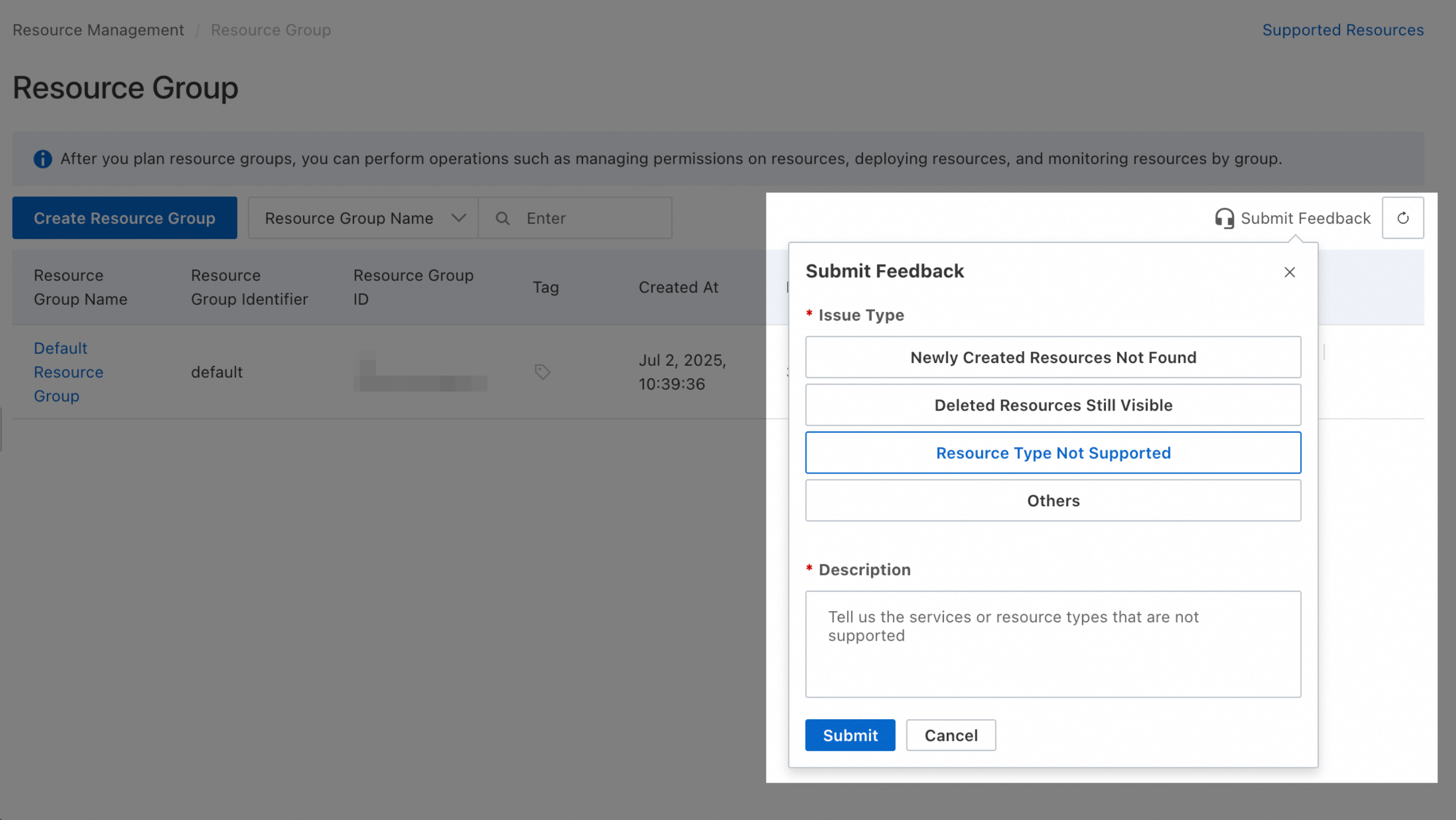
サポート対象外アクション
以下のExpress Connectアクションは、リソースグループレベルの権限付与をサポートしていません。
|
アクション |
説明 |
|
expressconnectrouter:CreateCarrierCloudLink |
- |
|
expressconnectrouter:DeleteCarrierCloudLink |
- |
|
expressconnectrouter:DescribeCarrierCloudLink |
- |
|
expressconnectrouter:DescribeCarrierCloudLinks |
- |
|
expressconnectrouter:DescribeLineProviders |
- |
|
expressconnectrouter:DescribePartnerAccessPointRegions |
- |
|
expressconnectrouter:DescribePartnerAccessPoints |
- |
|
expressconnectrouter:DescribePartnerVendors |
- |
|
expressconnectrouter:DescribeVpcRelatedAssociation |
- |
|
expressconnectrouter:ListExpressConnectRouterSupportedRegion |
- |
|
expressconnectrouter:ModifyCarrierCloudLink |
- |
|
vpc:AddBandwidthPackageIps |
- |
|
vpc:AddGlobalAccelerationInstanceIp |
- |
|
vpc:AddIPv6TranslatorAclListEntry |
- |
|
vpc:AllocateVpcIpv6Cidr |
- |
|
vpc:CancelExpressCloudConnection |
- |
|
vpc:CheckVpnBgpEnabled |
- |
|
vpc:ConvertBandwidthPackage |
- |
|
vpc:CreaeNatGateway |
- |
|
vpc:CreateBandwidthPackage |
- |
|
vpc:CreateBondRouterInterfaceConnection |
- |
|
vpc:CreateExpressCloudConnection |
- |
|
vpc:CreateGlobalAccelerationInstance |
- |
|
vpc:CreateIPv6Translator |
- |
|
vpc:CreateIPv6TranslatorAclList |
- |
|
vpc:CreateIPv6TranslatorEntry |
- |
|
vpc:CreateNqa |
- |
|
vpc:DeleteBandwidthPackage |
- |
|
vpc:DeleteGlobalAccelerationInstance |
- |
|
vpc:DeleteIPv6Translator |
- |
|
vpc:DeleteIPv6TranslatorAclList |
- |
|
vpc:DeleteIPv6TranslatorEntry |
- |
|
vpc:DeleteIpv6EgressOnlyRule |
- |
|
vpc:DescribeAccessPoints |
- |
|
vpc:DescribeBandwidthPackageMonitorData |
- |
|
vpc:DescribeBandwidthPackagePublicIpMonitorData |
- |
|
vpc:DescribeGlobalAccelerationInstances |
- |
|
vpc:DescribeGrantRulesToCbn |
- |
|
vpc:DescribeIPv6TranslatorAclListAttributes |
- |
|
vpc:DescribeIPv6TranslatorAclLists |
- |
|
vpc:DescribeIPv6TranslatorEntries |
- |
|
vpc:DescribeInstances |
- |
|
vpc:DescribeNetworkQuotas |
- |
|
vpc:DescribePublicIpAddress |
- |
|
vpc:DescribeRouterInterfacesForGlobal |
- |
|
vpc:DescribeServerRelatedGlobalAccelerationInstances |
- |
|
vpc:DescribeVPCs |
- |
|
vpc:DescribeVpnGatewayAvailableZones |
- |
|
vpc:DescribeVrouters |
- |
|
vpc:DescribeZones |
- |
|
vpc:DiagnoseVpnConnections |
- |
|
vpc:DiagnoseVpnConnectionsHistory |
- |
|
vpc:DiagnoseVpnGateway |
- |
|
vpc:DisableNatGatewayEcsMetric |
- |
|
vpc:EnableNatGatewayEcsMetric |
- |
|
vpc:GetBusinessAccessPointDetail |
- |
|
vpc:GetFlowLogServiceStatus |
- |
|
vpc:GetNatIpCidrAttribute |
- |
|
vpc:GetObject |
- |
|
vpc:GetPhysicalConnectionServiceStatus |
- |
|
vpc:GetPublicIpAddressPoolServiceStatus |
- |
|
vpc:GetTrafficMirrorServiceStatus |
- |
|
vpc:GetVpcIpamServiceStatus |
- |
|
vpc:GetVpnGatewayDiagnoseResult |
- |
|
vpc:GrantInstanceToCbn |
- |
|
vpc:InnerVpcCreateDscp |
- |
|
vpc:InnerVpcDeleteDscp |
- |
|
vpc:InnerVpcDescribeCrossBorderRouterInterface |
- |
|
vpc:InnerVpcDescribeDscp |
- |
|
vpc:InnerVpcModifyDscp |
- |
|
vpc:InnerVpcRefreshDscp |
- |
|
vpc:ListBusinessAccessPointPortUsage |
- |
|
vpc:ListBusinessAccessPoints |
- |
|
vpc:ListBusinessRegions |
- |
|
vpc:ListGeographicSubRegions |
- |
|
vpc:ListNatGatewayEcsMetric |
- |
|
vpc:ListVpcCloudInstance |
- |
|
vpc:ListVpcEndpointServicesByEndUser |
- |
|
vpc:ModifyBandwidthPackageAttribute |
- |
|
vpc:ModifyBandwidthPackageSpec |
- |
|
vpc:ModifyBypassToaAttribute |
- |
|
vpc:ModifyExpressCloudConnectionAttribute |
- |
|
vpc:ModifyGlobalAccelerationInstanceAttributes |
- |
|
vpc:ModifyGlobalAccelerationInstanceSpec |
- |
|
vpc:ModifyIPv6TranslatorAclAttribute |
- |
|
vpc:ModifyIPv6TranslatorAclListEntry |
- |
|
vpc:ModifyIPv6TranslatorAttribute |
- |
|
vpc:ModifyIPv6TranslatorBandwidth |
- |
|
vpc:ModifyIPv6TranslatorEntry |
- |
|
vpc:ModifyIpv6GatewaySpec |
- |
|
vpc:OpenFlowLogService |
- |
|
vpc:OpenPhysicalConnectionService |
- |
|
vpc:OpenPublicIpAddressPoolService |
- |
|
vpc:OpenTrafficMirrorService |
- |
|
vpc:OpenVpcIpamService |
- |
|
vpc:QueryPconnTrafficPrice |
- |
|
vpc:QueryPhysicalConnectionPrice |
- |
|
vpc:RejectVpcPeerConnection |
- |
|
vpc:RemoveBandwidthPackageIps |
- |
|
vpc:RemoveGlobalAccelerationInstanceIp |
- |
|
vpc:RemoveIPv6TranslatorAclListEntry |
- |
|
vpc:RevokeInstanceFromCbn |
- |
|
vpc:SetHaVipMasterInstance |
- |
|
vpc:TransformEipSegmentToPublicIpAddressPool |
- |
|
vpc:UnAssociateEipAddress |
- |
|
vpc:UnassociateGlobalAccelerationInstance |
- |
|
vpc:UpdateCrossBoarderStatus |
- |
|
vpc:associatevpccidrblock |
- |
|
vpc:createvpc |
- |
|
vpc:deleteBgpNetwork |
- |
|
vpc:describeVpcs |
- |
|
vpc:releaseIpv6Address |
- |
上記のアクションについては、 [Resource Scope] を [Account] に設定し、カスタムポリシーを作成する必要があります。
 以下のポリシー例は、必要に応じてカスタマイズ可能です。
-
読み取り専用アクセスの許可
{ "Version": "1", "Statement": [ { "Effect": "Allow", "Action": [ "expressconnectrouter:DescribeCarrierCloudLink", "expressconnectrouter:DescribeCarrierCloudLinks", "expressconnectrouter:DescribeLineProviders", "expressconnectrouter:DescribePartnerAccessPointRegions", "expressconnectrouter:DescribePartnerAccessPoints", "expressconnectrouter:DescribePartnerVendors", "expressconnectrouter:DescribeVpcRelatedAssociation", "expressconnectrouter:ListExpressConnectRouterSupportedRegion", "vpc:CheckVpnBgpEnabled", "vpc:DescribeAccessPoints", "vpc:DescribeBandwidthPackageMonitorData", "vpc:DescribeBandwidthPackagePublicIpMonitorData", "vpc:DescribeGlobalAccelerationInstances", "vpc:DescribeGrantRulesToCbn", "vpc:DescribeIPv6TranslatorAclListAttributes", "vpc:DescribeIPv6TranslatorAclLists", "vpc:DescribeIPv6TranslatorEntries", "vpc:DescribeInstances", "vpc:DescribeNetworkQuotas", "vpc:DescribePublicIpAddress", "vpc:DescribeRouterInterfacesForGlobal", "vpc:DescribeServerRelatedGlobalAccelerationInstances", "vpc:DescribeVPCs", "vpc:DescribeVpnGatewayAvailableZones", "vpc:DescribeVrouters", "vpc:DescribeZones", "vpc:GetBusinessAccessPointDetail", "vpc:GetFlowLogServiceStatus", "vpc:GetNatIpCidrAttribute", "vpc:GetObject", "vpc:GetPhysicalConnectionServiceStatus", "vpc:GetPublicIpAddressPoolServiceStatus", "vpc:GetTrafficMirrorServiceStatus", "vpc:GetVpcIpamServiceStatus", "vpc:GetVpnGatewayDiagnoseResult", "vpc:ListBusinessAccessPointPortUsage", "vpc:ListBusinessAccessPoints", "vpc:ListBusinessRegions", "vpc:ListGeographicSubRegions", "vpc:ListNatGatewayEcsMetric", "vpc:ListVpcCloudInstance", "vpc:ListVpcEndpointServicesByEndUser" ], "Resource": "*" } ] } -
フルアクセスの許可
{
  "Version": "1",
  "Statement": [
    {
      "Effect": "Allow",
      "Action": [
        "expressconnectrouter:CreateCarrierCloudLink",
        "expressconnectrouter:DeleteCarrierCloudLink",
        "expressconnectrouter:DescribeCarrierCloudLink",
        "expressconnectrouter:DescribeCarrierCloudLinks",
        "expressconnectrouter:DescribeLineProviders",
        "expressconnectrouter:DescribePartnerAccessPointRegions",
        "expressconnectrouter:DescribePartnerAccessPoints",
        "expressconnectrouter:DescribePartnerVendors",
        "expressconnectrouter:DescribeVpcRelatedAssociation",
        "expressconnectrouter:ListExpressConnectRouterSupportedRegion",
        "expressconnectrouter:ModifyCarrierCloudLink",
        "vpc:AddBandwidthPackageIps",
        "vpc:AddGlobalAccelerationInstanceIp",
        "vpc:AddIPv6TranslatorAclListEntry",
        "vpc:AllocateVpcIpv6Cidr",
        "vpc:CancelExpressCloudConnection",
        "vpc:CheckVpnBgpEnabled",
        "vpc:ConvertBandwidthPackage",
        "vpc:CreaeNatGateway",
        "vpc:CreateBandwidthPackage",
        "vpc:CreateBondRouterInterfaceConnection",
        "vpc:CreateExpressCloudConnection",
        "vpc:CreateGlobalAccelerationInstance",
        "vpc:CreateIPv6Translator",
        "vpc:CreateIPv6TranslatorAclList",
        "vpc:CreateIPv6TranslatorEntry",
        "vpc:CreateNqa",
        "vpc:DeleteBandwidthPackage",
        "vpc:DeleteGlobalAccelerationInstance",
        "vpc:DeleteIPv6Translator",
        "vpc:DeleteIPv6TranslatorAclList",
        "vpc:DeleteIPv6TranslatorEntry",
        "vpc:DeleteIpv6EgressOnlyRule",
        "vpc:DescribeAccessPoints",
        "vpc:DescribeBandwidthPackageMonitorData",
        "vpc:DescribeBandwidthPackagePublicIpMonitorData",
        "vpc:DescribeGlobalAccelerationInstances",
        "vpc:DescribeGrantRulesToCbn",
        "vpc:DescribeIPv6TranslatorAclListAttributes",
        "vpc:DescribeIPv6TranslatorAclLists",
        "vpc:DescribeIPv6TranslatorEntries",
        "vpc:DescribeInstances",
        "vpc:DescribeNetworkQuotas",
        "vpc:DescribePublicIpAddress",
        "vpc:DescribeRouterInterfacesForGlobal",
        "vpc:DescribeServerRelatedGlobalAccelerationInstances",
        "vpc:DescribeVPCs",
        "vpc:DescribeVpnGatewayAvailableZones",
        "vpc:DescribeVrouters",
        "vpc:DescribeZones",
        "vpc:DiagnoseVpnConnections",
        "vpc:DiagnoseVpnConnectionsHistory",
        "vpc:DiagnoseVpnGateway",
        "vpc:DisableNatGatewayEcsMetric",
        "vpc:EnableNatGatewayEcsMetric",
        "vpc:GetBusinessAccessPointDetail",
        "vpc:GetFlowLogServiceStatus",
        "vpc:GetNatIpCidrAttribute",
        "vpc:GetObject",
        "vpc:GetPhysicalConnectionServiceStatus",
        "vpc:GetPublicIpAddressPoolServiceStatus",
        "vpc:GetTrafficMirrorServiceStatus",
        "vpc:GetVpcIpamServiceStatus",
        "vpc:GetVpnGatewayDiagnoseResult",
        "vpc:GrantInstanceToCbn",
        "vpc:InnerVpcCreateDscp",
        "vpc:InnerVpcDeleteDscp",
        "vpc:InnerVpcDescribeCrossBorderRouterInterface",
        "vpc:InnerVpcDescribeDscp",
        "vpc:InnerVpcModifyDscp",
        "vpc:InnerVpcRefreshDscp",
        "vpc:ListBusinessAccessPointPortUsage",
        "vpc:ListBusinessAccessPoints",
        "vpc:ListBusinessRegions",
        "vpc:ListGeographicSubRegions",
        "vpc:ListNatGatewayEcsMetric",
        "vpc:ListVpcCloudInstance",
        "vpc:ListVpcEndpointServicesByEndUser",
        "vpc:ModifyBandwidthPackageAttribute",
        "vpc:ModifyBandwidthPackageSpec",
        "vpc:ModifyBypassToaAttribute",
        "vpc:ModifyExpressCloudConnectionAttribute",
        "vpc:ModifyGlobalAccelerationInstanceAttributes",
        "vpc:ModifyGlobalAccelerationInstanceSpec",
        "vpc:ModifyIPv6TranslatorAclAttribute",
        "vpc:ModifyIPv6TranslatorAclListEntry",
        "vpc:ModifyIPv6TranslatorAttribute",
        "vpc:ModifyIPv6TranslatorBandwidth",
        "vpc:ModifyIPv6TranslatorEntry",
        "vpc:ModifyIpv6GatewaySpec",
        "vpc:OpenFlowLogService",
        "vpc:OpenPhysicalConnectionService",
        "vpc:OpenPublicIpAddressPoolService",
        "vpc:OpenTrafficMirrorService",
        "vpc:OpenVpcIpamService",
        "vpc:QueryPconnTrafficPrice",
        "vpc:QueryPhysicalConnectionPrice",
        "vpc:RejectVpcPeerConnection",
        "vpc:RemoveBandwidthPackageIps",
        "vpc:RemoveGlobalAccelerationInstanceIp",
        "vpc:RemoveIPv6TranslatorAclListEntry",
        "vpc:RevokeInstanceFromCbn",
        "vpc:SetHaVipMasterInstance",
        "vpc:TransformEipSegmentToPublicIpAddressPool",
        "vpc:UnAssociateEipAddress",
        "vpc:UnassociateGlobalAccelerationInstance",
        "vpc:UpdateCrossBoarderStatus",
        "vpc:associatevpccidrblock",
        "vpc:createvpc",
        "vpc:deleteBgpNetwork",
        "vpc:describeVpcs",
        "vpc:releaseIpv6Address"
      ],
      "Resource": "*"
    }
  ]
}
アカウントレベルの権限を付与すると、アカウント内のすべての関連リソースへのアクセスが許可されます。常に最小権限の原則に従ってください。
よくある質問
リソースがどのリソースグループに属しているかを確認するにはどうすればよいですか。
-
方法 1:所属サービスのコンソールで確認
-
リソースが所属する Alibaba Cloud サービスのコンソールに移動します。通常、リソースの詳細ページの基本情報セクションにリソースグループが記載されています。
-
-
方法 2:Resource Management コンソールで確認
-
Resource Management コンソールにログインします。
-
を選択します。
-
左側のメニューで、対象リソースを所有するアカウントを選択します (デフォルトは [Current Account]) を選択します。
-
フィルター条件を使用してリソースを検索します。
-
[Resource Group Name] 列に、リソースが属するグループが表示されます。
-
特定のリソースグループ内のすべてのリソースを表示するにはどうすればよいですか。
-
方法 1:
-
Resource Management コンソールにログインします。
-
を選択します。
-
左側のメニューで、リソースを所有するアカウント (デフォルトは [Current Account]) の下にある、対象のリソースグループ名をクリックします。
-
右側の画面で、[Select resource types] ドロップダウンリストからクラウドサービスを選択します。
-
そのグループ内のすべてのリソースが表示されます。
-
-
方法 2:
-
Resource Management コンソールにログインします。
-
を選択します。
-
対象のリソースグループを見つけ、[Actions] 列の [Manage Resource] をクリックします。
-
リソース管理ページで、[Service] ドロップダウンリストからクラウドサービスを選択します。
-
そのグループ内のすべてのリソースが表示されます。
-
複数のリソースを別のリソースグループに一括で移動するにはどうすればよいですか。
-
Resource Management コンソールにログインします。
-
左側のメニューで、 を選択します。
-
対象のリソースグループを見つけ、[Actions] 列の [Manage Resource] をクリックします。
-
リソース管理ページで、フィルター条件を使用して移動したいリソースを検索します。
-
移動したいリソースのチェックボックスを選択します。
-
ページ下部にある [Transfer] をクリックします。
-
ダイアログボックスで、移動先のリソースグループを選択し、 [Confirm] をクリックします。