Container Compute Service (ACS) の GPU コンピューティングを使用すると、基盤となるハードウェアや GPU ノードを管理せずに利用を開始できます。その従量課金モデルは LLM の推論タスクに適しており、コストを削減します。DeepSeek-R1 はパラメーター数が多く、単一 GPU 容量を超えるため、マルチインスタンスによる分散デプロイメントが推奨されます。このガイドでは、ACS の GPU コンピューティングを使用して、プロダクションレディな分散 DeepSeek-R1 推論サービスをデプロイする方法を説明します。
背景
DeepSeek-R1 モデル
vLLM
ACS
LWS
Fluid
ソリューションの概要
モデル分割
DeepSeek-R1 には 6,710 億のパラメーターがあり、単一 GPU の 96 GB メモリを超えています。このガイドでは、モデル並列処理 (PP=2) とテンソル並列処理 (TP=8) を使用して、モデルを 2 つの GPU Pod インスタンスに分割します。
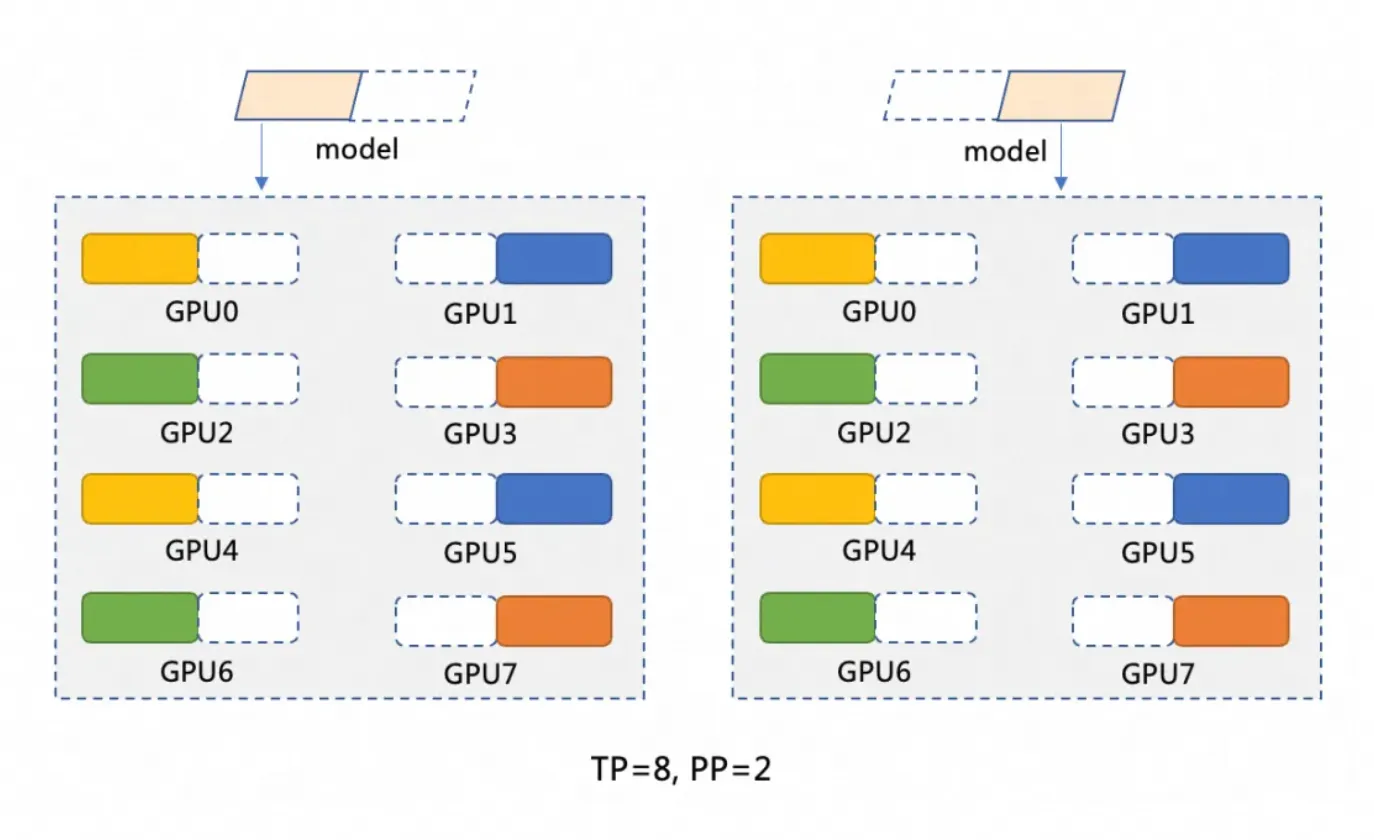
モデル並列処理 (PP=2) は、モデルを 2 つのステージに分割し、それぞれが 1 つの GPU Pod インスタンス上で実行されます。最初のステージは入力を処理し、中間結果を 2 番目のステージに渡します。
テンソル並列処理 (TP=8) は、各ステージ内の計算を 8 つの GPU に分散します。
分散デプロイアーキテクチャ
このソリューションは、vLLM と Ray を使用して、ACS 上に DeepSeek のフルバージョンの分散推論サービスをデプロイします。LWS はリーダー/ワーカー デプロイメントパターンを管理し、Fluid はモデルのロードを高速化する分散キャッシュを提供します。vLLM は、それぞれ 8 つの GPU を搭載した 2 つの GPU Pod インスタンス上で実行されます。各 Pod は、モデル分割のための Ray Group (Ray head と Ray worker) として機能します。デプロイアーキテクチャの違いは、YAML ファイル内の tensor-parallel-size や LWS_GROUP_SIZE などの変数に影響します。

前提条件
-
Container Compute Service (ACS) が Elastic Compute Service (ECS)、Object Storage Service (OSS)、Apsara File Storage NAS、Cloud Parallel File Storage (CPFS)、Server Load Balancer (SLB) などの依存サービスを呼び出し、クラスターを作成し、ログを保存できるように、サービスアカウントにシステムデフォルトロールを割り当ててください (Alibaba Cloud を初めて使用する場合は必須)。このロールが正しく付与されて初めて、ACS はこれらの機能を使用できるようになります。詳細については、「Container Compute Service の利用開始」をご参照ください。
-
kubectl クライアントがクラスターに接続されていること。詳細については、クラスターの kubeconfig ファイルを取得し、kubectl を使用してクラスターに接続する を参照してください。
GPU インスタンスの仕様とコスト
インスタンスあたりの推奨構成:GPU:8 カード (カードあたり 96 GiB の GPU メモリ)、CPU:64 vCPU、メモリ:512 GiB。「推奨インスタンスタイプ」および「GPU コンピューティングタイプと仕様」からインスタンスタイプを選択します。コスト計算については、「課金」をご参照ください。
-
ACS GPU インスタンスの仕様は、「ACS Pod 仕様調整ロジック」に従う必要があります。
-
ACS Pod は、デフォルトで 30 GiB の無料のエフェメラルストレージを提供します。推論イメージ
registry-cn-hangzhou.ack.aliyuncs.com/ack-demo/vllm:v0.7.2は約 9.5 GiB を占有します。ストレージを拡張するには、「エフェメラルストレージサイズの増加」をご参照ください。
手順
手順 1:DeepSeek-R1 モデルファイルの準備
大規模言語モデルには、かなりのディスク領域が必要です。モデルファイルの永続的なストレージとして、NAS または OSS ボリュームを作成します。このガイドでは OSS を使用します。
モデルファイルの転送は遅くなる可能性があります。チケットを送信して、モデルファイルを OSS バケットに迅速にコピーできます。
-
次のコマンドを実行して、ModelScope から DeepSeek-R1 モデルをダウンロードします。
説明git-lfs がインストールされていることを確認してください。インストールされていない場合は、
yum install git-lfsまたはapt-get install git-lfsを実行します。その他の方法については、「Git Large File Storage のインストール」をご参照ください。git lfs install GIT_LFS_SKIP_SMUDGE=1 git clone https://www.modelscope.cn/deepseek-ai/DeepSeek-R1.git cd DeepSeek-R1/ git lfs pull -
OSS にディレクトリを作成し、モデルをアップロードします。
説明ossutil をインストールして設定するには、「ossutil のインストール」に従ってください。
ossutil mkdir oss://<your-bucket-name>/models/DeepSeek-R1 ossutil cp -r ./DeepSeek-R1 oss://<your-bucket-name>/models/DeepSeek-R1 -
モデルを OSS に保存した後、次の 2 つの方法のいずれかでロードできます。
-
PVC と PV を使用してモデルを直接マウントする:起動やロード速度に厳しい要件がない小規模なモデルに適しています。
コンソール
以下は、PV の設定例です。
パラメーター
説明
ストレージボリュームタイプ
OSS
名前
llm-model
アクセスキー
OSS にアクセスするための AccessKey ID と AccessKey Secret を設定します。
バケット名
前の手順で作成した OSS バケットを選択します。
OSS パス
/models/DeepSeek-R1 など、モデルが格納されているパスを選択します。
以下は、PVC の設定例です。
パラメーター
説明
ストレージ要求タイプ
OSS
名前
llm-model
割り当てモード
[Existing Volume] を選択します。
既存のボリューム
[Select Existing Volume] リンクをクリックし、作成した PV を選択します。
kubectl
以下は YAML ファイルの例です。
apiVersion: v1 kind: Secret metadata: name: oss-secret stringData: akId: <your-oss-ak> # OSS にアクセスするための AccessKey ID。 akSecret: <your-oss-sk> # OSS にアクセスするための AccessKey Secret。 --- apiVersion: v1 kind: PersistentVolume metadata: name: llm-model labels: alicloud-pvname: llm-model spec: capacity: storage: 30Gi accessModes: - ReadOnlyMany persistentVolumeReclaimPolicy: Retain csi: driver: ossplugin.csi.alibabacloud.com volumeHandle: llm-model nodePublishSecretRef: name: oss-secret namespace: default volumeAttributes: bucket: <your-bucket-name> # バケット名。 url: <your-bucket-endpoint> # oss-cn-hangzhou-internal.aliyuncs.com などのエンドポイント。 otherOpts: "-o umask=022 -o max_stat_cache_size=0 -o allow_other" path: <your-model-path> # この例では、パスは /models/DeepSeek-R1 です。 --- apiVersion: v1 kind: PersistentVolumeClaim metadata: name: llm-model spec: accessModes: - ReadOnlyMany resources: requests: storage: 30Gi selector: matchLabels: alicloud-pvname: llm-model -
Fluid を使用してモデルのロードを高速化する:高速な起動とロードが必要な大規模モデルに推奨します。「Fluid を使用したデータアクセスの高速化」をご参照ください。
-
ACS アプリケーションマーケットプレイスから Helm を使用して、ack-fluid コンポーネント (バージョン 1.0.11-* 以降) をインストールします。「Helm を使用したアプリケーションの作成」をご参照ください。
-
ACS Pod の特権モードを有効にするには、チケットを送信してください。
-
OSS にアクセスするための Secret を作成します。
apiVersion: v1 kind: Secret metadata: name: mysecret stringData: fs.oss.accessKeyId: xxx fs.oss.accessKeySecret: xxxfs.oss.accessKeyIdとfs.oss.accessKeySecretに、上記で作成した OSS バケットの認証情報を設定します。 -
Dataset と JindoRuntime を作成します。
apiVersion: data.fluid.io/v1alpha1
kind: Dataset
metadata:
  name: deepseek
spec:
  mounts:
    - mountPoint:  oss://<your-bucket-name>       # 実際のバケット名に置き換えます。
      options:
        fs.oss.endpoint: <your-bucket-endpoint>    # 実際のバケットエンドポイントに置き換えます。
      name: deepseek
      path: "/"
      encryptOptions:
        - name: fs.oss.accessKeyId
          valueFrom:
            secretKeyRef:
              name: mysecret
              key: fs.oss.accessKeyId
        - name: fs.oss.accessKeySecret
          valueFrom:
            secretKeyRef:
              name: mysecret
              key: fs.oss.accessKeySecret
---
apiVersion: data.fluid.io/v1alpha1
kind: JindoRuntime
metadata:
  name: deepseek
spec:
  replicas: 16    # 必要に応じて調整します。
  master:
    podMetadata:
      labels:
        alibabacloud.com/compute-class: performance
        alibabacloud.com/compute-qos: default
  worker:
    podMetadata:
      labels:
        alibabacloud.com/compute-class: performance
        alibabacloud.com/compute-qos: default
      annotations:
        kubernetes.io/resource-type: serverless
    resources:
      requests:
        cpu: 16
        memory: 128Gi
      limits:
        cpu: 16
        memory: 128Gi
  tieredstore:
    levels:
      - mediumtype: MEM
        path: /dev/shm
        volumeType: emptyDir
        ## 必要に応じて調整します。
        quota: 128Gi
        high: "0.99"
        low: "0.95"
作成後、
kubectl get pod | grep jindoコマンドを実行して、Pod がRunning状態であることを確認します。期待される出力は次のとおりです。deepseek-jindofs-master-0 1/1 Running 0 3m29s deepseek-jindofs-worker-0 1/1 Running 0 2m52s deepseek-jindofs-worker-1 1/1 Running 0 2m52s ... -
DataLoad リソースを作成して、モデルをキャッシュします。
apiVersion: data.fluid.io/v1alpha1 kind: DataLoad metadata: name: deepseek spec: dataset: name: deepseek namespace: default loadMetadata: true -
次のコマンドを実行して、キャッシュステータスを確認します。
kubectl get dataload期待される出力は次のとおりです。
NAME       DATASET    PHASE       AGE     DURATION
deepseek   deepseek   Executing   4m30s   Unfinished
キャッシュ中は
PHASEがExecutingと表示されます。約 20 分待ってからコマンドを再実行します。Completeは成功を示します。kubectl logs $(kubectl get pods --selector=job-name=deepseek-loader-job -o jsonpath='{.items[0].metadata.name}') | grep progressで進捗を追跡します。 -
次のコマンドを実行して、Dataset リソースを確認します。
kubectl get datasets期待される出力は次のとおりです。
NAME       UFS TOTAL SIZE   CACHED    CACHE CAPACITY   CACHED PERCENTAGE   PHASE   AGE
deepseek   1.25TiB          1.25TiB   2.00TiB          100.0%              Bound   21h
-
-
手順 2: ACS GPU を使用したモデルのデプロイ
-
Helm を使用して、ACS アプリマーケットプレイスから lws コンポーネントをインストールします。詳細については、「Helm を使用してアプリケーションを作成する」をご参照ください。
-
LeaderWorkerSet を使用してモデルをデプロイします。
説明-
YAML ファイル内の
alibabacloud.com/gpu-model-series: <example-model>を、ACS でサポートされている特定の GPU モデルに置き換えてください。現在サポートされている GPU モデルのリストについては、PDSA にお問い合わせいただくか、チケットを送信してください。 -
TCP/IP と比較して、高性能な RDMA ネットワーキングは、ゼロコピーとカーネルバイパスを使用してデータのコピーと頻繁なコンテキストスイッチを回避し、レイテンシーの低減、スループットの向上、CPU 使用率の削減を実現します。ACS は、YAML ファイルにラベル
alibabacloud.com/hpn-type: "rdma"を設定することで RDMA をサポートします。RDMA をサポートする GPU モデル のリストについては、PDSA にお問い合わせいただくか、チケットを送信してください。 -
Fluid を使用してモデルを読み込む場合は、両方の PVC セクションの
claimNameを Fluid データセットの名前に変更してください。 -
分散デプロイメントアーキテクチャ の違いは、YAML ファイル内の
tensor-parallel-sizeやLWS_GROUP_SIZEなどの変数の値に影響を与えます。
標準デプロイメント
apiVersion: leaderworkerset.x-k8s.io/v1
kind: LeaderWorkerSet
metadata:
  name: deepseek-r1-671b-fp8-distrubution
spec:
  replicas: 1
  leaderWorkerTemplate:
    size: 2  # リーダーとワーカー Pod の合計数。
    restartPolicy: RecreateGroupOnPodRestart
    leaderTemplate:
      metadata:
        labels:
          role: leader
          alibabacloud.com/compute-class: gpu  # GPU タイプを指定します。
          alibabacloud.com/compute-qos: default  # ACS QoS レベルを指定します。
          alibabacloud.com/gpu-model-series: <example-model>  # GPU モデルを指定します。
      spec:
        volumes:
          - name: llm-model
            persistentVolumeClaim:
              # Fluid を使用する場合は、ここに Fluid データセット名 (例: deepseek) を入力します
              claimName: llm-model
          - name: shm
            emptyDir:
              medium: Memory
              sizeLimit: 32Gi
        containers:
          - name: deepseek-r1-671b-leader
            image: registry-cn-hangzhou.ack.aliyuncs.com/ack-demo/vllm:v0.7.2
            env:
              - name: NCCL_SOCKET_IFNAME  # ネットワークインターフェイスカード (NIC) を指定します。
                value: eth0
            command:
              - sh
              - -c
              - "/vllm-workspace/ray_init.sh leader --ray_cluster_size=$(LWS_GROUP_SIZE);vllm serve /models/DeepSeek-R1/ --port 8000 --trust-remote-code --served-model-name ds --max-model-len 2048 --gpu-memory-utilization 0.95 --tensor-parallel-size 8 --pipeline-parallel-size 2 --enforce-eager"  # tensor-parallel-size を Pod あたりの GPU 数に設定します。
            resources:
              limits:
                nvidia.com/gpu: "8"
                cpu: "64"
                memory: 512G
              requests:
                nvidia.com/gpu: "8"
                cpu: "64"
                memory: 512G
            ports:
              - containerPort: 8000
            volumeMounts:
              - mountPath: /models/DeepSeek-R1
                name: llm-model
              - mountPath: /dev/shm
                name: shm
    workerTemplate:
      metadata:
        labels:
          alibabacloud.com/compute-class: gpu  # GPU タイプを指定します。
          alibabacloud.com/compute-qos: default  # ACS QoS レベルを指定します。
          alibabacloud.com/gpu-model-series: <example-model>  # GPU モデルを指定します。
      spec:
        volumes:
          - name: llm-model
            persistentVolumeClaim:
              # Fluid を使用する場合は、ここに Fluid データセット名 (例: deepseek) を入力します
              claimName: llm-model
          - name: shm
            emptyDir:
              medium: Memory
              sizeLimit: 32Gi
        containers:
          - name: deepseek-r1-671b-worker
            image: registry-cn-hangzhou.ack.aliyuncs.com/ack-demo/vllm:v0.7.2
            env:
              - name: NCCL_SOCKET_IFNAME  # ネットワークインターフェイスカード (NIC) を指定します。
                value: eth0
            command:
              - sh
              - -c
              - "/vllm-workspace/ray_init.sh worker --ray_address=$(LWS_LEADER_ADDRESS)"
            resources:
              limits:
                nvidia.com/gpu: "8"
                cpu: "64"
                memory: 512G
              requests:
                nvidia.com/gpu: "8"
                cpu: "64"
                memory: 512G
            ports:
              - containerPort: 8000
            volumeMounts:
              - mountPath: /models/DeepSeek-R1
                name: llm-model
              - mountPath: /dev/shm
                name: shm
RDMA 高速化
オープンソースのベースイメージ (vLLM など) を使用する場合は、YAML ファイルに以下の環境変数を追加してください。
名前
値
NCCL_SOCKET_IFNAME
eth0
NCCL_IB_TC
136
NCCL_IB_SL
5
NCCL_IB_GID_INDEX
3
NCCL_DEBUG
INFO
NCCL_IB_HCA
mlx5
NCCL_NET_PLUGIN
none
apiVersion: leaderworkerset.x-k8s.io/v1 kind: LeaderWorkerSet metadata: name: deepseek-r1-671b-fp8-distrubution spec: replicas: 1 leaderWorkerTemplate: size: 2 # リーダーとワーカー Pod の合計数。 restartPolicy: RecreateGroupOnPodRestart leaderTemplate: metadata: labels: role: leader alibabacloud.com/compute-class: gpu # GPU タイプを指定します。 alibabacloud.com/compute-qos: default # ACS QoS レベルを指定します。 alibabacloud.com/gpu-model-series: <example-model> # GPU モデルを指定します。 # アプリケーションが高性能 RDMA ネットワークで実行されることを指定します。サポートされている GPU モデルについては、チケットを送信してください。 alibabacloud.com/hpn-type: "rdma" spec: volumes: - name: llm-model persistentVolumeClaim: # Fluid を使用する場合は、ここに Fluid データセット名 (例: deepseek) を入力します claimName: llm-model - name: shm emptyDir: medium: Memory sizeLimit: 32Gi containers: - name: deepseek-r1-671b-leader image: registry-cn-hangzhou.ack.aliyuncs.com/ack-demo/vllm:v0.7.2 env: - name: NCCL_SOCKET_IFNAME # ネットワークインターフェイスカード (NIC) を指定します。 value: eth0 - name: NCCL_IB_TC value: "136" - name: NCCL_IB_SL value: "5" - name: NCCL_IB_GID_INDEX value: "3" - name: NCCL_DEBUG value: "INFO" - name: NCCL_IB_HCA value: "mlx5" - name: NCCL_NET_PLUGIN value: "none" command: - sh - -c - "/vllm-workspace/ray_init.sh leader --ray_cluster_size=$(LWS_GROUP_SIZE);vllm serve /models/DeepSeek-R1/ --port 8000 --trust-remote-code --served-model-name ds --max-model-len 2048 --gpu-memory-utilization 0.95 --tensor-parallel-size 8 --pipeline-parallel-size 2 --enforce-eager" # tensor-parallel-size を Pod あたりの GPU 数に設定します。 resources: limits: nvidia.com/gpu: "8" cpu: "64" memory: 512G requests: nvidia.com/gpu: "8" cpu: "64" memory: 512G ports: - containerPort: 8000 volumeMounts: - mountPath: /models/DeepSeek-R1 name: llm-model - mountPath: /dev/shm name: shm workerTemplate: metadata: labels: alibabacloud.com/compute-class: gpu # GPU タイプを指定します。 alibabacloud.com/compute-qos: default # ACS QoS レベルを指定します。 alibabacloud.com/gpu-model-series: <example-model> # GPU モデルを指定します。 # アプリケーションが高性能 RDMA ネットワークで実行されることを指定します。サポートされている GPU モデルについては、チケットを送信してください。 alibabacloud.com/hpn-type: "rdma" spec: volumes: - name: llm-model persistentVolumeClaim: # Fluid を使用する場合は、ここに Fluid データセット名 (例: deepseek) を入力します claimName: llm-model - name: shm emptyDir: medium: Memory sizeLimit: 32Gi containers: - name: deepseek-r1-671b-worker image: registry-cn-hangzhou.ack.aliyuncs.com/ack-demo/vllm:v0.7.2 env: - name: NCCL_SOCKET_IFNAME # ネットワークインターフェイスカード (NIC) を指定します。 value: eth0 - name: NCCL_IB_TC value: "136" - name: NCCL_IB_SL value: "5" - name: NCCL_IB_GID_INDEX value: "3" - name: NCCL_DEBUG value: "INFO" - name: NCCL_IB_HCA value: "mlx5" - name: NCCL_NET_PLUGIN value: "none" command: - sh - -c - "/vllm-workspace/ray_init.sh worker --ray_address=$(LWS_LEADER_ADDRESS)" resources: limits: nvidia.com/gpu: "8" cpu: "64" memory: 512G requests: nvidia.com/gpu: "8" cpu: "64" memory: 512G ports: - containerPort: 8000 volumeMounts: - mountPath: /models/DeepSeek-R1 name: llm-model - mountPath: /dev/shm name: shm -
-
推論サービスを Service リソースを使用して公開します。
apiVersion: v1
kind: Service
metadata:
  name: ds-leader
spec:
  ports:
    - name: http
      port: 8000
      protocol: TCP
      targetPort: 8000
  selector:
    leaderworkerset.sigs.k8s.io/name: deepseek-r1-671b-fp8-distrubution
    role: leader
  type: ClusterIP
ステップ 3:推論サービスの検証
-
ローカルポートを推論サービスに転送します。
説明kubectl port-forwardは開発およびデバッグ専用です。本番環境のネットワーキングでは、Ingress の管理を使用してください。kubectl port-forward svc/ds-leader 8000:8000想定される出力は次のとおりです。
Forwarding from 127.0.0.1:8000 -> 8000 Forwarding from [::1]:8000 -> 8000 -
モデル推論リクエストを送信します。
curl http://localhost:8000/v1/chat/completions \
  -H "Content-Type: application/json" \
  -d '{
    "model": "ds",
    "messages": [
      {
        "role": "system",
        "content": "You are a friendly AI assistant."
      },
      {
        "role": "user",
        "content": "Introduce deep learning."
      }
    ],
    "max_tokens": 1024,
    "temperature": 0.7,
    "top_p": 0.9,
    "seed": 10
  }'
想定される出力は次のとおりです。
{"id":"chatcmpl-4bc78b66e2a4439f8362bd434a60be57","object":"chat.completion","created":1739501401,"model":"ds","choices":[{"index":0,"message":{"role":"assistant","reasoning_content":null,"content":"<think>\nOkay, the user wants me to introduce deep learning. I need to think about how to answer this well. First, I should clarify the basic definition of deep learning—it's a branch of machine learning, right? Then I should compare it to traditional machine learning methods to highlight its advantages, like automatic feature extraction. I'll probably need to mention neural networks, especially the structure of deep neural networks with multiple hidden layers.\n\nNext, I should talk about the core components of deep learning, like activation functions, loss functions, and optimizers. The user might not be familiar with these terms, so I'll need to briefly explain the role of each part. I can use examples like ReLU as an activation function, Adam as an optimizer, and cross-entropy loss.\n\nThen, I should cover application areas. Computer vision and natural language processing are common examples. I should provide some concrete examples like image recognition and machine translation to make it easier for the user to understand. I could also mention industry applications, like in healthcare and finance, as the user might be interested in these practical use cases.\n\nI should also mention popular frameworks like TensorFlow and PyTorch, which make it easier to implement deep learning. And the importance of hardware acceleration, like GPUs, which explains why deep learning has developed so rapidly.\n\nAdditionally, I should probably discuss the challenges and limitations of deep learning, such as its dependency on data, high demand for computational resources, and poor interpretability. This will give the user a well-rounded view of its pros and cons. I might also mention future development directions, like efficient training algorithms and research into interpretability.\n\nThe user likely wants a basic understanding of deep learning. They might have some technical background, but not a deep one. They probably want to quickly grasp the key points and applications, so the answer needs to be well-structured and highlight the main points without getting too deep into technical details, but it can't be too brief either. I need to balance technical accuracy with readability.\n\nI should avoid using too much jargon, or explain it briefly when I do, for terms like \"neural network\" or \"convolutional neural network.\" The user could be a student or someone new to the field, so I should use plain language. I'll also use examples to help them connect the concepts to real-world applications, which makes them easier to remember.\n\nI also need to be clear about the relationship between deep learning and machine learning, explaining that deep learning is a subfield of machine learning, but it's deeper and handles more complex problems. I might also mention the backpropagation algorithm as one of the key training techniques.\n\nFinally, I'll provide a summary, emphasizing the impact and potential of deep learning and its future directions, to give the user a comprehensive overview. I'll check if I've missed any important points, like common model architectures such as CNNs and RNNs, which might be worth a brief mention to show the diversity.\n\nSometimes users are interested in the principles, but it's important to keep it concise here. The focus should be on an overview rather than in-depth technical details. I'll ensure the answer flows logically, starting from the definition, then moving to core components, applications, frameworks, challenges, and future directions. That structure seems reasonable.\n</think>\n\nDeep learning is a subfield of machine learning that aims to simulate the learning mechanism of the human brain by building multi-layered neural networks (known as \"deep\" networks). It automatically learns complex features and patterns from large amounts of data and is widely used in fields like image recognition, speech processing, and natural language processing.\n\n### Key concepts\n1. **Artificial Neural Networks (ANNs)**:\n * Composed of an input layer, multiple hidden layers, and an output layer, with each layer containing multiple neurons.\n * Processes information by simulating the activation and transmission of signals between neurons.\n\n2. **Automatic Feature Extraction**:\n * Traditional machine learning relies on manually engineered features. In contrast, deep learning uses multi-layer networks to automatically extract abstract features from data (such as edges and shapes from pixels in an image).\n\n3. **Core Components**:\n * **Activation Function** (e.g., ReLU, Sigmoid): Introduces non-linearity, enhancing the model's expressive power.\n * **Loss Function** (e.g., Cross-Entropy, Mean Squared Error): Measures the difference between the model's predictions and the actual values.\n * **Optimizer** (e.g., SGD, Adam): Optimizes the network's parameters through backpropagation to minimize the loss.\n\n---\n\n### Typical models\n- **Convolutional Neural Network (CNN)**:\n Designed for images, it uses convolutional kernels to extract spatial features. Classic models include ResNet and VGG.\n- **Recurrent Neural Network (RNN)**:\n Processes sequential data (text, speech) by introducing a memory mechanism. Improved versions include LSTM and GRU.\n- **Transformer**:\n Based on a self-attention mechanism, it has significantly advanced natural language processing performance (e.g., BERT, GPT series).\n\n---\n\n### Use cases\n- **Computer Vision**: Face recognition, medical image analysis (e.g., detecting lesions in lung CT scans).\n- **Natural Language Processing**: Intelligent chatbots, document summarization, translation (e.g., DeepL).\n- **Speech Technology**: Voice assistants (e.g., Siri), real-time captioning.\n- **Reinforcement Learning**: Game AI (AlphaGo), robotics control.\n\n---\n\n### Advantages and challenges\n- **Advantages**:\n - Automatically learns complex features, reducing the need for manual intervention.\n - Far outperforms traditional methods when given large amounts of data and high computing power.\n- **Challenges**:\n - Relies on massive amounts of labeled data (e.g., requires tens of thousands of labeled medical images).\n - High model training costs (e.g., training GPT-3 cost over ten million USD).\n - \"Black box\" nature leads to poor interpretability, limiting its application in high-risk fields like medicine.\n\n---\n\n### Tools and trends\n- **Mainstream Frameworks**: TensorFlow (industry-deployment friendly), PyTorch (preferred for research).\n- **Research Directions**:\n - Lightweight models (e.g., MobileNet for mobile devices).\n - Self-supervised learning (reducing dependency on labeled data).\n - Enhanced interpretability (e.g., visualizing the model's decision-making basis).\n\nDeep learning is pushing the boundaries of artificial intelligence, from generative AI (like Stable Diffusion for image generation) to autonomous driving, and continues to transform the tech ecosystem. Future advancements will likely focus on reducing computational costs and improving efficiency and interpretability.","tool_calls":[]},"logprobs":null,"finish_reason":"stop","stop_reason":null}],"usage":{"prompt_tokens":17,"total_tokens":1131,"completion_tokens":1114,"prompt_tokens_details":null},"prompt_logprobs":null}
リファレンス
-
Alibaba Cloud Container Compute Service (ACS) は Container Service for Kubernetes に統合されています。ACK マネージドクラスター Pro で ACS が提供するコンテナコンピューティングを使用できます。詳細については、「例:ACS GPU 計算能力の使用」をご参照ください。
-
ACK で DeepSeek をデプロイする方法については、以下をご参照ください。
-
DeepSeek R1 および V3 モデルの詳細については、以下をご参照ください。
-
ACS AI コンテナイメージは、GPU インスタンスを使用する ACS クラスター向けの専用イメージです。現在利用可能なイメージの詳細については、「ACS AI コンテナイメージリリースノート」をご参照ください。