Container Compute Service (ACS) menyediakan pengalaman serverless yang siap pakai, membebaskan Anda dari pengelolaan perangkat keras dasar atau konfigurasi node GPU. Dengan penerapan yang sederhana dan model penagihan bayar sesuai pemakaian, ACS sangat ideal untuk tugas inferensi Large Language Model (LLM) dan secara signifikan mengurangi biaya inferensi. Jumlah parameter besar pada model DeepSeek-R1 membuatnya terlalu besar untuk dimuat atau dijalankan secara efisien pada satu GPU saja. Oleh karena itu, disarankan untuk menerapkannya secara terdistribusi pada dua instans kontainer atau lebih guna menjalankan inferensi pada model sebesar ini, meningkatkan throughput, dan memastikan kinerja. Topik ini menjelaskan cara menggunakan ACS untuk menerapkan layanan inferensi DeepSeek-R1 terdistribusi berkapasitas penuh yang siap produksi.
Latar Belakang
DeepSeek-R1
vLLM
ACS
LeaderWorkerSet (LWS)
Fluid
Ikhtisar solusi
Pemisahan model
Model DeepSeek-R1 memiliki 671 miliar parameter. Satu GPU biasanya memiliki memori maksimum 96 GiB dan tidak dapat memuat keseluruhan model. Oleh karena itu, model harus dipartisi. Topik ini menggunakan penerapan terdistribusi pada dua instans kontainer GPU, dengan strategi pemartisian berupa pipeline parallelism (PP=2) dan tensor parallelism (TP=8). Pemartisian model ditunjukkan pada gambar berikut.
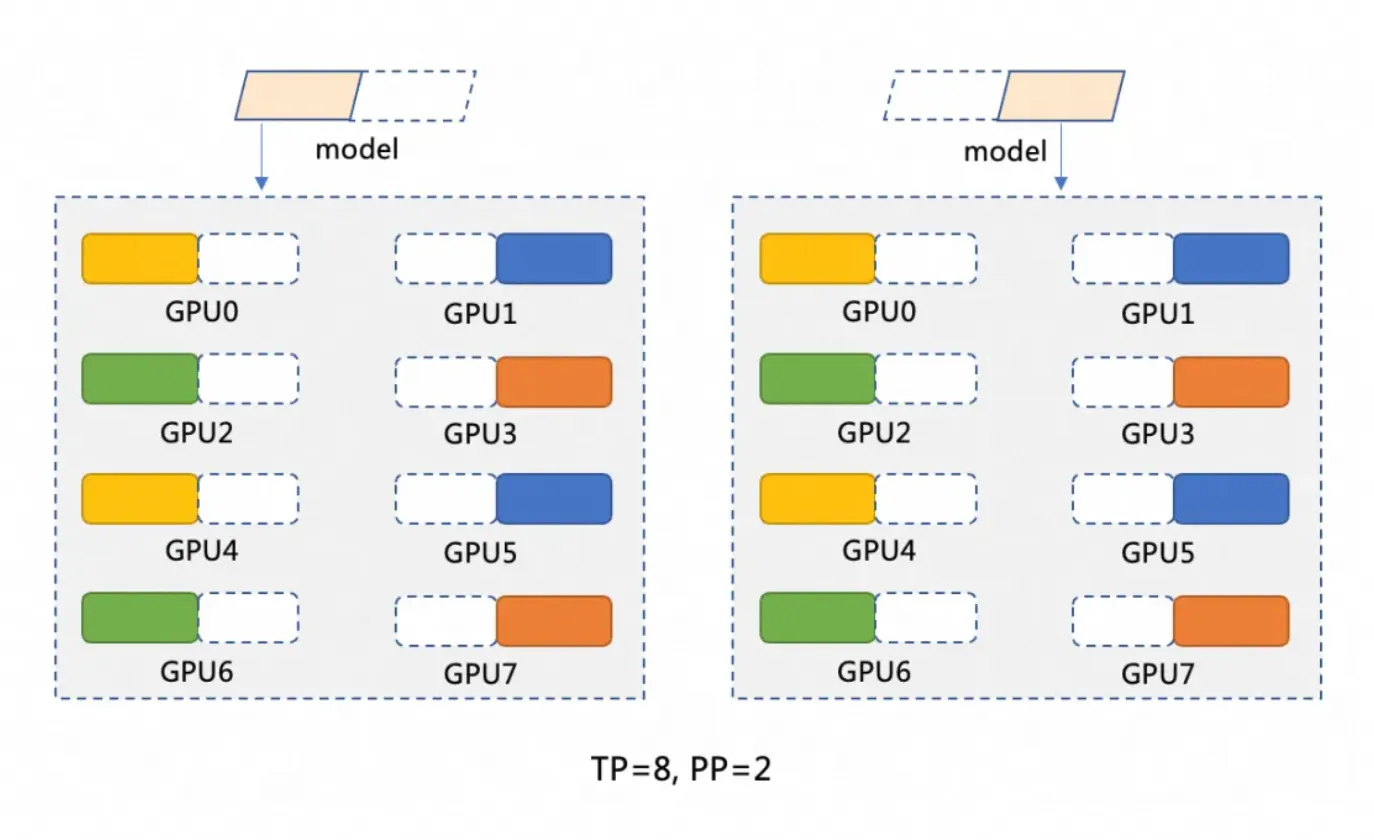
Pipeline parallelism (PP=2) mempartisi model menjadi dua tahap, dengan setiap tahap dijalankan pada instans kontainer GPU terpisah. Misalnya, model M dapat dipartisi menjadi M1 dan M2. M1 memproses input pada instans pertama dan meneruskan hasil antara ke M2 untuk operasi selanjutnya pada instans kedua.
Tensor parallelism (TP=8) mendistribusikan operasi komputasi dalam setiap tahap model (seperti M1 dan M2) ke 8 GPU. Misalnya, pada tahap M1, ketika data masukan tiba, data tersebut dibagi menjadi 8 bagian dan diproses secara simultan pada 8 GPU. Setiap GPU memproses sebagian kecil data, lalu hasilnya digabungkan.
Arsitektur penerapan terdistribusi
Solusi ini menggunakan ACS untuk menerapkan layanan inferensi DeepSeek-R1 berkapasitas penuh yang terdistribusi melalui vLLM dan Ray. Solusi ini memanfaatkan LWS untuk mengelola penerapan Leader-Worker dan Fluid untuk caching terdistribusi guna mempercepat pemuatan model. vLLM dijalankan pada dua Pod ber-GPU 8, masing-masing berfungsi sebagai Ray Group (Head dan Workers) untuk meningkatkan throughput. Perhatikan bahwa perubahan arsitektur memengaruhi variabel YAML seperti tensor-parallel-size dan LWS_GROUP_SIZE.

Prasyarat
Ketika pertama kali menggunakan Container Compute Service (ACS), Anda harus menetapkan peran default ke akun. Hanya setelah otorisasi selesai, ACS dapat memanggil layanan lain seperti ECS, OSS, NAS, CPFS, dan SLB, membuat kluster, serta menyimpan log. Untuk informasi selengkapnya, lihat Memulai Container Compute Service.
Anda telah terhubung ke kluster Kubernetes menggunakan kubectl.
Spesifikasi instans GPU dan estimasi biaya
Untuk penerapan dua instans atau multi-instans pada ACS, disarankan menggunakan satu instans dengan memori GPU 96 GiB: GPU: 8 kartu (memori 96 GiB per kartu), CPU: 64 vCPU, Memori: 512 GiB. Rujuk Tipe instans yang direkomendasikan dan Tipe instans komputasi berakselerasi GPU untuk memilih tipe instans yang sesuai. Untuk menghitung biaya instans GPU ACS, lihat Penagihan.
Spesifikasi instans GPU ACS juga mengikuti logika normalisasi spesifikasi pod ACS.
Secara default, Pod ACS menyediakan 30 GiB ruang penyimpanan sementara gratis (EphemeralStorage). Gambar inferensi
registry-cn-hangzhou.ack.aliyuncs.com/ack-demo/vllm:v0.7.2yang digunakan dalam topik ini menempati sekitar 9,5 GiB. Jika ukuran penyimpanan ini tidak memenuhi kebutuhan Anda, Anda dapat menyesuaikannya. Untuk informasi selengkapnya, lihat Perbesar ukuran ruang penyimpanan sementara.
Prosedur
Langkah 1: Siapkan file model DeepSeek-R1
Karena jumlah parameternya sangat besar, LLM memerlukan ruang disk yang signifikan untuk file modelnya. Kami menyarankan Anda membuat volume NAS atau OSS untuk penyimpanan persisten file model. Topik ini menggunakan OSS sebagai contoh.
Mengunduh dan mengunggah file model bisa lambat. Anda dapat membuat tiket untuk menyalin file model ke bucket OSS Anda secara cepat.
Jalankan perintah berikut untuk mengunduh model DeepSeek-R1 dari ModelScope.
CatatanPastikan Anda telah menginstal plugin git-lfs. Instal dengan menjalankan
yum install git-lfsatauapt-get install git-lfs. Untuk metode instalasi lainnya, lihat Instal git-lfs.git lfs install GIT_LFS_SKIP_SMUDGE=1 git clone https://www.modelscope.cn/deepseek-ai/DeepSeek-R1.git cd DeepSeek-R1/ git lfs pullBuat direktori di OSS dan unggah model ke OSS.
CatatanUntuk informasi selengkapnya tentang cara menginstal dan menggunakan ossutil, lihat Instal ossutil.
ossutil mkdir oss://<your-bucket-name>/models/DeepSeek-R1
ossutil cp -r ./DeepSeek-R1 oss://<your-bucket-name>/models/DeepSeek-R1
Setelah menyimpan model di OSS, Anda memiliki dua cara untuk memuatnya.
Langsung pasang model menggunakan PVC dan PV: Metode ini paling cocok untuk model yang lebih kecil dan aplikasi tanpa persyaratan ketat terhadap kecepatan startup pod atau pemuatan model.
Konsol
Tabel berikut menjelaskan konfigurasi dasar contoh PV:
Item konfigurasi
Deskripsi
Jenis volume
OSS
Nama
llm-model
Sertifikat akses
Konfigurasikan ID AccessKey dan rahasia AccessKey untuk mengakses OSS.
ID Bucket
Pilih bucket OSS yang dibuat pada langkah sebelumnya.
Jalur OSS
Pilih jalur tempat model berada, misalnya /models/DeepSeek-R1.
Tabel berikut menjelaskan konfigurasi dasar contoh PVC:
Item konfigurasi
Deskripsi
Jenis Persistent Volume Claim (PVC)
OSS
Nama
llm-model
Mode alokasi
Pilih volume yang sudah ada.
Volume yang ada
Klik tautan Select an existing PV dan pilih PV yang telah dibuat.
kubectl
YAML berikut adalah contohnya:
apiVersion: v1
kind: Secret
metadata:
  name: oss-secret
stringData:
  akId: <your-oss-ak> # ID AccessKey untuk mengakses OSS.
  akSecret: <your-oss-sk> # Rahasia AccessKey untuk mengakses OSS.
---
apiVersion: v1
kind: PersistentVolume
metadata:
  name: llm-model
  labels:
    alicloud-pvname: llm-model
spec:
  capacity:
    storage: 30Gi
  accessModes:
    - ReadOnlyMany
  persistentVolumeReclaimPolicy: Retain
  csi:
    driver: ossplugin.csi.alibabacloud.com
    volumeHandle: llm-model
    nodePublishSecretRef:
      name: oss-secret
      namespace: default
    volumeAttributes:
      bucket: <your-bucket-name> # Nama bucket.
      url: <your-bucket-endpoint> # Titik akhir, misalnya oss-cn-hangzhou-internal.aliyuncs.com.
      otherOpts: "-o umask=022 -o max_stat_cache_size=0 -o allow_other"
      path: <your-model-path> # Dalam contoh ini, /models/DeepSeek-R1/.
---
apiVersion: v1
kind: PersistentVolumeClaim
metadata:
  name: llm-model
spec:
  accessModes:
    - ReadOnlyMany
  resources:
    requests:
      storage: 30Gi
  selector:
    matchLabels:
      alicloud-pvname: llm-model
Percepat pemuatan model menggunakan Fluid: Metode ini cocok untuk model yang lebih besar dan aplikasi yang memerlukan kecepatan startup pod serta pemuatan model. Untuk informasi selengkapnya, lihat Gunakan Fluid untuk mempercepat akses data.
Di App Marketplace ACS, instal komponen ack-fluid menggunakan Helm. Versi komponen harus 1.0.11-* atau lebih baru. Untuk informasi selengkapnya, lihat Gunakan Helm untuk membuat aplikasi.
Anda dapat mengaktifkan mode istimewa untuk Pod ACS dengan membuat tiket.
Buat Secret untuk mengakses OSS.
apiVersion: v1
kind: Secret
metadata:
  name: mysecret
stringData:
  fs.oss.accessKeyId: xxx
  fs.oss.accessKeySecret: xxx
Dalam kode di atas,
fs.oss.accessKeyIddanfs.oss.accessKeySecretadalah ID AccessKey dan Rahasia AccessKey yang digunakan untuk mengakses bucket OSS.Buat Dataset dan JindoRuntime.
apiVersion: data.fluid.io/v1alpha1
kind: Dataset
metadata:
  name: deepseek
spec:
  mounts:
    - mountPoint:  oss://<your-bucket-name>       # Ganti <your-bucket-name> dengan nilai aktual.
      options:
        fs.oss.endpoint: <your-bucket-endpoint>    # Ganti <your-bucket-endpoint> dengan nilai aktual.
      name: deepseek
      path: "/"
      encryptOptions:
        - name: fs.oss.accessKeyId
          valueFrom:
            secretKeyRef:
              name: mysecret
              key: fs.oss.accessKeyId
        - name: fs.oss.accessKeySecret
          valueFrom:
            secretKeyRef:
              name: mysecret
              key: fs.oss.accessKeySecret
---
apiVersion: data.fluid.io/v1alpha1
kind: JindoRuntime
metadata:
  name: deepseek
spec:
  replicas: 16    # Sesuaikan sesuai kebutuhan.
  master:
    podMetadata:
      labels:
        alibabacloud.com/compute-class: performance
        alibabacloud.com/compute-qos: default
  worker:
    podMetadata:
      labels:
        alibabacloud.com/compute-class: performance
        alibabacloud.com/compute-qos: default
      annotations:
        kubernetes.io/resource-type: serverless
    resources:
      requests:
        cpu: 16
        memory: 128Gi
      limits:
        cpu: 16
        memory: 128Gi
  tieredstore:
    levels:
      - mediumtype: MEM
        path: /dev/shm
        volumeType: emptyDir
        ## Sesuaikan sesuai kebutuhan.
        quota: 128Gi
        high: "0.99"
        low: "0.95"
Setelah sumber daya dibuat, jalankan perintah
kubectl get pod | grep jindountuk memeriksa apakah pod berada dalam statusRunning. Output yang diharapkan:deepseek-jindofs-master-0 1/1 Running 0 3m29s deepseek-jindofs-worker-0 1/1 Running 0 2m52s deepseek-jindofs-worker-1 1/1 Running 0 2m52s ...Cache model dengan membuat DataLoad.
apiVersion: data.fluid.io/v1alpha1
kind: DataLoad
metadata:
  name: deepseek
spec:
  dataset:
    name: deepseek
    namespace: default
  loadMetadata: true
Jalankan perintah berikut untuk memeriksa status cache.
kubectl get dataloadOutput yang diharapkan:
NAME       DATASET    PHASE       AGE     DURATION
deepseek   deepseek   Executing   4m30s   Unfinished
Status
PHASEbernilaiExecutingmenunjukkan proses sedang berlangsung. Tunggu sekitar 20 menit lalu jalankan perintah lagi. Jika status berubah menjadiComplete, caching berhasil. Gunakan perintahkubectl logs $(kubectl get pods --selector=job-name=deepseek-loader-job -o jsonpath='{.items[0].metadata.name}') | grep progressuntuk mendapatkan nama job dan melihat log guna memeriksa progres.Jalankan perintah berikut untuk memeriksa sumber daya Dataset.
kubectl get datasetsOutput yang diharapkan:
NAME       UFS TOTAL SIZE   CACHED    CACHE CAPACITY   CACHED PERCENTAGE   PHASE   AGE
deepseek   1.25TiB          1.25TiB   2.00TiB          100.0%              Bound   21h
Langkah 2: Terapkan model menggunakan komputasi GPU ACS
Di App Marketplace ACS, instal komponen lws menggunakan Helm. Untuk informasi selengkapnya, lihat Gunakan Helm untuk membuat aplikasi.
Terapkan model menggunakan LeaderWorkerSet.
CatatanGanti
alibabacloud.com/gpu-model-series: <example-model>dalam file YAML dengan model GPU spesifik yang didukung oleh ACS. Untuk daftar model GPU yang saat ini didukung, konsultasikan dengan manajer akun Anda atau buat tiket.Dibandingkan TCP/IP, jaringan RDMA berkinerja tinggi memiliki fitur zero-copy dan kernel bypass untuk menghindari penyalinan data dan seringnya context switching. Fitur-fitur ini menghasilkan latensi lebih rendah, throughput lebih tinggi, dan penggunaan CPU lebih rendah. ACS mendukung penggunaan RDMA dengan mengonfigurasi label
alibabacloud.com/hpn-type: "rdma"dalam file YAML. Untuk daftar model GPU yang mendukung RDMA, konsultasikan dengan manajer akun Anda atau buat tiket.Jika Anda menggunakan Fluid untuk memuat model, Anda harus mengubah
claimNamekedua PVC menjadi nama Dataset Fluid.Arsitektur penerapan terdistribusi yang berbeda akan memengaruhi nilai variabel seperti
tensor-parallel-sizedanLWS_GROUP_SIZEdalam file YAML.
Penerapan standar
apiVersion: leaderworkerset.x-k8s.io/v1
kind: LeaderWorkerSet
metadata:
  name: deepseek-r1-671b-fp8-distrubution
spec:
  replicas: 1
  leaderWorkerTemplate:
    size: 2 # Jumlah total leader dan worker.
    restartPolicy: RecreateGroupOnPodRestart
    leaderTemplate:
      metadata:
        labels:
          role: leader
          alibabacloud.com/compute-class: gpu  # Tentukan jenis GPU.
          alibabacloud.com/compute-qos: default # Tentukan level QoS ACS.
          alibabacloud.com/gpu-model-series: <example-model> ## Tentukan model GPU.
      spec:
        volumes:
          - name: llm-model
            persistentVolumeClaim:
              ## Jika Anda menggunakan Fluid, masukkan nama dataset Fluid di sini, misalnya: deepseek
              claimName: llm-model
          - name: shm
            emptyDir:
              medium: Memory
              sizeLimit: 32Gi
        containers:
          - name: deepseek-r1-671b-leader
            image: registry-cn-hangzhou.ack.aliyuncs.com/ack-demo/vllm:v0.7.2
            env:
              - name: NCCL_SOCKET_IFNAME # Tentukan kartu antarmuka jaringan.
                value: eth0
            command:
              - sh
              - -c
              - "/vllm-workspace/ray_init.sh leader --ray_cluster_size=$(LWS_GROUP_SIZE);vllm serve /models/DeepSeek-R1/ --port 8000 --trust-remote-code --served-model-name ds --max-model-len 2048 --gpu-memory-utilization 0.95 --tensor-parallel-size 8 --pipeline-parallel-size 2 --enforce-eager"
# Atur tensor-parallel-size ke jumlah total kartu di setiap pod leader dan worker.
            resources:
              limits:
                nvidia.com/gpu: "8"
                cpu: "64"
                memory: 512G
              requests:
                nvidia.com/gpu: "8"
                cpu: "64"
                memory: 512G
            ports:
              - containerPort: 8000
            volumeMounts:
              - mountPath: /models/DeepSeek-R1
                name: llm-model
              - mountPath: /dev/shm
                name: shm
    workerTemplate:
      metadata:
        labels:
          alibabacloud.com/compute-class: gpu  # Tentukan jenis GPU.
          alibabacloud.com/compute-qos: default # Tentukan level QoS ACS.
          alibabacloud.com/gpu-model-series: <example-model> ## Tentukan model GPU.
      spec:
        volumes:
          - name: llm-model
            persistentVolumeClaim:
              ## Jika Anda menggunakan Fluid, masukkan nama dataset Fluid di sini, misalnya: deepseek
              claimName: llm-model
          - name: shm
            emptyDir:
              medium: Memory
              sizeLimit: 32Gi
        containers:
          - name: deepseek-r1-671b-worker
            image: registry-cn-hangzhou.ack.aliyuncs.com/ack-demo/vllm:v0.7.2
            env:
              - name: NCCL_SOCKET_IFNAME # Tentukan kartu antarmuka jaringan.
                value: eth0
            command:
              - sh
              - -c
              - "/vllm-workspace/ray_init.sh worker --ray_address=$(LWS_LEADER_ADDRESS)"
            resources:
              limits:
                nvidia.com/gpu: "8"
                cpu: "64"
                memory: 512G
              requests:
                nvidia.com/gpu: "8"
                cpu: "64"
                memory: 512G
            ports:
              - containerPort: 8000
            volumeMounts:
              - mountPath: /models/DeepSeek-R1
                name: llm-model
              - mountPath: /dev/shm
                name: shm
Akselerasi RDMA
Saat menggunakan image dasar open-source (seperti vLLM), tambahkan variabel lingkungan berikut ke file YAML:
Nama
Nilai
NCCL_SOCKET_IFNAME
eth0
NCCL_IB_TC
136
NCCL_IB_SL
5
NCCL_IB_GID_INDEX
3
NCCL_DEBUG
INFO
NCCL_IB_HCA
mlx5
NCCL_NET_PLUGIN
none
apiVersion: leaderworkerset.x-k8s.io/v1
kind: LeaderWorkerSet
metadata:
  name: deepseek-r1-671b-fp8-distrubution
spec:
  replicas: 1
  leaderWorkerTemplate:
    size: 2 # Jumlah total leader dan worker.
    restartPolicy: RecreateGroupOnPodRestart
    leaderTemplate:
      metadata:
        labels:
          role: leader
          alibabacloud.com/compute-class: gpu  # Tentukan jenis GPU.
          alibabacloud.com/compute-qos: default # Tentukan level QoS ACS.
          alibabacloud.com/gpu-model-series: <example-model> ## Tentukan model GPU.
          # Tentukan bahwa aplikasi berjalan di jaringan RDMA berkinerja tinggi. Buat tiket untuk daftar model GPU yang didukung.
          alibabacloud.com/hpn-type: "rdma"
      spec:
        volumes:
          - name: llm-model
            persistentVolumeClaim:
              ## Jika Anda menggunakan Fluid, masukkan nama dataset Fluid di sini, misalnya: deepseek
              claimName: llm-model
          - name: shm
            emptyDir:
              medium: Memory
              sizeLimit: 32Gi
        containers:
          - name: deepseek-r1-671b-leader
            image: registry-cn-hangzhou.ack.aliyuncs.com/ack-demo/vllm:v0.7.2
            env:
              - name: NCCL_SOCKET_IFNAME # Tentukan kartu antarmuka jaringan.
                value: eth0
              - name: NCCL_IB_TC
                value: "136"
              - name: NCCL_IB_SL
                value: "5"
              - name: NCCL_IB_GID_INDEX
                value: "3"
              - name: NCCL_DEBUG
                value: "INFO"
              - name: NCCL_IB_HCA
                value: "mlx5"
              - name: NCCL_NET_PLUGIN
                value: "none"
            command:
              - sh
              - -c
              - "/vllm-workspace/ray_init.sh leader --ray_cluster_size=$(LWS_GROUP_SIZE);vllm serve /models/DeepSeek-R1/ --port 8000 --trust-remote-code --served-model-name ds --max-model-len 2048 --gpu-memory-utilization 0.95 --tensor-parallel-size 8 --pipeline-parallel-size 2 --enforce-eager"
# Atur tensor-parallel-size ke jumlah total kartu di setiap pod leader dan worker.
            resources:
              limits:
                nvidia.com/gpu: "8"
                cpu: "64"
                memory: 512G
              requests:
                nvidia.com/gpu: "8"
                cpu: "64"
                memory: 512G
            ports:
              - containerPort: 8000
            volumeMounts:
              - mountPath: /models/DeepSeek-R1
                name: llm-model
              - mountPath: /dev/shm
                name: shm
    workerTemplate:
      metadata:
        labels:
          alibabacloud.com/compute-class: gpu  # Tentukan jenis GPU.
          alibabacloud.com/compute-qos: default # Tentukan level QoS ACS.
          alibabacloud.com/gpu-model-series: <example-model> ## Tentukan model GPU.
          # Tentukan bahwa aplikasi berjalan di jaringan RDMA berkinerja tinggi. Buat tiket untuk daftar model GPU yang didukung.
          alibabacloud.com/hpn-type: "rdma"
      spec:
        volumes:
          - name: llm-model
            persistentVolumeClaim:
              ## Jika Anda menggunakan Fluid, masukkan nama dataset Fluid di sini, misalnya: deepseek
              claimName: llm-model
          - name: shm
            emptyDir:
              medium: Memory
              sizeLimit: 32Gi
        containers:
          - name: deepseek-r1-671b-worker
            image: registry-cn-hangzhou.ack.aliyuncs.com/ack-demo/vllm:v0.7.2
            env:
              - name: NCCL_SOCKET_IFNAME # Tentukan kartu antarmuka jaringan.
                value: eth0
              - name: NCCL_IB_TC
                value: "136"
              - name: NCCL_IB_SL
                value: "5"
              - name: NCCL_IB_GID_INDEX
                value: "3"
              - name: NCCL_DEBUG
                value: "INFO"
              - name: NCCL_IB_HCA
                value: "mlx5"
              - name: NCCL_NET_PLUGIN
                value: "none"
            command:
              - sh
              - -c
              - "/vllm-workspace/ray_init.sh worker --ray_address=$(LWS_LEADER_ADDRESS)"
            resources:
              limits:
                nvidia.com/gpu: "8"
                cpu: "64"
                memory: 512G
              requests:
                nvidia.com/gpu: "8"
                cpu: "64"
                memory: 512G
            ports:
              - containerPort: 8000
            volumeMounts:
              - mountPath: /models/DeepSeek-R1
                name: llm-model
              - mountPath: /dev/shm
                name: shm
Ekspos layanan inferensi menggunakan Service.
apiVersion: v1
kind: Service
metadata:
  name: ds-leader
spec:
  ports:
    - name: http
      port: 8000
      protocol: TCP
      targetPort: 8000
  selector:
    leaderworkerset.sigs.k8s.io/name: deepseek-r1-671b-fp8-distrubution
    role: leader
  type: ClusterIP
Langkah 3: Verifikasi layanan inferensi
Gunakan
kubectl port-forwarduntuk membuat penerusan port antara layanan inferensi dan lingkungan lokal Anda.CatatanPenerusan port yang dibuat oleh
kubectl port-forwardtidak cocok untuk produksi karena kurang andal, aman, dan skalabel. Oleh karena itu, gunakan hanya untuk pengembangan dan debugging. Untuk informasi selengkapnya tentang solusi jaringan siap produksi di kluster Kubernetes, lihat Manajemen Ingress.kubectl port-forward svc/ds-leader 8000:8000Output yang diharapkan:
Forwarding from 127.0.0.1:8000 -> 8000
Forwarding from [::1]:8000 -> 8000
Kirim permintaan inferensi ke model.
curl http://localhost:8000/v1/chat/completions \
  -H "Content-Type: application/json" \
  -d '{
    "model": "ds",
    "messages": [
      {
        "role": "system",
        "content": "You are a friendly AI assistant."
      },
      {
        "role": "user",
        "content": "Tell me about deep learning."
      }
    ],
    "max_tokens": 1024,
    "temperature": 0.7,
    "top_p": 0.9,
    "seed": 10
  }'
Output yang diharapkan:
{"id":"chatcmpl-4bc78b66e2a4439f8362bd434a60be57","object":"chat.completion","created":1739501401,"model":"ds","choices":[{"index":0,"message":{"role":"assistant","reasoning_content":null,"content":"Okay, the user wants me to explain deep learning. I need to think about how to answer this well. First, I need to clarify the basic definition of deep learning. It's a branch of machine learning, right? Then I should compare it with traditional machine learning methods to explain its advantages, such as automatic feature extraction. I might need to mention neural networks, especially the structure of deep neural networks with multiple hidden layers.\n\nNext, I should talk about the core components of deep learning, such as activation functions, loss functions, and optimizers. The user might not be familiar with these terms, so I should briefly explain the role of each part. For example, ReLU as an activation function, Adam as an optimizer, and examples like the cross-entropy loss function.\n\nThen, for application areas, computer vision and natural language processing are common. I should provide some practical examples like image recognition and machine translation to make it easier for the user to understand. For industry applications, like healthcare and finance, the user might be interested in these real-world use cases.\n\nI also need to mention popular frameworks like TensorFlow and PyTorch, which make deep learning easier to implement. The importance of hardware acceleration, such as GPUs, is also key to explaining why deep learning is advancing so quickly.\n\nI should also discuss the challenges and limitations of deep learning, such as data dependency, high computational resource requirements, and poor interpretability. This will give the user a balanced view of its pros and cons. I might also mention future development directions, like efficient training algorithms and research into interpretability.\n\nThe user probably wants to understand the basic concepts of deep learning. They might have some technical background but not in-depth knowledge. They likely want to quickly grasp the key points and applications, so the answer needs to be well-structured and focused, without getting too deep into technical details but also not being too brief. I need to balance professionalism with ease of understanding.\n\nI should avoid using too much jargon, or explain terms when I use them, such as 'neural network' or 'convolutional neural network'. The user could be a student or a newcomer to the field, so I should use plain language. I should also use examples to connect the concepts to real-world applications to make them more memorable.\n\nI also need to be clear about the relationship between deep learning and machine learning, explaining that deep learning is a subset of machine learning but operates at a deeper level to handle more complex problems. I might also mention the backpropagation algorithm as one of the key training techniques.\n\nFinally, I'll provide a summary that emphasizes the impact and potential of deep learning and its future directions. This will give the user a comprehensive understanding. I'll double-check if I've missed any important points, like common model architectures such as CNNs and RNNs, which I should briefly mention to show the diversity.\n\nSometimes users are interested in the principles, but it's better to keep it concise here, focusing on an overview rather than in-depth technical details. I need to ensure the answer flows logically, starting from the definition, then moving to core components, applications, frameworks, challenges, and future directions. That structure seems reasonable.\n</think>\n\nDeep learning is a branch of machine learning that aims to simulate the human brain's learning process by building multi-layer neural networks (known as 'deep' networks). By automatically learning complex features and patterns from large amounts of data, it is widely used in fields such as image recognition, speech processing, and natural language processing.\n\n### Core concepts\n1. **Artificial Neural Network (ANN)**:\n - Consists of an input layer, multiple hidden layers, and an output layer, with each layer containing multiple neurons.\n - Processes information by simulating the activation and transmission of signals between neurons.\n\n2. **Automatic feature extraction**:\n - Traditional machine learning relies on manually designed features. Deep learning, through its multi-layer networks, automatically extracts abstract features from data, such as edges and shapes from pixels in an image.\n\n3. **Key components**:\n - **Activation function** (such as ReLU, Sigmoid): Introduces non-linearity, enhancing the model's expressive power.\n - **Loss function** (such as cross-entropy, mean squared error): Measures the difference between the predicted output and the actual value.\n - **Optimizer** (such as SGD, Adam): Optimizes the network's parameters through backward propagation to minimize the loss.\n\n---\n\n### Typical models\n- **Convolutional Neural Network (CNN)**: \n Designed specifically for images, it uses convolutional kernels to extract spatial features. Classic models include ResNet and VGG.\n- **Recurrent Neural Network (RNN)**: \n Processes sequential data like text and speech by introducing a memory mechanism. Improved versions include LSTM and GRU.\n- **Transformer**: \n Based on a self-attention mechanism, it has significantly improved performance in natural language processing tasks. Examples include the BERT and GPT series.\n\n---\n\n### Application scenarios\n- **Computer vision**: Facial recognition, medical imaging analysis (such as detecting lesions in lung CT scans).\n- **Natural language processing**: Intelligent chatbots, document summary generation, and translation (such as DeepL).\n- **Speech technology**: Voice assistants (such as Siri) and real-time caption generation.\n- **Reinforcement learning**: Game AI (AlphaGo) and robot control.\n\n---\n\n### Advantages and challenges\n- **Advantages**:\n - Automatically learns complex features, reducing the need for manual intervention.\n - Far outperforms traditional methods when given large amounts of data and high computing power.\n- **Challenges**:\n - Relies on massive amounts of labeled data (for example, tens of thousands of labeled medical images).\n - High model training costs (for example, training GPT-3 cost over ten million USD).\n - Its 'black box' nature leads to poor interpretability, limiting its application in high-risk fields like medicine.\n\n---\n\n### Tools and trends\n- **Mainstream frameworks**: TensorFlow (friendly for industrial deployment) and PyTorch (preferred for research).\n- **Research directions**:\n - Lightweight models (such as MobileNet for mobile devices).\n - Self-supervised learning (to reduce dependency on labeled data).\n - Enhanced interpretability (such as visualizing the model's decision-making basis).\n\nDeep learning is pushing the boundaries of artificial intelligence. From generative AI (such as Stable Diffusion generating images) to autonomous driving, it continues to transform the technology ecosystem. Future developments may bring breakthroughs in reducing computational costs, improving efficiency, and enhancing interpretability.","tool_calls":[]},"logprobs":null,"finish_reason":"stop","stop_reason":null}],"usage":{"prompt_tokens":17,"total_tokens":1131,"completion_tokens":1114,"prompt_tokens_details":null},"prompt_logprobs":null}
Referensi
Container Compute Service (ACS) diintegrasikan ke dalam Container Service for Kubernetes. Hal ini memungkinkan Anda menggunakan daya komputasi ACS di kluster ACK Pro. Untuk informasi selengkapnya tentang penggunaan daya komputasi GPU ACS di ACK, lihat Gunakan daya komputasi ACS di kluster ACK Pro.
Untuk informasi selengkapnya tentang penerapan DeepSeek di ACK, lihat topik-topik berikut:
Untuk informasi selengkapnya tentang DeepSeek R1 dan V3, lihat topik-topik berikut:
Gambar kontainer AI ACS dikhususkan untuk kontainer berakselerasi GPU di kluster ACS. Untuk informasi selengkapnya tentang catatan rilis gambar ini, lihat Riwayat rilis gambar kontainer AI ACS.