Pour démarrer un flux en direct, vous avez besoin d'une URL d'ingestion permettant à l'émetteur d'envoyer le flux et d'une URL de diffusion permettant aux spectateurs de le lire. Cette rubrique explique comment générer des URL d'ingestion et de diffusion signées pour ApsaraVideo Live afin de garantir une distribution sécurisée et fiable des flux.
Prérequis
Avant de générer des URL d'ingestion et de diffusion, ajoutez un domaine d'ingestion et un domaine de diffusion, puis associez-les. Pour plus d'informations, consultez la section Ajouter des domaines.
Un domaine d'ingestion prend en charge jusqu'à 300 flux simultanés dans les régions Chine (Pékin), Chine (Shanghai) et Chine (Shenzhen), et 50 dans les autres régions. Pour plus d'informations, consultez la section Limites.
Structure de l'URL
Une URL de flux en direct se compose d'un protocole, d'un domaine d'ingestion/de diffusion, d'un AppName, d'un StreamName et d'un Token.

Le tableau suivant décrit les composants d'une URL de flux en direct.
|
Paramètre |
Description |
Exemple |
|
Protocole |
Protocole utilisé pour le flux en direct. |
|
|
Domaine d'ingestion/de diffusion |
Domaine ajouté. Utilisez un domaine d'ingestion pour générer une URL d'ingestion et un domaine de diffusion pour générer une URL de diffusion. |
|
|
AppName |
Nom personnalisé de votre application, utilisé pour distinguer différents services ou scénarios. |
|
|
StreamName |
Nom personnalisé du flux, qui sert d'identifiant unique. |
|
|
Jeton d'accès |
Chaîne chiffrée générée à l'aide d'un algorithme MD5 et de la clé d'authentification configurée pour votre domaine. Elle sécurise votre flux en direct. Pour savoir comment cette chaîne est générée, consultez la section Signature d'URL. |
|
Générer des URL
Vous pouvez générer des URL d'ingestion et de diffusion à l'aide de l'une des méthodes suivantes :
Générer dans la console : recommandé pour les essais initiaux et les tests. Cette méthode génère automatiquement une URL avec un {Token} chiffré.
Générer par code : recommandé pour les environnements de production. Cette méthode permet d'automatiser la génération d'URL sur votre serveur pour une gestion et une distribution flexibles.
Générer dans la console
Accédez à la page Générateur d'URL.
-
Configurez les paramètres et cliquez sur Generate URLs pour obtenir les URL d'ingestion et de diffusion.
Ces paramètres incluent : Streaming domain (obligatoire ; cliquez sur Add domains si vous n'en avez aucun), Associated ingest domain (rempli automatiquement à partir du domaine de diffusion sélectionné), AppName et StreamName (obligatoires ; jusqu'à 256 caractères, y compris des chiffres, des lettres, des traits d'union, des traits de soulignement et des signes égaux), ainsi que Transcoding template (facultatif ; nécessite un AppName).
RemarqueLe générateur d'URL ne prend pas en charge la génération d'URL de diffusion pour les sous-titres en direct.
Générer par code
1. Construire l'URI
L'URI est construit selon le format {Protocol}://{DomainName}/{AppName}/{StreamName}. Pour des exemples utilisant différents protocoles, consultez les sections Exemples d'URL d'ingestion ou Exemples d'URL de diffusion.
// Pseudocode
protocol = "rtmp"
domain = "example.aliyundoc.com"
appName = "liveApp"
streamName = "liveStream"
uri = protocol + "://" + domain + "/" + appName + "/" + streamName
// Result: rtmp://example.aliyundoc.com/liveApp/liveStream
2. Obtenir la clé d'authentification
La clé d'authentification est utilisée pour générer le jeton d'accès. Vous pouvez obtenir la clé d'authentification depuis la page Signature d'URL dans la console ou en appelant l'opération API DescribeLiveDomainConfigs.
Utilisez la clé d'authentification du domaine d'ingestion pour l'URL d'ingestion et la clé d'authentification du domaine de diffusion pour l'URL de diffusion.
3. Assembler l'URL signée
Les exemples de code suivants montrent comment générer un {Token} et assembler une URL signée complète pour le protocole RTMP :
Java
import java.math.BigInteger;
import java.nio.charset.StandardCharsets;
import java.security.MessageDigest;
import java.security.NoSuchAlgorithmException;
import java.util.regex.Matcher;
import java.util.regex.Pattern;

public class AuthDemo {
    private static String md5Sum(String src) {
        MessageDigest md5 = null;
        try {
            md5 = MessageDigest.getInstance("MD5");
        } catch (NoSuchAlgorithmException e) {
            e.printStackTrace();
        }
        md5.update(StandardCharsets.UTF_8.encode(src));
        return String.format("%032x", new BigInteger(1, md5.digest()));
    }

private static String aAuth(String uri, String key, long exp) {
    String pattern = "^(rtmp://)?([^/?]+)(/[^?]*)?(\\\\?.*)?$";
    Pattern r = Pattern.compile(pattern);
    Matcher m = r.matcher(uri);
    String scheme = "", host = "", path = "", args = "";
    if (m.find()) {
        scheme = m.group(1) == null ? "rtmp://" : m.group(1);
        host = m.group(2) == null ? "" : m.group(2);
        path = m.group(3) == null ? "/" : m.group(3);
        args = m.group(4) == null ? "" : m.group(4);
    } else {
        System.out.println("NO MATCH");
    }

    String rand = "0";  // "0" by default, other value is ok
    String uid = "0";   // "0" by default, other value is ok
    String sString = String.format("%s-%s-%s-%s-%s", path, exp, rand, uid, key);
    String hashValue = md5Sum(sString);
    String authKey = String.format("%s-%s-%s-%s", exp, rand, uid, hashValue);
    if (args.isEmpty()) {
        return String.format("%s%s%s%s?auth_key=%s", scheme, host, path, args, authKey);
    } else {
        return String.format("%s%s%s%s&auth_key=%s", scheme, host, path, args, authKey);
    }
}

public static void main(String[] args) {
    // The ingest or streaming URL to be signed. example.aliyundoc.com is the domain name, liveApp is the AppName, and liveStream is the StreamName.
    // The same signing method is used for both ingest and streaming URLs.
    // The AppName and StreamName can be up to 256 characters long and can contain digits, uppercase and lowercase letters, hyphens (-), underscores (_), and equal signs (=).
    String uri = "rtmp://example.aliyundoc.com/liveApp/liveStream";
    // The authentication key. Use the key from the ingest domain for ingest URLs and the key from the streaming domain for streaming URLs.
    String key = "<input private key>";
    // The `exp` value is a UNIX timestamp in seconds. The URL's actual expiration time is this timestamp plus the validity period configured in the console. For example, if the configured validity period is 30 minutes and you set `exp` to the current time, the URL expires in 30 minutes.
    long exp = System.currentTimeMillis() / 1000 + 1 * 3600;
    String authUri = aAuth(uri, key, exp);
    System.out.printf("URL : %s\nAuth: %s", uri, authUri);
}
}
Python
import re
import time
import hashlib
import datetime
def md5sum(src):
    m = hashlib.md5()
    if isinstance(src, str):
        src = src.encode('utf-8')
    m.update(src)
    return m.hexdigest()

def a_auth(uri, key, exp):
    p = re.compile("^(rtmp://)?([^/?]+)(/[^?]*)?(\\?.*)?$")
    if not p:
        return None
    m = p.match(uri)
    scheme, host, path, args = m.groups()
    if not scheme: scheme = "rtmp://"
    if not path: path = "/"
    if not args: args = ""
    rand = "0"      # "0" by default, other value is ok
    uid = "0"       # "0" by default, other value is ok
    sstring = "%s-%s-%s-%s-%s" %(path, exp, rand, uid, key)
    hashvalue = md5sum(sstring.encode('utf-8'))
    auth_key = "%s-%s-%s-%s" %(exp, rand, uid, hashvalue)
    if args:
        return "%s%s%s%s&auth_key=%s" %(scheme, host, path, args, auth_key)
    else:
        return "%s%s%s%s?auth_key=%s" %(scheme, host, path, args, auth_key)
def main():
    # The ingest or streaming URL to be signed. example.aliyundoc.com is the domain name, liveApp is the AppName, and liveStream is the StreamName.
    # The same signing method is used for both ingest and streaming URLs.
    # The AppName and StreamName can be up to 256 characters long and can contain digits, uppercase and lowercase letters, hyphens (-), underscores (_), and equal signs (=).
    uri = "rtmp://example.aliyundoc.com/liveApp/liveStream"
    # The authentication key. Use the key from the ingest domain for ingest URLs and the key from the streaming domain for streaming URLs.
    key = "<input private key>"
    # The `exp` value is a UNIX timestamp in seconds. The URL's actual expiration time is this timestamp plus the validity period configured in the console. For example, if the configured validity period is 30 minutes and you set `exp` to the current time, the URL expires in 30 minutes.
    exp = int(time.time()) + 1 * 3600
    authuri = a_auth(uri, key, exp)
    print("URL : %s\nAUTH: %s" %(uri, authuri))
if __name__ == "__main__":
    main()
Go
package main
import (
    "crypto/md5"
    "encoding/hex"
    "fmt"
    "regexp"
    "time"
)

func md5sum(src string) string {
    h := md5.New()
    h.Write([]byte(src))
    return hex.EncodeToString(h.Sum(nil))
}

func a_auth(uri, key string, exp int64) string {
    p, err := regexp.Compile("^(rtmp://)?([^/?]+)(/[^?]*)?(\\?.*)?$")
    if err != nil {
        fmt.Println(err)
        return ""
    }
    m := p.FindStringSubmatch(uri)
    var scheme, host, path, args string
    if len(m) == 5 {
        scheme, host, path, args = m[1], m[2], m[3], m[4]
    } else {
        scheme, host, path, args = "rtmp://", "", "/", ""
    }
    rand := "0" // "0" by default, other value is ok
    uid := "0"  // "0" by default, other value is ok
    sstring := fmt.Sprintf("%s-%d-%s-%s-%s", path, exp, rand, uid, key)
    hashvalue := md5sum(sstring)
    auth_key := fmt.Sprintf("%d-%s-%s-%s", exp, rand, uid, hashvalue)
    if len(args) != 0 {
        return fmt.Sprintf("%s%s%s%s&auth_key=%s", scheme, host, path, args, auth_key)
    } else {
        return fmt.Sprintf("%s%s%s%s?auth_key=%s", scheme, host, path, args, auth_key)
    }
}

func main() {
    // The ingest or streaming URL to be signed. example.aliyundoc.com is the domain name, liveApp is the AppName, and liveStream is the StreamName.
    // The same signing method is used for both ingest and streaming URLs.
    // The AppName and StreamName can be up to 256 characters long and can contain digits, uppercase and lowercase letters, hyphens (-), underscores (_), and equal signs (=).
    uri := "rtmp://example.aliyundoc.com/liveApp/liveStream"
    // The authentication key. Use the key from the ingest domain for ingest URLs and the key from the streaming domain for streaming URLs.
    key := "<input private key>"
    // The `exp` value is a UNIX timestamp in seconds. The URL's actual expiration time is this timestamp plus the validity period configured in the console. For example, if the configured validity period is 30 minutes and you set `exp` to the current time, the URL expires in 30 minutes.
    exp := time.Now().Unix() + 3600
    authuri := a_auth(uri, key, exp)
    fmt.Printf("URL : %s\nAUTH: %s", uri, authuri)
}
PHP
<?php
function a_auth($uri, $key, $exp) {
    preg_match("/^(rtmp:\/\/)?([^\/?]+)?(\/[^?]*)?(\?.*)?$/", $uri, $matches);
    $scheme = $matches[1];
    $host = $matches[2];
    $path = $matches[3];
    $args = $matches[4];
    if  (empty($args)) {
        $args ="";
    }
    if  (empty($scheme)) {
        $scheme ="rtmp://";
    }
    if  (empty($path)) {
        $path ="/";
    }
    $rand = "0";
    // "0" by default, other value is ok
    $uid = "0";
    // "0" by default, other value is ok
    $sstring = sprintf("%s-%u-%s-%s-%s", $path, $exp, $rand, $uid, $key);
    $hashvalue = md5($sstring);
    $auth_key = sprintf("%u-%s-%s-%s", $exp, $rand, $uid, $hashvalue);
    if ($args) {
        return sprintf("%s%s%s%s&auth_key=%s", $scheme, $host, $path, $args, $auth_key);
    } else {
        return sprintf("%s%s%s%s?auth_key=%s", $scheme, $host, $path, $args, $auth_key);
    }
}
// The ingest or streaming URL to be signed. example.aliyundoc.com is the domain name, liveApp is the AppName, and liveStream is the StreamName.
// The same signing method is used for both ingest and streaming URLs.
// The AppName and StreamName can be up to 256 characters long and can contain digits, uppercase and lowercase letters, hyphens (-), underscores (_), and equal signs (=).
$uri = "rtmp://example.aliyundoc.com/liveApp/liveStream";
// The authentication key. Use the key from the ingest domain for ingest URLs and the key from the streaming domain for streaming URLs.
$key = "<input private key>";
// The `exp` value is a UNIX timestamp in seconds. The URL's actual expiration time is this timestamp plus the validity period configured in the console. For example, if the configured validity period is 30 minutes and you set `exp` to the current time, the URL expires in 30 minutes.
$exp = time() + 3600;
$authuri = a_auth($uri, $key, $exp);
echo "URL :" . $uri;
echo PHP_EOL;
echo "AUTH:" . $authuri;
?>
C#
using System;
using System.Text.RegularExpressions;
using System.Security.Cryptography;
using System.Text;
public class Test
{
    public static void Main()
    {
        // The ingest or streaming URL to be signed. example.aliyundoc.com is the domain name, liveApp is the AppName, and liveStream is the StreamName.
        // The same signing method is used for both ingest and streaming URLs.
        // The AppName and StreamName can be up to 256 characters long and can contain digits, uppercase and lowercase letters, hyphens (-), underscores (_), and equal signs (=).
        string uri= "rtmp://example.aliyundoc.com/liveApp/liveStream";
        // The authentication key. Use the key from the ingest domain for ingest URLs and the key from the streaming domain for streaming URLs.
        string key= "<input private key>";
        DateTime dateStart = new DateTime(1970, 1, 1, 8, 0, 0);
        // The `exp` value is a UNIX timestamp in seconds. The URL's actual expiration time is this timestamp plus the validity period configured in the console. For example, if the configured validity period is 30 minutes and you set `exp` to the current time, the URL expires in 30 minutes.
        string exp  = Convert.ToInt64((DateTime.Now - dateStart).TotalSeconds+3600).ToString();
        string authUri = aAuth(uri, key, exp);
        Console.WriteLine (String.Format("URL :{0}",uri));
        Console.WriteLine (String.Format("AUTH :{0}",authUri));
    }
    public static string aAuth(string uri, string key, string exp)
    {
        Regex regex = new Regex("^(rtmp://)?([^/?]+)(/[^?]*)?(\\\\?.*)?$");
        Match m = regex.Match(uri);
        string scheme = "rtmp://", host = "", path = "/", args = "";
        if (m.Success)
        {
            scheme=m.Groups[1].Value;
            host=m.Groups[2].Value;
            path=m.Groups[3].Value;
            args=m.Groups[4].Value;
        }else{
            Console.WriteLine ("NO MATCH");
        }
        string rand = "0";  // "0" by default, other value is ok
        string uid = "0";   // "0" by default, other value is ok
        string u = String.Format("{0}-{1}-{2}-{3}-{4}",  path, exp, rand, uid, key);
        string hashValue  = Md5(u);
        string authKey = String.Format("{0}-{1}-{2}-{3}", exp, rand, uid, hashValue);
        if (args=="")
        {
            return String.Format("{0}{1}{2}{3}?auth_key={4}", scheme, host, path, args, authKey);
        } else
        {
            return String.Format("{0}{1}{2}{3}&auth_key={4}", scheme, host, path, args, authKey);
        }
    }
    public static string Md5(string value)
    {
        MD5CryptoServiceProvider md5 = new MD5CryptoServiceProvider();
        byte[] bytes = Encoding.ASCII.GetBytes(value);
        byte[] encoded = md5.ComputeHash(bytes);
        StringBuilder sb = new StringBuilder();
        for(int i=0; i<encoded.Length; ++i)
        {
            sb.Append(encoded[i].ToString("x2"));
        }
        return sb.ToString();
   }
}
Exemples d'URL d'ingestion
|
Protocole |
Exemple d'URL |
Description |
|
RTMP |
|
Protocole standard pour l'ingestion de flux en direct. |
|
RTMPS |
|
Protocole standard chiffré pour l'ingestion de flux en direct. |
|
ARTC |
|
URL d'ingestion pour Real-Time Streaming (RTS). |
|
SRT |
|
Le protocole SRT est désactivé par défaut. Pour utiliser SRT, activez-le pour votre domaine d'ingestion. Consultez la section Ingestion de flux SRT pour obtenir des instructions. |
Exemples d'URL de diffusion
|
Type d'URL |
Description |
Protocole |
Exemple d'URL |
|
URL de diffusion standard |
Si vous utilisez le protocole SRT pour l'ingestion de flux, vous pouvez lire le flux à l'aide des protocoles RTMP, FLV, HLS et ARTC. |
RTMP |
|
|
FLV |
|
||
|
HLS |
|
||
|
ARTC |
|
||
|
URL de flux transcodé (Default Transcoding/Custom Transcoding) |
Ajoutez |
RTMP |
|
|
FLV |
|
||
|
HLS |
|
||
|
ARTC |
|
||
|
URL de flux transcodé (Multi-bitrate Transcoding) |
Pour les flux transcodés multi-débits, ajoutez |
HLS |
|
|
URL de flux différé |
Pour un flux différé, ajoutez |
RTMP |
|
|
FLV |
|
||
|
HLS |
|
||
|
ARTC |
|
||
|
URL de flux de sous-titres en direct |
Ajoutez |
RTMP |
|
|
FLV |
|
||
|
HLS |
|
Vérifier les URL
Nous vous recommandons d'utiliser l'application de démonstration mobile pour pousser un flux et le lecteur multimédia VLC sur un PC pour lire le flux afin de vérifier que les URL générées sont valides. Pour plus de méthodes de poussée et de lecture de flux, consultez les sections Poussée de flux en direct et Lecture de flux en direct.
Vérifier l'URL d'ingestion
-
Sur un appareil mobile Android ou iOS, scannez le code QR pour télécharger et installer l'application de démonstration ApsaraVideo Live.
 Remarque
Sur iOS, si vous voyez une invite « Développeur d'entreprise non approuvé » lors de l'installation, accédez à Settings > General > VPN & Device Management, recherchez le profil pour Taobao et appuyez sur Trust.
-
Ouvrez l'application de démonstration et sélectionnez Camera ou Screen Sharing. Dans le champ d'URL d'ingestion, saisissez l'URL que vous avez générée. Vous pouvez également scanner le code QR depuis la console pour remplir automatiquement l'URL.
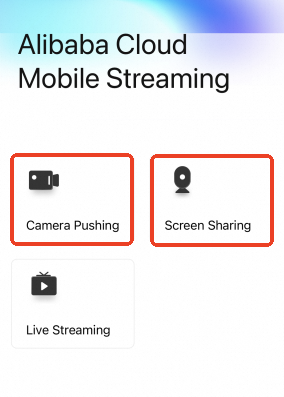
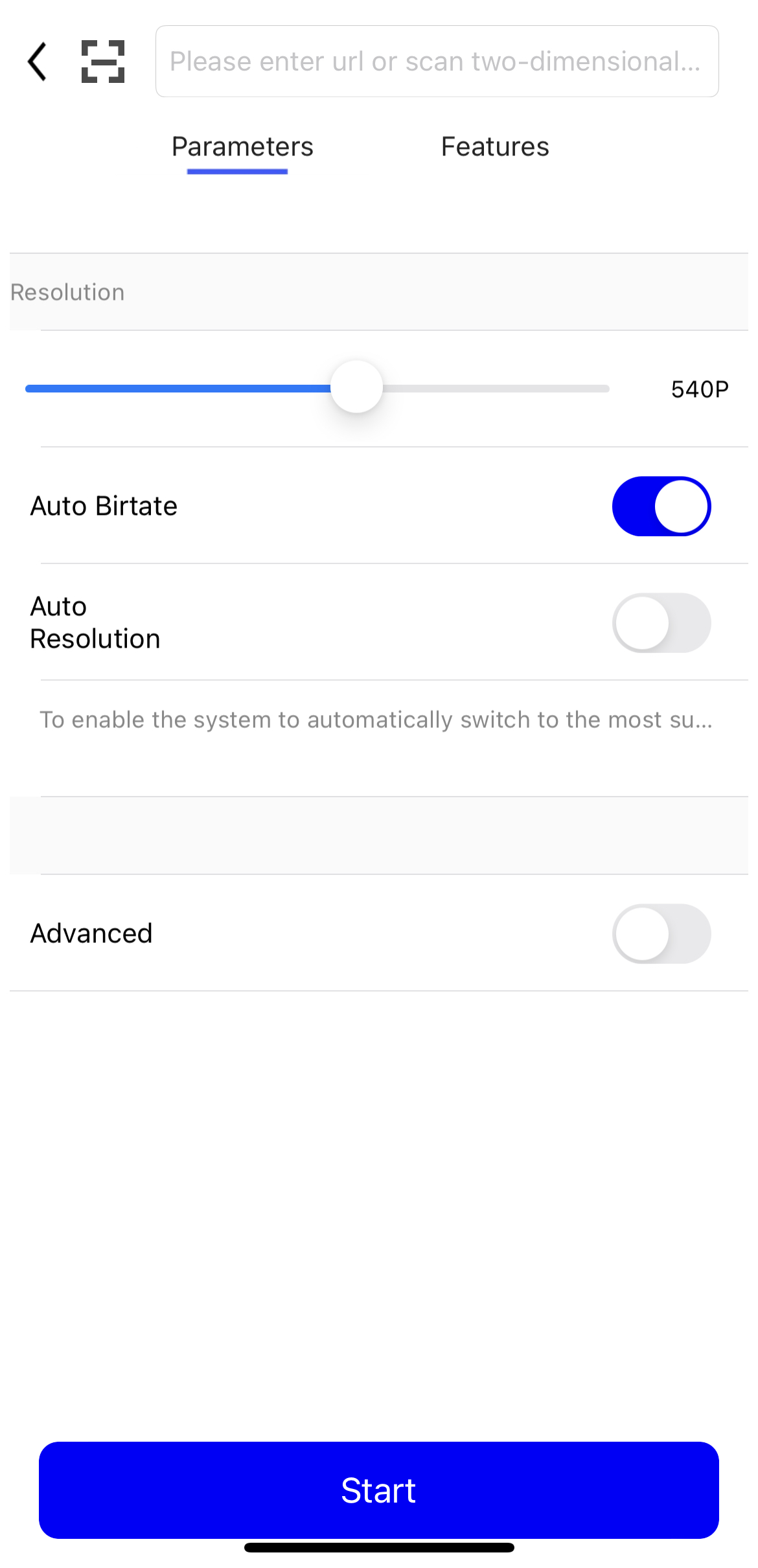
-
Appuyez sur Start. Vous avez maintenant démarré le flux en direct.
Vous pouvez accéder à la page Stream Management dans la console ApsaraVideo Live pour afficher le flux actif. Si le flux n'est pas affiché, vérifiez les étapes précédentes pour vous assurer qu'elles ont été correctement effectuées.
Vérifier l'URL de diffusion
Pour lire le flux, assurez-vous que le client d'ingestion diffuse activement. Sinon, la lecture échouera.
Téléchargez et installez VLC media player.
Ouvrez VLC media player.
Dans la barre de menus, sélectionnez Media > Open Network Stream.
-
Dans l'onglet Network, saisissez l'URL de diffusion que vous avez générée. Exemple :
rtmp://pull-singapore.cloud-example.net/testApp/testStream?auth_key=1750150177-0-0-9b7*******31acc543a99c69********Cliquez sur Play. Si VLC media player récupère et lit correctement le flux, votre configuration d'ingestion et de lecture fonctionne correctement.
Vérifier en appelant une API
Si vous poussez et tirez des flux via des API ou des commandes CLI sans interface graphique, appelez l'opération DescribeLiveStreamsOnlineList pour interroger la liste des flux actifs et confirmer si le flux est ingéré normalement.
Exemple CLI :
aliyun live DescribeLiveStreamsOnlineList --RegionId cn-hangzhou --DomainName <your streaming domain> --AppName <your app name> --StreamName <your stream name>Paramètres :
DomainName: le domaine de diffusion. Ce paramètre est obligatoire.AppName: le nom de l'application.StreamName: le nom du flux.StreamType: le type de flux. Valeurs valides :all(par défaut),raw(flux brut) ettrans(flux transcodé).
Champs de réponse :
StreamName: le nom du flux.AppName: le nom de l'application.PublishTime: l'heure à laquelle le flux a commencé à être ingéré.
L'opération renvoie une liste de flux actifs. Si le flux que vous avez spécifié est inclus dans la liste et est actif, l'ingestion fonctionne correctement. Cette méthode complète la visualisation du flux actif sur la page Stream Management dans la console ApsaraVideo Live.
Dépannage
Si vous rencontrez des problèmes lors de l'ingestion ou de la lecture de flux, utilisez l'outil de dépannage pour valider l'URL et les informations d'authentification.